


A loud case fan ruins late-night gaming sessions. A weak one cooks your GPU. The right fan balances airflow, noise, and thermals so your system runs cool without sounding like a jet engine. This roundup covers ten solid 120mm options that fit most modern ATX and micro-ATX builds, with honest notes on where each one earns its spot and where it falls short.
The Shortlist At A Glance
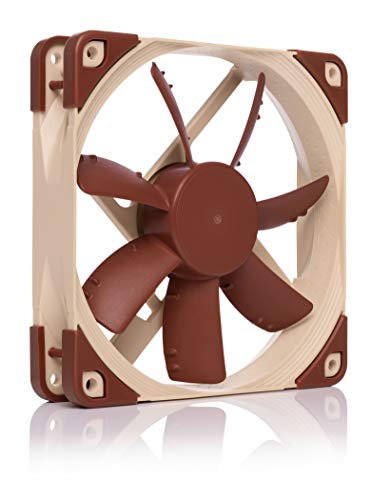
Noctua NF-S12A FLX Quiet Fan 120mm
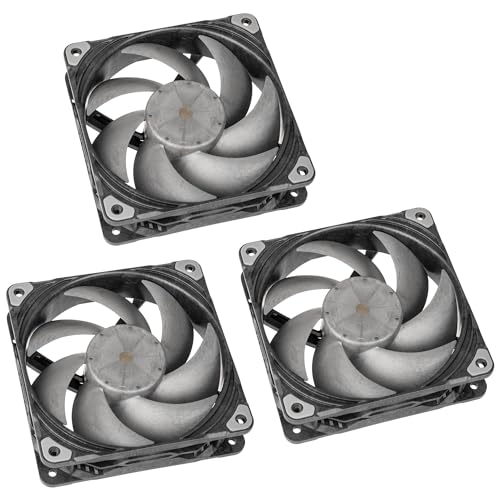
Phanteks T30-120 PWM Fan 120mm 3-Pack

Noctua NF-A12x25 PWM Quiet Fan 120mm
Noctua NF-S12A PWM Quiet Fan 120mm

JONSBO X400 Gray ATX PC Case

JONSBO ZA-360B ARGB Case Fan 3-Pack

AsiaHorse AMICI-5GT RGB PC Fans

AsiaHorse COSMIQ 120mm Case Fan 3-Pack

Asiahorse Nyota 120mm Case Fan
JONSBO XA-360B ARGB Case Fan
Inside Each Recommended Option
The Noctua NF-S12A FLX is built for builders who want air moving through the case without the whir. The 120x120x25mm frame fits standard mounts, and the included Low-Noise Adapter lets you drop the ceiling speed down to around 900 RPM when the system is idle.
Where this fan earns its reputation is acoustic refinement. The frame geometry and Anti-Stall Knobs help push steady airflow along the blade surface, which keeps noise smooth instead of buzzy under load. It suits sleeper PCs, recording setups, and anyone who games in the same room as their tower.
Where It Delivers
- Near-silent operation at lower RPM settings for noise-sensitive rooms
- Three speed tiers via included Low-Noise Adapter for flexible tuning
- Strong build quality that handles years of continuous use
- Solid airflow for case ventilation and exhaust positions
- Wide compatibility with standard 120mm mounts
Trade Offs
- 3-pin Molex-style connector requires a voltage step-down adapter for motherboard fan control
- Color scheme is the familiar brown-and-beige that may clash with themed builds
Who It Suits Best
Quiet-focused builders running mid-range CPUs and GPUs in standard ATX cases benefit most from this fan.
Skip It When
You want full PWM (Pulse Width Modulation, a way for the motherboard to vary fan speed automatically) control from your board, the Noctua NF-S12A PWM is the better match.
The Phanteks T30-120 arrives as a triple pack, which makes it a practical choice for full front-panel or radiator arrays. The 30mm thick frame pushes more air than standard 25mm fans, and a built-in mode switch lets you toggle between silent, balanced, and performance profiles without software.
Compared to the slim Noctua NF-S12A FLX above, the T30 trades a slightly larger footprint for raw thermal headroom. It fits well on 360mm AIO (All-In-One liquid cooler) radiators, dense air-cooled builds, and cases with restricted airflow paths.
Reasons It Performs
- 30mm frame pushes higher static pressure for radiator and fin-stack mounting
- Three preset profiles offer real-world tuning without extra software
- Triple pack fills a standard front intake at once
- Wide RPM range suits both quiet idle and aggressive load cooling
Honest Caveats
- Thicker frame may not fit every case, especially slim ITX layouts
- Performance mode gets loud at full tilt
- Premium positioning reflected in the cost of the three-pack
Feature Snapshot
Made For
Builders running flagship GPUs, AIO radiators, or restricted-airflow cases benefit from this fan’s pressure profile.
Where Another Pick Suits Better
For pure silence at lower RPMs, the Noctua NF-A12x25 PWM is a quieter specialist.
The NF-A12x25 represents Noctua’s flagship 120mm design, and the engineering shows in the details. A 0.5mm tip clearance between blade and frame tightens the airflow path, and the AAO (Advanced Acoustic Optimisation) frame smooths intake turbulence on both sides of the fan.
It handles both high airflow and high static pressure duties, which is unusual for a 25mm-thick fan. The result is a single SKU that works equally well as a case intake, a CPU cooler replacement, or an AIO radiator mount.
Where It Helps
- Combines high airflow and high static pressure in one frame
- Tight tip clearance boosts efficiency at lower RPMs
- Full PWM control through a standard 4-pin motherboard header
- Long-life SSO2 bearing rated for extended continuous use
Points To Keep In Mind
- Premium pricing for a single fan
- At maximum RPM it pushes noticeable noise
- Same beige-and-brown visual identity as other Noctua models
Best Suited To
Enthusiasts running high-TDP (Thermal Design Power, the maximum heat a component is rated to produce) CPUs or restricted cases who want one fan that does every job well.
Look Elsewhere When
Budget matters more than acoustics, the AsiaHorse COSMIQ 120mm Case Fan 3-Pack covers a full panel at lower cost.
The PWM version of the NF-S12A fixes the main friction point of the FLX model: it plugs directly into a 4-pin motherboard header and lets BIOS or software control the speed curve. If you already read about the FLX above, this is the same quiet design with native fan control built in.
It is the practical pick for most mid-range builds. The 1200 RPM ceiling keeps noise reasonable, and the Anti-Stall Knobs help the fan resist stall when paired with restrictive filters or fin stacks.
Why It Works Well
- Native 4-pin PWM control for automatic motherboard-based speed curves
- Same quiet frame design as the FLX variant
- Reliable long-life bearing rated for years of daily use
- Drops into standard 120mm mounts with no adapter required
Worth Noting
- 1200 RPM ceiling is conservative for dense radiator cooling
- Beige-and-brown aesthetic may not match themed builds
Right Fit For
Everyday builders who want set-and-forget cooling with quiet acoustics and no extra accessories.
Reach For A Different Pick When
You need more pressure for a thick radiator, the Phanteks T30-120 PWM Fan 120mm 3-Pack handles that workload better.
The JONSBO X400 is a mid-tower shell rather than a standalone fan, but it earns a place here because the chassis itself is designed to maximize what 120mm fans can do. The back-connect motherboard layout routes cables behind the tray, so the visible interior stays clean and airflow stays unobstructed.
The auxiliary air-guidance system feeds a dedicated 120mm fan directly into the motherboard compartment, a useful touch for VRM (Voltage Regulator Module, the components that deliver power to the CPU) cooling on hot-running CPUs. Compare that to the standard mid-tower shape and the X400 has airflow built in from day one.
Well-Handled Touches
- Back-connect layout keeps cable clutter out of the airflow path
- Auxiliary air channel directs cool air at motherboard VRMs
- Glass side panels show off internal fan lighting
- Supports 360mm AIO mounting and long GPUs
Small Caveats
- Back-connect layout requires a compatible BTF-style motherboard
- Case-only purchase, fans and AIO sold separately
Quick Facts
Who Will Love This
Builders planning a clean back-connect build with dedicated VRM airflow benefit from the X400’s integrated design.
Swap It Out When
You only need a fan upgrade for an existing case, the JONSBO ZA-360B ARGB Case Fan 3-Pack is the drop-in lighting choice.
The ZA-360B bundles three 120mm ARGB (Addressable RGB, individually controllable LED lighting) fans into a single 28mm-thick frame, so the trio installs as one rigid unit rather than three separately mounted fans. The four-sided infinity mirror turns the frame into a glowing block when the lights fire up.
It targets builders who care about the look of the interior as much as the cooling numbers. PWM support keeps the speed in step with system thermals, so the visual centerpiece does not have to scream at full tilt all day.
The Upside
- Unified frame simplifies installation of three fans at once
- Infinity mirror effect delivers a strong visual centerpiece
- PWM control keeps noise and thermals balanced
- 28mm thickness adds modest pressure headroom over standard 25mm fans
Practical Considerations
- High LED count may exceed the ARGB header on entry-level motherboards, requiring a separate controller
- Single-frame design limits placement flexibility
- Maximum 2400 RPM can be loud under sustained load
Perfect Match For
Show builders and RGB-focused gamers who want a tidy triple-fan install with one strong lighting element benefit most.
Consider Something Else When
You need traditional separate mounts for radiator or case positions, the AsiaHorse AMICI-5GT RGB PC Fans fit more configurations.
The AMICI-5GT packs a reverse-blade design, an HDB (Hydro Dynamic Bearing, a sealed bearing that uses fluid to reduce wear) for long life, and 24 LEDs per fan into a single 120mm package. The reverse blade orientation suits push configurations on radiators, where the thicker frame of a standard fan can catch on the fins.
Up to 1800 RPM gives it enough headroom for warm radiators, and the infinity mirror effect is gentler than the JONSBO ZA-360B above. For most users, it lands between performance RGB and silent cooling without leaning hard either way.
Positive Takeaways
- Reverse-blade layout cleans up radiator-side airflow visuals
- HDB bearing extends service life under continuous operation
- 24 LEDs per fan produce a strong mirror effect at modest cost
- Aura Sync compatibility plugs into most modern motherboard ecosystems
A Few Limitations
- Not wireless, ARGB requires a wired 3-pin motherboard header or controller
- At 1800 RPM the noise floor is noticeable in quiet rooms
Who Should Grab It
Aura Sync users building a coordinated RGB radiator setup benefit from the integrated ecosystem support.
A Better Fit Elsewhere
For a quiet office build, the Noctua NF-S12A PWM is the more acoustic-friendly option.
The COSMIQ 3-Pack delivers a front-panel solution in one box, with daisy-chain PWM and RGB (standard 12V RGB lighting) wiring that keeps cable runs tidy. The included small controller means you do not need an ARGB-ready motherboard to drive the lighting.
It is a sensible pick for a first build or a budget upgrade. The reverse-blade option on some SKUs suits radiator mounting, and the 2000 RPM ceiling gives the fans enough speed for most mid-range gaming loads.
Real Benefits
- Three fans plus a controller arrive in a single package
- Daisy-chain wiring reduces cable clutter behind the motherboard tray
- FDB (Fluid Dynamic Bearing, a bearing type that uses an oil film to reduce friction) extends longevity under daily use
- Reverse-blade variants available for radiator and push setups
Where It May Fall Short
- Lighting and speed controllers are basic compared to motherboard software
- At full 2000 RPM the acoustic profile is louder than premium models
Built With In Mind
First-time builders and budget-focused gamers who want a coordinated multi-fan install in one purchase benefit most.
Not Your Match When
You want the absolute quietest possible 120mm fan, the Noctua NF-A12x25 PWM sits at the top of that category.
The Nyota occupies a middle ground between the silent-focused Noctua models and the high-RPM Phanteks T30. An 800 to 1800 RPM control range and a stated acoustic profile under 29 dB (decibels, a unit of sound loudness) put it in the everyday-use category rather than either extreme.
ARGB lighting keeps the visual side modern without dominating the case interior. It is a flexible single-fan purchase for builders who want to upgrade one position at a time.
Useful Highlights
- Wide PWM speed range supports both quiet idle and modest load cooling
- Sub-29 dB target suits bedroom and office setups
- ARGB lighting adds visual appeal without RGB bloat
- Standard 120mm mounting fits most mainstream cases
Things To Weigh
- Single-fan purchase, multi-fan builds require multiple orders
- Lower static pressure than dedicated radiator fans
Whose Shelf It Belongs On
Mid-range builders upgrading one or two case positions at a time benefit from the Nyota’s flexible RPM range.
Another Choice May Suit
For a full triple-pack upgrade, the AsiaHorse COSMIQ 120mm Case Fan 3-Pack arrives complete.
The XA-360B pairs the same single-frame triple-fan design as the ZA-360B with a switchable dual-light effect, letting you toggle between lighting zones. The 2400 RPM ceiling puts it firmly in the high-heat category, and the 28mm frame thickness helps with radiator pressure.
Compare it to the ZA-360B above: the XA swaps a four-sided mirror for a tunable dual-zone glow, which some builders find easier to integrate with broader RGB themes. It targets flagship GPU and overclocked CPU setups that need every bit of airflow.
Real-World Strengths
- 2400 RPM ceiling handles sustained high-heat gaming sessions
- Switchable dual-light effect adapts to different RGB themes
- Single-frame triple-fan design simplifies radiator mounting
- 28mm thickness supports denser fin stacks than 25mm fans
Trade-Offs To Consider
- High LED count may require a dedicated ARGB controller on basic motherboards
- Single-frame format limits repositioning after initial install
The Right Fit
Owners of flagship GPUs and overclocked CPUs running thick radiators benefit most from the XA-360B’s pressure and ceiling.
Where A Sibling Pick Shines
For a quieter three-fan install, the JONSBO ZA-360B ARGB Case Fan 3-Pack is the more acoustic-friendly sibling.
Picking the Right Airflow for Your Build
A case fan only helps if it matches the slot, the noise tolerance, and the thermal load. Start with the mount: most modern ATX cases accept 120mm fans at the front, top, and rear, though slim ITX (a compact motherboard form factor) builds may need 92mm or 80mm alternatives. Measure the available clearance before adding thicker 28mm or 30mm frames like the Phanteks T30-120.
Static pressure versus airflow is the next call. Airflow-focused fans, like the Noctua NF-S12A series, push large volumes through open mesh panels. Static pressure fans, like the Phanteks T30-120, force air through restrictive radiators and dense fin stacks. Match the fan type to the position: pressure fans behind a radiator, airflow fans in front of an open mesh intake.
PWM control matters for everyday builds. A 4-pin PWM header lets the motherboard throttle the fan when the system is cool, which keeps idle noise low. The Noctua NF-S12A FLX omits PWM in favor of fixed voltage, which is fine for simple builds but less flexible in modern setups.
RGB and lighting are optional. Addressable RGB fans add visual flair, but the header count on budget motherboards may not drive all LEDs. Some models, like the JONSBO ZA-360B and XA-360B, include enough LEDs that an entry-level ARGB header can struggle. A dedicated controller solves the issue but adds cost and cable clutter.
Finally, consider bearing type and rated life. SSO (Self-Stabilising Oil-pressure, Noctua’s premium bearing tech), HDB, and FDB bearings all support years of continuous use. Sleeve bearings are cheaper but typically wear faster. For a daily-driver gaming PC that runs long sessions, the bearing choice is worth weighing.
Key Considerations Across These Picks
Common Shopping Slip Ups
The most common mistake is mixing airflow and pressure fans in the wrong positions. Putting an airflow-only fan behind a thick radiator will starve the radiator of cool air, and the GPU will run hotter than expected. Match the fan type to the resistance it has to push through.
Another trap is assuming all RGB fans work with every motherboard. A basic 3-pin 5V ARGB header on a budget board may not have enough LED channels for high-count frames like the JONSBO ZA-360B. Check the motherboard’s RGB header spec before buying triple-fan RGB packs, and plan for a separate controller if needed.
What The Higher Tier Buys
Premium fans like the Noctua NF-A12x25 PWM deliver tighter manufacturing tolerances, longer-life bearings, and refined blade geometry. The result is more airflow per decibel, which matters when a system runs near a desk or in a recording space.
Spending up also buys build consistency. Cheaper fans sometimes vary in noise or speed from unit to unit, while premium lines hold tighter tolerances across the production batch. For a showcase build or a workstation that runs 24/7, that consistency is often worth the premium.
Frequently Asked Questions
How Many Case Fans Does a Gaming PC Need?
Most gaming PCs run well with three to six 120mm fans: two or three in the front as intake, one or two on the top or rear as exhaust, and optional extras on a radiator.
Are PWM Fans Better Than Voltage-Controlled Fans?
PWM fans give the motherboard finer speed control through a digital signal, so they scale better with system thermals. Voltage-controlled fans offer fewer speed steps and are usually limited to fixed RPM settings.
Do RGB Fans Cool Worse Than Plain Fans?
RGB fans typically cool the same as non-lit versions of the same model, since the LEDs add minimal thickness. The difference comes from frame design, blade shape, and bearing type, not the lighting itself.
Can You Mix Different Fan Brands in One Build?
Yes, mixing brands is common. Just confirm each fan’s connector type matches the motherboard headers or splitters, and check that any RGB fans are compatible with the board’s lighting software.
How Often Should Case Fans Be Replaced?
Quality case fans often last five years or longer under normal use. If a fan starts rattling, grinding, or losing RPM, that is the practical signal to swap it.
Final Verdict
The right case fan for your gaming PC depends on what your system actually needs: silence, raw airflow, radiator pressure, or RGB lighting. Match the fan type to the position, the connector to the header, and the RPM ceiling to your noise tolerance. If you build with those three filters in mind, any of the ten picks above will earn its place.


