


Your console delivers gorgeous 4K, your internet connection holds steady, and your stream overlays look polished, then reality hits the moment you try to share the gameplay. Built-in console streaming tools are convenient, but they lock you out of overlays, scene layouts, multi-cam switching, and clean 60-fps recordings. A dedicated capture card changes the equation entirely, routing the signal through your PC so you can record, commentate, and broadcast on your terms.
The nine options below cover the full range, from a tiny USB capture stick for casual Twitch sessions to broadcast-tier switchers that handle multi-camera church services and esports tournaments. You will see straight USB dongles, internal PCIe cards, and full production switchers that double as capture hardware. Each review below explains what the card actually does in your setup, who it fits, and where a sibling pick might suit you better.
The Leading Options At A Glance

CINETREAK Mixer Plus 4 HDMI Video Switcher

CINETREAK Stream 1 Live Streaming Switcher

XIIXMASK USB 3.0 HDMI Capture Card 1080P60
CINETREAK Touch-S 10.1″ Touchscreen Switcher

XIIXMASK USB 3.0 Capture Card 100W PD
AVerMedia Live Streamer Ultra HD GC571

XIIXMASK USB 3.0 HDMI Capture Card 4K60FPS

BENFEI 4K@60Hz HDMI to USB-C Capture Card
CineTreak CT-4 4K Video Capture Card
A Closer Look At Each Pick
Most switchers in this category live in a rack, not a backpack. The CINETREAK Mixer Plus flips that script by building a 4-inch monitoring display straight into the chassis, so you can preview every HDMI feed without dragging a separate monitor to a classroom or pop-up event. The body stays small enough to sit beside a laptop on a folding table, and the four HDMI inputs cover the typical mix of camera angles, a laptop feed, and a console.
Educators running hybrid lessons, mobile worship teams, and small esports organizers tend to appreciate the form factor most. You get real-time multi-view without a second screen, and the layout frees you from stacking adapters behind a desk. The trade-off is processing depth: this is a switcher first, with capture offloaded to your computer through USB, so heavy chroma key work still happens downstream.
Points In Its Favor
- Built-in 4-inch display means no extra monitor for multi-cam previews, which simplifies travel setups.
- Four HDMI inputs cover a typical three-camera plus laptop arrangement with room to spare.
- Compact chassis fits in a small bag alongside a laptop and a couple of HDMI cables.
- Useful for online classes, small worship services, and on-location interviews where gear weight matters.
Things To Consider
- Real chroma key work and scene compositing happen on the host PC, so expect to lean on OBS or vMix.
- Codec flexibility is narrower than broadcast-tier units; the dongle-style capture path tops out at familiar streaming resolutions.
Key Specs
Made For
Mobile educators, small worship teams, and streamers who want a portable switcher they can toss in a backpack without sacrificing multi-cam previews.
Look Elsewhere When
Producers running four locked-off cameras in a permanent studio will get more mileage from the CineTreak CT-4, which feeds all four channels into OBS simultaneously.
The Stream 1 targets a different problem than the Mixer Plus: solo creators who need to push to two destinations at once. Dual RTMP output (Real-Time Messaging Protocol, the standard hand-shake that links encoders to platforms like Twitch and YouTube) lets you broadcast a clean feed to Twitch while a tweaked cut goes to YouTube, and a single laptop can run the show without a second encoder.
PTZ control (pan, tilt, and zoom commands sent to remote cameras over the network) baked into the unit removes another piece of gear from the rack. The chroma and luma keying open room for branded lower thirds and green-screen layouts, while the landscape and portrait output modes cover short-form platforms without a separate encoder for each. Two HDMI inputs accept 4K sources, so a high-end camera and a console can coexist on the same feed.
Strengths Worth Knowing
- Dual RTMP streaming offloads two destinations from your laptop, easing CPU pressure during long sessions.
- Built-in PTZ camera control cuts a controller out of the signal chain in small studios.
- Landscape and portrait output covers both traditional streams and short-form platforms from one unit.
- Chroma and luma keying allow green-screen work without a plugin stack in OBS.
Worth Noting
- Steep learning curve compared with a plain capture card, since menus, scenes, and PTZ presets all live inside the unit.
- AUX input and PTZ control are valuable only when you actually have compatible cameras on hand.
Feature Snapshot
Right Fit For
Solo creators producing both horizontal livestreams and vertical short-form clips who want one device to handle the split.
Skip It When
Single-platform hobbyists streaming only to Twitch will find the simpler XIIXMASK USB 3.0 HDMI Capture Card 1080P60 a more comfortable first step.
The XIIXMASK USB 3.0 HDMI Capture Card is the entry point that most first-time streamers reach for, and the spec sheet explains why. USB 3.0 bandwidth lets the dongle push 1080p at 60 frames per second to OBS, and a 4K HDMI loop-out keeps your monitor fed at full resolution while the software receives a downscaled feed.
Plug-and-play setup with Windows, macOS, and Linux means no driver hunt. The hardware is a one-way path, so it captures from any HDMI source but does not send video back to the console, which is exactly the behavior you want for streaming. Casual users, students capturing lectures, and budget-minded gamers will find this card a sensible trial balloon before scaling up.
A Few Highlights
- 1080p60 capture over USB 3.0 keeps streams smooth for fast-paced titles like fighters and racers.
- 4K HDMI loop-out means your gaming monitor still runs at native resolution during capture.
- No driver installation needed, which keeps setup fast for first-timers.
- Compatible with OBS, Streamlabs, and the consoles most people already own.
Honest Caveats
- Capture is unidirectional, so you cannot send signals back to the source, which rules out some workflow tricks.
- HDR (high dynamic range) passthrough is absent, so PS5 and Xbox HDR modes need to be toggled off to avoid washed-out captures.
Best Suited To
New streamers who want a no-fuss 1080p60 capture path without dropping cash on broadcast-tier hardware.
Consider Something Else When
Gamers chasing 4K capture on a USB budget should step up to the XIIXMASK USB 3.0 HDMI Capture Card 4K60FPS in slot seven.
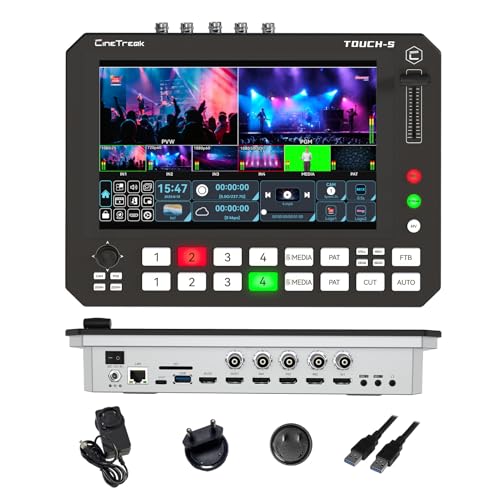
The Touch-S skips the menu-diving of traditional switchers by putting a 10.1-inch full touchscreen on the front panel. Tapping a source swaps the program feed, dragging a transition lays it in, and pinch-to-zoom controls PTZ cameras without a separate controller. The hybrid layout pairs the touchscreen with two rows of physical buttons, so muscle memory still has a home for live switching.
Six HDMI or SDI (Serial Digital Interface, a pro video standard for long cable runs and broadcast gear) channels give this unit more headroom than the four-channel Mixer Plus, and the addition of SDI matters for installations pulling long cable runs through walls and ceilings. Small studios, podcast networks, and houses of worship that need clean multi-cam control without a dedicated vision engineer should put this one on the short list.
A Strong Showing
- Full touchscreen plus physical buttons means a director can switch live without diving through menus.
- Six-channel HDMI and SDI mix gives permanent installations room for cameras, a laptop, and a confidence monitor.
- Built-in PTZ control with multi-view monitoring keeps the operator at one station.
- Audio mixing and recording are handled on the device, so a console failure does not necessarily kill the recording.
Factors To Consider
- Large footprint dominates a small desk, and the touchscreen adds weight that complicates portable setups.
- SDI inputs are useful only if you already own SDI cameras, otherwise the HDMI count alone is enough.
Who Will Love This
Small production studios and event teams that need a tactile, room-friendly control surface without committing to a full vision-mixer setup.
Reach For A Different Pick When
Mobile streamers should look back at the CINETREAK Mixer Plus for its smaller, screen-included chassis instead.
Most USB capture cards sip power from the host port, but the XIIXMASK with 100W Power Delivery turns the laptop’s USB-C jack into a passthrough charging port. A single cable carries video in, video to the computer, and power back to a Quest 3, a Switch dock, or a laptop, which keeps the streaming bag uncluttered.
Capture resolution tops out at 1440p30 or 1080p60, which is more than enough for VRChat sessions, indie game streams, and console capture on the road. The MS2130 chipset (a USB 3.0 video processor that handles encoding inside the dongle) keeps latency low, and the HDMI-to-USB-C design plays nicely with modern MacBooks and slim Windows laptops that dropped full-size HDMI ports years ago.
The Upside
- 100W passthrough charging means one cable powers a laptop, captures video, and runs a Quest 3 simultaneously.
- USB-C output matches modern laptops that no longer include full-size USB-A jacks.
- 1440p30 and 1080p60 capture covers the bulk of game and VR streaming scenarios.
- Quest 3 compatibility is a quiet win for VR creators who otherwise juggle adapters.
Small Caveats
- Not bidirectional, so you cannot push a clean feed back to the source device.
- 1440p30 tops out below 4K, which is plenty for streaming but limiting for archival capture.
Built With In Mind
VR streamers and laptop-first creators who want a clean one-cable setup that keeps the host machine charged while capturing.
Where Another Pick Suits Better
Gamers chasing 4K60 capture from a PlayStation 5 or Xbox Series X will get more value from the AVerMedia Live Streamer Ultra HD GC571 in slot six.
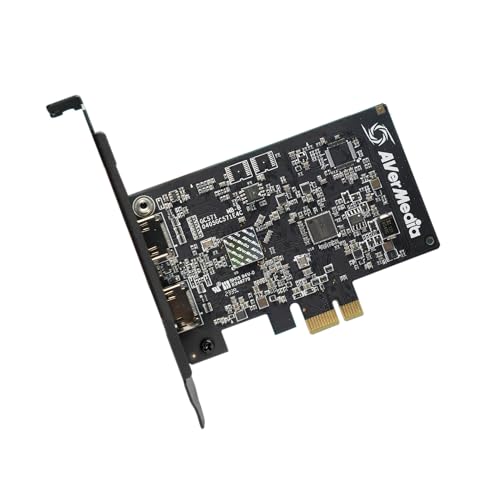
The GC571 is the only internal PCIe card in this roundup, and that single fact shifts who it suits. Installing it inside a desktop gives you a direct path to the CPU, no USB bus sharing, and a capture pipeline that scales with the host hardware. For a stationary streaming tower, that translates to lower latency, more stable frame rates, and the bandwidth headroom for 4K60 passthrough on current consoles.
AVerMedia’s VRR (Variable Refresh Rate, a display technology that syncs the monitor’s refresh cycle to the GPU to eliminate tearing) passthrough support means high-frame-rate gaming on a PlayStation 5 or Xbox Series X stays tear-free at 4K while the stream receives a downscaled capture. HDMI 2.0 input covers modern consoles, and AVerMedia’s software stack adds party-chat mixing that USB dongles cannot match.
What Makes Sense
- Internal PCIe slot frees up USB bandwidth and cuts latency for a stationary streaming rig.
- 4K60 passthrough with VRR support keeps gameplay smooth on modern consoles.
- Party-chat audio mixing is built into the AVerMedia software, removing a common pain point for console streamers.
- Stable frame pacing during long recording sessions is a real win for archivists.
Possible Compromises
- Requires a free PCIe x1 slot and a desktop tower, ruling out laptops and compact builds.
- Software suite is a download rather than a one-cable experience, and updates are part of the deal.
Spec Overview
Whose Shelf It Belongs On
Desktop-first console streamers and content creators who want the most stable 4K60 capture without tying up a USB port.
Swap It Out When
Laptop-only streamers should reach for the BENFEI 4K@60Hz HDMI to USB-C Capture Card in slot eight instead, which keeps the rig portable.
The XIIXMASK 4K60FPS sibling raises the bar on resolution, pushing true 4K60 capture through a USB 3.0 connection rather than a PCIe slot. The same 4K60 HDMI passthrough loop keeps a gaming monitor fed at native resolution, and 1080p120 recording opens room for high-frame-rate highlight reels on platforms that play them back at full speed.
HDR passthrough (high dynamic range, which preserves more color and brightness information than standard signals) means PS5 and Xbox Series X gamers can keep their wide color modes on without the capture looking washed out, a frequent complaint with cheaper USB dongles. The 4K60 capture rate is overkill for casual streaming, but for content creators who want archival-quality YouTube uploads, the upgrade is meaningful.
What Earns Its Place
- True 4K60 capture through a USB connection removes the need to open a desktop tower.
- 1080p120 high-frame-rate recording suits slow-motion highlight reels and competitive gaming reviews.
- HDR passthrough keeps modern consoles in their wide color modes without manual toggling.
Points To Note
- USB 3.0 bandwidth is shared with other ports on a busy hub, which can drop frames under heavy load.
- Encoding happens on the host CPU, so older laptops may struggle to keep up at 4K60.
Feature Rundown
Perfect Match For
Content creators who want 4K60 archive footage without installing an internal card, and competitive gamers recording high-frame-rate highlight clips.
A Better Fit Elsewhere
Streamers who only need 1080p60 will save money stepping back to the XIIXMASK USB 3.0 HDMI Capture Card 1080P60 in slot three.
The BENFEI 4K@60Hz HDMI to USB-C card speaks the language of modern laptops. A USB-C output is the right fit for current MacBook Air, MacBook Pro, and slim Windows machines that dropped full-size USB-A ports, and the dongle stays out of the way on a crowded desk. Capture tops out at 1080p60, which is the standard for most livestreaming platforms anyway.
Passthrough at 4K60 keeps the gaming monitor happy at full resolution, and the low-latency chipset claims near-zero delay for twitch-reflex titles. BENFEI’s value play is the price-to-feature balance. You get modern port selection, reliable passthrough, and clean capture without the bulk of an internal card or the complexity of a switcher.
What Helps Most
- USB-C output works with current MacBooks and slim Windows laptops without a dock.
- 4K60 HDMI loop-out keeps gaming monitors running at native resolution.
- Low-latency capture suits competitive shooters and fighting games.
- Plug-and-play setup works on macOS, Windows, and Linux with no driver hunt.
Room For Improvement
- Capture caps at 1080p60, which is fine for streaming but limiting for 4K archival work.
- USB-C cable is short, so the dongle lives close to the laptop rather than at the back of a desk.
Who Should Grab It
Mac and modern laptop users who want a low-fuss, USB-C-native capture path for streaming and recording.
Consider Something Else When
Multi-cam creators should consider the CineTreak CT-4 4K Video Capture Card, which captures four HDMI feeds at once.
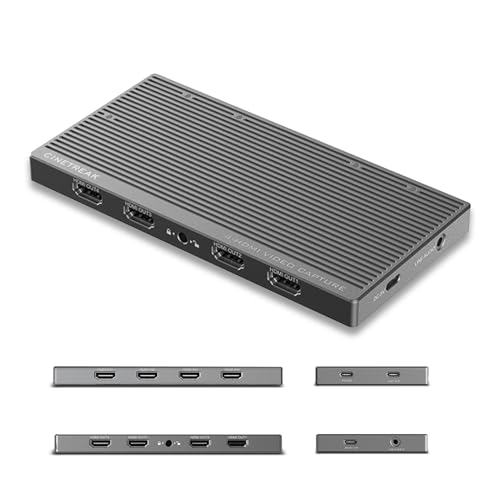
Multi-camera production used to mean a capture card per feed, plus a PCIe slot lottery. The CineTreak CT-4 collapses that stack into one unit, ingesting four HDMI sources at once and exposing them as four independent devices inside OBS, vMix, or Zoom. That means four locked-off angles, a presenter camera, and a screen share can land on the timeline without a separate capture appliance per channel.
UVC compatibility (USB Video Class, a standard that lets devices appear as webcams to any software without custom drivers) keeps driver installs off the list, and 10Gbps USB 3.2 bandwidth handles four channels of 4K30 capture without dropping frames. A 100W Power Delivery input lets the host laptop stay charged through the same hub, and the pro audio input brings XLR microphones into a software mixer without a separate interface.
Key Advantages
- Four simultaneous HDMI captures remove the need for one card per camera in production rigs.
- UVC plug-and-play means OBS, vMix, and Zoom treat each input as a standard webcam.
- 10Gbps USB 3.2 bandwidth handles 4K30 across all four channels without compression artifacts.
- Pro audio input and 100W passthrough cover power and sound in a single hub.
Less Ideal Details
- 4K30 capture per channel is solid for most cameras but limiting for high-frame-rate gaming.
- Real-world bandwidth depends on the host’s USB controller, so older laptops may bottleneck the full four-channel flow.
Feature Card
The Right Fit
Multi-camera production crews, podcast networks, and creators building permanent studios who want one device to feed every angle into their software.
Not Your Match When
Single-console streamers will find the XIIXMASK USB 3.0 HDMI Capture Card 4K60FPS in slot seven a simpler, more focused fit.
Matching Capture Cards For Gaming To Your Streaming Goals
Choosing the right capture card depends less on spec sheets and more on where you actually plan to use it. The single biggest decision is whether you need a simple USB dongle that sits between a console and a laptop, or a full switcher that can mix several cameras in real time.
Latency is the next filter that matters. Internal PCIe cards like the AVerMedia GC571 feed the CPU directly, which keeps frame delay at a minimum. USB dongles add a small amount of latency, and switchers can introduce a frame or two of additional delay during transitions. For most casual streamers, the difference is invisible, but competitive players running a single-monitor setup may notice.
Passthrough resolution is the third axis. A 4K60 passthrough keeps current-generation consoles running at full resolution, while the capture itself can be lower. Make sure the card you pick matches the monitor you already own. Buying a 4K60-capable card for a 1080p gaming display is wasted budget.
Connectivity comes last. Modern laptops lean on USB-C, while desktops still have plenty of USB-A ports. The XIIXMASK 100W PD card and the BENFEI USB-C card both speak the newer standard, which matters if your machine dropped full-size HDMI and USB-A in favor of thinner ports.
Finally, think about how many feeds you will run. Most streamers start with a single console and one webcam, so a basic USB dongle covers the early months. As soon as you add a second camera, a laptop feed, or a chroma key backdrop, a switcher like the CINETREAK Touch-S or the CT-4 starts making sense. The honest read is that overspeccing the first card rarely hurts, but underspeccing a permanent studio creates upgrade pain six months in.
Key Considerations Across These Picks
Pitfalls Shoppers Hit
A common slip is chasing capture resolution instead of passthrough. The capture stream is what your audience sees, and on most platforms 1080p60 is plenty. Passthrough is what your gaming monitor sees, and that is where 4K60 actually matters. Pick the side that fits your gear first.
Another trap is buying a USB capture card and expecting to plug a console into a USB-C hub on a thin laptop. Bandwidth on shared hubs often drops to USB 2.0 speeds, which kills the capture feed. Plug the card straight into the laptop when you can.
Where The Extra Money Goes
Higher-tier cards earn their price in three places. First, latency drops because the encoder sits closer to the CPU or uses a faster chipset. Second, more inputs mean fewer adapters and dongles stacked behind the desk. Third, software support, including party-chat mixing, chroma keying, and PTZ control, replaces plugins you would otherwise wire up yourself.
For streamers who only need 1080p60 to Twitch from a single console, the lower-priced USB dongles deliver a clean signal. For anyone running multi-cam or dual-platform output, the broadcast-tier switchers quickly earn back their cost in saved gear and simpler wiring.
Frequently Asked Questions
Do capture cards reduce game performance?
In most setups, the impact is small. Internal PCIe cards draw on the same bandwidth as a network card, and USB 3.0 cards use a separate bus. Encoding happens on the host CPU, so older machines may see a small drop in frame rate during recording.
Can a capture card stream to two platforms at once?
Standard USB dongles push a single feed to your software, and your software handles the platform split. The CINETREAK Stream 1 switcher can push to two RTMP destinations directly from the unit, which takes load off the laptop.
Do I need a 4K capture card for 1080p streaming?
Not strictly, but 4K passthrough keeps your gaming monitor running at native resolution while you stream at 1080p. If your monitor is 4K, look for a card that handles 4K60 passthrough at minimum.
Are USB capture cards good enough for console gaming?
Yes, for most streamers. USB 3.0 cards handle 1080p60 cleanly, and the XIIXMASK 4K60FPS card even handles 4K60 capture over USB. Competitive players on a single monitor may prefer the lower latency of the AVerMedia GC571.
What is UVC, and why does it matter?
UVC stands for USB Video Class, a standard that lets a capture device appear as a webcam to any software. Cards with UVC, including the CT-4, skip driver installs and show up in OBS, vMix, and Zoom immediately, which saves setup time and reduces compatibility headaches.
Closing Remarks
The right capture card for your setup is the one that matches the gear you already own. A console gamer with a 4K monitor gets the most from a 4K60 passthrough card, a laptop streamer wants USB-C and Power Delivery, and a multi-cam studio needs a switcher with enough inputs to grow into. The nine options above cover those profiles without overlap, and the buying guide flags the trade-offs that matter. Take a look at your desk, your console, and your streaming goals, and the right pick should jump out.


