


Picking a gaming rig or a panel to plug into one shouldn’t feel like a scavenger hunt. The mix below pairs a pair of prebuilt towers with several KTC gaming monitors, so you can match a chassis to a screen without cobbling together a parts list. Whatever your budget or desk size, one of these combos should slot in cleanly and start pulling frames on day one.
A Quick View Of The Lineup

KTC 27 Inch Gaming Monitor 200Hz, 2K 1440P (H27T6, White)

KTC 27 Inch 240Hz Gaming Monitor, 1080P Fast IPS (H27F7, Black)

KTC 27M1 27 Inch Gaming Monitor 1440P w/Speakers, 200Hz
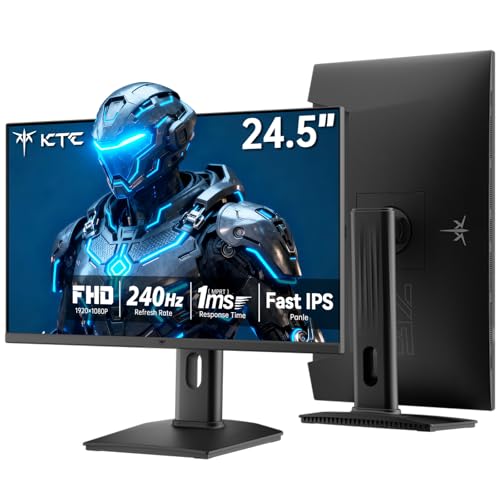
KTC 24.5 Inch 240Hz Gaming Monitor, FHD Fast IPS (H25T7-3)

Skytech Gaming PC Storm, Ryzen 5, RTX 5050, 32GB RAM, 1TB SSD

KTC 24 Inch Gaming Monitor 180Hz, 1440P Fast IPS (H24T7)

Lenovo Legion Tower 5i, Core Ultra 7 265F, RTX 5070 Ti, 32GB, 1TB
Why These Options Stand Out
The KTC H27T6 sits in a sweet spot many casual players overlook: 27 inches of 1440p (QHD) panel, 200Hz native refresh that you can nudge up to 210Hz, and a clean white chassis that doesn’t dominate a small battlestation. Adaptive Sync (a variable refresh technology that matches the panel to the GPU to kill screen tearing) is built in, and a 1ms response keeps motion blur from spoiling fast turns in shooters.
Built-in speakers keep your desk free of extra cables for everyday use, though audiophiles will still want a headset or external set. The full ergonomic stand supports tilt, swivel, pivot, and height, which is rare at this tier. For most people, the practical payoff is a panel that handles both competitive titles and color-accurate movie nights without needing a separate monitor.
Where It Delivers
- 1440p resolution gives a meaningful sharpness jump over 1080p on a 27-inch screen.
- 200Hz refresh with Adaptive Sync keeps fast-paced games feeling fluid.
- Integrated speakers handle basic audio and clear desk clutter.
- Full ergonomic stand supports pivot, which is handy for coding or document work.
- 131% sRGB coverage helps games and movies look punchy without manual tuning.
Things To Consider
- Built-in speakers lack the bass response of a dedicated pair, so most owners add external audio for immersive gaming.
- The white finish shows dust and fingerprints more easily than a black bezel, which means more frequent wipe-downs.
Key Specs
Right Fit For
Esports-leaning players who want a sharp 1440p panel with high refresh and a clean white aesthetic.
Look Elsewhere When
The KTC 27 Inch 240Hz Gaming Monitor, 1080P Fast IPS (H27F7) is the better match for someone who prioritizes raw frame rate over pixel count.
Where the H27T6 leans on resolution, the KTC H27F7 leans on speed. It pairs a 240Hz refresh rate with a 1080p Fast IPS panel (a panel type that combines fast pixel response with wide viewing angles and good color), so you get minimal motion blur and the wide viewing angles IPS is known for. Adaptive Sync keeps frames aligned with the GPU, and the stand supports tilt, pivot, and height adjustment, which covers most ergonomic setups.
For competitive Valorant or Apex players, 240Hz is a tangible upgrade over 144Hz, and the 1ms MPRT response (Moving Picture Response Time, a measure of how fast a pixel transitions between frames) helps the panel keep up. The trade-off is 1080p sharpness on a 27-inch screen, which can look a touch soft from up close. Pairing it with a mid-range GPU like the RTX 5050 in the Skytech Storm gets you maxed frame rates without the panel bottlenecking you.
Positive Points
- 240Hz refresh gives competitive players a real edge in fast shooters.
- Fast IPS panel keeps colors and viewing angles honest, unlike older TN panels.
- Adaptive Sync support minimizes screen tearing without input lag penalty.
- Pivot mode supports vertical orientation for coding, scrolling, or sim rigs.
Worth Noting
- 1080p on 27 inches looks softer than 1440p for general productivity, so text and UI elements may feel less crisp.
- No built-in speakers, so you will need headphones or a separate audio source.
- Owners commonly report the included stand is sturdy but takes a bit of desk depth.
Who It Suits Best
Competitive FPS players who chase high frame rates and prefer fluid motion over pixel density.
Skip It When
You want sharper text and a more balanced image, in which case the KTC 27 Inch Gaming Monitor 200Hz, 2K 1440P (H27T6) is the smarter pick.
The KTC 27M1 feels like the H27T6 grew a few accessories. You get the same 27-inch 2560×1440 Fast IPS panel with 200Hz native refresh (overclockable to 210Hz), 130% sRGB coverage, and a 1ms MPRT response, but KTC layers on a shielding hood and integrated dual 2W speakers. The hood helps block glare in bright rooms, which streamers and content creators tend to appreciate during long sessions.
For a creator-friendly setup, the practical payoff is one panel that handles editing, gaming, and casual streaming without piling on accessories. The full ergonomic stand covers tilt, swivel, pivot, and height, and the VESA mount opens up arm-mounting if you want to free up desk space. Compared to the H27F7, this trades raw 240Hz speed for sharper pixels and a few extras that justify the slight premium.
The Case For It
- QHD resolution gives noticeably sharper text and game detail than 1080p.
- 200Hz refresh rate (210Hz OC) handles fast-paced gameplay with Adaptive Sync.
- Included shielding hood reduces glare during daytime or bright-room streaming.
- Built-in dual 2W speakers offer simple audio for everyday use without extra clutter.
- 130% sRGB coverage supports content creation and vibrant game visuals.
- Full ergonomic adjustments plus VESA mount for flexible installations.
Trade Offs
- The shielding hood adds bulk and is less travel-friendly for those who move their setup often.
- 200Hz is lower than the 240Hz H27F7, so purely competitive players may want the speedier panel.
Feature Snapshot
Best Suited To
Hybrid creators and streamers who game and edit on the same panel in a brighter room.
Reach For A Different Pick When
The KTC 24.5 Inch 240Hz Gaming Monitor (H25T7-3) is a smarter grab for desk-space-tight competitive players who don’t need a hood.
At 24.5 inches, the H25T7-3 is a tournament-friendly size that keeps every corner of the action within easy eye reach. The 1920×1080 FHD panel runs at 240Hz with a 1ms MPRT response, Adaptive Sync support, and 94% DCI-P3 color coverage (a wider color gamut standard used heavily in film and modern displays), plus HDR 400 (an entry-level HDR brightness tier that adds some highlight pop but is far from full HDR). For small desks or shared spaces, it’s an honest, no-nonsense esports panel.
HDR 400 entry-level support brings a touch of highlight pop, though the full HDR effect you’d find on higher-end panels is more limited here. The stand supports tilt, pivot, and height adjustments, and VESA mounting is included for arm setups. Compared to the larger H27F7, this is a more compact alternative that doesn’t sacrifice refresh rate, just inches.
Practical Advantages
- 240Hz refresh paired with a tournament-friendly 24.5-inch size.
- 1ms MPRT response keeps motion clean during whip-fast turns.
- 94% DCI-P3 color coverage produces a wide, modern color range.
- Full tilt, pivot, and height adjustment, plus VESA mount support.
Honest Caveats
- HDR 400 is the entry tier, so HDR impact is subtle compared to higher-tier displays.
- 1080p resolution is fine for gaming but feels cramped for productivity multitasking.
- No built-in speakers, so you’ll need separate audio.
Spec Overview
Whose Shelf It Belongs On
Competitive players with smaller desks or anyone who prefers the classic 24-inch-class tournament form factor.
Where A Sibling Pick Shines
The KTC 27M1 27 Inch Gaming Monitor 1440P is the better answer when you want both speed and a sharper 1440p picture.
The Skytech Storm is what happens when you skip the parts list and want a complete 1080p gaming box that boots straight into Windows 11. Inside, an AMD Ryzen 5 5500 (a 6-core, 12-thread Zen 3 CPU) handles everyday work and games, paired with 32GB of DDR4 RAM at 3200MHz, a 1TB NVMe SSD (a fast solid-state drive that plugs directly into the motherboard for quick load times), and an NVIDIA RTX 5050 8GB GPU for modern titles with DLSS support.
For someone moving from a console or an aging laptop, the practical payoff is a tower that handles today’s games at 1080p with headroom, ships with no bloatware, and outputs through HDMI or DisplayPort to whatever panel you choose. Compared to the KTC monitors in this list, this is the actual computing engine they plug into, and it pairs well with the H27F7 or H25T7-3 for high-refresh 1080p gaming.
The Good Stuff
- Ryzen 5 5500 + RTX 5050 combo delivers strong 1080p performance in modern games.
- 32GB of DDR4 RAM covers gaming, streaming, and tab-heavy browsing without slowing down.
- 1TB NVMe SSD dramatically cuts load times compared to a traditional hard drive.
- Prebuilt and ready out of the box with no bloatware, saving setup time.
- Includes HDMI and DisplayPort outputs, so it pairs cleanly with any monitor on this list.
A Few Limitations
- Wi-Fi 5 (802.11ac) is a generation behind Wi-Fi 6, so wireless speeds may be slower in busy networks.
- The Ryzen 5 5500 lacks integrated graphics, meaning a GPU failure can leave troubleshooting trickier.
- Owners commonly report the stock air cooler is adequate but can run warm under sustained loads.
Key Product Details
Made For
First-time PC gamers and anyone upgrading from a console who wants a plug-and-play 1080p rig without assembling parts.
Swap It Out When
The Lenovo Legion Tower 5i is the smarter move for shoppers who need 4K gaming headroom and a higher-tier GPU.
The H24T7 is a small-footprint panel that punches above its size. At 24 inches, it sits comfortably on tighter desks, dorm setups, or shared bedrooms where a 27-inch panel would crowd the room. The 2560×1440 resolution gives it noticeably sharper text than 1080p competitors, and 180Hz (overclockable to 185Hz) is plenty fast for most games without taxing a mid-range GPU.
Adaptive Sync is supported for tear-free play, and the stand offers tilt, pivot, and height adjustments with VESA compatibility. For apartment dwellers, the practical payoff is genuine QHD clarity in a compact panel that doesn’t demand a deep desk. Compared to the H25T7-3, you trade raw refresh for a higher pixel density, which many find more useful day-to-day.
Why It Works Well
- QHD resolution on a 24-inch screen gives excellent pixel density for sharp visuals.
- 180Hz refresh (185Hz OC) keeps motion smooth for most gaming genres.
- Compact footprint suits small desks, dorms, and shared spaces.
- Full ergonomic stand plus VESA mount for flexible mounting.
- HDR 400 support adds a layer of highlight contrast in compatible games.
Points To Note
- 180Hz is lower than 240Hz options like the H25T7-3 or H27F7, so competitive purists may want more speed.
- Smaller 24-inch size leaves less screen real estate for multitasking and side-by-side windows.
Perfect Match For
Small-space gamers and apartment dwellers who want a sharp QHD image without a sprawling 27-inch panel.
A Better Fit Elsewhere
The KTC 27 Inch Gaming Monitor 200Hz, 2K 1440P (H27T6) is the better fit when desk space allows a larger display.
The Legion Tower 5i is the heavyweight of the list. It pairs an Intel Core Ultra 7 265F processor with an NVIDIA GeForce RTX 5070 Ti GPU, which together handle ray-traced games at 1440p and 4K, plus 32GB of memory and a 1TB SSD for game libraries. The system also includes 3 months of PC Game Pass for trying out new titles right out of the box.
For shoppers who want a tower that lasts through several GPU generations, the practical payoff is a high-end platform that won’t bottleneck a future monitor upgrade. Compared to the Skytech Storm, this is a meaningful step up in both CPU and GPU, and it pairs naturally with the 1440p KTC panels for maxed settings or 4K displays for cinematic play. The trade-off is the higher tier pricing, so it suits shoppers who plan to keep the rig for years.
Benefits That Matter
- RTX 5070 Ti handles ray-traced games and high-refresh 1440p/4K gaming with room to grow.
- Intel Core Ultra 7 265F brings strong multi-core performance for streaming and productivity.
- 32GB memory supports heavy multitasking and content creation workflows.
- 1TB SSD provides generous, fast storage for modern game libraries.
- Includes 3 months of PC Game Pass for trying new games immediately.
Possible Compromises
- Premium-tier components come at a noticeably higher price than mid-range prebuilts.
- Owners commonly report prebuilts in this class use proprietary parts, so future upgrades may need care.
Technical Highlights
Who Should Grab It
Enthusiasts and long-term shoppers who want a high-end prebuilt that won’t feel dated after one GPU generation.
Consider Something Else When
The Skytech Gaming PC Storm is a more reasonable fit for shoppers on a tighter budget who just want smooth 1080p.
How To Choose The Right Builts In Gaming Pc Setup
Match The Resolution To The GPU
Pairing a 1440p panel with a mid-range GPU and a 1080p panel with a flagship one wastes money. A 1080p panel and the Skytech Storm (or the RTX 5050) covers most modern games smoothly, while a QHD monitor like the KTC H27T6 or H24T7 pairs best with higher-tier graphics cards. Match the resolution to the GPU, and you’ll avoid either bottlenecking your hardware or paying for pixels you can’t push.
Refresh Rate Comes From The Game You Play
If you mostly play competitive shooters like Valorant, Apex, or CS, 240Hz (such as on the KTC H27F7 or H25T7-3) is worth prioritizing. For RPGs, open-world adventures, and cinematic titles, 144Hz to 200Hz looks and feels great without requiring flagship frame rates. Pick the refresh rate for the genre you actually play, not the one with the biggest number on the box.
Ergonomics Matter More Than You Think
A stand with full tilt, swivel, pivot, and height adjustment keeps your neck and shoulders happy during long sessions. Most KTC panels in this list include a fully adjustable stand, and VESA support gives you an upgrade path to a monitor arm. If you sit at your desk for hours, ergonomic flexibility is worth more than a few extra hertz.
Don’t Skimp On RAM And Storage In A Prebuilt
The Skytech Storm and Legion Tower 5i both ship with 32GB of RAM, which covers gaming, streaming, and heavy multitasking comfortably. A 1TB SSD is a sensible baseline for modern game sizes, and an NVMe drive (as both towers use) keeps load times fast. If your library grows, plan for a future storage upgrade from the start.
Smart Shopping In The Builts In Gaming Pc Category
Common Shopping Slip Ups
The most common mistake is chasing a high refresh rate at the cost of resolution, then pairing it with a GPU that can’t drive those frames. Buyers also tend to overlook stand ergonomics, only to regret a wobbly neck weeks later. Measure your desk depth before picking a 27-inch panel, and check that your chosen GPU and monitor share a compatible port (HDMI or DisplayPort) before checking out.
Where The Extra Money Goes
Stepping up to a Lenovo Legion Tower 5i buys you a much more capable CPU and GPU combination, which extends the usable life of the rig across several monitor upgrades. You also get features like ray tracing, DLSS, and a thermal design that holds up under sustained load. For shoppers who keep a gaming PC for four to five years, that extra spend usually pays for itself in avoided upgrades and longer relevance.


