


Wireless gaming keyboards used to mean compromise. Laggy 2.4GHz dongles, mushy membrane feel, batteries that died mid-match. That era is mostly over, and 2026 brings a crop of budget wireless boards that genuinely hold up for daily play. You want mechanical switches, low-latency wireless, and a layout that fits your desk without sacrificing arrow keys or volume controls.
This list covers ten picks under the budget wireless gaming keyboard umbrella, including a couple of wired options that still earn their place for the right shopper. The YUNZII B87 TKL is a charming, deck-friendly tenkeyless with playful keycaps. The AULA F75 Pro brings a rotary knob and a creamy typing feel. Logitech’s G715 trades raw specs for a polished, comfortable experience. Each pick below comes with honest strengths, real caveats, and a clear sense of who it’s actually for, so you walk away knowing which one suits your setup and your games.
A Side-By-Side Look

YUNZII B87 TKL Wireless Mechanical Keyboard (Blue Heart)

EPOMAKER x LEOBOG Hi75 Wired Aluminum Gaming Keyboard
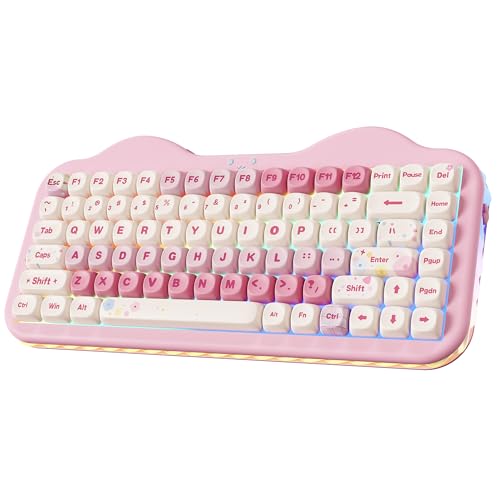
YUNZII C75 Cute 75% Wireless Mechanical Keyboard (Pink)

MechLands MCHOSE K99 96% Wireless Gaming Keyboard

Aula F75 Wireless Mechanical Keyboard (Reaper Switches)
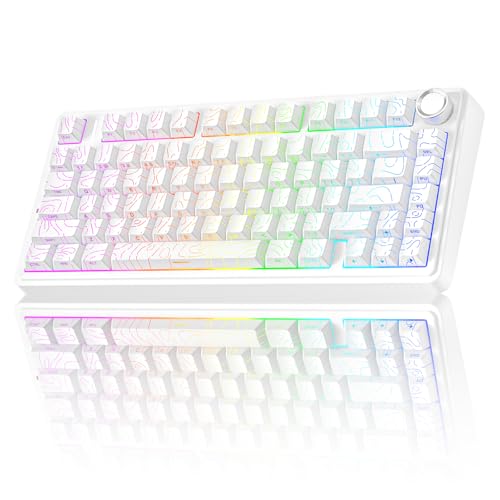
AULA F75 Pro Wireless Mechanical Keyboard with Knob (Line White)

RK ROYAL KLUDGE RK918 Wired Mechanical Keyboard (Typewriter Style)

COSTOM WK87 75% TKL Wireless Mechanical Gaming Keyboard

MOTOSPEED GK82 RGB Mechanical Gaming Keyboard (Aluminum Base)
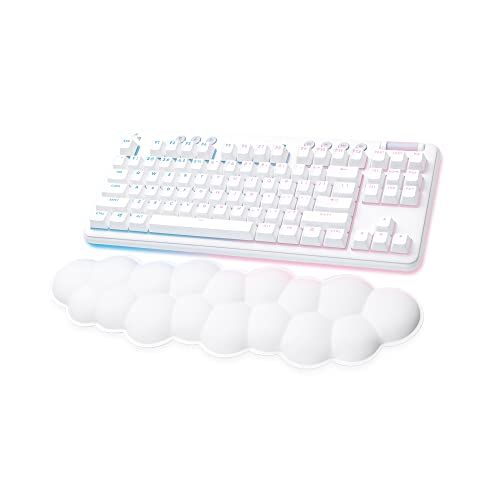
Logitech G715 Wireless Mechanical Gaming Keyboard (White Mist)
More On The Choices That Made The List
The YUNZII B87 TKL sits in that sweet spot where a keyboard stops feeling like a tool and starts feeling like a piece of your desk. The tenkeyless layout, which is the 87-key version with no number pad, frees up mouse space for lower-DPI players who sweep wide in shooters, and the bear-patterned PBT keycaps give it a personality that generic black boards can’t match. The included wrist rest genuinely helps during long sessions, softening the edge where your palms rest between rounds.
For someone setting up a first mechanical keyboard and wanting wireless freedom without dropping flagship cash, this lands in a comfortable place. It pairs over Bluetooth or 2.4GHz and ships with Milk switches, a linear option that feels light and consistent. The ABS frame keeps weight down for travel, though it does feel a step below the metal-cased options later on this list.
Well-Handled Touches
- The included soft-touch wrist rest takes pressure off your wrists during marathon matches, something many budget boards skip entirely.
- PBT keycaps resist the greasy shine that develops on ABS caps after months of use, keeping legends readable longer.
- The TKL footprint leaves room for wide mouse swings, a real advantage in competitive shooters like Valorant or Apex.
- Tri-mode wireless (Bluetooth, 2.4GHz, and USB-C wired) covers laptop, desktop, and tablet use without juggling dongles.
Things To Consider
- The ABS plastic frame feels lighter and less dampened than aluminum alternatives, so it can sound slightly hollow under aggressive typing.
- The bear-pattern aesthetic is charming but polarising; in a professional office setting, it leans playful.
Key Specs
Who It Suits Best
Casual gamers and students who want a personality-forward wireless mechanical keyboard that handles both study sessions and evening gaming without a steep learning curve.
Where Another Pick Suits Better
For a quieter, more office-appropriate board, the Logitech G715 trades the playful aesthetic for a sleeker white-mist finish and a low-profile feel.
The Hi75 is the outlier on this list, and proudly so. It skips wireless entirely in favor of a wired USB-C connection, a tradeoff that buys you an aluminum-alloy chassis and a rotary mode-switching knob you usually only see on boards double the price. For a desk-bound enthusiast who values build quality over cable freedom, that math works out beautifully.
The 75% layout crams 81 keys into a footprint closer to a TKL, preserving function keys and arrows in a tight rectangle. South-facing LEDs, where the diodes face you rather than the top of the keycap, mean most aftermarket keycap sets sit flush without interference, a small but meaningful detail for tinkerers. The pre-lubed Nimbus switches arrive smooth out of the box, and the hot-swap PCB lets you swap switch types without soldering.
What Stands Out
- The aluminum chassis adds meaningful heft and a premium feel that plastic boards struggle to imitate, anchoring the board solidly on a desk.
- The mode-switching knob handles volume, lighting, and connection layers without forcing you into software menus mid-game.
- South-facing LED orientation keeps your custom keycap sets flush, a small detail that matters for the modding crowd.
- Pre-lubed Nimbus switches feel refined from day one, sparing you the teardown-and-lube ritual that some enthusiasts dread.
Worth Noting
- Wired-only design rules this out for anyone wanting wireless freedom, and that’s a deliberate choice, not an oversight.
- The knob can’t wake a PC from sleep, so a quick tap before a deep rest won’t bring your system back.
Right Fit For
Customization-minded enthusiasts who want a premium-feeling wired board with hot-swap flexibility and the modding-friendly layout that comes with 75% designs.
Skip It When
Cable-free setups should look at the MechLands MCHOSE K99, which delivers a gasket-mount feel and a 6000mAh battery without tethering you to a port.
Where most “cute” keyboards sacrifice typing quality for looks, the C75 actually holds up. The cake-themed color scheme and pastel keycaps make it a natural fit for a desk setup that doubles as decor, but the wireless tri-mode connectivity, Bluetooth plus 2.4GHz plus wired, and the 75% layout keep it functional. For a streamer or a content creator whose camera frame includes their keyboard, this earns its keep visually and mechanically.
Candy switches are linear and creamy-sounding, leaning toward the “thocky” side that keyboard communities love. The 75% footprint saves room for a mouse pad or a stream deck without dropping arrows or the function row. Compared to the B87 earlier in this list, the C75 trades the TKL’s wider feel for a denser, more desk-efficient shape and a softer visual identity.
Reasons It Performs
- The cake-themed pastel finish is genuinely photogenic, useful for Twitch overlays and desk-flatlay photography.
- Creamy-sounding Candy switches give a satisfying acoustic profile out of the box, without needing foam mods.
- Wireless tri-mode support means you can pair it to a laptop, desktop, and tablet without juggling cables or dongles.
- The 75% layout keeps the function row and arrows, which content creators rely on for shortcuts and timeline scrubbing.
Honest Caveats
- The strong pink aesthetic won’t blend into a black or corporate workspace, and that visual identity is a deliberate feature, not a bug.
- As with many aesthetic-first boards, the included keycap set may not hold up as long as aftermarket PBT doubles.
Quick Facts
Made For
Streamers, content creators, and aesthetic-focused buyers who want a wireless mechanical keyboard that looks as good on camera as it feels under their fingers.
Consider Something Else When
If the playful color scheme doesn’t fit your setup, the AULA F75 Pro delivers a similar 75% form factor with a cleaner white finish and a useful rotary knob.
The MCHOSE K99 is the heavyweight on this list in a literal sense, packing a 6000mAh battery, a six-layer gasket-mounted structure, and a 96% layout that keeps the numpad without dominating your desk. A gasket mount is a build style where the PCB, the plate holding the switches, “floats” on soft pads rather than being screwed tight, which softens each keystroke and reduces rattle. For competitive players grinding long sessions, that combination of battery life and acoustic comfort is rare at this tier.
The surround RGB light strip adds an underglow that bleeds onto your desk surface, useful for mood lighting during late-night matches. Dual-tone PBT keycaps in MDA or OEM profiles give you tactile grip and durability. Cross-platform compatibility covers Windows, Mac, and Linux, a small detail that streamers and developers appreciate when juggling machines.
Notable Upsides
- The 6000mAh battery outlasts nearly every competitor on this list, easily covering a workweek of daily gaming before needing a top-up.
- Six-layer gasket padding gives a softer, less hollow typing feel than typical tray-mount boards, which bolt the plate directly to the case.
- Hot-swap sockets let you change switch types without a soldering iron, perfect for anyone experimenting with linear, tactile, or clicky options.
- The 96% layout retains a numpad while staying narrower than a full 108-key board, ideal for spreadsheets and MMOs alike.
Points To Note
- The 99-key count takes some adjustment for users coming from a TKL; expect a few muscle-memory recalibrations.
- Counterweight options add real weight, so this isn’t a board you toss in a backpack for café sessions.
Feature Card
Who Should Grab It
Competitive players and power users who want marathon battery life, a refined typing feel, and enough keys to handle both gaming and productivity without compromise.
Look Elsewhere When
For a lighter, more portable build, the COSTOM WK87 trades the numpad and the 6000mAh battery for a slimmer 75% TKL footprint and similar gasket-mount comfort.
The Aula F75 punches above its weight class. For shoppers who want the trinity of wireless modes, hot-swap switches, and a creamy typing feel without crossing into enthusiast pricing, this is the most balanced entry on the list. Reaper switches are linear and pre-lubed, so the board feels refined from the moment you unbox it, no break-in period required.
The 81-key 75% layout skips nothing essential while keeping your mouse hand free to roam. Tri-mode connectivity covers Bluetooth 5.0, 2.4GHz wireless, and USB-C wired, and the 4000mAh battery holds up to a few days of mixed use depending on your RGB settings. Compared to the more feature-loaded F75 Pro later on this list, this version skips the rotary knob but keeps the core experience intact, which is why it lands as the value anchor of the roundup.
Practical Advantages
- Hot-swap PCB means you can swap in any 3-pin or 5-pin switch you like, opening the door to custom sound and feel without soldering gear.
- Tri-mode wireless plus a 4000mAh battery covers cross-device workflows, useful for jumping between a work laptop and a gaming PC.
- Pre-lubed Reaper switches deliver a smooth linear feel out of the box, sparing you the most common modding ritual.
- The 75% layout preserves function keys and arrows, so muscle memory from a full-size board transfers without relearning.
Trade Offs
- No rotary knob means you’ll adjust volume through key combos or OS controls, a small step down from the F75 Pro.
- The included keycaps, while decent, are often the first thing enthusiasts replace with aftermarket doubles.
Whose Setup It Belongs In
Budget-conscious gamers and tinkerers who want hot-swap flexibility, wireless convenience, and a creamy feel without paying for a flagship badge or a knob they may not use.
A Better Fit Elsewhere
If a rotary volume knob matters to your workflow, the AULA F75 Pro adds that control and pre-lubed switches with a cleaner side-printed PBT keycap set.
The F75 Pro takes everything the standard F75 does well and adds the rotary knob, side-printed PBT keycaps, and a slightly more refined acoustic profile. In practice, that means adjusting volume mid-game without alt-tabbing, reading legends at an angle without craning your neck, and enjoying a quieter “creamy” sound as you type. For someone who treats their keyboard as a daily driver for work and play, those refinements add up.
Wireless connectivity spans Bluetooth 5.0, 2.4GHz, and USB-C wired, and the board can pair with up to five devices simultaneously. Switching between them happens through a side button or a key combo. The Line White colorway leans minimalist, fitting a home office as easily as a battlestation. The trade-off versus the EPOMAKER Hi75 earlier is that you give up the aluminum chassis in exchange for wireless freedom, which is a fair swap for cable-free setups.
What Makes Sense
- The rotary knob gives you analog volume control, which beats fumbling for a key combo during clutch rounds.
- Side-printed PBT keycaps keep legends visible at eye level while preserving a clean top-down aesthetic for streams.
- Five-device pairing handles laptop, desktop, tablet, phone, and console without re-pairing every time you switch.
- Pre-lubed switches deliver a quieter, more refined typing feel from day one, a meaningful upgrade for shared spaces.
Smaller Caveats
- Some users find the knob placement a matter of preference, depending on whether they rest their right hand on the mouse or the keyboard.
- Side-printed legends can be harder to read in low-light environments, a small trade-off for the cleaner top profile.
At A Glance
Best Suited To
Power users and hybrid workers who want a wireless mechanical keyboard that transitions from spreadsheets to shooter nights without skipping a beat.
Swap It Out When
For a wired build with even more premium heft, the EPOMAKER x LEOBOG Hi75 brings an aluminum-alloy chassis and a similar knob, just without the wireless flexibility.
The RK918 is the second wired entry on this list, and it earns its spot for an entirely different reason than the Hi75. Where that board chased the enthusiast crowd, this one leans into nostalgia. Round, typewriter-style keycaps, a full 108-key layout, and a large LED surround lamp along the side give it a presence that modern low-profile boards simply don’t have. For buyers who want personality and a numpad, this is the most distinctive option here.
Blue switches deliver the clicky, tactile feedback that mechanical keyboard fans either love or avoid, with the loud, definitive sound that some typists find deeply satisfying. N-key rollover, which is the ability to register every keypress even when you press many at once, keeps inputs clean in fast-paced games. Wide OS compatibility covers Windows, Mac, and Linux. The metal top panel adds scratch resistance, useful for a board that often lives on a coffee table or a shared desk.
Where It Excels
- Full 108-key layout retains every key, including a numpad and dedicated multimedia controls, a real plus for data entry and MMOs.
- The round, retro-style keycaps deliver a vintage typewriter aesthetic that’s rare in the mechanical keyboard market.
- Blue switches provide unmistakable clicky feedback, perfect for typists who want confirmation on every keystroke.
- The surrounding LED side lamp adds ambient lighting that doubles as desk decor, a touch most competitors skip.
Trade-Offs To Consider
- Wired-only design means no wireless freedom, which may be a deal-breaker for cable-free setups.
- Clicky blue switches are loud, a potential friction point in shared rooms, open offices, or late-night household use.
Perfect Match For
Typists and number-crunchers who want a full-size mechanical keyboard with a vintage aesthetic and don’t mind the clicky acoustic profile.
Not Your Match When
For a quieter wireless alternative with a similar feature set, the COSTOM WK87 brings a gasket-mount design and tri-mode connectivity in a more compact shape.
The WK87 feels like a careful balancing act. It doesn’t try to win on any single feature, but it covers the bases well: tri-mode wireless, a gasket-mount structure, hot-swap support, and a 5000mAh battery that lasts roughly a week and a half with backlighting off. For someone who needs a single board to handle work, study, and evening gaming, the WK87 quietly handles all three.
The 87-key layout walks a middle path between the more compact 75% boards earlier in this list and the 96% K99, keeping function keys and arrows while cutting the numpad. Pre-lubed POM linear switches produce a soft, creamy sound that won’t disturb housemates or coworkers. 19 RGB backlight modes and customization software give you room to tinker with macros and per-key lighting.
The Helpful Details
- Five-layer sound-absorbing padding softens each keystroke, producing a quieter profile that holds up in shared spaces.
- Tri-mode connectivity (2.4GHz, Bluetooth 5.1, USB-C) covers phones, tablets, laptops, and desktops without a dongle swap.
- Hot-swap compatibility with both 3-pin and 5-pin switches makes future mods easier, no soldering required.
- The 5000mAh battery delivers up to 15 days of use with backlighting off, reducing charger anxiety during long work sprints.
Less Ideal Details
- Battery life drops sharply with RGB on, closer to a week in heavy use, so you’ll want to budget for top-ups if you like the lighting.
- The customization software is functional but not as polished as Logitech’s ecosystem, a real comparison point for the G715 later.
Feature Snapshot
Built With In Mind
Mixed-use players and students who want a single wireless mechanical keyboard that handles essays, code, and late-night matches without missing a beat.
Reach For A Different Pick When
For a more refined typing experience with a rotary knob, the AULA F75 Pro upgrades the same wireless foundation with extra analog control.
The MOTOSPEED GK82 is the most accessible entry on this list, a budget mechanical keyboard that still offers hot-swap switches and an aluminum base. For first-time mechanical buyers or anyone testing the waters before committing to a pricier board, that low entry cost is the entire appeal. The aluminum base adds a touch of heft you’d usually only see in more expensive builds.
At 82 keys in a TKL-adjacent layout, it leans closer to the 75% camp while keeping the core keys in familiar positions. Soft tactile blue switches provide a light bump with each press, less loud than clicky blues but more feedback than linears. A detachable USB cable simplifies transport and replacement, a small but practical touch.
Where It Helps
- The aluminum base delivers surprising rigidity for the price, reducing flex and giving a more planted feel during intense typing.
- Hot-swap sockets let you try different switch types without a soldering iron, a true gateway into the hobby.
- The detachable USB cable makes storage and transport painless, plus replacements are easy to find.
Possible Compromises
- Wired-only design rules out wireless freedom, which is a fair trade-off for the lower price but worth noting.
- Noise-absorbing foam helps but doesn’t fully match the acoustic profile of gasket-mount boards like the WK87 or K99.
Who Will Love This
First-time mechanical keyboard buyers and curious tinkerers who want hot-swap and an aluminum base at a price that doesn’t require much commitment.
Swap It Out When
For a wireless upgrade with a similar hot-swap philosophy, the Aula F75 delivers tri-mode connectivity and pre-lubed switches in a comparable 75% footprint.
The Logitech G715 is the most polished board on this list, and it shows. Part of the Aurora collection, it pairs a dreamy White Mist finish with a cloud-shaped palm rest and a low-profile tenkeyless layout. For a buyer who cares as much about how a keyboard looks on a livestream as how it types, the G715 makes a strong case for itself even before you touch the switches.
The wireless connection runs through Logitech’s Lightspeed tech, which is engineered for low-latency gaming, alongside Bluetooth for secondary devices. The included palm rest genuinely changes long-session comfort, a meaningful upgrade for streamers and remote workers logging eight-hour days. The trade-off, as with most refined options, is that you give up the hot-swap modding freedom of the budget-friendly boards earlier in the list.
Useful Highlights
- The cloud-shaped palm rest is genuinely comfortable, taking pressure off during extended gaming or typing sessions.
- Low-profile mechanical switches deliver a familiar mechanical feel in a slimmer chassis, easier on the wrists for some users.
- Lightspeed wireless gives a low-latency experience competitive players expect, with Bluetooth as a backup for casual devices.
- The White Mist finish looks at home in bright, minimalist setups where the playful boards earlier in this list would feel out of place.
Where It May Fall Short
- No hot-swap support, so once you pick a switch type, you’re locked in. Tinkerers should look at the F75 or WK87 instead.
- The polished finish costs more than the playful options higher up the list, and that premium is largely aesthetic.
Right Fit For
Style-focused streamers and remote professionals who want a refined wireless mechanical keyboard that looks as good on a desk as it performs in a match.
Where A Sibling Pick Shines
For a similarly wireless option with hot-swap freedom, the COSTOM WK87 delivers a comparable feature set at a friendlier price for modding-curious shoppers.
What To Weigh Before Buying a Budget Wireless Gaming Keyboard
The term “budget wireless gaming keyboard” covers a wider range than most shoppers expect. Wired entries like the EPOMAKER Hi75 and the MOTOSPEED GK82 sit alongside tri-mode boards, so start by deciding whether wireless matters to your setup or if you’d happily trade it for a premium feel or a lower price. If you game at a desk and never move the board, wired is still a perfectly valid choice, and you may get more for your money.
Switch type is the next big decision. Linear switches (Milk, Candy, Reaper, POM) feel smooth and consistent, ideal for fast-paced gaming and quiet environments. Tactile switches give a small bump on each press, useful for typing accuracy. Clicky switches, like the blues on the RK918, are the loudest, satisfying for some typists but risky in shared spaces. Hot-swap support, found on most boards here, lets you change switch types later, which softens the choice.
Battery life varies dramatically across the list, from a 4000mAh cell in the Aula F75 to a 6000mAh unit in the MCHOSE K99. If you travel or game away from outlets, the higher-capacity boards are worth prioritizing. Finally, layout shapes how the board fits your desk. 75% boards save the most space, 96% boards like the K99 keep a numpad, and full-size options like the RK918 give you every key without compromise.
Key Considerations Across These Picks
Mistakes Worth Dodging
The most common slip-up is chasing specs that don’t match your actual use. A 6000mAh battery is wasted on a desk-bound setup that never leaves the charger, and a rotary knob is dead weight if you never adjust volume mid-game. Match the feature to the habit.
Another trap is ignoring the typing experience in favor of connectivity. Wireless is convenient, but a board with rattly stabilizers and hollow acoustics will frustrate you daily. Read into the gasket-mount and foam details, since those shape how the keyboard actually feels under your fingers.
When Paying More Pays Off
The step up from the cheapest entries to mid-tier boards like the AULA F75 Pro and the MCHOSE K99 buys you refinements that show up over months of ownership: pre-lubed switches, gasket mounts, larger batteries, and better keycap materials. For a daily driver that you use for years, that extra spend tends to age better than saving on day one.
If you only game a few hours a week, the budget-friendly end of this list is plenty. If you type and game daily, the mid-tier boards earn their keep.
Frequently Asked Questions
What Is a Tri-Mode Wireless Keyboard?
A tri-mode wireless keyboard supports three connection types: Bluetooth, 2.4GHz wireless through a USB dongle, and USB-C wired. Tri-mode gives you flexibility to pair with phones, tablets, laptops, and desktops.
Are Budget Wireless Gaming Keyboards Good for Competitive Play?
Yes, modern budget boards use 2.4GHz wireless with latency low enough for most competitive games. The trade-off versus wired is small, and the convenience of a cable-free desk is meaningful for many setups.
What Does Hot-Swap Mean on a Mechanical Keyboard?
Hot-swap means you can remove and replace switches without soldering. A hot-swap PCB has sockets that grip the switch pins, letting you experiment with different switch types or replace a faulty switch quickly.
How Long Do Wireless Gaming Keyboards Last on a Single Charge?
Battery life varies by board and usage. The MCHOSE K99 and COSTOM WK87 can last a week or longer, while smaller batteries like the Aula F75’s 4000mAh may need charging every few days with heavy RGB use.
Is a 75% Layout Better Than TKL for Gaming?
Both layouts omit the numpad, freeing desk space for mouse movement. The 75% layout is more compact and clusters navigation keys, while TKL keeps a more traditional spread with dedicated function keys. Choice depends on your muscle memory and desk size.
Closing Remarks
A budget wireless gaming keyboard in 2026 doesn’t have to feel like a compromise. The right pick depends on the habits you bring to it: how often you game, how much desk space you have, and how much you value modding flexibility versus refined polish. Start with the layout and switch type, then narrow down by wireless features and battery life. The board that matches your actual routine will be the one that quietly disappears into your setup, the way a good keyboard should.


