


Ultrawide monitors used to feel like a luxury purchase, reserved for flagship GPUs and deep wallets. Times have changed: you can now get 34-inch curved panels and even 49-inch super-ultrawides without mortgaging your rig. The catch is sorting through confusing model numbers, VA versus IPS trade-offs, and HDMI bandwidth limits that decide whether your games actually run at 240Hz.
This list covers ten solid ultrawide gaming options that balance screen real estate, refresh rates, and color quality. You’ll see compact 25-inch choices, standard 34-inch WQHD workhorses, and immersive 49-inch DQHD giants. Each pick calls out the strengths, the trade-offs, and who’ll appreciate it most, so you spend your money on the panel that fits your setup, not the one with the loudest marketing.
The Main Contenders
SAMSUNG Odyssey G4 Series FHD Gaming Monitor
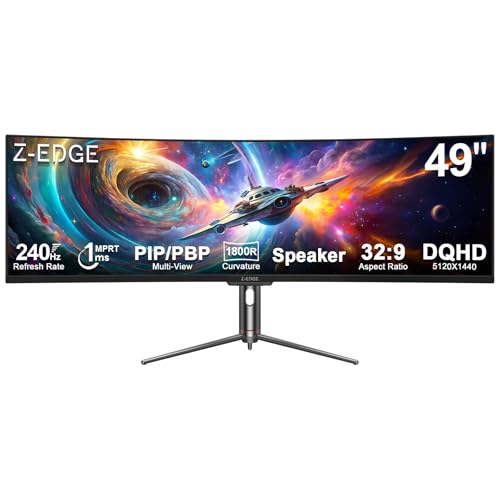
Z-Edge 5K 49 Inch Curved Gaming Monitor
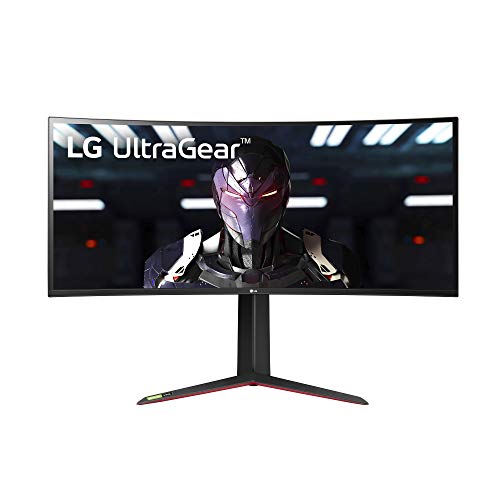
LG UltraWide QHD 34-Inch Computer Monitor 34WP65C-B

Alienware AW3420DW 34 Inch Curved Gaming Monitor

DJiEX 34 Inch Ultrawide Curved Gaming Monitor
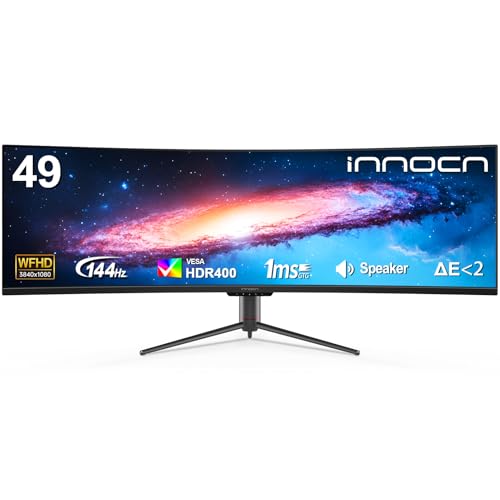
INNOCN 49″ Curved Ultrawide 144Hz Monitor
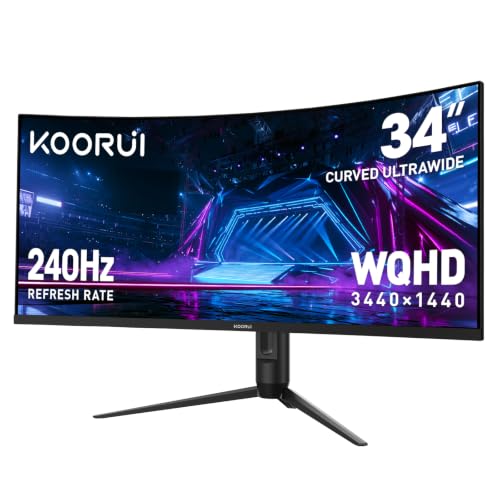
KOORUI 34 Inch 240Hz WQHD Ultrawide Curved Gaming Monitor

Amzfast 49 Inch Curved 120Hz DQHD Ultrawide Gaming Monitor

KTC 34 Inch Ultrawide Curved Gaming Monitor H34S5

AOC CQ34G2 Super Curved Frameless Gaming Monitor
A Breakdown Of The Leading Choices
The Odyssey G4 is the only pick here that stays at 25 inches, and that’s exactly its strength for compact battle stations. Its IPS panel, 240Hz native refresh rate, and 1ms response time target competitive players who care more about speed than pixel count.
An Ultrawide Game View setting stretches select titles to a 21:9 aspect ratio, giving you extra peripheral vision in supported games. AMD FreeSync Premium support pairs with G-Sync compatibility to keep frames aligned with your GPU, and HDR10 adds a touch of contrast in compatible scenes.
What It Does Well
- 240Hz refresh rate on a small-footprint IPS panel, ideal for fast-paced shooters on a tight desk
- 1ms gray-to-gray response time, helping motion stay clean during flick shots and quick camera turns
- Full adjustability with tilt, swivel, pivot, and height changes for ergonomic comfort over long sessions
- DisplayPort and HDMI inputs cover modern GPUs without needing adapters
Things To Consider
- 25-inch FHD means lower pixel density than the 34-inch WQHD picks, so text and UI elements feel larger
- You may find the screen height limiting in flight sims and racing titles where vertical awareness matters
Key Specs
Right Fit For
Competitive FPS players with a smaller desk who want 240Hz motion without stepping up to a 27-inch footprint.
Consider Something Else When
The Z-Edge 5K 49 Inch Curved Gaming Monitor makes more sense for sim and strategy players chasing immersion over a compact frame.
Stepping up from a 34-inch WQHD screen like the LG to a 49-inch super-ultrawide feels like moving from a wide window to a wraparound cockpit. The Z-Edge delivers a 5120×1440 resolution, which is essentially two QHD displays fused into one panel, with a deep 1800R curve.
Built-in speakers cover basic audio needs, while 240Hz refresh and 1ms response time keep motion in racing and flight sims looking fluid. The VA panel emphasizes deep blacks, which helps night scenes and dark UI themes feel more cinematic.
Features That Help
- 49-inch 32:9 super-ultrawide canvas, replacing a dual-monitor setup without a bezel gap
- 1800R curvature wraps your peripheral vision, useful for sim racing and flight games
- 240Hz refresh and 1ms response, reducing blur during high-speed turns
- Integrated speakers, removing the need for desktop audio in casual setups
Trade Offs
- Desk depth matters: a 49-inch curve pushes you back at least 80cm for comfortable viewing
- Owners commonly report that running two PCs into PBP modes takes some menu tinkering
- No height adjustability mentioned in the spec sheet, so a monitor arm becomes essential for ergonomics
Made For
Sim racers, flight sim enthusiasts, and strategy players who want a single wide canvas instead of a dual-monitor array.
A Better Fit Elsewhere
The Alienware AW3420DW 34 Inch Curved Gaming Monitor is the smarter pick if 49 inches feels excessive and you’d rather invest in IPS color and a 120Hz panel that still handles most genres gracefully.
The 34WP65C-B sits at a sweet spot for shoppers splitting time between spreadsheets and shooters. Its 34-inch VA panel runs 3440×1440, giving you about a third more horizontal real estate than a standard FHD screen, which makes a real difference in Excel and video editing timelines.
For games, AMD FreeSync Premium handles the tear prevention, while Dynamic Action Sync trims input lag. A 1ms response rating and HDR10 support round out the package, along with a three-side borderless bezel that helps the screen feel open rather than boxed in.
Advantages To Know
- 3440×1440 resolution gives comfortable room for side-by-side documents and chat windows
- 99% sRGB coverage suits photo editing and color-sensitive creative work
- MAXXAUDIO stereo speakers with 7W per channel, enough for casual listening without a headset
- Height and tilt adjustments make it easier to match the panel to your chair height
Worth Noting
- No G-Sync mention, so NVIDIA users rely on FreeSync compatibility modes
- Black Stabilizer brightens shadows in dark scenes, which is helpful for spotting enemies but can wash out dark movies
Best Suited To
Remote workers and students who game casually and want one display for documents, browsing, and after-hours play.
Reach For A Different Pick When
The KOORUI 34 Inch 240Hz WQHD Ultrawide Curved Gaming Monitor suits competitive gamers who prioritize 240Hz motion over the LG’s color and audio focus.
The Alienware AW3420DW leans into the brand’s enthusiast identity, pairing a 34-inch WQHD IPS panel with a 1900R curve and a 120Hz native refresh rate. IPS Nano color technology widens the gamut, so reds and greens land closer to what creators expect from a reference display.
Nvidia G-Sync support keeps frames synced to your GeForce card, and the Lunar Light finish gives the back of the monitor a clean, recognizable look. It’s a step up from the LG 34WP65C-B in panel quality, but not a leap in refresh rate, so it lands more in the premium immersive camp than the esports camp.
What Works In Its Favor
- IPS Nano color delivers stronger color accuracy out of the box, which helps in HDR-leaning single-player games
- Native G-Sync module, offering more consistent frame syncing than software-based FreeSync modes on NVIDIA cards
- Anti-glare coating on the WQHD panel reduces reflections from windows and overhead lights
- Curved 1900R design fills more of your field of view than a flat 34-inch screen
Honest Caveats
- 2ms response rating is fine for cinematic play, but slower than the 1ms VA alternatives on this list
- 120Hz refresh sits below the 240Hz ceiling of newer OLED and IPS panels, so competitive FPS players may want more headroom
Feature Snapshot
Whose Setup It Belongs In
NVIDIA-leaning enthusiasts building a high-end desk setup who care more about color fidelity and G-Sync reliability than raw refresh speed.
Where Another Pick Suits Better
The KTC 34 Inch Ultrawide Curved Gaming Monitor H34S5 is the better value for shoppers who want 180Hz motion without the Alienware tax.
The DJiEX 34-inch hits a price point that makes 240Hz ultrawide gaming reachable for builders on tighter budgets. Its UWQHD 3440×1440 VA panel pairs with a 1500R curve, and the high refresh rate only unlocks over DisplayPort, which is worth knowing if your GPU favors HDMI.
The 127% sRGB claim, assuming standard calibration, means colors should look more vivid than on basic office panels. HDR10 support adds highlight punch in supported games, though true HDR performance at this tier tends to be modest.
Everyday Advantages
- 240Hz refresh at 3440×1440 over DisplayPort, giving fast-paced genres a real motion upgrade over 144Hz
- 1500R curve matches the natural arc of your eyes, helping the panel feel more enveloping
- VESA mount compatibility, useful if you’d rather raise the screen on a third-party arm
Possible Compromises
- Brand recognition is limited, so firmware updates and warranty turnaround can take longer than with major names
- HDMI port may cap at a lower refresh rate, so plan your cable choice around your GPU’s DisplayPort output
The Right Fit
Budget-conscious competitive gamers who want a 34-inch 240Hz panel without paying the Alienware or Samsung premium.
Swap It Out When
The KOORUI 34 Inch 240Hz WQHD Ultrawide Curved Gaming Monitor is a sensible alternative if you prefer a brand with a broader accessory ecosystem and similar motion specs.
Unlike the 49-inch Z-Edge, the INNOCN uses a 3840×1080 panel, which keeps the price lower but reduces vertical detail. That trade-off works well for productivity and racing fans who want the 32:9 aspect ratio without driving their GPU as hard.
Built-in speakers, USB-C connectivity, and a screen-split feature help the INNOCN pull double duty as a work display. The 1800R curve and HDR400 support give it a more cinematic feel in supported movies and racing titles.
A Strong Showing
- USB-C input simplifies laptop connections, carrying display, and power over a single cable
- 32:9 super-ultrawide layout is ideal for side-by-side documents, timelines, or chat windows
- Built-in speakers handle basic video calls without extra desk clutter
Less-Strong Areas
- 3840×1080 resolution means individual windows look taller and slightly less crisp than 5120×1440 screens
- 144Hz refresh is smooth but doesn’t match 240Hz competitors in this list for esports-grade motion
Who Should Grab It
Hybrid users who split time between coding, editing, and casual gaming and want a single panel instead of two monitors.
Look Elsewhere When
The Z-Edge 5K 49 Inch Curved Gaming Monitor makes more sense for shoppers chasing 5K2K detail and 240Hz over the INNOCN’s gentler resolution.
KOORUI takes the same 34-inch 240Hz formula as the DJiEX and refines the brand experience. The 1500R curve pulls you into racing tracks, and Adaptive-Sync support covers both FreeSync and G-Sync-compatible scenarios.
For competitive Valorant, Apex, or Counter-Strike players, the jump from 144Hz to 240Hz is the kind of upgrade you’ll feel immediately. The 1ms response rating keeps motion blur in check during whip-pans, while the WQHD resolution keeps enemy outlines sharp at longer sightlines.
The Case For It
- 240Hz refresh rate on a 34-inch WQHD panel, a rare combo outside premium OLED territory
- Adaptive-Sync broadens support across AMD and NVIDIA GPUs without per-brand toggling
- 1500R curvature complements long horizontal sightlines in racing and flight sims
Points To Note
- Some owners commonly report minor backlight bleed on dark scenes, a known VA trait at this price tier
- Stand ergonomics are basic, so a VESA arm becomes a worthwhile add-on for taller users
Who Will Love This
Esports-leaning players who want a wide field of view without giving up the high refresh rates they’re used to on 24-inch screens.
Not Your Match When
The Alienware AW3420DW 34 Inch Curved Gaming Monitor is the right call if G-Sync hardware support and IPS color are higher priorities than peak motion.
The Amzfast splits the difference between the Z-Edge and the INNOCN with a 5120×1440 panel at 120Hz. That resolution makes text crisp enough for full-time productivity, while the 120Hz ceiling keeps motion smoother than the INNOCN’s 144Hz-with-lower-res combo.
PIP and PBP modes let you run two inputs side by side, which is useful for streamers keeping a chat laptop or console nearby. The 1500R curve is slightly tighter than the Z-Edge’s 1800R, drawing you further into the action.
Where It Delivers
- Dual QHD resolution gives each “half” the same sharpness as a standalone 27-inch 1440p display
- 120% sRGB coverage, assuming standard calibration, leans toward punchy, vivid colors
- Height-adjustable stand included, sparing you an immediate VESA arm purchase
- PIP/PBP modes simplify running two systems on one screen
Worth Bearing In Mind
- 120Hz falls below the 240Hz options on this list, so fast-twitch players may notice the gap
- 1ms MPRT is a moving-pixel response metric, not gray-to-gray, so real-world blur handling varies by content
Feature Rundown
Perfect Match For
Streamers, creators, and remote professionals who run multiple windows or systems and want one screen to anchor their desk.
Skip It When
The Z-Edge 5K 49 Inch Curved Gaming Monitor is a better match for shoppers who want 240Hz on the same panel size and are willing to push their GPU harder.
KTC’s H34S5 takes a different tack from the 240Hz crowd, offering 180Hz on a 34-inch UWQHD VA panel. That refresh rate lands in a comfortable middle zone: smoother than 144Hz, more affordable than 240Hz, and easier on mid-range GPUs.
The 4000:1 contrast ratio is the headline spec, giving dark scenes in horror and space games a depth that budget IPS screens often miss. PIP/PBP and a full ergonomic stand round out the package, which is unusual at this tier.
Useful Highlights
- 4000:1 contrast, well above typical IPS panels around 1000:1, for richer blacks
- Full ergonomic stand with tilt, swivel, pivot, and height adjustment, so no VESA arm is required
- 180Hz refresh hits a sweet spot for narrative games and moderate competitive play
- PIP/PBP support for running two inputs side by side
Where It Is Less Suited
- 1ms MPRT response rating uses moving-pixel measurement, which reads more aggressively than gray-to-gray numbers
- VA viewing angles narrow slightly at the edges, so off-center viewing shows mild color shift
Built With In Mind
Single-player and adventure game fans who prioritize deep contrast and a balanced refresh rate over pure esports speed.
Another Choice May Suit
The LG UltraWide QHD 34-Inch Computer Monitor 34WP65C-B is a sensible alternative for shoppers leaning toward productivity first, with a similar resolution and added speakers.
The AOC CQ34G2 is the gentlest entry into ultrawide gaming. Its 2560×1080 resolution is closer to a stretched 1080p than a true WQHD, which keeps the price low and the GPU load light. For a first-time ultrawide shopper, that balance is genuinely useful.
The 1500R curve and three-sided frameless design still deliver that wraparound feel, and AMD FreeSync support pairs with a 75Hz refresh to keep everyday gaming smooth without demanding a flagship graphics card.
Points In Its Favor
- Entry-level price point lowers the barrier for shoppers trying their first ultrawide
- 75Hz refresh and FreeSync reduce tearing without requiring a top-end GPU
- Three-year zero dead-pixel warranty offers peace of mind for new panel buyers
- Three-sided frameless design suits future multi-monitor expansions
Small Caveats
- 2560×1080 resolution looks softer than WQHD, especially in text-heavy productivity apps
- 75Hz ceiling will feel limiting to players who upgrade to 144Hz or 240Hz panels later
Quick Facts
Who It Suits Best
First-time ultrawide shoppers, students, or anyone driving a mid-range GPU who wants the ultrawide experience without overpaying for pixels.
Where A Sibling Pick Shines
The DJiEX 34 Inch Ultrawide Curved Gaming Monitor is the natural step up once you want 240Hz motion and proper WQHD sharpness in the same form factor.
What Matters Most Before Choosing Budget Ultrawide Gaming Monitors
Panel Type And Viewing Angles
IPS panels give the best viewing angles and color accuracy, which matters when you share a screen or watch from a couch. VA panels push deeper contrast and black levels, ideal for dark game scenes and HDR-leaning movies. Pick IPS for color-critical work and shared viewing, and VA for solo play in dim rooms where contrast carries the experience.
Resolution, Size, And Desk Real Estate
A 34-inch WQHD panel is the modern standard, packing 3440×1440 into a curved chassis that fits most desks. A 49-inch super-ultrawide replaces two monitors, but you’ll need at least 30 inches of desk depth and a chair that can roll back comfortably. Resolution matters for sharpness, but your GPU pays the bill: WQHD 240Hz is far more demanding than FHD 75Hz.
Refresh Rate And Adaptive Sync
Refresh rate defines how smooth motion looks, and 144Hz is the practical minimum for modern gaming. Adaptive Sync, including FreeSync and G-Sync compatibility, prevents screen tearing by syncing your monitor to your GPU’s frame output. Most budget-friendly picks now include some form of adaptive sync, so verify the supported range before pulling the trigger.
Connectivity And Ergonomics
Check for DisplayPort 1.4 or HDMI 2.1 if you want the full bandwidth for 240Hz at WQHD. Height, tilt, and swivel adjustments matter for long sessions, and VESA mount support keeps your options open for monitor arms. USB-C input is a quiet luxury for laptop users who want a one-cable desk.
Key Considerations Across These Picks
Common Shopping Slip Ups
Chasing the biggest refresh number often pushes shoppers into panels their GPU can’t drive, resulting in stutter and disappointment. Match your monitor to your graphics card, not the other way around. A 240Hz WQHD screen paired with an older mid-range GPU will underperform a 144Hz panel fed consistent frames. Measure your desk depth before any 49-inch purchase, and confirm your cables match the monitor’s full-bandwidth ports.
Where The Extra Money Goes
The jump from a budget VA to a premium IPS adds better viewing angles, stronger color accuracy, and often a hardware G-Sync module. Higher refresh rates, like the move from 144Hz to 240Hz, are felt most in competitive shooters, while resolution bumps from FHD to WQHD or DQHD make text sharper and open worlds more detailed. The upgrade is worth it when your games and GPU can take advantage of it, and less so for casual single-player sessions on older hardware.
Frequently Asked Questions
What size ultrawide monitor is best for gaming?
A 34-inch curved ultrawide with a 21:9 aspect ratio is the most common starting point. It gives meaningful extra width without dominating your desk, and most modern GPUs handle WQHD resolution comfortably.
Are curved ultrawide monitors better for gaming?
Curvature helps the screen edges stay within your natural field of view, which reduces eye movement during long sessions. The tighter the curve, like 1500R versus 1800R, the more immersive the wrap feels, especially in racing and flight sims.
Is a 49-inch ultrawide too big for a desk?
It depends on desk depth. Most 49-inch panels need at least 28 to 32 inches of viewing distance to feel comfortable. Measure your space and chair-to-screen distance before choosing a super-ultrawide, since a too-close panel forces constant head turning.
Do budget ultrawide monitors support G-Sync?
Many do, but typically through G-Sync Compatible mode rather than a hardware module. For full hardware G-Sync, you usually need a premium model like the Alienware AW3420DW. AMD FreeSync support is more common across budget panels.
How important is refresh rate on an ultrawide?
For competitive shooters and fast-paced games, 144Hz and above makes motion feel noticeably smoother. For slower single-player titles, 75Hz to 120Hz is often enough, and you can put the savings toward a better panel or GPU.
Closing Remarks
The right ultrawide for you depends on what you play, what you drive it with, and how much desk you can spare. Sim racers and multitaskers will love the 49-inch Z-Edge and Amzfast, while competitive players get the most from the 240Hz KOORUI and DJiEX. Pick the panel that matches your real games and your real space, and the rest of your setup will follow.


