


Plenty of prebuilt gaming rigs promise more than they deliver, and chasing the cheapest tower often means gambling on a weak power supply or a graphics card that chokes on anything but indie games. You want a system that boots up, runs your library smoothly, and won’t bottleneck the moment you push settings higher. This roundup focuses on ten prebuilt gaming PCs spanning true entry-level towers to higher-end desktops, with notes on who each one actually fits and where the trade-offs live.
Your Options, Compared

Skytech Gaming Edge Gaming PC, Ryzen 5 5500, RTX 5050, 1TB SSD

Horizon Autherium Dragon RGB I9 RTX Gaming PC, 64GB, 5TB, RTX 5070 OC

CYBERPOWERPC Gamer Master Gaming PC, Ryzen 5 7600, RTX 4060, 16GB DDR5

Skytech Gaming PC Azure 3, Ultra 7, RTX 5060, 32GB RAM, 1TB SSD

CLX Set Gaming PC, Core i9 12900KF, RTX 4060 Ti, 1TB NVMe + 4TB HDD

CyberpowerPC Gamer Xtreme VR Gaming PC, i5-10400F, GTX 1660 Super, 8GB
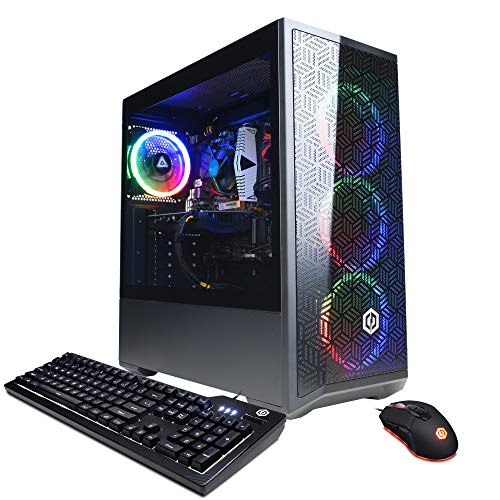
CYBERPOWERPC Gamer Xtreme VR Gaming PC, i5-12400F, RTX 3050, 16GB

Skytech Gaming King 95 Gaming PC, Ultra 7 270K, RTX 5070 Ti, 32GB DDR5

Lenovo Legion Tower 5i Gaming PC, Ultra 7 265F, RTX 5070 Ti, 32GB

ASUS ROG G700 (2025) Gaming Desktop PC, Ultra 7 265F, RTX 5070, 32GB
The Skytech Edge lands in that sweet spot where the spec sheet looks sensible and the price tag doesn’t require a second mortgage. The combination of an AMD Ryzen 5 5500 processor, an RTX 5050 graphics card, 16GB of DDR4-3200 memory, and a 1TB NVMe solid-state drive covers the basics that most entry-level players actually need.
For someone stepping up from console gaming or coming back to PC after a long break, this is a comfortable landing. The 650W Gold-rated power supply leaves enough overhead for the current GPU, and the 1TB SSD holds a reasonable game library without forcing constant uninstalls.
A Few Strong Suits
- Runs popular esports titles at high frame rates without breaking a sweat in 1080p.
- 1TB NVMe boot drive keeps load times short and gives real breathing room for modern games.
- 650W Gold PSU is a step up from the bargain-basement units often paired with budget GPUs.
- Windows 11 Home is preinstalled, so unboxing day equals play day.
Trade Offs
- Ryzen 5 5500 has no integrated graphics, meaning a dead GPU means a non-functional desktop until you replace the card.
- Air cooling keeps things simple, though sustained all-core loads may push the fan curve a bit higher than liquid-cooled alternatives.
Best Suited To
First-time PC gamers, esports players, and anyone leaving console gaming behind for a 1080p setup.
Reach For A Different Pick When
You want more headroom for 1440p or 4K gaming, in which case the Skytech Gaming PC Azure 3 (Item 4) is the smarter stretch.
Right out of the gate, the Horizon Autherium Dragon looks like it was built for people who hate deleting things. Between the 64GB of RAM, the 5TB of combined NVMe plus hard-drive storage, and a factory-overclocked RTX 5070 OC graphics card, this machine is hard to ignore on a spec sheet.
It runs an unlocked Core i9 CPU, which matters if you ever plan to tune the chip further. For streamers running a capture app, browser sources, and a game all at once, that 64GB ceiling takes the memory-crunch risk off the table. The 360mm AIO cooler keeps thermals in check during long sessions.
The Upside
- 64GB of RAM eliminates the multitasking ceiling that bottlenecks most prebuilt gaming PCs.
- 5TB total storage (1TB NVMe plus 4TB HDD) handles huge game libraries and capture files comfortably.
- Factory-overclocked RTX 5070 delivers extra frames over reference-spec cards.
- 360mm AIO liquid cooling helps the unlocked Core i9 sustain boost clocks longer.
Things To Consider
- The 4TB mechanical drive adds boot time lag if you store games on it; keeping titles on the NVMe is the practical move.
- Extra memory and storage drive the price well above mainstream 16GB/1TB builds.
- Larger cases from third-party builders can mean less standardized cable routing, so a quick tidy-up is worth doing early.
Feature Snapshot
Perfect Match For
Content creators, streamers, and anyone running multiple heavy applications alongside games.
A Better Fit Elsewhere
Shoppers who mainly play esports titles and don’t need 64GB of RAM will find the CYBERPOWERPC Gamer Master (Item 3) a more sensible fit.
The Gamer Master from CyberpowerPC moves onto AMD’s AM5 platform, which is the real story here. The Ryzen 5 7600 paired with 16GB of DDR5 memory and an RTX 4060 graphics card hits a comfortable middle ground for high-refresh 1080p play.
Compared to the older Gamer Xtreme VR towers below, this one feels like a generational step. Tempered glass side panel and customizable RGB lighting add some visual flair without inflating the price. The 500GB NVMe boot drive handles a handful of modern games before you start shuffling installs.
The Good Stuff
- AM5 platform supports future CPU upgrades, extending the tower’s useful life.
- RTX 4060 handles modern titles at high settings in 1080p, with DLSS to boost frame rates when needed.
- Wi-Fi 6 and a 7.1-channel audio stack keep cable clutter low.
- Tempered glass panel lets you see what you’re paying for, and the included keyboard and mouse get you playing immediately.
Points To Note
- The 500GB SSD fills up fast with modern games, so external or secondary storage is likely needed within months.
- DDR5 memory helps longevity but the included 16GB can feel tight if you run heavy browser tabs alongside games.
Whose Shelf It Belongs On
Competitive 1080p players and anyone who values a future-friendly CPU socket over maximum storage out of the box.
Not Your Match When
You want a 4K-ready rig, in which case the Skytech Gaming King 95 (Item 8) is the more appropriate jump.
The Azure 3 steps into the 1440p sweet spot, pairing Intel’s Core Ultra 7 270K processor with an RTX 5060 graphics card and a generous 32GB of DDR5-5200 memory. For shoppers who find entry-level towers too modest but top-tier rigs too rich, this lands in the middle.
The 360mm AIO liquid cooler paired with ARGB fans means the system stays cool under load without sounding like a leaf blower. Wi-Fi 6 keeps the desk uncluttered, and the 1TB NVMe drive is plenty for a rotation of current titles. Compared to the Skytech Edge earlier in this list, the jump in CPU and memory shows up immediately in heavier games and multitasking.
Well-Handled Touches
- 32GB of DDR5-5200 RAM keeps demanding games and browser sessions comfortable side by side.
- 360mm AIO liquid cooling manages the unlocked Ultra 7 during long play sessions.
- RTX 5060 targets 1440p gaming with smooth frame rates in most current titles.
- Wi-Fi 6 support removes the need for an Ethernet cable in many setups.
Practical Considerations
- The Ultra 7 chip draws meaningful power, so a clean surge protector is a sensible add-on.
- Custom builders using non-standard ARGB headers may find cable management a bit busier than minimalist builds.
Feature Snapshot
Made For
Mid-range gamers who want 1440p performance and don’t need to push all the way to 4K.
Look Elsewhere When
You prioritize ray tracing at maximum settings, where the Skytech Gaming King 95 (Item 8) has more muscle.
The CLX Set focuses on one thing that budget builds often get wrong: storage capacity. With a 1TB NVMe solid-state drive for fast boot and a 4TB mechanical drive for everything else, this rig is built for gamers who never delete anything.
The Core i9 12900KF processor still holds up well in modern titles, and the RTX 4060 Ti delivers strong 1080p and entry-level 1440p frame rates. The 32GB of DDR4 RGB memory with a 240mm AIO cooler keeps the system looking sharp while staying thermally stable. For streamers who archive a lot of footage, that 4TB drive earns its keep.
Strong Points
- 1TB NVMe plus 4TB HDD handles huge game libraries and capture archives without juggling drives.
- RTX 4060 Ti offers a meaningful frame-rate bump over the standard RTX 4060 in 1440p.
- Core i9 12900KF has plenty of headroom for streaming, video work, and heavy multitasking.
- Four memory slots total allow future RAM expansion up to 128GB.
Honest Caveats
- DDR4 memory is technically a step behind the DDR5 setups in newer prebuilt gaming PCs.
- The 4TB mechanical drive is slower for direct game loading, so expect longer level loads on titles stored there.
- CLX is a smaller builder, so long-term parts availability may require more direct ordering than mainstream brands.
Feature Snapshot
Who Will Love This
Collectors with massive Steam libraries and content creators archiving clips and streams locally.
Swap It Out When
You want a newer platform with DDR5 and PCIe Gen4 storage, in which case the CYBERPOWERPC Gamer Master (Item 3) is worth a look.
The Gamer Xtreme VR with GTX 1660 Super is a workhorse, and the honest read is that it’s starting to show its age. The 10th-gen Intel i5-10400F still handles esports and older titles without trouble, but newer AAA games will ask the GTX 1660 Super to do more than it can comfortably deliver at high settings.
For someone who plays mostly competitive shooters, indie games, or wants a low-cost entry into PC gaming, this is a straightforward tower that just works. The 500GB NVMe SSD and Wi-Fi keep it modern enough for daily use, though the 8GB of RAM will feel tight the moment you open more than a few browser tabs.
Where It Excels
- GTX 1660 Super still delivers solid 1080p performance in esports and indie titles.
- 500GB NVMe SSD keeps Windows and game loads quick despite the older platform.
- CyberpowerPC’s build quality is consistent for this price bracket.
Some Limits To Know
- 8GB of RAM is the most likely upgrade you’d want within the first year.
- Comes with Windows 10 Home rather than Windows 11, which is something to consider if you want the newest features.
- No ray tracing support means modern games with RT effects will run on lower presets.
Right Fit For
Budget shoppers focused on esports, indie games, and older titles who don’t need ray tracing or high-end visuals.
Where Another Pick Suits Better
If you can stretch a bit further, the CYBERPOWERPC Gamer Xtreme with the i5-12400F and RTX 3050 (Item 7) offers a meaningful generational bump.
Stepping up from the older Gamer Xtreme VR, this version runs an Intel Core i5-12400F processor and pairs it with an RTX 3050 graphics card. For casual single-player players, the RTX 3050 brings ray tracing into reach at lower settings, which is the main reason to choose it over the older GTX 1660 Super build above.
The 16GB of DDR4 memory matches what most modern games recommend, and Windows 11 Home is preinstalled so you don’t have to deal with a manual upgrade. The 500GB NVMe SSD keeps things snappy, though you’ll likely add a secondary drive for your game library.
What Earns Its Place
- RTX 3050 supports ray tracing and DLSS, a meaningful upgrade over older GTX cards.
- 16GB of RAM is the practical sweet spot for current titles.
- Intel i5-12400F handles both gaming and general productivity well.
Things To Weigh
- 500GB of storage will require management for anyone with more than a few modern games installed.
- RTX 3050 is the entry point to RTX features; expect to lower settings in demanding AAA titles.
- The compact Gamer Xtreme case has limited room for oversized coolers, so custom upgrades need planning.
Built With In Mind
Casual single-player fans who want ray tracing and DLSS without a premium price tag.
Consider Something Else When
You want longer-lasting 1440p performance, in which case the Skytech Azure 3 (Item 4) is the better upgrade path.
The Skytech Gaming King 95 is the kind of prebuilt where the spec list makes you double-check the price. The Intel Core Ultra 7 270K processor runs alongside an RTX 5070 Ti graphics card with 16GB of VRAM, a 1TB Gen4 NVMe SSD, and 32GB of DDR5-6000 RGB memory.
This is a 4K-capable system with the cooling to match: a 360mm ARGB AIO liquid cooler paired with an 850W Gold ATX 3 power supply. For high-refresh 1440p or steady 4K gaming at high settings, the King 95 has the hardware headroom most shoppers in this category are after.
Notable Upsides
- RTX 5070 Ti with 16GB VRAM handles 4K gaming and heavy ray tracing workloads.
- 32GB of DDR5-6000 RGB memory is a strong fit for current high-end gaming demands.
- 850W Gold ATX 3 PSU provides reliable headroom for the GPU and CPU.
- Wi-Fi 6 keeps the rig connected without an Ethernet drop in most homes.
Factors To Consider
- The unlocked 270K chip benefits from good case airflow, so the included AIO is doing real work here.
- Premium specs push this well beyond typical budget territory, so it’s only a fit for shoppers willing to spend for longevity.
Feature Snapshot
Who Should Grab It
Enthusiasts gaming at 4K or pushing high-refresh 1440p panels who want longevity from their next tower.
A Better Fit Elsewhere
If you prefer a brand-name chassis and refined thermals over raw spec count, the Lenovo Legion Tower 5i (Item 9) is a quieter alternative.
The Legion Tower 5i is Lenovo’s mainstream gaming desktop, and it leans on the brand’s reputation for clean engineering. The Intel Core Ultra 7 265F processor pairs with an RTX 5070 Ti graphics card and 32GB of memory, with a 1TB storage drive handling boot and game installs.
What sets this apart from the Skytech King 95 above is Lenovo’s Coldfront cooling, which is designed to stay quiet under pressure. You may find the Legion’s noise floor lower during long streaming sessions, which matters if your mic lives next to the tower. The included three months of PC Game Pass is a nice onboarding bonus for new PC players.
Useful Highlights
- RTX 5070 Ti graphics card handles 4K and high-refresh 1440p gaming comfortably.
- Legion Coldfront cooling is built for quiet, sustained performance.
- 32GB of system memory supports heavy multitasking and streaming.
- Lenovo’s mainstream brand support makes warranty claims easier to navigate than boutique builders.
Worth Bearing In Mind
- The 1TB storage is on the modest side for a tower at this performance level.
- Lenovo’s case is functional but less flashy than some RGB-heavy competitors.
Who It Suits Best
Streamers and quiet-workstream creators who want flagship GPU power without the noise of a high-RPM custom build.
Skip It When
RGB-heavy presentation and a dual-chamber showcase case matter more to you, in which case the ASUS ROG G700 (Item 10) is a stronger aesthetic match.
The ROG G700 is the showpiece tower of the list. ASUS leans into its gaming brand with a dual-glass-panel chassis, customizable RGB lighting via Aura Sync, and the iconic ROG Slash and Fearless Eye logo for anyone who wants their PC to look the part on camera.
Inside, the Intel Core Ultra 7 265F processor and RTX 5070 graphics card deliver strong 1440p performance with 32GB of DDR5 memory and a 1TB M.2 NVMe PCIe 4.0 SSD. It’s a more compact high-end option than the Skytech King 95, trading a tier of GPU power for build polish and a more refined case design.
Key Advantages
- Premium ROG chassis with dual tempered glass and RGB lighting through Aura Sync.
- RTX 5070 graphics card handles 1440p gaming and ray tracing well.
- 32GB DDR5 memory supports modern games and productivity workflows.
- PCIe 4.0 SSD offers fast boot and game load times.
Possible Compromises
- Glass panels collect dust and fingerprints, so plan for regular cleaning if you want it to stay showcase-ready.
- The RTX 5070 sits a tier below the RTX 5070 Ti used in the Skytech and Lenovo picks, so 4K frame rates are less comfortable.
Perfect Match For
Style-first battlestation builders and streamers who care as much about on-camera aesthetics as raw performance.
Where A Sibling Pick Shines
Raw 4K frame rates matter more than the case design, in which case the Skytech Gaming King 95 (Item 8) is the right jump up.
## What To Weigh Before Picking a Prebuilt Gaming Tower Start with the graphics card, because it dictates the most about your actual gaming experience. A current-generation RTX 4060 or 5060 handles smooth 1080p and entry-level 1440p, while RTX 5070 and 5070 Ti cards push comfortably into 4K territory. Pair the GPU with at least 16GB of system memory in 2026, since modern games and Windows 11 itself will quietly consume a large slice of that. DDR5 is the current standard and offers longer platform life, but DDR4 systems at this price point still handle most titles without trouble. Next, look at the storage layout. A single 500GB NVMe drive fills up fast, so towers with 1TB or dual-drive configurations give you more room to breathe. Mechanical hard drives are fine for archival storage, but games benefit from being installed on solid-state drives. Pay attention to the power supply wattage and efficiency rating; a Gold-rated unit from a known brand is a quiet but important quality signal. Lastly, think about cooling. Air coolers are fine for modest chips, but unlocked K-series and Ultra 7 processors run more comfortably with at least a 240mm AIO or larger under sustained load. ## Key Considerations Across These Picks ### Where Shoppers Go Wrong The most common mistake is buying on GPU alone and ignoring the power supply or storage layout. A powerful graphics card paired with a low-wattage or no-name PSU can throttle under load, and a small boot SSD fills up within months. Another trap is overlooking case airflow; even a strong CPU and GPU can throttle inside a poorly ventilated chassis, especially during long streaming or rendering sessions. Always read the listed cooling solution, not just the chip model. ### When Paying More Pays Off Stepping up from a GTX 1660 Super or RTX 3050 build to a current-generation RTX 5070 or 5070 Ti system brings noticeable gains in ray tracing, frame generation, and overall image quality. Spending more also tends to buy quieter cooling, larger SSDs, and DDR5 memory, all of which extend the useful life of the tower. The honest tradeoff is that you feel the difference most if you own a high-refresh 1440p or 4K monitor, so match the upgrade to your display, not just your ambition. ## Frequently Asked Questions ### How much should I spend on a budget prebuilt gaming PC? A solid entry-level prebuilt gaming PC starts around the price band of the Skytech Edge in this roundup and climbs from there. Spending more typically buys a stronger graphics card, more memory, and quieter cooling rather than dramatically different everyday performance. ### Is a prebuilt gaming PC worth it compared to building my own? A prebuilt saves you the time of sourcing parts, assembling, and troubleshooting a first build, and you get a single point of contact for support. Building your own can give you more control over specific components, but prebuilts are a sensible route for anyone who values convenience and a working system out of the box. ### What graphics card should I look for in a 2026 prebuilt? For 1080p gaming at high settings, an RTX 4060 or 5060 is a comfortable target. For 1440p or entry-level 4K, look for an RTX 5070 or RTX 5070 Ti to keep frame rates smooth and to support modern features like DLSS and ray tracing at higher settings. ### Do I need 32GB of RAM for gaming? 16GB still works for most current games, but 32GB is the safer ceiling if you want headroom for streaming, browser tabs, or future titles. The Horizon Autherium Dragon build in this list pushes to 64GB, which is genuinely useful for content creators more than for pure gamers. ### How long will a prebuilt gaming PC stay relevant? With a current-generation GPU and 16 to 32GB of memory, a prebuilt gaming PC should run modern titles comfortably for several years. The main upgrade path is the graphics card, so look for a system with a quality power supply that can support a future GPU swap. ## The Takeaway A prebuilt gaming PC is one of the easier ways to get into PC gaming without juggling parts lists and compatibility charts. Match the graphics card to the resolution you actually game at, give yourself enough memory and storage to avoid early frustration, and pick the cooling solution that matches the chip you want to run. The ten systems above cover the realistic range from first-time rigs to high-end towers, and the right one depends less on raw specs and more on how you actually play.

