


Picking a gaming monitor on a tight budget often means accepting some compromise, but the category has quietly improved. Several sub-$300 panels now push 240Hz refresh rates, AMD FreeSync Premium support, and curved VA or IPS panels that handle fast-paced shooters without the ghosting that used to plague cheap displays. The trick is knowing which trade-offs matter for your specific setup: a competitive Valorant player needs different things from a screen than someone running story-driven RPGs or console ports.
The list below focuses on monitors that hit the sweet spots where price meets genuine gaming performance. You’ll find fast refresh rates, low response times, and adaptive sync across every pick, with some leaning into immersive curved designs, others prioritising esports-grade flat panels, and one QD-OLED option that pushes the budget ceiling for shoppers who want true OLED contrast without the flagship tax.
A Snapshot Of The Selections

AOC C27G2Z 27″ Curved 240Hz VA Gaming Monitor

ASUS TUF VG27VH1B 27″ Curved 165Hz Gaming Monitor

Alienware AW2521HF 24.5″ 240Hz IPS Gaming Monitor

AOC CQ27G2 27″ QHD 144Hz Curved Gaming Monitor
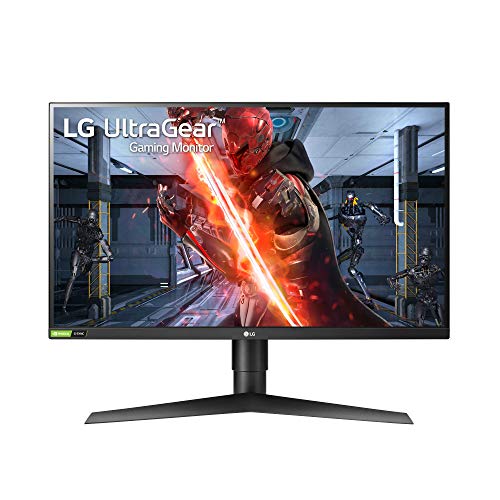
LG 27GN750-B UltraGear 27″ 240Hz IPS Monitor

Samsung Odyssey G3 24″ 144Hz Gaming Monitor

ASUS TUF VG27VQ 27″ Curved 165Hz Gaming Monitor

INNOCN 27″ QD-OLED 280Hz 1440p Gaming Monitor

Sceptre C248W-1920RN 24″ Curved 75Hz Monitor
The Details Behind The Selections
The AOC C27G2Z lives at the high-performance end of the budget tier, pairing a 240Hz refresh rate (the number of times the screen redraws each second) with a 0.5ms MPRT response time, which measures how quickly pixels can change colour before residual trails show up. If you grind ranked lobbies in Valorant or Apex Legends, that combination means your crosshair tracks moving targets with very little smearing, even when the action gets chaotic.
The 1500R curve wraps the corners of your field of view in a way that helps during long sessions, since your eyes don’t have to refocus as much across the screen. AMD FreeSync Premium matches the panel’s refresh to your GPU’s output, which kills screen tearing without the input lag that traditional v-sync introduces. Compared to the LG 27GN750-B later in this list, the AOC trades IPS viewing angles for higher contrast, which makes darker games look richer but can show some colour shift at the edges.
The Case For It
- 240Hz refresh rate delivers a tangible edge in fast-paced competitive shooters
- 0.5ms MPRT response keeps motion blur minimal during flick shots and tracking
- 1500R curvature creates a more immersive feel for sim and racing games
- AMD FreeSync Premium eliminates tearing without adding input lag
- VA panel produces deeper blacks than IPS alternatives in this range
Trade Offs
- VA panels can show slight colour shift when viewed from extreme angles, which may bother split-screen setups
- Stand ergonomics are basic; you’ll likely want a VESA arm (a third-party mounting bracket that attaches to the back of the monitor) for proper height adjustment
Key Specs
Who It Suits Best
Competitive FPS players running a mid-range graphics card who want maximum frames per second without overspending.
Where Another Pick Suits Better
Single-player RPG fans who want sharper text and more screen real estate should consider the AOC CQ27G2, which bumps resolution up to 1440p.
The ASUS TUF VG27VH1B takes a slightly more conservative path than the AOC C27G2Z, dropping the refresh rate to 165Hz (which is still well above the 60Hz standard) but gaining the build quality ASUS is known for in its TUF line. The 1500R curve and 1080p resolution match the experience of most budget curved panels, while the inclusion of Extreme Low Motion Blur technology, which uses backlight strobing to sharpen moving images, gives it a distinct edge in fast camera pans.
For gamers who treat their monitor as a multi-year investment, TUF components typically run cooler and last longer under extended use. The monitor supports both FreeSync Premium and adaptive sync broadly, which is helpful if you occasionally switch between an AMD and NVIDIA GPU. If the AOC C27G2Z is the speed-focused choice, this ASUS leans toward durability and balanced all-around performance.
The Practical Payoff
- TUF-grade components tend to hold up well during long daily gaming sessions
- Extreme Low Motion Blur technology sharpens motion in cinematic single-player games
- 165Hz refresh rate still feels noticeably smoother than standard 60Hz or 75Hz displays
- 1ms response time keeps ghosting minimal in darker scenes
Soft Spots
- 165Hz is a step behind the 240Hz panels in this roundup, which matters in twitchy esports titles
- No height-adjustable stand out of the box, similar to other budget TUF monitors
Best Suited To
Gamers who play a mix of competitive and story-driven titles and prioritise long-term reliability over peak frame rates.
Skip It When
Hardcore Apex Legends or CS2 players who want every possible frame should reach for the Alienware AW2521HF instead, with its 240Hz flat IPS panel.
The Alienware AW2521HF flips the script on budget gaming monitors by going smaller and faster. The 24.5-inch flat IPS panel is the classic tournament size, where every pixel sits comfortably in your central vision without forcing eye movement. Combined with a 240Hz refresh rate and 1ms GtG (gray-to-gray) response, which measures how long a pixel takes to shift between shades of grey, this monitor is built for players who measure their reaction time in milliseconds.
The “Dark Side of the Moon” colour scheme fits naturally into most desk setups without screaming “gamer.” Alienware’s venting system at the top, bottom, and rear helps the panel stay cool during long ranked sessions, which is the kind of detail that tends to matter more after the second year of ownership. If the AOC C27G2Z’s curved 27-inch format feels too immersive for your taste, the AW2521HF is the disciplined, no-nonsense counterpart.
Real Benefits
- IPS panel maintains colour accuracy and clarity even at the edges of the screen
- 240Hz refresh rate matches what most pro esports tournaments use
- Compatible with both AMD FreeSync Premium and NVIDIA G-SYNC for flexible GPU pairing
- 24.5-inch size works well on smaller desks and crowded battlestations
- Effective cooling design helps the panel run cooler during extended use
Honest Caveats
- Smaller screen size means less peripheral immersion in open-world games
- IPS contrast can’t match the deep blacks of the VA panels in this list, which matters in dark horror or space games
- 1080p resolution feels tight for productivity and multi-window workflows
Feature Card
Whose Shelf It Belongs On
Competitive gamers running CS2, Valorant, or Overwatch who prioritise speed and colour accuracy over screen real estate.
Not Your Match When
If you mostly play cinematic single-player games and want a bigger, more immersive view, the AOC CQ27G2 with its 27-inch 1440p curved panel is a better fit.
The AOC CQ27G2 is the resolution-focused choice in this lineup, stepping up to QHD 2K (2560×1440), which packs roughly 78% more pixels than 1080p. That extra detail makes a real difference in RPGs, strategy games, and any title where you want to read text on a distant sign or pick out fine details in character models. The 1500R curve is the same aggressive wrap as the C27G2Z, but the higher resolution gives the curvature more visual weight.
At 144Hz with a 1ms MPRT response, the CQ27G2 is noticeably slower than the 240Hz entries but still well above the 60Hz baseline. AMD FreeSync Premium keeps frame delivery smooth, and the height-adjustable stand is a small but welcome upgrade over the fixed stands common at this price. Compared to the Samsung Odyssey G3 further down, you gain serious pixel density at the cost of some raw speed.
Practical Advantages
- 1440p resolution delivers noticeably sharper text and finer detail than 1080p alternatives
- 1500R curve creates strong immersion for story-driven and racing games
- Height-adjustable stand supports healthier posture during long sessions
- VA panel produces over 120% sRGB coverage (the standard colour space used for most digital content) for vivid game art
- 3-year zero dead pixel warranty provides long-term peace of mind
Points To Keep In Mind
- 144Hz is the entry point for high-refresh gaming; competitive players will notice the gap to 240Hz
- 1440p demands a more capable GPU than 1080p, which adds to the total cost of ownership
Quick Facts
Made For
Single-player RPG and strategy game fans with a mid-to-upper-tier GPU who want sharper visuals and don’t need 240Hz.
Look Elsewhere When
Esports-first players who want every frame advantage should look at the LG 27GN750-B UltraGear, which pairs a 240Hz IPS panel with strong colour accuracy.
The LG 27GN750-B UltraGear is the monitor many buyers end up landing on, because it doesn’t make you choose between speed and image quality. The 27-inch IPS panel runs at 240Hz with a 1ms response, while NVIDIA G-SYNC compatibility means it works seamlessly with GeForce GPUs, and FreeSync support covers AMD cards too. HDR10 support rounds out the spec sheet for anyone dipping into high-dynamic-range content.
The 3-side virtually borderless design (bezels so thin they almost disappear) makes this a strong candidate for multi-monitor setups where you don’t want thick black bars between panels. The fully adjustable stand supports tilt, height, and pivot, which is a real ergonomic advantage over the fixed stands on the AOC and ASUS curved picks. If the Alienware AW2521HF is the compact esports choice, the 27GN750-B is the more spacious, equally fast alternative.
Useful Touches
- IPS panel delivers consistent colour from edge to edge, ideal for creative work alongside gaming
- 240Hz refresh rate keeps competitive titles running at peak clarity
- G-SYNC compatibility ensures smooth frame delivery on NVIDIA GPUs
- Fully adjustable stand supports tilt, height, and pivot for ergonomic flexibility
- Borderless design simplifies multi-monitor expansion
Possible Compromises
- IPS contrast is weaker than VA panels, so dark scenes can look slightly washed out
- HDR10 support is entry-level, not the brighter HDR400 or HDR600 tier
Right Fit For
Gamers who split time between competitive shooters and creative work, and who already run an NVIDIA GPU.
Swap It Out When
If you specifically want a curved panel for racing or flight sims, the ASUS TUF VG27VQ brings a 1500R curve and Extreme Low Motion Blur to the same 165Hz class.
The Samsung Odyssey G3 (G30A) is the most compact option in this roundup, and that size is its real selling point. The 24-inch flat panel fits comfortably on a small apartment desk, a dorm setup, or a secondary workstation where every inch counts. Despite the smaller size, you still get 144Hz refresh and AMD FreeSync Premium, which is a generous spec at this tier.
Vertical orientation is a quietly useful feature that gets overlooked: the G3 pivots 90 degrees, so you can rotate it for long coding sessions, reading documents, or scrolling through chat logs. The 1ms response time is solid for the price, and the clean black bezel keeps things looking tidy. Compared to the Alienware AW2521HF, you trade 240Hz for a more compact stand footprint and pivot flexibility.
Noteworthy Benefits
- Compact 24-inch size fits on small desks and tight workspaces
- 144Hz refresh delivers noticeably smoother motion than 60Hz or 75Hz panels
- Vertical pivot mode is useful for coding, document work, and long chat threads
- AMD FreeSync Premium eliminates tearing on compatible Radeon and newer NVIDIA cards
Small Caveats
- Smaller screen limits immersion in open-world and racing genres
- 144Hz is below the 240Hz standard for serious competitive play
- No USB-C or built-in speakers, so you’ll need separate audio and modern laptop connections may require an adapter
Spec Overview
Who Will Love This
Students, apartment dwellers, and anyone building a clean secondary setup where desk space is the main constraint.
Reach For A Different Pick When
Hardcore sim-racing fans wanting a wraparound feel should consider the ASUS TUF VG27VQ with its 27-inch 1500R curved panel instead.
The ASUS TUF VG27VQ is the sibling to the VG27VH1B covered earlier, and the two are close enough that buyers often compare them side by side. The main difference here is Extreme Low Motion Blur technology, which strobes the backlight (rapidly turning it on and off) to sharpen motion clarity, paired with a 1500R curve and 165Hz refresh rate. For racing, flight sims, and immersive RPGs, the curvature does more heavy lifting than raw frame rate would.
The TUF build quality carries over, with the same durable stand and matte black finish that resists fingerprints. DisplayPort and HDMI inputs are present, and the eye-care features include a flicker-free backlight and low blue light mode for late-night sessions. If the VG27VH1B is the all-rounder, the VG27VQ leans into immersion-first gaming where the curve matters more than peak Hz.
What Stands Out
- 1500R curve wraps the field of view for sim racing and flight games
- Extreme Low Motion Blur technology sharpens fast camera movements
- TUF-grade build quality supports years of daily use
- Eye-care features reduce fatigue during late-night gaming sessions
Worth Noting
- 165Hz is slower than 240Hz competitors in this roundup, depending on your sensitivity to motion
- Curved format is less ideal for productivity work involving straight lines, like spreadsheets or graphic design
Perfect Match For
Sim racing and flight sim enthusiasts who want a deeply curved screen without stepping up to ultrawide prices.
A Better Fit Elsewhere
Flat-panel loyalists and productivity-focused users should look at the LG 27GN750-B UltraGear, which delivers a flat IPS experience with pivot support.
The INNOCN 2780s is the wildcard in this roundup, because it’s the only true QD-OLED (Quantum Dot OLED, a panel technology that combines OLED’s per-pixel dimming with quantum dots for brighter, more saturated colours) option at this aggressive price point. The 27-inch 1440p panel runs at 280Hz with a near-instantaneous 0.03ms response, which is the kind of spec sheet you’d expect to see on a monitor costing two or three times as much. QD-OLED delivers per-pixel dimming, which means true blacks right next to bright highlights, something no VA or IPS panel in this list can match.
HDR400 support gives HDR content a visible boost, though serious HDR enthusiasts will note it’s the entry tier of the standard. The height- and pivot-adjustable stand is a welcome ergonomic inclusion, and built-in speakers cover the basics if you don’t have a headset handy. If the AOC C27G2Z represents the budget VA ceiling, the INNOCN 2780s is the door into OLED territory without crossing into flagship pricing.
Standout Benefits
- QD-OLED panel produces perfect blacks and exceptional contrast for cinematic games
- 280Hz refresh rate is the highest in this roundup, with 240Hz also supported
- 0.03ms response time eliminates motion blur at the pixel level
- 1440p resolution strikes a balance between sharpness and GPU demands
- Built-in speakers provide basic audio without external gear
Where It May Fall Short
- OLED panels carry a small long-term burn-in risk, especially with static UI elements like health bars and minimaps, though INNOCN includes pixel-refresh utilities to mitigate this
- Pricing sits at the top end of the budget category, depending on regional availability
- HDR400 is entry-level; HDR content doesn’t pop as hard as on HDR600 or HDR1000 displays
Technical Highlights
Built With In Mind
HDR-focused gamers and content creators who want OLED contrast without paying flagship prices, and who understand the burn-in trade-off.
Consider Something Else When
Pure competitive FPS players who don’t care about HDR or contrast should save money with the Alienware AW2521HF and put the difference toward a better mouse or keyboard.
The Sceptre C248W-1920RN is the entry-level pick for shoppers who want a curved gaming monitor without the higher price tags of the other options. The 24-inch panel runs at 75Hz, which is a modest step up from the standard 60Hz you’ll find on most office monitors, and the 1500R curve gives it a more gaming-focused feel than a flat budget display. 98% sRGB coverage means colours look reasonable for general use and casual gaming.
Built-in speakers and VESA mount compatibility (a standard mounting pattern on the back of the monitor that lets it attach to aftermarket arms and wall brackets) are useful touches, and the brushed-metal finish is a nice detail at this price. The 75Hz refresh is the main trade-off: it’ll feel smoother than 60Hz in everyday use, but serious gamers will notice the gap to 144Hz. Compared to the Samsung Odyssey G3, you give up speed and brand-name polish for a meaningfully lower price.
Features That Help
- Aggressive 1500R curve brings immersion to a budget price point
- 98% sRGB coverage produces decent colour for casual gaming and media
- Built-in speakers handle basic audio without extra gear
- VESA mount compatibility supports aftermarket arms and wall mounting
Practical Considerations
- 75Hz refresh rate is far below the 144Hz minimum most modern gamers expect
- No FreeSync or G-SYNC support, so screen tearing can appear in fast scenes
- Built-in speakers are basic; audiophiles will want dedicated desktop speakers or a headset
Who Should Grab It
Casual gamers, students, and console players who want a curved screen for everyday use and don’t play competitive shooters.
Where A Sibling Pick Shines
Gamers who want the same curved form factor with proper FreeSync and 144Hz should step up to the Samsung Odyssey G3 for a meaningful jump in motion clarity.
What To Weigh Before Choosing Your Next Monitor
The single biggest decision is panel type, because it shapes everything else. VA panels (used in the AOC C27G2Z and CQ27G2) deliver deeper blacks and stronger contrast, which makes moody single-player games look richer. IPS panels (Alienware AW2521HF, LG 27GN750-B) keep colours accurate even at the edges of the screen, which matters for creative work and split-screen sessions. QD-OLED (INNOCN 2780s) takes both further with per-pixel dimming, though at a higher price and with a small burn-in risk on static UI elements over years of use.
Refresh rate and response time matter most for competitive play. 240Hz panels give a tangible edge in fast-paced shooters, while 144Hz covers most genres comfortably. If you mostly play RPGs, strategy games, or single-player adventures, 144Hz hits the sweet spot without pushing your GPU to its limits. For 4K-heavy workflows or future-proofing, 1440p (the AOC CQ27G2 and INNOCN 2780s) is the practical middle ground between 1080p and true 4K.
Adaptive sync matters more than most shoppers realise. Both AMD FreeSync Premium and NVIDIA G-SYNC compatibility eliminate screen tearing, which is the horizontal split that happens when your GPU sends a new frame mid-draw, without the input lag of traditional v-sync. The AOC, Alienware, LG, and Samsung picks all support at least one standard, so pair your monitor choice with the GPU you already own or plan to buy. Size and ergonomics round out the decision: 27 inches is the modern standard, but 24-inch panels still make sense for tight desks, and an adjustable stand saves your neck during long sessions.
Smart Considerations Before You Commit
Common Pitfalls Worth Dodging
Chasing the highest refresh rate without checking your GPU’s output is a common trap. A 240Hz monitor only helps if your graphics card can actually push frame rates that high, otherwise you’re paying for headroom you can’t use. The reverse is also true: pairing a 1080p 60Hz monitor with a high-end GPU leaves performance on the table. Match the panel to your actual hardware, and check that the monitor’s ports (DisplayPort version matters more than HDMI version for high refresh rates) support the resolution and refresh you want.
Forgetting about ergonomics is another slip-up. A fixed stand might save money upfront, but daily neck strain adds up over months. If a monitor doesn’t include height adjustment, factor in the cost of a VESA-compatible arm. The AOC CQ27G2 and LG 27GN750-B both include adjustable stands out of the box, which is a meaningful quality-of-life upgrade.
Where Spending More Actually Helps
The jump from a basic 1080p 75Hz panel to a 240Hz IPS display, like the Alienware AW2521HF or LG 27GN750-B, brings immediately visible motion clarity in fast games. Stepping further to QD-OLED (INNOCN 2780s) adds contrast that no LCD panel can match, which transforms how dark and atmospheric games look. Higher-tier models also tend to include better stands, wider colour gamuts, and longer warranties, which is worth considering if you keep monitors for three or more years. For shoppers who can stretch the budget, the difference between the Sceptre C248W and the INNOCN 2780s is a genuine leap, not an incremental upgrade.
Frequently Asked Questions
What Is The Best Budget OLED Gaming Monitor Right Now?
The INNOCN 27″ QD-OLED 280Hz 1440p Gaming Monitor is the closest you’ll get to flagship OLED contrast without crossing into premium pricing, though it’s at the higher end of the budget category.
Is 1080p Still Good For Gaming In 2026?
Yes, 1080p remains the practical choice for esports and competitive gamers using mid-range GPUs. Pushing higher frame rates at 1080p is easier on hardware, and on a 24-inch panel the difference from 1440p is subtle at typical desk distances.
Do Budget Monitors Support FreeSync Or G-SYNC?
Most do. The AOC, Alienware, LG, and Samsung picks in this list all support at least one adaptive sync standard, which eliminates tearing when paired with a compatible GPU. The Sceptre C248W is the exception, lacking adaptive sync entirely.
How Important Is Response Time For Gaming?
Response time affects how quickly pixels change colour, which shows up as ghosting or smearing behind moving objects. For competitive shooters, lower is better: 1ms or under is the standard. Casual gamers rarely notice the difference between 1ms and 4ms.
Is A Curved Monitor Better For Gaming?
Curved panels work well for racing, flight sims, and immersive single-player games because the curve matches the natural shape of your field of view. For competitive shooters, productivity, and graphic design, flat panels are usually the better fit.
Wrap Up
Your monitor is the part of your setup you look at most, and the gap between a $150 panel and a $400 panel has narrowed significantly in the last few years. Start by matching the panel type and refresh rate to your main genre, then check that your GPU can drive it. The AOC C27G2Z and Alienware AW2521HF handle competitive play well, the AOC CQ27G2 brings 1440p into the budget tier, and the INNOCN 2780s is the right call if you want OLED contrast without paying flagship prices. Whatever you pick, run the included DisplayPort cable and enable adaptive sync in your GPU settings to get the full experience.


