


Mechanical keyboards no longer demand a premium. The current crop of budget-friendly boards brings hot-swappable switches, gasket mounts, tri-mode wireless, and creamy acoustics to a price tier that used to feel like a compromise. Plenty of these boards now look the part of something twice the cost, with PBT keycaps, aluminum plates, and software-driven RGB that actually responds.
This list rounds up ten boards that hit the sweet spot of price, build, and daily feel. Some lean cute and compact, others go full-size with media keys, and a few skip wireless to pour the budget into a better typing experience. Each one earns its place for a specific kind of setup, so the right pick depends on what you type on, where you sit, and how much desk real estate you want to give up.
The Essentials At A Glance

YUNZII B87 TKL Wireless Mechanical Keyboard (Blue Heart, Milk Switch)

EPOMAKER x LEOBOG Hi75 Wired Aluminum Mechanical Keyboard (White Green)
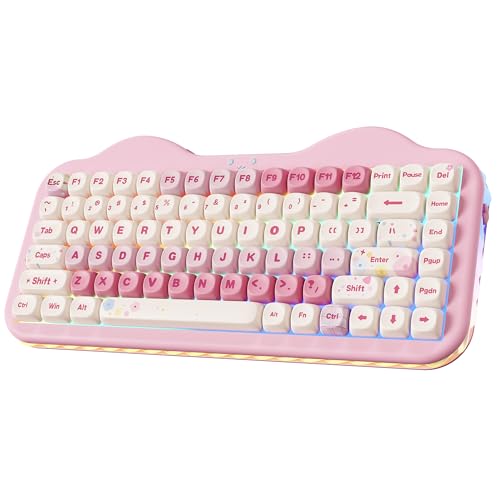
YUNZII C75 Cute 75% Wireless Mechanical Keyboard (Pink, Candy Switch)

Aula F75 Wireless Mechanical Keyboard (Reaper Switches)
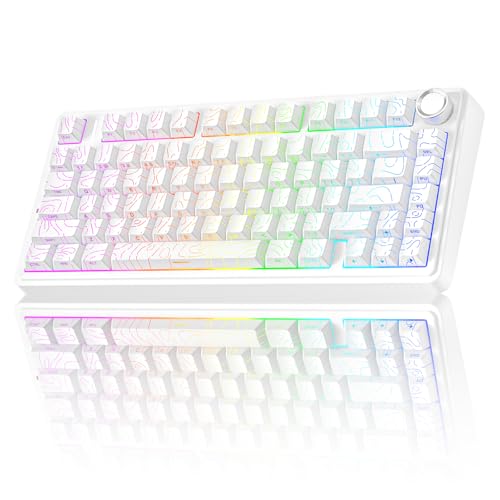
AULA F75 Pro Wireless Mechanical Keyboard with Knob (Line White)

RK ROYAL KLUDGE RK918 Wired Mechanical Keyboard (Blue Switch, White)

COSTOM WK87 75% TKL Wireless Mechanical Gaming Keyboard (Black)

MechLands Aula F99 PRO 96% Mechanical Gaming Keyboard

MOTOSPEED GK82 RGB Backlit Wired Mechanical Gaming Keyboard (Blue Switch)
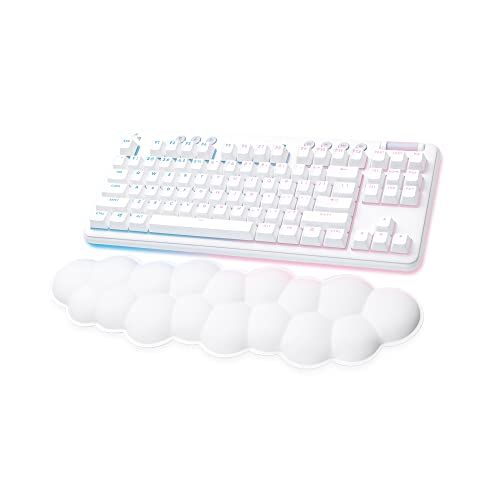
Logitech G715 Wireless Mechanical Gaming Keyboard (White Mist)
The Strengths Of Each Pick
YUNZII leans into personality with the B87, and the result is a TKL (tenkeyless, meaning no number pad) board that actually feels designed, not just assembled. The 87-key layout keeps the desk open for a wide mouse sweep, and the bundled wrist rest softens long writing sessions in a way most budget boards skip entirely.
Compared to the more reserved EPOMAKER x LEOBOG Hi75 later in this list, the B87 trades aluminum seriousness for a friendlier vibe. The bear-patterned keycaps (Dye-Sub PBT, a printing method that embeds legends into the keycap so they won’t fade) and Milk linear switches make it a fun option for a bedroom desk, a study nook, or a workspace you actually want to look at.
What Helps Most
- 80% TKL layout (compact with arrow keys and function row retained) frees up space for mouse-heavy gaming setups.
- Dye-sublimated PBT keycaps resist shine over time, so legends stay readable through heavy use.
- Included soft-touch wrist rest helps during long typing or study sessions.
- Wireless design reduces cable clutter on smaller desks.
Things To Consider
- The novelty colorway may not match minimalist setups.
- Switch feel leans toward entry-level, so heavy typists may want to swap in premium switches later.
Who It Suits Best
Students, casual gamers, and anyone building a personality-driven desk who wants wireless freedom without sacrificing a wrist rest.
Where Another Pick Suits Better
The EPOMAKER x LEOBOG Hi75 is a smarter grab for desk-bound users who want aluminum heft over playful colorways.
The Hi75 swaps the playful B87 aesthetic for a clean, planted aluminum body that feels closer to a mid-range board than a budget one. The mode-switching knob up top handles volume, lighting, or system controls without forcing your hand off the mouse, and the 75% layout keeps a function row within reach.
Where the YUNZII B87 leans cute, the Hi75 leans professional. It is wired only, which actually plays to its strength: zero wireless latency, and the budget gets spent on materials instead of batteries. Pre-lubed Nimbus switches keep the sound profile smooth out of the box.
Strengths Worth Knowing
- Aluminum alloy frame adds meaningful weight and a planted desk feel.
- Hot-swappable PCB (printed circuit board that lets you pull and replace switches without soldering) accepts 3-pin and 5-pin switches for easy customization later.
- South-facing RGB LEDs shine more evenly under most keycap profiles.
- Mode-switching knob replaces one less-reached key with something tactile.
Worth Noting
- Wired-only design won’t suit cable-free desks.
- Some users report the knob can’t wake the PC from sleep, a minor inconvenience for clean shutdowns.
Feature Snapshot
Made For
Home-office workers and competitive-leaning gamers who want a clean, planted, wired-only setup that doesn’t feel cheap.
Consider Something Else When
The Aula F75 is a better fit if tri-mode wireless is non-negotiable.
The C75 is YUNZII doubling down on the “cute but capable” formula. The pink colorway and Candy switches give it a confectionery theme, but underneath sits a proper 75% wireless board with Bluetooth and wired connectivity for flexibility across devices.
Side by side with the YUNZII B87, the C75 trades the TKL layout for an even more compact 75% footprint. For desk real estate under twenty inches wide, that matters. The “creamy” typing sound suggests factory lubing, so it should stay quiet in a shared room.
Bright Spots
- Compact 75% layout tucks arrows, function row, and a few extras into a small frame.
- Dual wireless (Bluetooth) plus wired connection handles laptops, tablets, and phones with ease.
- Creamy acoustics and Candy switches target a softer, thockier (deeper, fuller-sounding) typing sound.
- Color theme doubles as decor for bright, expressive setups.
Points To Note
- The pink-and-candy aesthetic is polarizing, especially in professional environments.
- Switch choice is limited; you may need to replace the Candies if you prefer a heavier linear feel.
Best Suited To
Gift shoppers, themed desk enthusiasts, and students who care more about looks and sound than maximum performance.
Skip It When
The COSTOM WK87 makes more sense for late-night typists who want a quieter, gasket-mounted feel without the candy theme.
The Aula F75 is the board to beat in this price tier for versatility. Tri-mode connectivity (Bluetooth 5.0, 2.4 GHz wireless, and USB-C wired) plus a 4000 mAh battery make it a real daily driver, not a wireless compromise. The 81-key 75% layout balances desk space and usability well.
Compared to the wired EPOMAKER x LEOBOG Hi75, the Aula F75 trades aluminum weight for wireless freedom. The Reaper switches aim for that creamy, low-pitched sound, and the hot-swap PCB means you can swap in your own switches without a soldering iron.
The Good Stuff
- Tri-mode wireless supports up to five paired devices, ideal for laptop + desktop + tablet users.
- 4000 mAh battery delivers long stretches between charges.
- Hot-swap PCB allows switch customization without soldering.
- RGB backlighting layers in 18+ effects for a tunable gaming atmosphere.
Honest Caveats
- Plastic chassis feels lighter than the aluminum Hi75, so it slides more on smooth desks.
- Some users report minor firmware quirks; updating via the configurator may be needed.
Spec Overview
Who Will Love This
Hybrid users who type on a laptop at the coffee shop and game on a desktop at home, all from the same keyboard.
Not Your Match When
The AULA F75 Pro is worth the bump if a rotary knob is a daily convenience you don’t want to live without.
The F75 Pro takes the F75 formula and adds a rotary knob plus side-printed PBT keycaps, the kind with the legends etched on the side facing the typist rather than the top. The knob alone transforms how often you reach for volume or scrubbing controls, especially while editing video or audio.
It inherits the same tri-mode wireless and hot-swap PCB as its sibling, but the Line White colorway and cleaner keycap printing give it a more grown-up, desk-photo-ready look. Pre-lubed switches aim for a creamy sound that holds up in quieter environments.
Notable Upsides
- Rotary knob gives quick access to volume, scrubbing, or zoom in creative apps.
- Side-printed PBT keycaps keep the top surface clean and resist shine.
- Tri-mode wireless with shortcut-key switching between paired devices.
- Pre-lubed switches reduce rattle out of the box, no modding required.
Small Caveats
- Side-printed legends take a few days to memorize if you’ve never used them before.
- Knob position is fixed, so left-handed users still need the right hand for it.
Perfect Match For
Content creators, editors, and multitaskers who want one tactile control that beats keyboard shortcuts for everyday adjustments.
A Better Fit Elsewhere
The RK ROYAL KLUDGE RK918 makes sense if you need a dedicated numpad and don’t mind skipping wireless.
The RK918 is the odd one out in this list, and proudly so. It keeps the full 108-key layout, which means a numpad, dedicated media keys, and arrow cluster intact. For spreadsheet warriors, accountants, and anyone in love with a number pad, that alone justifies the choice.
Where the Aula F75 Pro focuses on compact 75% wireless, the RK918 leans into retro typewriter styling with round keycaps, a metal top panel, and a chunky side LED strip. Blue switches give a clicky, tactile feel that some writers and coders prefer for feedback.
The Upside
- Full-size layout covers every key, no compromises for shortcuts.
- N-key rollover (N-key rollover means every keypress registers simultaneously, even during fast gaming combos) keeps gaming responsive.
- Metal panel reduces flex and resists scratches on a busy desk.
- Side LED lamp adds a noticeable ambient glow without a separate light strip.
Practical Considerations
- Wired only, which means cable management on the right side.
- Blue clicky switches are loud; not ideal for shared offices or late-night households.
- Round keycaps take a few sessions to adjust to if you’re used to flat profiles.
Right Fit For
Data-entry pros, students in STEM, and home office users who want the full layout and don’t mind a clicky, retro feel.
Look Elsewhere When
The COSTOM WK87 is a quieter, more modern pick if the clicky sound and round keycaps aren’t your style.
The COSTOM WK87 quietly earns its place by going gasket-mounted at a budget price. A gasket mount sandwiches the PCB between soft foam or silicone pads, which softens the typing sound and flex, and the 5-layer sound-absorbing stack here aims for that satisfying thock (a deep, muted typing sound) without modding.
Side by side with the Aula F75, the WK87 trades a smaller 75% layout for a true TKL (87-key) footprint, keeping the function row and arrows but dropping the numpad. Tri-mode wireless, 5000 mAh battery, and pre-lubed POM linear switches (polyoxymethylene plastic stems known for smoothness) round out a stealth spec sheet.
Strong Points
- Gasket mount with multi-layer foam dampening delivers a softer, deeper typing sound.
- Tri-mode wireless handles Bluetooth 5.1, 2.4 GHz, and USB-C across Windows, Mac, and iOS.
- 5000 mAh battery pushes multi-day use even with the backlight on.
- Hot-swap PCB supports both 3-pin and 5-pin switches for future tinkering.
Possible Compromises
- POM linear switches may feel too smooth if you prefer tactile bumps.
- Software customization requires a download, and setup isn’t always intuitive for first-timers.
Feature Card
Who Should Grab It
Late-night typists, roommates sharing a space, and anyone obsessed with a creamy, low-pitched sound without modding.
Reach For A Different Pick When
The MechLands Aula F99 PRO fits better if you want a 96% layout with a rotary knob for more advanced controls.
The Aula F99 PRO carves out a niche with its 96% layout, which tucks a numpad column right next to the main keys. You get most of the function of a full-size board, with noticeably less width. The added rotary knob brings quick-access control without a dedicated key.
Compared to the COSTOM WK87’s 75% TKL, the F99 PRO is for users who occasionally need a number pad but don’t want a giant board. Tri-mode wireless, a gasket-mounted structure, and 1.6M-color RGB keep the spec list current.
What It Does Well
- 96% layout balances numpad access with a smaller footprint than a full-size board.
- Rotary knob adds tactile control for volume, zoom, or lighting.
- Gasket structure softens the typing feel and dampens noise.
- Tri-mode connectivity covers Bluetooth 5.0, 2.4 GHz, and USB-C wired.
Details To Watch
- The 96% layout has a learning curve; key positions differ slightly from standard TKLs.
- Some users report firmware quirks that need occasional driver updates.
Built With In Mind
Hybrid gamers and office workers who want a numpad for spreadsheets without giving up desk space for a full-size board.
Swap It Out When
The Logitech G715 Wireless is a cleaner style pick if you want premium-feeling wireless and a palm rest out of the box.
The MOTOSPEED GK82 leans into the classic TKL formula: 82 keys, an aluminum base, and a wired connection that prioritizes stability. Noise-absorbing foams inside the case help mute the ping and echo that budget boards often suffer from.
Against the COSTOM WK87, the GK82 trades wireless and gasket-mount refinement for a heavier aluminum base and a simpler plug-and-play experience. For a stationary desk where you don’t need battery life or Bluetooth, it’s a no-nonsense pick.
The Value In It
- Aluminum base adds weight, so the keyboard stays put during intense gaming.
- Hot-swap socket allows switch changes without soldering.
- Noise-absorbing foams reduce hollow sound out of the box.
- Wired connection means zero input lag for competitive play.
Trade-Offs To Consider
- Wired only, so it won’t move cleanly between rooms.
- Soft tactile blue switches are quieter than clicky blues but still audible in shared spaces.
Whose Shelf It Belongs On
Plug-and-play PC gamers with a fixed battle-station setup who want durability and a quiet-ish typing feel on a budget.
Another Choice May Suit
The EPOMAKER x LEOBOG Hi75 makes more sense for users who want the aluminum top-frame aesthetic in a 75% footprint.
The G715 sits at the top of this list in price, but the experience matches. White Mist colorway, a cloud-shaped palm rest, and floating keycap design make it look more like a piece of decor than a gaming peripheral. Wireless connectivity over Logitech’s Lightspeed (a low-latency 2.4 GHz wireless protocol) keeps response times tight for gaming.
Compared to the Aula F75 Pro or the COSTOM WK87, the G715 trades hot-swap flexibility for a more polished, out-of-the-box experience. It also skips the gasket mount and pre-lubed switches in favor of a softer, quieter typing feel tuned for long sessions.
Advantages To Know
- Wireless Lightspeed connection delivers low-latency gaming without cables.
- Floating keycap design with white backlight gives a clean, modern look.
- Cloud-shaped palm rest reduces wrist strain during long sessions.
- TKL layout keeps the desk open for a wide mouse sweep.
Worth Bearing In Mind
- Higher price than the rest of the list, even in this budget-friendly category.
- No hot-swap PCB; switches are fixed, so customization is limited to keycaps.
Quick Facts
Right Fit For
Style-conscious wireless users who want a polished, ready-to-go board and don’t need to swap switches down the road.
Not Your Match When
The Aula F75 Pro is a more capable value pick if hot-swap switches and full RGB are higher on your list than aesthetic polish.
What To Weigh Before Choosing a Budget Mechanical Gaming Keyboard
Layout matters more than most shoppers expect. A full-size board, like the RK918, gives you a numpad and dedicated media keys but takes up real estate. TKL (tenkeyless) layouts, such as the YUNZII B87 or Logitech G715, drop the numpad and reclaim a few inches of mouse space. 75% layouts, like the EPOMAKER Hi75 and Aula F75, keep the function row but compress the rest, while 96% layouts strike a middle ground.
Switches define how the board feels and sounds. Linear switches (smooth top-to-bottom with no bump) suit gamers and fast typists, tactile switches (a small bump mid-press that signals actuation) suit writers who like feedback, and clicky switches (a bump plus an audible click) are loud but precise. Hot-swap PCBs, found on the Aula F75, AULA F75 Pro, COSTOM WK87, and MOTOSPEED GK82, let you swap switches later without soldering.
Connectivity changes how the board lives on your desk. Wired boards, like the EPOMAKER Hi75, RK918, and MOTOSPEED GK82, deliver the lowest latency and never need charging. Tri-mode wireless, offered on the Aula F75, AULA F75 Pro, COSTOM WK87, and MechLands F99 PRO, adds Bluetooth and 2.4 GHz for multi-device flexibility. Pure wireless boards like the Logitech G715 trade some customization for a clean, cable-free look.
Key Considerations Across These Picks
Common Shopping Slip Ups
Many shoppers grab a board on looks alone and regret the switch type. A clicky blue feels great in a solo home office but can be a problem in a shared apartment. Always check the switch type listed, and consider linear or tactile if roommates are nearby.
Another trap is ignoring the layout until after the board arrives. A 75% board, like the Aula F75, doesn’t have a numpad, and muscle memory from a full-size keyboard takes adjustment. Measure your desk and think about whether you actually need a numpad for daily work before committing to a compact form factor.
What The Higher Tier Buys
The Logitech G715 commands more because of polish, not raw specs. The included palm rest, floating keycap design, and Lightspeed wireless add up to an out-of-the-box experience that budget boards can’t quite match. Software like Logitech G Hub also tends to be more stable than smaller-brand configurators.
Higher-tier boards in this category also tend to ship with better factory lubing and tuned acoustics. The AULA F75 Pro and COSTOM WK87, for example, arrive pre-lubed and gasket-mounted, which is a meaningful upgrade over unmodded budget boards, but they still ask less than flagship models that use premium PBT doubleshot keycaps (keycaps molded in two layers so the legend won’t wear off) and aluminum cases throughout. For most desk setups, mid-tier is the sweet spot.
Frequently Asked Questions
Are budget mechanical gaming keyboards worth it in 2026?
Yes, the gap between budget and premium has narrowed significantly. Boards like the Aula F75 and COSTOM WK87 now offer hot-swap switches, gasket mounts, and tri-mode wireless that flagship models offered only a few years ago.
What is a hot-swap PCB?
A hot-swap PCB lets you pull out and replace switches without soldering. It’s a big deal for tinkerers, because you can change switch types or replace a single broken switch in minutes.
Do I need a wireless mechanical keyboard?
Not always. Wired boards like the EPOMAKER x LEOBOG Hi75 and MOTOSPEED GK82 deliver the lowest latency for competitive gaming. Wireless makes sense if you switch between devices or want a cleaner desk, and tri-mode boards give you both options in one package.
What is a gasket mount?
A gasket mount suspends the PCB between soft pads rather than screwing it directly into the case. The result is a softer typing feel, less ping, and a deeper, creamier sound. The COSTOM WK87 and MechLands F99 PRO use this design at budget prices.
How loud are mechanical keyboards?
It depends on the switch. Linear and tactile switches stay relatively quiet, while clicky blues, like the RK918’s, produce an audible click with each press. For shared rooms, linear or tactile pre-lubed switches are the safer bet.
Final Take
The right pick comes down to how you actually use your desk. Power users who want customization gravitate toward the Aula F75 or AULA F75 Pro for hot-swap flexibility. Style-first shoppers land on the Logitech G715 for its clean, premium feel. Numpad loyalists stay loyal to the RK918. Anyone with a small desk and a need for wireless should start at the Aula F75 or COSTOM WK87 and work outward from there. Whichever you choose, the budget category finally feels like a category worth taking seriously.


