


You don’t need to spend a fortune to get a responsive, comfortable keyboard for gaming. The trick is matching a switch type, layout, and connection method to the way you actually play, whether that’s rank-climbing shooters at your desk or casual sessions on a laptop and tablet. This roundup focuses on options that balance price with real performance, so you can spend more on games and less on peripherals.
A Closer Look At The Lineup

YUNZII B87 TKL Wireless Mechanical Keyboard (Blue Heart)
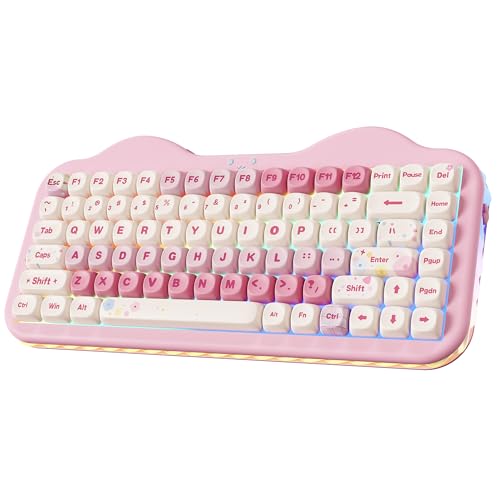
YUNZII C75 Cute 75% Wireless Mechanical Keyboard (Pink)

Aula F75 Wireless Mechanical Keyboard (81 Keys, 75%)
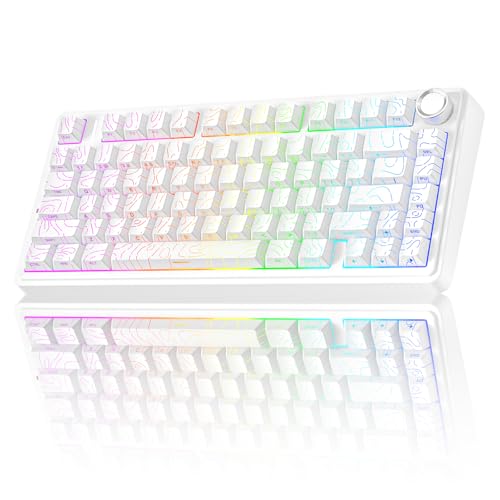
AULA F75 Pro Wireless Mechanical Keyboard with Knob

COSTOM WK87 75% TKL Wireless Mechanical Gaming Keyboard
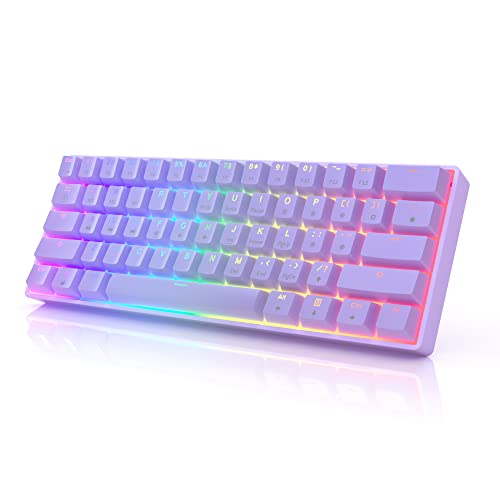
HK GAMING GK61 Mechanical Gaming Keyboard (Gateron Optical)

MOTOSPEED GK82 RGB Mechanical Gaming Keyboard (Aluminum)
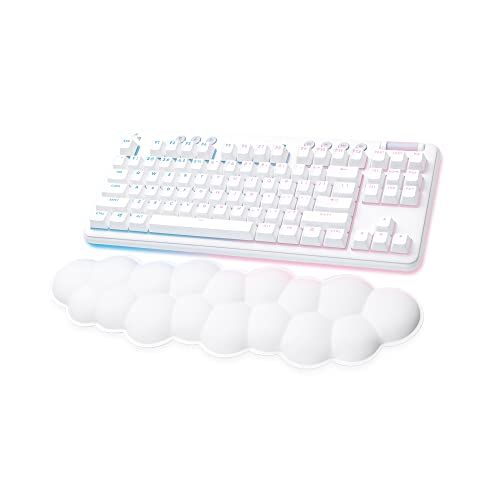
Logitech G715 Wireless Mechanical Gaming Keyboard (White Mist)

Redragon K552P Mechanical Gaming Keyboard TKL (Red Switch)

Razer Cynosa Chroma Gaming Keyboard (RGB, Spill-Resistant)
More On The Choices That Made The List
Stepping away from the C75’s pink-and-sweet personality on our list, the B87 leans into a more eye-catching aesthetic. The bear-patterned dye-sublimation PBT (a durable plastic that resists shine) keycaps give it a playful identity that stands out on a busy desk, while the 80% TKL layout (no number pad, full function row) preserves arrow keys and function shortcuts for FPS play. Owners commonly describe the ABS frame (a lightweight but budget-grade plastic shell) as light enough to reposition often, and the included soft-touch wrist rest takes pressure off during long raids.
In a dorm or shared space where you want something that looks like a conversation piece, this hits a different note than the more austere picks later on the list. The Milk Switches feel smooth, and Bluetooth plus 2.4GHz (a wireless protocol prized for low latency) flexibility makes it friendly for laptop and tablet play alongside the desktop. For most gamers chasing character and wireless freedom in a single board, the B87 earns its place.
What Earns Its Place
- Distinctive bear-print PBT keycaps that resist shine and fading over years of typing.
- TKL layout keeps arrow keys and function row intact for shooters and MMOs.
- Included wrist rest softens the edge during multi-hour sessions, a real perk for typists and gamers alike.
- Wireless freedom via Bluetooth and 2.4GHz means one board covers a laptop, tablet, and desktop.
Points To Keep In Mind
- The ABS shell is light and portable but flexes more than a metal chassis during aggressive typing.
- The look is polarizing; you may find the bear pattern less suited to a minimalist workspace.
Feature Snapshot
Right Fit For
Gamers who want a wireless mechanical with personality and a TKL layout that still gives them arrows.
Consider Something Else When
The YUNZII C75 below suits shoppers who prefer a smaller 75% footprint and a pink color scheme over a bold print.
Where the B87 above makes a statement with a printed pattern, the C75 takes a softer, gift-friendly path. The 75% layout (a size that drops the function row to fit more compact desks) trims off a chunk of width, which matters if your mouse pad doubles as your desk. Candy Switches are tuned for a creamy, low-noise typing feel that won’t echo around a shared apartment, and the triple-mode connectivity (Bluetooth, 2.4GHz, and USB-C wired) covers everything from a streaming PC to a couch-bound tablet.
It’s a charming pick for someone setting up a smaller battlestation or gifting a first board to a younger sibling. The pink colorway isn’t for everyone, and the brand’s catalog is thin on replacement parts, so owners sometimes source third-party keycaps to refresh the look. For most people wanting a wireless mechanical that disappears on the desk and adds personality without dominating it, the C75 works well.
Points In Its Favor
- 75% layout frees up valuable mouse space, useful for low-DPI (sensitivity) players.
- Creamy typing acoustics keep shared spaces quieter than typical clicky boards.
- Triple-mode connectivity adapts to PC, laptop, and tablet workflows.
Worth Noting
- Pink colorway limits matching with darker themed setups; you may find the look too themed for an office.
- Replacement keycap sets are less common than for mainstream sizes.
Best Suited To
Shoppers building a compact, pastel-themed setup or gifting a first mechanical to a casual player.
Swap It Out When
The AULA F75 Pro below is a better fit for someone who wants a similar compact size with a dedicated control knob.
The F75 lands in the sweet spot for most buyers who want wireless flexibility without giving up gaming responsiveness. Tri-mode connection covers Bluetooth 5.0 (a fast, stable wireless standard), 2.4GHz, and USB-C wired, so the same keyboard can sit between a desktop tower, a work laptop, and a tablet without a second dongle. Reaper Switches lean linear (smooth, no tactile bump), which suits rapid keypresses in rhythm and action games, and hot-swappable sockets (a feature that lets you change switches without soldering) make future tinkering painless.
Compared with the YUNZII C75, the F75 trades color personality for a more neutral look that fits an office or living room. The 4000mAh battery (a high-capacity cell that powers the wireless and lighting) holds up well across long sessions, though heavy RGB use will shorten that runway. For most multi-device households, this is the kind of board that quietly handles whatever you throw at it.
The Helpful Details
- Tri-mode connection (Bluetooth 5.0, 2.4GHz, USB-C) handles up to five paired devices.
- Hot-swappable switches make future upgrades easy, no soldering required.
- 4000mAh battery supports long workdays before a recharge becomes urgent.
Things To Consider
- RGB-heavy use can drain the battery faster than the rated endurance suggests.
- Reaper Switches feel smooth, which competitive tactility fans may find too gentle.
Quick Facts
Who It Suits Best
Multi-device users who want a single wireless board for both work and gaming setups.
A Better Fit Elsewhere
The COSTOM WK87 below serves marathon wireless sessions better thanks to its larger battery.
Where the standard F75 above keeps things clean, the Pro version adds a rotary control knob (a small dial that scrolls volume or adjusts settings) and pre-lubed switches for a more refined feel out of the box. The Line White colorway reads modern on a white desk, and the side-printed PBT keycaps keep legends visible from your natural viewing angle while letting the RGB shine through cleanly from above. Tri-mode connectivity remains, so this board slots into the same multi-device lifestyle.
The knob becomes a real productivity tool for media control, and many users repurpose it for zooming or scrubbing timelines. Side-printed legends take a day or two to adjust to if you’ve used top-printed caps your whole life, and the additional features push the price above the basic F75. For most tinkerers and desk-setup enthusiasts, the Pro version is a worthy upgrade path.
What Pays Off
- Pre-lubed switches deliver a smoother sound and feel without the user opening the board.
- Side-printed PBT keycaps keep legends angled toward you while showing RGB.
- Rotary knob adds tactile control for volume, scrubbing, or custom macros.
Honest Caveats
- Side-printed legends may feel awkward during the first few gaming sessions.
- Features and pre-lubing add to the price versus the base F75 model.
Made For
Tinkerers who want pre-lubed smoothness and a knob for media control without leaving the 75% footprint.
Skip It When
The Logitech G715 suits shoppers who want a more lifestyle-focused wireless board with a built-in palm rest.
The WK87 is the marathon runner of this list. A 5000mAh battery (one of the larger capacities at this size) keeps the wireless and RGB running for days between charges, and the gasket-mounted chassis (an internal design that uses soft pads to isolate the plate, softening the bottom-out feel) combined with five layers of sound-absorbing padding gives the board a creamy, low-rattle typing tone. Pre-lubed POM linear switches (made of polyoxymethylene plastic, prized for smoothness) are smooth on the way down, which is friendly for both typing and fast-paced play.
Compared with the AULA F75 Pro, this board leans more toward acoustic refinement than feature count. Hot-swap support covers 3-pin and 5-pin switches (the small metal legs underneath that slide into the board’s sockets), and software lets you rebind keys and customize lighting per game. For most gamers who game in long sessions and dislike charging interruptions, the WK87 is a sensible pick.
Real Benefits
- 5000mAh battery lasts through long work-and-play cycles, even with lighting enabled.
- Gasket mount plus sound-absorbing layers deliver creamy, low-noise acoustics.
- Customization software supports macros, key remapping, and lighting profiles per game.
Practical Considerations
- Software support is less polished than mainstream brands, depending on the OS you use.
- POM linear switches may feel too smooth for players who prefer a tactile bump.
Feature Card
Who Should Grab It
Wireless-first gamers who play for hours and want acoustic refinement without a custom build.
Not Your Match When
The HK GAMING GK61 below is a better fit for shoppers who want a wired 60% board with optical speed.
The GK61 takes the opposite approach from the WK87 above: 61 keys, wired only, and a footprint that almost disappears on the desk. Gateron Optical switches (a type of switch that registers a keypress via light rather than metal contacts, reducing debounce delay) register faster than typical mechanical switches, which competitive players value in shooters and rhythm games. With 16.8 million color combinations and multiple lighting effects, the per-key RGB delivers a strong aesthetic without bloat.
Where the larger boards in this roundup include function rows and arrow clusters, the 60% (a minimal layout without function keys, arrows, or numpad) layout asks you to use a Fn layer (a secondary set of commands accessed by holding a modifier key) for anything beyond letters and numbers. The wired connection is a non-issue for a permanent desktop setup, but the lack of wireless rules it out for couch play. For most low-DPI players and small-desk owners who want raw speed, this is a focused tool.
Key Advantages
- Optical switches register faster than standard mechanicals, useful in twitch games.
- Per-key RGB unlocks 16.8 million color combinations for full customization.
- Compact 60% layout leaves more room for sweeping mouse movement.
Small Caveats
- No wireless option limits placement flexibility beyond the desktop.
- Missing arrow keys and function row require a learning curve with the Fn layer.
Perfect Match For
Competitive players on tight desks who want speed and a clean aesthetic without paying for wireless.
Another Choice May Suit
The Aula F75 above fits users who want a similar compact size but with full wireless freedom.
Most budget boards cut corners on the chassis; the GK82 takes a different route with an aluminum base that adds weight and rigidity under the keys. The 82-key layout keeps arrows and a function column, which is rare at this size, and an upgraded hot-swap socket (the housing beneath each switch, here redesigned for easier swaps) plus noise-absorbing foams help mute the ping you sometimes get from budget mechanicals. Soft tactile blue switches (a switch with a small bump felt during the keypress, plus a click) give a clear feedback point that typists and certain gamers prefer.
The board skips wireless, which fits a desktop-first setup. Owners commonly report the heavier base reduces slide during aggressive play, and the detachable USB cable (a removable cord, easy to swap or replace) is a small but appreciated touch for transport. For most users who want a tactile board that feels like a more expensive unit, the GK82 holds its own.
What Helps Most
- Aluminum base adds stability and a more premium feel under hand.
- Upgraded hot-swap socket and foams cut noise compared to bare-budget boards.
- Soft tactile blue switches give clear feedback for typing and select gaming genres.
Points To Note
- Wired-only design limits where you can place it relative to your display.
- Tactile blue switches can feel loud in quiet shared rooms.
Whose Shelf It Belongs On
Typists and tactile-feedback gamers who want a sturdy chassis without paying premium prices.
Where A Sibling Pick Shines
The COSTOM WK87 above is a better match for shoppers who want wireless alongside a creamy sound profile.
Where the YUNZII boards earlier on the list lean into playful aesthetics, the G715 takes a more mature, lifestyle-oriented route. The cloud-shaped palm rest is a defining feature; it ships attached and shaped to spread contact across a wider area, which is meaningful if you game into the late hours. The tenkeyless layout (full size minus the number pad) keeps your mouse hand close to your body, and the White Mist colorway reads as a design object rather than just a peripheral.
Logitech’s wireless ecosystem is mature, with long battery life and stable connections, and the keyboard pairs easily with the rest of the Aurora collection if you want matching gear. The price is higher than most picks in this roundup, which keeps it from being a default for first-time shoppers. For most people willing to invest in a polished wireless board with a real palm rest, the G715 is a comfortable step up.
Why It Works Well
- Cloud-shaped palm rest reduces pressure during long sessions, a real comfort gain.
- Polished wireless ecosystem pairs well with other Logitech Aurora gear.
- White Mist colorway fits modern, light-themed setups without screaming “gamer.”
A Few Limitations
- Higher price than most other picks in this roundup.
- No dedicated control knob for quick media adjustments.
Spec Overview
Who Will Love This
Gamers who want a polished wireless board with a real palm rest and a design-forward look.
Look Elsewhere When
The Redragon K552P below is a better fit for shoppers who want hot-swap flexibility on a tighter budget.
The K552P has been around long enough to earn its reputation as a no-nonsense budget mechanical. The TKL 87-key layout keeps arrows and function row available, and the metal frame (a sturdy top plate that resists flex during aggressive typing) gives it a feel that punches above its price. Hot-swappable red switches (linear, no bump) let you swap in your preferred feel without a soldering iron, which is rare at this end of the market.
Eighteen backlight modes give plenty of visual variety, and the compact TKL footprint gives your mouse room to breathe. Limited Mac OS support is worth knowing up front, and the included keycaps are entry-level, so many users upgrade to a custom set down the road. For most first-time customizers building a setup on a tight budget, this is a logical starting point.
Standout Benefits
- Metal frame adds rigidity uncommon at this price.
- Hot-swappable switches invite tinkering without a soldering setup.
- 18 backlight modes let you match the look to your battlestation.
Trade Offs
- Mac OS support is limited compared with Windows compatibility.
- Stock keycaps are entry-level; many owners swap them for something more durable.
Built With In Mind
First-time customizers and budget-conscious gamers who want a TKL with hot-swap and a metal frame.
Reach For A Different Pick When
The Razer Cynosa Chroma below fits shoppers who want a quieter membrane feel for shared spaces.
Closing out the list, the Cynosa Chroma takes a different philosophy. This is a membrane keyboard (a design that uses a rubber dome under each key instead of individual mechanical switches), which means a softer, quieter press that fits shared rooms and late-night sessions. Razer Chroma RGB lights up each key individually with 16.8 million colors, and the spill-resistant design handles the occasional drink mishap without panic.
Hypershift (software that unlocks a second layer of customizable commands) makes every key remappable, which is useful for MMO and productivity workflows. The cushioned feel is divisive: gamers who want crisp mechanical feedback may find it vague, while people sharing a workspace will appreciate the quiet. For most casual players and shared-space setups, the Cynosa Chroma keeps things simple and dependable.
Noteworthy Benefits
- Spill-resistant design offers real-world peace of mind during long sessions.
- Per-key Chroma RGB integrates with a wide ecosystem of games and accessories.
- Quiet cushioned keys suit shared bedrooms, dorms, and offices.
Possible Compromises
- Membrane feel lacks the crisp feedback competitive players expect from mechanicals.
- Some users report the key legends wear over years of heavy use.
Who It Suits Best
Casual players and shared-space setups that need quiet keys, RGB polish, and spill resistance.
Not Your Match When
The HK GAMING GK61 above fits shoppers who want faster optical switches in a compact 60% layout.
What To Weigh Before Choosing Your Next Gaming Keyboard
A budget gaming keyboard is really a bundle of three decisions: how it feels, how it connects, and how it fits on your desk. Get any one wrong and the rest of the spec sheet stops mattering.
Switch Type And Feedback Style
Mechanical switches split into three broad families. Linear (like the red switches on the Redragon K552P or the POM switches on the COSTOM WK87) feel smooth on the way down, which suits rapid keypresses in shooters and action games. Tactile switches (like the blue switches on the MOTOSPEED GK82) add a small bump you can feel during the press, useful for typing accuracy. Clicky switches layer an audible click on top, which gives feedback but can disturb a shared room. Optical switches (like the Gateron Optical Yellows on the HK GAMING GK61) register via light, which trims the response window for twitch play. Membrane (like the Razer Cynosa Chroma) feels soft and quiet, which fits a bedroom or office better than a competitive setup.
Connection Method And Daily Routine
Wireless boards like the YUNZII B87, the Aula F75, the AULA F75 Pro, and the COSTOM WK87 give you cable-free flexibility for couch, laptop, or tablet play, though battery life drops when RGB runs hot. Wired boards like the HK GAMING GK61, MOTOSPEED GK82, and Redragon K552P avoid charging and pair instantly with any desktop. The Logitech G715 sits in a polished wireless tier that costs more but trades extra dollars for ecosystem polish and a real palm rest.
Size, Layout, And Desk Space
The 60% HK GAMING GK61 is the smallest here and gives your mouse the most room, but you’ll lean on a Fn layer for arrows and function keys. 75% boards (the YUNZII C75, Aula F75, AULA F75 Pro, COSTOM WK87) add a function row without much extra width. TKL layouts (the YUNZII B87, MOTOSPEED GK82, Logitech G715, Redragon K552P) keep the full top row and arrows but skip the numpad, which is a sweet spot for most gamers. Choose based on whether you game with low DPI and need the space, or whether you edit spreadsheets and want quick number access.
Key Considerations Across These Picks
Common Shopping Slip Ups
The most common trap in this category is choosing a board by RGB count alone, only to find that the switch feel doesn’t match your game. A second slip is buying wireless without checking the actual battery capacity, since some boards can drain in a day under heavy lighting. Finally, picking a layout that omits arrows or function row without considering how often you use them leads to weeks of awkward Fn-layer gymnastics.
Where The Extra Money Goes
Stepping up to a higher tier typically buys a sturdier chassis, pre-lubed or optical switches for a cleaner feel, a dedicated control knob, and a real palm rest. The Logitech G715 sits at the top of this list and earns its price through the palm rest and wireless polish. Whether the upgrade is worth it depends on how many hours you spend at the desk and how much you value that extra refinement over a competent budget board.
Frequently Asked Questions
Are Membrane Keyboards Good For Gaming On A Budget?
Yes, especially for casual play. The Razer Cynosa Chroma is a good example: it offers per-key RGB, spill resistance, and a quiet feel that fits shared spaces, though it lacks the crisp feedback competitive players expect from mechanical or optical switches.
What Is The Best Switch Type For FPS Gaming?
Linear mechanical or optical switches are the most common pick. The HK GAMING GK61’s optical switches and the Redragon K552P’s linear red switches both suit fast, repeated keypresses, and the difference comes down to whether you prefer the snap of optical actuation or the smoother feel of a traditional linear.
Do Budget Gaming Keyboards Support Hot Swapping?
Several on this list do, including the Redragon K552P, the Aula F75, the AULA F75 Pro, the COSTOM WK87, and the MOTOSPEED GK82. Hot-swap support means you can change switches later without soldering, which makes future tinkering much more approachable for first-time customizers.
Is Wireless Reliable Enough For Competitive Play?
Modern wireless has come a long way. The Aula F75, AULA F75 Pro, COSTOM WK87, and Logitech G715 all use stable wireless protocols, and for most gamers the difference from wired is imperceptible. Competitive players who want zero chance of wireless interference may still prefer the wired route.
What Size Keyboard Should I Choose?
It depends on your mouse sensitivity and desk space. Low-DPI gamers often prefer 60% or 75% boards (the HK GAMING GK61 or AULA F75 Pro) for extra mouse room, while general users usually prefer TKL (the YUNZII B87, MOTOSPEED GK82, Logitech G715, or Redragon K552P) for a balance of compactness and full functionality.
The Takeaway
The right pick depends on what you game, where you sit, and how much tinkering you enjoy. The Redragon K552P, Razer Cynosa Chroma, and HK GAMING GK61 cover the entry-level and competitive ends of the spectrum, while the Aula F75, AULA F75 Pro, and COSTOM WK87 offer wireless flexibility with creamy acoustics. Whichever board you lean toward, matching switch type, layout, and connection method to your routine will do more for your daily experience than any spec-sheet number.


