


Tangled cables, sluggish response, and a full-sized board that eats half your desk space: these frustrations push gamers toward wireless mechanical boards. Bluetooth and 2.4 GHz wireless keyboards now match wired latency closely enough that you no longer trade performance for cable-free setups, and the options below cover compact 75% layouts, full-size alternatives, and even a travel case. Pick the form factor that matches your play style, then dial in the switch feel and connectivity that suits the rest of your setup.
A Quick View Of The Lineup
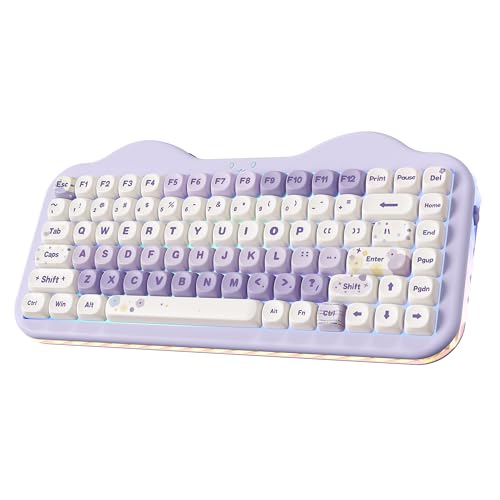
YUNZII C75 Cute 75% Wireless Mechanical Keyboard (Purple)

AULA F75 Wireless Mechanical Keyboard (Pink)

GravaStar Mercury K1 Pro 75% Wireless Gaming Keyboard

MechLands Aula F99 PRO 96% Mechanical Gaming Keyboard

YUNZII B87 TKL Wireless Mechanical Keyboard (Pink)

co2CREA Hard Case for Logitech POP Mouse
nuphy Kick75 Low Profile Wireless Mechanical Keyboard
nuphy Air75 V3 Wireless Mechanical Keyboard

GravaStar Mercury K1 75% Wireless Gaming Keyboard
Inside Each Recommended Option
The YUNZII C75 in purple leans into a dessert-themed aesthetic that doubles as a compact 75% gaming board. Its Candy switches and creamy typing sound give casual play sessions a soft, satisfying thock rather than a sharp click, and the wireless + wired dual mode keeps the desk tidy. In a small bedroom battlestation or a home office that doubles as a streaming nook, it pulls double duty: a pretty desk piece during the day and a responsive gaming tool at night.
For most casual gamers, the format strikes a good balance: arrow keys stay reachable, function row survives, and the overall footprint shrinks compared to a full board. Anyone who wants personality on the desk without giving up wireless convenience will find it fits the brief.
Where It Delivers
- Compact 75% layout frees roughly 25 percent of the desk versus a full board, leaving more mouse space for low-DPI FPS play.
- Wireless and wired modes let you keep a clean setup for typing and drop to a cable for tournament nights when you want zero doubt about latency.
- Color-forward keycap design turns the keyboard into desk decor, useful for creators who stream or film their workspace.
- Creamy switch sound profile reads as pleasant on long Discord sessions without being distracting in voice chat recordings.
Things To Weigh Up
- Plastic chassis construction may feel lighter than aluminum alternatives, and travel cases are worth considering for commuters.
- Pastel keycap surfaces can show fingerprint oils on glossy finishes, so a microfiber wipe during weekly cleaning helps them stay vibrant.
Who It Suits Best
Casual gamers, students, and content creators who want personality in a compact wireless form factor for both typing and play.
Where Another Pick Suits Better
Hardcore competitive players chasing the lowest wireless latency should look at the AULA F75, which adds a dedicated 2.4 GHz mode.
The AULA F75 is the kind of board that quietly handles five devices at once and never complains. Tri-mode connectivity (Bluetooth 5.0, 2.4 GHz wireless, and USB-C wired) pairs with hot-swap switch sockets, so swapping switch feel takes a puller and a few minutes rather than a soldering iron. The 4000mAh battery and 60-second auto-sleep help it stay ready across a full work-and-play day, and LEOBOG Strawberry Mint switches give a creamy sound that gamers tend to appreciate during long raids.
It slots in well between a gaming PC, a work laptop, and a tablet, which matters for hybrid setups. Compared to the YUNZII C75 above, the F75 trades a touch of aesthetic charm for real connectivity flexibility and switch tinkering.
A Strong Showing
- Tri-mode wireless keeps a dedicated 2.4 GHz lane for gaming latency while Bluetooth handles phone and tablet input.
- Hot-swap PCB accepts 3-pin and 5-pin switches, so trying linear, tactile, or silent feels becomes a no-solder weekend project.
- Pre-lubed stabilizers and a gasket-style mount cut rattle on the spacebar and larger keys during intense play.
- 4000mAh battery stretches across multiple days of mixed use, and auto-sleep prevents accidental overnight drain.
- Full-key macro programming through the F75 driver (wired, Windows) lets competitive players bind complex combos to single keys.
Worth Noting
- Macro programming is locked to Windows in wired mode, which leaves macOS and Linux users with on-board shortcuts only.
- Three device profiles means juggling shortcuts for a phone, a tablet, and a console alongside the PC, so a quick reference label helps during the first week.
Feature Snapshot
Right Fit For
Multi-device hybrid users who want one board for PC gaming, laptop work, and casual console play without swapping gear.
A Better Fit Elsewhere
Streamers who want a thinner desk profile should consider the nuphy Air75 V3, which trims thickness while keeping a similar wireless feature set.
GravaStar built the Mercury K1 Pro like a small sculpture that happens to take keystrokes. A premium aluminum alloy exoskeleton wraps an open, skeletal frame, and the metal adds noticeable heft compared to plastic 75% boards like the YUNZII C75. Hot-swap sockets let you swap switch feel when the mood strikes, and the cyberpunk styling reads as a centerpiece rather than a hidden peripheral.
It suits a desk where the keyboard is part of the visual identity: streamed setups, content creation bays, or a home office that gets photographed for socials. The 75% layout still keeps arrow keys and a function row within reach, so gaming performance does not take a hit for the looks.
Where It Helps
- Aluminum chassis resists flex and dampens vibration, which keeps heavy-handed keypresses from feeling hollow.
- Open-frame design funnels RGB light outward, giving your streaming camera a clean glow without a separate light strip.
- Hot-swap switch compatibility means switch taste can evolve over time without retiring the whole board.
- Wireless connectivity cleans the desk, and the metal weight helps the board stay planted during competitive play.
Trade Offs
- Open-frame key wells collect dust faster than enclosed cases, so a quick brush during weekly cleaning prevents debris build-up between switches.
- The aluminum shell raises the board’s weight, which is welcome at the desk but tougher to pack for travel or LAN events.
Made For
Visual-focused battlestation builders and streamers who want a keyboard that earns camera time while staying gaming-capable.
Swap It Out When
You need a board that lives in a backpack, where the nuphy Air75 V3’s lighter low-profile frame is easier to carry daily.
The MechLands Aula F99 PRO splits the difference between a TKL board and a full-size keyboard, keeping a number pad and navigation cluster in a 96% layout. That extra key plus a rotary knob opens up real productivity shortcuts: volume scrubbing, timeline scrubbing in video editing, or quick zoom in design apps. Tri-mode wireless (Bluetooth 5.0, 2.4 GHz, USB-C) means the F99 PRO jumps between a work laptop, a gaming PC, and a streaming deck without a cable swap.
Anyone whose day drifts between spreadsheets, creative tools, and evening gaming will appreciate not relearning shortcuts between machines. Compared to the AULA F75, the F99 PRO sacrifices some desk footprint savings for genuine numpad access, which matters for finance work, data entry, and many game macros.
Everyday Perks
- 96% layout preserves a number pad without a full-size footprint, useful for finance, coding, and macro-heavy games.
- Rotary knob assigns to volume, backlight, or app-specific functions, so common tweaks land on a single twist.
- Gasket structure softens bottom-out feel, reducing finger fatigue across long typing and gaming sessions.
- Tri-mode wireless covers a low-latency gaming link, a phone-friendly Bluetooth link, and a wired fallback for firmware updates.
Points To Keep In Mind
- Wider footprint than a 75% board means tighter mouse space on small desks, so plan for a wider mat before committing.
- Gasket-mount boards tend to feel softer on the spacebar, which some competitive FPS players prefer to bypass with firmer aftermarket stabilizers.
Who Should Grab It
Hybrid users who split hours between keyboard-heavy work and gaming, and who need a number pad without dedicating a full-size footprint to it.
Reach For A Different Pick When
Hardcore couch or travel use is the priority, where the nuphy Air75 V3’s slim form slides into a backpack much more easily.
The YUNZII B87 keeps things familiar: a tenkeyless layout (TKL, meaning no numpad) that gives the mouse room to breathe without removing the function row, arrow cluster, or navigation keys. The included soft-touch wrist rest takes real pressure off the wrists during marathon sessions, and PBT keycaps with a bear-pattern dye sublimation finish resist the shine that ABS caps pick up over months of use. Milk switches lean soft and linear, which suits long MMO rotations and typing-heavy workflows alike.
For someone logging serious hours on a single desk, the comfort focus reads as the main event. Compared to the YUNZII C75, the B87 trades pastel novelty for wrist-friendly ergonomics and a more traditional layout that competitive players tend to prefer.
What Pays Off
- Factory wrist rest cuts wrist extension during long sessions, useful for MMO players and writers who keep both hands on the keys.
- PBT keycaps hold texture longer than ABS alternatives, so legends stay readable after a year of daily use.
- TKL layout preserves a familiar muscle memory from full-size boards, easing the transition for competitive players.
- Wireless mode keeps the desk clean, and the sturdy ABS frame stays planted during high-tempo play.
Honest Caveats
- Stock wrist rest is fixed in shape, so users with broader shoulders may want to swap in a wider third-party rest later.
- Milk switches lean linear and soft, which helps typing but removes the tactile bump that some RTS players prefer for keystroke feedback.
Quick Facts
Best Suited To
Gamers and writers clocking long daily hours who want comfort-first ergonomics without dropping wireless convenience.
Skip It When
You rely on a number pad for work or games, where the MechLands Aula F99 PRO keeps numpad access in a wider footprint.
The co2CREA hard case is a small accessory, but it solves a real problem for anyone who pairs a Logitech POP, Pebble, or M350 mouse with a wireless gaming keyboard on the go. The EVA shell absorbs drops, shrugs off splashes, and keeps the mouse from getting scratched in a backpack alongside a charger and a laptop. A carabiner clip and a sturdy zipper make it easy to attach to a daypack for coffee-shop gaming sessions or LAN trips.
Inside, the case has room for the mouse plus a charging cable and a small dongle, so the full travel kit stays together. Think of it less as a keyboard accessory and more as the missing piece that keeps a mobile wireless setup intact between sessions.
Standout Benefits
- Rigid EVA shell cushions the mouse against drops and backpack pressure during commutes and flights.
- Carabiner loop adds grab-and-go portability, useful for students and hybrid workers bouncing between locations.
- Interior space fits a charging cable and USB receiver, so a complete wireless mobile setup stays organized.
Practical Considerations
- Case is sized for compact Logitech mice, so a full-size gaming mouse will not fit, and owners should measure before committing.
- Mouse and accessories are not included, so this purchase only makes sense alongside compatible Logitech models.
Whose Shelf It Belongs On
Commuters and travelers pairing a Logitech POP or Pebble with a wireless gaming keyboard for café or LAN sessions.
Look Elsewhere When
Your mobile mouse is a full-size gaming model, which will not fit this case and may need a generic sleeve instead.
The nuphy Kick75 takes the 75% formula and slims it down. Low-profile mechanical switches and PBT keycaps cut the board’s height, so the wrists sit at a more natural angle without a tall wrist rest. Tri-mode connectivity (Bluetooth, 2.4 GHz, USB-C) and a multi-function rotary knob give the board real versatility, while the NuPhy IO web assistant handles key customization, macro recording, and lighting profiles without a clunky desktop app.
On a thin desk, a slim laptop stand setup, or a coffee shop table, the lower travel height makes a noticeable comfort difference over standard mechanical boards. It splits the difference between a traditional mech and a laptop keyboard, and that middle ground suits many real desks.
Reasons It Performs
- Low-profile switches reduce finger travel, easing fatigue on long typing stretches and casual play sessions.
- Rotary knob is a quality-of-life upgrade, scrubbing through timelines, adjusting volume, or cycling RGB without a hotkey combo.
- Web-based NuPhy IO driver keeps customization available across operating systems without a dedicated app install.
- 75% layout and slim chassis leave more desk room for mouse movement and a clean visual profile.
Worth Bearing In Mind
- Low-profile switches offer shorter travel, so users coming from full-height mechanicals may notice the difference for a week or two.
- Slender build feels lighter than aluminum boards, and a desk mat helps anchor the Kick75 during aggressive play.
Feature Snapshot
Who Will Love This
Desk minimalists and laptop-plus-keyboard users who want a slim, capable wireless mech that plays well in a small footprint.
Where A Sibling Pick Shines
Heavier typists who prefer deep mechanical travel should look at the YUNZII B87, which keeps a standard key height with a wrist rest.
The nuphy Air75 V3 is the board to reach for when “thin and light” matters. At roughly 13.2mm thick, it slips into a laptop sleeve or a small backpack pocket, and the gasket-mount design (a floating plate suspended on silicone pads) softens each keystroke for a quieter sound profile. Tri-mode connectivity covers Bluetooth, 2.4 GHz, and USB-C, and a multi-function knob handles volume, brightness, or app-specific shortcuts.
It fits naturally on a minimalist desk, a coworking table, or a hotel nightstand, and the typing feel is gentler than a standard mechanical. For people who work from a laptop during the day and game on the same machine at night, the Air75 V3 reads as a do-everything travel pick.
A Favorable Mix
- Ultra-thin chassis at about 13.2mm keeps the board in laptop-bag territory for real portability.
- Gasket mount with silicone pads absorbs vibration, giving a quiet, low-effort typing feel in shared spaces.
- Multi-function knob handles volume or app shortcuts, which saves hunting through menus during play.
- Tri-mode wireless covers a low-latency link for gaming and a Bluetooth path for tablets and phones.
Some Limits To Know
- Low-profile layout means shallower key travel, so mech purists who like a deep bottom-out may want a taller board instead.
- Slim chassis is more flexible than aluminum, and a rigid laptop shelf or hard surface helps the typing feel stay consistent.
Perfect Match For
Frequent travelers, students, and remote workers who split time between a laptop and a desktop and want one board to cover both.
Not Your Match When
You want the heavier, more planted feel of a full aluminum chassis, which the GravaStar Mercury K1 Pro delivers in exchange for weight.
The GravaStar Mercury K1 in Sakura Pink is a statement piece, with an aluminum alloy exoskeleton and a symmetrical 75% layout that looks at home in a pastel battlestation. Dual-layer PBT keycaps add both color depth and long-term durability, and the GravaStar x Kailh collaboration switches target a smooth, game-ready feel. RGB backlighting glows through the open frame, giving streaming setups a clear visual centerpiece.
It pairs naturally with a matching Mercury K1 Pro if you want to standardize a desk, or stands alone as the visual anchor in a single-keyboard setup. Anyone whose desk doubles as a backdrop for content will find the styling earns its keep.
The Good Stuff
- Aluminum exoskeleton stiffens the chassis, giving a planted feel that holds up during intense gaming sessions.
- Symmetrical 75% layout (79 keys) keeps a balanced look under camera and maintains reachable arrows and a function row.
- Dual-layer PBT keycaps resist shine and keep legends sharp over time, important for a board that lives in frame.
- RGB lighting wraps the open frame, useful for streamers and creators who want a clean glow without extra lighting gear.
Where It Is Less Suited
- Open-frame gaps catch dust and crumbs, so a small brush during weekly cleaning prevents debris between switches.
- Aluminum body plus the bold finish adds weight, making this less of a “throw in a bag” pick than the Air75 V3.
Built With In Mind
Pastel-themed battlestation builders and content creators who want a keyboard that anchors a desk photo while still gaming competitively.
Consider Something Else When
Absolute portability is the goal, where the nuphy Air75 V3’s thin profile travels much more comfortably than an aluminum shell.
What To Weigh Before Picking Your Wireless Gaming Board
Connection type sets the tone. Bluetooth 5.0 handles most PC, phone, and tablet connections with low power draw, but 2.4 GHz wireless through a USB dongle typically delivers the lowest latency for competitive play. Some boards, like the AULA F75 and the MechLands Aula F99 PRO, offer both, so you can keep Bluetooth for casual use and switch to 2.4 GHz for ranked matches.
Layout decides how much desk you give up. A 75% board, used by the YUNZII C75, GravaStar Mercury K1, and nuphy Kick75, keeps arrows and a function row while saving roughly a quarter of the footprint. A 96% board, like the MechLands Aula F99 PRO, adds a numpad for productivity. A TKL board, such as the YUNZII B87, drops the numpad entirely, freeing the most mouse space for low-DPI FPS aim.
Switch type changes the feel. Linear switches (the smooth, no-bump style) feel fast and quiet, tactile switches (a small bump on each press) give feedback during typing, and low-profile switches reduce travel for thinner boards. Hot-swap sockets, found on the AULA F75 and both GravaStar Mercury boards, let you swap switches later without soldering, which protects the investment if your taste evolves.
Battery and build round out the picture. 4000mAh cells stretch across multiple days of mixed use, and aluminum frames, like the GravaStar exoskeleton, add heft that keeps the board planted during heated play. For travel, the nuphy Air75 V3’s thin profile is the easier carry, and the co2CREA case keeps a travel mouse safe between sessions.
Key Considerations Across These Picks
Where Shoppers Go Wrong
A common slip is choosing a board on looks alone, then discovering the switch feel is wrong for long sessions. Sound, key travel, and weight matter as much as color when the board lives at your fingertips for hours. Another trap is ignoring connectivity: a Bluetooth-only board can stutter during competitive FPS play, so a 2.4 GHz mode (or wired fallback) is worth prioritizing for ranked gaming.
When Paying More Pays Off
Higher-tier boards in this category tend to spend the money on chassis materials, gasket mounts, and longer battery life. Aluminum shells, like the GravaStar Mercury K1 Pro and Mercury K1, dampen vibration and last longer under daily abuse, while a gasket mount (a floating plate suspended on silicone pads) softens the typing feel and reduces hollow noise. Hot-swap switch sockets and rotary knobs also add long-term value by extending the board’s usable life as your taste changes.
Frequently Asked Questions
Are Bluetooth keyboards good enough for gaming?
Modern Bluetooth 5.0 boards handle casual and mid-tier competitive gaming without issue. For twitch-heavy ranked play, a 2.4 GHz wireless mode or a wired connection gives more predictable latency, which is why boards like the AULA F75 include all three.
What is a 75% keyboard layout?
A 75% layout is a compact form factor that keeps the main keys, arrow cluster, and a function row while removing the numpad and trimming unused gaps. It saves desk space compared to a full-size board, which makes it a popular choice for gaming setups where mouse room matters.
Do low-profile mechanical switches feel different?
Yes. Low-profile switches have shorter travel than standard mechanicals, which feels closer to a laptop keyboard with a more responsive bump. The nuphy Kick75 and nuphy Air75 V3 use this style for slimmer builds and easier portability.
How long do wireless gaming keyboards last on a single charge?
Battery life varies by usage, lighting, and connection type, but many boards in this category clear several days of mixed work and play on a single charge. Turning off RGB and using a wired connection during long sessions can stretch the battery further when needed.
Is hot-swappable worth it on a wireless gaming keyboard?
Hot-swap support, found on the AULA F75 and both GravaStar Mercury boards, lets you change switch types without soldering. For anyone curious about different switch feels or worried about long-term durability, hot-swap extends the board’s useful life and makes upgrades low-fuss.
Closing Remarks
The right wireless gaming keyboard comes down to where you play, how you hold your mouse, and how much desk you can spare. Compact 75% boards like the nuphy Kick75 or GravaStar Mercury K1 fit smaller setups, while the MechLands Aula F99 PRO keeps a numpad for productivity. Try a layout in person where you can, pick the switch feel that matches your game, and your next wireless board should serve both work and play comfortably.


