


A solid backlit gaming keyboard changes late-night sessions. The right key caps, switch feel, and RGB spread help your hands land clean inputs when the room goes dark and the rest of the house has gone quiet. This list covers nine backlit gaming keyboards for 2026, from compact magnetic boards to full-size workhorses with smart screens, so you can match lighting, layout, and feel to the way you actually play.
A Side-By-Side Look

GravaStar Mercury K1 Pro 75% Wireless Mechanical Gaming Keyboard, Hot-Swap
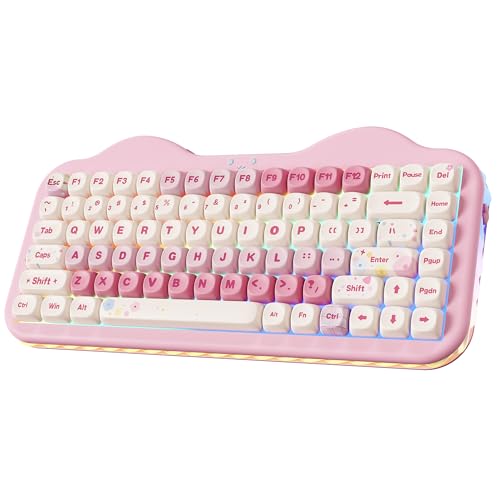
YUNZII C75 Cute 75% Wireless Mechanical Keyboard (Pink, Candy Switch)
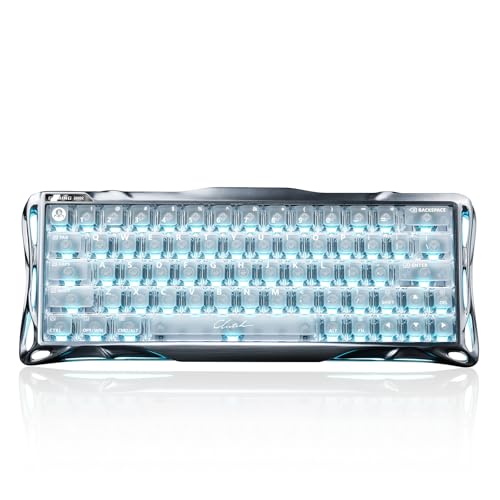
GravaStar Mercury V60 Pro 60% HE Magnetic Gaming Keyboard

KINESIS Gaming TKO Mechanical Keyboard (Clicky White)

BOYI K104Pro Mechanical Keyboard with 2.2″ Screen & Media Knob (Retro)

BOYI K104Pro Mechanical Keyboard with 2.2″ Screen & Media Knob (Black Gray)

BOYI K104Pro Creamy Mechanical Gaming Keyboard (White Joker)
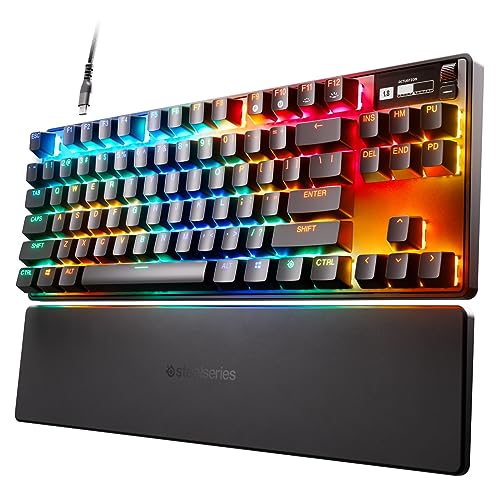
SteelSeries Apex Pro TKL HyperMagnetic Gaming Keyboard

GravaStar Mercury K1 75% Wireless Mechanical Gaming Keyboard RGB Backlit
Meet The Standout Selections
The Mercury K1 Pro leans hard into visual personality without losing the daily comfort you want from a 75% layout. The aluminum alloy exoskeleton (a rigid outer shell, in plain terms) gives the chassis real heft, so it stays planted during a heated match instead of sliding across the desk. Hot-swap sockets let you pull the stock switches and drop in your own without soldering, which is a quiet luxury for anyone who likes to tinker between sessions.
Compare that to the KINESIS TKO covered later, which is built for portability, and the K1 Pro reads more like a desk centerpiece. Owners who care about RGB spread and a sculpted silhouette tend to land here first.
Real-World Strengths
- Aluminum exoskeleton adds weight and rigidity, helping the board stay anchored during fast wrist flicks.
- Hot-swap switch sockets let you swap switch types without a soldering iron.
- 75% layout keeps arrows, a function row, and a compact footprint that suits smaller desks.
- Open skeletal frame channels RGB light outward, giving the per-key lighting a wider wash.
Things To Consider
- The exposed frame catches dust more easily than a closed chassis, so weekly wipe-downs are a fair expectation.
- Open design can amplify typing acoustics, which may matter in shared rooms.
Made For
Style-focused gamers who want a wireless 75% board that doubles as desk decor and who enjoy swapping switches over time.
Consider Something Else When
The GravaStar Mercury K1 (pick 9) suits you better if you want the same 75% footprint in a more traditional, beginner-friendly shell.
The YUNZII C75 is for people who want their setup to make them smile. The pink colorway reads playful from across the room, and Candy switches are tuned for a creamy, rounded thock on the way down. For casual co-op nights, chat-heavy MOBAs, or long Discord sessions, the feel is forgiving on the fingers and easy on the ears of anyone sitting nearby.
Stacked against the GravaStar K1 Pro’s industrial frame, the C75 goes the other direction: cute over cyberpunk. Triple-mode connectivity means you can hop between a laptop, a tablet, and a desktop without re-pairing every time.
Well-Handled Touches
- Pink colorway doubles as a desk accent, so the keyboard pulls double duty as decor.
- Candy switches are tuned for a soft, rounded bottom-out, which suits long typing stretches.
- Triple-mode connectivity covers wireless and wired use across multiple devices.
Trade Offs
- Color-first buyers will love it; anyone wanting a more neutral aesthetic may scroll past.
- Lightweight plastic shell is easy to toss in a bag, though less planted on a slippery glass desk.
Key Specs
Who It Suits Best
Style-driven players who want a charming pink board for a streaming or study setup and value a soft typing feel over clicky feedback.
Look Elsewhere When
The SteelSeries Apex Pro TKL (pick 8) is a stronger match for competitive play where per-key actuation adjustment matters more than color.
The V60 Pro is the board you reach for when every millisecond matters. HE stands for Hall Effect, a magnetic switch design that lets the keyboard measure key travel without a traditional metal contact. That opens up features like adjustable actuation (the exact depth at which a press registers) and Rapid Trigger, which re-arms a key the moment it starts moving back up, so repeated taps in shooters and rhythm games feel almost instant.
Polling rate, the number of times per second the keyboard reports its state to the PC, runs at 8kHz here, which is eight times the standard 1kHz ceiling. The full aluminum frame keeps the chassis rigid under fast play, and the 60% layout leaves more room for sweeping mouse movement.
Features That Help
- Hall Effect switches support adjustable actuation, so lighter taps and deeper presses can live side by side.
- 8kHz polling cuts the gap between your input and what the game sees on screen.
- Full aluminum frame resists flex and stays put during aggressive mouse flicks.
- 60% layout frees up desk space for low-DPI aiming on wide mousepads.
Trade Offs
- No arrow cluster, so users coming from a full-size board face a learning curve with Fn-layer shortcuts.
- HE features need software setup to unlock their full potential, which adds a weekend of tinkering for first-time magnetic-switch users.
Right Fit For
Competitive FPS and rhythm-game players who want granular control over actuation depth and value low-latency input above extra keys.
Skip It When
The KINESIS TKO (pick 4) is a better fit for players who need a 60% form factor that also travels well to LAN events.
The KINESIS TKO is built for players who refuse to leave their main board at home. The 60% layout keeps things tight in a laptop bag, and the included SF Shock travel case adds a layer of protection that most stock packaging can’t match. The aluminum body gives the board a solid, planted feel, so it doesn’t rattle during fast inputs even when it’s sitting on a hotel-room desk.
It lands in a different spot than the GravaStar V60 Pro. The TKO leans on hot-swap Kailh Box White clicky switches, which are tactile, audible, and easy to swap, while the V60 Pro leans on magnetic HE switches for analog-style precision. Split spacebar support is a small detail that helps players who remap jump or crouch onto an alternate position.
The Upside
- Aluminum body keeps the board rigid without adding much weight for travel.
- Hot-swap switch sockets let you swap clicky switches for linear or tactile alternatives.
- Included shock-resistant case protects the board in checked luggage and backpacks.
- Split spacebar option suits players who remap to a custom control layout.
Trade Offs
- Clicky Box White switches are loud, so late-night use in shared spaces can be a friction point.
- No wireless option means one more cable in the travel bag.
Feature Snapshot
Best Suited To
Tournament and LAN players who travel with a full-size mousepad and want a clicky, custom-friendly board that can take a beating in transit.
Another Choice May Suit
The GravaStar Mercury V60 Pro (pick 3) is a smarter pick if you want the same compact 60% size but with wireless freedom and adjustable HE switches.
The BOYI K104Pro Retro throws a lot at the wall, then asks what sticks. The 2.2-inch TFT screen shows system status, time, connection mode, and even custom GIFs, so your desk can show off a bit of personality. The metal rotary knob handles volume and media scrubbing, and full QMK/VIA support means you can remap every key, set up macros, and create layers without flashing firmware the hard way.
Where the KINESIS TKO and GravaStar V60 Pro focus on pure play, the K104Pro Retro is a tinkerer’s playground. Gasket mounting (a sandwich-style build that lets the plate flex slightly) gives the typing feel a softer, springier bottom-out, which long-form writers tend to appreciate.
Benefits That Matter
- Built-in TFT screen shows system info, time, and custom animations at a glance.
- QMK/VIA support unlocks deep remapping and macro layers for power users.
- Gasket-mounted chassis softens the bottom-out for a less fatiguing typing feel.
- Tri-mode connectivity covers Bluetooth, 2.4GHz wireless, and USB-C wired use.
Honest Caveats
- The feature list is long, so expect a learning curve before the screen and software feel second nature.
- Full-size layout takes up significant desk space, which cramped workstations may not have.
Whose Shelf It Belongs On
Tinkerers and QMK-curious users who want every layer, macro, and animation under their own control without soldering.
Reach For A Different Pick When
The SteelSeries Apex Pro TKL (pick 8) is the better call if you want adjustable actuation more than custom screens and QMK layers.
The Black Gray K104Pro takes the same chassis as the Retro edition and trades the colorway for a more neutral, work-friendly look. That makes it a sensible fit for anyone whose keyboard sits between a daytime spreadsheet and an evening raid. You keep the 2.2-inch smart screen, the rotary knob, hot-swap sockets, and full QMK/VIA support, all in a board that won’t clash with a corporate Zoom background.
Versus the GravaStar K1 Pro, the K104Pro Black Gray is denser on the desk but richer in software-driven control. NKRO (n-key rollover) means every simultaneous press registers independently, which matters in rhythm games and MMO keybinds.
Where It Excels
- Neutral colorway suits dual-use workstations, from daytime work to late-night gaming.
- Smart screen and media knob speed up volume, mode switching, and status checks.
- Hot-swap switch support lets you retune the feel without tools.
- NKRO ensures every simultaneous press registers in complex keybind setups.
Softer Spots
- Full-size layout is wide, so a proper wrist rest is a worthwhile add-on for long sessions.
- Tri-mode radios compete for USB ports on a dongle-heavy desktop; a spare USB-A or hub helps.
Feature Card
Who Will Love This
Hybrid work-and-play users who want a single full-size board that handles both spreadsheets and skill rotations.
Where Another Pick Suits Better
The YUNZII C75 (pick 2) is the right call if you prefer a smaller 75% footprint in a more expressive colorway over a neutral full-size layout.
The White Joker colorway leans bright, with keycap legends and accents tuned to pop on camera. For streamers, content desks, and anyone whose keyboard spends more time on a webcam than a work call, the clean white base lets RGB lighting read clearly through every key. The chassis and feature set mirror the other K104Pro variants: gasket mount, QMK/VIA, tri-mode wireless, and a 2.2-inch smart screen that doubles as a quick-glance status panel.
Against the Black Gray sibling, the choice comes down to room palette rather than function. White keycaps do show grime faster, so anyone eating at the desk will want to keep a microfiber cloth nearby.
Points In Its Favor
- White theme reads brightly on stream and pairs well with soft RGB underglow.
- QMK/VIA support lets you build custom macros for editing shortcuts and streaming scenes.
- Tri-mode connectivity covers laptop, desktop, and tablet use from a single board.
Minor Gripes
- White keycaps show dust and oils faster, so routine cleaning becomes part of ownership.
- Full-size footprint still demands meaningful desk space, even in a bright colorway.
Perfect Match For
Streamers and content creators who want a clean, camera-ready board that pulls double duty as a macro pad and a status display.
Not Your Match When
The GravaStar Mercury K1 Pro (pick 1) is a smarter pick if you want a more compact 75% layout and prefer an industrial design over a white desk aesthetic.
The Apex Pro TKL is the board to beat when per-key control is the priority. SteelSeries’ OmniPoint 2.0 switches let you set the actuation point for every single key, from a hair-trigger 0.1mm to a deliberate 4.0mm. In shooters, you can keep WASD feather-light for fast strafing, while ability keys get a deeper press so you don’t fire them by accident. Rapid Trigger re-arms the key the moment it starts rising, which is a quiet edge in fast movement games.
Compared to the GravaStar V60 Pro, the Apex Pro keeps the numpad off the desk in favor of arrow keys, function row, and a small OLED screen for system info. TKL (tenkeyless) layouts give mouse hands more room without going all the way down to 60%.
Where It Helps
- Per-key adjustable actuation lets you tune each key to your muscle memory.
- Rapid Trigger re-arms keys the instant they begin to release, helping fast repeated inputs.
- OLED screen displays game info, Discord status, and system stats at a glance.
- PBT keycaps resist shine and wear over years of daily use.
Some Limits To Know
- Wired USB-C connection means one more cable on the desk, even on wireless-leaning setups.
- Software is required to unlock the per-key settings, which adds a setup step on day one.
Feature Rundown
Who Should Grab It
Hardcore competitive players who want a TKL board with deep per-key tuning and don’t mind installing software to unlock the best features.
Swap It Out When
The GravaStar Mercury K1 (pick 9) is the better fit if you want wireless freedom and a 75% layout over a software-tuned TKL experience.
The Mercury K1 in Sakura Pink is the friendliest door into the GravaStar lineup. You get the same 75% layout and aluminum-alloy feel as the K1 Pro, but in a more traditional shell and a colorway that lights up a desk without leaning industrial. RGB backlighting shows through dual-layer PBT keycaps, so legends stay readable even after long sessions of late-night play.
Against the K1 Pro’s open skeletal frame, the standard K1 is the more conservative pick. For first-time wireless keyboard shoppers, the combination of solid build, recognizable layout, and a friendly colorway is hard to overstate.
Key Advantages
- Closed aluminum-alloy shell feels sturdier than typical plastic wireless boards.
- 75% layout keeps arrows and a function row in a manageable footprint.
- Sakura colorway adds personality without leaning fully into gamer-bling territory.
- Dual-layer PBT keycaps help legends stay crisp under RGB glow.
Points To Note
- Pink colorway is expressive, so it may not match every existing setup.
- No hot-swap sockets, so switch changes need soldering or full-board replacement.
Quick Facts
Built With In Mind
First-time wireless keyboard shoppers who want a polished 75% board in a friendly colorway and don’t plan to swap switches.
A Better Fit Elsewhere
The GravaStar Mercury K1 Pro (pick 1) is the smarter pick if you want hot-swap switch support and a more aggressive skeletal design.
Factors To Weigh Before Choosing Backlit Gaming Keyboards
Layout and Desk Real Estate
Start with the footprint. A 60% board like the GravaStar V60 Pro or KINESIS TKO frees up massive mouse movement for low-DPI aiming. A 75% board (K1 Pro, K1, C75) keeps the arrow cluster and function row without crossing into numpad territory, which suits a hybrid work-and-play desk. A full-size K104Pro covers spreadsheet work, macro-heavy games, and a dedicated numpad for hotkey-bound MMO players. Match the layout to the room you have, not the room you wish you had.
Switch Feel and Adjustability
Linear, tactile, and clicky switches each tell a different story. Linear feels smooth through the full press, tactile gives a small bump at the actuation point, and clicky adds an audible snap. HE switches on the V60 Pro and Apex Pro TKL take it further with adjustable actuation, so a single board can behave like a feather-light hair trigger for movement and a deep-press safety for abilities. Tinkerers and competitive players tend to love this; casual users often do fine with a well-chosen stock switch.
Connection Style and Latency
Wired boards avoid battery management entirely, while wireless options need charging or AA cells. Tri-mode boards like the K104Pro cover Bluetooth for laptop hopping, 2.4GHz for low-latency desktop play, and USB-C for the days you forget to charge. Polling rate matters most at the competitive end: the V60 Pro’s 8kHz polling shrinks the gap between input and on-screen response, though for casual play standard 1kHz is rarely the bottleneck.
Lighting, Build, and Long-Term Care
RGB lighting is only as good as the keycaps above it. PBT caps resist shine and keep legends readable, while ABS caps look brighter out of the box but tend to slick up over time. Aluminum bodies add weight and rigidity, plastic shells travel lighter. Open frames show more RGB but collect dust, so plan a weekly wipe-down. Closed shells hide grime better but hide the lighting under the cap rather than letting it wash outward.
Key Things To Keep In Mind
Common Pitfalls When Shopping
A pretty colorway can hide a layout that doesn’t fit your games. Make sure arrows, function row, or numpad actually match the genres you play. Don’t skip the switch feel, since a board you hate the feel of will collect dust on a shelf in two months. Double-check that “wireless” includes a 2.4GHz dongle and not just Bluetooth, since the latter can introduce lag. For magnetic-switch boards, the software setup is real work, so factor that into your expectations.
Where The Extra Money Goes
Spending up on a premium board usually buys adjustability, build materials, and connectivity. Adjustable actuation, found on the Apex Pro TKL and GravaStar V60 Pro, gives per-key control that budget boards can’t touch. Aluminum frames and gasket mounts add a softer, sturdier feel that cheaper plastic chassis struggle to match. Tri-mode wireless with proper 2.4GHz support is another premium-tier feature, and it shows in day-to-day convenience. For casual play, a mid-range board with a good stock switch often does everything a flagship does at a friendlier price.
Frequently Asked Questions
Are Hall Effect switches better than standard mechanical switches?
Hall Effect switches use magnets and sensors to detect key travel instead of metal contact, which lets the keyboard support adjustable actuation and Rapid Trigger. For competitive play, that’s a meaningful edge. For casual gaming and typing, a quality standard mechanical switch is plenty.
Does polling rate really matter for gaming?
Polling rate is how often the keyboard reports its state to the PC. Standard 1kHz means 1ms reporting, while 8kHz on boards like the V60 Pro drops that to 0.125ms. In fast-paced shooters and rhythm games, the difference is noticeable to competitive players, though most casual players won’t feel it.
What’s the difference between 60%, 75%, and TKL layouts?
A 60% board drops the function row, arrows, and numpad for the smallest footprint. A TKL (tenkeyless) keeps arrows and the function row but skips the numpad. A 75% squeezes in arrows, a function row, and sometimes a small navigation cluster, which most people find is the sweet spot for daily use.
Can I use a wireless gaming keyboard for typing and streaming?
Yes, tri-mode boards like the BOYI K104Pro support Bluetooth, 2.4GHz wireless, and USB-C wired connections. The 2.4GHz mode is the one to use for gaming, while Bluetooth works well for pairing with laptops and tablets during the workday.
How long do mechanical keyboard switches usually last?
Most quality mechanical switches are rated for 50 to 100 million keystrokes, and Hall Effect switches can exceed that since there’s no metal contact to wear. For most users, that translates into many years of daily use before any noticeable change in feel.
The Takeaway
Your keyboard is the part of the setup your hands touch every minute, so the right pick depends on the games you play, the desk you have, and the feel you enjoy typing on. Match the layout to your space, the switches to your style, and the lighting to your personality, and you’ll spend less time fussing with your gear and more time playing.


