


Gaming audio used to mean a headset and a Discord slider. Now your stream is your storefront, your voice chat is your living room, and the on-board sound in your motherboard is a bottleneck you can hear. A dedicated audio interface for gaming cleans up the signal path between your mic, your game audio, and the people on the other end. It also gives you real knobs to twist when you want game sound mixed under your voice, your chat muted independently of your stream, or your guitar tracked during a co-op session.
The trick is finding one that fits how you actually play. The picks below cover serious recording hardware for creators who also stream, hybrid units for mobile-first streamers, and plug-and-play mixers that solve the everyday “I just want my friends to hear me” problem. Each one is matched to a different style of gamer and creator, so you can match your rig, your room, and your budget without guessing.
The Lineup, Simplified
MAONO P2 Hybrid USB Audio Interface Dual XLR

Focusrite Scarlett 4i4 4th Gen USB-C Audio Interface
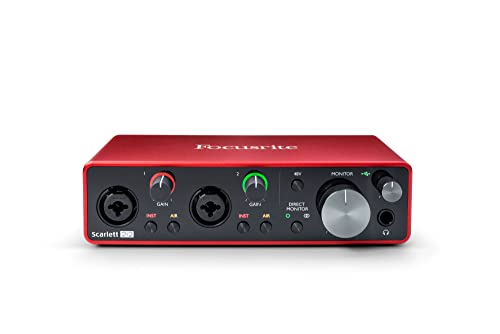
Focusrite Scarlett 2i2 3rd Gen USB Audio Interface

Arturia MiniFuse 2 USB Audio & MIDI Interface

Podcast Microphone Bundle for Live Streaming

MAONO P1 USB Audio Interface with 70dB Gain

Podcast Equipment Bundle Audio Mixer with 48V

MAONO PS22 Lite USB Audio Interface for PC

BlueAVS USB Audio Interface 2-In/4-Out

Audio Mixer Sound Board for PC and Phone Gaming
More On The Choices That Made The List
The MAONO P2 is built for the streamer whose setup isn’t just a desktop tower. It pairs a desktop DAW session with a phone or iPad in parallel, so you can record a guitar cover into your DAW while a vocal take or backing track lives on the mobile side. MFi-certified (Apple’s “Made for iPhone/iPad” standard) means it cooperates with iOS without adapter headaches, and dual XLR inputs let you run a condenser mic plus a dynamic mic at the same time.
For a gamer who also produces content, that hybrid hook saves a lot of fiddling. You can stay in your game on the PC, bounce audio to the mobile app for a quick clip, and keep your signal chain clean. Compared to the Focusrite Scarlett 2i2 later in this list, the P2 trades pure recording purity for a wider compatibility story, which is exactly the kind of trade-off mobile-first creators care about.
The Practical Payoff
- Dual USB ports route PC and phone or iPad at the same time, useful for cross-platform streaming.
- Two XLR inputs give you a real mic and a guest mic without a splitter.
- MFi-certified iOS support means fewer cables and adapters on the mobile side.
- Single-box workflow keeps your game PC focused on gaming rather than audio routing.
Points To Note
- Two simultaneous XLRs and a phone is a lot for one small chassis, so fan noise from your gaming PC may creep in during quiet sections.
- Mobile-first creators may find the on-board controls lighter than a dedicated mixer.
Right Fit For
Streamers and creators who bounce between a gaming PC and an iPad or iPhone for mobile recording sessions.
Reach For A Different Pick When
The Focusrite Scarlett 2i2 makes more sense if your workflow lives entirely on a desktop and you want a tighter, studio-leaning signal path.
The 4i4 4th Gen sits a tier above the classic 2i2 and earns its keep when your gaming room also doubles as a recording space. You get two of Focusrite’s ultra-low-noise preamps, a full set of line inputs for synths or drum machines, and a dynamic range figure that holds its own against pricier outboard. Auto Gain and Clip Safe are nice quality-of-life touches: Auto Gain listens and sets sensible levels on its own, while Clip Safe quietly prevents digital clipping (the harsh distortion that happens when a signal exceeds the maximum recordable level) when a teammate suddenly yells into your mic mid-match.
For a serious creator who also streams, the 4i4 leaves room to grow. Where the MAONO P2 leans on hybrid USB flexibility, this one doubles down on raw conversion and I/O depth. You can mic yourself for streaming, mic a co-host, and still keep a synth or game capture audio routed in.
Notable Gains
- Two detailed preamps handle dynamic and condenser mics without obvious noise floor.
- 120dB dynamic range (the gap between the quietest and loudest sound the unit can capture cleanly) keeps game audio and vocal peaks separated.
- Four line inputs make room for synths, drum pads, or extra game captures.
- Auto Gain and Clip Safe reduce mid-stream level anxiety.
Trade Offs
- Larger desktop footprint than a 2i2, which matters in tight battlestation setups.
- More I/O than most solo streamers actually need, so the extra inputs can sit unused.
Who It Suits Best
Creators who run a hybrid streaming and music production setup and want one box to handle both jobs.
A Better Fit Elsewhere
The Arturia MiniFuse 2 is a more natural fit for a creator who values a tiny footprint and built-in MIDI over line-input count.
The Scarlett 2i2 3rd Gen is the unit most solo creators end up with, and for good reason. Two upgraded third-generation Scarlett mic preamps with switchable Air mode (a circuit that lifts high frequencies to add presence and clarity, like a subtle studio polish) help vocals and acoustic instruments sit forward in a mix, and the high-headroom instrument inputs mean your guitar or bass doesn’t get crushed when you dig in. For gaming, the real story is the clean headphone and monitor outputs: low-noise balanced outs deliver audio without the hiss you can sometimes hear from motherboard jacks.
It is a calmer, simpler box than the MAONO P2 reviewed earlier. The 2i2 doesn’t try to be a hybrid mobile studio, it just gives a desktop creator two solid inputs and reliable monitoring. That focus is part of why it has stayed popular across multiple generations.
Practical Pluses
- Air mode adds clarity to vocals and acoustic instruments without extra plugins.
- Two high-headroom instrument inputs handle guitar and bass without clipping.
- Low-noise balanced outputs give clean playback through monitors and headphones.
- Compact enough to leave on a desk permanently for daily streaming use.
Less Ideal Details
- Only two inputs means a guest setup needs an extra mixer or adapter.
- Gain Halos (the LED rings around the gain knobs that glow green when levels are healthy) are helpful, but a sudden loud laugh can still peak if you forget to pad the input.
Key Product Details
Made For
Solo streamers, podcasters, and gamers who want a simple, dependable desktop interface with pro-grade preamps.
Swap It Out When
The MAONO PS22 Lite is a smarter pick for a strict entry-level shopper who only needs a single mic and a guitar input.
The MiniFuse 2 is a small, squared-off unit that fits the kind of desk where every centimeter counts. It offers two combo inputs for mics, instruments, or line sources, plus a real MIDI (Musical Instrument Digital Interface, a standard port that lets you connect keyboards, drum pads, and controllers to your computer) on the back. That MIDI port is a quiet superpower for gamers who also make beats, because it keeps a keyboard or pad controller in the same box as your stream mic, instead of adding a separate MIDI interface to your setup.
Arturia also backs the MiniFuse line with a long warranty, which is unusually reassuring in this category. The 2i2 3rd Gen from Focusrite still has the more familiar feel for studio work, but the MiniFuse 2 is the cleaner choice when a desk-friendly box with both audio and MIDI is the goal.
Positive Takeaways
- Two inputs plus dedicated MIDI in/out covers a bedroom producer’s essentials.
- USB-C bus power (drawn from your computer’s USB port, no wall adapter needed) keeps cable clutter low.
- Small chassis tucks beside a monitor or behind a laptop stand.
- Long warranty reflects the brand’s stated reliability testing.
A Few Limitations
- Two inputs is the same as the cheaper Scarlett 2i2, so the value here leans on MIDI and size rather than I/O count.
- Plastic shell feels lighter than metal-housed units, so a long cable run may tug at the USB port.
Best Suited To
Bedroom producers who also stream and need MIDI connectivity in a compact interface.
Where A Sibling Pick Shines
The Focusrite Scarlett 4i4 makes more sense if MIDI is irrelevant and you want more line-level inputs for synths and pads.
This Beyoursun bundle is built for someone setting up a stream for the first time and not sure which cable goes where. You get a 3.5mm condenser mic, an adjustable disc bracket, and the G10 sound card mixer in one box, so the learning curve is mostly just plugging it in. The mixer includes one-click noise reduction and a few voice effects, which is friendly for creators who want their stream to sound “different” from a plain headset without diving into software plugins.
Compare that to the MAONO PS22 Lite later in the list, which is a more traditional audio interface with no mic included. The Beyoursun bundle is a softer landing for a true beginner, but the PS22 Lite is a better long-term platform if you plan to upgrade your mic down the road.
The Case For It
- Includes a mic, bracket, and mixer, so there’s no separate shopping list for a first-time streamer.
- One-click noise reduction helps in rooms with PC fan noise or street sound.
- Voice changer effects add personality for variety streamers.
- Plug-and-play design with PC and phone compatibility.
Honest Caveats
- The included 3.5mm condenser mic is convenient but limited compared to a standalone XLR setup.
- Bundled software and effects may feel gimmicky to users who want a clean, neutral signal.
Perfect Match For
New streamers who want a complete starter kit and a low-pressure entry into content creation.
Not Your Match When
You already own a quality XLR mic, in which case the MAONO P1 is a better value as a bare interface.
The P1 is the single-XLR sibling to the P2, and it leans into one specific strength: 70dB of clean preamp gain. That is the kind of headroom that lets you pair a gain-hungry dynamic microphone directly, without buying a separate inline booster like a Cloudlifter or FetHead. For gamers using broadcast-style dynamics such as an SM7B or similar, this is the part of the spec sheet that actually matters day to day. ASIO (Audio Stream Input/Output, a low-latency driver protocol that lets your DAW talk to the interface with minimal delay) support keeps monitoring responsive during live takes, and independent mute control is a small but real quality-of-life win for live streams where you need to cough or chat without unplugging.
Versus the Focusrite Scarlett 2i2 reviewed earlier, the P1 gives up some brand familiarity and one extra input. In return, you get a higher native gain figure and routing software aimed at solo creators, which is a fair trade for the right user.
What Earns Its Place
- 70dB of clean preamp gain drives demanding dynamic mics without external boosters.
- 24-bit/192kHz recording captures full detail for voice and instrument work.
- Independent mute control avoids on-stream fumbling for the mute button.
- Routing software simplifies solo podcast and stream workflows.
Trade-Offs To Consider
- Only one XLR input, so a guest or co-host requires a workaround.
- Auto Gain is helpful, but very dynamic talkers may still want to fine-tune manually.
Quick Facts
Whose Shelf It Belongs On
Solo creators using a high-output-demand dynamic mic who want a clean, no-booster signal path on a tighter budget.
Look Elsewhere When
The Focusrite Scarlett 4i4 is the better tool if you need two XLR inputs and richer I/O for guest formats.
The Beyoursun G10 Pro mixer is a more ambitious bundle than the simpler podcast kit reviewed earlier. It accepts 3.5mm microphones, XLR dynamic mics with 48V phantom power (the small electrical charge sent through an XLR cable to power condenser microphones), and instrument inputs, all in one chassis. For a live streamer who also sings or hosts a co-op karaoke segment, that mix-and-match input set is genuinely useful, and the DJ-style effects plus a voice changer keep variety content feeling fresh without third-party software.
It is bus-powered over USB and pairs with PC, Mac, and mobile. The BlueAVS unit later in this list offers tighter conversion and zero-latency direct monitoring, but the G10 Pro is more of an entertainment board, while the BlueAVS leans toward traditional recording.
A Few Highlights
- Mixes 3.5mm, XLR, and instrument sources in one unit.
- 48V phantom power covers condenser mic upgrades later on.
- DJ effects and voice changer add production value to live streams.
- Multi-channel routing suits co-host and karaoke formats.
Where It May Fall Short
- Onboard effects are fun but introduce latency, so monitoring through the mixer requires care during tracking.
- Large control surface eats desk space compared to a slim interface like the MiniFuse 2.
Built With In Mind
Variety streamers and karaoke hosts who want a single hub for mics, instruments, and live effects.
Skip It When
The BlueAVS interface is the better tool if you want clean studio capture and zero-latency monitoring without FX in the chain.
The PS22 Lite is the entry ticket into the MAONO interface family. It is a low-noise preamp paired with 24-bit/192kHz conversion, loopback (a feature that lets you route your computer’s system audio back into the interface, so you can capture game sound, Discord calls, or music in your stream) for stream capture, and ASIO driver support for low-latency monitoring. For a first-time interface owner, the spec sheet is more serious than the price suggests, and the form factor is small enough to disappear behind a monitor.
The honest read is that you give up some refinement versus the Scarlett 2i2 or the PS22’s bigger siblings. For most bedroom streamers, though, the PS22 Lite is a confident first step that won’t box you in.
The Good Stuff
- Low-noise preamp at an entry price point.
- 24-bit/192kHz resolution matches much pricier units.
- Loopback routing simplifies stream audio capture.
- ASIO driver support gives low-latency monitoring for live work.
Things To Weigh
- Single combo input means no second mic for interviews or co-streams.
- Plastic housing may scratch or scuff with frequent transport.
Who Should Grab It
First-time interface owners on a tight budget who still want serious conversion specs.
Where Another Pick Suits Better
The Focusrite Scarlett 2i2 is the right upgrade once you outgrow a single input and want a more proven preamp design.
BlueAVS brings a balanced 2-in/4-out layout that fits a wider set of workflows than a 2-in/2-out interface. The 2 XLR/TRS combo inputs accept both mics and line-level instruments, while the four outputs let you route separate mixes to monitors, headphones, a stream computer, and a recorder if you want a safety track. Zero-latency direct monitoring (a hardware-based monitor path that sends your input straight to your headphones with no delay, bypassing the computer entirely) is the kind of feature that stream users appreciate when their DAW buffer is set high for game performance.
The Beyoursun G10 Pro mixer covered earlier is more about live FX and entertainment. The BlueAVS is more about clean capture and flexible routing, which is closer to what a hobbyist producer who also games actually needs on most nights.
Useful Touches
- 2-in/4-out I/O supports separate mixes for monitors, headphones, and stream.
- Combo inputs handle mics, guitars, and line sources without re-plugging.
- Zero-latency direct monitoring keeps vocals tight even with a high DAW buffer.
- 48V phantom power covers future condenser mic upgrades.
Possible Compromises
- Brand familiarity is lower than Focusrite or MAONO, so resale and community support may be thinner.
- Routing four outputs can feel over-built for a pure single-mic streaming setup.
Feature Snapshot
The Right Fit
Hobbyist producers and home studio creators who also stream and want flexible routing alongside their gaming PC.
Consider Something Else When
The Arturia MiniFuse 2 is the cleaner answer for a smaller desk that doesn’t need four outputs.
The second Beyoursun mixer on this list is essentially the G10 Pro’s sibling with a slightly different control layout and the same core capability set: 3.5mm and XLR dynamic mic inputs, 48V phantom power, DJ-style effects, a voice changer, and a one-click mute button. For a variety streamer, that one-click mute is the kind of feature you stop noticing until you have to apologize on stream for forgetting to unmute, then you can’t live without it.
Compared to the MAONO P1 earlier, this is a different kind of tool. The P1 is a recording-first interface for vocal capture. The Beyoursun is a live-first mixer for entertainment streams. If your gaming channel leans more into live reaction, music, and chat than music production, the mixer is a better cultural fit.
Everyday Wins
- Voice changer and DJ effects add live production value without software.
- One-click mute reduces the most common live-streaming mistake.
- 3.5mm and XLR inputs with 48V cover a wide range of mic types.
- PC and phone compatibility fits multi-platform streamers.
Where It Is Less Suited
- Effects-heavy signal path is less neutral than a recording-focused interface like the Focusrite Scarlett 2i2.
- Build is plastic and lightweight, so a crowded desk may need cable management to keep it stable.
Who Will Love This
Variety streamers, hobby DJs, and karaoke hosts who want live FX and a forgiving control layout.
Not Your Match When
The MAONO P1 is a better fit for solo creators who prioritize clean vocal capture over live effects.
What To Weigh Before Buying Audio Interfaces For Gaming
Input count and type matter more than brand for most gamers. A solo streamer running a single dynamic mic and a guitar needs only one or two inputs. A two-person podcast or co-hosted gaming channel needs at least two XLR inputs, which makes the Focusrite Scarlett 2i2 or 4i4 worth the spend. If your mic is a 3.5mm headset or a USB condenser, the Beyoursun bundles give you a friendlier entry point than a full XLR interface.
Preamp gain is the spec most beginners underestimate. Dynamic mics like the SM7B need lots of clean gain to reach a healthy recording level. If you already own or plan to buy a high-demand dynamic mic, the MAONO P1’s 70dB of headroom keeps you from buying a separate inline booster later. Condenser mics need 48V phantom power, so any interface you choose should either include it or match a mic that doesn’t need it.
Latency, the small delay between speaking into your mic and hearing yourself in headphones, is the real enemy of natural conversation. ASIO driver support, zero-latency direct monitoring, and dedicated monitor knobs all help. The BlueAVS unit and the MAONO PS22 Lite both lean into low-latency designs, which matters when your game already pushes your CPU.
Connectivity and form factor close the list. A desktop creator can live with a single USB-C cable to a tower, but a streamer who also records to an iPad needs a unit with MFi certification and hybrid USB like the MAONO P2. For a tight battlestation desk, the MiniFuse 2’s tiny chassis is easier to fit than a full-size mixer.
Smart Buying Advice For Audio Interfaces
Where Shoppers Go Wrong
The most common mistake is buying an interface for the mic you wish you had, not the mic you actually own. A 70dB preamp does you no good on a sensitive condenser that needs 48V phantom power, and a 48V unit does nothing for a gain-hungry dynamic without enough clean headroom. Match the interface to the mic that’s currently on your desk.
Where The Extra Money Goes
Higher-tier interfaces in this category tend to spend your money on three things: quieter preamps with more headroom, more flexible I/O for routing multiple sources, and longer warranties. The Focusrite Scarlett 4i4 is a good example. The dynamic range and the additional line inputs cost more, but if you regularly add gear, that headroom pays for itself. If you only need a single mic, the extra money is harder to justify and a value pick like the MAONO P1 is plenty.
Frequently Asked Questions
Do I really need an audio interface for gaming?
A dedicated interface gives you cleaner mic audio, lower-latency headphone monitoring, and physical knobs for muting and mix control, all of which improve both in-game chat and stream audio compared to a motherboard’s built-in sound.
Can I use a music interface for streaming too?
Yes. The Focusrite Scarlett 2i2, 4i4, and the MAONO units all handle a gaming headset mic or XLR mic, and most offer loopback or routing software to capture system and game audio alongside your voice.
XLR or 3.5mm, which is better for a gaming mic?
XLR gives you upgrade headroom, better noise rejection over long cable runs, and access to professional dynamic and condenser mics. 3.5mm is simpler and cheaper but harder to grow into.
How many inputs do I need?
One input covers a solo streamer. Two covers a co-host or a mic-plus-instrument setup. Four or more is only worth it once you start adding synths, drum machines, or multiple guests.
What is loopback and why do gamers care about it?
Loopback routes your computer’s system audio back into the interface, so you can capture game sound, Discord calls, or music in your stream or recording without extra cables or software routing.
The Takeaway
Audio interfaces for gaming cover a wide spectrum, from a $30 mixer for a casual variety streamer to a 4i4-grade recording hub for a hybrid creator. The honest move is to match the box to your mic, your platform, and your latency tolerance, not to chase the most inputs you can find. Pick the one that fits the way you actually play and record today, and leave yourself room to grow into it tomorrow.


