


Spinners, encoders, joysticks, and buttons. The home arcade scene splits into two camps: people building a full-size cabinet from scratch, and people modding an existing rig to play Tempest-class games properly. Either way, you need gear that talks to a PC or Raspberry Pi without lag, fits the buttons you already own, and survives years of weekend marathons.
This list covers the parts that make up a USB arcade spinner setup, from the encoder brains to a finished leverless pad. Expect a mix of two-player kits, single-board options, and one ready-to-play console controller. Read the whole thing, then pick the stack that matches your build.
The Picks In Brief


BEYEE 2-Player Zero Delay USB Encoder

Reyann Zero Delay USB Encoder

EG STARTS Zero Delay USB Encoder

Easyget 2-Player Zero Delay Encoder
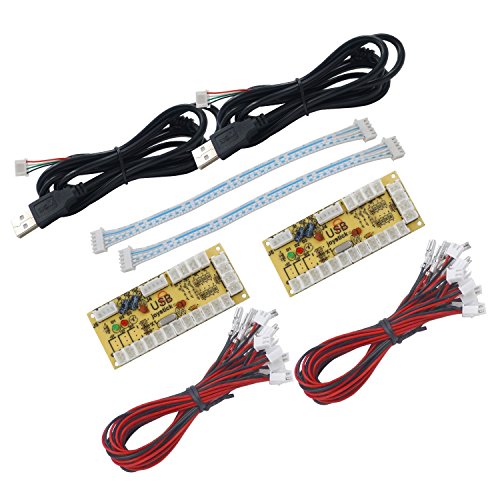
SJ@JX 2-Player Zero Delay Encoder
Guwarry 2-Player LED USB Encoder

ThunderStick Arcade Spinner for Arcade1Up

8BitDo All-Button Arcade Controller

Qenker 2-Player LED Arcade DIY Kit
A Deeper Look At The Lineup
Spinners usually mean cutting into a control panel, wiring through an encoder, and hoping the rotation feels right. The GRS USB Button Hole Spinner skips most of that pain by fitting into a standard 28mm button hole, the same cutout you already use for Sanwa or HAPP-style buttons. It ships with two action buttons and a USB cable, so you can drop it into an existing panel without redesigning the layout.
Setup is genuinely beginner-friendly on Windows, Linux, Mac, or Raspberry Pi. Hold both buttons for ten seconds to flip between X and Y axis input, which matters because some titles expect horizontal rotation and others want vertical. For Tempest, Centipede, or Breakout clones, that axis swap is the kind of small detail that makes the spinner feel native instead of a square peg in a round hole.
Advantages To Know
- Smallest form factor in the lineup, so it fits crowded control panels where a full spinner module would never seat properly.
- Plugs straight into a PC or Pi with no separate encoder board required, cutting your build’s wiring complexity in half.
- Axis swap trick via button hold means one hardware purchase covers both horizontal and vertical spinner games.
- Two included action buttons give you a usable test rig before you wire a full panel.
Worth Noting
- You give up the heft of a full-size spinner, so the rotational feel reads lighter than a Pac-Man or Arkanoid-class arcade original.
- Documentation is thin, and the ten-second axis swap is the kind of feature you only discover by accident.
Feature Snapshot
Made For
Modders squeezing a spinner into an existing Arcade1Up or bartop with no room for a chunky module.
Look Elsewhere When
You want the rotational weight of a true arcade part, in which case the Guwarry 2-Player LED USB Encoder paired with a traditional spinner wheel will feel closer to the original.
An encoder is the little board that translates joystick and button presses into USB keystrokes your PC understands. The BEYEE 2-Player kit covers two full players on a single board, and “zero delay” in this category means no intentional input lag, which matters for fighting games where one frame decides a round.
Wiring lands on 4.8mm quick-disconnect terminals, the size that matches HAPP-style joysticks and buttons. That compatibility is the practical reason this kind of board became a DIY staple. You snap the connectors on, plug the USB into a PC, MAME build, or Raspberry Pi, and the system maps the inputs as a generic gamepad with no driver hunting required.
Useful Touches
- Two players on one board keeps your wiring tree small and your USB ports free.
- Zero-delay design delivers the responsiveness fighting and shmup players expect from a custom rig.
- HAPP-style 4.8mm terminals accept the most common American arcade parts without adapters or soldering.
Points To Keep In Mind
- Documentation is sparse, so first-time builders may spend an evening watching tutorial videos before the wiring clicks.
- No LED power outputs, so light-up buttons need a separate power supply wired in alongside this board.
Right Fit For
DIYers building a two-player MAME or Pi-based cab on a tight parts budget who already own HAPP-style hardware.
Skip It When
Your build centers on Sanwa Japanese-style parts, in which case the EG STARTS Zero Delay USB Encoder with its 5-pin joystick and 2.8mm button terminals is a cleaner match.
The Reyann board is the one longtime MAME builders have been quietly recommending for years. It shows up in more custom cab builds than almost any other encoder in this niche, and the design hasn’t drifted far from that original form factor. American-style joysticks and HAPP buttons drop straight onto the 4.8mm terminals, which is the practical reason it stays relevant.
Plug-and-play is the headline feature. The board enumerates as a generic game controller on Windows, Mac, Linux, and Raspberry Pi 1, 2, and 3, so you spend your build time on the panel and not on driver setup. MAME, RetroPie, and most PC fighting game emulators map the inputs without extra configuration, which keeps your project moving on a Saturday afternoon.
A Few Highlights
- Tracks as a standard HID gamepad, so no custom drivers or config files to chase down.
- Works across the whole Raspberry Pi lineup, including older Pi 1 and 2 boards still running in legacy cabs.
- Zero-delay input handling keeps combo timing honest in fighting and shoot-em-up titles.
- 4.8mm quick-disconnect terminals accept the most common American arcade wiring harnesses without modification.
Honest Caveats
- The single-board format is generous, but a two-player build requires a second board or a daisy chain, so wiring count grows fast.
- Owners commonly report that the included wiring harness uses thin gauges, which works but feels flimsy in a permanent build.
Key Specs
Best Suited To
Builders constructing a single-player MAME panel or a multi-board multi-player rig who want the broadest community-tested option.
Reach For A Different Pick When
You want a clean two-player build with fewer boards, in which case the Easyget 2-Player Zero Delay Encoder handles both players on one PCB.
Sanwa is the Japanese joystick brand that anchors most tournament-grade fight sticks, and its parts use a different terminal size than American HAPP hardware. The EG STARTS encoder is built specifically for that 5-pin joystick and 2.8mm button wiring, so the parts seat cleanly with no adapters or rewiring.
That terminal difference is the whole reason this board exists as a sibling to the Reyann and BEYEE options. Build a panel around Sanwa parts and reach for a 4.8mm encoder, and you’ll spend the afternoon trimming or splicing wires. This board sidesteps the mess entirely.
A Favorable Mix
- 5-pin joystick connector accepts Sanwa and similar Japanese-style sticks without harness modification.
- 2.8mm button terminals match the smaller Sanwa button lugs used on most imported arcade parts.
- Zero-delay design carries over from the broader encoder family, so the responsiveness carries over too.
Practical Considerations
- You give up HAPP 4.8mm support, so a mixed Sanwa and HAPP build needs a different board or adapter cables.
- Some users may find the lack of LED power outputs limiting if a light-up panel is part of the plan.
Perfect Match For
Fight stick modders and Japanese-hardware purists who standardize their cab on Sanwa joysticks and buttons.
Swap It Out When
You prefer American-style HAPP parts, in which case the Reyann Zero Delay USB Encoder covers the same zero-delay role with 4.8mm terminals.
Two-player cabs run into the same wiring problem every time. One board per player means two boards, two USB cables, and twice the cable management. The Easyget encoder crams both players onto a single PCB, which keeps the inside of your cabinet looking less like a bowl of spaghetti.
RetroPie support is the reason this board shows up in so many Pi projects. RetroPie is the popular Raspberry Pi software bundle that turns the small computer into a multi-system arcade, and it expects generic gamepad HID devices, which is exactly how this encoder presents itself. You flash your SD card, plug the board in, configure once, and your two-player setup just works across MAME, Neo Geo, and the classic console cores.
Positive Takeaways
- Single-board two-player design simplifies cable routing inside the cabinet.
- Confirmed RetroPie compatibility removes the configuration guesswork for first-time Pi builders.
- Supports Raspberry Pi 1, 2, and 3, so older Pi boards still earn a role in a new build.
- Generic gamepad HID profile works with MAME, console emulators, and most PC fighting games.
Where It Is Less Suited
- No dedicated LED power outputs, so adding light-up buttons means wiring a separate supply.
- You may find the documentation minimal if it’s your first encoder install.
Who Should Grab It
Hobbyists building a two-player RetroPie bartop or pedestal cab who want a clean single-board backbone.
Not Your Match When
Your panel design calls for LED buttons and you want one wiring harness instead of two, in which case the Guwarry 2-Player LED USB Encoder solves both problems in one board.
Where most two-player kits lean HAPP, the SJ@JX kit targets Sanwa. The included harnesses and terminal layout are designed to drop straight into Sanwa joysticks and Sanwa buttons, which are the parts most Japanese arcade imports and modern fight sticks rely on. If you’ve standardized on Sanwa across your cab, this is one of the cleaner two-board pairings you’ll find.
The two-pack ships two zero-delay boards, so a two-player build stays compact without daisy-chaining extra PCBs. Plug-and-play recognition across Windows and RetroPie means the system treats the boards as standard HID gamepads, which is the same plug-and-play behavior you’d get from a console controller.
Where It Delivers
- Sanwa-specific terminal layout means no harness modifications on Japanese-style parts.
- Two boards in the kit cover a complete two-player rig without extra purchases.
- Cross-platform support covers Windows, MAME, and Raspberry Pi RetroPie projects from one purchase.
Potential Compromises
- Sanwa focus means mixed Sanwa and HAPP builds need a second board type, which adds cost.
- No LED power outputs on the board, so light-up Sanwa buttons need an external power tap.
Whose Shelf It Belongs On
Fight stick and JAMMA-cab builders who already own Sanwa parts and want a two-player kit without re-terminating anything.
A Better Fit Elsewhere
You prefer a single-board LED-capable design for a smaller cab, in which case the Guwarry 2-Player LED USB Encoder covers both players and powers light-up hardware on one PCB.
Light-up buttons look great until you wire them. Most zero-delay boards have no way to power LEDs, so you end up adding a second power supply, running parallel wiring, and hoping the polarity matches across daisy-chained buttons. The Guwarry board folds three 5V outputs onto the encoder itself, so the LED chain runs from the same board that reads your inputs.
That built-in power is the headline feature, and the rest of the board is familiar territory: HAPP-style 4.8mm quick-disconnect terminals, two-player support, and standard HID gamepad enumeration. The Guwarry is a particularly strong fit for Arcade1Up mods because those cabinets often already have light-up buttons that need a 5V feed.
Real-World Strengths
- Three 5V outputs remove the need for a separate LED power supply in most cab builds.
- Two-player support on one PCB keeps the USB and wiring tree compact.
- Direct compatibility with HAPP joysticks, HAPP buttons, and Arcade1Up light-up hardware.
- Standard HID gamepad recognition works across PC, Mac, Raspberry Pi, and Arcade1Up mods.
- JST XH2.54 to 4.8mm quick-disconnect plugs make the LED harness connection tool-free.
Trade Offs
- LED feature is wasted on builds with non-illuminated buttons, in which case a simpler board costs less.
- Adding LED wiring means the build time runs longer than a basic encoder install.
Feature Card
Who Will Love This
Cabinet modders adding light-up buttons to an Arcade1Up or full-size MAME build who want a single-board power and input solution.
Consider Something Else When
You want a quick weekend swap without LED wiring, in which case the BEYEE 2-Player Zero Delay USB Encoder keeps the install simple and the parts count low.
Arcade1Up cabinets ship with a 12-in-1 or 6-in-1 interface board that talks to a fixed set of inputs. The ThunderStick spinner was designed to drop into that ecosystem and add a real rotary spinner where the cab’s stock controls only support a trackball or joystick. For Tempest-class games, that distinction is the difference between playing and struggling.
The spinner connects through the cabinet’s 12-in-1 interface board, which means no driver install and no custom wiring harness. You pull the existing control panel, mount the spinner into a 28mm hole, and connect it to the interface board. For supported cab models, the install lands somewhere between easy and satisfying.
What Works In Its Favor
- Native support for Arcade1Up 12-in-1 and 6-in-1 boards means no separate encoder purchase.
- Direct compatibility with Windows, Linux, and macOS via the interface board.
- Drop-in rotary control transforms a Tempest-incapable cab into a Tempest-capable one.
Smaller Caveats
- Not compatible with Counter Cade, Party Cade, or Legacy Tempest 12-in-1 cabs, so verify your cabinet model first.
- Single-cabinet scope means this isn’t the part you reach for in a full custom build, where a generic encoder is more flexible.
Built With In Mind
Arcade1Up owners with a 12-in-1 or 6-in-1 cab who want a real spinner without converting the whole cabinet to a generic encoder setup.
Another Choice May Suit
You own a different cabinet type or want a generic spinner for a custom build, in which case the GRS USB Button Hole Spinner works across any 28mm hole on any platform.
Every other pick on this list is a component. The 8BitDo All-Button Arcade Controller is a finished product, a slim, leverless pad designed for Xbox Series X, Xbox One, and Windows. You take it out of the box, pair or plug it in, and start playing. For people who want the feel of an arcade stick without the cabinet work, this is the part of the list to read.
The “leverless” layout removes the joystick entirely. Directional inputs come from a quad-movement button arrangement, which is the design that serious fighting game players have gravitated toward for cleaner motion inputs. The slim profile, about the size of an A4 sheet and roughly 1.6 cm thin, lives happily next to a TV stand or packs into a bag for travel.
Benefits That Matter
- Officially licensed Xbox compatibility removes the “does it work with my console” question.
- Leverless all-button layout delivers the precise motion inputs fighting game players prefer.
- Slim A4-sized footprint fits in tight living room setups and travel bags alike.
- Wireless 2.4GHz on Xbox and Windows means no cable management for couch play.
- Quad-movement design executes quarter-circles, half-circles, and charge motions with predictable timing.
Worth Bearing In Mind
- You skip the rotary spinner entirely, so Tempest and Centipede are out of reach on this pad.
- The all-button design has a learning curve for players coming from a traditional joystick.
The Right Fit
Console fighter fans who want a finished arcade-style pad without building a cabinet or wiring a kit.
Where Another Pick Suits Better
Your goal is a real spinner for Tempest and Centipede on a cab, in which case the GRS USB Button Hole Spinner or the ThunderStick Arcade Spinner for Arcade1Up handles rotary input that this pad cannot.
Most of the kits in this list require you to buy the encoder, the joysticks, and the buttons separately. The Qenker kit puts all of that in one box: two joysticks, twenty LED arcade buttons, and two zero-delay USB encoders. The included hardware lands at 4.8mm-compatible terminals, and the LED buttons get their glow from the encoder or an external 5V feed depending on how you wire it.
For a first-time cab builder, the all-in-one bundle matters more than the spec sheet suggests. Instead of juggling three shopping carts, two shipping windows, and a parts list, you place one order and your panel components arrive together. The heat-resistant plastic on the buttons is a quiet upgrade, since cabinet interiors get warm under stress.
Practical Advantages
- One bundle covers a complete two-player panel, which shortens the planning phase of a new build.
- Heat-resistant button construction holds up to long play sessions in enclosed cabinets.
- Twenty LED buttons give you flexibility for a six-button-per-player layout plus start, select, and extras.
- Two included zero-delay encoders match the boards covered earlier in this list.
Some Limits To Know
- Bundled parts are functional rather than premium, so seasoned builders may swap in higher-end Sanwa or Seimitsu parts later.
- Wiring 20 LED buttons still requires planning around power distribution, so the install runs longer than a one-board swap.
Technical Sheet
Who Should Grab It
First-time cabinet builders who want a single shopping cart and a known-good parts list rather than piecing a build together across multiple orders.
Not Your Match When
You already own a quality set of Sanwa or HAPP parts, in which case the BEYEE 2-Player Zero Delay USB Encoder pair covers the electronics without forcing you to replace your existing hardware.
What To Weigh Before Choosing Your Setup
Start with the controls you already have. HAPP-style joysticks and buttons use 4.8mm quick-disconnect terminals, which fit the Reyann, BEYEE, Easyget, and Guwarry boards out of the box. Sanwa-style parts use 5-pin joystick connectors and 2.8mm button terminals, which match the EG STARTS and SJ@JX options instead. Picking an encoder that doesn’t match your existing hardware is the most common reason a build stalls on the wiring bench.
The second decision is platform. Windows PCs are the most forgiving because every encoder on this list enumerates as a generic HID gamepad. Raspberry Pi with RetroPie works with most boards, though the older Pi 1 and 2 generations have less CPU headroom for high-resolution 3D titles. Console builds on Arcade1Up need a cabinet-specific part like the ThunderStick spinner, since the interface board is not a generic USB host.
Form factor matters more than people expect. A two-player build with single-player encoders means two PCBs, two USB cables, and twice the troubleshooting. A two-player single-board design like the Easyget or Guwarry cuts the wiring tree in half. For tight bartop builds, every extra cable competes for limited interior space.
LED buttons are a separate power problem. The Guwarry encoder handles 5V LED output on the same board, which removes a supply from the parts list. Every other encoder on this list needs an external 5V feed for light-up hardware, which adds wiring and a power brick to the build.
Finally, decide whether you want to build or play. Every other pick on this list is a component, which means soldering, crimping, and a weekend with a wiring diagram. The 8BitDo All-Button Arcade Controller is the only finished product, designed for Xbox and Windows. If building isn’t the point, that’s the pick to read twice.
Things To Watch Before You Click Buy
Wrong Turns To Avoid
The most common mistake is buying an encoder without checking the terminal size. The 4.8mm and 2.8mm connectors look similar, but they don’t seat in each other’s housings, and forcing a fit cracks the terminal. A two-minute check of the joystick and button specs before ordering saves an evening of frustration.
A second trap is assuming every Arcade1Up cabinet accepts the same spinner. The ThunderStick spinner covers the 12-in-1 and 6-in-1 boards, but the Counter Cade, Party Cade, and Legacy Tempest 12-in-1 cabinets need a different version. That detail is worth a model-number lookup before you place the order.
Where The Extra Money Goes
LED-ready encoders like the Guwarry cost more than basic zero-delay boards because they integrate a 5V power section that other boards leave to a separate supply. The price premium is real, and the trade-off shows up in your build time, since one power source is simpler to wire than two.
Higher-grade joysticks and buttons, the Sanwa and Seimitsu parts used in tournament fight sticks, cost several times more than the generic parts in the Qenker bundle. The honest read is that the difference matters most for fighting games, where stick precision and button actuation weight shape competitive play. For a casual MAME or RetroPie cabinet, the bundled parts are usually enough.
Frequently Asked Questions
What is a zero-delay USB encoder?
A zero-delay USB encoder is a small board that connects arcade joysticks and buttons to a computer via USB, with no intentional input lag added between the physical press and the on-screen action. Most boards in this list present as a generic HID gamepad, so the operating system treats them like any standard controller.
Can I use these encoders with a Raspberry Pi?
Yes. Most zero-delay encoders on this list, including the Reyann, BEYEE, EG STARTS, Easyget, and Guwarry boards, work with Raspberry Pi 1, 2, and 3 running RetroPie. The Pi 4 and 5 also work, though their extra processing power is better used for more demanding emulators than for encoder compatibility.
What is the difference between HAPP and Sanwa parts?
HAPP and Sanwa are two major arcade parts brands from different regions. HAPP uses 4.8mm quick-disconnect button terminals, common in American cabinets. Sanwa uses 2.8mm button terminals and 5-pin joystick connectors, standard in Japanese arcade hardware. Pick an encoder that matches the terminal size of the parts you already own.
Do I need a separate power supply for LED buttons?
Most zero-delay encoders don’t supply LED power, so illuminated buttons need an external 5V feed. The Guwarry 2-Player LED USB Encoder is the exception on this list, with three 5V outputs built in for LED buttons, daisy chains, and LED joysticks.
Can I add a spinner to a stock Arcade1Up cabinet?
Stock Arcade1Up cabinets don’t include rotary spinners, but cabs with a 12-in-1 or 6-in-1 interface board can accept a compatible spinner module like the ThunderStick. Other Arcade1Up models, including the Counter Cade, Party Cade, and Legacy Tempest 12-in-1, need a different version of the spinner.
Closing Remarks
The right pick depends on what you already own and how much wiring you want in your weekend. Match the encoder to your joystick and button terminals first, then worry about LED power, board count, and platform. Spinners are a separate conversation, since only a handful of products on this list cover rotary input, and those are the ones to focus on if Tempest or Centipede is the headline game. Build it once, wire it cleanly, and the cab will outlast the next round of consoles.


