


Anime gaming keyboards blend expressive colorways, themed keycaps, and high-performance mechanical or magnetic hardware into a setup that feels personal. Gamers chasing that aesthetic often wrestle with the same trade-off: bold visual design versus genuine competitive responsiveness. The list below pairs stylized boards with serious specs, so your battlestation looks the part and plays the part.
A Side-By-Side Look
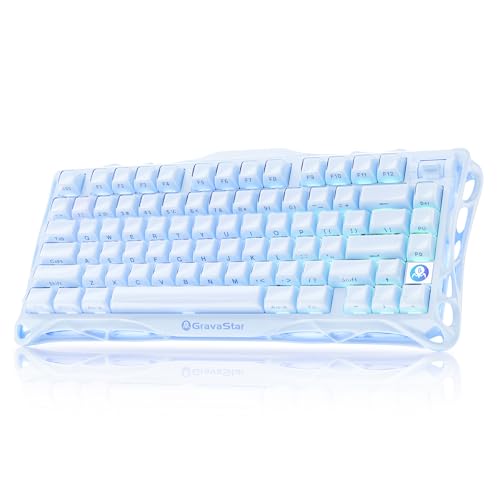
GravaStar Mercury K1 75% Wireless Mechanical Gaming Keyboard
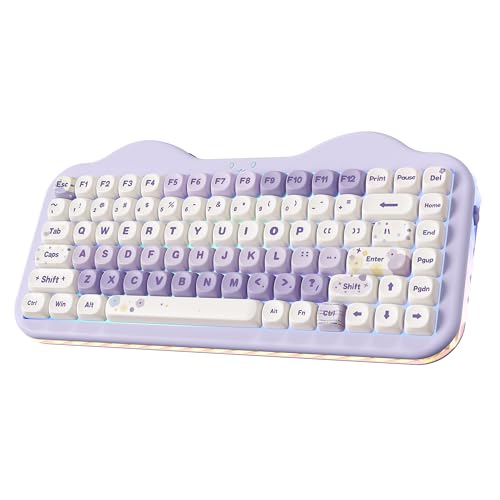
YUNZII C75 Cute 75% Wireless Mechanical Keyboard

Razer Huntsman V3 Pro TKL 8KHz Esports Gaming Keyboard
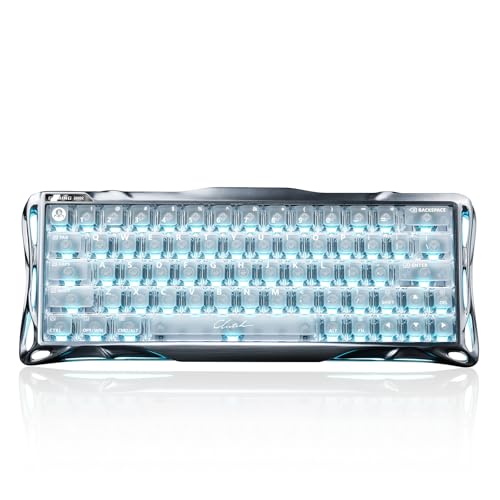
GravaStar Mercury V60 Pro 60% HE Magnetic Gaming Keyboard

Razer Huntsman V3 TKL 8KHz Analog Optical Esports Gaming Keyboard

Razer Huntsman V3 Pro 8KHz Esports Gaming Keyboard

Razer Huntsman V3 Pro Mini 60% Esports Gaming Keyboard

Razer BlackWidow V4 Pro 75% Wireless Gaming Keyboard

Razer BlackWidow V4 TKL Wireless Gaming Keyboard
Razer Pro Type Ergo Wireless Split Ergonomic RGB Keyboard
A Deeper Look At The Lineup
The GravaStar Mercury K1 leans hard into a sci-fi-meets-mech aesthetic, and the 75% layout keeps the desk uncluttered for mouse-heavy play. Where the YUNZII C75 leans pastel and friendly, this one reads like industrial armor, the kind of board that anchors an anime-themed battlestation built around a blue, silver, or gunmetal palette.
Its aluminum shell adds weight that helps it stay planted during long sessions. Depending on your desk lighting, the per-key RGB can either glow softly or stage a full-on light show, which is exactly the range anime-keyboard shoppers usually want.
Everyday Perks
- Aluminum frame gives the board a planted, premium feel during intense play.
- 75% layout leaves more mouse room than a full-size board without sacrificing arrow keys.
- Wireless design removes cable drag, useful for clean desk photos and stream setups.
- RGB backlighting makes keycap art pop, the main reason most anime-themed boards sell.
Worth Noting
- The sculpted design takes desk space you may not have on a smaller surface.
- Wireless mode means you’ll want to keep an eye on battery life during long sessions.
Who It Suits Best
Style-first gamers building a coordinated anime battlestation who still want real mechanical performance and wireless freedom.
Look Elsewhere When
You need maximum mouse-swipe room for low-sensitivity aim, since the Razer Huntsman V3 Pro Mini 60% Esports Gaming Keyboard serves that profile better.
The YUNZII C75 throws out the typical black-box gamer look and embraces a candy-colored design that fits a softer anime aesthetic. The 75% layout squeezes a function row and arrows into a small footprint, so the cuteness doesn’t cost you everyday utility.
It uses pre-lubed-style switches tuned for a creamy, low-noise typing feel, which sets it apart from the clicky clatter you may associate with mechanical boards. For streamers or content creators who want a pretty board that won’t drown out their mic, this fits well.
Positive Points
- Color-driven design that pairs naturally with kawaii and pastel anime themes.
- Compact layout leaves room for mouse movement and decorative desk items.
- Wireless and Bluetooth connectivity cut down on cable clutter for camera-facing setups.
- Smooth switch feel keeps typing noise low compared to typical clicky mechanical boards.
Trade Offs
- Light keycap colors can show dust and oil faster than darker sets, so regular wiping pays off.
- The aesthetic is bold, and minimalist gamers may find the styling too loud.
Made For
Cute-aesthetic shoppers and creators who want a mechanical board that complements a soft anime theme and stays quiet on stream.
Consider Something Else When
You want darker, more industrial styling, since the GravaStar Mercury K1 75% Wireless Mechanical Gaming Keyboard serves that taste.
The Razer Huntsman V3 Pro TKL is built around analog optical switches, meaning each key registers based on how far you press rather than a fixed actuation point. That gives FPS and rhythm players a real edge, because lighter taps fire faster and you can tune actuation to your game.
It runs at an 8KHz polling rate, which is how often the keyboard reports to your PC. A higher polling rate reduces input lag at the cost of a bit of CPU overhead, so a fast rig pairs nicely with it. Compared to the V60 Pro’s magnetic tech, Razer’s analog optical approach is more mature in software support.
What Makes Sense
- Adjustable actuation depth lets competitive players tune travel to their reflexes.
- 8KHz polling reduces input lag, a noticeable upgrade over standard 1KHz boards.
- TKL layout keeps the numpad out of the way for wider mouse sweeps.
- Analog optical switches last through heavy use, helpful if you play daily.
Points To Note
- Software tuning is essential to unlock analog benefits, so casual users may leave features on default.
- Premium performance comes with a heavier price tag than entry-level mechanical boards.
Key Product Details
Right Fit For
Competitive FPS and Valorant-style players who want adjustable actuation and care about low input lag more than RGB frills.
Swap It Out When
You want maximum mouse-room and a smaller footprint, since the Razer Huntsman V3 Pro Mini 60% Esports Gaming Keyboard trims the layout further.
The V60 Pro uses Hall-effect magnetic switches, which detect keypresses through magnetic fields rather than physical contact. That removes the debounce delay common in traditional mechanical switches and unlocks features like rapid trigger and ultra-fine actuation tuning, both of which matter in modern FPS play.
Its full aluminum frame pairs nicely with the smaller 60% footprint, giving the board a dense, sturdy feel. The dynamic rapid trigger feature lets you reset key actuation with a tiny upward motion, an edge in games that reward quick counter-strafing. For most desk setups, the 60% layout forces you to relearn some shortcuts via layers.
Where It Delivers
- Magnetic switches deliver near-instant response, ideal for fast, repeated inputs.
- Full aluminum body gives the board a planted, premium feel during heavy play.
- Adjustable actuation at a fine resolution lets you dial in travel precisely.
- 60% form factor frees up significant mouse-pad real estate for low-sensitivity aimers.
Where It May Fall Short
- The 60% layout drops dedicated arrows and function row, so productivity tasks need layer remapping.
- Premium components push it past casual budget expectations.
Whose Shelf It Belongs On
Competitive FPS players with low mouse sensitivity who want the fastest actuation physics and a clean, sculpted board.
Another Choice May Suit
You want analog optical tuning with broader software ecosystem support, since the Razer Huntsman V3 Pro TKL 8KHz Esports Gaming Keyboard covers that need.
The Huntsman V3 TKL sits between Razer’s flagship V3 Pro and the entry-tier Huntsman line, packing analog optical switches and an 8KHz polling rate into a more accessible TKL package. If you don’t need every bell and whistle but want adjustable actuation, this is a smart middle ground.
It also adds Razer Snap Tap, a feature that prioritizes the most recent input when two assigned keys are pressed simultaneously, very useful for strafing and movement-heavy games. The TKL form keeps the numpad out of the way, and keycap art shines under per-key RGB.
Good Reasons To Consider
- Analog optical switches offer adjustable actuation without flagship pricing.
- 8KHz polling rate lowers input lag compared to standard 1KHz boards.
- Snap Tap streamlines opposing key inputs for smoother movement in FPS titles.
- TKL layout works well for both gaming and everyday typing tasks.
Small Caveats
- Some of the most advanced analog customization is reserved for the Pro variants.
- The plastic-heavy build doesn’t feel quite as dense as full aluminum competitors.
Quick Facts
Best Suited To
Esports-leaning gamers who want analog optical performance and Snap Tap without stepping into flagship pricing.
Reach For A Different Pick When
You want a fuller layout for productivity, since the Razer Huntsman V3 Pro 8KHz Esports Gaming Keyboard keeps the numpad and function row.
The full-size Huntsman V3 Pro keeps everything the TKL version offers and adds a dedicated numpad and full navigation cluster. For streamers who bind macros, OBS shortcuts, and chat commands to the numpad, the extra real estate is genuinely useful rather than just nostalgic.
It uses the same Gen-2 analog optical switches with adjustable actuation and rapid trigger, so competitive play isn’t compromised by the larger layout. The longer chassis also gives you a wrist rest option and room for themed keycap sets, an underrated perk for anime-keyboard shoppers.
Notable Upsides
- Full-size layout includes numpad, ideal for macros, shortcuts, and productivity.
- Analog optical switches with adjustable actuation and rapid trigger for competitive titles.
- 8KHz polling rate helps reduce perceived input lag during fast-paced play.
- More room for themed keycap sets, helpful for anime-style customization.
Practical Considerations
- The wider footprint takes serious desk space, which can crowd smaller battlestations.
- Full-size boards leave less room for sweeping mouse movements in low-sensitivity setups.
Feature Snapshot
Who Will Love This
Full-layout gamers, streamers, and content creators who want flagship performance plus the numpad real estate for shortcuts.
Where Another Pick Suits Better
You prioritize compact size for low-sensitivity mouse aiming, since the Razer Huntsman V3 Pro Mini 60% Esports Gaming Keyboard handles that better.
The Huntsman V3 Pro Mini trims everything except the core alphanumeric block, leaving a board that’s small enough to leave serious room for sweeping mouse movements. For low-DPI Valorant or Apex players, that extra mousepad real estate is a meaningful upgrade over a TKL.
It still packs Razer Analog Optical Switches with adjustable actuation and rapid trigger, so you don’t trade competitive performance for the smaller size. The catch is the same as any 60% board: arrows, function keys, and numpad all live behind a layer key.
Well-Handled Touches
- 60% footprint frees up substantial mouse space for low-sensitivity aimers.
- Analog optical switches with adjustable actuation preserve competitive responsiveness.
- Rapid trigger mode helps in fast counter-strafe and reset-heavy FPS play.
- Compact chassis travels well for LAN parties and tournaments.
Possible Compromises
- No dedicated arrow keys or function row, so productivity tasks require layer remapping.
- Smaller chassis can flex slightly during heavy typing compared to full aluminum builds.
Perfect Match For
FPS players who use low mouse sensitivity and need every inch of mousepad for clean, sweeping flicks.
A Better Fit Elsewhere
You want more layout room for typing and macros, since the Razer BlackWidow V4 Pro 75% Wireless Gaming Keyboard offers extra space and a wireless setup.
The BlackWidow V4 Pro 75% is Razer’s feature-stacked take on the compact form factor, complete with a built-in OLED display and Command Dial. The screen shows system metrics, custom GIFs, or profile info at a glance, while the dial handles on-the-fly volume, brightness, and shortcut scrubbing without alt-tabbing out of a game.
It also runs wireless, so the extra screen and dial don’t translate to a cable jungle. Orange tactile switches give you the familiar bump and click feedback without going full linear, a comfortable middle ground for both gaming and typing-heavy sessions.
The Practical Payoff
- OLED display surfaces PC info or custom art without alt-tabbing.
- Command Dial offers tactile control over volume, lighting, and shortcuts.
- Wireless design keeps the desk clean for camera-facing streams.
- 75% layout balances compactness with functional keys.
Details To Watch
- Orange tactile switches can feel clicky enough to bother noise-sensitive roommates.
- Wireless mode requires occasional charging or wired fallback during long marathons.
Product At A Glance
Who Should Grab It
Tinkerers and macro-heavy gamers who appreciate having live system data and a tactile dial right on the keyboard.
Skip It When
You want a simpler wireless TKL without the OLED extras, since the Razer BlackWidow V4 TKL Wireless Gaming Keyboard keeps things stripped back.
The BlackWidow V4 TKL is the straightforward, all-purpose version of Razer’s wireless gaming line, pairing Orange tactile switches with a familiar TKL layout. The hot-swap-compatible socket design means you can swap switch types later without soldering, which is a real perk for anyone who likes to tinker.
It also supports Bluetooth alongside Razer’s 2.4GHz wireless, so toggling between a gaming PC, laptop, and tablet is a quick flip of a switch. Compared to the V4 Pro’s OLED-and-dial setup, this one skips the extras and focuses on reliable wireless performance.
Notable Gains
- Hot-swappable switch sockets let you customize feel without a soldering iron.
- 2.4GHz plus Bluetooth lets you pair multiple devices from the same board.
- TKL form factor is comfortable for both gaming and long typing sessions.
- Orange tactile switches provide clear feedback for everyday typing.
Things To Consider
- Orange switches can feel noisy in shared or late-night spaces.
- Switch feel varies depending on which third-party switches you swap in.
Built With In Mind
Everyday gamers and hot-swap enthusiasts who want wireless convenience without the flagship features or full-size footprint.
Where A Sibling Pick Shines
You want an OLED screen and Command Dial built in, since the Razer BlackWidow V4 Pro 75% Wireless Gaming Keyboard serves that need.
The Razer Pro Type Ergo breaks from the rest of the list with a split ergonomic layout, designed to keep your wrists in a more neutral position during long sessions. The split, combined with a 10-degree slope and adjustable tilt, reduces ulnar deviation, a common source of typing fatigue for content creators and writers.
It uses ultra-low-profile keycaps with spherical indents to match the natural shape of your fingertips, which can speed up typing for those who adjust to the low travel. RGB backlighting still anchors it visually in the anime-aesthetic space, so comfort doesn’t mean sacrificing a colorful look.
What It Does Well
- Split layout and tilt options reduce wrist strain during long typing sessions.
- Low-profile keycaps with finger-shaped indents help fingers settle into place.
- Wireless design keeps the desk clean for both work and play.
- Per-key RGB lets you customize lighting to match themed keycap art.
Potential Sticking Points
- The split layout has a learning curve, so your typing speed may dip briefly during the first week.
- It lacks the analog optical or magnetic switches of the gaming-focused Huntsman line.
Key Attributes
The Right Fit
Writers, programmers, and creators who spend long hours typing and want a more wrist-friendly layout with the option for themed lighting.
Not Your Match When
You want competitive gaming performance with adjustable actuation, since the Razer Huntsman V3 Pro TKL 8KHz Esports Gaming Keyboard is built for that path.
What To Weigh Before Choosing An Anime Gaming Keyboard
Aesthetics matter, but the switch type, layout, and connectivity do most of the daily work. Start by matching the board to your dominant use case, then narrow by feel and theme.
Switch Technology And Feel
Mechanical switches use physical contact for actuation and come in linear, tactile, and clicky varieties. Linear feels smooth, tactile gives a bump, and clicky adds an audible click. The Razer Huntsman V3 Pro TKL and Huntsman V3 Pro Mini use analog optical switches, which let you adjust actuation depth, useful for FPS players who want lighter, faster taps. The GravaStar Mercury V60 Pro uses Hall-effect magnetic switches, which sense keypresses through magnetic fields and remove the debounce delay common in mechanical switches. Magnetic tech is great for fast, repeated inputs but requires software tuning to feel its best.
Layout And Footprint
Layout drives how your desk feels. A 60% board like the Razer Huntsman V3 Pro Mini leaves the most mouse room but hides arrows and function keys behind a layer. TKL boards like the Huntsman V3 Pro TKL keep arrows and a function row while dropping the numpad. A 75% board like the GravaStar Mercury K1 squeezes in a small function column, and full-size boards like the Huntsman V3 Pro keep everything, including the numpad, ideal for productivity and macro-heavy play.
Wireless, Wired, And Polling
Wireless boards, like the BlackWidow V4 Pro 75% and BlackWidow V4 TKL, cut cable clutter for clean desk photos and stream setups, but you do need to keep tabs on battery life. Wired boards never run out of juice. Polling rate, measured in hertz, is how often the board reports input to your PC. A higher rate, like 8KHz on the Huntsman V3 Pro TKL, reduces input lag at the cost of slightly more CPU overhead.
Shopping Smart Across The Anime Keyboard Lineup
Pitfalls Shoppers Hit
A common trap is buying a themed board for its keycap art and ending up with a switch feel you dislike. Check the switch type first, since you’ll feel it on every keystroke. Another miss is picking a 60% or TKL layout for its photo-friendly size and then struggling with productivity tasks that need arrows, function keys, or a numpad. Make sure the layout matches your day-to-day mix of gaming, typing, and creative work.
What The Higher Tier Buys
Premium tiers tend to buy analog optical or magnetic switches with adjustable actuation, faster polling rates, and sturdier aluminum frames. Those features matter if you play competitive FPS, where every millisecond of input lag and every fraction of a millimeter of travel can show up in your match results. For casual play, a mid-tier board with reliable switches and a layout you like will serve you well without the flagship markup.
Frequently Asked Questions
What Is An Anime Gaming Keyboard?
An anime gaming keyboard is a mechanical, optical, or magnetic keyboard designed with anime-inspired aesthetics, often featuring themed keycap sets, vibrant colorways, and RGB lighting to match a personalized battlestation.
Are 60% Keyboards Good For Gaming?
Yes, 60% boards like the Razer Huntsman V3 Pro Mini are popular in competitive FPS because they free up significant mousepad space for low-sensitivity aiming, though they require layer remapping for arrows and function keys.
What Is An 8KHz Polling Rate?
An 8KHz polling rate means the keyboard reports its input state 8,000 times per second, reducing input lag compared to standard 1KHz boards, which is helpful for fast-paced competitive games.
Do Hall-Effect Magnetic Switches Feel Different From Mechanical?
Yes, Hall-effect magnetic switches feel smoother and more consistent because they sense keypresses through magnetic fields, removing the debounce delay found in many mechanical switches, though they require software tuning to fully unlock features like rapid trigger.
Can Anime Keyboards Be Used For Work And Gaming?
Yes, TKL and 75% boards like the GravaStar Mercury K1 and Razer BlackWidow V4 TKL strike a good balance between compact gaming form factors and everyday typing utility for work and school.
The Takeaway
Anime gaming keyboards come in many flavors, from pastel cuteness to sculpted aluminum and split ergonomic comfort. The right pick depends on what you play, how you work, and how much mouse room your setup needs. Pick the switch type and layout first, then let the aesthetic follow, and your battlestation will look and play the part.


