


Mechanical keyboards used to mean committing serious money to a hobbyist build. That changed. Today you can grab a solid mechanical board with hot-swap switches, gasket mounts, and tri-mode wireless without draining your wallet. Whether you’re chasing snappy response times in competitive shooters, want the satisfying thock of linear switches for late-night typing, or simply want RGB that actually looks good on camera, there’s a sensible pick under the enthusiast umbrella.
The trick is knowing what trade-offs come with each price tier. Some boards cut costs on stabilizers and sound dampening. Others skip wireless entirely. A few keep the full-size layout but cheap out on keycaps. This roundup walks through nine options across different form factors, switch types, and connectivity setups, so you can match the right board to the way you actually game and type.
The Essentials At A Glance

GravaStar Mercury K1 Lite 75% Wireless Mechanical Gaming Keyboard

GravaStar Mercury K1 75% Wireless Mechanical Gaming Keyboard
HyperX Alloy Origins Core Tenkeyless Mechanical Gaming Keyboard

COSTOM WK87 75% TKL Wireless Mechanical Gaming Keyboard

MechLands Aula F99 PRO 96% Mechanical Gaming Keyboard
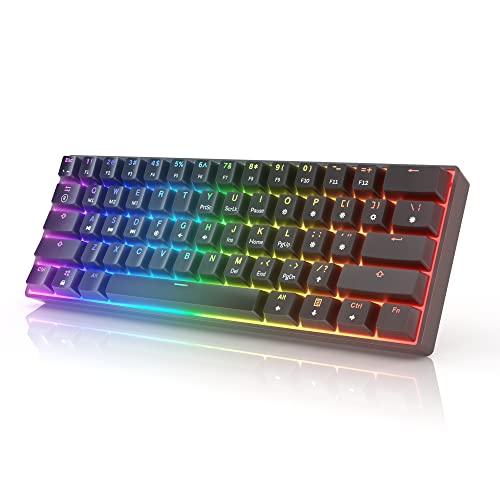
HK GAMING GK61 Mechanical Gaming Keyboard
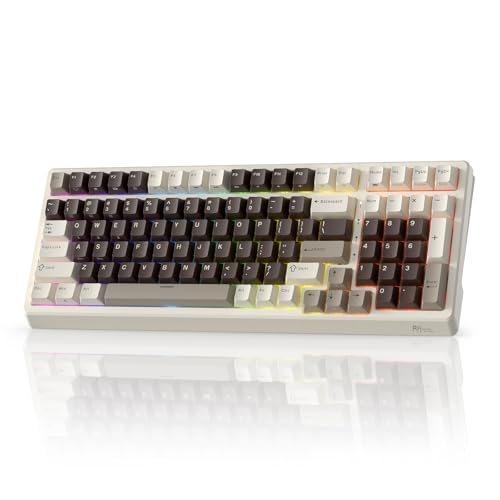
RK ROYAL KLUDGE F99 Wireless Mechanical Keyboard

Redragon K552P Mechanical Gaming Keyboard TKL

Razer Cynosa Chroma Gaming Keyboard
The Picks, Examined More Closely
The Crystal Aurora edition of the Mercury K1 Lite leans hard into visual personality. Translucent keycaps, soft lavender, and icy mint accents turn the keyboard into a centerpiece rather than a peripheral. The 75% layout keeps arrow keys and a function row, which matters for productivity users who want a compact board without giving up navigation shortcuts.
Wireless connectivity is the headline feature here, freeing your desk of one more cable. For streamers and content creators, the RGB diffusion through translucent caps produces a more pronounced glow than opaque boards. Gamers who prioritize pure performance specs may find the K1 Lite leans aesthetic-first compared to the more aluminum-focused K1 Pro further down this list.
Useful Highlights
- Translucent keycaps create layered RGB that diffuses across the desk in low light
- 75% form factor saves desk space while preserving arrows and function row
- Wireless setup reduces cable clutter for streaming or multi-monitor stations
- Compact footprint pairs well with smaller mousepads in apartment setups
Trade Offs
- Translucent keycaps can show dust and oil more readily than opaque sets
- Style-forward design may not blend into conservative office environments
Who It Suits Best
Streamers, content creators, and style-driven desk builders who want personality alongside everyday gaming performance.
Look Elsewhere When
You prefer a metal-bodied board with a more traditional keyboard feel, in which case the HyperX Alloy Origins Core is a stronger match.
The full Mercury K1 swaps the Lite’s translucent novelty for an aluminum alloy exoskeleton with a gradient black finish. That metal frame adds meaningful heft on the desk, which translates to less chassis flex during aggressive typing or when the keyboard lives on a pull-out tray. The flowing curves give it a sculptural quality that sets it apart from standard TKL slabs.
Custom GravaStar x Kailh linear switches power the typing feel, prioritizing smooth key travel over tactile bump or click. For gamers who hold W and A for long stretches in shooters, the linear action keeps inputs consistent. Compared to the Lite model above, this version trades RGB theatrics for a more grown-up aesthetic suited to mixed gaming and work setups.
The Value In It
- Aluminum exoskeleton adds rigidity that cheaper plastic frames often lack
- Custom Kailh linear switches deliver smooth travel for fast-paced gaming
- 75% layout balances desk savings with full function-row access
- Wireless freedom keeps your gaming space flexible for different setups
Honest Caveats
- Linear switch feel may feel flat for users who prefer tactile feedback
- Aluminum body adds noticeable weight, less friendly for travel bags
Feature Card
Right Fit For
Gamers and hybrid work-from-home users who want a wireless board with a premium chassis feel and don’t mind linear switches.
A Better Fit Elsewhere
Hot-swap tinkerers who want to swap switch types without soldering should look at the COSTOM WK87 instead.
The Alloy Origins Core is a textbook tenkeyless (TKL) board, meaning it skips the number pad for a wider mouse area. HyperX builds the chassis from aircraft-grade aluminum, and that rigidity shows up the moment you start mashing keys in ranked play. The TKL layout also makes the keyboard easier to pack for LAN parties or coffee shop gaming sessions.
HyperX Aqua switches give this board a tactile bump without the louder click of traditional blue switches. That middle-ground feel works well for people who game and type in the same sessions. The exposed LED design under each keycap lets RGB shine through cleanly, and the customization software handles per-key lighting plus macro recording. Against the wireless picks above, this one is wired-only, which keeps input lag minimal but ties you to a cable.
What Makes Sense
- Full aluminum body resists flex during aggressive keypresses
- TKL layout frees up mouse space for low-DPI aiming
- Tactile Aqua switches balance gaming precision with typing comfort
- Software-controlled macros and lighting unlock deeper customization
Things To Consider
- Wired-only connection limits flexibility for streaming setups
- Lacks a number pad, so spreadsheet-heavy users may need an external numpad
Made For
Competitive FPS players and esports-leaning users who want a sturdy, wired, tactile board for tournament-style play.
Skip It When
You need wireless freedom for couch gaming or multi-device setups, where the RK ROYAL KLUDGE F99 fits more naturally.
The WK87 crams an enthusiast-style feature set into a wallet-friendlier price point. Gasket mounting, where the PCB sits on soft gaskets rather than screwed directly to the plate, is the kind of detail usually reserved for custom builds. The result is a softer, less hollow typing sound compared to tray-mount boards. Pre-lubed POM linear switches back that up with a smooth bottom-out feel.
Three connection modes give you flexibility: 2.4GHz wireless for low-latency gaming, Bluetooth 5.1 for tablets and laptops, and USB-C wired when you want zero compromise. The 5000mAh battery is rated for roughly 400 hours with backlighting off. Hot-swap support means you can pull switches and replace them with 3-pin or 5-pin alternatives without touching a soldering iron, a strong draw for tinkerers who want to experiment.
Everyday Perks
- Gasket mount produces a softer, less pingy typing sound than tray-mount boards
- Tri-mode connection covers gaming, productivity, and mobile devices
- Hot-swap PCB accepts both 3-pin and 5-pin switch alternatives
- 5000mAh battery stretches across roughly two weeks of typical use
Trade-Offs To Consider
- Software for macro and lighting customization may feel less polished than mainstream brands
- Gasket mount delivers a softer feel that some competitive players find too cushioned
Feature Card
Best Suited To
First-time custom keyboard explorers who want hot-swap and tri-mode wireless without paying custom-build prices.
Swap It Out When
You want a more established brand ecosystem with broader software support, in which case the RK ROYAL KLUDGE F99 is a sensible alternative.
The Aula F99 PRO sits in a layout category most people overlook: 96%. That format keeps the number pad and arrow cluster but trims the wasted space around them, giving you a near-full-size footprint without the wide chassis of a traditional 108-key board. A rotary knob rounds out the design, useful for volume, scrolling, or zoom control in creative apps.
Gasket construction carries over from the original Aula F99, softening the typing acoustic compared to hard-mounted boards. Tri-mode connectivity covers Bluetooth 5.0, 2.4GHz wireless, and USB-C wired. For users who bounce between gaming and spreadsheet-heavy work, the 96% layout preserves productivity keys without the desk real estate of a full-size board. Against the smaller picks above, this one trades portability for function coverage.
Useful Touches
- 96% layout retains number pad while shrinking overall width
- Rotary knob adds tactile control for volume and creative software
- Gasket mount reduces hollow sound common in tray-mount boards
- Tri-mode wireless covers PC, laptop, and tablet pairings
Possible Compromises
- Larger footprint than 75% or 60% boards, less travel-friendly
- Rotary knob placement may feel awkward for left-handed mouse users
Whose Shelf It Belongs On
Mixed-use desk setups where gaming sessions share space with data entry, accounting, or creative work.
Where A Sibling Pick Shines
Travel-heavy users or those with tight desk space will get more mileage from the HK GAMING GK61’s compact 60% layout.
The GK61 is a 60% wired board built for people who want the smallest possible desk footprint. Sixty-one keys means no function row, no arrows, and no number pad, just the core letter and modifier cluster. The optical Gateron Yellow switches here work differently from standard mechanical switches: they register keypresses via light interruption, which generally allows faster actuation than traditional metal-contact designs.
Full RGB covers each key individually, and hot-swap compatibility means you can swap in other optical switches without soldering. For pure gaming setups where mouse space matters more than spreadsheet access, the 60% layout is hard to beat. The trade-off shows up the moment you try to type a long document or use arrow-heavy shortcuts, since those require layer toggles.
A Few Strong Suits
- 60% layout maximizes mouse movement space for low-DPI play
- Optical switches offer fast, consistent actuation for fast-paced games
- Hot-swap support lets you change optical switch types easily
- Per-key RGB produces clean, vivid backlight without bleeding
Less Ideal Details
- No dedicated arrow keys or function row requires layer combinations
- Wired-only design limits repositioning on adjustable desks
Feature Card
Who Will Love This
Competitive gamers and minimalist desk enthusiasts who prioritize mouse space over dedicated function keys.
Another Choice May Suit
Productivity-focused shoppers will find the MechLands Aula F99 PRO’s 96% layout more practical for mixed workloads.
The F99 carries a 96% layout similar to the Aula F99 PRO, but RK ROYAL KLUDGE positions it as a strong gasket-mounted value play. The 100-key design packs a number pad, arrows, and function row into a compact chassis, giving you full-size functionality without the wide footprint. PBT keycaps here are a meaningful upgrade over the ABS caps found on many budget boards, since PBT resists shine and oil buildup over time.
South-facing RGB shines through the keycaps more cleanly than north-facing alternatives, which matters if you plan to swap in aftermarket sets later. Tri-mode connectivity covers 2.4GHz wireless, Bluetooth 5.0, and USB-C wired. The gasket mount softens the bottom-out sound and adds a bit of flex, which enthusiasts tend to prefer for long typing sessions.
Key Advantages
- PBT keycaps resist shine and finger oils over months of use
- 96% layout preserves full-size functionality in a tighter footprint
- South-facing RGB plays nicely with most aftermarket keycap profiles
- Tri-mode wireless covers gaming, mobile, and wired scenarios
A Few Limitations
- Gasket feel may feel too soft for users who prefer a firm typing response
- Brand-name recognition lags behind more established keyboard makers
Perfect Match For
Wireless-first users who want a gasket-mounted board with PBT keycaps and don’t need a premium-tier brand badge.
Not Your Match When
You prioritize brand-name software support and ecosystem polish, where the HyperX Alloy Origins Core delivers more refinement.
The K552P has been a gateway mechanical board for years, and the recipe still works. The metal frame adds weight and rigidity that plastic-only boards in this price tier usually lack, so it stays planted during intense matches. Double-shot PBT keycaps here resist fading from UV exposure and finger oils better than the printed ABS caps common in entry-level mechanical boards.
Eighty-seven keys give you a TKL layout that skips the number pad but keeps function keys and arrows. Hot-swappable red switches let you replace individual switches without soldering, which is a rare feature at this price point. The 18 backlight modes are toggled via shortcut keys, and you can dig into deeper customization through Redragon’s downloadable software. Spill resistance adds peace of mind for late-night gaming sessions with drinks nearby.
Advantages To Know
- Metal frame anchors the board during aggressive keypresses
- Hot-swap red switches let you experiment with replacements over time
- Double-shot PBT keycaps resist fading and oil buildup
- TKL layout balances desk savings with full function-row access
Points To Note
- Wired-only design, no wireless flexibility for repositioning
- Software ecosystem is more functional than polished compared to premium brands
Feature Card
Who Should Grab It
First-time mechanical keyboard shoppers who want a proven, no-nonsense TKL board with hot-swap flexibility.
Reach For A Different Pick When
You want wireless connectivity and gasket mounting, in which case the COSTOM WK87 is a more modern alternative.
The Cynosa Chroma is a membrane keyboard wearing a gaming label, and that’s not a knock. Membrane switches use rubber domes instead of individual mechanical switches, which produces a softer, quieter press that fits shared apartments, dorm rooms, and open offices. Razer rates the key life for up to 80 million clicks, which is solid for the category.
Per-key RGB with 16.8 million colors is rare on membrane boards, and Razer Chroma syncs with popular games, Philips Hue, and a wide range of partner gear. Spill resistance protects against the inevitable coffee splash, and Hypershift lets you remap any key to complex macros. For shoppers who want the Razer ecosystem and quiet operation over the tactile snap of mechanical switches, this is a sensible entry point.
Where It Excels
- Membrane switches produce quieter operation than mechanical alternatives
- Per-key RGB with Chroma sync ties into games and smart lighting
- Spill-resistant design handles everyday drink accidents
- Hypershift remapping unlocks complex macros on any key
What To Weigh
- Membrane feel lacks the tactile or linear feedback of true mechanical switches
- Limited key travel reduces typing precision for fast typists
Feature Card
Built With In Mind
Shared-space users, students, and office-adjacent gamers who want quiet operation and a polished RGB ecosystem.
Consider Something Else When
You want the tactile or linear feel of true mechanical switches, in which case the Redragon K552P is a closer mechanical entry.
What To Weigh Before Choosing Affordable Mechanical Gaming Keyboards
Switch Type Shapes Daily Feel
The biggest decision isn’t layout or wireless, it’s switch type. Linear switches press straight down with no bump, which suits fast gaming and smooth typing. Tactile switches add a small bump mid-press that confirms actuation without the noise of a click. Clicky switches add an audible click to that bump, satisfying for some typists but often unwelcome in shared spaces. Optical switches register presses via light, generally offering faster actuation than traditional metal-contact designs. The right pick depends on whether you prioritize speed, feedback, or noise level.
Layout and Form Factor
TKL boards drop the number pad for a wider mouse area, while 60% boards drop arrows and function keys for a tight footprint. 75% boards keep the function row in a compact frame, and 96% boards preserve the number pad in a narrower chassis. For mouse-driven competitive play, smaller is better. For spreadsheet-heavy productivity, a full-size or 96% layout is hard to give up.
Connectivity and Battery Life
Wired boards skip battery anxiety and offer the lowest input lag. Tri-mode wireless boards let you switch between 2.4GHz (low-latency gaming), Bluetooth (mobile and tablets), and USB-C wired. Battery life varies widely. Boards like the COSTOM WK87 rate up to 400 hours with lighting off, which means roughly two weeks of typical mixed use. Run RGB at full brightness and that number drops fast.
Build, Mount, and Acoustic
Gasket-mounted boards sit on soft pads that absorb vibration, producing a softer, less hollow sound than tray-mount boards. Aluminum chassis reduce flex but add weight. PBT keycaps resist shine and oil buildup better than ABS. These details add up to a typing experience that either feels refined or rattly, depending on where the manufacturer invested.
Key Considerations Across These Picks
Common Shopping Slip Ups
A frequent mistake is buying a board without checking switch type compatibility for future hot-swap replacements. A 3-pin-only PCB limits your options; 5-pin support opens more doors. Another trap is overlooking stabilizer rattle, which tends to show up on the spacebar and larger keys. Reading user feedback on stabilizers and sound dampening pays off before checkout.
What The Higher Tier Buys
Spending more generally delivers better stabilizers, gasket mounts, PBT keycaps, and tri-mode wireless. Those upgrades matter most if you type for hours daily or want the soft, deep sound that custom builds are known for. For casual gaming and mixed use, mid-tier boards cover the essentials without the premium. The honest read is that you can land a genuinely good typing experience without paying custom-build prices.


