


Shopping for a new display can feel like a maze of refresh rates, panel types, and curve radii. You want smooth motion, sharp text, and a screen that does not fight your desk setup, all without draining your wallet. This list rounds up ten displays that deliver real gaming performance under typical mid-range price tags, covering everything from compact 24-inch panels to immersive ultrawide canvases.
The Picks In Brief

VisionOwl 18.5 Inch 2K QHD 120Hz Portable Monitor
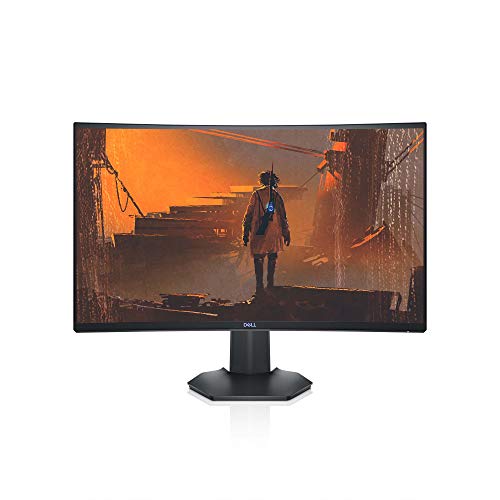
Dell S2721HGF 27 Inch 144Hz Curved Gaming Monitor

KTC H32S17F 32 Inch 240Hz Curved Gaming Monitor

KTC H32C5 32 Inch Curved 280Hz Gaming Monitor

KTC H32S25E 32 Inch 2K 240Hz Curved Gaming Monitor

KTC H24S17P 24 Inch 240Hz Curved Gaming Monitor

KTC 24 Inch QHD IPS 100Hz Zero-Frame Monitor

KTC H34S5 34 Inch Ultrawide 180Hz Curved Monitor

KTC H24B9S 24 Inch FHD 144Hz IPS Monitor

KTC H24F8 24 Inch 180Hz Fast IPS Gaming Monitor
The Strengths Of Each Pick
For travelers, students in cramped dorms, or anyone running hot multiplayer nights on a Switch and PS5, this VisionOwl 18.5-inch portable screen solves a problem most desktop panels cannot: it travels with you. The 2K QHD panel (2560×1440 resolution, which packs noticeably more detail than standard 1080p) and 120Hz refresh rate mean console games render crisply, and the built-in kickstand plus VESA mount compatibility let you set it up almost anywhere.
Unlike every other panel in this roundup, this one is designed to be thrown in a backpack. The matte anti-glare surface helps in coffee shops and bright hotel rooms, and the integrated speakers mean you do not need to fumble for a headset to hear a quick match of Fortnite on the road.
Everyday Wins
- 2K QHD resolution makes text and game detail sharp at this size
- 120Hz refresh rate smooths out console gameplay
- USB-C and HDMI inputs cover most modern laptops, phones, and consoles
- Built-in kickstand eliminates the need for a separate stand on hotel desks
- Speakers onboard, so you can game quietly without packing extras
Things To Consider
- 18.5 inches feels modest as a primary desktop display
- Portable panels tend to attract fingerprints, so a microfiber cloth is worth keeping nearby
Made For
Roamers and console gamers who want a second screen that fits in a carry-on and runs off a single USB-C cable.
Look Elsewhere When
You want a permanent desk centerpiece: the KTC H34S5 ultrawide delivers far more screen area for sim racing and productivity.
The Dell S2721HGF has earned its place as a steady favorite for a reason: it pairs a 27-inch 1500R curved VA panel with a 144Hz refresh rate and a 1ms MPRT response time (MPRT, or Moving Picture Response Time, measures how fast pixels transition during fast motion, so lower numbers reduce blur). For a college student or family PC handling Valorant one night and a spreadsheet the next, that balance is hard to argue with.
Compared to the VisionOwl above, this is a proper desk display with height and tilt adjustment, joystick-style OSD navigation, and VESA mounting for clean setups. Nvidia G-SYNC Compatible certification plus AMD FreeSync Premium (both variable refresh rate technologies that sync your GPU’s frame output to the display, killing screen tearing) keep frame handoffs smooth on the widest range of graphics cards.
Real-World Strengths
- 1500R curve wraps your peripheral vision without feeling aggressive
- 1ms MPRT response time keeps fast pans readable in shooters
- Joystick and shortcut buttons make the on-screen display easy to navigate
- Height and tilt adjustment support long sessions without neck strain
Worth Noting
- 1920×1080 resolution looks softer at 27 inches than 2K alternatives
- VA panels can show slight smearing in dark scenes, an issue you may notice in moody single-player games
Right Fit For
Gamers and everyday users who want a trusted mainstream curved panel with strong brand support behind it.
Reach For A Different Pick When
You want sharper text and more detail: the KTC H32S25E 2K curved monitor upgrades both resolution and curve depth.
Stepping up to 32 inches at 240Hz used to be a wallet killer, but the KTC H32S17F makes the jump surprisingly approachable. Its 1500R curved VA panel delivers motion handling for twitchy shooters, and a 1ms response time keeps ghosting in check. The 1080p resolution on a 32-inch panel produces softer text than 2K displays, so this monitor targets gamers who prize speed and immersion over fine pixel density.
That trade-off is worth flagging: sitting at a typical desk, you may find individual pixels more visible compared to a 27-inch 1080p screen. For couch-style gaming, racing sims, or anyone with a deep desk, though, the immersive scale is the main draw.
Well-Handled Touches
- 240Hz refresh rate keeps competitive motion razor-sharp
- Curved 32-inch canvas dominates your field of view
- Tiltable stand and VESA mount support flexible setups
Trade Offs
- 1080p resolution is looser on a 32-inch panel, so spreadsheets and dense menus look fuzzy
- VA contrast helps but can dim corners in very dark scenes, a common trait of curved VA panels
Who Will Love This
Fast-paced gamers on a tight budget who already sit further from the screen and want a large, smooth display for shooters and racing.
Swap It Out When
You need sharper text: the KTC H32S25E keeps the 32-inch curve but adds 2K resolution for far cleaner detail.
The KTC H32C5 pushes refresh rates higher than the H32S17F above, hitting a 240Hz native rate that overclocks to 280Hz for sheer motion clarity. That extra headroom matters for ranked FPS players who count frames between flick shots. Adaptive Sync pairs with 1ms MPRT response to keep frame pacing tight across both Nvidia and AMD graphics cards.
Specs like 128% sRGB coverage and a 3500:1 contrast ratio are pleasant extras on a monitor focused on speed, while HDR support and a low-blue-light mode help during late-night ranked sessions. The tiltable stand and VESA compatibility keep installation simple.
What Pays Off
- 280Hz overclocked refresh rate reduces motion blur in competitive play
- Adaptive Sync eliminates screen tearing across GPU brands
- 3500:1 contrast gives dark scenes more depth than typical VA gaming panels
Honest Caveats
- 1080p on 32 inches still looks loose up close, so a deeper desk helps
- To fully exploit 280Hz, you need a GPU that pushes those frame rates, meaning mid-range cards may leave the extra headroom on the table
Best Suited To
Esports-focused players with capable GPUs who want every frame advantage a 32-inch curved panel can offer.
Not Your Match When
You value single-player immersion over speed: the KTC H32S25E delivers 2K resolution and a deeper 1000R curve for cinematic moments.
The H32S25E is what happens when KTC takes the 32-inch curved formula and adds sharper detail. A 1000R curve (the tightest curve in this roundup, matching the natural arc of human vision) wraps your peripheral sightlines more aggressively than the 1500R panels above, and the 2560×1440 QHD resolution makes textures and HUD elements noticeably crisper. The 240Hz refresh rate hits via DisplayPort 1.4, while Adaptive Sync works with both FreeSync and G-Sync systems.
Color coverage hits 122% sRGB and the contrast ratio reaches 4000:1, so single-player games and HDR content actually look rich. The 1ms MPRT response time keeps fast motion readable when you swap to competitive shooters.
Notable Gains
- 2K resolution delivers far sharper text and game textures at 32 inches
- 1000R curve surrounds your field of view for cinematic immersion
- 4000:1 contrast ratio deepens shadows and brightens highlights
- HDMI and DisplayPort inputs cover PCs and current-gen consoles
Points To Keep In Mind
- The aggressive 1000R curve can feel intense for productivity work like spreadsheets
- No height adjustment is mentioned in the listed specs, so you may need a VESA arm for ergonomic positioning
Who Should Grab It
Gamers chasing a cinematic single-player experience who also want the speed to drop into competitive modes without switching screens.
Consider Something Else When
You want a flatter panel for office work alongside gaming: the KTC 24 Inch QHD IPS Zero-Frame monitor handles mixed use with a more neutral flat format.
For compact desks, dorm setups, and LAN-tournament go-bags, the KTC H24S17P crams a 240Hz refresh rate and 1ms response into a 24-inch curved chassis. The 1500R curve gives you a wraparound feel without dominating the room, and the 3000:1 contrast ratio is solid for moody games like Alan Wake or late-night single-player sessions.
Versus the Dell S2721HGF, this trades some screen real estate for higher refresh and a more aggressive curve. If your play style involves quick flicks in Counter-Strike 2 rather than sprawling RPGs, that is a worthwhile swap.
The Helpful Details
- 240Hz refresh rate delivers top-tier motion clarity for competitive play
- Compact 24-inch footprint fits on small desks and crowded setups
- Adaptive Sync works across both major GPU ecosystems
Possible Compromises
- 1080p on 24 inches is fine but not particularly sharp compared to 2K panels like the KTC 24 Inch QHD IPS reviewed below
- Smaller screens can feel cramped if you multitask with multiple windows open
Perfect Match For
Competitive players working in small spaces who prioritize frame rate and desk space over pixel density.
Where A Sibling Pick Shines
You want similar speed with more room to breathe: the KTC H32S17F offers the same 240Hz spec on a roomier 32-inch canvas.
The 24-inch QHD IPS monitor steps away from the curved VA crowd and offers a flat IPS panel (IPS, or In-Plane Switching, delivers wide viewing angles and accurate colors, making it a favorite for content work) with 2560×1440 resolution and a 100Hz refresh rate. The three-sided borderless design keeps multi-monitor arrays visually clean, and HDR10 support brightens highlights for movies and supported games.
It runs alongside the KTC H24F8 as a more productivity-leaning sibling. You trade raw gaming speed for sharper text and color accuracy that holds up during photo edits or design projects between matches.
A Few Highlights
- 2K resolution on 24 inches produces crisp, easy-to-read text for office work
- IPS panel delivers wide viewing angles and consistent colors
- Three-sided zero-frame design suits dual-monitor setups cleanly
Small Caveats
- 100Hz refresh rate lags behind the 144Hz and 240Hz options above for fast-twitch gaming
- IPS panels can show slight backlight glow in dark rooms, depending on unit variation
Whose Shelf It Belongs On
Hybrid users who toggle between spreadsheets during the day and casual gaming at night.
Skip It When
Speed is the priority: the KTC H24F8 below pushes 180Hz to 190Hz on the same screen size for competitive edge.
The KTC H34S5 is the only ultrawide in this roundup, and it earns the slot by doing double duty. The 3440×1440 UWQHD panel and 21:9 aspect ratio give you a wider field of view for sim racing and flight games, while PIP and PBP modes (Picture-in-Picture and Picture-by-Picture, which let you display two video sources on the same screen) let you run a second input alongside your main feed. The 180Hz refresh rate and 1ms MPRT response keep fast action clean, and the 4000:1 contrast ratio adds depth to dark scenes.
Ergonomics match the breadth: tilt, swivel, pivot, and height adjustment are all built into the stand, so you can fine-tune the panel for long sessions without resorting to a separate VESA arm.
What Stands Out
- 34-inch ultrawide canvas replaces a dual-monitor setup in a single panel
- 1500R curve wraps the wider screen naturally for immersion
- Full ergonomic stand with tilt, swivel, pivot, and height adjustment
- PIP and PBP support simplify side-by-side workflows
Factors To Consider
- Ultrawide dimensions demand desk depth of roughly 30 inches for a comfortable viewing distance
- Not every game supports 21:9 aspect ratios natively, so older titles may show letterboxing
Built With In Mind
Sim racers, flight sim fans, and productivity-heavy gamers who want one screen that handles work and play.
Another Choice May Suit
You prefer a standard 16:9 panel: the KTC H32S25E keeps the curved 2K experience in a more traditional shape.
The H24B9S is the kind of monitor you recommend to a cousin setting up their first gaming PC. A 24-inch IPS panel with 1920×1080 resolution and a 144Hz refresh rate hits the sweet spot of affordability, smooth motion, and dependable color for everyday use. It also pulls double duty as a work monitor, since the IPS panel keeps colors consistent during late-night study sessions.
Compare it to the Dell S2721HGF above, and you see the trade-off: similar 144Hz motion handling in a smaller flat format with IPS color accuracy, rather than a larger curved VA panel.
What Helps Most
- 144Hz refresh rate smooths everyday gaming and general scrolling
- IPS panel keeps colors consistent across wide viewing angles
- Compact 24-inch size fits on smaller desks and dorm setups
Some Limits To Know
- 1080p resolution is starting to feel dated for productivity use
- Lacks the higher refresh rates of the H24F8 below, so competitive players may want to step up
Who It Suits Best
Students, first-time PC builders, and casual gamers who want a reliable no-fuss display.
Look Elsewhere When
Speed matters as much as savings: the KTC H24F8 jumps to 180Hz on a similar IPS panel for an extra edge.
The H24F8 closes out the list by combining the speed of the H24S17P with the color accuracy of an IPS panel. A 180Hz refresh rate (overclockable to 190Hz) sits on a Fast IPS panel, which delivers the wide viewing angles IPS is known for with faster pixel transitions than standard IPS, reducing motion blur. Color coverage reaches 133% sRGB, and HDR400 support brightens compatible content. FreeSync compatibility keeps frame pacing smooth.
For content creators who moonlight as competitive gamers, this is the panel that does both jobs well. It is also a strong pick if you are editing video on the same screen where you queue for ranked matches.
Features That Help
- 180Hz to 190Hz refresh rate delivers fast, smooth motion for competitive play
- Fast IPS panel offers wide viewing angles and accurate colors for content work
- 133% sRGB coverage gives photos and videos a vivid palette
Worth Bearing In Mind
- 1080p resolution on 24 inches is the same density as the H24B9S, so text sharpness is not its strong suit
- To push past 144Hz, you need a graphics card capable of those frame rates, since older GPUs may top out lower
Who Should Grab It
Gaming-focused creators who edit photos or video between sessions and want a single panel for both.
Not Your Match When
You want sharper text for coding or document work: the KTC 24 Inch QHD IPS Zero-Frame monitor serves that profile better.
What To Weigh Before Choosing Your Next Display
Picking a gaming monitor is less about chasing the highest numbers and more about matching the panel to the way you actually play. Start with size and desk depth: a 24-inch screen suits shallow desks, while 32-inch and 34-inch ultrawide panels need at least 28 to 32 inches of depth for comfortable viewing. The KTC H24F8 and Dell S2721HGF both fit smaller spaces, whereas the KTC H34S5 ultrawide demands a deeper setup.
Next, weigh resolution against refresh rate. A 1080p 240Hz panel like the KTC H24S17P delivers buttery motion, but 2K options such as the KTC H32S25E and KTC 24 Inch QHD IPS offer sharper text and game detail at the cost of needing a more powerful GPU. For competitive shooters, higher refresh wins; for sprawling RPGs and sims, sharper pixels and deeper curves pay off more.
Finally, think about panel technology. VA panels (Vertical Alignment, known for deep contrast ratios) deliver strong contrast and immersive curves but can show slight smearing in dark transitions. IPS panels trade some contrast for color accuracy and viewing angles, which is why creator-leaning picks like the KTC H24F8 use Fast IPS. Match the panel to your mix of gaming, work, and content tasks rather than chasing one spec in isolation.
Smart Spending In The Gaming Monitor Aisle
Where Shoppers Go Wrong
A common slip is chasing the highest refresh rate without checking whether your GPU can push those frames. A 280Hz panel like the KTC H32C5 only feels faster if your graphics card is actually delivering 200+ frames per second in your favorite games. The other trap is ignoring resolution: 1080p on a 32-inch screen looks noticeably softer than 2K, so consider viewing distance before locking in screen size. Finally, do not skip the stand and ergonomics. A VESA-compatible display with a tilt-only stand, like some of the picks above, may need a third-party monitor arm if you want full height and swivel flexibility.
What The Higher Tier Buys
Stepping up to a 2K or 4K gaming monitor usually means sharper text, deeper color coverage, and stronger HDR performance. The KTC H32S25E and KTC 34 Inch Ultrawide demonstrate the jump: 122% sRGB and 4000:1 contrast ratios turn games and movies into richer, more detailed experiences. Higher tiers also tend to add ergonomic stands, factory-calibrated color, and more robust Adaptive Sync implementations. Paying more makes sense once you value pixel density alongside speed, and once your desk and GPU can support the resolution.
Frequently Asked Questions
What Refresh Rate Matters Most For Affordable Gaming Monitors?
For most gamers, 144Hz offers a noticeable jump over 60Hz without breaking budgets, and 240Hz or higher panels like the KTC H32C5 add extra smoothness for competitive titles. If your GPU cannot sustain those frame rates, the visual difference shrinks, so match refresh rate to your hardware.
Is A Curved Monitor Better For Gaming Than A Flat One?
Curved panels, like the KTC H32S25E and Dell S2721HGF, pull the edges of the screen into your field of view for a more immersive feel, especially on 27-inch and larger displays. Flat monitors, such as the KTC 24 Inch QHD IPS, work better for productivity and multi-monitor arrays.
Do I Need G-Sync Or FreeSync On An Affordable Gaming Monitor?
Variable refresh rate (VRR) technologies like FreeSync and G-Sync reduce screen tearing and stutter when your frame rate fluctuates. Most monitors here support Adaptive Sync, which works with both AMD and Nvidia GPUs, making it a worthwhile feature to prioritize.
What Size Monitor Is Best For A Small Desk?
A 24-inch panel, like the KTC H24F8 or H24B9S, is the practical choice for desks under 30 inches deep. Larger curved screens can still work but require more space to avoid sitting too close to the edges.
Can An Affordable Gaming Monitor Work For Console Gaming?
Yes. The VisionOwl 18.5 Inch 2K QHD 120Hz portable monitor includes HDMI and USB-C inputs compatible with current-generation consoles, and most of the panels above support HDMI connections for PS5 and Xbox at 120Hz where the console allows it.
Bottom Line
A great gaming monitor does not require a four-figure budget, and the ten options above show just how far panel quality has come at approachable prices. The honest read is to pick the one that matches your desk, your games, and your GPU rather than chasing a single spec. For most people setting up a balanced rig this year, the KTC H32S25E and the Dell S2721HGF cover the sweet spot of speed, sharpness, and value, with the KTC H34S5 ultrawide waiting for anyone ready to widen the field.


