


Affordable Gaming Keyboard And Mouses can be a real minefield, because the cheap end of the market swings wildly between genuinely solid mechanical builds and featherweight plastic that quits after a semester of late-night sessions. You’ve got form factors to weigh, from compact 60% boards to full-size sets with a mouse in the box, and the wrong choice usually shows up in the first week as sticky switches, a cable that kinks, or a mouse that drags on anything but a perfect pad. This lineup cuts through the noise with ten real options that balance cost, feel, and longevity, and each one is reviewed for a specific kind of player rather than a generic spec sheet.
A Closer Look At The Lineup

HyperX Alloy Origins 60 Mechanical Gaming Keyboard (HyperX Red)

COSTOM WK87 75% TKL Wireless Mechanical Gaming Keyboard (Black)

HyperX Alloy Core RGB Membrane Gaming Keyboard (Black)

Redragon S101 Wireless Gaming Keyboard and Mouse Combo (White)
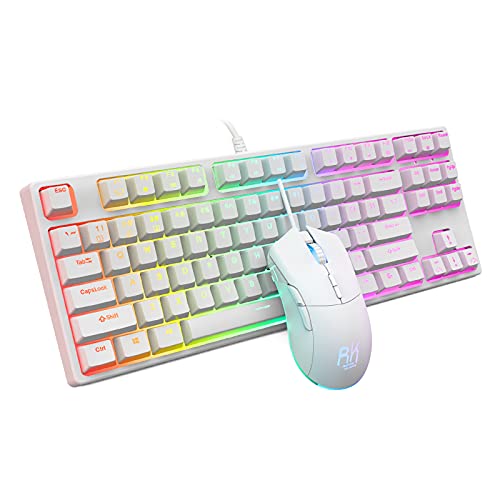
RK ROYAL KLUDGE Gaming Keyboard and Mouse Combo (Blue Switches)

Ajazz AK820 75% Wired Mechanical Gaming Keyboard (Grey White)

Redragon Wireless Keyboard and Mouse Tri-Mode Combo

LEOBOG X Aula Wireless Mechanical Keyboard 8000mAh
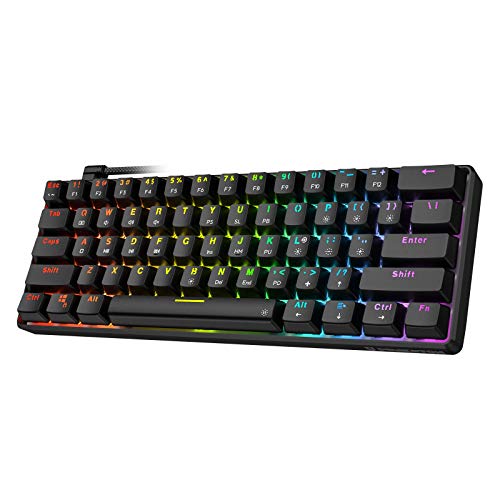
TH61 60% Mechanical Gaming Keyboard (Optical Blue Switch)

Razer Cynosa Chroma Gaming Keyboard
More On The Choices That Made The List
The HyperX Alloy Origins 60 shaves the keyboard down to its essentials, dropping the function row, numpad, and arrow cluster to free up serious mouse real estate. That trade makes it a favorite for FPS players who sweep their mouse across the pad and want the desk to breathe. The full aluminum body gives it a reassuring weight that stays planted during long ranked sessions.
HyperX’s own linear red switches (linear meaning a smooth press without the tactile bump you get on clicky switches) are tuned for fast, quiet inputs, and the double shot PBT keycaps use a two-layer molding process that resists shine even after months of use. Secondary functions sit on the side of each cap, so you can find shortcuts without fighting the layout.
Advantages To Know
- 60% footprint leaves room for low-DPI aiming and wider mousepads
- Linear HyperX switches are balanced for both typing and gaming cadence
- Full aluminum chassis feels sturdy for a board this small
- Double shot PBT keycaps resist the greasy shine that ABS plastic picks up over time
- RGB per-key lighting with NGENUITY software for per-key remapping
Points To Keep In Mind
- No arrow keys or dedicated function row, so muscle memory needs adjustment
- Linear switches may feel flat for anyone who types by touch and relies on a bump
Key Specs
Who It Suits Best
FPS players and minimalists with small desks who want premium feel in a stripped-down board.
Look Elsewhere When
You want wireless freedom, and the COSTOM WK87 is a better match since it adds Bluetooth and 2.4 GHz without giving up the compact footprint.
The COSTOM WK87 sits in a sweet spot, keeping arrow keys and a function row but skipping the numpad for a tighter 75% layout (TKL meaning tenkeyless, so no number pad). Where it pulls ahead of the HyperX Alloy Origins 60 is connectivity: 2.4 GHz wireless for low-latency gaming, Bluetooth 5.1 for hopping between a laptop and a tablet, and USB-C for when the battery runs low.
That 5000mAh battery is the real headline, since it stretches the board across workdays and game nights without forcing a midweek charge. The gasket-mounted design (a mount style where the PCB sits on rubber pads rather than being screwed tight, which softens the typing feel and reduces rattle) with five layers of sound-absorbing padding, paired with pre-lubed POM linear switches, gives a creamy, muted thock that some folks chase in custom builds costing twice as much.
What Earns Its Place
- Triple-mode connection covers gaming, mobile, and office setups
- 5000mAh battery delivers long wireless sessions between charges
- Hot-swappable PCB supports both 3-pin and 5-pin switch replacements
- Gasket mount with multiple sound-absorbing layers for a softer feel
Trade Offs
- Software customization can feel rougher than HyperX’s polished NGENUITY suite
- Brand recognition is thin, so long-term firmware support is less certain
- Wireless mode requires more charging attention than the wired picks on this list
Best Suited To
Tinkerers and multi-device users who want a wireless board that doesn’t feel like a compromise on typing sound.
A Better Fit Elsewhere
You need absolute typing silence for a shared room, and the HyperX Alloy Core RGB delivers that with its membrane design.
The HyperX Alloy Core RGB takes a different road than the other picks here, using a membrane switch design (a single rubber dome under each key that collapses on press, rather than the individual mechanical switches on most gaming boards) to keep noise almost off the table. That makes it a strong option for dorm rooms, shared apartments, and streamers running open mics.
You also get dedicated media keys and a reinforced plastic frame that’s light enough to toss in a bag. The signature HyperX light bar runs along the top, and six lighting effects plus three brightness levels give you enough flair to dress up a basic battlestation without paying for per-key customization.
Where It Excels
- Membrane keys stay whisper-quiet during late-night play
- Dedicated media controls keep volume and playback away from layered shortcuts
- Spill-resistant design handles the occasional drink without panic
Worth Noting
- No mechanical feedback means less precision in fast-paced competitive titles
- Plastic frame is light, which helps portability but feels less planted than the Alloy Origins 60’s aluminum
Feature Snapshot
Perfect Match For
Quiet typists, shared-room gamers, and anyone who treats a microphone as part of the setup.
Swap It Out When
You want the feel of real mechanical switches, and the RK ROYAL KLUDGE combo offers clicky blues plus a mouse for similar money.
The Redragon S101 combo answers the question of what to grab when you need a full-size board and a mouse on the same receipt. It lands 104 keys, including a numpad that spreadsheet users will appreciate, and pairs it with an 8-button gaming mouse that holds its own for casual FPS and MMO play. The white finish brightens up darker setups without screaming for attention.
Macro keys sit above the numpad for binding in-game commands or productivity shortcuts, and a built-in wrist rest keeps wrists at a friendlier angle during long sessions. RGB lighting runs through both the keyboard and the mouse, and the unified look saves the hassle of matching two separate devices.
Notable Gains
- Full-size 104-key layout with a numpad for productivity tasks
- Included wrist rest reduces wrist strain during long typing or gaming sessions
- Bundled 8-button gaming mouse with matching RGB keeps the setup coordinated
- Dedicated macro keys above the numpad for bindings and shortcuts
Honest Caveats
- Full-size footprint demands more desk space than the 60% and 75% picks above
- Mouse DPI (dots per inch, a measure of cursor sensitivity) is modest by competitive standards, so esports-focused players may want something sharper
Whose Shelf It Belongs On
First-time gaming PC owners who want a full kit without piecing a keyboard and mouse together separately.
Reach For A Different Pick When
Competitive FPS is the priority, and the Redragon Tri-Mode combo with its 61-gram mouse is a better speed-focused alternative.
The RK ROYAL KLUDGE combo brings real mechanical switches into a budget combo, using blue switches that deliver the classic clicky bump and audible click. For typists and gamers who want every keystroke confirmed by both feel and sound, that feedback is the whole point of a mechanical board, and this set keeps the entry cost reasonable.
The 87-key TKL layout drops the numpad for more mouse room, and the included mouse runs up to 7200 DPI across six adjustable steps, so you can tune sensitivity on the fly. Software support lets you rebind keys and record macros, and 17 RGB backlight modes add plenty of visual flavor for a starter setup.
Where It Delivers
- Clicky blue switches give crisp feedback for typing-heavy play
- Mouse reaches 7200 DPI with six adjustable sensitivity steps
- Software support enables key remapping and macro recording
Some Limits To Know
- Clicky switches get loud in shared spaces, unlike the silent HyperX Alloy Core RGB
- Combo mouse is solid but not as light as the Redragon Tri-Mode’s 61-gram option
Feature Card
Who Should Grab It
Mechanical fans who want both a keyboard and a mouse in one order and prefer a tactile, loud typing feel.
Not Your Match When
You need wireless freedom, and the COSTOM WK87 covers that ground with Bluetooth and 2.4 GHz options.
The Ajazz AK820 leans into the custom-keyboard community’s favorite trends, with a gasket-mounted chassis and five layers of sound-dampening padding that give it a deep, muted thock. It’s the kind of refinement that, until recently, you’d only see on boards costing noticeably more. The grey-and-white colorway keeps it clean enough to fit a work desk and a game setup side by side.
A metal volume knob on the top right adds physical control, and hot-swappable switches let you swap in different feel options without soldering. PBT keycaps round out the build with a textured surface that resists shine through months of daily use.
Noteworthy Benefits
- Volume knob allows fast audio adjustments without tabbing out
- Hot-swappable PCB invites custom switch experiments down the road
- PBT keycaps stay matte and grippy through heavy use
Less Ideal Details
- Wired-only design leaves cable management to figure out
- 75% layout is tighter than full-size, so spreadsheet-heavy workflows lose the numpad
The Right Fit
Custom keyboard enthusiasts entering the hobby who want gasket feel and hotswap without a full DIY build.
Where A Sibling Pick Shines
Battery life matters more than tactile refinement, and the LEOBOG X Aula’s 8000mAh battery handles long wireless sessions with ease.
The Redragon Tri-Mode combo earns its place with a mouse that weighs in around 61 grams, which lands in the territory of dedicated esports mice. That featherweight feel makes tracking and flick shots noticeably easier in fast FPS titles, and 4800 DPI is more than enough for most desk sizes.
The keyboard leans into a mechanical-feel membrane design with a clicky response that borrows the sensation of mechanical switches at a friendlier price. Tri-mode connectivity covers 2.4 GHz wireless, Bluetooth, and USB-C wired use, and four macro keys give you room to bind without drowning in extra buttons.
Why It Works Well
- Sub-65-gram mouse helps reduce arm fatigue during long sessions
- Tri-mode connection handles wireless, Bluetooth, and wired in one package
- Four macro keys support bindings for MMO and MOBA players
Things To Consider
- Keyboard switch feel is mechanical-inspired rather than true mechanical
- Mouse sensor is solid but not on the level of dedicated flagship esports sensors
Built With In Mind
FPS players who want the lightest possible mouse paired with a wireless keyboard under one order.
Where A Sibling Pick Shines
You prefer a real mechanical keyboard feel, and the RK ROYAL KLUDGE combo offers clicky blues at a similar price.
The LEOBOG X Aula makes its case with sheer battery capacity, packing an 8000mAh cell that pushes well past the runtime of any other pick in this lineup. For people who forget to plug things in (or simply hate doing it), that translates to days of wireless use between charges, depending on backlight intensity.
Triple-mode connectivity lets you jump between Bluetooth 5.0, 2.4 GHz wireless, and USB-C, and the board supports up to five paired devices for fast switching between a desktop, laptop, tablet, and phone. The “creamy” descriptor points to a tuned, sound-absorbing internal structure that produces a smooth, rounded typing noise.
Features That Help
- 8000mAh battery stretches wireless use across multiple work and play sessions
- Multi-device pairing supports quick switching across five devices
- Triple-mode connection covers Bluetooth, 2.4 GHz, and USB-C
Practical Considerations
- Larger battery adds a bit of weight compared to lighter wireless boards
- Brand support and software polish are thinner than HyperX or Razer ecosystems
Made For
Power users and remote workers who want a wireless mechanical that lasts through a week of mixed use.
Consider Something Else When
You want the tightest 60% layout for FPS play, and the HyperX Alloy Origins 60 is purpose-built for that scenario.
The TH61 takes the 60% format on the road, fitting in a backpack pocket while still delivering true mechanical feel through optical blue switches. Optical switches use a light beam to register keypresses instead of metal contacts, which speeds up actuation and improves long-term durability compared to traditional mechanical switches.
That optical actuation also opens the door to IPX4 water resistance, meaning splashes from a tipped drink drain off the board through built-in channels rather than frying the internals. With 13 preset RGB effects plus custom modes, the lighting does the visual work of a much larger board in a tighter package.
The Practical Payoff
- Optical blue switches actuate quickly and resist wear over time
- IPX4 splash protection handles accidental drink spills
- Compact 60% layout fits easily in a laptop bag
Room For Improvement
- Hot-swap support is limited to optical switches, not standard mechanical
- Companion software currently supports Windows only, not Mac
Best Suited To
Travelers and LAN party regulars who need a compact, spill-resistant board with real switch feedback.
A Better Fit Elsewhere
You need wireless connectivity, and the COSTOM WK87 covers the compact-and-wireless combination.
The Razer Cynosa Chroma closes the list with a membrane board (membrane meaning a single rubber dome layer under the keys, which keeps typing soft and quiet) that punches above its feel thanks to the Chroma ecosystem. Each key carries its own LED, so you can run game-synced lighting, per-key reactive effects, or integrations with Hue and other Chroma-aware gear.
Razer’s Hypershift feature unlocks macro remapping across the entire keyboard, and anti-ghosting with 10-key rollover (N-key rollover is the ability to register many simultaneous keypresses without misses; this board handles 10 at once) keeps multi-key combos from dropping inputs during frantic play. Spill resistance and cushioned keycaps keep daily use comfortable.
Bright Spots
- Chroma RGB syncs with games and compatible accessories for unified lighting
- Per-key remapping through Hypershift adds flexibility for any genre
- Cushioned, quiet keycaps suit long daily use
Potential Drawbacks
- Membrane feel can’t match the tactile bump of the RK ROYAL KLUDGE’s blue switches
- Full-size footprint takes more desk room than the compact boards above
Feature Snapshot
Right Fit For
Razer fans and RGB lovers who want full Chroma support without paying flagship prices.
Where A Sibling Pick Shines
You want a true mechanical experience, and the HyperX Alloy Origins 60 delivers linear switches in a compact build.
What To Weigh Before Buying Affordable Gaming Keyboard And Mouses
Form Factor Comes First
The size of a keyboard dictates how your desk feels every day, and 60% boards like the HyperX Alloy Origins 60 and TH61 free up enormous mouse space at the cost of dedicated arrows and a function row. 75% and TKL layouts like the COSTOM WK87, Ajazz AK820, and RK ROYAL KLUDGE strike a middle ground by keeping arrows and the function row while skipping the numpad. Full-size boards, including the Redragon S101 and Razer Cynosa, give you every key but demand the most room.
Switch Type Drives The Feel
Linear switches (smooth, no bump) suit fast inputs in FPS and racing games. Tactile and clicky switches, like the blues on the RK ROYAL KLUDGE combo, give a clear bump and audible feedback that many typists prefer. Membrane boards, like the HyperX Alloy Core RGB and Razer Cynosa, trade tactile feedback for quiet operation and a lower entry cost. Optical switches on the TH61 register via light, which speeds up actuation and tends to last longer than standard mechanical switches.
Connectivity And Battery Life
Wired boards (HyperX Alloy Origins 60, Ajazz AK820, Razer Cynosa, RK ROYAL KLUDGE, Redragon S101) skip charging entirely and avoid input lag from wireless interference. Tri-mode and dual-mode wireless boards (COSTOM WK87, LEOBOG X Aula, Redragon Tri-Mode) add flexibility at the cost of more charging attention, and battery capacity varies from a few days to multiple weeks depending on backlight use.
Real-Life Use Scenarios
A shared dorm room favors silent membrane picks like the HyperX Alloy Core RGB or Razer Cynosa. A competitive FPS desk rewards a compact board paired with a lightweight mouse, pointing toward the HyperX Alloy Origins 60 and Redragon Tri-Mode combo. A mixed work-and-play setup benefits from a wireless mechanical with strong battery life, which is exactly the lane the LEOBOG X Aula occupies.
Considerations That Shape The Right Pick
Pitfalls Shoppers Hit
Going by spec sheet alone misses the daily-use feel, since a great-looking board with harsh switches can sour the relationship in a week. Bluetooth-only keyboards tend to disappoint in competitive games because of higher input lag, so 2.4 GHz or wired is the safer call for ranked play. Bundled mice in entry-level combos often lag behind standalone options, so check the mouse’s DPI and weight if competitive performance matters. Compact boards save space but require remapping arrows and function keys, and that learning curve is worth considering before committing to a 60% layout.
Why Top Tier Costs More
Premium picks in this category earn their higher price through better build materials, hot-swap PCBs, gasket mounts, and larger batteries. Aluminum chassis resist flex and stay planted during intense play, while reinforced plastic frames in budget boards save money but feel lighter and less durable. Optical and pre-lubed switches deliver smoother sound and longer lifespans, but they add cost. For most casual players, mid-tier options deliver the best balance, while competitive players and custom-keyboard fans will feel the upgrade difference over time.
Frequently Asked Questions
What size gaming keyboard works best for small desks?
A 60% or 75% layout is the best fit for small desks because it removes the numpad and (in the 60% case) the function row to free up mouse space. The HyperX Alloy Origins 60 and Ajazz AK820 are strong examples, depending on whether you want wireless flexibility or a premium feel.
Are membrane gaming keyboards bad for gaming?
Membrane keyboards, like the HyperX Alloy Core RGB and Razer Cynosa, are not inherently bad for gaming; they simply trade tactile feedback for quieter operation. They work well for casual play, RPGs, and MOBAs, though competitive FPS players usually prefer the faster response of mechanical or optical switches.
Do I need a wireless gaming keyboard for competitive play?
A wireless gaming keyboard can work for competitive play when it uses a 2.4 GHz connection, which delivers low-latency performance comparable to wired. Bluetooth introduces more input lag and is better suited to general productivity than ranked sessions.
How important is mouse weight in a gaming combo?
Mouse weight matters a lot for FPS play, where lighter mice (around 60 grams, like the Redragon Tri-Mode’s 61-gram option) reduce arm fatigue and let you track targets faster during long sessions. Heavier mice offer more stability for low-sensitivity aiming but can wear down your wrist over time.
Should I buy a keyboard and mouse separately or as a combo?
Combos are a smart way to save money and get matched aesthetics on a single receipt, which works well for first-time setups and casual gaming. Separate purchases let you mix and match specific features, like pairing the HyperX Alloy Origins 60 with a higher-end mouse, once you know your preferences.
Final Verdict
Choosing Affordable Gaming Keyboard And Mouses really comes down to matching the format, switch feel, and connection type to how you actually play, work, and rest your wrists. A compact mechanical like the HyperX Alloy Origins 60 rewards a clean desk and fast inputs, while the COSTOM WK87 and LEOBOG X Aula open up wireless freedom for multi-device routines. The right pick is the one that disappears into your habits and stays out of the way.


