


Building a setup that sounds great shouldn’t require a small loan. The trick is knowing which trade-offs matter for your kind of play, whether that’s late-night ranked matches, weekend story campaigns, or long Discord calls with friends. A solid budget headset can handle all of that if you match the design to your console, your room, and how long you usually play.
This list gathers ten genuinely accessible options, from wired workhorses to long-battery wireless picks, plus a couple of accessories that make any of them easier to live with day to day.
An Overview Of The Picks

6amLifestyle Universal Metal Headphone Holder Under Desk

HyperX Cloud III Wired Gaming Headset (White)

HyperX Cloud Flight 2 Wireless Gaming Headset (White)

HyperX Cloud III Wired Gaming Headset (Pink)

Aproca Hard Storage Case for Astro A50 / A50 X

HyperX CloudX Official Xbox Gaming Headset

HyperX Cloud Alpha Gaming Headset (Red)

HyperX CloudX Stinger Core Wireless Gaming Headset

HyperX Cloud III S Wireless Gaming Headset (Black)
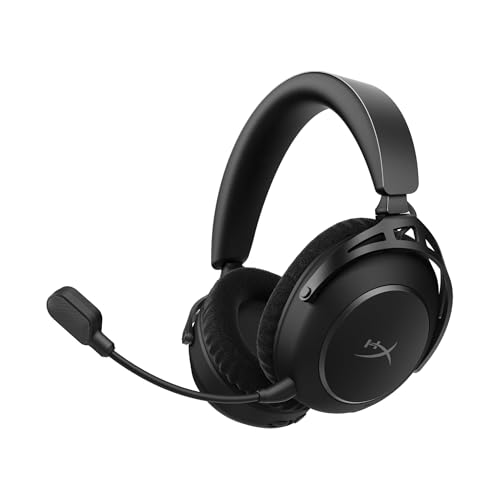
HyperX Cloud Alpha 2 Wireless Gaming Headset
A Breakdown Of The Leading Choices
Headsets tend to take over a desk after a long session, especially the over-ear kind that don’t stack well. The 6amLifestyle holder fixes that without drilling a single hole, clamping under a desk edge so the cans hang beneath the surface, off the keyboard, off the mouse, and out of the way of a morning coffee.
Anyone with a small battlestation or a shared bedroom desk benefits from reclaiming the flat space for a notebook, a second monitor, or just breathing room. It’s the kind of accessory you forget about until you try it.
Benefits That Matter
- Clamp-on design needs no screws or adhesive, so renters and dorm dwellers can use it without losing their damage deposit.
- Around 2.95 inches of arm length fits wide headbands and lets you hang a second pair underneath if needed.
- Metal body supports up to about 11 pounds, so heavier studio-style cans sit on it without sagging.
- Anti-slip rubber on the clamp keeps the holder from drifting on glass or smooth shelf edges.
Points To Note
- Maximum clamp thickness caps at roughly 38mm, so unusually thick butcher-block desks may not take the grip.
- Owners commonly report needing a moment to find the right knob tension so the arm doesn’t slowly droop under heavier headsets.
Feature Snapshot
Right Fit For
Small-space desk setups where flat surface area is precious and a headset usually ends up tossed next to the keyboard.
Skip It When
You’d rather mount something with a proper stand like the HyperX Cloud III Wired Gaming Headset and don’t need overhead storage at all.
HyperX built its reputation on cushioned, durable frames, and the Cloud III continues that approach with retuned 53mm angled drivers and the brand’s signature memory foam throughout the headband and ear cups. The white finish gives it a cleaner look on stream than the usual matte black, which streamers and content creators tend to appreciate.
Wired design means zero charging anxiety, which is the right call for marathon sessions or tournaments where you simply cannot have a headset die mid-round. Compared with the 6amLifestyle holder from earlier, this is the actual audio side of the equation, designed to be worn for hours, not hung up between rounds.
Standout Benefits
- 53mm angled drivers position sound slightly off-axis, which helps directional cues in shooters feel more natural.
- Memory foam ear cushions distribute clamping pressure well across multi-hour ranked sessions.
- USB-C, USB-A, and 3.5mm connections cover PC, PS5, and Xbox Series X|S without swapping cables.
- The upgraded 10mm mic captures voice clearly enough that friends tend not to ask you to repeat callouts.
Trade-Offs To Consider
- The wired cable can snag on chair arms or monitor stands during long play, depending on your cable routing.
- Leatherette ear cups tend to warm up in hot rooms, which is worth knowing for summer gaming.
Made For
Multiplatform players who want one headset for PC, PS5, and Xbox Series X|S without juggling wireless dongles or proprietary receivers.
A Better Fit Elsewhere
Cord-cutters who want Bluetooth convenience should look at the HyperX Cloud III S Wireless Gaming Headset, which trades the cable for triple-mode wireless.
The Cloud Flight 2 leans into personality, with full-panel RGB lighting and magnetic ear-cup plates that pop off without tools, so swapping colors or designs takes seconds. It pairs that flexibility with up to 100 hours of battery life and simultaneous 2.4GHz plus Bluetooth, meaning your phone calls can come through while the console session keeps running.
Style-focused streamers get the most out of this pick, since the lighting is visible on camera and the swappable plates let the headset match a channel’s branding. Versus the wired HyperX Cloud III, the trade is real: you get wireless freedom and RGB flash, but you also gain a charging habit you didn’t have before.
What Works In Its Favor
- Magnetic ear-cup plates mean no screws, no snaps, no downtime when changing the look between streams.
- Around 100 hours of battery reduces charging to a weekly chore rather than a daily one.
- Dual 2.4GHz and Bluetooth lets the headset handle console audio and phone notifications at the same time.
- Onboard lighting memory stores one profile, so the headset keeps its look even when paired to a new device.
Small Caveats
- RGB lighting is the main battery drain, so turning it off is the practical way to hit the long end of that runtime estimate.
- Wireless mode introduces a faint audio delay that’s noticeable in rhythm games, depending on your sensitivity to latency.
Key Specs
Who It Suits Best
Streamers and RGB enthusiasts who want their headset to match their setup and survive a long broadcast without recharging.
Consider Something Else When
You’re on Xbox Series X|S only and want a direct wireless link, in which case the HyperX CloudX Stinger Core Wireless Gaming Headset pairs without a dongle.
The pink Cloud III is mechanically the same headset as the white version above, sharing the angled 53mm drivers, the memory foam cushions, and the USB-C, USB-A, and 3.5mm connectivity. What changes is the colorway, which matters more than it sounds for a setup that doubles as a personality statement on camera or in a shared space.
Color-coordinated battlestations and themed streaming setups get a lot from this option, since you don’t have to settle for the default black. Gamers who run pink keyboards, pink mice, or soft pastel lighting will find this an easy aesthetic match without sacrificing audio quality.
Real-World Strengths
- Memory foam in both the headband and ear cups helps prevent the hotspot some players get across the top of the skull.
- 53mm angled drivers keep directional audio cues clear enough to track footsteps in competitive shooters.
- Multi-connection support means one headset follows you from a PC to a PS5 to a Switch without buying a second one.
- The detachable mic arm makes the headset easy to wear for music or movies between gaming sessions.
Honest Caveats
- Light colorways tend to show makeup transfer, dust, and wear faster than black, so cleaning frequency goes up.
- Wired-only design limits how far you can sit from the console, depending on your cable length.
Best Suited To
Players building a coordinated pink or pastel setup who care about aesthetics as much as audio and comfort.
Reach For A Different Pick When
You’d rather skip the cable entirely and step up to wireless, in which case the HyperX Cloud III S Wireless Gaming Headset offers a similar comfort profile with more freedom.
The Aproca case is purpose-built for owners of the Logitech G Astro A50 and A50 X wireless headsets, with molded compartments that cradle the headset, charging dock, and cables in their own spaces. It earns its place on a list like this because premium wireless headsets are expensive to replace, and a hard case is far cheaper than a single cracked ear cup.
LAN party regulars, frequent travelers, and anyone who tosses a console setup in a car trunk gets real value from the protection. It’s the kind of accessory that doesn’t change how the headset sounds, but extends how long the headset lasts in real-world use.
Advantages To Know
- Hard EVA shell absorbs shock from drops and rough handling during transport.
- Individual molded slots keep the headset, dock, and cables from rattling against each other.
- Mesh accessory pocket stores charging cables and small adapters without losing them in the foam.
- Reinforced handle makes the case easier to carry between rooms or out to a friend’s place.
Points To Keep In Mind
- Fit is model-specific to the A50 and A50 X, so it won’t accommodate other headsets on this list.
- Owners commonly report the case adds noticeable bulk, which matters for crowded backpacks.
Feature Snapshot
Who Will Love This
Astro A50 owners who travel with their setup, attend LAN events, or simply want a safer storage spot than a shelf.
Look Elsewhere When
You own a HyperX Cloud or Cloud II instead, in which case a more generic protective pouch sized for over-ear cans would suit you better.
Officially licensed by Microsoft, the CloudX targets Xbox One and Series X|S players who want a headset that just works on the console without adapters. The aluminum frame keeps the weight down while adding the kind of structural rigidity that survives a few years of being dropped, shoved in a drawer, or yanked off mid-tantrum.
It’s a sensible step up from bundled accessories, with detachable noise-cancelling mic and in-line audio controls that keep you out of the system menus. Compared with the storage case reviewed just before, this is a different category, the actual headset itself, aimed squarely at console-first players.
Points In Its Favor
- Microsoft licensing means plug-and-play compatibility with Xbox One and Series X|S controllers.
- Memory foam ear cushions handle long Halo sessions without the hotspots cheaper foam tends to develop.
- Detachable mic is easy to remove for music listening, reducing the chance of bending it during transport.
- In-line audio controls let you adjust volume and mute without breaking out of a game.
Worth Bearing In Mind
- Wired-only design means you’re tethered to the controller, depending on your seating distance.
- Leatherette cushions can get warm during summer sessions, which is worth knowing if your room runs hot.
Right Fit For
Xbox One and Series X|S owners who want licensed compatibility and a solid step up from a basic bundled headset without going wireless.
Where A Sibling Pick Shines
Players who want a wireless Xbox experience at a similar level should consider the HyperX CloudX Stinger Core Wireless Gaming Headset, which pairs directly to the console.
The Cloud Alpha introduced HyperX’s dual-chamber driver design, which physically separates bass from mids and highs to reduce distortion at higher volumes. That extra engineering shows up clearly in games with heavy mix design, like atmospheric horror or cinematic RPGs, where subtle details tend to disappear on cheaper headsets.
Audio-leaning players get the most from this pick, since the wider frequency range reveals more of the soundtrack and the spatial cues. Versus the CloudX reviewed just before, the difference is internal: the CloudX is built for Xbox comfort, while the Cloud Alpha chases cleaner sound across all platforms.
Notable Upsides
- Dual-chamber drivers keep bass punchy without muddying dialogue and footstep audio.
- Aluminum frame balances light weight with the durability expected from a daily-use headset.
- 3.5mm connection works across PC, PS4, PS5, Xbox, Switch, and mobile, depending on the device.
- Detachable braided cable resists tangles and tends to last longer than standard rubber cables.
Factors To Consider
- The red and black color scheme doesn’t match every setup, depending on your aesthetic preference.
- No wireless option means you’re always tied to a cable, which can be a real limitation for couch play.
Quick Facts
Who Should Grab It
Players who care about clean audio detail, play across multiple platforms, and want a wired headset that still feels premium in the hand.
Not Your Match When
You want wireless freedom, in which case the HyperX Cloud Alpha 2 Wireless Gaming Headset carries the same dual-chamber design with up to 250 hours of battery.
The Stinger Core uses Xbox Wireless to pair directly with the console, no dongle, no adapter, no USB port sacrificed. For Xbox players tired of juggling wireless receivers behind the TV, that single-cable-free connection is a meaningful quality-of-life win on top of the price.
Casual and mid-core Xbox gamers get the cleanest entry point into wireless audio here, since the setup basically amounts to turning the headset on. Compared with the wired CloudX reviewed earlier, the trade is a battery to manage, but the freedom tends to feel worth it on a couch setup.
Practical Pluses
- Direct Xbox Wireless connection means no USB dongle eating into a controller port.
- Memory foam and leatherette cushions provide a comfortable fit across longer play sessions.
- 40mm drivers paired with Windows Sonic spatial sound add depth to positional audio.
- Lightweight build reduces neck fatigue during all-day couch sessions.
A Few Limitations
- Xbox-only wireless means PC and PS5 use requires a separate connection method, which adds friction.
- Battery life is shorter than the flagship Cloud models, so charging becomes a regular habit.
Built With In Mind
Xbox Series X|S and Xbox One owners who want wireless audio without buying a separate adapter and prefer a lighter, simpler headset.
Swap It Out When
You game across multiple platforms and need wireless everywhere, in which case the HyperX Cloud III S Wireless Gaming Headset handles PC, console, and mobile in one unit.
The Cloud III S Wireless is the most flexible of the Cloud III family, with 2.4GHz wireless, Bluetooth, and Instant Pair on select OMEN laptops. That gives it a real edge for people who hop between a gaming PC, a console, and a phone throughout the day, since one headset can stay on your head across all of it.
Up to 120 hours on 2.4GHz and up to 200 hours on Bluetooth puts charging in the rearview for most users, which matters for travel or long work-from-home stretches. The 53mm angled drivers carry over from the wired Cloud III, so you don’t give up sound quality for the wireless upgrade.
Strong Points
- Triple-mode wireless covers 2.4GHz, Bluetooth, and Instant Pair, depending on your device.
- Up to 200 hours of Bluetooth battery life means occasional gamers can go weeks between charges.
- 53mm angled drivers preserve the directional clarity of the wired Cloud III.
- Detachable mic works well for calls and removes cleanly for media listening on the go.
Where It May Fall Short
- Premium positioning puts it in a higher tier than the wired Cloud III, so budget-focused shoppers may want to look elsewhere.
- Instant Pair only works with select OMEN laptops, which limits that specific feature’s appeal.
Feature Rundown
Perfect Match For
Multiplatform players and remote workers who want one wireless headset to handle gaming, calls, and music across PC, console, and phone.
Where Another Pick Suits Better
Hardcore marathon streamers who want the absolute longest battery life should check the HyperX Cloud Alpha 2 Wireless Gaming Headset, which pushes the number even higher.
The Cloud Alpha 2 Wireless pushes battery life to the extreme, with up to 250 hours on a single charge, depending on lighting and connection settings. It also adds an RGB base station to the package, which doubles as a charging dock and a desk accent.
Streamers, content creators, and anyone who forgets to plug things in benefit from the long runtime. The 53mm dual-chamber drivers carry over the cleaner sound signature from the wired Cloud Alpha, so the audio side keeps pace with the hardware side. Compared with the Cloud III S just before, the difference is mostly about endurance and the included base station.
What Stands Out
- Up to 250 hours of battery life drastically reduces charging interruptions across long work and play weeks.
- 53mm dual-chamber drivers preserve clean separation between bass and detail frequencies.
- Simultaneous 2.4GHz and Bluetooth keeps the headset connected to multiple devices at once.
- RGB base station acts as both a charging dock and a visible accent piece on a desk or streaming setup.
Some Limits To Know
- Maximum battery life depends on disabling RGB and sticking to one wireless mode, so real-world use varies.
- Base station takes up desk space, which is a real consideration for compact setups.
Whose Shelf It Belongs On
Streamers, remote workers, and frequent travelers who want maximum battery endurance and don’t mind a dedicated base station on the desk.
Where A Sibling Pick Shines
Setup minimalists who prefer a simpler charging cable should look at the HyperX Cloud III S Wireless Gaming Headset, which skips the base station for a more compact footprint.
What To Weigh Before Buying a Gaming Headset
A headset is one of the few pieces of gear that touches your head for hours at a time, so the fit and the connection type matter more than the spec sheet suggests. Wired models like the HyperX Cloud III never run out of battery, but they tether you to the controller or PC, depending on cable length and routing. Wireless models like the Cloud III S or Cloud Alpha 2 buy real freedom but introduce a charging habit and a small amount of audio latency that rhythm-game players tend to notice.
Platform compatibility is the next filter. Xbox-licensed options like the CloudX and CloudX Stinger Core pair directly with the console, while generic 3.5mm or USB headsets travel easily between PC, PS5, and Switch. Comfort features, including memory foam, leatherette versus fabric ear cups, and clamping force, are where most budget headsets quietly differ, and a heavier frame can turn a four-hour session into a headache, depending on head shape.
Drivers, Microphones, and Build Materials
Driver size affects how much air the headset can move, which loosely translates to how loud and how full the low end feels. A 53mm driver, as used in the Cloud III family, generally produces a more cinematic rumble than a 40mm driver, depending on tuning. Dual-chamber designs, like the one in the Cloud Alpha, physically separate bass and detail frequencies to reduce the muddiness that single-chamber drivers can introduce at higher volumes.
Microphone quality matters most for team-based games, where callouts need to land clearly. Detachable mics are easier to store and replace, while built-in booms are sturdier but harder to swap. Build materials like aluminum frames tend to survive daily handling better than all-plastic builds, though they do add a small amount of weight.
Key Considerations Across These Picks
Where Shoppers Go Wrong
The most common mistake is buying for a single platform and assuming the headset will follow you to the next one. A wireless Xbox headset that doesn’t support 2.4GHz or Bluetooth becomes a paperweight the moment you swap in a PS5, so it helps to check supported connection types before you commit. Another frequent miss is ignoring clamping force, which is hard to evaluate from photos, but tends to make or break long-session comfort. Cloth ear cups breathe better than leatherette but trap less bass, so the choice depends on your climate and your audio preference.
When Paying More Pays Off
The jump from a basic budget headset to a mid-tier option usually buys better drivers, a sturdier frame, and often wireless connectivity. Going further up the line tends to add longer battery life, advanced connection modes, and accessories like the RGB base station on the Cloud Alpha 2. That extra spend is worth it for streamers, remote workers, and anyone who games daily, since the comfort and convenience gains stack across years of use. Casual weekend players may not need those refinements, and a simpler wired Cloud III can serve them well for a long time.
Frequently Asked Questions
Are wired gaming headsets better than wireless for sound quality?
Wired headsets tend to deliver slightly cleaner audio because they don’t compress the signal for transmission, though the difference is small in modern wireless models. Comfort and convenience usually decide it more than raw sound.
How long should a gaming headset last?
Most mid-range gaming headsets last around two to four years with daily use, depending on cable care, head shape, and how often the cushions get cleaned. Aluminum frames and replaceable ear pads tend to extend that lifespan.
Can I use a console gaming headset on PC?
Most 3.5mm and USB headsets work on PC without extra software, though some Xbox-specific wireless headsets require an adapter for PC use. Checking the connection type before buying helps avoid surprises.
Is memory foam worth it on a budget headset?
Memory foam distributes clamping pressure more evenly than standard foam, which matters most during multi-hour sessions. For shorter play, the difference is harder to notice.
Do gaming headsets work for music and movies?
Yes, modern gaming headsets handle music and movie audio well, especially models with dual-chamber drivers that separate frequencies cleanly. The main trade-off is microphone presence on the cable, which can show up on recordings rather than playback.
Closing Remarks
The right affordable gaming headset comes down to matching connection type, comfort, and battery needs to your actual play style. Console-first players will find the CloudX and CloudX Stinger Core especially easy to live with, while multiplatform gamers get more flexibility from the Cloud III family. Take stock of how long you usually play, where you sit, and what you plug into, and the right pick usually makes itself clear.


