


A 49-inch curved ultrawide can replace two monitors and pull you into a game the way a flat panel never could. The trick is finding one that balances resolution, refresh rate, and ergonomic comfort without forcing you to learn its quirks. This roundup walks through ten options that cover the major use cases, from competitive play to all-day productivity on a single seamless canvas.
A Quick View Of The Lineup
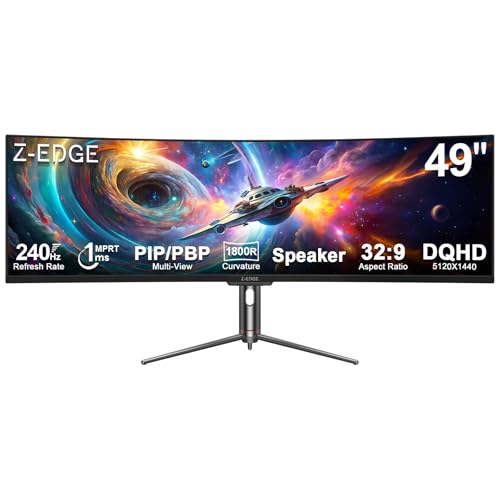
Z-Edge 5K 49 Inch Curved Gaming Monitor, DQHD 240Hz Ultrawide

DJiEX 49 Inch Curved Ultrawide Monitor, DQHD 5K 165Hz

Z-Edge UG49W 49 inch Ultrawide Curved Monitor, DQHD 165Hz
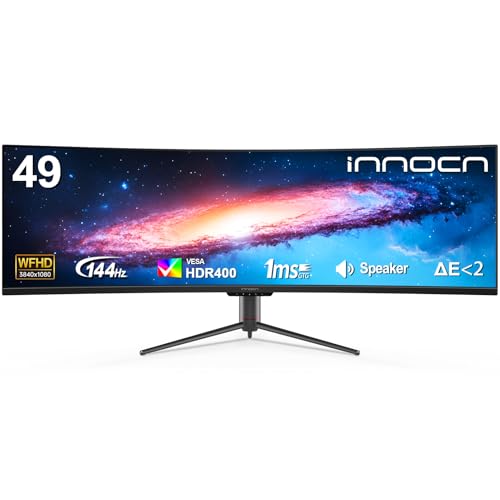
INNOCN 49 Inch Curved Ultrawide 3840×1080 144Hz Monitor

Amzfast 49 Inch Curved Monitor 120Hz DQHD Ultrawide (AMZG49C7U)
Deco Gear 49 Inch Curved Ultrawide 5K Gaming Monitor, White Edition

INNOCN 49 Inch Mini LED Monitor WFHD 144Hz Flat Screen

Deco Gear 49 Inch Curved Ultrawide DQHD Monitor 165Hz USB-C KVM

KTC H49S66 Ultrawide 49 Inch Curved Gaming Monitor, 5K2K 180Hz

Deco Gear 49 Inch Curved Ultrawide Monitor, DQHD 120Hz USB-C KVM
The Strengths Of Each Pick
The Z-Edge 5K 49-inch model leans hard into speed, pairing a 5120×1440 DQHD panel (Dual QHD, essentially two QHD screens fused into one) with a 240Hz refresh rate, which is genuinely rare at this screen size. The 1800R curve wraps your peripheral vision in a way that pays off in racing sims and flight games where spotting motion at the edges changes outcomes. For most setups, the built-in speakers remove a small piece of desk clutter even if they will not replace a real audio setup.
Compare that to the Amzfast option further down, which targets a calmer 120Hz sweet spot: this Z-Edge is the choice for people who want every frame their GPU can push. The stand and VESA mount compatibility keep it flexible for monitor arms, and the aggressive curve helps the panel feel less like a wall and more like a cockpit.
Strong Points
- 240Hz refresh gives esports and racing titles the smoothest motion in this roundup.
- DQHD 5120×1440 resolution handles spreadsheets, timelines, and side-by-side documents without the bezels of a dual-monitor rig.
- 1800R curvature makes the wide canvas easier to scan, reducing the head-turning strain a flat ultrawide can cause.
- Integrated speakers keep the desk minimal for users who stream or game casually without a separate audio system.
Worth Noting
- Running 240Hz at full DQHD resolution demands a strong graphics card, and you may find older GPUs capping well below the headroom this panel offers.
- VA panels at this size and speed sometimes show mild smearing in dark transitions, depending on the overdrive setting you choose.
Key Specs
Who It Suits Best
Competitive gamers and sim-racing enthusiasts who own a high-end GPU and want the smoothest motion this screen class can deliver.
Look Elsewhere When
You prioritize color accuracy and quiet productivity over speed, in which case the DJiEX DQHD 5K 165Hz monitor across the table is a more measured fit.
DJiEX targets the creative side of the ultrawide category with a 5120×1440 DQHD panel, 127% sRGB coverage, and HDR400 support, which together give photo editors and colorists more headroom than typical gaming-focused screens. The 1500R curve is gentler than the Z-Edge 5K’s 1800R, so the panel feels more like a wide desk monitor and less like a cockpit wrap, which some long-session editors may prefer.
G-Sync and FreeSync compatibility keep it relevant for casual gaming on the side. VESA mounting and an adjustable stand mean you can dial in height and tilt without immediately bolting it to an arm, which matters in studios where the monitor moves between collaborators.
Useful Highlights
- 127% sRGB coverage gives creative projects richer color volume than many gaming-first panels.
- 1500R curvature balances immersion with a natural feel for document and timeline work.
- Adaptive-Sync support (G-Sync and FreeSync) reduces screen tearing across both NVIDIA and AMD rigs.
- 1ms MPRT response keeps motion crisp during fast cuts in editing timelines and casual gaming sessions.
Trade Offs
- 165Hz is a meaningful step down from the Z-Edge 5K’s 240Hz, so competitive players will notice the difference in twitch-heavy games.
- HDR400 is an entry-level HDR tier; the highlights look softer than what Mini LED or higher-tier HDR can deliver.
Built With In Mind
Content creators, video editors, and photo retouchers who also enjoy gaming but care more about color than chasing the highest refresh rate.
A Better Fit Elsewhere
Hardcore competitive players who want every frame possible should look at the KTC H49S66, which pairs 5K2K resolution with a 180Hz refresh.
The Z-Edge UG49W focuses on the productivity side of the 49-inch ultrawide category, and the metal stand with height adjustment is one of the more useful touches in this roundup for users who care about desk posture. USB-C connectivity, KVM switching, and PIP/PBP (Picture-in-Picture and Picture-by-Picture, which let you display two input sources at once) mean a laptop and a desktop can share this panel without constant cable juggling.
The 1500R curve and 165Hz refresh land it in a comfortable middle ground between the speed-first Z-Edge 5K and the more creative DJiEX. For hybrid workers who game a few nights a week, this is the most flexible of the three Z-Edge entries here.
The Practical Payoff
- KVM functionality lets one keyboard and mouse control two connected systems, which simplifies a laptop-plus-desktop workflow.
- USB-C input reduces cable clutter on minimal desks where a docking station feels excessive.
- Height-adjustable metal stand supports long working sessions without forcing an immediate VESA-arm purchase.
- PIP and PBP modes let you keep a chat window or trading dashboard visible while focusing on a primary feed.
Soft Spots
- At 165Hz, the gaming ceiling sits below the Z-Edge 5K’s 240Hz, so dedicated esports players may want the faster panel.
Right Fit For
Hybrid users who split time between a work laptop and a personal desktop and want one panel to handle both cleanly.
Swap It Out When
Your setup leans more heavily on console gaming on the side, in which case the Deco Gear 49 inch DQHD 165Hz with dual HDMI 2.1 ports may be a better match.
INNOCN takes a different angle here with a 3840×1080 WFHD panel, which is a lower pixel count than the DQHD competition but a meaningful savings on GPU demand. The 1800R curve and 32:9 aspect ratio keep the wide-format feel intact, and the 144Hz refresh rate still offers a noticeably smoother feel than a standard 60Hz office display.
For casual gamers who want the ultrawide immersion without forcing their graphics card to push 11 million-plus pixels, this hits a useful middle ground. Screen split functionality and an adjustable stand make it work for side-by-side documents and chats.
Everyday Advantages
- 144Hz refresh rate delivers a tangible smoothness upgrade over standard 60Hz monitors for everyday use and casual gaming.
- Lower WFHD resolution is friendlier to mid-range GPUs, which is helpful for setups that do not run top-tier graphics cards.
- Screen split functionality helps with multi-window workflows on the wide canvas.
Honest Caveats
- 3840×1080 looks softer than 5120×1440, and text-heavy users may notice the lower pixel density in spreadsheets and code.
- You give up the dual-QHD real estate that makes the higher-resolution picks so useful for serious multitasking.
Who Should Grab It
Casual gamers and home-office users on mid-tier hardware who want the 49-inch ultrawide feel without the GPU cost of a full DQHD panel.
Consider Something Else When
You need crisp text for code or design work, in which case the Deco Gear 49 Inch Curved Ultrawide DQHD monitor offers sharper pixel density at a similar price tier.
Amzfast’s 49-inch curved entry balances the categories without going extreme in any direction. DQHD resolution, a 1500R curve, 120Hz refresh, and HDR support cover the bases for someone who works from home and unwinds with games in the evening. PIP and PBP modes add versatility when you need a second source visible.
The 120% sRGB figure puts the color performance above entry-level office panels, though a step below the DJiEX option. VESA 75×75 mounting and a height-adjustable stand round out a flexible everyday setup.
Good Reasons To Consider
- 120% sRGB gives general creative tasks and game visuals a richer palette than basic office displays.
- Height-adjustable stand plus VESA 75×75 support gives desk-setup flexibility out of the box.
- PIP and PBP modes help when you want a reference window or chat feed visible during work or play.
Points To Note
- 120Hz sits below the 144Hz and 165Hz competitors, so the motion ceiling is more modest.
- HDR is supported, but the brightness tier is not specified for high-end HDR content.
Key Specs
Best Suited To
Home office workers who game casually and want one panel that handles both responsibilities without overpaying for esports-grade speed.
Reach For A Different Pick When
You want a white-finish desk centerpiece, in which case the Deco Gear 49 inch White Edition offers a similar spec sheet in a more design-forward package.
Most ultrawides ship in black, so the Deco Gear White Edition stands out on a desk for purely visual reasons. Underneath the finish, it carries a 5120×1440 DQHD panel, 120Hz refresh, 100% sRGB and 101% NTSC coverage, plus USB-C 65W power delivery for laptop users who want a single-cable connection.
The 1500R curve keeps it comfortable for both work and play, and the adjustable stand supports ergonomic positioning. For users who curate their setup visually and want the desk to look intentional, this is a refreshing alternative to the typical black slab.
What Pays Off
- USB-C 65W power delivery charges a connected laptop, removing an extra brick from the desk.
- White finish pairs well with light-wood and minimalist setups where black monitors feel heavy.
- 100% sRGB and 101% NTSC coverage support color-conscious creative work without extra calibration.
Points To Keep In Mind
- White finishes show dust more visibly than black, so plan on regular wipe-downs if you keep the desk clear.
- 120Hz is a measured refresh choice rather than a high-speed one, so it suits slower-paced games more than twitch shooters.
Perfect Match For
Design-conscious users building a curated workspace who also want respectable all-around specs for work and play.
Not Your Match When
You want the highest possible refresh rate, in which case the KTC H49S66 pushes 180Hz at a similar resolution.
This INNOCN model steps outside the curved category with a flat 49-inch panel built around Mini LED backlighting and 1760 local dimming zones, a setup that delivers the deep blacks and punchy highlights HDR content needs. The 144Hz refresh rate keeps it functional for gaming, and the flat surface can actually suit certain productivity workflows where a curve distorts straight lines.
For HDR-critical creative work, the Mini LED approach outperforms standard edge-lit displays by a clear margin. The trade-off is a higher price tier and the absence of a curve, so it serves a different audience than the rest of the roundup.
Features That Help
- 1760 local dimming zones deliver far better black levels than edge-lit panels in the same size class.
- Flat screen geometry keeps straight lines straight, which matters for CAD, schematic, and layout work.
- 144Hz refresh keeps the panel relevant for gaming on the side of creative workflows.
Where It Is Less Suited
- Flat panel loses the wraparound immersion that curved 49-inch screens deliver in racing and flight sims.
- Mini LED and high-zone dimming typically land at a higher price tier than standard ultrawides.
Whose Shelf It Belongs On
HDR-conscious editors, colorists, and CAD users who value straight lines and high-contrast output over curved immersion.
Another Choice May Suit
Immersive sim fans will get more from a curved DQHD panel like the KTC H49S66, which pairs 5K2K resolution with 180Hz.
Deco Gear builds this model around heavy connectivity, and it shows. Dual HDMI 2.1 ports, DisplayPort 1.4, USB-C with 65W power delivery, and KVM switching make it one of the most flexible panels in the roundup for users juggling multiple input sources. A 5120×1440 DQHD panel at 165Hz covers the resolution and speed bases for both productivity and gaming.
Adaptive-Sync and HDR support round out the gaming side, while the ergonomic stand and built-in speakers keep the desk tidy. For users who want one panel to handle a PC, a console, and a laptop without swapping cables, the port layout is the headline feature.
Real Benefits
- Dual HDMI 2.1 ports handle modern consoles at full bandwidth, which matters for 4K and high-refresh console gaming.
- USB-C 65W plus KVM switching streamlines a multi-device setup with one keyboard and mouse.
- 165Hz refresh rate sits in the sweet spot for both fast-paced games and smooth scrolling on the desktop.
What To Weigh
- The port density is a strength, but it can also mean more cables to manage behind the desk if you use every input.
Feature Snapshot
Made For
Multi-device households with a PC, a console, and a laptop all sharing the same desk and screen real estate.
Where Another Pick Suits Better
Color-critical editors may prefer the DJiEX 49-inch model, which leans harder into sRGB coverage for creative work.
The KTC H49S66 lands in a useful middle ground between the speed-first Z-Edge 5K 240Hz and the productivity-leaning 120Hz options. A 5K2K (5120×1440) panel at 180Hz gives racing sim and flight sim fans a real sweet spot, with motion smooth enough to feel premium without the GPU cost of pushing 240 frames at full resolution.
The 32:9 aspect ratio replaces a dual-monitor setup for productivity, and PIP/PBP support helps when you want a second source visible. For single-display racing builds, this is one of the more attractive spec sheets in the roundup.
Where It Excels
- 180Hz refresh at 5K2K hits a balance that many high-end GPUs can actually drive in modern sim titles.
- 32:9 aspect ratio delivers a panoramic field of view that pulls you into racing and flight games.
- PIP and PBP modes support multi-source workflows when the panel pulls double duty for work.
Smaller Considerations
- It is a step behind the Z-Edge 5K 240Hz for pure esports motion, so it is not the panel for top-tier competitive shooters.
Who Will Love This
Sim racing and flight sim enthusiasts who want a single panoramic display that handles high refresh without requiring flagship GPU hardware.
Skip It When
You need the absolute highest refresh rate, in which case the Z-Edge 5K 49 Inch 240Hz is the clear alternative in this roundup.
The Deco Gear DQHD 120Hz wraps up the roundup as a measured, practical pick for laptop-driven workspaces. USB-C 65W power delivery, KVM switching, PIP and PBP modes, and a 5120×1440 panel cover the productivity side, while a 120Hz refresh and Adaptive-Sync keep gaming on the table for after-hours sessions.
The 1500R curve and 3000:1 contrast from the VA panel (a panel type known for deeper blacks and stronger contrast than IPS) give games and movies a punchier look than typical office displays. For users who treat their laptop as the primary computer and want a one-cable upgrade, this is a sensible fit.
Standout Benefits
- USB-C 65W power delivery turns a single cable into a full docking experience for USB-C laptops.
- KVM switching simplifies control between a work laptop and a personal machine.
- VA panel with 3000:1 contrast delivers deeper blacks than typical IPS office panels.
Less Ideal Details
- 120Hz is the lower end of the roundup, so dedicated gamers may prefer the 165Hz or 180Hz options.
Feature Snapshot
Best Suited To
Laptop-first professionals who want a one-cable upgrade path and still want a panel that handles evening gaming.
Not Your Match When
You want the cleanest white-finish look on the desk, in which case the Deco Gear 49 inch White Edition serves the same brand with a different aesthetic.
What To Weigh Before Choosing A 49 Inch Curved Gaming Monitor
Resolution, Refresh, And The GPU Connection
DQHD (5120×1440) is the standard for a reason. It gives you the equivalent of two QHD monitors side by side without a bezel gap, which is genuinely useful for spreadsheets, timelines, and trading dashboards. The trade-off is GPU cost: pushing 240 frames per second at this resolution requires top-tier hardware, which is why the Z-Edge 5K’s 240Hz ceiling only matters if your graphics card can actually reach it. Mid-range builders may find 120Hz or 144Hz DQHD panels a smarter balance.
Curve Depth And Desk Distance
Curvature is measured in radius: a 1800R curve bends more sharply than a 1500R curve. Tighter curves feel more immersive in games, but they can also distort straight lines in design work. For most desk setups at 60 to 80 cm viewing distance, 1500R hits a comfortable middle ground. Sim racing and flight sim enthusiasts often prefer 1800R for the wider field of view.
Connectivity And KVM Value
USB-C with power delivery turns a 49-inch monitor into a docking station, which is why so many of these panels include it. KVM (Keyboard, Video, Mouse) switching lets one set of peripherals control two connected systems, so a work laptop and a personal desktop can share the screen without swapping cables. If you live in this kind of multi-device world, KVM and USB-C PD pay for themselves quickly.
HDR, Color, And Panel Type
HDR400 is the entry tier and offers a modest improvement. For real HDR impact, look for Mini LED backlighting with hundreds or thousands of local dimming zones, like the INNOCN flat Mini LED model in this roundup. VA panels typically deliver deeper contrast than IPS, while IPS panels often have wider viewing angles and slightly better color accuracy out of the box.
Key Considerations Across These Picks
Pitfalls Shoppers Hit
The most common mistake is buying a 49-inch DQHD panel without checking the desk depth. These screens are wide, and you need enough distance to sit back from the curve comfortably. Another slip is chasing a high refresh rate that your GPU cannot actually drive, leaving you with a panel that never reaches its advertised ceiling. Finally, many shoppers forget about cable management: USB-C, HDMI, DisplayPort, and power cables from a 49-inch monitor can quickly turn a clean desk into a tangle without a plan.
When Paying More Pays Off
Stepping up to a 240Hz DQHD panel, a Mini LED backlight, or a 65W USB-C hub is worth it when your daily use matches those features. Esports players will feel the jump from 144Hz to 240Hz. Creators will see the difference between HDR400 and a Mini LED HDR experience. Laptop-first professionals will appreciate a one-cable USB-C setup. For casual users, a 120Hz or 144Hz DQHD panel delivers the ultrawide experience without overspending on headroom you may never touch.
Frequently Asked Questions
Is a 49 inch curved monitor too big for a normal desk?
At a standard 60 to 80 cm viewing distance, a 49-inch curved ultrawide generally fits a regular desk, though the depth and width of the surface matter. A monitor arm can free up the space the stand would otherwise occupy, and the curve keeps the edges within a comfortable sightline.
What resolution should I look for in a 49 inch curved gaming monitor?
DQHD (5120×1440) is the most common and most useful target, since it gives you two QHD screens without a bezel gap. Lower WFHD (3840×1080) is friendlier to mid-range GPUs but softer for text-heavy work. Higher 5K2K panels are excellent when your graphics card can drive them.
Do I need a high refresh rate on an ultrawide monitor?
For competitive shooters and sim racing, higher refresh rates like 165Hz, 180Hz, or 240Hz make a real difference. For productivity and slower-paced games, 120Hz or 144Hz is plenty. The deciding factor is usually the games you play most, not the panel’s max capability.
Can one 49 inch curved monitor replace two monitors?
In most cases, yes. A 49-inch ultrawide with a 32:9 aspect ratio covers the same horizontal space as two 27-inch 16:9 monitors without a bezel between them. PIP and PBP modes on many of these panels add the option to display two sources at once when you need a clear visual divider.
How important is USB-C power delivery on these monitors?
It depends on your setup. Laptop-first users benefit most, since one USB-C cable can carry the display signal, USB data for KVM peripherals, and charge the laptop simultaneously. Desktop users can safely deprioritize this feature.
Closing Remarks
The right 49-inch curved monitor comes down to which trade-off matters least in your daily use. Competitive gamers will lean toward the Z-Edge 5K 240Hz, creators toward the DJiEX or INNOCN Mini LED, and hybrid workers toward the Deco Gear and Z-Edge KVM-equipped options. Match the panel to the games you play and the work you do, and the rest of the decision tends to follow.


