


Modern games chew through memory while browsers, voice chat, and capture software pile on more pressure. A system with 32GB of RAM keeps frame pacing smooth and gives you the headroom to stream, edit clips, and run background tools without the stutter that 16GB builds run into. The ten machines below span compact desks, dorm rooms, and full tower battlestations, so you can match the form factor to your space and your workload.
The Choices Worth Comparing
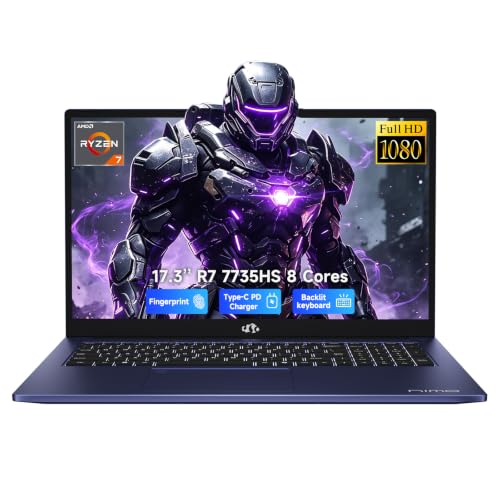
NIMO 17.3 FHD Light Gaming AI-Laptop, AMD Ryzen 7

KAMRUI Hyper H2 Mini PC Intel Core i7 14650HX

Skytech Gaming PC Storm, Ryzen 5, RTX 5050

Skytech Gaming King 95, RTX 5070 Ti, 32GB DDR5
KAMRUI E3B Mini PC, Ryzen 5 7430U, 32GB

KAMRUI Mini PC, Ryzen 7 7735HS, 16GB

NIMO 17.3″ Gaming-Laptop, Ryzen 7 8745HS, 32GB

NIMO 15.6 Gaming-Creator-Laptop, Ryzen 7 8745HS
KAMRUI Hyper H2 Mini PC, i5-14450HX, 32GB

KAMRUI Hyper H2 Mini PC, i5-14450HX, 16GB
What Each Pick Brings To The Table
The 17.3-inch display gives this NIMO room to breathe when you split work windows between a spreadsheet, a video call, and a browser tab farm. DDR5 memory at 16GB is the headline spec, and the AMD Ryzen 7 7735HS, an 8-core, 16-thread mobile chip, has the muscle to keep those apps responsive without the visible stutter common on older 4-core laptops.
Casual players will appreciate the integrated graphics handling esports titles and lighter single-player games at the panel’s native resolution. The 1TB SSD gives you enough storage for an OS, productivity tools, and a respectable game library before you reach for an external drive.
Standout Benefits
- 8-core Ryzen 7 7735HS handles spreadsheets, browser tabs, and video calls together without dropping frames.
- DDR5 memory runs cooler and faster than the DDR4 you find in older budget laptops.
- 17.3-inch screen real estate is a genuine comfort upgrade for split-window work.
- 1TB SSD boots Windows quickly and leaves room for a reasonable game library.
Things To Consider
- 16GB of RAM, not 32GB, so heavy multitaskers may want to upgrade later or look at the bigger NIMO below.
- Integrated graphics limit you to lighter or older titles at high settings.
- A 17.3-inch chassis is large, so it may not fit smaller backpacks.
Who It Suits Best
Students and home office users who want a large-screen laptop for everyday productivity and light gaming without the weight of a full tower.
Where Another Pick Suits Better
Gamers chasing 32GB out of the box should look at the NIMO 17.3″ Gaming-Laptop, Ryzen 7 8745HS, 32GB, which pairs a newer Ryzen 7 with double the memory.
The Hyper H2 stands out in a category full of low-watt chips by squeezing an HX-class Intel Core i7 14650HX into a mini PC case. The HX label is Intel’s mobile designation for chips that draw more power and run faster, the same family you’d normally find in a chunky gaming laptop, and the 16-core, 24-thread layout handles the kind of multi-app load that small desktops usually choke on.
With 32GB of DDR5 and a 1TB PCIe 4.0 SSD, this KAMRUI has the core spec that this list revolves around. The form factor makes sense for a living room battle station, a studio desk where space is tight, or a streaming setup behind a monitor.
Well-Handled Touches
- i7 14650HX runs cooler under sustained load than the U-series chips found in most minis.
- 32GB of RAM as standard removes any near-term upgrade anxiety.
- 1TB PCIe 4.0 SSD loads games and large project files noticeably faster than SATA.
- The mini chassis tucks behind a monitor or under a TV stand.
Points To Note
- An HX chip pulls more power, so expect the fan to spin up during long renders.
- Mini PC cases can run warmer than full towers with dedicated airflow paths.
- No discrete GPU, so high-refresh AAA gaming isn’t its lane.
Key Product Details
Made For
Power users who want desktop-class speed in a mini chassis, especially those running multiple creator apps at once.
Skip It When
Hardcore gamers who need a discrete GPU should look at the Skytech Gaming PC Storm instead.
Skytech’s Storm is the first traditional tower in this list, and it answers the question that no mini PC can: where is the dedicated graphics card? The RTX 5050 with 8GB of GDDR6 VRAM is the part that actually pushes pixels, and it makes a real difference in any modern title with ray tracing or frame generation.
The Ryzen 5 5500 CPU is the lower-tier half of the build, but paired with 32GB of DDR4 RAM, it has enough headroom for 1080p gaming, Discord running in the background, and a browser tab you refuse to close. The 1TB SSD holds the OS plus a stack of games, and Skytech ships the machine clean of bloatware, so the storage you see is the storage you get.
The Good Stuff
- RTX 5050 with 8GB VRAM handles 1080p gaming with headroom for higher settings.
- 32GB DDR4 RAM is generous for a mainstream build and rarely bottlenecks at this resolution.
- 1TB NVMe SSD keeps load times short for modern open-world games.
- Air cooler and clean Windows install mean you can boot and start playing without a setup detour.
Where It May Fall Short
- Ryzen 5 5500 is the slower part of the build and can limit frame rates in CPU-heavy titles.
- Mid-tower cases are larger than a mini PC, so plan desk space accordingly.
- The PSU is not listed for headroom-heavy upgrades, so a future GPU swap may need a power check.
Best Suited To
Entry-level PC gamers who want a turnkey 1080p machine with a real graphics card and 32GB of RAM on day one.
Not Your Match When
Gamers chasing 1440p or 4K at high refresh rates should look at the Skytech Gaming King 95, RTX 5070 Ti, 32GB DDR5.
The Gaming King 95 is the build on this list for people who care more about pushing frame rates than saving desk space. The RTX 5070 Ti with 16GB of GDDR7 VRAM is the headline component, and it is the part that lets you run modern games at 1440p with high refresh or 4K with sensible settings, the kind of configuration that turns a good monitor into a great one.
Intel’s Core Ultra 7 270K Plus chip clocks up to 5.4GHz and feeds the GPU without becoming a bottleneck, and the 32GB of DDR5 RAM at 6000MT/s, with heat spreaders, keeps memory-bound games and creator tools running without stalls. Cooling comes from a 360mm AIO liquid cooler with ARGB fans, and an 850W Gold ATX 3 PSU covers the GPU and leaves headroom for future parts.
Reasons It Performs
- RTX 5070 Ti with 16GB GDDR7 VRAM targets 1440p high-refresh and 4K gaming.
- 32GB DDR5 at 6000MT/s removes the memory bottleneck in modern titles.
- 360mm AIO liquid cooler keeps the CPU cool under long sessions.
- 850W Gold ATX 3 PSU is built for current-gen power-hungry graphics cards.
- Wi-Fi 6 gives you fast wireless without depending on a wired drop.
Worth Noting
- A full tower with an AIO takes serious desk or floor space.
- ARGB lighting and liquid cooling are great, but they are extra parts to maintain or replace if anything fails.
- Higher-end power draw means more heat in your room during long sessions.
Feature Snapshot
Whose Shelf It Belongs On
Enthusiast gamers and creators who want a 1440p or 4K machine with the parts picked for sustained performance, not just a flashy spec sheet.
Reach For A Different Pick When
Casual gamers who mostly play esports and indie titles will do better with the Skytech Gaming PC Storm and save money for a nicer monitor.
The E3B is the smallest 32GB machine in this lineup, and it earns that label by pairing a Ryzen 5 7430U mobile chip with a generous 32GB of RAM and a 512GB SSD inside a tiny case. The 7430U uses 7nm process tech and Zen 3+ cores, a 6-core, 12-thread layout that lands in a sensible middle between low-power U-series chips and full-power HX parts.
For a kitchen counter PC, a quiet home office, or a living room streaming box, the small footprint and full memory count make more sense than raw GPU power. You give up frame rates, and you gain a desktop that disappears behind the monitor.
A Favorable Mix
- 32GB of RAM in a mini case is a generous memory budget for the price tier.
- Ryzen 5 7430U balances power draw and performance for everyday apps.
- Tiny chassis fits behind monitors or inside entertainment centers.
- 45W CPU power ceiling keeps heat and noise modest during office work.
Honest Caveats
- 512GB SSD fills up quickly with a modern game library.
- No discrete graphics, so modern AAA gaming is off the table.
- Mini PC cases can trap heat during extended loads, so a well-ventilated spot helps.
Perfect Match For
Anyone who needs a small, quiet PC with 32GB of RAM for office work, light editing, or a media setup in a shared living space.
Consider Something Else When
Gamers who want real frame rates in modern titles should look at the Skytech Gaming PC Storm instead.
The Ryzen 7 7735HS inside this KAMRUI is the same 8-core, 16-thread mobile chip that powers the bigger NIMO laptop up the list, and it lands here in a small desktop form factor. The 16GB of LPDDR5 RAM is soldered to the board on this model, so plan your multitasking around that ceiling rather than an upgrade path.
Where this KAMRUI makes sense is on a desk where you need the multi-core punch of an H-class chip without giving up real estate to a tower. Code editors, browser sessions, virtual machines for school, and lighter creative work all stay responsive.
The Case For It
- 8-core Ryzen 7 7735HS with 16 threads handles sustained multi-app loads well.
- Mini case disappears into small desks or shared rooms.
- Lower power draw than the HX-class KAMRUI above, so it runs cooler and quieter.
Practical Considerations
- 16GB of RAM, not 32GB, so heavy multitaskers may hit a ceiling.
- Memory is LPDDR5 and soldered, so you cannot upgrade later.
- No discrete graphics, so modern AAA gaming is out of reach.
- 512GB SSD is on the smaller side for a media library.
Who Will Love This
Home office users and students who want Ryzen 7 power in a mini PC for schoolwork, light editing, and casual play.
Look Elsewhere When
Anyone who needs 32GB of RAM out of the box should jump to the KAMRUI E3B Mini PC, Ryzen 5 7430U, 32GB in the same form factor.
This NIMO is the laptop version of the question, “what if I want 32GB of RAM and a real CPU without buying a desktop?” The Ryzen 7 8745HS climbs up to 4.9GHz, and integrated Radeon 780M graphics based on RDNA 3 architecture handle modern games at sensible settings, the kind of chip you’d otherwise see in a $1,200+ ultraportable.
The 17.3-inch FHD panel gives you a real desktop-replacement canvas, USB 4.0 gives you modern docking and fast external storage, and a 2-year warranty on the machine itself is a noticeable step up from the typical 1-year coverage you see in this tier.
Everyday Perks
- 32GB of RAM as standard is rare in this laptop tier.
- Radeon 780M RDNA 3 graphics outperform older integrated options in modern games.
- 2-year warranty covers more ground than the industry-standard 12 months.
- USB 4.0 enables modern docks and fast external SSDs.
Trade Offs
- Integrated graphics still trail any discrete GPU for serious AAA play.
- 17.3-inch laptops are heavy and bulky for daily travel.
- Battery life takes a hit under gaming or compilation loads.
Feature Card
Right Fit For
Remote creators, streamers, and students who want a 17.3-inch laptop with real memory and warranty for content and code work.
A Better Fit Elsewhere
Hardcore gamers chasing high-refresh AAA play should look at the Skytech Gaming King 95, RTX 5070 Ti, 32GB DDR5 instead.
The 15.6-inch NIMO trims the chassis of its bigger sibling without giving up the Ryzen 7 8745HS or the Radeon 780M integrated graphics. 100W fast PD charging through USB-C is the practical touch here, the kind of feature that turns a laptop bag into a one-cable setup with a portable charger or modern monitor.
16GB of RAM is the headline limit, so for video editing in 4K or running a local AI tool, the 32GB version of this laptop two spots up makes more sense. For writing, lighter photo work, and on-the-go streaming, this 15.6-inch build hits a sweet spot between portability and capability.
Key Advantages
- 15.6-inch form factor is a genuine step up for backpack portability.
- 100W USB-C PD charging simplifies travel setups.
- Radeon 780M RDNA 3 graphics handle esports and lighter single-player titles smoothly.
- 2-year warranty matches the bigger NIMO.
Small Caveats
- 16GB of RAM, not 32GB, so heavier creators will feel the cap.
- 15.6-inch screen real estate is smaller than the 17.3-inch NIMO up the list.
- No discrete GPU, so AAA frame rates stay modest.
Who Should Grab It
Travelling students, journalists, and creators who want a 15.6-inch laptop with strong battery-friendly performance and modern USB-C charging.
Swap It Out When
You need 32GB of RAM for editing or local AI workloads, in which case the NIMO 17.3″ Gaming-Laptop, Ryzen 7 8745HS, 32GB is the more sensible step up.
The i5-14450HX version of the Hyper H2 drops down a tier from the i7 sibling two spots up, but it keeps the 32GB of RAM, the 1TB PCIe 4.0 SSD, and the Windows 11 Pro license, a combination that matters more for office and creator workflows than raw benchmark numbers.
The HX chip still pulls 10 cores and 16 threads at up to 4.8GHz, and Windows 11 Pro unlocks features like BitLocker drive encryption and remote desktop hosting that the Home edition skips. For a small business desktop or a quiet home office, the trade-off lands well.
What Earns Its Place
- 32GB of RAM and 1TB PCIe 4.0 SSD at a sensible price tier for a mini PC.
- Windows 11 Pro enables BitLocker, Remote Desktop, and Group Policy editing.
- i5-14450HX with 10 cores handles multi-app office and creator workflows comfortably.
- Small form factor tucks behind any monitor.
Points To Keep In Mind
- No discrete GPU, so modern gaming at high settings is off the table.
- HX-class chips run warmer than U-series parts in tight mini cases.
- Less headroom for future upgrades than a full tower.
Key Product Details
Built With In Mind
Home offices, small businesses, and remote workers who need a quiet 32GB mini PC with Pro features for security and remote access.
Another Choice May Suit
Gamers and creators who want stronger single-core speed should look at the KAMRUI Hyper H2 Mini PC Intel Core i7 14650HX up the list.
The triple-4K display support is the reason this KAMRUI exists. With USB Type-C, Wi-Fi 6, and Bluetooth 5.2, it sits at the center of a productivity setup where spreadsheets, dashboards, and chat windows need their own monitors. The 16GB of RAM is a more modest allotment than the other KAMRUIs on this list, so consider your multitasking depth before you commit.
For users who spend their day in Office apps, browser research, and video calls, the 10-core i5-14450HX keeps the experience responsive without the heat or noise of a tower. Where it strains is in video editing, local AI tools, or running virtual machines.
What Works In Its Favor
- Triple 4K display support turns the mini into a real productivity hub.
- USB Type-C, Wi-Fi 6, and Bluetooth 5.2 cover modern connectivity in one box.
- 10-core HX-class chip feeds multiple apps across three screens without lagging.
- Mini chassis keeps the desk clear for monitors instead of towers.
Trade Offs To Consider
- 16GB of RAM is a tighter cap for heavy multitaskers than the 32GB KAMRUIs above.
- 512GB SSD fills up quickly with project files and media.
- No discrete GPU, so gaming or GPU-accelerated work has limits.
The Right Fit
Office multitaskers, analysts, and stock-trader setups where three screens of data matter more than frame rates in games.
Not Your Match When
You need 32GB of RAM for creator or developer workloads, in which case the KAMRUI Hyper H2 Mini PC, i5-14450HX, 32GB covers that brief without giving up the multi-display setup.
What To Weigh Before Choosing Your Next 32gb Ram Gaming Pc
A 32GB gaming PC lives or dies by three parts working together: the CPU, the GPU, and the memory itself. The CPU feeds instructions to the graphics card, the GPU draws each frame, and the RAM holds the textures, levels, and background apps in reach so the CPU and GPU can pull them quickly. A system with a strong GPU but a slow CPU bottlenecks frame rates, while a strong CPU with no discrete GPU limits the kind of games you can actually play.
Form factor matters as much as raw power. Mini PCs like the KAMRUIs hide behind a monitor and sip less power, but their small cases can run warm under sustained loads, and they rarely include a discrete GPU. Full towers like the Skytech Gaming King 95 and Storm give you a real graphics card and easier upgrade paths, yet they demand desk or floor space. Laptops, including the NIMO 17.3-inch and 15.6-inch builds, trade some performance for the ability to game from a café table or hotel desk.
For everyday users, 32GB is plenty. Streamers who run a capture app, voice chat, browser tabs, and the game itself benefit most from the headroom, and creators who edit the footage afterward are the clearest case for pushing to 32GB. Casuals who play one indie title at a time and keep their browser closed can save money with a 16GB build.
Key Considerations Across These Picks
Where Shoppers Go Wrong
The most common trap in this category is chasing RAM while ignoring the GPU. A 32GB system with no discrete graphics card will not run modern AAA games at high settings, regardless of how much memory you have. Match the GPU to the resolution of your monitor, and pair that with a CPU that can keep up.
A second pitfall is buying a mini PC expecting desktop-class cooling. The KAMRUI Hyper H2 builds run an HX-class chip in a tight case, which is fine for office and creator work but produces more heat than a tower with dedicated airflow. Plan a well-ventilated spot and reasonable ambient temperatures.
What Separates Premium From Basic
Higher-tier systems in this list earn their price through three upgrades: a discrete GPU with more VRAM, faster DDR5 memory with higher transfer rates, and dedicated cooling like the 360mm AIO on the Skytech Gaming King 95. The RTX 5070 Ti in the King 95 enables features that the RTX 5050 in the Storm cannot, including 1440p high-refresh gameplay and frame generation in modern titles.
Whether the upgrade is worth paying for depends on your monitor. A 1080p display does not benefit from the 5070 Ti the way a 1440p or 4K panel does, so casual gamers may be better served by the Storm and a better screen.
Frequently Asked Questions
Is 32GB of RAM overkill for gaming?
For most single-player and esports titles, 16GB still works, but modern games paired with a browser, Discord, and a capture app push past 16GB regularly. You will notice fewer stutters during long sessions with 32GB, especially in open-world and simulation games.
Do I need a discrete GPU if I have 32GB of RAM?
Yes. RAM and the GPU handle different jobs. The KAMRUI E3B and Hyper H2 builds have 32GB of RAM, but their integrated graphics are designed for productivity and lighter games, not modern AAA titles. For real frame rates, look at the Skytech Gaming Storm or Gaming King 95.
Can a mini PC handle 32GB of RAM without overheating?
Most KAMRUI mini PCs in this list manage 32GB without trouble because the RAM itself runs cool. The chips inside them, particularly the HX-class parts, run warmer, so placement and ventilation matter more than memory capacity in those cases.
What is the difference between DDR4 and DDR5 RAM in these builds?
DDR5 transfers data faster and runs at lower voltage than DDR4, which helps in memory-bound games and creator tools. The Skytech Gaming Storm uses DDR4, while the Skytech Gaming King 95 and most KAMRUI HX builds use DDR5, and you will feel the difference most in large project files and modern open-world games.
Are pre-built gaming PCs a good value in 2026?
Pre-builts like the Skytech systems ship with clean Windows installs, balanced parts, and warranty coverage that you would otherwise spend hours researching yourself. The trade-off is less control over specific component brands, so check the listings carefully for PSU wattage, cooler size, and motherboard details before you commit.
Wrap Up
The right 32GB gaming PC for you comes down to where it lives. Mini PCs like the KAMRUI Hyper H2 and E3B fit living rooms and small desks, full towers like the Skytech Gaming Storm and Gaming King 95 deliver real frame rates, and the NIMO laptops travel with you. Pick the form factor first, then match the GPU and CPU to the games and software you actually run, and you will end up with a system that holds up well past 2026.


