


Big-screen gaming no longer means settling for fuzzy text or a washed-out color palette. The current crop of 32-inch displays stretches across 1080p, 1440p, and full 4K, with refresh rates climbing past 240Hz and curve options ranging from subtle to wraparound. You sit closer to a 32-inch panel than a 27, so panel type, stand adjustability, and pixel density start to matter more than raw size alone. This roundup covers eight contenders worth shortlisting, balancing speed, sharpness, and curve depth against what your desk and your GPU can actually drive.
An Overview Of The Picks

KTC 32 Inch Curved Gaming Monitor H32S17C

KTC 32 inch 240Hz Curved Gaming Monitor H32S17F
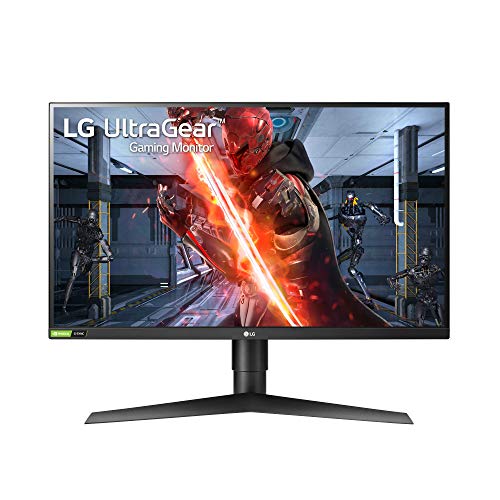
LG 27GN750-B UltraGear Gaming Monitor 27″ FHD IPS

KTC 32 Inch 2K 120Hz Computer Monitor H32T13

KTC 32 inch 240Hz Curved Gaming Monitor H32S25E

KTC 32 Inch Curved 280Hz Gaming Monitor H32C5

KTC 32 Inch 2K Computer Monitor H32D6

KTC 32 Inch 4K UHD Monitor H32U6
A Closer Look At Each Pick
The KTC H32S17C pulls you into single-player campaigns with a 1500R HVA curve, the kind of gentle arc that wraps the edges of a racing game or horror title toward your peripheral vision. Full HD at 32 inches means each pixel is larger than on a 27-inch 1080p panel, so sitting two feet back on a deep desk helps. For competitive shooters running on mid-range GPUs, the 165Hz refresh ceiling frees up headroom your graphics card can actually push without bottlenecking.
Adaptive Sync support keeps frame handoffs cleaner when your FPS dips below the ceiling, and the 1ms response rating helps motion stay readable in fast pans. If you spend most evenings in Apex, Valorant, or open-world RPGs, this panel feels tuned for that blend of speed and immersion.
A Favorable Mix
- 1500R curve draws the edges in for racing and flight sims
- 165Hz ceiling gives most mid-tier GPUs plenty of frame room
- 1ms response keeps fast pans readable during close fights
- Adaptive Sync smooths the dips when frame rates fluctuate
Honest Caveats
- 1080p on a 32-inch panel means text and UI elements look softer than on the 1440p or 4K siblings in this list
- Owners commonly report that the stand only tilts, so a VESA mount helps if you need height adjustment
Built With In Mind
Casual competitive players running mid-range hardware who want curve immersion without paying for a high refresh ceiling they cannot drive.
Where Another Pick Suits Better
The LG 27GN750-B UltraGear fits better if you want a flat 27-inch IPS panel with 240Hz speed and accurate color for shared work and play.
The H32S17F takes the same 32-inch curved footprint as the H32S17C and pushes refresh hard, advertising 240Hz for twitch shooters and ranked ladder climbs. The curve is gentle enough to stay comfortable during long sessions without bending UI elements awkwardly. Running at 1080p, this panel asks less of your GPU per frame, so you can actually feed 240fps in lighter titles like CS2 or Valorant without flagship hardware.
Like its sibling, the 1ms response time targets ghosting, and the curve helps spot enemies peeking the edges of a wide crosshair. The honest read is that this is a panel for someone who has already committed to high frame rates and wants the screen to keep up.
A Few Highlights
- 240Hz ceiling suits competitive shooters and fast esports titles
- 1ms response minimizes smearing during flick shots
- 1080p resolution keeps frame demands manageable for mid-tier GPUs
- Curved format widens peripheral vision for team fights
Trade-Offs
- The curved HVA panel may show slight color shift at extreme angles versus a flat IPS display
- Cable management tends to be minimal out of the box, so plan for some Velcro if your desk is tidy
Best Suited To
Esports-leaning players who want 240Hz headroom and a wraparound feel for ranked play.
Consider Something Else When
The KTC H32S25E is the smarter match if you want 1440p resolution alongside a 240Hz refresh, since it sharpens the image at this size.
The LG 27GN750-B lands in this list as a size outlier at 27 inches, but the 240Hz IPS combo and G-SYNC Compatible certification earn it a spot. IPS panels (in-plane switching) deliver wider viewing angles and more accurate color than VA alternatives, so the picture holds up when a friend leans over to watch a match. At 1080p, pixels stay tight at this size, so text and HUD elements look crisp.
You also get a tilt, height, and pivot adjustable stand, which makes long sessions easier on your neck compared to the tilt-only stands on most 32-inch curved picks. If your desk is shallow or you split time between gaming and color-sensitive work, this LG is the practical crossover.
Notable Upsides
- IPS panel brings wider viewing angles and richer color out of the box
- NVIDIA G-SYNC Compatible mode reduces tearing across the refresh range
- Full tilt, height, and pivot adjustments make ergonomic positioning easy
- 1080p at 27 inches keeps pixel density high for sharp text
Soft Spots
- At 27 inches, screen real estate feels smaller than the rest of this shortlist
- The plastic chassis design looks plain next to sleeker modern monitors
Made For
Gamers who want a flat, color-accurate IPS panel and full ergonomic adjustments for a shared office-and-battle-station setup.
Skip It When
Pick the KTC H32C5 instead if 32-inch immersion and 280Hz speed matter more than pixel density and IPS color.
The KTC H32T13 is the all-rounder in this roundup: 32 inches, 2560×1440 IPS, 120Hz, and HDR support on a flat panel. That resolution step up from 1080p gives you noticeably sharper text and UI elements, which matters on spreadsheets and browser tabs during the day. At night, the 120Hz ceiling keeps casual shooters and RPGs feeling responsive without leaning on a flagship GPU.
Compared to the curved picks above, the flat layout avoids any color shift at the edges, and IPS brings consistent color across the panel. HDR compatibility is a real feature here, not just a marketing badge, though you’ll want to tune it in the OSD for proper highlights rather than leaving it on auto.
Notable Gains
- 1440p resolution sharpens text and detailed textures at 32 inches
- IPS panel keeps color and contrast consistent across the whole screen
- 120Hz strikes a comfortable balance for both work and casual gaming
- HDR support improves highlight detail in supported games and movies
Things To Weigh
- 120Hz is a step below the 240Hz esports options for ranked play
- You may find the stand ergonomics basic and prefer a separate monitor arm for long sessions
Right Fit For
Hybrid users who want one monitor for office work, streaming, and weekend gaming without specializing in either.
Look Elsewhere When
The KTC H32U6 is the better match if 4K detail matters more than refresh rate for your daily use.
The H32S25E brings the deepest curve on this list, a 1000R radius that mimics the natural curve of your field of view. Combined with 1440p resolution and a 240Hz refresh ceiling, it targets sim racers, flight sim pilots, and immersive RPG fans who sit close and want the edges pulled in. The contrast rating of 4000:1 also suggests deeper blacks than typical IPS screens, useful for night-time or horror scenes.
Adaptive Sync support covers both FreeSync and G-Sync-compatible workflows, so the tear-free handoff should hold across most modern GPUs. For desk depth, give yourself a little extra room: a 1000R curve can feel slightly claustrophobic if you sit back more than 30 inches.
Positive Points
- 1000R curve wraps the screen around your field of view for sims and RPGs
- 240Hz at 1440p blends speed with sharper imagery than 1080p
- High contrast ratio gives night scenes real depth
- Adaptive Sync works with both FreeSync and G-Sync setups
Worth Noting
- The aggressive 1000R curve takes adjustment if you’ve only used flat panels before
- Owners commonly report that the tilt-only stand pushes them toward a third-party VESA arm
Whose Shelf It Belongs On
Sim racers, flight sim pilots, and immersive single-player fans who want a wraparound field of view.
A Better Fit Elsewhere
The KTC H32T13 is the smarter choice if you prefer a flat panel for general work and occasional gaming.
The H32C5 pushes the refresh ceiling higher than any other 1080p panel on this list, advertising 240Hz native with an overclock path to 280Hz. The 1500R curve stays comfortable during long sessions, and 1ms MPRT (moving picture response time) targets motion blur. If you’re chasing every possible frame in Counter-Strike or Valorant and your GPU can feed those numbers, this is the screen built to receive them.
Low blue light mode helps during late-night grinding, and 128% sRGB coverage means colors don’t look washed out at the cost of speed. The trade-off is the same as other 1080p 32-inchers: you’ll see individual pixels if you sit close, so consider desk depth.
Features That Help
- 280Hz overclock pushes motion clarity in twitch shooters
- 1500R curve stays comfortable for long play sessions
- Low blue light mode reduces eye strain during late-night matches
- Wide sRGB coverage keeps colors accurate for general content
Points To Note
- 1080p resolution on 32 inches means you may see pixel structure up close
- Reaching 280Hz reliably requires a top-tier GPU and the right cable setup
Who Will Love This
Hardcore competitive players with flagship GPUs who measure performance in frames per second.
Another Choice May Suit
The KTC H32S25E is the smarter pick if you want 1440p resolution to pair with that 240Hz speed.
The H32D6 is the most balanced panel for someone who treats their monitor as a daily tool rather than a dedicated gaming screen. The IPS panel at 2560×1440 gives you crisp text for documents and emails, and the 120Hz ceiling (up from a 100Hz base) keeps scrolling and casual gaming smooth. HDR support adds punch to streaming content without demanding calibration expertise.
Compared to the curved picks in this list, the flat layout here makes it easier to place two windows side by side for productivity. The IPS color accuracy also benefits anyone dabbling in photo editing or content creation outside of gaming hours.
The Practical Payoff
- IPS panel delivers consistent color for both work and play
- 120Hz keeps everyday motion smooth and games responsive
- 1440p resolution sharpens text and reduces pixel structure at viewing distance
- Flat layout supports easy side-by-side window arrangements
Where It May Fall Short
- 120Hz tops out below the 240Hz and 280Hz options for competitive gaming
- You may find the built-in speakers thin and prefer dedicated audio for media
Perfect Match For
Remote workers and home office users who game casually and want one screen that handles both well.
Reach For A Different Pick When
The KTC H32T13 fits better if you want a similar feature set with a different industrial design or stand profile.
The H32U6 is the only 4K UHD option in this roundup, packing 3840×2160 resolution into a 32-inch panel. At normal viewing distance, text looks razor-sharp, photo editing reveals fine detail, and 4K games show textures that the 1080p and 1440p picks simply cannot match. The 3000:1 contrast ratio and 125% sRGB coverage hint at solid color reproduction for content creation.
The catch is the 60Hz refresh ceiling, which is fine for cinematic gaming, work, and console play, but rules out competitive shooters. The fully adjustable stand (tilt, height, swivel) is a real perk, since most 32-inchers settle for tilt only. If your priorities are pixels and color accuracy over speed, this is the screen that puts detail first.
Strengths Worth Knowing
- 4K UHD resolution reveals fine detail in games, photos, and documents
- Wide sRGB coverage and high contrast benefit content creators
- Full tilt, height, and swivel adjustments support ergonomic positioning
- HDR support adds highlight depth for media and supported games
Honest Caveats
- 60Hz refresh rate is a step down from the 120Hz+ gaming options
- Pushing 4K at high frame rates requires a powerful GPU, so budget your hardware
Who Should Grab It
Content creators, photo editors, and cinematic gamers who prioritize pixel density and color accuracy over speed.
Where A Sibling Pick Shines
The LG 27GN750-B UltraGear is the better match if competitive refresh rates and IPS color are your priority over 4K resolution.
Picking The Right Panel: What Actually Matters
A 32-inch monitor lives close to your eyes, so the choice between 1080p, 1440p, and 4K affects everything you do. Pixel density (pixels per inch) is the number behind that: higher density means sharper text, finer textures, and less visible pixel structure at normal viewing distance. At 32 inches, 1080p spreads pixels thin, 1440p hits a comfortable middle ground, and 4K gives you the sharpest image your eyes can resolve at a desk.
Refresh rate is the second decision point. It measures how many times per second the panel redraws the image, and the jump from 60Hz to 120Hz feels immediately smoother in scrolling and casual games. Competitive players chasing every edge will want 240Hz or higher, but those numbers only matter if your GPU can actually feed them. Pairing a 280Hz screen with a mid-tier graphics card wastes the panel’s potential.
Panel type rounds out the choice. IPS (in-plane switching) gives wide viewing angles and accurate color. VA (vertical alignment) panels, common in curved gaming screens, deliver deeper contrast but can show color shift at extreme angles. HVA is a VA variant designed for higher refresh, balancing the trade-off.
Finally, ergonomics. Tilt-only stands push you toward a VESA mount or monitor arm for proper height adjustment, which matters during long sessions. A fully adjustable stand saves that cost.
Quick Considerations Before You Decide
Common Shopping Slip Ups
The biggest mistake is buying a 240Hz or 280Hz panel without a GPU that can drive those frame rates. You end up paying for a ceiling your system never reaches. The second trap is picking 1080p at 32 inches and sitting close: individual pixels become visible, and text looks fuzzy compared to 1440p. Finally, ignoring stand ergonomics leads to neck strain during long sessions, since most 32-inch curved panels ship with tilt-only stands.
What The Higher Tier Buys
Stepping up to a premium 4K panel like the H32U6 buys you real-world sharpness for editing and detailed textures, plus wider color coverage for content creation. The 1000R curved H32S25E trades some sharpness for immersion, wrapping your field of view in a way flat panels cannot. The 280Hz H32C5 is the speed-focused upgrade, where the extra refresh headroom only matters in competitive play. Each step up serves a specific priority, so match the upgrade to your use case rather than chasing the highest number on the spec sheet.
Frequently Asked Questions
Is 4K worth it on a 32-inch gaming monitor?
4K on 32 inches delivers the sharpest image in this size class, especially for text, photo editing, and cinematic games. For competitive multiplayer, the 60Hz refresh on most 4K panels is a real trade-off versus 1440p options that hit 240Hz.
How important is curve depth on a 32-inch screen?
Curve depth, measured in radius (1500R, 1000R, etc.), affects how much the edges wrap toward you. A 1500R curve feels gentle and works for most desks. A 1000R curve wraps further and suits sim racers or anyone who sits close, but can feel tight if your desk is shallow.
Do I need G-SYNC or FreeSync?
Adaptive Sync technologies (G-SYNC Compatible, FreeSync) reduce screen tearing when your frame rate fluctuates below the panel’s refresh ceiling. They matter most when your GPU cannot consistently hit the panel’s max refresh, which is common in modern AAA titles.
What GPU do I need for 240Hz gaming?
To fully use a 240Hz panel in competitive titles, you need a current-generation mid-to-high-tier GPU from the last few product cycles. Lighter esports titles run on less hardware, but AAA games at 240fps require serious graphics horsepower and fast memory.
Can I use a 32-inch monitor for office work?
Yes, especially at 1440p or 4K resolution. The larger screen real estate helps with side-by-side documents, and IPS panels keep text and color consistent for long reading sessions. Consider a monitor arm to fine-tune height and viewing distance for ergonomics.
Closing Remarks
The right 32-inch monitor depends on what you actually do at your desk. Competitive players will lean toward the high-refresh curved picks, content creators will appreciate the 4K detail of the H32U6, and hybrid users will find their balance in the 1440p flat panels. Match the panel to your GPU and your habits, and the upgrade pays off every time you sit down.


