


A solid RTX 3060 Ti rig still hits a sweet spot in 2026: enough muscle for 1080p and respectable 1440p gaming, paired with CPUs that won’t bottleneck you. You don’t need a flagship GPU to enjoy modern titles with smooth frame rates. The trick is finding a desktop or compact build that pairs the 3060 Ti with the right memory, storage, and thermals, without paying for parts you’ll never push to their limit. This list rounds up seven options worth your attention, from full-size towers ready for marathon sessions to space-saving mini PCs that quietly handle the workload.
A Closer Look At The Lineup
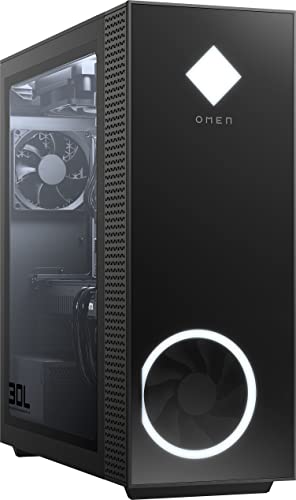
HP OMEN 30L Gaming Desktop RTX 3060 Ti Ryzen 7 5800X 32GB 1TB SSD

Dell XPS 8950 Desktop i7-12700 32GB RTX 3060 Ti Renewed

KAMRUI Hyper H2 Mini PC Core i7 14650HX 32GB 1TB SSD
KAMRUI E3B Mini PC Ryzen 5 7430U 32GB 512GB SSD

KAMRUI Mini PC Ryzen 7 7735HS 16GB LPDDR5 512GB SSD
KAMRUI Hyper H2 Mini PC Intel 14450HX 32GB 1TB SSD

KAMRUI Hyper H2 Mini PC 14450HX 16GB 512GB Triple 4K
A Closer Look At Each Pick
The HP OMEN 30L earns its spot at the top of the list because it doesn’t ask you to compromise. It pairs the RTX 3060 Ti with an AMD Ryzen 7 5800X, an 8-core CPU (central processing unit, the brain of the PC) that boosts up to 4.7 GHz and handles both gaming and background tasks without breaking a sweat. 32GB of RAM is more than most 3060 Ti builds ship with, and a 1TB NVMe SSD (a fast solid-state drive using the NVMe interface) gives you quick load times across a healthy game library.
Where this rig actually wins is thermals and headroom. The 750W PSU (power supply unit) and liquid cooling setup give you room to tinker, push settings, and keep temps in check during long sessions. Compared to the compact options further down this list, you trade desk space for a tower that breathes. If you want a turnkey 3060 Ti system that just works, this one fits.
What Makes Sense
- Ryzen 7 5800X with 8 cores handles modern games and streaming at the same time
- 32GB of RAM keeps multitasking smooth even with a browser full of tabs
- Liquid cooling keeps the CPU quiet under sustained loads, useful for long play sessions
- 1TB SSD delivers fast boot and load times across dozens of modern titles
- 750W power supply leaves comfortable headroom for future GPU (graphics processing unit) swaps
Points To Keep In Mind
- The full-tower footprint demands serious desk or floor space, so measure before buying
- RGB fans and glass panels collect dust visibly, meaning regular wipe-downs are a must
Right Fit For
Gamers who want a full-size desktop that can handle 1080p and 1440p without tweaking every setting in the menus.
Look Elsewhere When
The KAMRUI Hyper H2 Mini PC 14450HX suits you better if a compact chassis that disappears behind a monitor matters more than upgrade room.
The Dell XPS 8950 sits in a different lane from the HP OMEN above. It’s a renewed professional desktop (inspected and resold by the retailer) dressed in Platinum Silver, pairing the RTX 3060 Ti with a 12th Gen Intel Core i7-12700. That chip has 12 cores and turbos up to 4.9 GHz, which translates to a noticeably snappier feel in productivity apps compared to older i7 parts. You also get 32GB of RAM and a 1TB HDD plus 512GB SSD combo, so storage is flexible rather than blazing fast.
The honest read is that this is a productivity-first machine that happens to game well. Owners commonly report that the XPS chassis runs quiet and stays cool, though the dual-storage layout means you may want to migrate your active game library onto the SSD. Wireless connectivity is built in, and the keyboard and mouse are included, which is a nice touch for a ready-to-go setup.
What Stands Out
- 12-core i7-12700 handles video editing and large spreadsheets without slowing down
- Clean, understated Platinum Silver chassis blends into home offices and dorm rooms
- Built-in Wi-Fi and Bluetooth keep cable clutter to a minimum
- Renewed condition from the retailer offers a more accessible entry into 3060 Ti gaming
Worth Noting
- Renewed units may show minor cosmetic wear, so check the listing photos carefully
- The 1TB HDD uses older mechanical storage, so you may find load times drag on large modern games
- Less internal expansion room than the HP OMEN tower above
Who It Suits Best
Shoppers who split time between creative work and after-hours gaming and prefer a quieter, more office-friendly chassis.
Consider Something Else When
The HP OMEN 30L Gaming Desktop is a better match if raw gaming performance and a roomy tower matter more to you than a refined professional look.
The KAMRUI Hyper H2 with the Intel Core i7-14650HX punches well above its size. The HX-class chip is a high-performance mobile CPU with 16 cores, 24 threads, and boost speeds up to 5.2 GHz, which is closer to desktop territory than typical mini PCs. Pair that with 32GB of RAM and a 1TB PCIe 4.0 SSD (the latest generation of NVMe storage, roughly twice as fast as PCIe 3.0), and you’ve got a tiny box that handles gaming, streaming, and content creation at once.
Realistically, this is the sweet spot for shoppers who want serious power without a tower under the desk. You may find that the compact chassis limits long-term GPU upgrades, since the RTX-class graphics here are part of the integrated design. But for everyday gaming, video calls, and creative workloads, the performance is hard to beat at this footprint.
A Few Strong Suits
- 16-core i7-14650HX delivers desktop-adjacent performance in a mini chassis
- 32GB of RAM keeps dozens of browser tabs and apps open without slowdown
- PCIe 4.0 SSD cuts game and project load times noticeably compared to older drives
- Tiny footprint frees up desk space for monitors and accessories
Trade Offs
- Compact cooling solutions tend to ramp up under sustained heavy gaming sessions
- Limited internal expansion means you can’t swap in a larger GPU later
Best Suited To
Power users who want high-core-count performance in a small case and don’t plan to upgrade the GPU down the line.
A Better Fit Elsewhere
The HP OMEN 30L Gaming Desktop suits you better if you want the option to swap in a stronger graphics card a few years from now.
The KAMRUI E3B is a different animal from the others on this list. Instead of a full RTX 3060 Ti desktop, it’s a compact mini PC built around the AMD Ryzen 5 7430U, a 6-core, 12-thread mobile processor that boosts up to 4.3 GHz. The 32GB of RAM is generous for this class, and a 512GB SSD covers everyday storage. Where it fits is media centers, light gaming setups, and quiet home offices where you stream, browse, and run productivity apps.
The honest tradeoff is that this isn’t a true 3060 Ti gaming machine. It’s a tiny productivity box that handles casual or older titles well at modest settings. Compared to the Hyper H2 above, you give up significant CPU horsepower for a quieter, more efficient build. For shoppers who want a low-fuss daily driver, the trade works in your favor.
The Value In It
- 32GB of RAM is uncommon at this size and price tier
- 6-core Ryzen 5 7430U handles spreadsheets, documents, and light photo editing smoothly
- Compact chassis disappears behind a monitor, ideal for clean desk setups
Honest Caveats
- Not a true 3060 Ti gaming platform, so demanding 3D titles will need lower settings
- 512GB of storage fills up quickly with modern game installs, so you may need external drives
- Integrated graphics limit the ceiling for AAA gaming at high frame rates
Who Should Grab It
Shoppers who want a quiet, compact PC for everyday tasks, media streaming, and light indie or older gaming sessions.
Skip It When
The KAMRUI Hyper H2 Mini PC with the 14450HX is a smarter pick if you need real headroom for modern gaming or video editing.
The KAMRUI Mini PC with the Ryzen 7 7735HS is a strong middle ground. The 8-core, 16-thread chip boosts up to 4.75 GHz, giving you more CPU muscle than the E3B above without jumping to the 14650HX’s price tier. The 16GB of LPDDR5 RAM (the latest low-power memory standard) is soldered in, so future upgrades are limited, but it runs efficiently and keeps thermals manageable in the small chassis.
For shoppers running a multi-monitor home office, this little box handles productivity, light creative work, and casual gaming with room to spare. The 7735HS tends to hold boost clocks well under sustained loads, which matters when you’re pushing a render or compiling code. Compared to the KAMRUI E3B, you get noticeably more headroom for the same compact footprint.
Good Reasons To Consider
- 8-core Ryzen 7 7735HS handles multitasking, light editing, and older gaming comfortably
- LPDDR5 memory runs efficiently, helping the mini stay cool and quiet
- Compact form factor tucks away neatly in entertainment centers or behind monitors
Soft Spots
- 16GB of RAM is soldered, so you can’t expand later for heavier workloads
- 512GB SSD may run tight for users with large media libraries or multiple modern games
Who Will Love This
Home office users and hobbyists who want a tidy, capable PC that fits anywhere and handles everyday creative and gaming tasks well.
Another Choice May Suit
The KAMRUI Hyper H2 Mini PC Core i7 14650HX is a better match if you want a 32GB RAM ceiling and stronger multi-core performance.
The 14450HX version of the KAMRUI Hyper H2 steps down slightly from the 14650HX but keeps the same chassis philosophy. You get 10 cores, 16 threads, and boost speeds up to 4.8 GHz, paired with 32GB of RAM and a 1TB PCIe 4.0 SSD. That memory and storage combination is genuinely generous for a mini PC, and for productivity-heavy workflows, it covers most needs without external drives.
In our view, the difference between this and the i7-14650HX sibling is mostly about peak clock speed and core count. The 14450HX is more than enough for office multitasking, virtual meetings, and moderate creative work, but you may notice slower exports in heavy video projects. Compared to the Dell XPS tower above, you trade raw GPU upgrade room for a much smaller footprint.
Strong Points
- 10-core 14450HX handles spreadsheets, code editing, and creative apps without breaking a sweat
- 32GB RAM and 1TB SSD provide room to grow before you need external storage
- Compact design fits behind any monitor, freeing your desk for other work
- Windows 11 Pro is preinstalled, useful for business and remote-work setups
Possible Compromises
- Less multi-core headroom than the i7-14650HX sibling for heavy video rendering
- Compact thermals can push fan noise up under extended heavy loads
Perfect Match For
Remote workers and small-business owners who need a capable daily driver that fits in tight desk spaces and handles multitasking well.
Reach For A Different Pick When
The KAMRUI Hyper H2 Mini PC Core i7 14650HX makes more sense for content creators who need every thread they can get.
The final Hyper H2 config strips back to 16GB of RAM and a 512GB SSD but adds triple 4K display support, USB Type-C, Wi-Fi 6, and Bluetooth 5.2. The same 14450HX chip powers it, so you get 10 cores and 16 threads of work behind the scenes. The triple-display output makes this the strongest option on the list for multi-monitor trading desks, control rooms, or content review workflows.
Where this version loses ground is in raw memory and storage compared to the 32GB sibling above. For shoppers running virtual machines or heavy creative software, that cap shows up fast. But for office productivity with three or four screens, the modern port selection and wireless standards cover what most people need in 2026.
A Favorable Mix
- Triple 4K display support is rare in this price and size category
- Wi-Fi 6 and Bluetooth 5.2 keep wireless connections fast and stable
- USB Type-C adds flexibility for modern docks and accessories
- 10-core 14450HX handles multiple apps and browser tabs without slowdown
Details To Watch
- 16GB of RAM may feel tight for heavy multitasking, so consider future upgrades
- 512GB SSD can run low fast with multiple modern game or software installs
Whose Shelf It Belongs On
Multi-monitor home office users and productivity fans who want a clean desk and modern connectivity above all else.
Swap It Out When
The KAMRUI Hyper H2 Mini PC Intel 14450HX 32GB 1TB SSD is the better fit if you need more memory and storage for demanding workloads.
What Matters Most Before Choosing 3060 Ti Gaming Pcs
CPU Pairing And Bottleneck Risk
The RTX 3060 Ti is a mid-range GPU that pairs best with mid-to-upper-range CPUs. Pairing it with a Ryzen 5 or older i5 can leave performance on the table. The HP OMEN’s Ryzen 7 5800X and the Dell XPS 8950’s i7-12700 both sit comfortably above the threshold, so you won’t bottleneck the graphics card in most modern titles.
Form Factor And Desk Space
Tower desktops like the HP OMEN and Dell XPS 8950 offer upgrade room and stronger thermals. Mini PCs like the KAMRUI Hyper H2 series trade that flexibility for a footprint that fits behind a monitor. Pick the chassis that matches your workspace, since you’ll live with the size and noise for years.
RAM And Storage For The Long Haul
32GB of RAM is the new comfortable baseline for gaming and productivity in 2026, especially if you keep a browser and chat apps open. Storage matters too: NVMe SSDs cut load times significantly compared to older SATA drives or spinning HDDs. The KAMRUI E3B and 7735HS Mini PC are workable but more constrained at 16GB or 512GB.
Connectivity And Display Output
If you run a multi-monitor setup, check the port layout before buying. The KAMRUI Hyper H2 with triple 4K support is purpose-built for that scenario, while tower desktops often need a dedicated GPU upgrade to drive more than two high-resolution screens.
Picking Wisely Across 3060 Ti Gaming Pcs
Where Shoppers Go Wrong
A common slip-up is chasing the lowest advertised RAM figure without checking whether it’s upgradeable. Soldered laptop-style memory in mini PCs can’t grow later, so the number you buy is the number you live with. Another trap is assuming any 3060 Ti system can handle 1440p at high frame rates. The card is capable, but only if the CPU and thermals keep up. Finally, don’t overlook the PSU wattage. A 3060 Ti system with a tight power supply can throttle under load, so room to breathe matters.
When Paying More Pays Off
Spending more on a 3060 Ti build usually buys you a stronger CPU, a better cooling solution, and a more generous SSD. The HP OMEN 30L sits at the higher end because you’re paying for liquid cooling, a 750W PSU, and 32GB of RAM, all of which extend the system’s useful life. If you plan to keep your PC for four or five years, those upgrades pay off in smoother performance and fewer compromises. For a one- or two-year stopgap, a KAMRUI mini PC delivers strong value without the long-term commitment.
Frequently Asked Questions
Is The RTX 3060 Ti Still Good For Gaming In 2026?
Yes, the RTX 3060 Ti remains a strong 1080p card and a capable 1440p card in 2026, handling most modern titles at high settings with smooth frame rates. You may need to dial back settings on the most demanding new releases, but the card is far from obsolete.
How Much RAM Do I Need With A 3060 Ti?
16GB is workable for pure gaming, but 32GB is the safer pick if you keep other apps open. Several options on this list, including the HP OMEN 30L and the KAMRUI Hyper H2 i7-14650HX, ship with 32GB, which future-proofs the build nicely.
Can A Mini PC Handle Real Gaming?
Compact mini PCs like the KAMRUI Hyper H2 series handle everyday gaming and creative workloads well, especially with HX-class chips. They won’t match full tower performance under sustained load, but for most users, the trade-off in size and noise is worth it.
What Should I Look For In A 3060 Ti PSU?
A 650W power supply is the practical minimum for a 3060 Ti system, and 750W gives you headroom for future upgrades. The HP OMEN 30L ships with 750W, which is a comfortable margin for a mid-range GPU.
Are Renewed Desktops Worth Considering?
Renewed desktops like the Dell XPS 8950 offer real value when you want a professional-grade chassis at a lower cost. Check the listing details and return policy carefully, since cosmetic condition and warranty coverage can vary by seller.
The Takeaway
Your best 3060 Ti gaming PC depends on where and how you play. Full-tower builds like the HP OMEN 30L deliver the strongest all-around experience, while compact KAMRUI Hyper H2 configurations offer impressive power in a fraction of the space. Match the build to your desk, your workload, and how long you plan to keep it, and you’ll land on a system that feels just right.


