


Picking the right gaming monitor changes how every match, stream, or late-night session feels, and screen size sets the tone. A 27 inch panel hits the sweet spot between desk presence and pixel density, giving competitive players enough space for peripheral vision without the bulk of a 32 inch display. The nine options below cover curved ultra-wides, flat QHD panels, and high-refresh workhorses built for different budgets and play styles.
Each pick below lists honest strengths and the real trade-offs you should weigh before committing, so you can match a monitor to your rig, your games, and your desk.
The Leading Options At A Glance
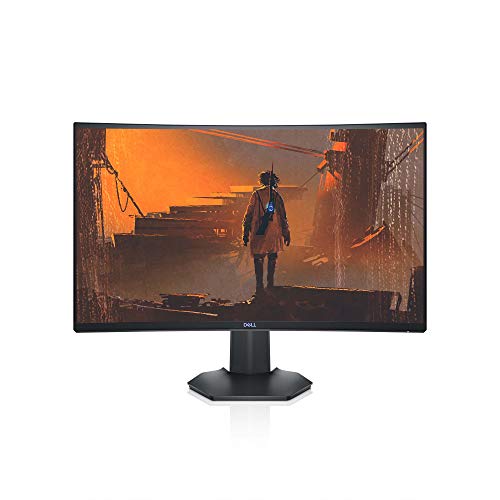
Dell 144Hz Gaming 27 Inch Curved Monitor S2721HGF
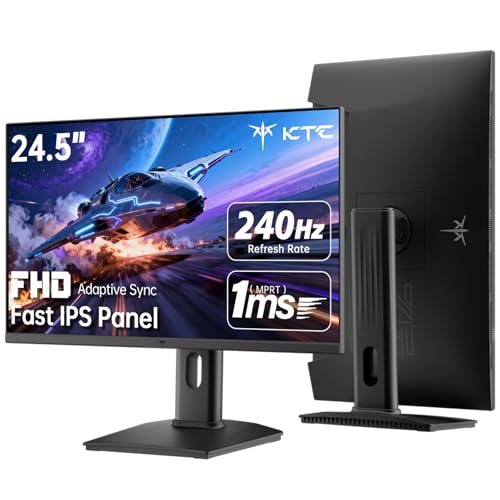
KTC 24.5 Inch 240Hz Gaming Monitor H25T7-3

Samsung 34″ Odyssey G5 Ultra-Wide Curved Monitor
Samsung 32″ Odyssey G55C QHD Curved Monitor

KTC 27 Inch 240Hz Gaming Monitor H27F7

KTC 27 Inch 1440P 200Hz White Monitor H27T6

KTC 24 Inch QHD 180Hz Gaming Monitor H24T7

KTC 25M2 Pro 400Hz Gaming Monitor

Samsung 37″ Odyssey G7 4K UHD Curved Monitor
Inside Each Recommended Option
The Dell S2721HGF wraps a 1500R curve around a 27 inch Full HD panel, and that gentle bend pulls the edges of the screen closer to your peripheral vision, which most players find more natural during long ranked sessions. The 144Hz refresh rate pairs with both Nvidia G-SYNC Compatible and AMD FreeSync Premium, so screen tearing drops away regardless of which GPU brand you run.
For a budget-friendly entry into competitive play, this monitor handles the fundamentals without overpromising. You won’t find a flashy HDR600 layer here, and the resolution tops out at 1080p, but for fast-paced shooters at high frame rates, those trade-offs rarely matter.
Everyday Advantages
- 1500R curve fills peripheral vision for more natural aim tracking
- 144Hz refresh with dual adaptive sync support keeps motion clean
- 1ms MPRT response limits blur during fast camera turns
- Height and tilt adjustments support marathon sessions
- Joystick-style OSD controls make menu navigation quick
Worth Noting
- 1080p resolution looks softer if you sit closer than two feet
- VA panel viewing angles are narrower than IPS, so off-center viewing dims slightly
Right Fit For
Competitive players stepping up from a 60Hz office display who want proven adaptive sync at a comfortable price.
Consider Another Pick When
The Samsung 32″ Odyssey G55C QHD Curved Monitor suits you better when sharper QHD detail matters more than 144Hz esports speed.
The KTC H25T7-3 trades a 27 inch screen for 240Hz, which is a meaningful swap for anyone grinding Valorant or CS2 where every frame of input latency counts. A Fast IPS panel keeps colors consistent across the wide 178° viewing angle, so the picture doesn’t shift when you lean or share the screen for co-op sessions.
Compared to the Dell S2721HGF above, this panel pushes nearly 100 more refresh cycles per second, but the 24.5 inch frame means it fits on smaller desks without crowding your keyboard. HDR400 support adds modest highlight pop without the heavy brightness of premium HDR tiers.
A Strong Showing
- 240Hz refresh rate delivers tournament-grade motion clarity
- Fast IPS panel offers wide viewing angles and accurate color
- HDR400 expands contrast in supported games and movies
- Tilt, pivot, and height adjustments suit varied seating positions
Points To Note
- Smaller 24.5 inch frame lacks the desk presence of 27 inch options
- 1080p resolution is the limit, so pixel density stays modest
- 100x100mm VESA mount requires checking your existing arm compatibility before swapping
Made For
Esports players and ranked competitors chasing the smoothest possible aim feel at a realistic budget.
A Better Fit Elsewhere
The KTC 25M2 Pro 400Hz Gaming Monitor makes more sense if your GPU can push frame rates well past 240fps and you want maximum headroom.
The Samsung Odyssey G5 34 inch pushes a 1000R curve, one of the tightest curvatures in the category, which wraps the display into your visual field rather than just sitting in front of you. That aggressive bend, combined with an ultra-wide aspect ratio, makes racing sims, flight games, and open-world RPGs feel more cinematic without strapping on a headset.
Where the Dell and KTC picks earlier focus on 16:9 speed, this one trades pixel density for horizontal space, so you see more of the game world at once. It’s a different kind of immersion, and one that fits RPG and simulation fans more than twitchy FPS players.
Standout Benefits
- 1000R curve mimics the natural field of view for deeper immersion
- Ultra-wide panel reveals more of the game world without alt-tabbing
- Curved design reduces eye strain during long RPG or sim sessions
- Wide canvas works well for streaming and productivity side-by-side
Honest Caveats
- Ultra-wide format needs game compatibility, with some older titles showing black bars
- 34 inch footprint demands more desk depth than a standard 27 inch monitor
- VA panel contrast favors dark rooms, so bright office lighting can wash out the image
Best Suited To
Single-player enthusiasts and sim players who want cinematic wraparound visuals over pure competitive speed.
Where Another Pick Suits Better
The Dell S2721HGF is a stronger match for ranked FPS players who prefer compact 16:9 frames and proven 144Hz performance.
The Samsung G55C steps up to QHD resolution, 2560×1440, which packs about 1.7 times more pixels than the 1080p panels earlier in this list. That density shows in-game text, distant UI elements, and texture detail, all of which benefit from sharper rendering without the GPU hammering that 4K demands.
The 1000R curve and 32 inch frame give this monitor real desk presence, and the 165Hz refresh keeps motion smooth for both competitive and adventure games. AMD Radeon FreeSync support is the headline adaptive sync tech, which is worth confirming if your rig runs Nvidia rather than AMD graphics.
Practical Advantages
- QHD resolution sharpens text, textures, and in-game UI detail
- 165Hz refresh balances competitive speed with cinematic smoothness
- HDR10 expands color and contrast in supported titles
- Eye Care and Glare Free features reduce fatigue in lit rooms
Trade Offs
- 32 inch screen needs deeper desk space than 27 inch picks
- 1000R curve feels aggressive for users who prefer flat displays
- FreeSync certification focuses on AMD GPUs, so Nvidia users may need manual tuning
Who Will Love This
Gamers who want sharper QHD detail and a deep curve for immersive single-player and adventure titles.
Skip It When
The KTC 27 Inch 1440P 200Hz White Monitor H27T6 is a smarter pick if you want QHD clarity in a smaller 27 inch footprint with more ergonomic movement.
The KTC H27F7 lands at the 27 inch sweet spot with 240Hz, a combination that gives competitive players the higher frame ceiling without forcing them onto a 24 inch screen. The Fast IPS panel keeps colors looking true from any angle, which helps during co-op gaming or when you shift posture between rounds.
Compared to the KTC 24.5 inch model earlier, this one gives up some pure speed headroom in exchange for more screen real estate. Adaptive-Sync, HDR10, and full height, tilt, and pivot adjustability round out a practical package for desk-bound players.
Positive Takeaways
- 240Hz refresh delivers noticeably smoother aim than 144Hz
- 27 inch size balances desk presence with competitive frame rates
- Fast IPS panel offers wide viewing angles and rich color
- Height, pivot, and tilt adjustments support varied seating setups
- HDR10 brings extra contrast to compatible games and video
Some Limits To Know
- 1080p resolution looks modest at 27 inches, especially for productivity
- Built without dedicated speakers, so external audio is necessary
Perfect Match For
Multi-hour ranked sessions where you want maximum refresh at the standard 27 inch size without breaking into premium pricing.
Reach For A Different Pick When
The KTC 27 Inch 1440P 200Hz White Monitor H27T6 fits better if QHD sharpness matters more than raw 240Hz headroom.
The KTC H27T6 is the rare gaming monitor that doesn’t look like one, with a white chassis that slots cleanly into bright, minimalist desk setups. Underneath the clean exterior, a 1440p Fast IPS panel hits 200Hz natively, with an overclocked ceiling of 210Hz when your GPU can push the extra frames.
Built-in speakers add convenience for casual sessions, though dedicated audio gear still sounds better for immersive titles. HDR400 and Adaptive-Sync support keep the visual feature set competitive with darker, more aggressive-looking monitors.
Bright Spots
- White finish suits light-themed and wood-grain desk builds
- 1440p resolution sharpens UI and texture detail over 1080p
- 200Hz native, 210Hz overclocked refresh for fluid motion
- Built-in speakers reduce cable clutter for casual use
- Full height, tilt, swivel, and pivot adjustments fit any seating position
Less Ideal Details
- White finish shows dust and fingerprints more easily than darker panels
- Built-in speakers are functional but lack depth for cinematic gaming
Who Should Grab It
Streamers, content creators, and aesthetic-minded gamers who want a clean-looking display with serious QHD speed.
Swap It Out When
The Samsung 32″ Odyssey G55C QHD Curved Monitor is a better match if you prefer a deeper curve and larger 32 inch canvas over a flat white design.
The KTC H24T7 crams 1440p resolution into a 24 inch frame, which pushes pixel density high enough that text and game details look crisp even at close viewing distances. For small desks, dorm setups, or anyone running a compact battlestation, that density matters more than sheer screen size.
Compared to the 27 inch QHD options in this roundup, the smaller panel sacrifices some screen real estate for sharper per-pixel clarity. A 180Hz refresh rate keeps motion smooth, and the 1ms response time holds up well in fast-paced shooters.
Why It Works Well
- 1440p at 24 inches delivers excellent pixel density for sharp text and detail
- 180Hz refresh rate balances speed with mid-range GPU capability
- HDR400 expands highlight detail in compatible content
- Compact footprint fits narrow desks and dual-monitor layouts
Points To Keep In Mind
- 24 inch screen lacks the immersion of 27 inch or larger panels
- Smaller frame gives multi-window productivity less room to breathe
Built With In Mind
Compact desk owners and students who want sharp QHD clarity without giving up space for textbooks, notebooks, or a second display.
Not Your Match When
The KTC 25M2 Pro 400Hz Gaming Monitor makes more sense for competitive players chasing the highest possible refresh rate on a similarly compact frame.
The KTC 25M2 Pro is built for one thing: pushing frames as fast as your GPU can render them. A native 360Hz refresh rate climbs to 400Hz when overclocked, which is the kind of headroom that matters in pro-level CS2 or Valorant where every frame improves target tracking.
The included shielding hood is a thoughtful touch for players gaming in bright rooms, blocking overhead glare that would otherwise wash out the picture. A 24.5 inch footprint keeps the monitor compact enough for tournament-style setups.
What Makes Sense
- 400Hz overclocked refresh rate delivers elite motion clarity
- 1ms MPRT response time minimizes ghosting during rapid camera turns
- Shielding hood reduces glare in bright environments
- Adaptive-Sync support smooths frame delivery across GPU brands
Less-Strong Areas
- 1080p resolution is the trade-off for ultra-high refresh rates
- Requires a high-end GPU to fully exploit 400Hz capability
- Shielding hood adds bulk and may not suit minimalist setups
The Right Fit
Tournament-level competitors and serious esports players with flagship GPUs who want maximum frame headroom in a compact frame.
Where A Sibling Pick Shines
The KTC 24.5 Inch 240Hz Gaming Monitor H25T7-3 is a more practical pick if your GPU typically sits below 240fps in your main titles.
The Samsung Odyssey G7 37 inch is the flagship pick here, pairing 4K UHD resolution with a 1000R curve and VESA DisplayHDR 600 for serious contrast and brightness. That combination means dark scenes reveal detail you’d lose on a standard HDR10 panel, and bright highlights pop without washing out the rest of the image.
Where earlier picks optimized for speed or compact value, this monitor focuses on visual fidelity for single-player flagship titles. The 165Hz refresh keeps motion smooth enough for most genres, though you’ll need a top-tier GPU to drive 4K frames at high rates.
The Case For It
- 4K UHD resolution reveals fine detail in flagship single-player titles
- VESA DisplayHDR 600 delivers deeper blacks and brighter highlights
- 1ms GtG response time keeps fast motion clear despite the high resolution
- 165Hz refresh balances cinematic quality with smooth gameplay
Where It May Fall Short
- 4K gaming demands a high-end GPU to push high frame rates
- 37 inch frame requires substantial desk depth for the curve to work well
- Premium positioning puts it well above mainstream gaming budgets
Whose Shelf It Belongs On
Single-display flagship rigs where visual fidelity in story-driven games matters more than esports-level refresh rates.
Another Choice May Suit
The Samsung 32″ Odyssey G55C QHD Curved Monitor is a more accessible pick if you want a curved immersive experience at QHD rather than 4K.
What Matters Most Before Choosing 27 Inch Gaming Monitors
Resolution Versus Refresh Rate
The biggest trade-off in this category sits between pixel count and frames per second. 1080p panels can hit 240Hz or even 400Hz, which competitive players value for aim clarity, while QHD and 4K displays trade some refresh ceiling for sharper detail. Your GPU determines which trade-off you can afford, since pushing 4K at 165Hz requires far more graphical horsepower than 1080p at the same rate.
Panel Technology In Plain Terms
IPS panels, short for In-Plane Switching, offer wide viewing angles and accurate color, making them versatile for both gaming and content work. VA panels, or Vertical Alignment, deliver deeper contrast and richer blacks, which suit cinematic single-player titles but can shift in tone when viewed off-center. Fast IPS variants close the response gap with VA, which is why most modern gaming monitors lean IPS.
Adaptive Sync And Your GPU
G-SYNC and FreeSync are variable refresh rate technologies that match the monitor’s refresh to your GPU’s output, eliminating screen tearing and stuttering. Nvidia G-SYNC Compatible certification matters if you run an Nvidia card, while AMD FreeSync Premium covers the AMD side. Some monitors support both, which keeps your options open if you upgrade GPUs later.
Ergonomics And Desk Real Estate
Height, tilt, pivot, and swivel adjustments matter more than people expect, especially during long sessions where a poorly positioned monitor strains your neck. VESA mount compatibility (the 100x100mm standard) lets you swap in a monitor arm for finer control, and the 27 inch standard fits most desks without crowding keyboards or mousepads.
Key Considerations Across These Picks
Wrong Turns To Avoid
A common mistake is chasing the highest refresh rate without checking whether your GPU can actually push that many frames. A 400Hz monitor running a 60fps game wastes the panel’s potential. Another trap is ignoring panel type, since a high-refresh TN or VA panel may look duller than a 144Hz IPS option in everyday use. Confirming adaptive sync compatibility with your GPU brand also saves you from manual tweaking later.
When Paying More Pays Off
The jump from entry-level to premium monitors usually buys stronger HDR performance, sharper resolution, and more robust build quality. For most gamers, the meaningful upgrade is moving from 1080p to QHD at 27 inches, which sharpens text and detail noticeably. Going further to 4K makes sense for flagship single-player rigs, but only if your graphics card can sustain playable frame rates at that resolution.
Frequently Asked Questions
What size gaming monitor is best for most setups?
A 27 inch panel offers the best balance of desk presence and pixel density for most gaming setups, fitting standard desks while keeping text and UI elements readable at typical viewing distances.
Is 144Hz enough for competitive gaming?
For most players, 144Hz provides a clear smoothness improvement over 60Hz, and many competitive gamers find it sufficient. Stepping to 240Hz or higher adds diminishing returns unless you play at a high rank or have a GPU that can sustain extreme frame rates.
Do I need a curved monitor for gaming?
Curved monitors enhance immersion on larger or ultra-wide panels, particularly 32 inches and above, by reducing distortion at the edges. Smaller 24 to 27 inch panels work fine flat, so the curve is more about aesthetic and immersion than performance.
What is FreeSync and does it matter?
FreeSync is AMD’s variable refresh rate technology that synchronizes the monitor’s refresh with your GPU output to prevent tearing. It matters for smooth gameplay, and many FreeSync monitors also support Nvidia G-SYNC Compatible mode, so adaptive sync works across both major GPU brands.
Should I prioritize IPS or VA for gaming?
IPS panels deliver better color accuracy and wider viewing angles, which suit both gaming and general use. VA panels offer deeper contrast and richer blacks, which enhance cinematic titles, though viewing angles are narrower than IPS.
Final Verdict
Your ideal monitor depends on what you play and what your GPU can deliver. Competitive players running high frame rates will appreciate the KTC 25M2 Pro 400Hz or the H25T7-3 240Hz pick, while single-player fans get the most out of the Samsung Odyssey G7 4K or the Odyssey G5 32 inch QHD. For most gamers seeking a balanced 27 inch display, the KTC H27F7 240Hz or the white H27T6 QHD offer strong middle-ground value. Match the panel to your rig, your games, and your desk, and the rest tends to fall into place.


