


Competitive players live by milliseconds and pixel clarity. A 27 inch screen hits the sweet spot: large enough to track fast motion in your peripheral vision, small enough that every corner of the action stays inside your eye line without head-swiveling. Refresh rate, response time, panel type, and adaptive sync technology all shape how cleanly each frame lands, especially in FPS, fighting, and racing titles where every frame counts.
This list rounds up ten 27 inch monitors (with a few value-driven 24 and 32 inch cousins for context) that lean into what serious play actually demands. Each entry breaks down real specs, honest trade-offs, and the type of player it suits best, so you can match hardware to your game library instead of the other way around.
The Main Contenders
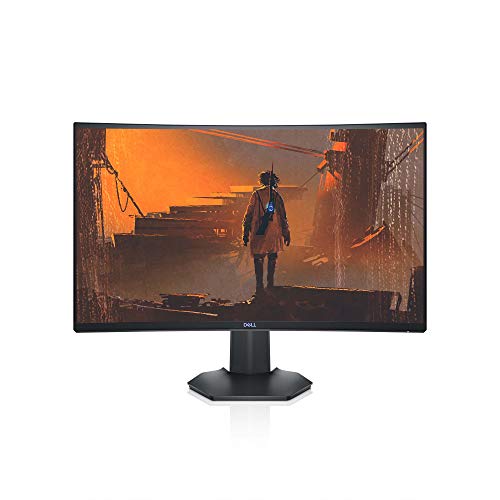
Dell S2721HGF 144Hz Curved Gaming Monitor

KTC H27D9 27 Inch QHD 120Hz IPS Monitor

msi MAG 274CF X24 240Hz FHD Monitor

KTC H27T22C-3 27 Inch 220Hz QHD Monitor

KTC H32T13 32 Inch 2K 120Hz IPS Monitor
KTC H24T27 24 Inch QHD 100Hz IPS Monitor

INNOCN 27 Inch QD-OLED 280Hz Gaming Monitor
KTC H27T27S 27 Inch QHD 144Hz Monitor

KTC H32D6 32 Inch 2K 120Hz IPS Monitor

msi PRO MP275 27 Inch 100Hz IPS Monitor
Why These Options Stand Out
The Dell S2721HGF leans into immersion through a 1500R curve, which wraps the edges of the screen toward your eyes. For someone who plays single-player campaigns or story-rich competitive modes, that curve pulls you into the world more than a flat panel can.
Running at 144Hz with a 1ms MPRT response time, the screen keeps motion crisp in fast-paced matches. Nvidia G-SYNC compatibility and AMD FreeSync Premium work together to minimize screen tearing, which matters when frame delivery stutters in the middle of a clutch round.
The Practical Payoff
- 1500R curve creates a wider field of view for racing and flight sims
- 144Hz refresh rate keeps fast motion readable in FPS and battle royale titles
- Height and tilt adjustments help you maintain posture across long sessions
- Back-mounted joystick and shortcut buttons speed up menu navigation mid-game
Worth Noting
- FHD resolution looks softer at 27 inches, especially in menus and UI elements
- VA panel contrast is strong, but viewing angles narrow off-center compared to IPS picks later in this list
Whose Setup It Belongs On
Players who want a curved, high-refresh experience without paying flagship prices, especially those who game from a single fixed position.
Consider Something Else When
The KTC H27D9 makes more sense for you if QHD sharpness matters more than curve geometry.
KTC’s H27D9 splits the difference between the curved Dell and the speed-focused MSI later on, offering 2560 x 1440 resolution on a flat IPS panel. That combination suits a desk that doubles as a work-and-play hub, since text stays sharper than it does on FHD screens.
Adaptive Sync (a variable refresh technology that matches the display to the GPU’s output frame rate) keeps frame delivery smooth with both AMD and Nvidia graphics cards, and a claimed 123% sRGB coverage gives games and creative apps a wider color palette.
Points In Its Favor
- QHD resolution renders text, HUDs, and map details with more clarity than FHD
- IPS panel keeps colors consistent from off-angle seating positions
- VESA mount compatibility frees up desk space with a swing-arm setup
Trade Offs
- 120Hz refresh rate trails the 144Hz and 240Hz options for raw esports speed
- Owners commonly report that the out-of-box color profile benefits from manual calibration for color-accurate work
Key Attributes
Right Fit For
Hybrid users who split time between competitive gaming and color-conscious work like editing or coding.
Skip It When
The MSI MAG 274CF X24 fits better if tournament-level 240Hz refresh is your priority.
The MSI MAG 274CF X24 is built for players who measure performance in frames per second. At 240Hz with a 0.5ms GtG response time (a gray-to-gray pixel transition measurement, where lower numbers mean faster pixel changes), it processes four times the frames of a standard 60Hz panel.
That speed matters most in FPS, fighting games, and racing sims, where target tracking and motion clarity define outcomes. AMD FreeSync Premium support keeps frame pacing aligned with the GPU, and the 27 inch FHD canvas stays easy to scan without head movement.
Useful Strengths
- 240Hz refresh rate reduces motion blur for fast camera turns
- HDR Ready support adds contrast in supported titles
- Tilt-adjustable stand keeps the screen aligned to your eye line
Small Caveats
- FHD resolution on a 27 inch screen shows visible pixel structure to users sitting close
- HDR Ready does not match the brightness of true HDR400 or higher panels
Best Suited To
Competitive FPS and fighting game players whose GPU can push frame rates well above 144 fps.
Not Your Match When
Look at the KTC H27T22C-3 if you want QHD detail alongside high refresh without leaving the 200Hz tier.
The KTC H27T22C-3 pairs QHD resolution with a 220Hz refresh rate, which lands it in a useful middle zone. You get sharper in-game detail than FHD delivers, while the 220Hz ceiling keeps motion tracking responsive for twitch shooters and MOBAs.
Built-in speakers cover casual sessions and voice chat, so external audio gear isn’t a hard requirement on day one. A 1ms response time target supports clean transitions during rapid camera swings.
Where It Delivers
- QHD resolution renders distant enemies and map markers more clearly
- 220Hz refresh rate gives competitive players extra headroom over 144Hz panels
- Integrated speakers remove one peripheral from your setup
Room For Improvement
- Built-in speakers lack bass depth for immersive single-player titles
- Stand adjustability is limited compared to ergonomic mounts on premium models
Feature Snapshot
Who It Suits Best
Mid-range competitive players who want QHD sharpness and high refresh in one screen, with built-in speakers as a backup.
A Better Fit Elsewhere
The INNOCN 27 inch QD-OLED makes sense when you want OLED contrast and 280Hz speed together.
The H32T13 stretches past 27 inches into a 32 inch QHD panel, which gives you more space for open-world games, sims, and split-screen sessions. It uses an IPS panel for accurate color and wide viewing angles.
At 120Hz with HDR support, the screen keeps motion decently fluid in casual and mid-tier competitive play. The thin bezels help it disappear into a multi-monitor setup if you scale up later.
A Few Strong Suits
- Larger 32 inch screen gives racing, flight, and open-world games more presence
- IPS panel keeps colors accurate from off-angle positions
- Thin bezels blend into a dual-monitor desk layout
Honest Caveats
- 32 inches demands more desk depth to maintain a comfortable viewing distance
- 120Hz refresh rate sits below the esports-focused options in this list
Made For
Single-player and open-world players who value screen real estate over raw refresh rate.
Reach For A Different Pick When
The Dell S2721HGF is a better fit if you want a 27 inch curved screen at a similar tier.
The H24T27 pulls back to a 24 inch diagonal, which is the traditional sweet spot for FPS and competitive esports play. QHD resolution at 24 inches produces sharper text and game detail than 24 inch FHD competitors can manage.
Running at 100Hz with FreeSync and G-Sync compatibility, the screen smooths out frame hitches for casual and mid-tier competitive matches without overspending on flagship refresh rates.
Why It Works Well
- Smaller 24 inch frame fits tight desks and shallow viewing distances
- QHD density makes text and HUDs sharper than FHD at the same size
- IPS panel keeps colors consistent from off-center viewing positions
Points To Keep In Mind
- 100Hz refresh rate trails behind the 144Hz and 240Hz options for fast-paced play
- 24 inch footprint may feel small for racing and open-world genres
Perfect Match For
Small desk and dorm room players who want QHD sharpness without giving up valuable workspace.
Look Elsewhere When
The KTC H27T27S makes more sense if you want 27 inches and 144Hz in a similar feature set.
The INNOCN 2780s leans on QD-OLED technology, which fuses quantum dots with OLED panels for true blacks and richer color volume. At 280Hz with a 0.03ms response spec, the screen pushes toward the upper limit of what most GPUs can feed in competitive titles.
HDR400 support and a height, pivot, and tilt adjustable stand round out the package, so the screen adapts to your seating position rather than the other way around. Built-in speakers cover backup audio needs.
Real Benefits
- QD-OLED panel delivers near-instant pixel response for zero motion smear
- 280Hz refresh rate gives the fastest headroom in this lineup
- Height, pivot, and tilt adjustability supports ergonomic long-session play
Factors To Consider
- OLED panels benefit from careful brightness management to reduce long-term burn-in risk
- Owners commonly report that firmware updates can help stabilize HDR behavior over time
Feature Overview
Who Should Grab It
High-refresh flagship seekers who want OLED contrast and esports speed on the same 27 inch panel.
Where Another Pick Suits Better
The MSI MAG 274CF X24 is a friendlier match if you prefer a non-OLED panel and want to spend less.
The H27T27S uses an HVA panel, a high-contrast variant of VA technology, to deliver a 4000:1 contrast ratio. That deeper black level helps horror, space, and night-time racing games where shadow detail drives atmosphere and visibility.
At 144Hz with adaptive sync, the screen covers mainstream competitive play well. The QHD resolution keeps maps and HUDs readable during long sessions, and the spec mix sits in a comfortable mid-range position between budget and flagship options.
The Helpful Details
- 4000:1 contrast gives dark games richer shadow detail than standard VA panels
- 144Hz refresh rate covers most competitive genres comfortably
- QHD resolution sharpens in-game UI elements like mini-maps and ammo counters
Possible Compromises
- HVA panel viewing angles are narrower than IPS for shared seating setups
- Stand adjustability is basic compared to ergonomic mounts on premium competitors
Built With In Mind
Players who alternate between story-driven dark games and casual competitive matches and want a versatile panel.
Where A Sibling Pick Shines
The KTC H27T22C-3 steps in for 220Hz refresh when esports speed matters more than contrast.
The H32D6 gives you a 32 inch QHD IPS canvas at 120Hz, which is a useful spread for people who mix gaming with work and streaming. IPS keeps color accurate for shared viewing, and HDR support adds punch to supported media.
Adaptive Sync support helps when frame rates fluctuate in heavier single-player games, where your GPU may not always hit a fixed 120fps. The larger screen gives a more cinematic feel for racing and adventure titles.
Practical Advantages
- 32 inch screen adds immersion for non-competitive genres
- IPS panel keeps colors true for media and casual creative work
- 120Hz refresh rate smooths casual and mid-tier competitive play
Things To Weigh Up
- Larger footprint requires deeper desk space to avoid neck strain
- 120Hz refresh rate lags behind the speed-focused monitors in this lineup
Who Will Love This
Mixed-use households that want a large screen for gaming, streaming, and productivity in one panel.
Swap It Out When
The KTC H27T27S suits you better if 27 inches and higher contrast fit your desk and game library.
The MSI PRO MP275 is the practical closer on this list. At 27 inches with a 100Hz IPS panel, it covers everyday work and casual gaming without pushing flagship pricing. The 1ms MPRT response target keeps casual titles feeling responsive.
FreeSync support smooths out frame delivery on AMD graphics cards, and built-in speakers handle basic audio. The VESA-compatible mount opens the door to a clean monitor-arm setup when you want to free up desk space.
What Helps Most
- IPS panel offers solid color and viewing angles for shared desk use
- 100Hz refresh rate feels noticeably smoother than 60Hz in everyday apps and games
- Built-in speakers and VESA mount support a tidy desk setup
Small Limitations
- FHD resolution is softer than QHD for productivity tasks and detailed game UI
- 100Hz refresh rate sits below the speed-focused picks in this list
Best Suited To
Casual gamers and work-from-home setups that want a reliable 27 inch screen without overspending.
Another Choice May Suit
The KTC H24T27 fits when you want QHD clarity and a smaller 24 inch footprint instead.
What Matters Most Before Choosing 27 Inch Gaming Monitors For Competitive Gaming
Refresh Rate and Response Time
Refresh rate (measured in Hz) tells you how many times per second the display redraws the image. 144Hz is the comfortable baseline for competitive play, 240Hz pulls ahead in FPS and fighting titles, and 280Hz covers the high end. Response time is the related speed at which individual pixels change, and lower numbers reduce visible ghosting. MPRT (Moving Picture Response Time) and GtG (Gray-to-Gray) measure this differently, but values at or below 1ms generally keep motion clean.
Resolution and Panel Type
QHD (2560 x 1440) on a 27 inch screen hits a comfortable pixel density, sharper than FHD without taxing your GPU as hard as 4K. Panel type shapes your experience: IPS gives wide viewing angles and accurate color, VA and HVA deliver deeper contrast, and OLED or QD-OLED combine both with near-instant pixel response. Your game library and seating position should drive this choice more than any single spec.
Adaptive Sync and Connectivity
Adaptive Sync, whether branded FreeSync, G-Sync compatible, or generic, reduces screen tearing by syncing the display’s refresh to the GPU’s frame output. Make sure your graphics card brand lines up with the monitor’s support list. Also check the available ports: HDMI and DisplayPort handle most modern GPUs, while older VGA inputs are less common on current gaming cards.
Key Considerations Across These Picks
Traps First Timers Fall Into
Chasing the highest refresh rate number can backfire when the rest of the system cannot feed it. A 280Hz monitor paired with a mid-range GPU often runs at half its potential, which a 144Hz panel would have handled at full capacity. Resolution mismatch is the other common miss: buying a 27 inch 4K screen for an older GPU, or settling for FHD on a 27 inch screen and noticing pixel structure up close.
Where The Extra Money Goes
Premium tiers typically add OLED or QD-OLED panels for better contrast and response, along with sturdier stands, USB-C inputs, and higher HDR brightness. These extras help if you play HDR-supported titles, share your screen, or run a multi-device desk. For most competitive players, a 144Hz QHD IPS panel covers the meaningful gains, and the rest is refinement rather than necessity.
Frequently Asked Questions
What refresh rate matters most for competitive gaming?
Anything above 144Hz is a noticeable jump from 60Hz, and 240Hz or higher matters most in FPS, fighting, and racing genres. The rest of your system has to keep up, so balance refresh rate with your GPU’s actual frame output.
Is QHD better than FHD on a 27 inch monitor?
QHD produces sharper text and more readable game UI at 27 inches than FHD does. Competitive players who sit close to the screen often notice the difference, especially in dense HUDs and detailed maps.
Do I need G-Sync or FreeSync for competitive play?
Adaptive Sync reduces screen tearing and stutter, which is most visible when frame rates fluctuate. You do not need it to play, but it makes gameplay feel smoother, especially on mid-range GPUs.
What size monitor is best for competitive gaming?
27 inches is the most popular competitive size, because it fills your field of view without forcing head movement. 24 inches is the classic alternative, and 32 inches works when you want more screen for single-player and media.
Is OLED worth it for competitive gaming?
QD-OLED and OLED panels deliver near-instant response and high contrast, which helps both competitive and cinematic play. They cost more and benefit from brightness management to reduce long-term burn-in risk.
Wrap Up
A good competitive monitor is the one that matches how you actually play, rather than the one with the loudest spec sheet. Fast FPS players benefit from 240Hz or higher with adaptive sync, story-driven and mixed-use players get more from QHD resolution and panel contrast, and small-desk users can stay at 24 inches without losing capability. Match the monitor to the games you play, the GPU you own, and the desk you sit at, and the rest tends to fall into place.


