


Shopping for a new display in the 23–32 inch range means balancing panel size, refresh rate, resolution, and curve geometry against the games you actually play. A 240Hz esports panel rewards twitch shooters but wastes money on slow-paced RPGs, while a 4K-adjacent 1440p screen makes spreadsheets and story games look gorgeous at the cost of raw frame rate. This lineup covers curved and flat, FHD and QHD, entry-level and high-refresh, so you can match the panel to the way you game, work, and unwind.
The Shortlist At A Glance
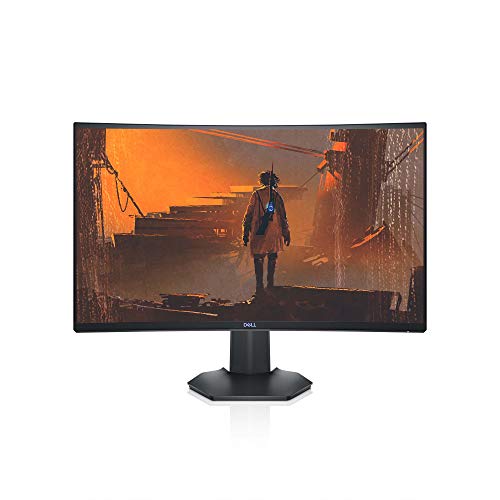
Dell S2721HGF 27-Inch 144Hz Curved Gaming Monitor

KTC H27D9 27-Inch QHD 120Hz IPS Monitor

Sceptre C255B-FWT240 24.5-Inch Curved 240Hz Gaming Monitor

Sceptre C248B-FWT168 24-Inch Curved 180Hz Gaming Monitor

Sceptre E255B-FWD240 24.5-Inch Flat 240Hz Gaming Monitor

Sceptre C275B-1858RN 27-Inch Curved 165Hz Gaming Monitor

KTC H32T13 32-Inch 2K 120Hz IPS Monitor
KTC H24T27 24-Inch QHD 100Hz IPS Monitor
KTC H27T27S 27-Inch QHD 144Hz HVA Monitor

KTC H32D6 32-Inch 2K 120Hz IPS Monitor
A Deeper Look At The Lineup
The Dell S2721HGF opens the list because it threads a needle most budget panels can’t: a 1500R curve, a 144Hz refresh rate, and dual adaptive-sync support, all wrapped in a chassis with genuinely usable ergonomics. The 27-inch FHD panel keeps pixel density reasonable for the size, so menus and text stay readable during long work sessions. Compared with the flat panels later in the lineup, the curve here is subtle enough that productivity tasks don’t feel warped, but pronounced enough that racers and flight sims wrap around your peripheral vision.
Height and tilt adjustments come standard, which is rarer than it should be at this tier, so you can dial in a comfortable posture for marathon sessions. The OSD joystick on the back makes swapping between game profiles quick, and the matte gray finish stays clean in shared spaces. If your gaming leans single-player and immersive rather than twitch-reflex, the S2721HGF strikes a confident balance.
What Helps Most
- 1500R curvature wraps peripheral vision without distorting spreadsheets
- Nvidia G-SYNC Compatible and AMD FreeSync Premium keep frames aligned across GPU brands
- Height- and tilt-adjustable stand supports long sessions without neck strain
- OSD joystick and shortcut buttons make profile switching fast during a game
Points To Note
- 1080p at 27 inches means individual pixels can show in desktop text and UI elements
- VESA mounting is supported but the included stand does most owners fine on its own
Best Suited To
Gamers who play a mix of immersive single-player titles and competitive shooters on a mid-range GPU, and want a curved screen that doesn’t punish productivity work.
Consider Something Else When
You want a sharper 1440p image for photo editing or dense spreadsheets, in which case the KTC H27D9 covered later is a better match.
Where the Dell leans into curve and FHD speed, the KTC H27D9 trades some refresh rate for genuine pixel density. A 2560×1440 IPS panel at 27 inches hits the productivity sweet spot: text is crisp, game art shows more detail, and HDR support adds pop to supported titles. Adaptive Sync compatibility keeps frame delivery clean whether you run an AMD or Nvidia card, which matters if your GPU might change.
The flat screen makes the H27D9 a natural fit for coding, writing, and photo work where straight lines matter. It’s also the first flat option here, and that distinction counts for anyone tired of curve-induced geometry quirks in spreadsheets or design tools. The included VESA mount compatibility means you can swap the stand for an arm, freeing up desk space for the rest of your setup.
What Stands Out
- 1440p resolution renders text and game detail noticeably sharper than 1080p at the same size
- IPS panel with 123% sRGB coverage supports color-accurate creative work
- Adaptive Sync works across both major GPU families without mode swaps
- HDR support adds highlight depth for movies and supported games
Worth Noting
- 120Hz ceiling falls short of the 144Hz and 240Hz panels in this list for high-frame-rate play
- IPS glow at the edges can show in dark rooms during letterboxed movies
Made For
Hybrid users who split time between gaming and creative or office work and want a single screen that handles both without compromise.
Skip It When
You play ranked shooters at high frame rates and want every hertz available, in which case the Sceptre C255B-FWT240 below is built for that exact workload.
Stepping down in size and up in speed, the Sceptre C255B-FWT240 targets the audience the Dell only flirts with: competitive FPS players. A 240Hz refresh rate paired with a 1ms response means frames refresh quickly enough that flick shots and tracking duels feel more connected to your mouse. The 24.5-inch diagonal keeps targets large on screen, which matters when you play at a distance and need fast recognition.
Two DisplayPort and two HDMI ports give you flexibility for multiple inputs, whether you swap between a gaming PC and a console or run a dual-PC streaming setup. Built-in speakers keep cable clutter down for casual play, though serious sessions will want external audio. Compare this to the flat 24.5-inch Sceptre E255B-FWD240 later, and the choice is essentially curve versus straight geometry for the same speed class.
Real-World Strengths
- 240Hz ceiling translates to noticeably smoother motion at high frame rates
- Twin DisplayPort and HDMI inputs cover multi-device and console setups
- Eye-care features reduce fatigue during late-night ranked sessions
- 24.5-inch size hits the esports sweet spot for target visibility
Trade Offs
- 1080p resolution looks softer than the KTC QHD panels when sitting close
- Built-in speakers are functional but not a substitute for headphones or desktop audio
Who Will Love This
Ranked Valorant, CS, or Apex players with a GPU that pushes 200+ frames and a desk where a 24.5-inch panel fits naturally.
Look Elsewhere When
You also watch a lot of movies or edit video, where the KTC H27D9’s QHD sharpness and 123% sRGB coverage will serve you better.
The C248B-FWT168 trims size and refresh rate just enough to land in tighter spaces and tighter budgets. At 24 inches with a 1500R curve, it hugs close to the eye line, which helps in dorm setups where the desk sits against a wall. 100% sRGB coverage and AMD FreeSync support keep the image faithful and the frames smooth, even if the panel doesn’t push into true esports territory.
The up to 180Hz ceiling is genuinely useful for mid-range GPUs that can’t always feed 240Hz, and it still feels fluid compared to standard 60Hz panels. Built-in speakers and straightforward HDMI plus DisplayPort inputs mean most owners plug in and play without extra accessories. It’s the practical middle ground between the 240Hz Sceptre and a basic 1080p work display.
What Pays Off
- Compact 24-inch footprint fits small desks and shared rooms
- 180Hz refresh suits mid-tier GPUs that can’t push 240 frames reliably
- 100% sRGB keeps colors accurate for casual content work
- FreeSync support eliminates tearing on AMD graphics cards
Honest Caveats
- 1080p density is comfortable but not crisp for detailed productivity tasks
- Curve depth takes a couple of sessions to feel natural for editing or design work
Perfect Match For
Students and casual gamers who need a compact curved panel that handles both study and play without dominating the room.
Swap It Out When
You sit further from the screen or want a larger canvas, in which case the Sceptre C275B-1858RN 27-inch curved option offers similar features in a bigger frame.
The E255B-FWD240 answers a specific preference: the same 240Hz speed as the curved C255B, but on a flat panel. Some gamers find flat geometry cleaner for tracking strafe-heavy targets in shooters, and it removes any curve-induced optical shift in game UI elements. The 24.5-inch size and 1080p resolution together keep pixel response tight, which helps competitive clarity.
Two HDMI and two DisplayPort inputs mirror the curved sibling, so multi-device setups translate cleanly between the two. FreeSync Premium support keeps frame delivery smooth on AMD GPUs, and 100% sRGB coverage ensures colors don’t look washed out at high refresh. For esports purists who want speed without the curve conversation, this is the cleanest expression of that priority.
Strengths Worth Knowing
- Flat geometry suits players who prefer straight horizontal reference lines
- 240Hz refresh rate delivers top-tier motion clarity for competitive games
- Dual HDMI and DisplayPort inputs handle consoles and PCs simultaneously
- FreeSync Premium reduces stutter and tearing during heavy action
Small Caveats
- Smaller 24.5-inch screen feels tight for split-window productivity
- 1080p ceiling means a high-end GPU leaves frames on the table above 240Hz
Who Should Grab It
Competitive players who want 240Hz motion clarity on a flat screen and use their monitor almost exclusively for fast-paced gaming.
A Better Fit Elsewhere
You split your screen between gaming and serious work, in which case the KTC H27T27S 27-inch QHD 144Hz panel offers more usable real estate with the same competitive spirit.
The C275B-1858RN has been around long enough to earn its place as a budget-friendly curve workhorse. A 1800R curvature, 165Hz refresh ceiling via DisplayPort (144Hz over HDMI), and an edge-less design give it a more modern look than the spec sheet suggests. For entry-level gamers who want a curved screen without stretching to higher-tier pricing, this is the natural starting point.
FreeSync Premium support means the panel plays nicely with AMD cards, and built-in speakers keep the desk uncluttered for casual play. The 27-inch FHD combination won’t match the pixel density of the KTC QHD options, but it also demands less from your graphics card, leaving headroom for higher frame rates. Think of it as the everyday curved gaming display rather than a flagship.
The Case For It
- Curved 27-inch canvas wraps the field of view without dominating smaller desks
- 165Hz via DisplayPort suits mid-range GPUs that exceed 144Hz comfortably
- FreeSync Premium keeps gameplay smooth for AMD card owners
- Edge-less bezel design looks clean in side-by-side dual-monitor layouts
Areas To Watch
- 1080p at 27 inches shows visible pixel structure during text-heavy tasks
- Refresh rate tops out lower than the 240Hz Sceptre panels higher in this list
Feature Snapshot
Right Fit For
First-time curved-monitor shoppers who want a familiar 27-inch size with modern gaming features at a sensible spend.
Not Your Match When
You edit photos or work with dense spreadsheets daily, where the KTC H24T27’s QHD panel in a smaller frame is the sharper tool.
Stepping up to 32 inches changes the conversation entirely, and the KTC H32T13 leans into that shift. A QHD resolution stretched across a 32-inch canvas gives you genuinely more room to work without making text feel too small at typical viewing distances. The IPS panel keeps color and viewing angles steady, which matters when a panel this large occupies a wide swath of your desk.
Thin bezels frame the display, making the H32T13 a natural fit for multi-monitor arrangements if you ever want to expand. HDR support adds highlight pop for supported games and movies, and 120Hz keeps motion fluid even on a screen this size. Compared with the 27-inch KTC H27D9 above, this trades pixel density for sheer workspace, so your decision hinges on whether you want sharper text or more real estate.
Where It Excels
- 32-inch canvas handles multiple windows without feeling cramped
- QHD resolution keeps text legible at comfortable desk distances
- Thin bezels support clean dual- and triple-monitor expansion
- HDR compatibility adds depth to movies and supported games
Points To Keep In Mind
- 32-inch size demands a deeper desk for proper viewing distance
- 120Hz refresh sits below the 144Hz and 240Hz panels in this list for high-frame-rate play
Built With In Mind
Single-display users who want one panel to handle spreadsheets, creative work, and casual gaming without juggling windows.
Reach For A Different Pick When
You need high-contrast cinematic depth for dark single-player games, where the KTC H27T27S 4000:1 HVA panel delivers deeper blacks in a smaller frame.
The H24T27 solves a real problem: how do you get QHD sharpness in a 24-inch frame? At this size, 2560×1440 produces one of the densest pixel counts in the list, which makes text crisp and small UI elements readable. If you sit close to a compact desk, this density is genuinely useful for both work and play.
The 100Hz refresh rate won’t win any speed contests, but for productivity and casual gaming it’s a meaningful step up from standard 60Hz panels. Adaptive Sync compatibility keeps frames aligned across GPU brands, and the IPS panel maintains color consistency when you lean to one side or share the screen. It’s the productivity pick for tight setups.
What Makes Sense
- QHD density in a 24-inch frame delivers exceptionally sharp text and UI
- 100Hz refresh rate is a noticeable upgrade over standard office displays
- Adaptive Sync compatibility supports both AMD and Nvidia GPUs
- IPS panel keeps color steady across wider viewing angles
Practical Considerations
- 100Hz ceiling may feel limiting for fast-paced competitive games
- Smaller screen means less room for side-by-side windows than 27-inch options
Whose Shelf It Belongs On
Compact-desk professionals and remote workers who want the sharpest possible image without sacrificing a small footprint.
Where A Sibling Pick Shines
You want a larger canvas for multitasking and still want QHD sharpness, in which case the KTC H32T13 above gives you similar resolution with much more screen real estate.
The H27T27S earns its place by doing something the IPS panels above can’t: a 4000:1 native contrast ratio. HVA (High Vertical Alignment) panel technology produces deeper blacks and more dimensional shadows, which is exactly what cinematic games, horror titles, and dark sci-fi settings benefit from. You see into shadow detail rather than guessing at what lurks there.
Pair that contrast with a 144Hz refresh rate and QHD resolution, and the H27T27S becomes a genuine hybrid panel. Adaptive Sync support keeps frames smooth across GPU brands, and the 27-inch size hits the productivity-to-gaming balance most shoppers actually want. Compared with the KTC H27D9, you trade a touch of color vibrancy for much stronger dark-scene performance.
Bright Spots
- 4000:1 native contrast delivers visibly deeper blacks than typical IPS panels
- 144Hz refresh rate balances speed and image quality for mixed gaming
- QHD resolution keeps text and game detail sharp at 27 inches
- Adaptive Sync supports both AMD and Nvidia GPU owners
Less Ideal Details
- HVA viewing angles are slightly narrower than IPS, so off-center seating shifts color
- Color gamut may not match IPS panels for professional photo editing
Technical Highlights
The Right Fit
Single-player gamers who play a lot of dark, atmospheric titles and want contrast that holds up without moving to OLED pricing.
Where Another Pick Suits Better
You prioritize color accuracy for creative work and want wider viewing angles, where the IPS-based KTC H27D9 above fits the brief more cleanly.
The H32D6 rounds out the list as the versatile 32-inch option, sharing the same QHD canvas as the H32T13 but adding 120Hz support and HDR for casual media enjoyment. The IPS panel maintains accurate color at wide angles, which matters when family or roommates gather around for a movie or split-screen game night. It’s the screen that tries not to be anything specific and ends up being useful for almost everything.
Adaptive Sync support smooths frame delivery across both major GPU brands, and the 120Hz ceiling feels noticeably more fluid than standard 60Hz for general desktop use, not just games. The size and resolution together work well as a single-display replacement for a laptop and a second monitor, especially in a small apartment or shared room. Think of it as the practical close to the list rather than a flagship statement.
What Earns Its Place
- 32-inch QHD canvas handles mixed work and entertainment on a single screen
- 120Hz refresh rate improves everyday desktop smoothness beyond standard 60Hz
- IPS panel with HDR support keeps colors and contrast balanced for media
- Adaptive Sync works with both AMD and Nvidia graphics cards
Possible Compromises
- 120Hz falls below 144Hz and 240Hz panels for high-frame-rate play
- IPS contrast is lower than the HVA-based H27T27S, so dark scenes feel less deep
Who It Suits Best
Shoppers who want one display for work, streaming, and casual gaming and prefer a larger screen over a denser smaller one.
Consider Something Else When
You mostly play dark atmospheric games, in which case the KTC H27T27S 144Hz HVA panel’s 4000:1 contrast will be more rewarding.
What Matters Most Before Choosing 23 8 Inch Gaming Monitors
Panel Size and Viewing Distance
The 24 to 32 inch range covers most gaming setups, but each size behaves differently. At 24 inches you sit close and benefit from high pixel density, while 32 inches rewards a deeper desk and more relaxed posture. Measure the distance from your chair to where the screen will sit, and pick a size that lets you see the whole panel without head turning for fast-paced play.
Resolution Versus Refresh Rate
Higher resolution means sharper text and more game detail, but it also demands more from your graphics card. A 1080p 240Hz panel lets mid-range GPUs push competitive frame rates, while a 1440p 120Hz screen gives you sharper image quality at the cost of raw speed. Match the panel to the GPU you actually own rather than the one you hope to upgrade to.
Adaptive Sync and Variable Refresh
FreeSync and G-SYNC Compatible support eliminate screen tearing and stutter by syncing refresh rate to your GPU’s output. Most modern panels support both standards, but verify before you buy, especially if you might switch GPU brands. A panel without adaptive sync will show visible tearing during fast camera pans in most games.
Curved Versus Flat Geometry
Curved screens wrap peripheral vision in racing and flight games, and they reduce eye strain during long sessions on a wide panel. Flat screens keep straight lines straight, which matters for design work, photo editing, and competitive shooters where horizontal reference lines aid tracking. Your desk layout and dominant game genre usually settle this question for you.
Key Considerations Across These Picks
Common Shopping Slip Ups
Skipping the GPU check is the most common mistake shoppers make when buying a high-refresh monitor. A 240Hz panel looks identical to a 60Hz panel if your graphics card can’t push frame rates past 60, and the extra cost goes to waste. Measure your realistic in-game frame rates before committing to the top-tier refresh options, and match the panel’s resolution to what your card handles comfortably.
Where The Extra Money Goes
Spending more on a gaming monitor typically buys you three things: higher resolution, faster refresh rates, and better panel technology. The jump from 1080p to 1440p is one of the most noticeable upgrades because it sharpens both work and play, while moving from a standard VA or IPS panel to a high-contrast HVA or OLED-style option changes how dark scenes render. Higher refresh rates above 144Hz only matter if your hardware can drive the frames, so consider the total system cost before chasing the top end.
Frequently Asked Questions
Is a 27-inch or 32-inch gaming monitor better for mixed use?
A 27-inch panel offers a denser image and fits closer desks, while a 32-inch panel gives you more room for split-window work. If you sit about two to three feet from the screen, 27 inches tends to feel more comfortable for both work and play, and 32 inches suits deeper setups.
Do I really need 144Hz or higher for gaming?
For fast-paced shooters and racing games, the difference between 60Hz and 144Hz is genuinely visible in motion clarity. For slower-paced RPGs and strategy games, 60Hz remains perfectly serviceable, and you may prefer investing in resolution or panel quality instead.
What is adaptive sync and do I need it?
Adaptive sync matches the monitor’s refresh rate to your GPU’s frame output, eliminating screen tearing and stutter. It matters most in games where frame rates fluctuate, and it costs you nothing to enable, so a panel with FreeSync or G-SYNC Compatible support is worth prioritizing.
Are curved gaming monitors better for your eyes?
A gentle curve can reduce the distance your eyes need to refocus across a wide screen, which helps during long sessions. The effect is most noticeable on 27-inch and larger panels, and on smaller 24-inch screens the curve feels more aesthetic than functional.
How important is panel response time for gaming?
Lower response times reduce ghosting behind fast-moving objects, which matters in competitive shooters and racing games. For casual and story-driven play, the difference between 1ms and 5ms is subtle, so it’s worth prioritizing only if you play twitch-reflex genres regularly.
Wrap Up
The right monitor depends less on raw spec sheets and more on the games you play, the GPU you own, and the space you sit in. Match the panel to your frame rates, your desk depth, and your content, and you’ll end up with a screen that disappears into the experience rather than one you constantly notice. Any of the picks above will serve you well, and the differences between them are a matter of fit, not hierarchy.


