


A 1440p screen hits a sweet spot 1080p can’t reach and 4K makes you work for. You get noticeably sharper text, more breathing room for game UI, and a frame rate that doesn’t need a top-tier GPU to stay smooth. The picks below cover every common scenario: a fast 27-inch panel for competitive shooters, a larger 32-inch display for cinematic single-player nights, and a couple of portable options for laptop users who want a real second screen on the road. Every entry is a 2560×1440 panel with enough refresh rate to feel current in 2026.
The Lineup, Simplified

cocopar Portable Monitor 18.5 Inch 2K QHD 120Hz Travel Monitor

VisionOwl Portable Monitor 18.5 Inch 2K QHD 120Hz Travel Monitor

KTC 27 Inch QHD 120Hz IPS Monitor H27D9
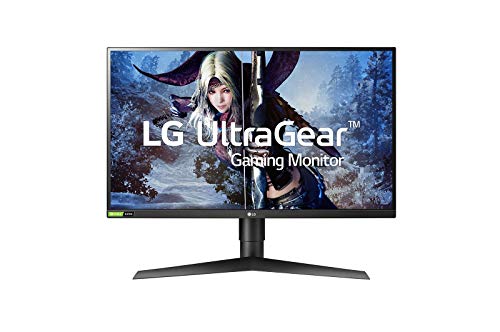
LG 27GL850-B 27 Inch Ultragear QHD Nano IPS Gaming Monitor

KTC 27 Inch Gaming Monitor 220Hz 2K QHD H27T22C-3
KTC 24 Inch QHD 100Hz IPS Monitor H24T27

KTC 32 Inch 2K 120Hz IPS QHD Monitor H32T13
KTC 27 Inch QHD 144Hz Gaming Monitor H27T27S

KTC 32 Inch 2K 120Hz IPS Monitor H32D6

INNOCN 27″ QD-OLED 2K QHD 280Hz Gaming Monitor 2780s
More On The Choices That Made The List
Traveling with a 15-inch laptop gets old fast when you need real screen real estate. The cocopar 18.5-inch portable slips into a backpack sleeve, props up with a built-in kickstand, and accepts a single USB-C cable from most modern laptops for both power and image. At 2560×1440 with a 120Hz refresh, it doubles as a credible console screen for a PS5 or Xbox in a hotel room, and the 120% sRGB coverage makes photo review work passable on the road.
Where this panel earns its place is flexibility, not raw image quality. Unlike a stationary 27-inch, you can move it between a home office, a coworking space, and a kitchen counter without rebooting your whole setup. The matte coating helps in bright environments where glossy panels wash out completely.
Strengths Worth Knowing
- Single-cable USB-C connection keeps cable clutter minimal at a café table.
- 120Hz refresh rate feels notably smoother than older 60Hz portable panels for cursor work.
- Built-in kickstand removes the need to carry a separate folding cover.
- VESA mountable for a more permanent dual-monitor setup when you’re at a desk.
- HDMI and USB-C inputs cover laptops, consoles, and phones with the right adapter.
Trade-Offs To Consider
- 18.5 inches is generous for portable, yet small next to a desktop panel for split-screen work.
- Built-in speakers are a convenience, not a substitute for headphones or a real speaker.
- Portable panels tend to attract fingerprints and need a soft microfiber wipe between trips.
Who It Suits Best
Remote workers and digital nomads who already own a capable laptop and want a true second screen without checking a 27-inch monitor as luggage.
Where Another Pick Suits Better
Desk-bound gamers chasing maximum refresh should look at the KTC H27T22C-3, which pushes 220Hz on a larger 27-inch canvas.
Side by side with the cocopar, the VisionOwl travels a very similar road but leans harder on visibility in awkward lighting. The matte anti-glare surface is the headline feature for anyone who has tried to work near a window or under overhead fluorescents. It keeps the 120% sRGB color coverage intact while knocking down the reflections that ruin productivity on glossy portable screens.
HDR support and a 120Hz refresh make it a more serious option for console play, particularly for PS5 owners who want to leave a 4K TV for a sharper 1440p feed in a smaller room. Built-in speakers and a folding kickstand round out a road-ready package.
The Helpful Details
- Matte anti-glare coating preserves color while reducing harsh reflections.
- HDR input support gives console games a richer, more contrasted look.
- USB-C and HDMI inputs cover modern laptops and older docks without fuss.
- Built-in kickstand adjusts to multiple angles for couch, desk, or standing setups.
- VESA mount option turns it into a permanent second display at home base.
Points To Note
- The 18.5-inch size still feels compact for spreadsheets with many columns.
- External power may be required when a connected device can’t supply enough over USB-C.
- Matte surfaces can soften the perceived sharpness slightly compared to glossy panels.
Right Fit For
Hybrid workers and console gamers who split time between a home desk, a hotel room, and anywhere with unpredictable lighting.
Look Elsewhere When
You want a single dedicated desktop monitor with deeper HDR impact, in which case the INNOCN 2780s QD-OLED brings real per-pixel contrast to the table.
The H27D9 is the kind of monitor most people can live with for years without thinking about it. A 27-inch IPS panel at 2560×1440 hits the comfortable pixel density sweet spot where text is sharp without needing aggressive scaling, and 120Hz with Adaptive Sync (a frame-syncing tech that matches the display’s refresh to your GPU’s output to reduce stutter) keeps both work and play feeling fluid. The 123% sRGB coverage gives photo edits and game art a bit more punch than budget panels manage.
It steps in as a sensible middle ground between the LG Nano IPS unit higher on the list and the more specialized KTC gaming models. Eye-care filtering and a VESA-mountable back panel round out a flexible everyday display.
Benefits That Matter
- IPS panel gives wide viewing angles for sharing content across a desk.
- 123% sRGB coverage brings richer color to games and edited photos.
- Adaptive Sync support smooths frame delivery on both AMD and NVIDIA cards.
- Eye-care screen tech reduces fatigue during long spreadsheet sessions.
- HDMI and DisplayPort inputs make cable swaps painless.
Honest Caveats
- 120Hz is plenty for casual play yet trails the 144Hz and 220Hz KTC options in the same family.
- IPS glow can show in dark scenes when the room is dim.
- Stock stand adjustments are limited compared to premium ergonomic arms.
Key Product Details
Best Suited To
Home office users and casual gamers who split their day between documents, video calls, and evening play sessions.
Swap It Out When
Competitive shooters will be better served by the KTC H27T22C-3 and its 220Hz refresh ceiling.
The 27GL850-B is the panel that put Nano IPS on the map for gamers, and it still holds its ground years later. A 1ms response rating combined with NVIDIA G-Sync compatibility (a frame-syncing standard that works with GeForce GPUs to eliminate stutter and tearing) gives competitive players confidence, while the wide color gamut makes single-player titles look the way their artists intended. Compared to the KTC H27D9 just above, this LG leans harder into enthusiast gaming rather than office work.
Build quality and OSD (on-screen display) navigation are noticeably more polished than the budget-friendly KTC options. For shoppers who want a known quantity from a major display brand, this Ultragear remains a sensible choice.
Positive Points
- Nano IPS layer expands color without sacrificing response time.
- 1ms rated response keeps fast motion crisp during competitive play.
- NVIDIA G-Sync compatibility broadens its appeal to GeForce owners.
- LG’s OSD joystick makes menu adjustments faster than typical button arrays.
- Mature firmware and broad community knowledge for fine-tuning.
Where It May Fall Short
- Refresh rate trails newer 240Hz and 280Hz competitors in raw speed.
- Older design language with chunkier bezels than recent releases.
- Some users find the default gamma needs calibration out of the box.
Made For
Enthusiast PC gamers who care about color accuracy and response in roughly equal measure, and who already run an NVIDIA GPU.
A Better Fit Elsewhere
The INNOCN 2780s QD-OLED is a strong alternative for those willing to step up to OLED contrast and 280Hz in one panel.
When the priority is squeezing every last frame out of a 1440p signal, the H27T22C-3 is the most aggressive option in this list. 220Hz on a 27-inch panel gives competitive shooters a tangible edge in tracking fast motion, and the 1ms response keeps the input feel sharp. Compared to the LG 27GL850-B’s G-Sync-compatible 144Hz ceiling, this KTC leans further into raw speed.
Built-in speakers are a small touch, but they cover the gap when desk space is tight or you’re just trying a quick game without dragging out headphones. Expect to lean on the VESA mount if the stock stand feels too basic for daily adjustments.
Useful Highlights
- 220Hz refresh rate is well above the 144Hz standard for fast titles.
- 1ms response target keeps motion blur to a minimum for FPS players.
- Speakers are a passable backup when a headset isn’t nearby.
- VESA compatibility opens up ergonomic arm mounting.
- Adaptive Sync support reduces tearing across a wide frame rate range.
Things To Consider
- You need a GPU capable of pushing high frame rates at 1440p to fully use 220Hz.
- Color coverage is more modest than the H27D9, making it less ideal for color work.
- Stock stand offers limited tilt and height adjustment out of the box.
Who Will Love This
Competitive PC gamers running mid-to-high-end GPUs who play Valorant, CS, or Apex at high frame rates.
Reach For A Different Pick When
You mostly play cinematic single-player games and would value deeper contrast over speed, in which case the KTC H27T27S makes more sense.
Not every desk has room for a 27-inch panel, and that is exactly where the H24T27 earns its keep. A 24-inch screen at 2560×1440 produces a noticeably higher pixel density than the same resolution stretched across a 27-inch display, which means crisper text and finer detail in games. For tight dorm desks or compact home office setups, that density wins out over raw screen size.
100Hz with Adaptive Sync puts it ahead of older 60Hz office panels, and the IPS panel keeps colors from washing out at off-angle viewing. It’s a quietly capable monitor that often gets overlooked for flashier 27-inch siblings.
A Favorable Mix
- Compact 24-inch footprint fits desks where a 27-inch won’t.
- Higher pixel density than 27-inch 1440p panels for sharper detail.
- IPS panel maintains color accuracy at wider viewing angles.
- Adaptive Sync support smooths gameplay without G-Sync licensing costs.
- 100Hz refresh is a meaningful step up from standard 60Hz displays.
Some Limits To Know
- Smaller screen area means less room for stacked windows and side-by-side documents.
- 100Hz falls short of the 144Hz and above options in the KTC lineup.
- Smaller panels can show pixel grid more easily at close seating distances.
Perfect Match For
Apartment dwellers, students, and minimalists who need 1440p clarity on a desk that physically can’t fit a larger display.
Where A Sibling Pick Shines
Shoppers with more room and a hunger for larger game scenes will appreciate the extra canvas of the KTC H32T13.
Stepping up to 32 inches changes the feel of a 1440p monitor more than the spec sheet suggests. The H32T13 turns the same resolution into a roomier, more cinematic canvas, which is exactly what single-player RPGs, racing sims, and 4K-downscaled console feeds need. HDR support gives darker game scenes a touch more pop, and the IPS panel keeps the corners from looking washed out.
It’s not a competitive panel, but it isn’t trying to be. Think of it as the workhorse for someone who watches a lot of game streams, plays story-heavy games, and edits photos on the same display.
What It Does Well
- 32-inch size makes split-screen work and open-world games more immersive.
- IPS panel keeps colors consistent edge to edge.
- HDR support brings extra punch to supported movies and games.
- 120Hz refresh keeps desktop navigation smooth and gaming fluid.
- Thin bezels lend a cleaner dual-monitor look when paired.
Possible Compromises
- Lower pixel density than 27-inch 1440p means slightly softer text up close.
- Best viewed from a slightly greater seating distance to take in the full screen.
- Requires more physical desk space than compact 24-inch alternatives.
Best Suited To
Console gamers and home theater PC builders who want a single big screen for games, movies, and casual work in one spot.
Not Your Match When
Esports-focused players will find the 120Hz ceiling restrictive and should pivot to the KTC H27T22C-3 instead.
Few specs move the needle on a 1440p monitor like a strong contrast ratio, and the H27T27S claims a 4000:1 native contrast figure that puts it well above typical IPS monitors. Dark games like horror titles and space sims look noticeably more layered, and a 144Hz refresh rate hits the modern sweet spot for both fast and slow genres. It’s the kind of panel that quietly outperforms flashier-looking competitors once you actually sit in front of it.
Adaptive Sync and a familiar KTC feature set make it a confident all-rounder. The honest read is that this is the model to beat in the sub-premium 27-inch tier.
The Upside
- 4000:1 native contrast brings real depth to dark scenes and HDR content.
- 144Hz refresh handles both fast and slow genres comfortably.
- Adaptive Sync support cuts stutter across variable frame rates.
- 27-inch form factor fits standard desks without a footprint overhaul.
Worth Noting
- Color gamut is less wide than the H27D9 and not aimed at professional photo work.
- Stock stand is functional but limited in ergonomic adjustment.
- High contrast panels can occasionally show minor backlight variance in dark rooms.
Key Product Details
Who Should Grab It
Gamers who play a mix of atmospheric single-player titles and online shooters and want one panel that handles both well.
Consider Something Else When
You specifically want OLED contrast and the deepest possible blacks, where the INNOCN 2780s is a clear step up.
The H32D6 is the more everyday-focused sibling of the H32T13, with a slightly different feature mix aimed at living-room PCs and general use. The 32-inch IPS panel at 2560×1440 handles movies, casual games, and work-from-home tasks with equal ease, and HDR support gives streaming content a bit more contrast. At 120Hz, it sits comfortably between office panels and high-refresh gaming monitors.
Versatility is the real pitch here. It’s a sensible pick when one display needs to cover the whole household’s needs without being a specialist tool.
Standout Benefits
- 32-inch IPS canvas suits family-room or shared-desk use.
- HDR support brightens streaming movies and supported games.
- 120Hz refresh rate keeps general use feeling responsive.
- Adaptive Sync support improves casual gaming smoothness.
- IPS technology gives consistent color from off-center seats.
Where It Is Less Suited
- 120Hz is conservative for serious competitive gaming.
- Lower pixel density than 27-inch 1440p panels at close seating distances.
- IPS glow can show in late-night movie sessions with lights off.
Built With In Mind
Shared spaces where one monitor covers work, casual gaming, and family streaming without specializing in any one area.
Where Another Pick Suits Better
Gamers chasing 144Hz and deeper contrast will be happier with the KTC H27T27S in a 27-inch frame.
QD-OLED (Quantum Dot OLED, a panel tech that layers OLED pixels with a quantum-dot color filter for brighter, more saturated color) changes the conversation around contrast, and the 2780s is the only panel on this list that truly delivers per-pixel black levels. A 280Hz refresh rate and 0.03ms response combine to make fast motion look almost liquid, while HDR400 unlocks far more dynamic range than typical IPS gaming monitors can manage. For shoppers with the GPU and budget to match, this is the high-water mark for 1440p gaming in 2026.
It’s also a more demanding panel to live with. OLED requires more thoughtful use to keep the panel healthy, and the price tier sits above every other pick here. Compared to the LG 27GL850-B, the leap in image quality is real but not subtle.
Key Advantages
- QD-OLED panel produces true blacks and wide HDR highlights.
- 280Hz refresh rate handles competitive titles at maximum speed.
- 0.03ms response time eliminates visible motion blur.
- Height, pivot, and tilt adjustments on the included stand.
- HDMI and DisplayPort inputs support PCs and modern consoles.
Potential Drawbacks
- QD-OLED panels warrant care to avoid burn-in with static UI elements.
- Premium price tier limits its audience to enthusiasts with deeper budgets.
- Built-in speakers are a convenience, not a replacement for proper audio.
Key Product Details
The Right Fit
Enthusiast gamers and creative professionals who want OLED contrast with high-frame-rate gaming in one 27-inch display.
A Better Fit Elsewhere
If budget is tighter, the KTC H27T27S delivers strong contrast without the OLED price premium.
What To Weigh Before Picking Your Next 1440p Screen
Panel Type And The Trade-Offs You’ll Live With
IPS panels give the widest viewing angles and accurate color, which is why most 1440p monitors lean on them. VA variants push deeper blacks and stronger contrast, useful for dark-room gaming, though response time can be a step behind. The newest option, QD-OLED, combines OLED’s per-pixel contrast with a quantum-dot color layer for extra brightness, though it carries a higher price and more careful use requirements. Pick based on whether contrast, color, or response time matters most in your typical session.
Refresh Rate, Adaptive Sync, And What You’ll Actually Notice
A 120Hz panel is a meaningful step up from 60Hz and the practical floor for a current 1440p display. 144Hz and 220Hz models deliver smoother motion in fast games, and 280Hz on the INNOCN sets the ceiling. Adaptive Sync (FreeSync and G-Sync compatible) prevents tearing without adding the input lag of older v-sync workarounds. For most gamers, 144Hz with Adaptive Sync is the comfortable sweet spot.
Size, Pixel Density, And Desk Reality
A 27-inch 1440p monitor hits a comfortable pixel density where text looks sharp without aggressive scaling. A 32-inch 1440p display feels more cinematic but slightly less crisp up close, so seating distance matters. The 24-inch KTC H24T27 trades screen area for higher density, ideal for tight desks. Measure your desk and your viewing distance before settling on a size.
Connectivity, Ergonomics, And Long-Term Comfort
Look for HDMI and DisplayPort inputs, USB-C if you plan to dock a laptop, and a VESA mount if your stand needs replacing. A stand that tilts, swivels, and adjusts in height saves your neck during long sessions. Built-in speakers are useful as a backup, not as a primary audio source.
Smart Habits Before You Click Buy
Pitfalls Shoppers Hit
The most common mistake is chasing a high refresh rate without checking whether the GPU can push the panel. A 280Hz display fed by a 60fps source is wasted money, while a 120Hz panel paired with a powerful GPU often delivers more enjoyment. The other common slip is ignoring panel type: a cheap 144Hz VA screen can look worse for daily work than a well-tuned 120Hz IPS unit.
When Paying More Pays Off
Stepping up to a QD-OLED panel like the INNOCN 2780s brings real per-pixel contrast and ultra-fast response, a meaningful leap for anyone with the hardware to feed it. Higher-tier KTC models with 220Hz or wider color gamuts pay off when you play across multiple genres and want one screen that handles all of them. The honest read is that paying more tends to buy contrast, color, and longevity, all of which matter more over years than they do in a single gaming session.
Frequently Asked Questions
Is 1440p Still Worth Buying In 2026?
For most gamers, yes. 1440p delivers a clear jump in sharpness over 1080p without the GPU cost of 4K, and 27-inch 1440p panels at 144Hz or higher are now mainstream. 4K is sharper still, but the frame rate cost is real on mid-range hardware.
Do You Need Adaptive Sync On A 1440p Monitor?
In practice, yes. Adaptive Sync eliminates screen tearing without the input lag of traditional v-sync, and most modern GPUs and consoles support it. Every monitor on this list includes some form of adaptive sync support.
What Refresh Rate Should You Target?
A minimum of 120Hz is sensible for 2026, with 144Hz as the comfortable target for most genres. Competitive FPS players will appreciate 220Hz and above, while cinematic gamers gain less from extreme refresh rates and more from contrast and resolution.
Are Portable 1440p Monitors Worth It?
For travelers, hybrid workers, and anyone using a laptop as their primary computer, a portable 1440p panel adds real productivity. They are not replacements for a quality desktop monitor, but as a second screen on the go, the cocopar and VisionOwl options both deliver.
How Long Do 1440p Monitors Typically Last?
Most LED-backlit 1440p monitors run reliably for many years, and panel longevity depends more on usage patterns than brand. OLED panels warrant more careful use, especially regarding static UI elements and brightness settings, but with sensible habits they hold up well over a typical multi-year ownership window.
The Takeaway
The right 1440p monitor depends almost entirely on what fills your screen. Competitive players get the most from a 220Hz or 280Hz panel like the KTC H27T22C-3 or INNOCN 2780s, while single-player enthusiasts will appreciate the contrast of the KTC H27T27S or the cinematic reach of the 32-inch KTC H32T13. Travelers and hybrid workers have two solid portable options in the cocopar and VisionOwl. Match the panel to the games and the desk, and the rest of the decision usually takes care of itself.


