


A capable gaming monitor doesn’t have to drain your wallet, and it doesn’t have to feel like a compromise either. The ten screens below cover everything from travel-ready second displays to ultrawide battlestations, all priced for everyday spend. You can keep frame rates high and stay inside a realistic budget at the same time.
A Snapshot Of The Selections

VisionOwl Portable Monitor 16″ 2.5K QHD 144Hz with Kickstand
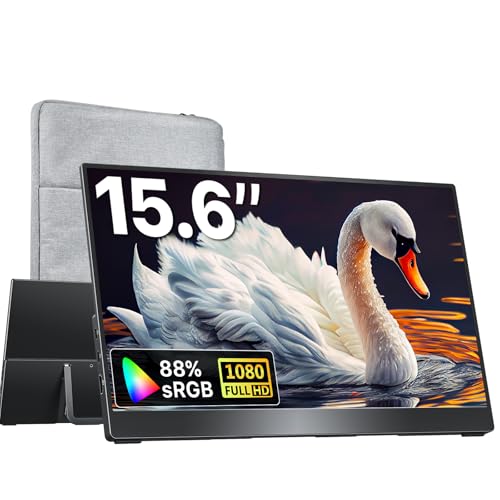
kksmart Portable Monitor 15.6″ Travel Second Screen

KTC H32S17F 32″ 240Hz Curved 1080P

KTC H32C5 32″ Curved 280Hz 1080P

KTC H32S25E 32″ 1440P Curved 240Hz

KTC H24S17P 24″ Curved 240Hz FHD

KOORUI 24″ Curved 180Hz FHD



KTC H34S5 34″ Ultrawide 180Hz WQHD
A Breakdown Of The Leading Choices
Hotel-room play sessions and crowded coffee-shop desks are where a portable screen earns its keep. The VisionOwl ships a 16-inch 2560×1600 panel running at 144Hz, which is sharper than the typical 1080P travel monitor and noticeably smoother for fast shooters. Its 16:10 aspect ratio lines up cleanly with most modern laptops, including MacBook screens, so mirroring feels native without awkward black bars. The built-in kickstand and VESA mount option give you desk and arm-mount flexibility, and dual USB-C plus HDMI inputs mean you can plug in a laptop, a Steam Deck, or a console with one cable.
For frequent flyers, students in tight dorms, and anyone who treats a Switch or PS5 as travel gear, this panel pulls real duty. You may find the small integrated speakers serviceable for video calls but thin for gaming audio, so headphones are the realistic move.
Everyday Advantages
- 2.5K resolution on a 16-inch panel delivers crisp text and detailed game UI without scaling headaches.
- 144Hz refresh keeps console and PC play feeling smooth, not the choppy travel-screen experience you might expect.
- The 16:10 ratio matches modern laptops cleanly, so mirrored desktops feel familiar instead of cramped.
- USB-C and HDMI inputs cover laptops, MacBooks, PS5, and Xbox with a single cable each.
- VESA compatibility plus the built-in kickstand handle both desk and mounted setups.
Honest Caveats
- 16 inches is plenty for solo use, but split-screen work gets tight fast.
- Built-in speakers handle calls fine, though most users will reach for headphones during games.
- Portability is a real perk, though the panel still wants a stable flat surface to sit on for long sessions.
Quick Technical Notes
Who It Suits Best
Frequent travelers, hybrid workers, and console owners who want a second screen that travels without feeling like a toy.
Where Another Pick Suits Better
Desktop-only players who want a larger, fixed curve should look at the KTC H32S17F 32″ 240Hz Curved 1080P for a proper desk centerpiece.
When the brief is plain and simple, a featherweight 15.6-inch screen for travel days, the kksmart gets the job done without demanding attention. The slim housing weighs around 1.5 pounds and slips into a backpack sleeve next to a 14-inch laptop without crowding it. Dual USB-C ports plus an HDMI input cover the usual mix of laptops, MacBooks, Surface devices, and current-generation consoles, so the cable bag stays minimal. The three-side frameless look keeps the footprint compact and the panel modern.
For commuters, remote workers splitting focus between spreadsheets and a game lobby, and anyone who treats a laptop as their main rig, the trade-off is the right one. You may notice the integrated speaker is fine for calls but thin for cinematic games, so plan on pairing with headphones.
Everyday Perks
- Around 1.5 pounds of carry weight keeps it friendly for daily commutes.
- Dual USB-C plus HDMI inputs handle laptops, handhelds, and consoles with one cable per device.
- The three-side frameless panel looks modern and keeps the footprint small in a bag.
- VESA compatibility gives you a real desk or arm-mount option when you settle in.
Points To Keep In Mind
- 15.6 inches works for solo play but gets cramped when you split two windows side by side.
- Speaker output is passable for voice, light on bass for games or music.
- No built-in battery means you stay tied to the host device or a USB power source.
Made For
Remote workers, students, and hybrid commuters who need a simple second screen that travels without ceremony.
Look Elsewhere When
Gamers who want a faster, sharper travel panel should consider the VisionOwl Portable Monitor 16″ 2.5K QHD 144Hz with Kickstand instead.
For a 32-inch desk centerpiece built around pure speed, the KTC H32S17F answers the call. The 240Hz refresh rate combined with a 1ms response targets exactly the kind of motion clarity competitive players want from a fast-paced shooter or racing sim. The 1080P resolution keeps frame rates high on mid-tier GPUs, which matters if your rig is a generation behind the flagship cards. Adaptive Sync support helps eliminate tearing when frame rates swing during chaotic firefights.
This is a strong fit for esports-leaning players, anyone running older GPUs that need easy frames, and couch co-op setups where the curve pulls you into the action. In our view, 1080P on a 32-inch panel can feel soft up close to a careful eye, so sitting a bit further back makes the picture look more natural.
Notable Upsides
- 240Hz refresh is a real performance edge in fast shooters and racing games.
- 1080P resolution keeps frame rates high on mid-range graphics cards.
- The 1500R curve wraps the action around your peripheral vision for racing and flight sims.
- 1ms response keeps motion blur to a minimum during quick camera turns.
Worth Noting
- 1080P at 32 inches looks softer up close to a sharp eye.
- No height adjustment listed, so monitor arms or a VESA mount help with desk ergonomics.
Feature Snapshot
Right Fit For
Esports-style players and competitive FPS fans running mid-tier GPUs who want maximum frame rates on a 32-inch curve.
Swap It Out When
Pilots and sim racers who want a wider field of view should consider the KTC H34S5 34″ Ultrawide 180Hz WQHD for a real ultrawide canvas.
When the goal is pushing refresh rates as high as the budget allows, the KTC H32C5 stretches the ceiling to 280Hz on a 32-inch curved panel. The native 240Hz base gives you sharp motion out of the box, and the 280Hz overclock kicks in for titles that can actually push those frames. A 1ms MPRT response and Adaptive Sync keep motion clean when frame rates spike and dip during crowded multiplayer moments. Low blue light and 128% sRGB coverage handle both late-night sessions and content creation duties.
This screen targets the segment that lives inside Valorant, CS, and Overwatch, where every frame matters. You may find the 1080P density soft on a 32-inch panel, so a slightly longer viewing distance makes text and HUD elements feel right.
The Upside
- 280Hz overclock ceiling ranks near the top of the affordable category.
- Adaptive Sync keeps gameplay tear-free when frame rates swing.
- 128% sRGB coverage adds color punch beyond basic gaming monitors.
- VESA mount compatibility and tilt adjustment handle most desk setups.
Trade Offs
- 1080P on a 32-inch panel looks best from a moderate viewing distance.
- 280Hz mode requires DisplayPort and a GPU that can actually push those frames.
- Tilt-only stand means monitor arms help users who want full ergonomic adjustment.
Feature Card
Best Suited To
Hardcore competitive FPS players who want the highest refresh rate possible without crossing into premium pricing.
Another Choice May Suit
Players chasing sharper detail at 1440P should look at the KTC H32S25E 32″ 1440P Curved 240Hz for noticeably crisper visuals.
The KTC H32S25E lands in the sweet spot where resolution and refresh rate both come to play. A 2560×1440 panel on a 1000R curve gives you a wraparound feel that pulls you into the action, while 240Hz keeps the motion clean even when frame rates dip during heavy effects. The 4000:1 contrast ratio and 122% sRGB coverage produce punchy colors and deep blacks, which makes single-player RPGs and story-driven games look notably richer than typical budget panels.
For sim racers, RPG players, and anyone with a mid-to-upper tier GPU who wants sharper detail than 1080P without stepping into 4K, the H32S25E makes a strong case. The 1000R curve is more aggressive than 1500R, so you may find it requires a centered seating position to feel natural.
The Practical Payoff
- 1440P resolution on a 32-inch panel gives noticeably crisper text and game detail than 1080P.
- 1000R curve creates a tight wraparound feel for racing and immersive single-player titles.
- 4000:1 contrast delivers deep blacks and stronger color depth for cinematic games.
- 240Hz refresh handles fast competitive play when your GPU can keep up.
- Adaptive Sync across HDMI and DisplayPort keeps gameplay smooth.
Factors To Consider
- The aggressive 1000R curve feels best with a centered viewing position.
- 1440P at 240Hz demands a mid-to-upper tier GPU to fully exploit.
- Tilt-only adjustment means a monitor arm helps with ergonomics.
Feature Snapshot
Perfect Match For
Mid-to-upper tier PC gamers who want a balance of sharp detail, fast motion, and immersive curvature on a single screen.
Consider Something Else When
Players who want the widest field of view for sim racing or productivity multitasking should explore the KTC H34S5 34″ Ultrawide 180Hz WQHD.
When desk space is the bottleneck, the KTC H24S17P delivers the speed of a 240Hz panel in a footprint that fits almost anywhere. The 24-inch size pairs well with a compact gaming chair setup, a dorm desk, or a bedroom corner where a 32-inch display would dominate. A 1500R curve adds depth without overwhelming the smaller panel, and 1080P keeps frame rates high on modest GPUs. The 3000:1 contrast gives the picture a noticeable richness compared to flat budget panels.
Players on tight desks, FPS enthusiasts who sit close to the screen, and students who game in shared spaces should find the size and curve easy to live with. You may find 24 inches limiting for productivity work, so pairing it with a laptop or a second screen helps for spreadsheets and browser tabs.
Useful Strengths
- 24-inch size fits cramped desks and small gaming corners without crowding.
- 240Hz refresh gives you real competitive speed in a small form factor.
- 1500R curve adds depth without overpowering the smaller panel.
- 1080P resolution keeps frame rates high on modest GPUs.
Less-Strong Areas
- 24 inches feels tight for split-screen productivity or side-by-side documents.
- Tilt-only stand may push you toward a monitor arm for ergonomic comfort.
Whose Shelf It Belongs On
FPS players and competitive gamers working with limited desk space who want high refresh rates in a compact form.
Reach For A Different Pick When
Players who want a more immersive single-screen experience should consider the KTC H32S25E 32″ 1440P Curved 240Hz for a larger canvas.
KOORUI’s 24-inch 180Hz curved monitor covers the everyday balance point between speed, price, and usable size. The 1500R curve adds immersion without distorting the picture at normal viewing distances, and 1080P on a 24-inch panel keeps text and game UI readable without scaling. A 1ms MPRT response and the 180Hz refresh handle fast-paced shooters and racing games comfortably, and the 3000:1 contrast gives colors a bit more depth than typical entry-level flat screens.
For mixed-use households, casual competitive players, and anyone upgrading from a 60Hz office monitor, this screen makes the transition feel meaningful without overspending. In our view, the 180Hz rate is the sweet spot for most modern GPUs at 1080P, giving you headroom without demanding a flagship card.
Everyday Wins
- 180Hz refresh rate is a real upgrade over standard 60Hz or 75Hz panels.
- 1500R curve adds immersion while keeping the screen usable for work and browsing.
- 1ms response time keeps motion clean during fast-paced gaming.
- 24-inch form factor fits a wide range of desk setups, from dorms to home offices.
Where It Is Less Suited
- 1080P resolution works well at 24 inches but limits the panel’s longevity as a productivity display.
- Color accuracy is fine for gaming but not aimed at professional content work.
Feature Card
Who Should Grab It
Casual to mid-level gamers and mixed-use households who want a noticeable speed upgrade from a standard office monitor.
Not Your Match When
Players chasing the absolute highest refresh rates should consider the KTC H32C5 32″ Curved 280Hz 1080P instead.
The KOORUI 24-inch 100Hz curved monitor sits in the relaxed middle ground, offering a smoother experience than a standard office display without pushing into high-refresh territory. The 1500R curve wraps the image around your field of view, which adds a noticeable sense of depth during single-player games and movies. The VA panel delivers stronger contrast than typical IPS budget screens, giving darker scenes a richer look. At 100Hz, everyday navigation, web browsing, and casual gaming all feel more responsive than a 60Hz screen.
For casual home players, families sharing a screen, and anyone who games alongside spreadsheets and streaming, this model handles the workload without drama. The product listing does not mention VESA support, so wall or arm mounting isn’t part of the picture for this model.
The Case For It
- 100Hz refresh makes everyday tasks and casual gaming feel noticeably smoother than 60Hz.
- VA panel technology gives the picture deeper contrast than typical budget IPS screens.
- The 1500R curve adds immersion for single-player games and movie nights.
- 24-inch size with a slim frame keeps the desk footprint tidy.
Potential Sticking Points
- This monitor does not support VESA mounting, so placement is limited to the included stand.
- 100Hz is a real upgrade from 60Hz but trails behind the 180Hz and 240Hz picks in this list.
Built With In Mind
Casual gamers, families, and home office users who want a smoother, more immersive screen than a basic office monitor.
Skip It When
Competitive players who want higher refresh rates should look at the KOORUI 24″ Curved 180Hz FHD for a real speed upgrade.
The KOORUI 27-inch 180Hz curved monitor steps up to a larger panel without jumping the price tier. The 1500R curve on a 27-inch screen feels naturally immersive, pulling the edges of the image into your peripheral vision during racing and adventure games. A 3000:1 contrast ratio gives the VA panel real depth in darker scenes, and 180Hz keeps motion smooth for shooters and sports games alike. The 1080P resolution makes the most sense for mid-tier GPUs, where the goal is high frame rates rather than maximum pixel count.
For living-room gaming, family setups, and anyone who wants a noticeably larger screen without leaving the affordable bracket, this is an easy screen to live with. You may notice 1080P feels a touch soft at 27 inches up close, so a slightly longer viewing distance keeps the picture looking sharp.
Useful Touches
- 27-inch size gives you a comfortable middle-ground for gaming and media.
- 180Hz refresh delivers a clear motion upgrade over standard 60Hz displays.
- 3000:1 VA contrast adds depth in darker scenes for cinematic games.
- 1500R curve enhances immersion without aggressive wraparound distortion.
A Few Limitations
- 1080P at 27 inches looks best at a moderate viewing distance, not pressed up close.
- No height adjustment listed, so monitor arms help with ergonomic setup.
Who Will Love This
Living-room gamers, family households, and mid-tier PC users who want a larger curved screen without a major price jump.
A Better Fit Elsewhere
Players who want sharper detail on a similar-size screen should consider the KTC H32S25E 32″ 1440P Curved 240Hz for a clear resolution boost.
For a real change in how a game feels, the KTC H34S5 ultrawide delivers a 21:9 canvas that simply gives you more world to look at. The 3440×1440 resolution on a 1500R curve wraps your peripheral vision naturally, which is what makes sim racers, flight sims, and open-world RPGs feel genuinely different rather than slightly better. PIP and PBP modes let you run a second source alongside your game, which is handy for guides, streams, or work tasks on the same screen. A 4000:1 contrast ratio gives the panel strong color depth, while full tilt, swivel, pivot, and height adjustment handle ergonomic needs without requiring a separate monitor arm.
For sim racers, RPG players, and productivity multitaskers who want a wide desktop without buying two monitors, the H34S5 makes a strong case. You may find some competitive shooters limit ultrawide support, so titles without native 21:9 compatibility will show black bars on the sides.
Features That Help
- 3440×1440 ultrawide resolution gives a noticeably wider field of view than 16:9 panels.
- 1500R curve wraps the image naturally for sim racers and immersive single-player games.
- PIP and PBP modes handle secondary inputs without a second monitor.
- Full ergonomic stand with tilt, swivel, pivot, and height adjustment.
- 4000:1 contrast ratio delivers strong color depth for cinematic games.
Things To Weigh Up
- Some competitive shooters don’t support 21:9 natively, so black bars appear on the sides.
- 34 inches demands a wider desk footprint, so smaller desks may feel crowded.
Who It Suits Best
Sim racers, flight sim fans, RPG players, and productivity multitaskers who want a wide-screen experience without buying two monitors.
Look Elsewhere When
Competitive FPS players focused purely on speed and frame rates should consider the KTC H32C5 32″ Curved 280Hz 1080P for a faster traditional panel.
Picking The Right Screen For Your Setup
Choosing an affordable gaming monitor comes down to matching the panel to the games you play and the GPU you own. Refresh rate, expressed in hertz (Hz), describes how many times per second the image updates: 60Hz feels standard, 144Hz feels noticeably smoother, and 240Hz-plus targets competitive play. Response time, measured in milliseconds, tells you how quickly a pixel changes color: lower numbers reduce motion blur during fast camera turns.
Resolution shapes how sharp the picture looks at a given size. 1080P (1920×1080) on a 24-inch screen looks clean and runs easily on modest GPUs. At 27 inches or larger, 1080P can feel soft, and 1440P (2560×1440) becomes a meaningful upgrade without taxing modern graphics cards heavily. Aspect ratio, the shape of the screen, changes how a game feels: 16:9 is standard, 16:10 adds a little extra vertical space, and 21:9 ultrawide widens your peripheral view for racing and immersive titles.
Adaptive Sync, whether labeled FreeSync or G-Sync Compatible, eliminates screen tearing by matching the monitor’s refresh to the GPU’s output. Curvature, measured with an R rating like 1500R or 1000R, describes how tightly the screen bends: lower numbers mean a more aggressive curve. Panel technology, the panel type, affects color and contrast: VA panels typically deliver deeper blacks, while IPS panels often show wider viewing angles.
For competitive shooters, prioritize refresh rate and response time. For RPGs and story-driven games, prioritize resolution, contrast, and curve. For mixed gaming and work, look for a panel that handles both at a comfortable size.
Key Considerations Across These Picks
Where Shoppers Go Wrong
A common mistake is buying the highest refresh rate panel you can afford without checking whether your GPU can push those frame rates. A 280Hz monitor connected to a mid-tier graphics card often performs no better than a 144Hz screen because the GPU can’t keep up. Another pitfall is choosing a 32-inch 1080P panel and expecting sharp text: at that size, 1080P looks soft up close, and 1440P becomes the smarter move for everyday use.
Overlooking stand ergonomics is another frequent miss. Tilt-only stands can leave you craning your neck during long sessions, so check whether the monitor supports VESA mounting or includes height adjustment. Finally, ignoring Adaptive Sync support means risking screen tearing, which is a visible distraction even on otherwise capable panels.
When Paying More Pays Off
Higher-tier panels in this category tend to add 1440P resolution, stronger contrast ratios, and more aggressive curves. Spending up makes sense if your GPU can drive the extra pixels and you play immersive single-player games where sharper detail and deeper blacks add meaningful enjoyment. Ultrawide screens also justify the step up if you game in racing or flight sims and want the wider field of view.
For purely competitive play on a tight budget, refresh rate and response time matter more than resolution, and the affordable tier handles that scenario well. The honest read is that the step up pays off most when your hardware and your favorite genres can actually use it.
Frequently Asked Questions
Is 1080P still good for gaming in 2026?
Yes, 1080P remains a strong choice on 24-inch panels and for competitive titles where high frame rates matter more than pixel density. On screens 27 inches and larger, 1440P offers a clear sharpness upgrade.
What refresh rate do most gamers actually need?
For most genres, 144Hz feels like a real upgrade from 60Hz, and 180Hz sits comfortably in the sweet spot. Competitive FPS players often target 240Hz or higher for the smoothest motion possible.
Do I need a curved monitor for gaming?
Curved panels add immersion, especially on 27-inch and larger screens, and they help reduce eye strain during long sessions. Flat panels remain fine for smaller sizes and competitive play where uniform focus matters.
Is Adaptive Sync really necessary?
Adaptive Sync eliminates screen tearing without the input lag of older sync methods, which makes gameplay noticeably smoother when frame rates fluctuate. Most modern GPUs support it, so it’s a worthwhile feature to keep enabled.
How big should my gaming monitor be?
24 inches works well for tight desks and competitive FPS where you sit close to the screen. 27 to 32 inches is the comfortable middle ground for most setups, and 34-inch ultrawides suit sim racers and multitaskers.
Closing Remarks
Your best pick comes down to the games you play and the hardware driving them. Competitive FPS players chasing the smoothest motion should focus on the 240Hz and 280Hz KTC panels, while RPG and sim fans get more out of the 1440P and ultrawide options. Travel-heavy users have a clear answer in the VisionOwl and kksmart portables. Match the screen to your setup, and the right affordable monitor will outlast several GPU generations without complaint.


