


A smooth 144Hz panel used to feel like a splurge, but the category has matured into something far more approachable. Today’s budget-friendly options deliver genuinely fluid motion for fast-paced shooters, racing sims, and even everyday desktop work without the sticker shock of flagship screens. The challenge is that “budget” now spans everything from compact 22-inch panels to curved 27-inch displays, IPS to VA, and modest 120Hz refresh rates all the way up to 180Hz-plus headroom.
The list below focuses on monitors that balance real-world gaming performance with practical desktop usability. Every pick runs at 144Hz or higher, supports adaptive sync to keep frame pacing clean, and represents a sensible trade-off between panel size, image quality, and price. Whether you play for an hour a night or grind ranked all weekend, there’s a sensible match here.
The Lineup, Simplified
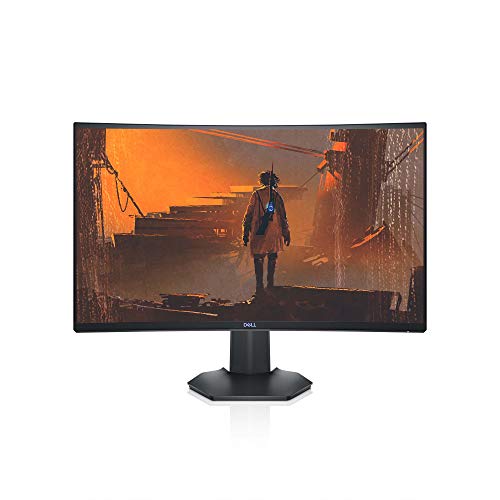
Dell S2721HGF 27 Inch 144Hz Curved Gaming Monitor

BenQ Mobiuz EX2510 24.5 Inch 144Hz IPS Gaming Monitor

ArcticPro 22 Inch 144Hz FHD Gaming Monitor

ArcticPro 24 Inch 120Hz IPS FHD Monitor

ArcticPro 27 Inch 120Hz IPS FHD Monitor

KTC 24 Inch QHD 100Hz IPS 2K Monitor

KTC 24 Inch 1080P 100Hz Eye Care Monitor

KTC 24 Inch FHD 144Hz Office Gaming Monitor (H24B9S)

KTC 24 Inch QHD 180Hz Fast IPS Gaming Monitor (H24T7)

KTC 24 Inch 180Hz FHD Fast IPS Gaming Monitor (H24F8)
A Closer Look At Each Pick
The Dell S2721HGF leans into immersion with a 1500R curved 27-inch panel, the kind of wrap that pulls you into a racing sim or a horror game far more than a flat screen manages. At 1920 x 1080, you get pixels large enough to read clearly without scaling headaches on a standard desk setup.
Adaptive sync support is unusually thorough here: it works with both Nvidia G-SYNC Compatible hardware and AMD FreeSync Premium systems, which is rare on a budget panel. A 1ms MPRT response rating and 144Hz refresh rate handle fast motion cleanly, and the height- and tilt-adjustable stand helps during long sessions.
Benefits That Matter
- Curved 1500R field of view that genuinely changes how single-screen gaming feels
- Dual adaptive sync (G-SYNC Compatible plus FreeSync Premium) covers either GPU camp
- Height- and tilt-adjustable stand that makes marathon sessions easier on your neck
- Rear-mounted joystick plus shortcut buttons for quick OSD changes
Worth Noting
- 1080p on a 27-inch panel means pixel density drops, so text and UI elements look softer than on 24-inch alternatives
- VA-style contrast is strong, but viewing angles in a shared-room setup can shift color at the edges
- Owners commonly report the OSD takes a few minutes to learn, given the new rear-mounted controls
Feature Snapshot
Right Fit For
Single-screen gamers who want a curved, immersive experience and run either an Nvidia or AMD graphics card without paying flagship prices.
Skip It When
You prefer the sharper text and pixel density of the KTC 24 Inch QHD 100Hz IPS 2K Monitor for productivity-heavy use.
The BenQ Mobiuz EX2510 sits a tier above most budget panels in terms of image tuning, largely thanks to BenQ’s HDRi processing that adapts contrast and color to the content on screen. It’s the kind of monitor that looks thoughtfully put together, from the slim bezels to the integrated speaker bar.
You get a 24.5-inch IPS panel, a 144Hz refresh rate, 1ms MPRT response, and FreeSync Premium support, which together handle both fast shooters and slower story-driven games well. Built-in speakers save desk space for setups that don’t want a separate audio rig, and HDMI plus DisplayPort inputs keep cabling flexible.
What It Does Well
- HDRi optimization plus Light Tuner and Black eQualizer give more usable detail in dark scenes than a stock panel
- IPS viewing angles stay consistent when you share the screen or shift posture
- Integrated speaker system saves desk space and works fine for casual play
- Bezel-light design helps in multi-monitor layouts
Honest Caveats
- Built-in speakers sound fine for system audio but won’t replace a dedicated setup for music or competitive play
- IPS glow at the corners can show up in dark rooms, depending on the brightness setting you prefer
Who It Suits Best
Shoppers who want a polished, all-in-one 24.5-inch panel that handles HDR content, audio, and gaming without extra accessories.
Another Choice May Suit
For shoppers who want a higher refresh ceiling for the same screen size, the KTC 24 Inch 180Hz FHD Fast IPS Gaming Monitor (H24F8) pushes past 144Hz.
The ArcticPro 22-inch is the smallest panel in this lineup, and that 22-inch footprint is genuinely useful on a cramped desk, a dorm shelf, or a side station where every inch counts. At 1080p, the pixel density actually feels tighter here than on the 27-inch Dell, so text and HUD elements stay crisp.
You still get a 144Hz refresh rate, 105% sRGB coverage, and a 4000:1 contrast rating, which is strong for this screen class. Three-sided frameless styling helps it disappear visually in multi-monitor builds, and VESA mount support means it can hang off an arm if the included stand feels too small.
Useful Strengths
- 22-inch size suits dorms, shared rooms, and tight workstations where a 27-inch panel won’t fit
- 105% sRGB coverage means colors look rich for content creation beyond gaming
- 4000:1 contrast rating keeps dark scenes readable compared to typical IPS alternatives
- VESA mount support and ultra-slim profile work well with monitor arms
Points To Note
- A 22-inch screen feels small for racing sims and open-world games where a wider field of view matters
- Only HDMI and VGA inputs are listed, so older connections take up a port that some users might prefer for modern HDMI 2.0 devices
- Smaller panels run warmer to the touch in some setups, given the electronics sit closer to the surface
Feature Snapshot
Made For
Students, dorm dwellers, and anyone with limited desk space who still wants proper 144Hz gaming performance.
Consider Something Else When
You want more screen real estate for spreadsheets and side-by-side windows, in which case the ArcticPro 27 Inch 120Hz IPS FHD Monitor is the same brand in a larger form.
ArcticPro’s 24-inch IPS monitor trades a bit of refresh ceiling for a panel that feels easy to live with day after day. The 120Hz rate is plenty for most single-player adventures, MOBAs, and lighter competitive play, and IPS technology keeps colors consistent across the screen.
A 1ms response rating and built-in low blue light mode make this a sensible pick for people who use their monitor for eight-hour workdays plus evening gaming. The trade-off is that competitive esports players chasing absolute frame speed may want to look at higher-Hz options later in this list.
Positive Takeaways
- IPS panel keeps colors accurate even when you shift posture or share the screen
- Low blue light design reduces eye fatigue during long work sessions
- 1ms response rating helps motion clarity for fast in-game action
- 24-inch size is the comfortable sweet spot for typical desk depth
Trade-Offs To Consider
- 120Hz is below the 144Hz mark this article targets, so it’s a soft ceiling for speed-focused gamers
- IPS panels in this range can show mild backlight bleed in dark scenes at high brightness
Perfect Match For
People who split their time between office work, school tasks, and casual evening gaming on the same panel.
Where Another Pick Shines
Hardcore competitive players will find the KTC 24 Inch FHD 144Hz Office Gaming Monitor (H24B9S) a closer match at the same 24-inch size with a real 144Hz ceiling.
The 27-inch ArcticPro steps up the screen size while keeping the same 120Hz IPS philosophy as its smaller sibling. For shoppers who want a larger canvas for both work and play but don’t want to pay for higher refresh rates, this panel splits the difference well.
The 16:9 aspect ratio and 1920 x 1080 resolution deliver comfortable screen space, though at 27 inches the pixel density does soften compared to a 24-inch 1080p display. Color reproduction stays consistent across the IPS panel, and the 1ms MRTP response handles day-to-day motion cleanly.
Bright Spots
- 27-inch size makes spreadsheets, documents, and open games easier to read at a glance
- IPS technology keeps colors accurate across the wider screen
- Low blue light design helps reduce eye strain during long sessions
Points To Note
- 1080p on a 27-inch screen means individual pixels are larger, so text and UI details look softer than on denser panels
- 120Hz ceiling trails the 144Hz standard this roundup targets, depending on how you define the threshold
Feature Snapshot
Best Suited To
Shoppers who want a generous 27-inch screen for both work and play without stepping up to higher refresh rates or 1440p.
Look Elsewhere When
You want sharper text at this screen size, which the KTC 24 Inch QHD 100Hz IPS 2K Monitor delivers with a 1440p panel in a smaller form factor.
The KTC 24-inch QHD monitor steps the resolution up to 2560 x 1440, which is the upgrade that genuinely changes how 24-inch screens feel. Text gets noticeably crisper, and games show more detail without requiring a 27-inch panel to take advantage of the extra pixels.
A 100Hz refresh rate is modest by gaming standards, but combined with FreeSync and G-Sync compatibility, the panel keeps frame pacing clean for the kinds of games where resolution matters more than raw speed. The three-sided zero-frame design also helps in dual-monitor setups.
The Helpful Details
- 1440p resolution delivers a meaningful jump in clarity for both work and games
- FreeSync and G-Sync compatibility keeps motion smooth with most modern GPUs
- HDR10 support brings more depth to compatible games and content
- Zero-frame three-sided bezel design fits clean multi-monitor layouts
Where It Is Less Suited
- 100Hz refresh rate trails the 144Hz sweet spot for fast-paced competitive gaming
- 1440p demands more from your graphics card than 1080p, so older GPUs may struggle at higher detail settings
Whose Shelf It Belongs On
Shoppers who want sharper text and more in-game detail and are willing to trade a bit of refresh speed for pixel density.
Reach For A Different Pick When
You’d rather prioritize raw speed at 1080p, in which case the KTC 24 Inch 180Hz FHD Fast IPS Gaming Monitor (H24F8) makes more sense.
This KTC 24-inch leans into the office-plus-gaming use case with an explicit eye-care focus and a tilt-adjustable stand. The 23.8-inch visible screen keeps pixel density tight at 1080p, which matters if you read a lot of text during the day and want the same panel to handle evening games.
You get HDMI and VGA ports, HDR10 support, FreeSync compatibility, and a three-sided frameless bezel that looks clean in any setup. The 100Hz refresh rate isn’t aimed at competitive play, but it gives a noticeable bump over standard 60Hz office monitors for general use.
Reasons It Performs
- Eye-care features reduce strain during long reading or spreadsheet sessions
- Dual HDMI and VGA ports make it easy to connect a work laptop and a desktop at the same time
- Tilt-adjustable stand lets you set a comfortable viewing angle without an aftermarket arm
- 104% sRGB coverage keeps colors looking natural for casual content creation
Smaller Limitations
- VGA input is dated for modern gaming GPUs, so you may end up using only one of the listed ports
- 100Hz refresh is below the 144Hz threshold for speed-focused competitive gaming
Who Should Grab It
Hybrid users who want a single panel for documents, video calls, and casual evening play without paying for higher refresh rates.
Swap It Out When
You’re chasing 144Hz or higher for serious gaming, in which case the KTC 24 Inch FHD 144Hz Office Gaming Monitor (H24B9S) fits the same form factor with more speed.
The KTC H24B9S feels like the natural middle-of-the-road pick: 24 inches, 1080p, IPS, and a real 144Hz refresh rate. The H24B9S naming makes it easy to identify in KTC’s lineup, and the panel itself is built to do both work and play without leaning hard in either direction.
IPS technology keeps colors accurate for content viewing, while 144Hz handles most modern games with headroom. The 16:9 aspect ratio is the standard widescreen format, so games and movies display without letterboxing or stretching.
Noteworthy Benefits
- True 144Hz refresh rate handles the games most people actually play
- IPS panel keeps colors consistent when you shift position or share the screen
- 24-inch 1080p combination keeps pixel density tight for text-heavy work
- Office-and-gaming positioning means it works in bedrooms, studies, and shared spaces
Potential Compromises
- 144Hz is the floor for serious gaming, not the ceiling, so esports players may want to step up to 180Hz panels later in this list
Feature Snapshot
Built With In Mind
Mainstream 1080p gamers who want a no-fuss panel that hits 144Hz and works equally well for office tasks.
A Better Fit Elsewhere
For shoppers chasing extra speed, the KTC 24 Inch 180Hz FHD Fast IPS Gaming Monitor (H24F8) uses a similar form factor with significantly more refresh headroom.
The KTC H24T7 is the closest this list gets to a true performance panel without crossing into flagship pricing. A 2560 x 1440 QHD resolution pairs with a 180Hz refresh rate (up to 185Hz) and a Fast IPS panel, which is a meaningful step up in both clarity and speed compared to standard IPS.
You also get 99% sRGB coverage, HDR400 support, and a 1ms response rating, all of which add up to a monitor that can handle competitive shooters and detailed single-player games in the same session. The 24-inch size keeps pixel density high enough that 1440p looks sharp rather than stretched.
What Makes Sense
- 180Hz refresh ceiling gives competitive gamers extra headroom over 144Hz panels
- 1440p resolution on a 24-inch screen keeps text and game detail sharp
- HDR400 support brings more depth to compatible games and movies
- Fast IPS technology handles motion cleanly without sacrificing color accuracy
Less Ideal Details
- 1440p at 180Hz demands a capable graphics card, so older GPUs may not push the panel to its full potential
- 24-inch 1440p can feel small for productivity users accustomed to 27-inch screens
Feature Snapshot
The Right Fit
Competitive gamers with a modern graphics card who want both high refresh and sharp 1440p resolution in a 24-inch form factor.
Not Your Match When
You’d rather have a larger 27-inch screen for immersive single-player games, in which case the Dell S2721HGF 27 Inch 144Hz Curved Gaming Monitor is a better direction.
The KTC H24F8 takes the same 24-inch Fast IPS formula as its QHD sibling but pairs it with 1080p resolution and a 180Hz (up to 190Hz) refresh rate. For pure speed at a budget tier, that combination is hard to beat: every frame is on screen faster, and the lower resolution means mid-range GPUs can actually drive it.
Color reproduction is generous at 133% sRGB, HDR400 support adds depth to compatible games, and FreeSync compatibility keeps frame pacing clean. The 23.8-inch viewable size keeps pixel density tight, which is one reason competitive players often prefer 1080p on 24-inch panels over 27-inch.
Strengths Worth Knowing
- 180Hz (up to 190Hz) refresh rate gives competitive gamers serious motion headroom
- 1080p resolution is easy for mid-range graphics cards to push at high frame rates
- 133% sRGB coverage means colors stay vivid across a wide range of content
- Fast IPS panel keeps response times tight without sacrificing viewing angles
Honest Caveats
- 1080p resolution looks softer than 1440p at the same screen size, which matters for productivity and visual detail
- 23.8-inch viewable size may feel small for open-world and sim games that benefit from a wider field of view
Who Will Love This
Esports and competitive-action players who prioritize frame speed above all else and own a GPU that can push 1080p at high frame rates.
Where Another Pick Suits Better
You want both speed and sharper detail in one panel, in which case the KTC 24 Inch QHD 180Hz Fast IPS Gaming Monitor (H24T7) is the natural step up.
What To Weigh Before Choosing Your Next Monitor
Picking a monitor comes down to how you actually use your desk, not just what’s on a spec sheet. Start with screen size: 22 to 24 inches is the comfortable sweet spot for most desks, while 27 inches gives you more room for spreadsheets and side-by-side windows but requires more viewing distance to feel natural.
Refresh rate is the second call. 144Hz is the modern baseline for smooth gaming, and anything above that (180Hz, 190Hz) gives competitive players extra headroom. Panel type matters too: IPS panels give consistent color and wide viewing angles, while VA panels typically offer deeper contrast for darker games. Adaptive sync (FreeSync or G-Sync compatibility) keeps frame pacing clean, which matters once you commit to high refresh rates.
Resolution ties it all together. 1080p is easy for mid-range graphics cards to push and keeps pixel density sharp on 24-inch panels. 1440p gives more detail but demands a stronger GPU. For most shoppers, matching your GPU’s capability to the panel’s resolution prevents the common frustration of buying a monitor your system can’t fully drive.
Resolution and Refresh Rate Trade-Offs
A 24-inch 1080p monitor running at 144Hz is the most balanced entry point for most gamers. Stepping up to 1440p adds clarity but requires more GPU muscle, and going beyond 180Hz only matters if your hardware can actually push those frame rates in the games you play.
Adaptive Sync and HDR Considerations
FreeSync and G-Sync compatibility reduce screen tearing without the input lag of older v-sync methods. HDR support varies widely in this price tier, with HDR400 being a meaningful but not transformative step. If HDR matters to you, look at the panel’s local dimming capability alongside the HDR badge.
Key Considerations Across These Picks
Common Shopping Slip Ups
The most common mistake is buying a 27-inch 1080p panel and expecting sharp text. At 27 inches, 1080p spreads pixels thinner, so icons and edges look softer than they do on a 24-inch screen. The other trap is ignoring your GPU: a 180Hz 1440p monitor is wasted on a graphics card that can’t push past 60 frames per second in the games you actually play.
Where The Extra Money Goes
Stepping up to higher refresh rates or 1440p resolution costs more because the panel technology, scaler, and backlight are all more demanding to manufacture. IPS panels with strong color coverage cost more than basic TN alternatives, and HDR400 support requires tighter backlight control. The upgrade is worth it when your GPU can take advantage of it, and when you spend enough time gaming to notice the difference.


