


A solid gaming setup lives or dies on the small stuff. The controller dangling from a shelf, the muffled Discord call, the headset cable yanking your monitor at the worst moment: these annoyances add up. A few well-chosen accessories turn a cluttered desk into a clean command center, and they don’t have to cost a fortune or swallow your whole room.
Below: eight picks covering mounts, microphones, and desk personality, each one picked for a real pain point. Whether you’re a Switch player, a competitive PC gamer, or somewhere in between, there’s something here that earns its place.
A Fast Comparison Of The Options
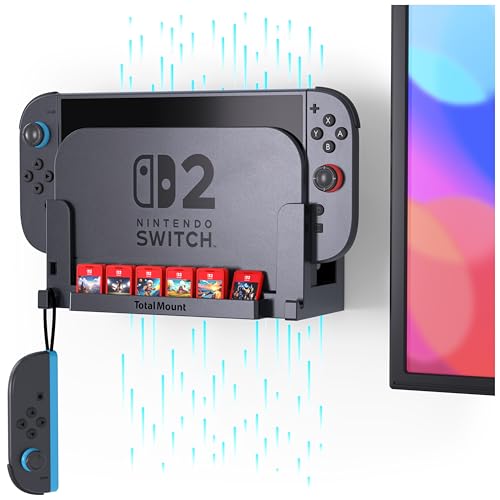
TotalMount for Nintendo Switch 2 Wall Mount

Gctriki Dumpster on Fire Round Mouse Pad 8.6 in

MAONO PD100W Wireless Dynamic Gaming Microphone

MAONO DGM20S Gaming Microphone USB

MAONO PD100XS USB/XLR Boom Mic (Black)

MAONO DGM20W Wireless Gaming Microphone

MAONO DGM20S USB Microphone (Alternate)

MAONO PD100X USB/XLR Dynamic Microphone
More On The Choices That Made The List
Wall-mounted televisions and gaming docks have always played poorly together, especially with the Switch 2’s larger footprint. The TotalMount for Nintendo Switch 2 wall mount solves that by lifting the dock off the entertainment center entirely, tucking the console behind or beside a TV where cables disappear from view. It’s designed in the USA and built specifically for Switch 2 hardware, which matters because dock dimensions shifted noticeably from the original model.
For Switch owners with a wall-mounted display and a chronically crowded media shelf, this mount earns its space. It’s not for everyone: anyone still using a 1st generation Switch, OLED 1st gen, or Switch Lite will find it incompatible. The kit ships with the mount and hardware only, so the console and Joy-Cons come from your existing collection.
Useful Highlights
- Lifts the Switch 2 dock off the shelf, freeing space for soundbars and streaming gear.
- Designed around the Switch 2’s larger dock, which older mounts don’t account for.
- Hardware is included, so no extra trip to the hardware store.
- Keeps cables routed behind the TV rather than tangled in front.
- Simple installation that you can reverse without leaving obvious damage, depending on the wall type.
Trade Offs
- Strictly Switch 2 only: original Switch, OLED 1st gen, and Switch Lite won’t fit.
- Wall-mounting means you lose easy access to the dock’s ports, so swapping cartridges or HDMI cables takes more effort.
- If your TV isn’t wall-mounted, the mount’s main benefit disappears and a simple stand would do.
Who It Suits Best
Anyone running a Switch 2 on a wall-mounted TV who wants a clean, shelf-free entertainment setup without re-routing the entire media center.
Where Another Pick Suits Better
PC-only gamers with no Switch in the mix should skip this entirely and focus on the MAONO microphone options later in the list.
Not every accessory needs to chase performance metrics. The Gctriki Dumpster on Fire round mouse pad leans hard into personality, covering its 8.6-inch circular surface with the kind of sarcastic “I’m fine, everything’s fine” energy that fits a mid-rank-ladder gaming session. It’s a small, low-stakes swap that turns a generic mouse area into a conversation starter during voice chat or a team call.
The round shape and compact footprint suit a laptop, a tight cubicle, or a secondary monitor nook more than a full desktop battlestation. For shoppers who treat the desk as a reflection of mood rather than a tool for esports, this delivers on the brief without trying to be a performance surface.
A Few Strong Suits
- Compact 8.6-inch size fits laptop trays and small desks where a full pad would dominate.
- Round shape adds a visual break from rectangular accessories around it.
- Humor-forward design is great for shared workspaces and streams.
- Makes a low-cost gift for the gamer who already owns everything functional.
Minor Gripes
- Round pads give less horizontal glide area than a rectangular pad, so low-sensitivity FPS players may bump edges.
- Printed graphic designs often show wear in high-friction zones after months of daily use, so the joke can fade as the surface scuffs.
- Not aimed at competitive performance: serious mouse-and-keyboard players may want a wider tracking surface.
Made For
Remote workers, students, and casual gamers who want a small desk accent that sparks a laugh rather than chasing top-tier sensor tracking.
Consider Something Else When
Hardcore FPS players should reach for the MAONO DGM20S Gaming Microphone for a true performance upgrade instead, since a wider desk mat would suit their needs better.
Dynamic microphones (the kind that reject background noise in favor of close-range voice) have reshaped gaming audio, and the MAONO PD100W brings that formula into a wireless form factor with a USB-C receiver. For streamers and Discord regulars tired of cables snagging their keyboard or mouse, going wireless cleans up the desk in a way that even a careful cable management setup can’t match. The dynamic capsule helps reject keyboard clatter and room noise, which matters in shared apartments and busy households.
Compared to the DGM20S condenser option later in this list, the PD100W is a different tool: it trades the brighter condenser sound for a tighter, closer vocal capture that doesn’t pick up the whole room. Anyone recording a podcast one day and queuing ranked matches the next will appreciate the flexibility.
The Helpful Details
- Wireless USB-C receiver cuts the cable between the mic and the PC, freeing desk space.
- Dynamic capsule focuses on close vocal capture, reducing background distractions from keyboard, fan, or roommates.
- Pairs well with both gaming and content creation workflows without re-plugging gear.
- Modern wireless mics at this level have largely closed the latency gap that worried earlier adopters, though results may vary by system load.
Worth Noting
- Wireless operation means the mic needs charging, so heavy streamers should plan for downtime or a charging routine.
- USB-C receivers are usually plug-and-play, but older PCs without a USB-C port will need an adapter.
- Dynamic mics typically need more gain than condensers, so quiet voices may need a boost.
Feature Snapshot
Right Fit For
PC gamers and entry-level streamers who want a cable-free voice setup in a shared or noisy environment.
Look Elsewhere When
Mobile creators who need to plug into a smartphone should consider the MAONO DGM20W Wireless Gaming Microphone for cross-platform flexibility.
Condenser microphones (which capture a wider frequency range and more room detail than dynamic mics) often get dismissed in gaming circles, but the MAONO DGM20S makes a strong case with focused voice pickup and a one-click noise reduction feature. The cardioid pattern, a directional pickup shape that captures sound mostly from the front, helps isolate the speaker’s voice from the rest of the room. For Discord squads, casual streaming, and after-work voice chat, that combination of clarity and noise control lands well.
Compared to the PD100W covered above, this DGM20S is wired and condenser-based, which means it tends to capture more of the room’s character. In a quiet home office, that richer sound is a feature; in a noisy shared space, it can pull in more than you’d like.
Positive Points
- One-click noise reduction simplifies setup for users who don’t want to fiddle with filters.
- Cardioid pickup focuses on the voice and reduces side and rear noise.
- USB connection means plug-and-play on most modern PCs without extra drivers.
- Condenser design produces a brighter, more detailed voice than typical dynamic mics in the same range.
Points To Keep In Mind
- Condenser capsules pick up more room sound than dynamic alternatives, so a treated or quiet space helps.
- Wired USB limits placement to the cable’s reach, which can complicate larger desks.
- One-click noise reduction is convenient, though heavy background noise may still need a software solution.
Best Suited To
Squad-based PC gamers and casual streamers running Discord, in-game voice chat, or weekly streams from a relatively quiet room.
A Better Fit Elsewhere
Anyone streaming in a noisier environment will get more consistent rejection from the MAONO PD100W Wireless Dynamic Gaming Microphone instead.
Stepping up to a boom-arm-ready mic with both USB and XLR output is the natural move for anyone taking streaming or podcasting seriously. The MAONO PD100XS dynamic microphone supports both connection types: USB for a simple PC setup, and XLR (the professional three-pin cable standard used in studios) for routing through an audio interface. That dual output is a real advantage, since you can start with USB today and move to a dedicated interface later without replacing the mic.
Against the PD100W covered earlier, the PD100XS leans toward permanence. It’s a boom-mount design, so it expects a dedicated arm and a settled desk arrangement. For the hobbyist who’s also dipping into voice-over work or weekly podcasting, that flexibility is worth the trade-off in portability.
What Makes Sense
- Dual USB and XLR output lets you start simple and upgrade to a full audio interface later.
- Dynamic capsule rejects background noise, useful in untreated rooms and apartments.
- Onboard mute and volume controls keep adjustments within reach mid-game.
- RGB accents add a visual touch that fits gaming-oriented setups.
Practical Considerations
- Boom-arm setup means more installation time and a permanent spot on the desk.
- Buying an XLR cable and audio interface on top of the mic raises the real cost for the XLR path.
- RGB lighting looks sharp but adds another power consideration in cable-heavy setups.
Key Product Details
Who Should Grab It
Creators who game and stream, or who want one mic to cover both casual play and a more polished podcast or voice-over workflow.
Skip It When
Pure squad-chat users will find the MAONO DGM20S USB Microphone a simpler, more affordable voice upgrade.
The MAONO DGM20W stands out in a sea of PC-only mics by working with both computers and smartphones. That cross-platform support is a quiet superpower for anyone who games on a PC at the desk and shoots video or streams from a phone elsewhere. The wireless design cuts the cord between device and mic, which removes one of the most common setup annoyances.
Where the PD100W (covered above) focuses purely on PC use, the DGM20W opens up the smartphone workflow without forcing you to learn a different mic. For mobile content creators who also game, that’s a real convenience.
Positive Takeaways
- Works with both PC and smartphones, covering gaming and mobile content creation.
- Wireless design simplifies travel setups and small desks where cables are already crowded.
- Plug-and-play approach keeps the barrier to entry low for new creators.
Less Ideal Details
- Wireless mics need battery management, so casual users should expect periodic charging.
- Smartphone compatibility sometimes requires specific adapters or apps, so check the supported devices before committing.
- At this category, a single mic rarely excels at both professional studio capture and casual chat, so expectations matter.
Perfect Match For
Hybrid creators who split their work between a PC gaming setup and a smartphone-based recording workflow.
Another Choice May Suit
Pure PC streamers chasing a more permanent setup should look at the MAONO PD100XS USB/XLR Boom Mic instead.
This ASIN lists the same DGM20S family as the earlier condenser entry, but the alternate listing sometimes pairs with different bundle options depending on availability. Either way, the core experience stays consistent: a USB condenser microphone with a cardioid pattern and one-click noise reduction aimed at gamers who want their voice to cut through squad chat without learning audio engineering.
The honest read is that for a PC-only desk where the mic sits a few inches from the mouth, this format does the job. Anyone with a louder environment should still consider the dynamic PD100W or PD100XS covered above.
Everyday Advantages
- Cardioid pickup pattern (a directional shape that captures sound mostly from the front) keeps voice centered while quieting the rest of the room.
- USB plug-and-play removes driver headaches for casual users.
- One-click noise reduction is genuinely useful for households with a TV or fan running in the background.
Where It Is Less Suited
- Like other condensers, this design picks up more room tone than a dynamic alternative, depending on room treatment.
- The wired USB cable limits repositioning, which can frustrate streamers who like to adjust mic placement mid-session.
Built With In Mind
PC gamers with a quiet desk who want a simple, plug-and-play voice upgrade for multiplayer and casual streaming.
Swap It Out When
Creators in a noisier space should consider the MAONO PD100X USB/XLR Dynamic Microphone for stronger background rejection.
The MAONO PD100X closes the list with the same hybrid DNA as the PD100XS, but in a slightly different form factor. It supports both USB and XLR connections, runs as a dynamic microphone (so it rejects room noise rather than capturing it), and targets users who want a single mic that can grow with their setup. The combination makes it appealing for someone starting a podcast or stream today while keeping the door open for an audio interface tomorrow.
Where the PD100XS leans heavily into RGB and boom-arm aesthetics, the PD100X reads as a more studio-flavored option. For creators who care more about the recording than the lighting, that restraint is a feature, not a compromise.
Why It Works Well
- Dual USB and XLR output supports both beginner and intermediate audio chains.
- Dynamic capsule is forgiving in untreated rooms, which most home setups are.
- Cardioid pattern keeps focus on the speaker’s voice.
- Sturdy build tends to feel stable on a desk or boom arm, though results depend on the chosen arm.
Honest Caveats
- Choosing the XLR path means buying an interface and cable separately, which adds to the total.
- Dynamic mics usually need more gain than condensers, so quiet voices may want a cloudlifter or preamp.
- Less of a visual centerpiece than RGB-equipped alternatives, which may matter for camera-facing setups.
Quick Facts
Whose Shelf It Belongs On
Creators who want a future-proof dynamic mic that grows from a USB setup into an XLR studio chain without replacing hardware.
Reach For A Different Pick When
Console or mobile-first creators should look at the TotalMount wall mount and the MAONO DGM20W wireless mic instead.
What Matters Most When Building A Gaming Accessory Kit
Matching The Accessory To The Real Problem
Start with the annoyance, not the spec sheet. A noisy Discord call, a wobbly controller, a Switch 2 sliding off the entertainment center: these are the daily frictions a good accessory solves. Picking based on a benchmark number often buys a feature you won’t actually use.
For microphones, the core decision is dynamic versus condenser. Dynamic mics reject background noise and suit louder or untreated rooms. Condensers capture more detail and brightness, but they also pick up more of the room, so they shine in quieter spaces. Once you know which trade-off matches your environment, the rest of the list narrows quickly.
Form Factor And Desk Reality
A boom-arm mic does its best work when you commit to a fixed spot. A wireless mic earns its price tag when cable clutter is your real enemy. A wall mount only helps if the TV is already on the wall. Measure your real estate before choosing, since “compact” and “low-profile” are easy claims that don’t always match the actual footprint on your desk.
Wired versus wireless is more than a convenience call. Wired mics never need charging, but they pin you to a cable run. Wireless mics free the desk but introduce a charging routine. For most casual gamers, a wired USB mic remains the lowest-friction option, and that tradeoff only flips once the cable actually starts bothering you.
Compatibility And Connection Type
USB microphones are plug-and-play across nearly every modern PC. XLR microphones (the three-pin professional cable standard) require an audio interface, which adds cost but opens up better signal chains for serious creators. Dual-output mics like the PD100X and PD100XS let you start simple and grow into a studio setup later, which is a strong middle path for hobbyists.
For console players, the compatibility map looks different. A Switch 2 wall mount only fits the Switch 2, and older mounts from the original Switch era won’t account for the new dock size. Always match the accessory to the specific hardware revision you own.
Key Considerations Across These Picks
Common Buying Slip Ups
A surprisingly common trap is choosing a condenser microphone for a noisy room, then wondering why the keyboard and the neighbor’s dog end up in the recording. Match the mic type to your environment before chasing features. Another misstep is buying a wall mount for hardware it doesn’t support: the Switch 2 dock and the original Switch dock are not interchangeable, and that detail is easy to miss in a quick browse.
A third pitfall is treating RGB and accessories as essentials when the core experience still rides on fit and function. A great-looking mic that doesn’t reject noise in your actual room is just an expensive decoration.
Where The Extra Money Goes
Stepping up to a dual USB/XLR dynamic mic buys you flexibility, not magic. The extra cost covers a more capable capsule, dual connection paths, and build quality that holds up to daily boom-arm use. For casual Discord users, that’s overkill. For streamers and podcasters who want a single mic to last several years and multiple setup changes, the upgrade pays off.
Higher tiers also tend to include onboard controls like mute and gain, which keep adjustments in reach instead of buried in software menus. That tactile control tends to matter more than people expect once they actually use the mic daily.
Frequently Asked Questions
Do I need a dedicated microphone for gaming, or is a headset enough?
A headset mic works fine for casual play, but a dedicated microphone gives your teammates a clearer, fuller voice and frees you from uncomfortable headband designs during long sessions. For anyone streaming, recording, or just tired of headset fatigue, an external mic is a noticeable upgrade.
What’s the difference between a dynamic and a condenser microphone?
A dynamic microphone rejects background noise and captures close-range voice well, which suits gaming and shared rooms. A condenser microphone picks up more detail and a wider frequency range, but also captures more of the room, so it works best in quiet, treated spaces. The two types suit different environments, not different skill levels.
Will a wall mount work with any Switch model?
No. The TotalMount covered here is built for the Switch 2 specifically, and it will not fit the original Switch, OLED 1st gen, or Switch Lite. Always confirm the specific hardware revision before mounting anything to a wall.
Is a wireless gaming microphone worth the extra cost?
A wireless mic is worth it when cable clutter is genuinely bothering you and you value a cleaner desk over a wired connection’s reliability. For users who keep the same setup for years and don’t mind one cable, a wired USB mic delivers the same core audio quality at a lower cost.
Can I use a USB/XLR microphone without an audio interface?
Yes, at least through the USB path. The XLR output requires an audio interface to connect to a PC, so you can start with USB and add an interface later if you decide to upgrade. That’s part of why dual-output mics appeal to people who want to grow into a more serious setup over time.
Bottom Line
A few well-chosen accessories can quietly transform a gaming setup without demanding a full rebuild. The right mount, mic, or desk accent depends on your actual pain point, your room, and how you actually use the space. Pick the one annoyance you want gone first, and let the rest follow when it’s earned.


