


A 75Hz refresh rate used to be a quiet middle ground between basic 60Hz panels and the high-refresh elite. In 2026, it still makes sense for plenty of desks: light competitive play, console gaming, a tight office setup where the monitor doubles as a work screen. The picks below cover that middle ground well, with options that climb higher when your GPU and games actually need it.
Your Options, Compared
Your Options, Compared
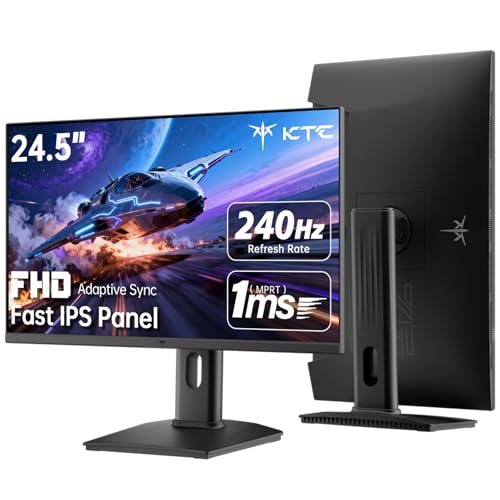
KTC 24.5 Inch 240Hz Gaming Monitor, FHD Fast IPS, H25T7-3

ASUS VA27EHE 27″ Eye Care Monitor 75Hz IPS

BenQ Zowie RL2455S 24″ 1080p Gaming Monitor 75Hz

Sceptre Curved 24.5″ 240Hz Gaming Monitor 1080p

Sceptre 24″ Curved Gaming Monitor 1080p 180Hz

Sceptre 24.5″ 240Hz Gaming Monitor 1ms FreeSync

KTC 27″ 240Hz Gaming Monitor FHD Fast IPS H27F7

KTC 27″ 1440P 200Hz White Gaming Monitor H27T6

KTC 24″ QHD 180Hz Gaming Monitor H24T7

KTC 25M2 Pro 400Hz Gaming Monitor with Hood
Why These Options Stand Out
Small desks and tight setups are where the KTC H25T7-3 feels most at home. The 24.5-inch Fast IPS panel pairs a 240Hz ceiling with a 1ms MPRT response, and the 178-degree viewing angle means colors stay even when you shift in your chair. Most competitive players running fast-paced shooters will appreciate how clean motion looks on a panel this size.
Where it earns its keep is the port layout: two HDMI 2.0 inputs, a DisplayPort 1.4, and a USB 2.0 hub for quick peripherals. HDR400 support brings a mild bump in highlight detail, and the 114% sRGB coverage keeps colors from looking washed out during long sessions.
Useful Touches
- 240Hz ceiling gives headroom well above 75Hz for when you want to push frames higher.
- 1ms MPRT response keeps fast camera pans from trailing into a blur.
- Full tilt, pivot, and height adjustment let you dial in posture without a separate arm.
- 114% sRGB and HDR400 make single-player games look richer without extra calibration fuss.
Points To Keep In Mind
- 1080p on a 24.5-inch screen is sharp, but text and dense UI work look softer than on a QHD panel.
- Built-in speakers are absent, so plan for external audio if your desk currently relies on monitor output.
Quick Facts
Best Suited To
Competitive players who want speed and a small footprint, especially those running FPS or battle royale titles at high frame rates.
Swap It Out When
You want a larger, sharper screen for story-driven games, where the KTC 27 Inch 1440P 200Hz White Gaming Monitor (H27T6) makes a better match.
For desks that double as a workplace, the ASUS VA27EHE stays practical. A 27-inch Full HD IPS panel with a 178-degree viewing angle keeps spreadsheets and documents readable from any seat at the table. The native 75Hz ceiling, paired with Adaptive-Sync over a 48 to 75Hz range, keeps casual gaming and video smooth without taxing the GPU.
Eye comfort is the headline feature here. Low Blue Light filtering and a flicker-free backlight reduce the strain that builds up during long report-writing sessions. GamePlus overlays add a crosshair and timer for the moments you switch to a quick match.
What Pays Off
- TÜV-certified low blue light and flicker-free tech protect tired eyes during long days.
- Frameless design makes a clean two-monitor workstation without a thick gap in the middle.
- VESA mount support gives you flexibility to swap in a monitor arm later.
- GamePlus crosshair and FPS counter are handy for casual competitive sessions.
Small Caveats
- 75Hz is the ceiling, so this is not the pick if you chase frame rates above 100Hz.
- Full HD on 27 inches shows pixel structure up close, so text clarity is only average.
Who Will Love This
Remote workers and students who game on the side, especially those putting in eight-hour days in front of the screen.
Look Elsewhere When
You mostly play fast-paced multiplayer, where the BenQ Zowie RL2455S 24″ 1080p Gaming Monitor offers better motion tuning.
Console players gravitate toward the BenQ Zowie RL2455S for good reason. The 24-inch 1080p TN-style panel tops out at 75Hz through GPU settings, which lines up well with console frame targets in fighting games and shooters. Black eQualizer technology lifts shadow detail without washing out the bright spots, so you can spot campers hiding in dark corners.
Dual HDMI ports make swapping between a console and a PC painless, and the compact base leaves room for a controller. Built-in speakers handle basic audio, though most players will run headphones for ranked play.
The Good Stuff
- Optimized presets for RTS, FPS, and fighting games save time tweaking the on-screen display.
- Black eQualizer reveals detail in dark scenes without overexposing the rest of the frame.
- 1ms GTG response keeps input feel snappy in fast fighting game combos.
- Slip-resistant base and tilt adjustment keep the screen planted on crowded desks.
Honest Caveats
- Color vibrancy and viewing angles are more limited than IPS panels like the ASUS VA27EHE.
- 75Hz ceiling is the hard limit, so PC users chasing high refresh rates will want a faster panel.
Made For
Console players running fighting games, sports titles, and competitive shooters where every frame of clarity matters.
Reach For A Different Pick When
You want a more modern IPS panel with similar console-friendly sizing, where the KTC 24.5 Inch 240Hz Gaming Monitor (H25T7-3) gives you much more speed headroom.
The Sceptre C255B-FWT240 brings a 1500R curve to a 24.5-inch screen, which is on the aggressive side for the size. The wraparound feel pulls you into single-player RPGs and racing sims without making the edges of the panel feel distant. The 240Hz refresh rate and 1ms response make sure the curve does not come at the cost of motion clarity.
Two DisplayPort and two HDMI inputs handle multi-device setups, and built-in speakers cover the times you do not want to wear headphones. Eye care features round out the package for long nights of exploration.
Well-Handled Touches
- 1500R curve brings genuine wraparound immersion at this screen size.
- 240Hz refresh ceiling is well above the 75Hz target for those who want to push higher.
- AMD FreeSync Premium support keeps the frame pacing tight when the action gets chaotic.
- Dual DisplayPort and dual HDMI inputs cover consoles and PCs at the same time.
Trade-Offs To Consider
- The curve is divisive for productivity work where straight lines and spreadsheets matter.
- Color accuracy lands in the casual range, so color-grading work is not the strength here.
Best Suited To
Gamers who play single-player or atmospheric games and want the screen to fill more of their peripheral vision.
Where A Sibling Pick Shines
You mostly play competitive shooters and prefer a flat panel, where the Sceptre 24.5-inch 240Hz 1ms Flat Gaming Monitor (E255B-FWD240) keeps the same speed without the curve.
The Sceptre C248B-FWT168 lands as a friendly entry point into curved gaming. The 24-inch screen is a touch smaller than the 24.5-inch options, but the 180+Hz refresh ceiling still gives a noticeable jump over a 75Hz baseline. Full 100% sRGB coverage is a nice surprise at this tier, and the curve keeps the experience cinematic without taking over your desk.
Connectivity covers the basics with two HDMI inputs and a DisplayPort. AMD FreeSync support helps when frame rates dip during heavy scenes, and built-in speakers handle everyday audio.
Good Reasons To Consider
- 100% sRGB coverage gives accurate colors for casual content work.
- 180+Hz refresh rate is a meaningful step up from 75Hz for fast-paced games.
- Curved panel adds immersion without demanding a larger footprint.
- AMD FreeSync keeps gameplay smooth when frame rates fluctuate.
Possible Compromises
- Smaller 24-inch size means less screen space for multitasking compared to 27-inch panels.
- Built-in speakers are functional but not loud enough for larger rooms.
Right Fit For
Shoppers new to curved gaming who want a small, affordable screen with a noticeable speed boost over 75Hz.
Not Your Match When
You want a larger workspace for productivity, where the KTC 27 Inch 240Hz Gaming Monitor (H27F7) covers a much wider canvas.
The Sceptre E255B-FWD240 is the flat-screen sibling to the curved 24.5-inch option earlier in this list. The 240Hz ceiling and 1ms response time cover the same speed territory, and the flat panel suits players who prefer straight lines and accurate geometry in tactical shooters. 100% sRGB coverage adds versatility for light content work between matches.
Two DisplayPort and two HDMI inputs keep device swapping quick, and AMD FreeSync Premium support handles the frame pacing during heavy action. Built-in speakers keep the desk simple if you only occasionally need audio.
What Makes Sense
- Flat panel layout keeps crosshairs and grid lines geometrically accurate.
- 240Hz refresh rate comfortably exceeds the 75Hz benchmark for any genre.
- 100% sRGB coverage supports basic photo and video work without extra calibration.
- FreeSync Premium reduces screen tearing during sudden frame drops.
Soft Spots
- No height or pivot adjustment out of the box, so a monitor arm may be needed.
- 1080p resolution is sharp at this size but limiting for high-detail editing work.
Built With In Mind
Competitive gamers who want fast motion on a flat screen, especially in FPS and tactical titles where geometry matters.
Skip It When
You want a curve for immersive single-player sessions, where the Sceptre Curved 24.5-inch 240Hz Gaming Monitor (C255B-FWT240) brings the same speed with a wraparound feel.
The KTC H27F7 scales the H25T7-3 formula up to 27 inches, keeping the 240Hz ceiling and Fast IPS panel for clean motion. A 350cd/m² brightness level holds up well in sunlit rooms, and HDR10 support gives a mild lift in highlights for cinematic games. You get the same generous ergonomic stand with tilt, pivot, and height adjustment.
The 1080p resolution on a 27-inch panel is the main trade-off. For competitive play, that means a more forgiving target for mid-range GPUs pushing toward 240 frames. For office work, text looks a touch softer than on QHD screens, which is worth keeping in mind.
What Stands Out
- 27-inch screen provides breathing room for chat apps and overlays during streams.
- 240Hz refresh rate gives the same speed ceiling as the smaller KTC panel.
- Full tilt, pivot, and height adjustment let you match a standing desk setup.
- HDR10 compatibility adds depth to single-player titles without forcing calibration.
Things To Weigh
- 1080p at 27 inches shows more visible pixel structure, so reading dense text feels less crisp.
- Demands a strong GPU to fully use the 240Hz ceiling at native resolution.
Key Product Details
Whose Shelf It Belongs On
Streamers and multitaskers who want a 27-inch gaming screen with the speed of a smaller esports panel.
Another Choice May Suit
You want sharper text and more pixel density, where the KTC 24 inch QHD 180Hz Gaming Monitor (H24T7) brings 1440p to a smaller screen.
Stepping up to 1440p on a 27-inch screen brings a real jump in sharpness, and the KTC H27T6 keeps the speed up to match. The native 200Hz refresh rate climbs to 210Hz with a small overclock, and the 1ms MPRT response keeps motion clean. The white cabinet gives a desk setup a fresh look that stands out from the usual black panels.
HDR400 support and a wide color gamut help sims and RPGs feel more cinematic, and the full ergonomic stand handles height, tilt, swivel, and pivot adjustments. Built-in speakers cover casual audio, though serious players will still reach for headphones.
Useful Strengths
- 1440p resolution on a 27-inch screen gives noticeably sharper text and game detail.
- 200Hz native, with a 210Hz overclock option, leaves plenty of headroom over 75Hz.
- Wide color gamut and HDR400 support add depth to cinematic single-player games.
- White finish and slim bezels give a clean, modern desk aesthetic.
Where It Is Less Suited
- Requires a stronger GPU to push 200+ frames at 1440p in demanding titles.
- Built-in speakers are basic and lack bass for music or movie sessions.
Perfect Match For
Gamers who want both sharpness and speed, especially those running sims, RPGs, and shooters at 1440p.
Consider Something Else When
You want the cleanest competitive motion on a smaller screen, where the KTC 25M2 Pro 400Hz Gaming Monitor targets pure speed.
The KTC H24T7 is the rare 24-inch screen with 1440p resolution, which makes text and game detail noticeably sharper than the 1080p panels at the same size. With up to 185Hz available, it offers a real speed boost over 75Hz baselines. Fast IPS keeps colors consistent across the 178-degree viewing angle.
HDR400 support and 99% sRGB coverage make content and games look richer without heavy calibration. The 1ms response time keeps competitive play feeling responsive, and a compact footprint suits smaller desks where every inch counts.
Reasons It Performs
- 1440p on 24 inches gives a high pixel density for sharp text and UI elements.
- Up to 185Hz refresh rate comfortably clears 75Hz for fast-paced titles.
- HDR400 and 99% sRGB coverage add vibrancy for media and games.
- Fast IPS panel keeps colors even at off-center seating positions.
Factors To Consider
- Smaller screen real estate limits how many windows you can keep open side by side.
- Smaller text at 1440p may require display scaling tweaks in your operating system.
Feature Rundown
Who Should Grab It
Competitive players and productivity users who want extra sharpness on a small screen without giving up speed.
A Better Fit Elsewhere
You want a larger workspace and do not mind a softer pixel pitch, where the ASUS VA27EHE 27″ Eye Care Monitor 75Hz IPS offers a bigger canvas.
The KTC 25M2 Pro targets the competitive tier with a 400Hz ceiling on a 24.5-inch Fast IPS panel. That kind of headroom is well beyond what 75Hz screens can offer, and the included shielding hood is a thoughtful touch that reduces glare from overhead lights during ranked matches. The 1080p resolution keeps the GPU load manageable, which matters when chasing extreme frame rates.
1ms MPRT response and Adaptive-Sync keep motion clean even when frame rates fluctuate. The 126% sRGB coverage gives colors a punchy, vivid look out of the box, and the high 400cd/m² brightness holds up in bright rooms.
The Practical Payoff
- 400Hz refresh ceiling is at the top end of consumer panels for serious competitive play.
- Shielding hood cuts glare and helps you focus during long sessions.
- 1080p resolution keeps frame rates high on mid-range GPUs.
- 126% sRGB coverage gives vivid, saturated colors for content and games.
Room For Improvement
- The hood adds bulk and may not fit smaller monitor arms or shallow desks.
- 1080p pixel density is lower than the 1440p KTC H24T7 covered earlier in this list.
Feature Snapshot
Right Fit
Hardcore competitive players and aspiring esports athletes who want every possible frame advantage.
Swap It Out When
You want a larger 27-inch canvas at solid speed, where the KTC 27 Inch 240Hz Gaming Monitor (H27F7) offers a more flexible everyday balance.
Picking The Right 75Hz Gaming Monitor For Your Setup
A 75Hz monitor used to be the practical middle ground, and it still fits plenty of real desks. The question is whether you actually need more. Run games where you can already feel the difference above 60 frames, or play competitively at all, and a higher ceiling starts to make sense.
Match The Refresh Rate To Your Hardware
The first thing to think about is your GPU. A 75Hz monitor is a smart pick if your graphics card is a few years old, or if you mostly play single-player games where frame rates hover in the 60s. Picking a 240Hz or 400Hz panel only pays off when your system can actually push those frames, otherwise the extra ceiling sits unused.
Panel Type And Image Quality
IPS panels, like the ones in the KTC and ASUS options on this list, give wider viewing angles and better color out of the box. TN-style panels, like the BenQ Zowie, prioritize response time and motion clarity over color richness. For most people who split time between work and play, IPS is the more flexible choice.
Size, Resolution, And Desk Space
A 24-inch screen is comfortable at arm’s length and a natural fit for competitive play. A 27-inch screen gives you more space for chat windows and side-by-side apps. Higher resolutions like 1440p look sharper, but they ask more from your graphics card, so balance the resolution against the frame rates you actually want to hit.
Connectivity And Ergonomics
Look for DisplayPort if you want to push high refresh rates on PC, and enough HDMI ports for a console plus a laptop. A stand with height, tilt, and pivot adjustment helps you avoid neck strain during long sessions, and VESA mount support lets you add a monitor arm later if the included stand feels limited.
Smart Spending Across These Picks
A few common traps catch shoppers looking at 75Hz gaming monitors, and a few honest reasons exist to pay more for a higher tier.
Where Shoppers Go Wrong
The first mistake is chasing the highest refresh number without checking if the GPU can feed it. A 240Hz screen fed by a 60fps source looks identical to a 75Hz screen. Another common miss is overlooking the stand. A monitor that only tilts forces you into awkward neck angles, and a replacement arm costs more than the difference between a basic and a fully adjustable stand. Color gamut matters for anyone editing photos or watching HDR content, so do not assume every “gaming” monitor covers the full sRGB range.
What The Higher Tier Buys
Spending more on a tier above 75Hz usually means a faster IPS panel with better color, a more useful stand, and HDR support that actually changes how games look. The KTC H27T6 and the Sceptre C255B-FWT240 are good examples: both push well past 75Hz, add ergonomic stands, and bring richer colors. If your GPU can keep up and you play a mix of competitive and cinematic titles, that step up earns its keep.
Frequently Asked Questions
Is A 75Hz Monitor Good Enough For Gaming In 2026?
A 75Hz monitor is good enough for casual and story-driven gaming, and it is a real upgrade over a 60Hz screen for general desktop use. For competitive shooters and fast-paced multiplayer, a 144Hz or higher panel gives noticeably smoother motion.
What Is The Difference Between 75Hz And 144Hz Gaming Monitors?
A 75Hz monitor refreshes the image 75 times per second, while a 144Hz monitor refreshes 144 times. That gap shows up most clearly in fast camera pans and quick target tracking, where higher refresh rates reduce motion blur and make inputs feel more responsive.
Do 75Hz Monitors Support Adaptive-Sync?
Many 75Hz monitors do support Adaptive-Sync, including the ASUS VA27EHE covered above. Adaptive-Sync reduces screen tearing by matching the monitor’s refresh rate to the GPU’s frame output, which is helpful even within a narrow 48 to 75Hz range.
Can A 75Hz Monitor Run At Higher Refresh Rates?
Some 75Hz-rated panels can be overclocked through GPU settings to push slightly higher rates, but that varies by model and is not guaranteed. The BenQ Zowie RL2455S explicitly notes that 75Hz is reached through GPU configuration, which suggests some headroom depending on the specific unit.
Is IPS Or TN Better For A 75Hz Gaming Monitor?
IPS panels give better color and wider viewing angles, which suits mixed work and play. TN panels prioritize response time and motion clarity, which competitive players sometimes prefer. For most people in 2026, IPS is the more versatile choice at the 75Hz tier.
Bottom Line
The right 75Hz gaming monitor depends on how you actually use your desk. Office-first shoppers who game on the side will find the ASUS VA27EHE easy to live with, while competitive players chasing higher ceilings will get more out of the KTC H25T7-3 or the KTC 25M2 Pro. Match the screen to your real hardware and habits, and the rest of the decision tends to fall into place.


