


A 75% layout hits a sweet spot most full-size boards miss. You keep the arrows, the function row, and a column of useful nav keys, yet reclaim a chunk of desk space for sweeping mouse movement during a clutch round. The category has matured fast, and the current crop of 75 keyboards for gaming brings serious wireless stability, hot-swap flexibility, and refined typing acoustics to the table.
Gamers juggling multiple devices, streamers working from tight desks, and enthusiasts who want a custom feel without building from parts all land here. The picks below sort the strongest options by feel, connectivity, and who they actually serve.
The Main Contenders

GravaStar Mercury K1 Pro 75% Wireless Mechanical Gaming Keyboard

AULA F75 Wireless 75% Gaming Keyboard (Pink)
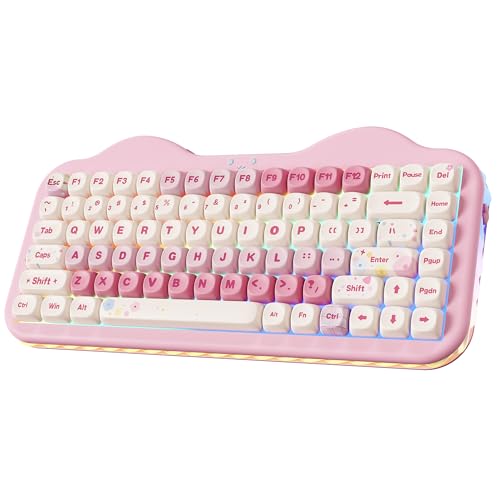
YUNZII C75 Cute 75% Wireless Mechanical Keyboard (Pink)

LEOBOG Aula F75 Wireless Mechanical Keyboard (Reaper)

EPOMAKER EA75 75% RGB Gaming Mechanical Keyboard (Black Gradient)

GravaStar Mercury K1 75% Wireless Mechanical Gaming Keyboard
The Details Behind The Selections
The Mercury K1 Pro arrives in a skeletal aluminum frame that looks pulled from a sci-fi prop shop, and that visual identity is its whole pitch. Built around a 75% layout with hot-swap switch sockets, it serves players who want their gear to look as deliberate as the rest of a curated battlestation.
Compared to the AULA F75 that follows, this GravaStar leans heavier on industrial styling and structural metal. The trade-off shows up in weight, but you get a stiffer typing surface and a centerpiece that pulls double duty as desk art. Owners who prioritize personality over pure portability will find a lot to like here.
Everyday Perks
- Aluminum alloy exoskeleton adds structural rigidity for steady keystrokes during long sessions.
- Hot-swap sockets let you change switches without soldering, opening easy customization.
- Open-frame design gives the desk a distinctive focal point rather than another black rectangle.
- Wireless support keeps the cable clutter down for clean setup photography.
- Solid feel under heavy hands thanks to the metal construction.
Things To Consider
- The skeletal frame exposes internals, so dust collects on the switch plate faster than closed designs.
- Heavier chassis makes it less ideal for travel between setups.
- Distinctive styling may not blend with minimalist or office environments.
Who It Suits Best
Gamers building a themed battlestation who care about industrial aesthetics and want hot-swap flexibility for switch experimentation.
Where Another Pick Suits Better
The AULA F75 fits better for shoppers wanting tri-mode wireless across PC, console, and mobile at a lower entry point.
The AULA F75 is the flexibility play in this lineup. Tri-mode connectivity (Bluetooth 5.0, 2.4GHz wireless, and USB-C wired) means the keyboard hops between a gaming PC, a laptop, a tablet, and a phone without a dongle graveyard. Pairing up to five devices at once turns it into a command center for mixed workflows.
The pink colorway gives it personality, but the substance sits in the pre-lubed stabilizers and the LEOBOG Strawberry Mint switches that deliver a creamy, low-noise typing sound. Where the GravaStar K1 Pro flexes industrial design, the F75 leans into practicality. You can remap every key through the F75 driver, dial in 16.8 million RGB shades, and swap switches thanks to 3-pin and 5-pin hot-swap support.
What Works In Its Favor
- Tri-mode wireless handles gaming, work, and mobile on one board.
- 4000mAh battery stretches across long sessions between charges.
- Auto-sleep after 60 seconds preserves runtime without laggy wake-ups.
- Hot-swap base supports both 3-pin and 5-pin switches for easy tinkering.
Worth Noting
- Full macro programming works only in wired mode on Windows, limiting flexibility for Mac or mobile users.
- Pink finish may clash with neutral or masculine-leaning setups.
Key Product Details
Made For
Multi-device households, streamers, and remote workers who want one board to handle gaming and productivity.
Consider Something Else When
Shoppers wanting a knob and side RGB bars should look at the EPOMAKER EA75 instead.
The YUNZII C75 leans into a dessert-cute visual identity, with candy-color keycaps and a compact 75% footprint. It targets the desk-toy crowd: streamers with personality-driven setups, gift shoppers, and casual players who want their gear to spark conversation.
Underneath the playful shell sits a competent wireless mechanical board with Bluetooth and wired connectivity. Where the AULA F75 prioritizes connectivity breadth, the C75 prioritizes aesthetic warmth. The Candy switches add a soft bottom-out that suits long writing sessions between matches. You give up some of the F75’s macro depth, but for many casual gamers, the look is the point.
Well-Handled Touches
- Candy switches deliver a soft, fatigue-friendly typing feel for long sessions.
- Compact layout frees up space for a wide mouse sweep in FPS titles.
- Pink colorway works as a charming gift for setup-focused friends.
- Wireless and wired modes cover both clean desk setups and lag-free competitive play.
Points To Note
- Lower rank in the video games category suggests fewer mainstream reviews to lean on.
- Styling skews niche, so resale value stays narrow.
Best Suited To
Aesthetic-focused casual gamers, content creators, and gift shoppers who want a charming centerpiece rather than a competitive tool.
Look Elsewhere When
Competitive FPS players wanting deeper macro remapping should reach for the LEOBOG Aula F75.
This LEOBOG-branded take on the Aula F75 swaps the Strawberry Mints for Reaper switches, leaning into a creamy, thocky typing sound that typing enthusiasts chase. Eighty-one keys fill the 75% layout with a full function row and arrows, no compromises on navigation.
The shared chassis with the AULA F75 means tri-mode wireless, hot-swap sockets, and the same 4000mAh battery carry over. The Reaper switches are the headline difference, and they turn this board into a hybrid tool for gamers who also write code, essays, or stream long sessions. Against the GravaStar K1 Pro, it sacrifices visual drama for everyday versatility.
What Helps Most
- Reaper switches deliver a creamy, satisfying sound profile for typing-heavy work.
- Full 81-key 75% layout keeps every key most users reach for.
- Hot-swap design lets you tune the feel after purchase.
- RGB backlight gives the board personality in low-light setups.
Honest Caveats
- Plastic chassis feels lighter than the GravaStar’s aluminum, so it slides more on smooth desks.
- Creamy switches can feel slow for twitch-reflex competitive play compared to linear options.
Feature Snapshot
Who Should Grab It
Hybrid users who split time between competitive gaming and long typing sessions, especially those chasing that creamy sound profile.
Skip It When
Buyers wanting rotary-knob control should consider the EPOMAKER EA75 instead.
The EPOMAKER EA75 takes the F75 formula and adds a rotary knob plus shine-through PBT keycaps. That knob handles volume, scrubbing, or brightness without breaking your hand position, which sounds small until you spend a long stream reaching for system controls.
It carries 81 keys and dual side RGB light bars for an immersive glow that wraps the desk. EPOMAKER’s FN shortcuts let you change light effects, colors, and brightness on the fly, and the 3.0 Bluetooth option offers stable pairing when you have multiple wireless devices in the room. The pairing ritual (holding FN plus a slot key until the light flashes rapidly) is a small wrinkle for first-timers.
What Pays Off
- Rotary knob adds one-handed control for volume and scrolling.
- Shine-through PBT keycaps keep legends crisp and resist shine over time.
- Side RGB bars create ambient light for nighttime gaming sessions.
- Hot-swap support means you can experiment with switch feel after purchase.
Points To Note
- Pairing requires holding FN plus a number key until the light flashes rapidly, a step first-timers may miss.
- BT 3.0 stability lags behind Bluetooth 5.0 options when many wireless devices share the same space.
Right Fit For
Creators and streamers who want quick knob control and ambient RGB without sacrificing the 75% footprint.
Another Choice May Suit
Gamers wanting Bluetooth 5.0 and broader device support should look at the AULA F75.
The original Mercury K1 trades the K1 Pro’s exposed frame for a Sakura Pink aluminum chassis with a 79-key 75% layout. The aesthetic lands closer to a designer object than a peripheral, and the dual-layer PBT keycaps keep that pink theme consistent under the RGB glow.
GravaStar’s collaboration switches target pro-grade response, and the symmetrical curves make for a stable typing surface even during rapid inputs. Compared to the YUNZII C75, this board costs more, but you trade up to metal construction and a more refined acoustic profile. For shoppers who want the look without the open-frame maintenance of the K1 Pro, the closed K1 is the easier long-term companion.
The Helpful Details
- Aluminum alloy chassis gives the board a premium weight and feel.
- Sakura Pink colorway with dual-layer PBT keycaps creates a cohesive themed setup.
- 79-key layout balances arrows, function row, and a slim footprint.
- RGB backlit shine-through keycaps make the pink theme pop in low light.
Factors To Consider
- Pink finish is a deliberate aesthetic choice, and clashing with existing gear is a real risk.
- Aluminum body adds weight that may bother anyone shifting the board between desks often.
Quick Facts
Whose Shelf It Belongs On
Setup collectors and RGB enthusiasts who want a board that doubles as a sculptural desk object and a capable gaming tool.
Reach For A Different Pick When
Value-focused shoppers who want similar wireless flexibility at a friendlier price should consider the AULA F75.
Factors To Consider When Choosing 75 Keyboards For Gaming
Switch Type And Feel
Linear switches deliver smooth, uninterrupted keystrokes that competitive FPS players often prefer. Tactile switches give a small bump at actuation, which helps typists feel each press without bottoming out. The LEOBOG Reaper and AULA Strawberry Mint options lean toward creamy, muted acoustics, while linear choices push toward faster response for twitch gaming.
Hot-swap sockets let you change switches after purchase without soldering. That flexibility matters if you have not yet decided between a thocky typing feel and a snappy gaming feel.
Connectivity And Battery
Tri-mode boards covering Bluetooth, 2.4GHz wireless, and USB-C wired handle the most use cases. Bluetooth 5.0 holds stronger connections in busy wireless environments than older 3.0 versions, and a 4000mAh battery stretches across days of normal use with auto-sleep. For pure competitive play, wired mode eliminates any concern about wireless latency.
Build, Layout, And Extras
Aluminum chassis add weight and rigidity but cost more and travel poorly. Plastic shells stay light and affordable, though they can flex under heavy hands. Layout extras matter: a rotary knob on the EPOMAKER EA75 speeds up volume and scrubbing, while side RGB bars on the same board add ambient lighting. Think about which features touch your daily routine, not just your wish list.
Key Considerations Across These Picks
Wrong Turns To Avoid
Buying on looks alone is the most common slip in this category. The YUNZII C75 and GravaStar K1 charm visually, but their switch feel and macro support may not match a serious gamer’s daily grind. Match the board to how you actually use it, not just how it photographs.
Skipping the hot-swap check is another trap. Without hot-swap support, a switch you end up disliking means a full replacement rather than a quick swap.
When Paying More Pays Off
Premium picks like the GravaStar K1 spend the extra money on aluminum construction, refined switches, and tighter acoustic tuning. That upgrade pays off for shoppers who type all day, stream for hours, and want a board that holds up to daily use. Casual players gaming a few nights a week often find the mid-tier picks deliver the same core experience without the cost.
Frequently Asked Questions
What Is A 75% Keyboard?
A 75% layout is a compact keyboard that keeps the main typing area, arrows, function row, and a small column of navigation keys. It drops the numpad and trims the spacing to save desk space. The result is a board that feels familiar to full-size users while freeing up room for mouse movement during gaming.
Are 75 Keyboards Good For Gaming?
Yes, especially for FPS and MOBA players who need wide mouse movement. Modern 75% gaming keyboards offer hot-swap switches, low-latency wireless, and mechanical key feel that match full-size options. You give up the numpad, but most competitive games never need it.
What Does Hot-Swap Mean On A Mechanical Keyboard?
Hot-swap means the switches plug into the PCB through sockets rather than being soldered. You can pull a switch out with a simple tool and slot a new one in, no soldering required. This makes it easy to customize feel, replace a broken switch, or experiment with different switch types.
Is Wireless Or Wired Better For Gaming?
Wired connections remove any chance of wireless interference, which competitive players often prefer for tournaments. Modern 2.4GHz wireless keyboards have come close to wired latency for everyday play, and Bluetooth 5.0 handles casual gaming and console use without issues. Many boards, including several in this list, let you switch between modes.
What Is A Rotary Knob On A Keyboard?
A rotary knob is a small dial mounted on the keyboard, usually top-right. It typically controls system volume by default, but software can reassign it to scroll, zoom, or adjust brightness. The EPOMAKER EA75 in this list includes one for quick, tactile control without leaving the home row.
Final Verdict
The right 75% gaming keyboard comes down to what you touch most: switches, knobs, chassis, or aesthetics. Style-driven shoppers will gravitate to the GravaStar Mercury K1 Pro or K1, while hybrid typist-gamers get the most out of the LEOBOG Aula F75 or EPOMAKER EA75. Multi-device households get the strongest value from the AULA F75, and gift shoppers land on the YUNZII C75. Pick the board that fits the way you already play and work, and the upgrade pays off every time you sit down.


