


A cramped desk and a tight mouse-hand arc make a full-size board feel like overkill. Sixty percent keyboards strip the numpad, the arrow cluster, and the function row down to the keys you actually use in-game, freeing up desk real estate for wider mouse sweeps during FPS matches. They’re not for everyone: spreadsheet-heavy work, CAD shortcuts, and frequent number entry all suffer without those extra keys. But for FPS players, MMO enthusiasts who lean on layered hotkeys, and anyone chasing a cleaner battlestation, the form factor earns its keep.
The picks below lean on hot-swap flexibility, optical and mechanical switch variety, and the kind of build quality that survives years of travel between setups. A few entries stretch slightly past the 60% line into TKL territory because they share the same chipset and switch tech, which gives a fair sense of what stepping up in size actually buys you.
The Main Contenders
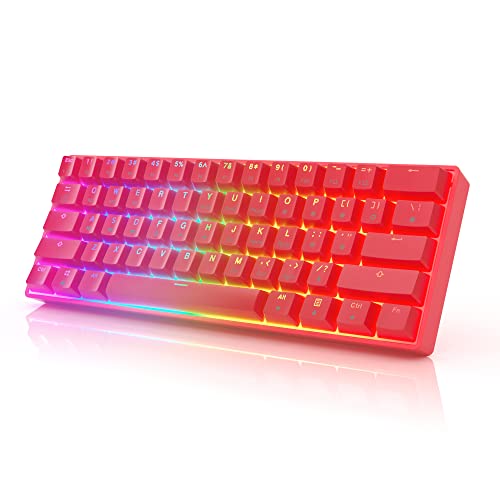
HK Gaming GK61 Mechanical Gaming Keyboard 60 Percent

Razer Huntsman V3 Pro TKL 8KHz Esports Gaming Keyboard

Razer Huntsman V3 Pro TKL Esports Gaming Keyboard

YUNZII AL65 Wireless Mechanical Keyboard (Aluminum)

Razer Huntsman V3 TKL 8KHz Analog Optical Esports Gaming Keyboard

Razer Huntsman V3 Pro 8KHz Esports Gaming Keyboard (Analog Optical)

Razer Huntsman V3 Pro Mini 60% Esports Gaming Keyboard

Razer BlackWidow V4 Pro 75% Wireless Gaming Keyboard

Razer BlackWidow V4 TKL Wireless Gaming Keyboard
Razer Pro Type Ergo Wireless Split Ergonomic RGB Keyboard
A Deeper Look At The Lineup
The HK Gaming GK61 lands as the entry point for anyone curious about the 60% form factor without committing to a flagship-priced board. Its 61-key layout keeps the typing position centered, which leaves plenty of room for a low-DPI mouse pad to stretch across the rest of the desk. Optical switches (a design that uses light to register keypresses rather than metal contacts, which tends to respond faster) are the standout feature, and the hot-swap PCB means swapping in a new feel later takes a pull of a switch, not a soldering iron.
It arrives wired over USB with no software required, which keeps first-time setup painless. The full RGB backlighting covers 16.8 million color combinations across adjustable brightness levels. Compared to the premium Razers that follow, this one trades the analog depth and software polish for a much friendlier entry price, which is exactly the trade many newcomers want to make.
Everyday Wins
- Hot-swap optical switches let you change feel without soldering
- Full RGB with multiple effect modes adds personality at no extra cost
- Plug-and-play USB works on both Mac and Windows without drivers
- Compact 60% footprint frees up a meaningful slice of desk space for mouse work
- Gateron optical switches are widely appreciated for crisp, fast response
Things To Consider
- No wireless option, so cable management on a clean desk needs a plan
- Lacks the analog actuation and software depth of the flagship Huntsman boards
- The plastic chassis feels lighter than the CNC-aluminum builds reviewed later
Who Will Love This
First-time 60% shoppers who want hot-swap flexibility and RGB without paying flagship money.
Look Elsewhere When
You want adjustable actuation and analog input, in which case the Razer Huntsman V3 Pro Mini 60% delivers a noticeably deeper feature set.
The Huntsman V3 Pro TKL 8KHz is built for the player who measures wins in milliseconds. Its 8KHz polling rate (the keyboard reports its key state to your PC 8,000 times per second, eight times the standard 1,000Hz) pairs with Razer’s second-generation analog optical switches to give every input tighter timing windows. The adjustable actuation range of 0.1 to 4.0 mm means each key’s trigger depth can be tuned to your preference, lighter for rapid taps, deeper for deliberate presses.
Rapid Trigger (a feature that resets a key the instant it starts to lift, allowing for faster repeated directional inputs) keeps movement crisp during counter-strafe sequences. Compared to the HK Gaming GK61 that opened this list, this is the board to graduate to once competitive play becomes a serious pursuit. The wired-only TKL layout keeps cable-related latency at zero.
What Makes Sense
- 8KHz polling rate keeps input reporting at the top of the current ceiling
- Adjustable actuation from 0.1 to 4.0 mm per key suits both rapid taps and deliberate presses
- 100-million keystroke lifespan supports years of heavy competitive use
- Rapid Trigger mode benefits FPS movement where repeated directional inputs matter
Trade-Offs To Consider
- Wired-only design limits desk flexibility for clean setups
- TKL size, not 60%, which is worth confirming if you specifically need 60% footprint
- Software tuning adds a learning curve compared to plug-and-play boards
Quick Facts
Right Fit For
Competitive esports players who want the fastest possible input pipeline and the tuning depth to match.
A Better Fit Elsewhere
Anyone working in a tight footprint should consider the Razer Huntsman V3 Pro Mini 60%, which carries the same analog optical core in a smaller shell.
The standard Huntsman V3 Pro TKL keeps the analog optical foundation of its 8KHz sibling but steps down the polling rate, which is a meaningful differentiator worth understanding before you commit. It still offers adjustable actuation and Rapid Trigger, so the gameplay experience stays close. Razer Snap Tap, which prioritizes the most recent input when two assigned keys are pressed at once, helps when you need cleaner counter-strafing and quick direction changes during clutch moments.
The wired-only TKL format works for static desk setups but doesn’t free up quite as much mouse-pad room as a true 60% board. If you want the analog features without paying extra for 8KHz, this is the more measured entry into the Huntsman Pro line.
Strengths Worth Knowing
- Adjustable actuation range per key, same as the 8KHz flagship
- Razer Snap Tap helps with cleaner directional priorities in FPS play
- Analog optical switches rated for a 100-million keystroke lifespan
Worth Noting
- Polling rate is lower than the 8KHz variant reviewed above
- TKL form factor takes up more desk than a 60% board
- Wired only, so cable routing needs attention on minimalist setups
Made For
FPS players who value adjustable actuation and Snap Tap but don’t need 8KHz polling.
Swap It Out When
You want a smaller footprint and don’t need TKL, in which case the Razer Huntsman V3 Pro Mini 60% is the same generation’s compact answer.
The YUNZII AL65 swaps plastic for CNC-machined anodized aluminum, which is a real-feel upgrade you notice the second you pick it up. The hollow side-cut design with 360-degree RGB surround lighting gives the board a presence that cheaper cases can’t match. Tri-mode connectivity covers Bluetooth, 2.4GHz wireless, and USB-C wired, which makes it equally happy at a clean desk, a couch-gaming setup, or a travel bag.
QMK/VIA support (open-source firmware that lets you remap every key, set macros, and customize lighting through a browser-based interface) is the real differentiator for tinkerers. Compared to the Razer entries above, the AL65 leans into the keyboard-enthusiast crowd rather than the esports segment, which is a meaningful identity split depending on which side of that line you stand on.
Everyday Perks
- CNC-machined aluminum body adds weight and desk presence
- Tri-mode wireless covers Bluetooth, 2.4GHz, and USB-C
- QMK/VIA support enables deep key remapping and macro work
- Hot-swap PCB accepts your switch preferences without soldering
- Default RGB includes 16 effects and 8 color options
Honest Caveats
- Wireless mode adds potential input lag compared to wired Razer flagships
- QMK/VIA learning curve is steeper than proprietary software
Feature Snapshot
Best Suited To
Customization-minded enthusiasts who enjoy remapping firmware and want a premium aluminum chassis with wireless freedom.
Where Another Pick Suits Better
Hardcore competitive players should reach for the Razer Huntsman V3 Pro Mini 60% instead, which prioritizes input speed over deep firmware customization.
The Huntsman V3 TKL 8KHz sits one rung below the Pro lineup while keeping the headline features intact. You still get 8KHz polling, Gen-2 analog optical switches, and the 0.1 to 4.0 mm adjustable actuation range. Rapid Trigger and Snap Tap are also in play, which is what most competitive players actually touch day to day. The trade-off vs. the Pro TKL is generally software depth and a few premium-tier niceties, but the core gaming experience holds up.
For a TKL board on a desk with limited space, this is one of the more balanced entries in the current Razer stack. If the Pro 8KHz TKL above stretches your budget, this version covers the same use cases for a likely friendlier price.
The Good Stuff
- 8KHz polling rate matches the Pro TKL on input speed
- Adjustable actuation range supports varied play styles
- Snap Tap and Rapid Trigger both included
Points To Note
- Wired-only design, so cable clutter stays a factor
- Some Pro-tier software features may be trimmed vs. the flagship
Feature Card
Perfect Match For
Competitive players who want 8KHz and analog optical in a TKL layout without paying the Pro premium.
Where A Sibling Pick Shines
Shoppers who need a true 60% form factor should pivot to the Razer Huntsman V3 Pro Mini 60%, which delivers the same chipset philosophy in a smaller footprint.
The full-size Huntsman V3 Pro 8KHz is the flagship of Razer’s analog optical stack, with the numpad and full key cluster intact. For competitive FPS players who also need a numpad for spreadsheets or game-specific macros, this is the layout that splits the difference. Rapid Trigger, Snap Tap, and the 0.1 to 4.0 mm adjustable actuation all carry over from the TKL version.
Its wired-only design and larger footprint mean it isn’t the right pick if your goal is minimal desk clutter, but the input ceiling is the same as the TKL Pro reviewed earlier. Owners of older Razer boards commonly report that the analog switches feel more consistent across the keypress travel than earlier generations, which is a meaningful quality-of-life improvement.
Standout Benefits
- Full-size layout keeps the numpad for spreadsheet work or custom keybinds
- 8KHz polling pairs with Gen-2 analog optical switches for top-tier input speed
- 100-million keystroke switch rating supports long-term heavy use
Potential Drawbacks
- Larger footprint contradicts the desk-saving intent of 60% boards
- Wired-only, which can complicate clean cable layouts on minimalist desks
Spec Overview
Who Should Grab It
Esports players who genuinely need a numpad and want the full analog optical experience without compromise.
Reach For A Different Pick When
You want 60% compactness instead, in which case the Razer Huntsman V3 Pro Mini 60% preserves the same input philosophy in a smaller package.
The Huntsman V3 Pro Mini 60% is the board this list keeps circling back to. It carries the same Gen-2 analog optical switches, Snap Tap, Rapid Trigger, and adjustable actuation as the larger Pro models, but in the most desk-friendly footprint of the lineup. Low-DPI players who swing their mouse across a wide pad benefit most from the extra space, and tournament travelers appreciate how little room it eats in a bag.
It loses the function row, arrows, and numpad, so anyone relying on those for daily work will need to remap via layers. That’s the classic 60% trade-off, and it shows up here just as it does on the HK Gaming GK61 that opened the list, only with a much more advanced switch platform underneath.
A Few Highlights
- Compact 60% form factor maximizes mouse-pad real estate
- Full analog optical feature set in the smallest Huntsman Pro shell
- Snap Tap and Rapid Trigger included for competitive play
- Dual-purpose keys compensate for the missing rows via remapping
Small Caveats
- No dedicated arrows or function row without layer remapping
- Wired-only, like the rest of the analog optical Pro family
The Right Fit
Low-sensitivity FPS players who want flagship-tier input tech in the smallest possible footprint.
Consider Something Else When
You need a numpad for productivity or accounting work, in which case the full-size Razer Huntsman V3 Pro 8KHz is the better match.
The BlackWidow V4 Pro 75% stretches the compact-keyboard idea just enough to add a small OLED display and the Razer Command Dial, a programmable rotary control that lets you scrub through settings, brightness, or media without opening software. Wireless operation gives you freedom from the desk cable, and the hot-swap PCB accepts 3 or 5-pin switches, which is friendly to anyone who likes to tinker with feel over time.
The 75% layout keeps the function row and arrows while trimming the numpad, which is a sensible middle ground for creators who game on the same board. Owners of older BlackWidow models commonly note that the Command Dial becomes a favorite shortcut for stream controls and timeline scrubbing once you map it.
Everyday Advantages
- OLED display surfaces system stats and custom visuals at a glance
- Command Dial adds tactile control for streaming, media, or system tweaks
- Wireless operation keeps the desk cable-free
- Hot-swap PCB supports 3-pin and 5-pin switch swaps
Some Limits To Know
- 75% is bigger than true 60%, so it doesn’t free up the same mouse space
- Wireless mode adds a small latency cost vs. wired flagship boards
Feature Card
Built With In Mind
Creators and streamers who game on the same board and want media controls and system info on the keyboard itself.
Skip It When
You want pure 60% compactness, in which case the Razer Huntsman V3 Pro Mini 60% gives you a smaller footprint and analog optical input instead.
The BlackWidow V4 TKL wireless trims the desk footprint to TKL while keeping the wireless flexibility the Pro version offers. Razer HyperSpeed Wireless delivers a low-latency 2.4GHz link, and Bluetooth lets you pair up to three devices for quick switching between work laptop, home rig, and tablet. The hot-swap socketed PCB works with 3 or 5-pin switches, which keeps the door open for personalization later.
It lacks the OLED display and Command Dial of the 75% Pro, but for gamers who want a clean desk and don’t need the extra screen, that’s a fair trade. Battery life expectations and wireless dongle placement are worth a quick look before you commit, since they’re common sticking points users mention in real-world ownership.
Positive Points
- Tri-mode wireless covers 2.4GHz low-latency and multi-device Bluetooth
- Hot-swap PCB supports 3-pin and 5-pin switch swaps
- TKL layout balances compactness with function row access
Less Ideal Details
- Wireless adds small latency cost vs. wired flagship boards
- No OLED display or Command Dial, unlike the 75% Pro version
Whose Shelf It Belongs On
Hybrid work-and-play users who want one board to cover both a wireless office setup and evening gaming.
Not Your Match When
You specifically need a 60% form factor, in which case the Razer Huntsman V3 Pro Mini 60% is the more compact answer in the Razer stack.
The Pro Type Ergo takes a different path from every other board on this list. Its split layout, 10-degree slope, and adjustable 4 or 7-degree tilt aim to reduce wrist strain over long workdays. The low-profile, fingertip-shaped keycaps keep finger travel short, and dual “B” keys let you pick the placement that matches your hand. Wireless operation keeps the desk free of cables for clean productivity setups.
This is a productivity-first keyboard that happens to look like a gaming peripheral. For pure gaming, the analog optical boards reviewed above deliver more meaningful advantages. But for anyone whose day is mostly typing and wants to give their wrists a more natural angle, the split design earns its place here.
Well-Handled Touches
- Split layout with adjustable tilt reduces wrist strain during long sessions
- Low-profile fingertip keycaps shorten finger travel for faster, more accurate typing
- Wireless operation supports clean desk setups
Things To Weigh
- Not optimized for competitive gaming input speed
- Split layout has a meaningful adjustment period for touch typists
Who Will Love This
Long-session typists and writers who want to ease wrist strain without leaving the Razer ecosystem.
Reach For A Different Pick When
You want genuine gaming input speed, in which case the Razer Huntsman V3 Pro Mini 60% is the more performance-oriented choice in this lineup.
What Matters Most Before Choosing 60 Percent Gaming Keyboards
Switch Type And Feel
Linear, tactile, and optical switches each offer a different balance of speed, feedback, and noise. Linear feels smooth with no bump, tactile gives a small click-like bump at actuation, and optical uses light-based actuation for faster response. Players who prioritize twitch movement often lean linear or optical, while writers and hybrid users sometimes prefer the feedback of a tactile switch.
Hot-Swap Vs. Soldered
A hot-swap PCB lets you pull switches out with a keycap puller and slot in new ones without soldering. This matters if you want to try different switch types over time, or if a switch fails and you’d rather replace one than the whole board. Soldered boards lock in the factory feel.
Wired Vs. Wireless
Wired boards remove any question of input lag or battery life. Wireless boards free up desk space but introduce a small latency cost, and you’ll need to manage charging. For pure competitive play, wired is the safer call.
Layout And Footprint
True 60% drops the function row, arrows, and numpad, which means some shortcuts require layer remapping. TKL keeps arrows and function row, full-size keeps everything. If you work in spreadsheets or use CAD shortcuts often, the smaller layouts can frustrate you quickly.
Key Considerations Across These Picks
Pitfalls Shoppers Hit
Going for the cheapest hot-swap board without checking the switch socket compatibility can lock you into a narrow selection of replacement switches. Another common mistake is buying a 60% board for productivity-heavy work and finding yourself constantly reaching for missing keys. Confirm your daily use case before committing to the smallest layout.
What The Higher Tier Buys
The jump from entry-level to flagship analog optical boards buys you adjustable actuation, Rapid Trigger, and 8KHz polling, which all matter in fast competitive play. The build quality also climbs, with CNC aluminum, longer switch lifespans, and tighter firmware tuning. For casual play, the budget tier is plenty. For tournament-level play, the higher tier pays for itself in tighter timing windows and better-feeling hardware.
Frequently Asked Questions
Are 60 Percent Gaming Keyboards Good For Typing?
Yes, especially once you adapt to layer-based shortcuts for missing keys. Many writers prefer them for the cleaner desk and centered hand position, though heavy spreadsheet users may miss the numpad and arrow keys.
What Is Rapid Trigger On A Gaming Keyboard?
Rapid Trigger resets a key the moment it starts to lift, rather than waiting for it to fully return to the top. This allows faster repeated directional inputs, which is helpful in FPS movement.
Do I Need 8KHz Polling For Gaming?
For most casual and even ranked play, 1KHz polling is plenty. 8KHz is a noticeable edge only for top-tier competitive players where every millisecond of input lag matters.
Can I Use A 60% Keyboard For Mac?
Most modern 60% boards, including the HK Gaming GK61 and YUNZII AL65, work with both Mac and Windows. Some keys may need remapping for Mac-specific shortcuts, and a few features may require platform-specific software.
How Do I Clean A 60% Mechanical Keyboard?
Unplug the board, flip it upside down, and shake out loose debris. A soft brush or compressed air clears the gaps between keycaps, and a damp microfiber cloth wipes the surface. For deeper cleaning, a keycap puller lets you remove caps for washing.
Wrap Up
The right 60% gaming keyboard comes down to how you split your time between gaming and everything else. Competitive FPS players will find the most value in the analog optical Razer boards, especially the Huntsman V3 Pro Mini 60%, while tinkerers and customization fans get more mileage from the YUNZII AL65. Budget shoppers can ease into the form factor with the HK Gaming GK61, and anyone dealing with wrist discomfort should look at the Pro Type Ergo for a different kind of upgrade. The form factor rewards people who actually use that freed-up mouse space, so pair your pick with the gameplay style that benefits most from it.


