


A 34 inch ultrawide monitor reshapes your desktop. You get genuine side-by-side workspace, a deeper field of view in shooters and sims, and an immersive curve that pulls racing and RPG worlds forward. The category now spans creative workhorses, esports-tuned panels, and budget-friendly all-rounders, so picking the right one means weighing panel type, refresh rate, and how you actually use your desk. This roundup cuts through that range with nine current options that cover most play styles and setups.
The Lineup, Simplified

LG 34WN80C-B UltraWide Curved WQHD IPS Monitor

INNOCN 34″ Ultrawide WQHD 180Hz IPS Monitor (34C1R)

CRUA 34″ WQHD 240Hz Ultrawide Curved Gaming Monitor

LG 34″ UltraWide WFHD IPS HDR 400 Monitor
CRUA 45″ DQHD 240Hz Ultrawide Curved Gaming Monitor

CRUA 27″ QHD 260Hz Curved Gaming Monitor

CRUA 32″ Curved QHD 144Hz Gaming Monitor
CRUA 34″ WQHD 165Hz IPS Ultrawide Monitor (White)
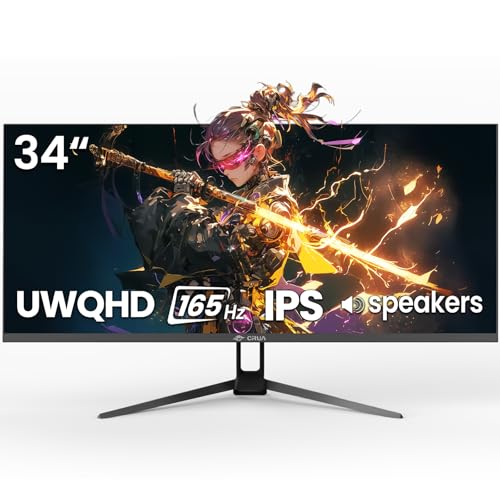
CRUA 34″ UWQHD 165Hz Ultrawide Gaming Monitor
The Picks, Examined More Closely
The LG 34WN80C-B earns its place as a reference point in this list because it does the rare job of bridging work and play on one panel. The 34-inch curved WQHD (Wide Quad HD, a 3440 x 1440 resolution) IPS screen gives you roughly a third more horizontal pixels than a standard 1440p display, so a full timeline in Premiere or a coding window next to documentation both fit without a second monitor.
USB-C connectivity with 60W power delivery means a single cable charges a compatible laptop and carries the display signal, which keeps a hot-desk setup clean. The sRGB 99% color coverage suits photo and video work that needs predictable output, and HDR 10 support adds depth to compatible games and movies. Compared with the CRUA panels coming later, this LG is built more for fidelity than speed, so serious competitive FPS players may want to look elsewhere.
What Works In Its Favor
- Single-cable USB-C connection reduces cable clutter and charges a laptop at the same time.
- IPS panel with sRGB 99% delivers color that holds up for editing and design tasks.
- Curved WQHD format creates a natural two-window workflow without needing a second display.
- Tilt and height adjustments help long sessions feel less taxing on your neck.
Worth Noting
- At 60Hz, this display is built for creative work and slower-paced games, not for high-frame competitive play.
- Some owners report that factory calibration is good but benefits from a quick user-level tune.
Key Specs
Best Suited To
Hybrid professionals who split time between creative work and after-hours gaming on one desk.
Where Another Pick Suits Better
Competitive shooters will get more value from the CRUA 34″ WQHD 240Hz Ultrawide Curved Gaming Monitor, which prioritizes frame rate over color fidelity.
Where the LG 34WN80C-B leans toward creative work, the INNOCN 34C1R pivots hard toward versatility. It pairs a 180Hz refresh rate with Adaptive-Sync and G-SYNC compatibility, which keeps fast motion clean without screen tearing on either NVIDIA or AMD graphics cards. For anyone running a PC and a console at the same desk, that combination tends to be a quiet relief.
The 130mm height adjustment and tilt range make it easy to settle into a comfortable viewing angle without an aftermarket arm, and dual HDMI 2.0 ports plus DisplayPort 1.4 cover just about every source you’d reasonably plug in. PIP and PBP modes let you mount a console feed in a corner while you work on the main panel, which suits streamers and hybrid users who like everything on one screen.
Good Reasons To Consider
- 180Hz refresh rate keeps motion smooth in both single-player and competitive titles.
- Adaptive-Sync with G-SYNC compatibility broadens GPU support without a separate adapter.
- PIP and PBP let you run a second source alongside your main display, useful for console and PC users.
- Ergonomic stand offers 130mm of height travel for long sessions at a standing desk.
Trade Offs
- Built-in speakers are present but most owners end up routing audio through external solutions.
- Some users may find the OSD takes a few sessions to navigate comfortably.
Feature Snapshot
Who It Suits Best
Gamers who want a high refresh rate ultrawide that also accepts a console signal cleanly.
A Better Fit Elsewhere
Designers chasing color accuracy first will find the LG 34WN80C-B UltraWide Curved WQHD IPS Monitor a stronger match for editing work.
This CRUA leans fully into the speed side of the ultrawide conversation. A 240Hz refresh rate on a 1500R curved panel is a noticeable upgrade over a standard 144Hz display, and in fast-twitch shooters the smoother motion can genuinely change how targets read at a flick. FreeSync support (a variable refresh rate technology that syncs the display to your GPU) keeps frame delivery consistent when frame rates swing.
The 1500R curve is tighter than the gentle bend on the LG, so it pulls the edges of the screen closer to your peripheral vision. For racing sims and immersive RPGs that wraparound feel is welcome. The honest read is that you trade some color depth for that speed, so creators may still want a separate color-tuned panel.
Positive Takeaways
- 240Hz refresh rate is a clear advantage in fast shooters and esports titles.
- 1500R curvature creates an immersive feel for racing and flight sims.
- FreeSync reduces screen tearing when frame rates fluctuate mid-game.
Honest Caveats
- You will need a strong GPU to drive 240 frames at 3440 x 1440 in most modern titles.
- Stand ergonomics are basic compared with the height-adjustable options from LG and INNOCN.
Made For
Competitive players who want maximum frame rate on an ultrawide and play fast-paced genres.
Skip It When
Color-critical work matters more than speed, in which case the LG 34WN80C-B UltraWide Curved WQHD IPS Monitor is a more balanced fit.
The second LG on this list is a different flavor of the ultrawide idea. The 2560 x 1080 resolution is lower than WQHD, but that lower pixel count lets a modest GPU push a smooth 100Hz across the panel without breaking a sweat. For productivity users who run spreadsheets, documents, and browser windows side by side, the wider format is the real draw rather than pure pixel density.
IPS color with sRGB 99% coverage keeps the screen honest for general content work, and HDR 400 support adds some depth to movies and supported games. The tilt-only stand is the main compromise, so anyone needing height adjustment will want a VESA arm. Compared with the 240Hz CRUA above, this LG is calmer, lighter on the GPU, and built for everyday mixed use.
A Few Strong Suits
- 100Hz refresh rate is a noticeable smoothness upgrade over standard 60Hz panels.
- sRGB 99% color coverage holds up for everyday content work.
- VESA mount compatibility opens up arm and mount options for a tidier desk.
Points To Note
- WFHD resolution is less sharp than WQHD for text-heavy tasks and detailed editing.
- Tilt-only stand means height adjustment requires an aftermarket VESA mount.
Quick Facts
Right Fit For
Productivity-first desks that want ultrawide real estate without the GPU demand of WQHD panels.
Not Your Match When
You need sharper text for editing or design, where the INNOCN 34″ Ultrawide WQHD 180Hz IPS Monitor (34C1R) is the stronger WQHD step up.
The 45-inch CRUA sits in a different weight class. With a DQHD (Dual QHD) 5120 x 1440 panel at 32:9, you essentially get two QHD displays in one continuous screen, with no bezel running down the middle. For sim racers, flight sim pilots, and traders running multiple charts, that unbroken canvas is hard to replicate with a dual-monitor setup.
The 1500R curve keeps the edges of that wide screen within a natural viewing range, and 240Hz keeps motion fluid for fast titles. The honest trade-off is desk depth: you need a deep, clear surface to make a 45-inch panel feel right, and the GPU load at 5120 x 1440 is significant. It is overkill for many users, and that is the point.
Why It Works Well
- DQHD resolution at 32:9 replaces a dual-monitor setup without a center bezel.
- 240Hz refresh rate keeps even wide-format gameplay feeling responsive.
- 1500R curvature keeps the screen edges comfortable to view across the full width.
A Few Limitations
- Requires a deep desk and significant GPU power to drive at full resolution.
- Not all games support 32:9 natively, so you may see letterboxing in some titles.
Whose Shelf It Belongs On
Sim racing enthusiasts, flight sim pilots, and traders who want one continuous wide canvas.
Look Elsewhere When
Your desk is small or you prefer a simpler 21:9 setup, in which case the CRUA 34″ WQHD 240Hz Ultrawide Curved Gaming Monitor fits more naturally.
Stepping down to 27 inches changes the math. A QHD 260Hz panel is the sweet spot for competitive FPS players: the smaller screen keeps pixel density high, and the 260Hz refresh rate (a faster panel update rate for smoother motion) is a meaningful edge in Valorant, CS2, and Apex Legends. FreeSync support keeps frame delivery clean when the action spikes.
The 1800R VA panel delivers strong contrast for a gaming monitor in this class, which gives darker scenes in cinematic games a bit more punch. Built-in speakers are present for casual use, though most gamers will route audio elsewhere. Compared with the 34-inch ultrawides earlier in this list, this CRUA is unapologetically about speed on a smaller footprint.
Points In Its Favor
- 260Hz refresh rate is among the highest in this roundup for twitch gaming.
- 1800R VA curve adds immersion while keeping the screen size manageable.
- Compact 27-inch form factor fits on smaller desks and tighter setups.
What To Weigh
- 27 inches is smaller than the other picks here, so the ultrawide field of view is not part of the deal.
- VA panel response can show slight dark smearing in some fast scenes.
Spec Overview
Who Should Grab It
FPS and esports players who prioritize frame rate and have a smaller desk footprint to work with.
Another Choice May Suit
Anyone wanting the ultrawide format should consider the CRUA 34″ WQHD 240Hz Ultrawide Curved Gaming Monitor for that wider field of view.
The 32-inch CRUA hits a comfortable middle ground. QHD resolution at 144Hz is a configuration that has aged well: sharp enough for everyday productivity, smooth enough for most modern games, and far easier on a mid-range GPU than 4K or ultrawide WQHD. FreeSync support rounds out a balanced spec sheet.
The 1800R VA panel brings a deeper curve than flat productivity displays, which adds a touch of immersion without dominating your desk. VESA mount support at 100x100mm gives you flexibility on arms and stands. It is the kind of panel that does many things competently rather than one thing dramatically.
The Upside
- 144Hz refresh rate pairs well with mid-range GPUs for smooth gameplay.
- VA panel with 1800R curve delivers strong contrast and a subtle wraparound feel.
- VESA mount support at 100x100mm allows flexible arm and stand setups.
- 99% sRGB coverage suits light content work without extra calibration.
Less-Strong Areas
- 144Hz is solid but not as fast as the 240Hz and 260Hz options in this list.
- Viewing angles are narrower than IPS, so off-center seating can shift the image.
Built With In Mind
Mixed-use shoppers who want a capable gaming monitor without overspending on a specialized panel.
Reach For A Different Pick When
You want the ultrawide format specifically, in which case the CRUA 34″ WQHD 165Hz IPS Ultrawide Gaming Monitor is a step up into 21:9.
Most ultrawides in this category lean black, which is why a white 34-inch IPS option stands out on a desk. Beyond the color, the panel itself is a capable 165Hz WQHD IPS display with FreeSync support, and 120% sRGB color volume (the total range of colors the screen can show) gives content creators a bit more working room for vivid projects.
Built-in speakers handle basic audio, and the 178° viewing angle keeps the image consistent if you ever step away from dead center. The wall mount option at 75x75mm adds placement flexibility. Compared with the 240Hz CRUA earlier, this one is a calmer all-rounder with a different look, well suited to a bright studio or creator setup.
What Makes Sense
- White finish offers a clean, distinct look that pairs well with bright desk setups.
- 120% sRGB color volume supports more vivid photo and video work.
- 165Hz refresh rate strikes a balance between smooth play and GPU friendliness.
- 178° viewing angle keeps the image consistent across the room.
Where It May Fall Short
- 165Hz is lower than the 240Hz options if frame rate is your main priority.
- White finish may show dust and smudges more visibly than a black bezel over time.
Feature Card
Perfect Match For
Creators and style-conscious users who want a vivid ultrawide with a clean, modern look.
Swap It Out When
Raw speed is the priority, in which case the CRUA 34″ WQHD 240Hz Ultrawide Curved Gaming Monitor is the better esports-tuned option.
The black sibling to the white CRUA above covers the same UWQHD 3440 x 1440 IPS territory at 165Hz. It is the kind of all-purpose ultrawide that does not lean heavily into any single spec, which makes it a sensible choice for households that share a screen between work, school, and games.
FreeSync keeps motion clean during play, and built-in speakers handle basic audio without requiring a desktop setup. IPS viewing angles mean two people side by side at the same screen still see accurate color. Versus the LG productivity panel earlier, this one trades a USB-C dock for a more gaming-focused feature set.
A Few Highlights
- 165Hz ultrawide strikes a balance between smooth play and lower GPU load.
- IPS panel keeps color and viewing angles consistent for shared viewing.
- FreeSync support reduces tearing during frame rate variation.
Small Caveats
- No USB-C input means laptops need HDMI or DisplayPort for a single-cable setup.
- 165Hz is a step behind the 240Hz esports-focused options in this list.
The Right Fit
Households and general users who want one ultrawide that handles work, study, and gaming without specializing.
Where A Sibling Pick Shines
Creative professionals will appreciate the LG 34WN80C-B UltraWide Curved WQHD IPS Monitor for its USB-C single-cable workflow.
What To Think Through Before Choosing a 34 Inch Ultrawide
Panel Type Sets the Whole Tone
IPS, VA, and OLED each handle a 34-inch ultrawide differently. IPS panels give you wide viewing angles and accurate color, which matters for design and shared viewing. VA panels push contrast higher, which gives games and movies a richer look in dim scenes, though viewing angles are tighter. Pick the panel that matches your primary use rather than chasing a single spec.
Resolution, Refresh Rate, and Your GPU
WQHD 3440 x 1440 is the modern standard, but your graphics card has to push it. A 240Hz ultrawide is wasted on a GPU that cannot deliver close to 240 frames, and a 60Hz panel is plenty for cinematic single-player games. Match the refresh rate to what your hardware can actually drive, and your experience will feel far smoother than chasing the highest number on the box.
Curve, Stand, and Desk Reality
A 1500R curve pulls you deeper into the action, while a 1800R curve is more subtle. Both work on a 34-inch panel, but the deeper curve looks better on a desk where you sit centered. Adjustable height and tilt matter more than people expect, because ultrawides are wide enough that small posture issues become neck strain over time. If the included stand is limited, plan on a VESA arm.
Connectivity and the Cable Mess
USB-C with power delivery is a quiet luxury for laptop users, while HDMI 2.0 and DisplayPort 1.4 cover most desktops. Console gamers should check that the panel supports the right HDMI standard for their hardware. Built-in speakers are convenient for casual use, but anyone serious about audio will want a separate solution routed through the 3.5mm jack or external speakers.
Smart Choices Across the Lineup
Where Shoppers Go Wrong
The most common mistake is chasing refresh rate without checking GPU capability. A 240Hz ultrawide is wasted if your graphics card can only push 80 frames in modern titles, and that mismatch often shows up as visual stutter rather than the smooth motion you expected. Another frequent trap is buying on resolution alone, when the panel type and stand ergonomics have a bigger day-to-day impact than a small pixel count difference.
When Paying More Pays Off
Premium models justify their cost through panel quality, USB-C single-cable convenience, and better factory calibration. For creative professionals, the color accuracy and connectivity alone can replace an entire docking station. For most shoppers, the upgrade path makes sense when you can name a specific feature you need: a tighter curve for sim racing, USB-C for laptop workflows, or a faster refresh rate for competitive play. Without that clear need, a balanced mid-range panel often delivers more satisfaction per dollar.


