


A wider field of view changes how you play, work, and even multitask. These 34 inch curved gaming monitors bring that wraparound feel without the bulk of a 49 inch panel, and most of them now run sharp 3440×1440 resolution. Curved displays at this size pull your eyes toward the center, which helps with long sessions and gives shooters and sims a more natural depth cue. Whether you’re chasing frame rates for competitive play or want a cleaner desk setup for editing and spreadsheets, the category has grown crowded with options. This roundup cuts through the noise, matching each monitor to the shopper it suits best.
The Essentials At A Glance

LG 34WN80C-B 34-Inch Curved UltraWide WQHD IPS Monitor

Alienware AW3420DW 34-Inch Curved WQHD Gaming Monitor

CRUA 34-Inch WQHD 240Hz Ultrawide Curved Gaming Monitor

CRUA 34-Inch WQHD 165Hz Ultrawide Curved Gaming Monitor

Westinghouse 34-Inch Curved WQHD 180Hz Gaming Monitor

CRUA 34-Inch WQHD 120Hz Ultrawide Curved White Monitor

LG 32ML600M-B 32-Inch IPS Monitor with HDR 10
CRUA 34-Inch WQHD 165Hz IPS Ultrawide White Monitor
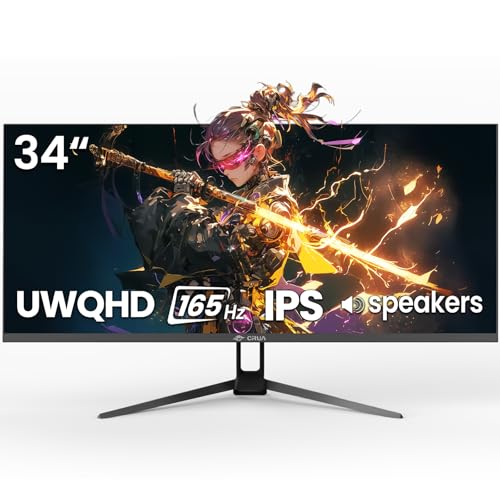
CRUA 34-Inch UWQHD 165Hz Ultrawide IPS Gaming Monitor
A Breakdown Of The Leading Choices
The LG 34WN80C-B leans into a productivity-first identity without giving up on casual play. Its 3440×1440 IPS panel renders documents, timelines, and code at a comfortable density, and the 21:9 ratio gives you room to park a chat window beside a main workspace.
USB Type-C with 60W power delivery is the headline feature for hybrid workers. A single cable can carry video, data, and laptop charging, which keeps a minimal desk tidy. The virtually borderless three-side frame also makes a two-monitor array look intentional rather than clunky.
Notable Upsides
- USB-C with 60W power delivery simplifies cable management for laptop-first desks
- IPS panel with 99% sRGB coverage suits color-aware editing and content work
- HDR 10 compatibility adds depth to supported movies and games
- Height and tilt adjustments help dial in a comfortable posture for long sessions
Points To Keep In Mind
- Standard 60Hz refresh rate falls behind dedicated gaming panels for fast-twitch titles
- No advanced sync technology like FreeSync Premium or G-Sync, so frame hitches may show in variable-fps scenes
Made For
Remote professionals and students who want a single screen for documents, video calls, and evening play.
Look Elsewhere When
The Alienware AW3420DW makes more sense for shoppers who want G-Sync-grade smoothness for high-frame-rate PC gaming.
The Alienware AW3420DW is built for enthusiasts who want color fidelity and smooth motion on the same panel. Its IPS Nano color technology pushes wider color volume than standard IPS, which is a meaningful upgrade for anyone editing photos or grading video in a workflow that also includes gaming.
At a 120Hz native refresh rate with a 2ms response time, it splits the difference between the LG above and the high-refresh picks further down the list. Nvidia G-Sync support keeps frames in lockstep with compatible GeForce cards, which is where the monitor shows its real strength during long single-player sessions.
Advantages To Know
- IPS Nano color panel delivers a broader color range for visual work
- Nvidia G-Sync synchronization reduces screen tearing on GeForce systems
- Lunar Light finish stands apart from the usual black-and-red gaming aesthetic
- Anti-glare coating helps in bright rooms or near windows
Trade Offs
- G-Sync support benefits Nvidia users most, leaving AMD shoppers underutilized
- 120Hz tops out lower than CRUA’s 165Hz and 240Hz alternatives for competitive play
Feature Snapshot
Right Fit For
Enthusiast PC builders with Nvidia graphics cards who split time between creative work and immersive single-player gaming.
Skip It When
The CRUA 34-Inch WQHD 240Hz Ultrawide Curved Gaming Monitor makes more sense for esports-focused shoppers chasing maximum frame rates.
Speed is the entire pitch here. The CRUA 240Hz model targets competitive players who want ultra-wide real estate without giving up the high refresh rates they’d find on a 16:9 esports display. The 1500R curve is a deeper wrap than the 1800R panels common in this size, which helps your eyes track enemies at the screen edges.
FreeSync support keeps frames in sync with AMD GPUs, reducing the visual stutter that distracts during ranked matches. For most setups running shooters or MOBAs, 240Hz means each frame gets a fraction more time on screen, smoothing out the feel of a mouse flick.
Well-Handled Touches
- 240Hz refresh rate is the highest in this lineup, ideal for competitive play
- 1500R curvature creates a deeper sense of immersion for first-person titles
- FreeSync synchronization reduces tearing on AMD graphics cards
Trade Offs
- Requires a powerful GPU to push frame rates that actually take advantage of 240Hz
- Color and contrast are tuned for speed rather than professional content work
Who Should Grab It
Competitive gamers running modern GPUs who want ultra-wide immersion without dropping to a lower refresh rate.
Consider Something Else When
The LG 34WN80C-B is a smarter fit for hybrid work-and-play setups where color accuracy and USB-C connectivity matter more than raw speed.
This CRUA lands in the sweet spot for most shoppers. A 165Hz refresh rate is fast enough to feel responsive in modern games without demanding the kind of GPU that pushes 240Hz comfortably. The 1500R curve wraps around your field of view, and the 120% sRGB color range keeps casual editing tasks looking right.
Connectivity covers the bases with HDMI 2.0 and DisplayPort 1.4, so it pairs with both current consoles and gaming PCs. A 75×75mm VESA mount on the back means you can swap the included stand for an arm mount, which helps reclaim desk space.
Features That Help
- 165Hz refresh rate hits a practical middle ground for mid-range GPUs
- 120% sRGB color coverage supports light photo and video work
- 75×75mm VESA compatibility for arm or wall mounting
- FreeSync reduces stutter during variable frame rate scenes
Honest Caveats
- VA panel technology means viewing angles are narrower than the Alienware’s IPS display
- No built-in speakers, so you’ll need external audio or headphones
Key Product Details
Best Suited To
Mid-range PC gamers and content creators who want ultra-wide immersion and a high refresh rate without flagship pricing.
Another Choice May Suit
The Westinghouse 34-Inch Curved 180Hz Gaming Monitor is a better match for shoppers prioritizing deep contrast for darker game scenes and movie watching.
Westinghouse leans into contrast and color volume with this model. A 3000:1 contrast ratio is well above what most IPS panels manage, which makes dark scenes in horror and cinematic games feel weightier. The 122% sRGB color coverage gives games and movies a vivid, slightly oversaturated look that many players prefer.
A 180Hz refresh rate and AMD FreeSync Premium support keep motion smooth on AMD graphics cards. The inclusion of built-in speakers and dual HDMI plus dual DisplayPort inputs makes it an easy hub for a desk with both a PC and a console.
Strengths Worth Knowing
- 3000:1 contrast ratio delivers deep blacks for atmospheric games and movies
- FreeSync Premium certification targets low-framerate compensation for smoother play
- Dual HDMI and dual DisplayPort inputs simplify multi-device setups
- Built-in speakers reduce desk clutter for casual use
- 1ms response time rating supports fast-paced competitive titles
Some Limits To Know
- VA panel response characteristics can show slight dark smearing in fast transitions
- Built-in speakers are basic, best reserved for casual background audio
Who Will Love This
Single-player gamers and movie watchers who want deep contrast and rich colors over maximum competitive speed.
Reach For A Different Pick When
The CRUA 34-Inch WQHD 240Hz Ultrawide Curved Gaming Monitor is a smarter call for esports-minded shoppers who prioritize frame rate over contrast depth.
Most gaming monitors wear black bezels and aggressive stands. This CRUA flips the script with a white chassis that fits naturally into brighter, minimalist rooms. The 120Hz refresh rate is modest by gaming standards but still smoother than standard 60Hz displays, and the 1500R curve keeps the wraparound feel.
Low blue light mode and tilt adjustment make it comfortable for long working sessions. For shoppers who care as much about how a desk looks on a video call as how games play, this monitor earns its place.
Real-World Strengths
- White finish blends with Scandinavian, modern, and bright decor styles
- Low blue light mode reduces eye strain during extended work sessions
- Tilt adjustment from -5° to 20° supports comfortable viewing angles
- 75×75mm VESA mount for arm or wall installation
Potential Compromises
- 120Hz falls short of the 165Hz and 240Hz CRUA models in the same family
- White finish may show dust more readily than darker monitors, depending on your environment
Perfect Match For
Aesthetic-focused shoppers building a clean, bright desk setup where the monitor is part of the room’s visual design.
A Better Fit Elsewhere
The CRUA 34-Inch WQHD 165Hz Ultrawide Curved Gaming Monitor in black is a stronger match for shoppers who prefer the same brand with a higher refresh rate.
Technically the LG 32ML600M-B is a 32-inch flat panel rather than a 34 inch curved gaming monitor, but it earns a spot here for shoppers who want LG’s IPS color quality in a simpler package. The 1080p resolution keeps GPU demands low, which makes it a sensible pick for older systems or starter builds.
HDR 10 compatibility and a wide color gamut make movies and lighter games look better than the resolution alone might suggest. It’s the kind of display that quietly handles a dorm room or a kid’s first PC without complaint.
What It Does Well
- IPS panel delivers consistent color at wide viewing angles
- HDR 10 support improves contrast in supported content
- Lower resolution eases the load on entry-level graphics cards
Worth Noting
- Flat 32-inch form factor lacks the immersive wrap of a 34-inch curved display
- 1080p resolution shows visible pixel structure at typical desk distances for some users
- Standard refresh rate limits appeal for fast-paced competitive gaming
Whose Shelf It Belongs On
Students, casual users, and parents building an affordable secondary display for homework and light gaming.
Where Another Pick Suits Better
The CRUA 34-Inch WQHD 165Hz Ultrawide Curved Gaming Monitor is a smarter fit for shoppers who want the full ultra-wide curved experience at a modest cost.
This white CRUA combines the IPS color quality of the Alienware with the feature set of the 165Hz black model. The 178° wide viewing angle makes it practical for shared spaces, and the 120% sRGB color range supports casual photo editing alongside gaming. Built-in speakers are a nice touch for a tidy desk.
FreeSync keeps frame delivery smooth on AMD systems, and the 75×75mm VESA mount gives you flexibility on how you install it. Compared to the Alienware above, the trade-off is more modest color volume, but for most everyday use the difference is subtle.
The Practical Payoff
- IPS panel provides accurate color and wide 178° viewing angles
- Built-in speakers remove the need for separate desktop audio in casual setups
- Low blue light mode supports long working sessions with less eye fatigue
- White chassis matches modern decor and bright workspaces
- FreeSync synchronization smooths variable frame rate scenes on AMD GPUs
Practical Considerations
- IPS panels at this tier typically don’t match the deep contrast of the Westinghouse VA display
Core Details
Best Suited To
Hybrid work-and-play users who want a clean white setup with enough color accuracy for content work and enough speed for games.
Swap It Out When
The Alienware AW3420DW is a better fit for color-critical creative work where IPS Nano color technology provides a meaningful upgrade.
The final CRUA in this lineup is a sensible all-rounder for shoppers who want IPS color, 165Hz motion, and built-in speakers without paying for a premium brand label. It covers the most common reasons people buy an ultra-wide: a wider canvas for spreadsheets, more space for game UI, and a cleaner desk setup.
FreeSync support and HDMI plus DisplayPort connectivity make it compatible with both modern consoles and gaming PCs. For someone upgrading from a standard 16:9 monitor, this is the kind of display that makes the difference obvious the first time you load a wide-aspect game or open three windows side by side.
What Makes Sense
- IPS panel offers accurate color at this size class
- 165Hz refresh rate handles most modern games smoothly
- Built-in speakers simplify desk audio for casual use
- FreeSync support reduces stutter on AMD graphics cards
Less-Strong Areas
- Spec sheet is more modest than the Alienware on premium color technology
- Brand recognition and long-term support are less established than LG or Alienware
Built With In Mind
First-time ultra-wide shoppers who want a balanced display for work, study, and gaming without a steep learning curve.
Where A Sibling Pick Shines
The LG 34WN80C-B is a stronger choice for laptop-first workflows thanks to its USB-C with 60W power delivery.
Choosing The Right Ultrawide For Your Setup
Panel Type And What It Means Day To Day
The three panel technologies you’ll meet most often in this category are IPS, VA, and the various Nano variants. IPS panels, short for in-plane switching, prioritize color accuracy and wide viewing angles, which makes them versatile for both editing and gaming. VA panels, or vertical alignment, push deeper contrast and richer blacks, which is ideal for cinematic games and movies. The Alienware’s IPS Nano and the Westinghouse’s VA show how each technology leans into its strengths, so the right call depends on whether you value color accuracy or contrast depth more.
Refresh Rate, Response Time, And Real Motion
Refresh rate, measured in hertz, tells you how many times the screen redraws per second. For casual single-player gaming, 120Hz is a meaningful step up from 60Hz, while 165Hz covers most modern game genres comfortably. Competitive players pushing ranked shooters will appreciate 180Hz, 200Hz, or 240Hz panels, though reaching those frame rates demands a serious GPU. Response time, listed in milliseconds, describes how quickly pixels change color, and a 1ms or 2ms rating helps reduce ghosting during fast camera movement.
Curve Depth And Desk Distance
The R-number in a curve spec, like 1500R or 1800R, indicates the radius of the circle the screen would form if extended. A 1500R curve wraps more tightly than 1800R, which suits desk distances of about two to three feet. If you sit farther back, a gentler curve may feel more natural. Most curved gaming monitors in this size class land at 1500R, which is a safe middle ground for typical desks.
Connectivity And Mounting Options
Look at both the port selection and the VESA mount pattern. HDMI 2.0 and DisplayPort 1.4 cover most modern PCs and consoles, while USB-C with power delivery, like the LG 34WN80C-B offers, can charge a laptop and carry video over a single cable. A 75×75mm or 100×100mm VESA pattern lets you swap the included stand for a monitor arm, which is a small upgrade that makes a noticeable difference in desk flexibility.
Key Considerations Across These Picks
Pitfalls Shoppers Hit
The most common mistake is chasing the highest refresh rate without checking whether your graphics card can push enough frames to use it. A 240Hz panel driven by a mid-range GPU often runs at 80 to 100 frames per second, which looks the same as a 144Hz monitor in practice. Another frequent miss is ignoring panel type. Shoppers focused on resolution alone sometimes end up with a VA panel that smears in dark scenes, or an IPS panel with washed-out contrast, when a different technology would have suited their content better.
When Paying More Pays Off
The step up from a budget 165Hz CRUA to the Alienware AW3420DW buys you IPS Nano color, G-Sync certification, and a longer track record for build quality and firmware support. That premium makes sense for color-critical creative work, for shoppers who keep monitors for five or more years, and for anyone who specifically needs G-Sync on an Nvidia card. For shoppers who mainly play single-player games or use their monitor for general productivity, the extra spend is harder to justify. The honest read is that the right pick depends on whether your workflow will actually use what the premium tier provides.
Frequently Asked Questions
What Resolution Works Best On A 34 Inch Curved Monitor?
Most shoppers in this category settle on 3440×1440, sometimes called UWQHD or WQHD. It strikes a balance between sharp detail and reasonable GPU demands, and it scales text comfortably on a 34-inch panel. Lower resolutions start to show pixel structure at typical desk distances, while higher resolutions like 5120×1440 require significantly more graphics horsepower.
Is 165Hz Enough For Competitive Gaming?
For most people, yes. 165Hz delivers visibly smoother motion than 60Hz and is enough headroom for the majority of modern games at high settings. Esports professionals chasing every possible edge may prefer 240Hz panels like the CRUA 240Hz model, but the difference matters mostly at the very top of competitive play.
Do I Need G-Sync Or FreeSync?
Adaptive sync technologies reduce screen tearing and stutter by matching the monitor’s refresh to the GPU’s frame output. FreeSync works with AMD graphics cards, G-Sync works with Nvidia cards, and many modern monitors support both. If your GPU pushes variable frame rates, adaptive sync is a meaningful quality-of-life improvement, especially in games without locked frame rates.
How Far Should I Sit From A 34 Inch Curved Monitor?
A typical recommendation is two to three feet, depending on how deep the curve feels to you. At 1500R, sitting closer emphasizes the wraparound effect, while sitting back reduces it. For most desks, the default position works fine, but arm mounts and adjustable stands make it easier to fine-tune distance and height.
Can These Monitors Work With A Console?
Most 34 inch curved gaming monitors in this list support HDMI 2.0, which is compatible with current-generation consoles at 1440p or 1080p. Some consoles may not output at the monitor’s full refresh rate, so adaptive sync and high-refresh features may not be fully utilized in console gaming.
Wrap Up
A 34 inch curved monitor is one of the more meaningful upgrades you can make to a desk setup, and the category now spans everything from budget IPS panels to high-refresh competitive screens. The best match depends on what you spend most of your time doing. For hybrid work and play, the LG 34WN80C-B is hard to beat. For pure speed, the CRUA 240Hz model leads. For deep contrast and cinematic play, the Westinghouse stands out. Pick the one that aligns with how you actually use your screen, and the rest tends to fall into place.


