


The hunt for a real 32-inch 4K OLED gaming monitor is tougher than it looks. Most “4K” listings out there are actually 1440p VA panels, and OLED still carries a premium that leaves many shoppers wondering where the sweet spot sits. This list cuts through the noise with ten options that earn their place for specific reasons, from genuine QD-OLED flagship hardware to curved 4K VA panels that deliver the resolution without the OLED price tag.
A Closer Look At The Lineup

SANSUI 32 Inch Curved 240Hz Gaming Monitor 1500R FHD

ASUS TUF Gaming VG32WQ3B 31.5″ 1440P Curved Monitor

CRUA 32″ 4K 240Hz Curved Gaming Monitor 1500R White

CRUA 34″ WQHD 240Hz Ultrawide Curved Gaming Monitor

ASUS ROG PG32UCDM 32″ 4K 240Hz QD-OLED Gaming Monitor

CRUA 34″ WQHD 165Hz Ultrawide Curved Gaming Monitor
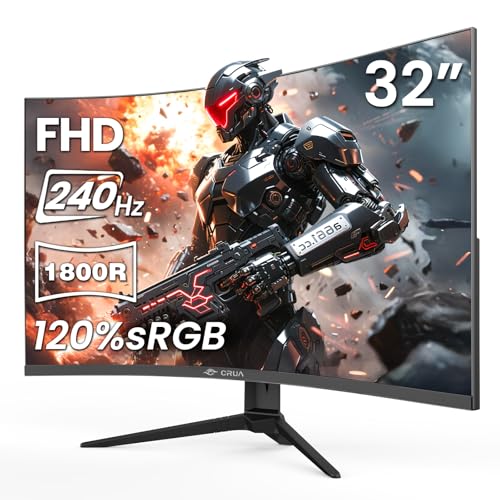
CRUA 32″ FHD 1080P 240Hz Curved Gaming Monitor 1800R

CRUA 32″ 4K UHD 60Hz Curved Monitor 1500R White
CRUA 34″ WQHD 165Hz IPS Ultrawide Gaming Monitor White

CRUA 32″ 4K UHD 160Hz Curved Gaming Monitor 1500R
Why These Options Stand Out
Competitive players chasing motion clarity above all else tend to gravitate toward high-refresh panels, and this SANSUI delivers the headline 240Hz figure in a 32-inch curved format. The 1500R curvature is a comfortable wrap for desk distances, pulling the edges of the screen into your natural line of sight without feeling aggressive. For a dorm desk or a tight gaming nook, the metal stand and VESA compatibility give you flexibility on mounting.
Resolution is the trade-off here. The Full HD pixel count looks softer than the 4K options further down this list, so single-player adventures and content work may not feel as crisp. For FPS and racing where every frame counts, that’s an acceptable compromise.
Everyday Perks
- 240Hz refresh keeps fast motion smooth in esports and racing titles
- 1ms MPRT response time (a measure of how quickly a pixel changes, lower means less ghosting) reduces visible blur in frantic scenes
- AMD FreeSync support synchronizes the panel with your graphics card to fight screen tearing
- 1500R curve wraps peripheral vision for more immersive single-screen play
- Includes a DP cable, saving you a separate purchase
Things To Consider
- 1080p resolution looks noticeably soft at 32 inches compared to 1440p or 4K alternatives
- No built-in speakers, so plan for headphones or external audio
- Owners commonly report that VA panels (Vertical Alignment screens known for high contrast) can show minor smearing in dark transitions
Built With In Mind
Competitive esports and racing fans who prioritize frame rate over pixel density and sit close enough that 1080p still looks sharp.
Swap It Out When
Step up to the ASUS TUF Gaming VG32WQ3B if you want 1440p clarity with a similar speed profile.
The TUF Gaming VG32WQ3B sits in a comfortable middle ground that a lot of mid-range PC builders actually need. You get 1440p resolution, which gives you a meaningful bump in text and texture sharpness over the SANSUI without demanding the GPU horsepower that 4K requires. At 180Hz with a 0.5ms response time, it keeps up with most modern GPUs in competitive play.
ASUS leans on its Extreme Low Motion Blur technology and a 1500R curve to deliver a more cinematic feel in single-player games. For a single-display setup in a home office that doubles as a gaming station, this panel covers a lot of ground.
Points In Its Favor
- 1440p resolution strikes a clean balance between sharpness and GPU demands
- 180Hz refresh rate keeps multiplayer titles feeling responsive
- 90% DCI-P3 color coverage (a wide color space used in film production) gives games and movies richer, more accurate tones
- Shadow Boost feature lifts detail in dark scenes without washing out highlights
Worth Noting
- 0.5ms figure is gray-to-gray, which is a specific pixel-transition measurement that can look more optimistic than real-world performance
- 31.5 inches is slightly under the 32-inch mark, so plan your desk depth accordingly
Feature Snapshot
Right Fit For
Mid-range PC builders who want sharper visuals than 1080p without the GPU cost of 4K gaming.
Where A Sibling Pick Shines
Pick the CRUA 32″ 4K 240Hz Curved Gaming Monitor if you want 4K resolution and 240Hz in one panel.
Pairing 4K with 240Hz on a 32-inch panel is exactly what hybrid shoppers keep asking for, and this CRUA ticks both boxes. The 1500R curve softens the wide viewing angle, so corners don’t feel stretched during long sessions of open-world games. You also get a white chassis, which is rare enough to stand out in a sea of black monitors and matches clean, modern desk builds.
For content creators, the 3840×2160 resolution makes spreadsheets and timelines easier to manage, and built-in speakers keep your desk minimal. You will want a recent GPU to push 4K at high frame rates, so this one is best paired with upper-tier hardware.
Bright Spots
- 4K resolution at 32 inches delivers noticeably sharper text and textures than 1440p
- 240Hz refresh handles fast-paced games without blur
- White finish gives minimalist or bright desk setups a different look from typical black panels
- Built-in speakers reduce desk clutter for casual viewing
Trade Offs
- 4K at 240Hz requires a high-end GPU, so budget for graphics card upgrades
- VA panel contrast is strong, but viewing angles in dark rooms can feel slightly limited compared to IPS
Made For
Gamers and creators who split their day between fast-paced titles and detail-heavy work on the same display.
Consider Something Else When
Choose the ASUS ROG PG32UCDM if you want a true QD-OLED panel with deeper blacks and wider viewing angles.
Ultrawide panels earn their keep in racing simulators and strategy games where peripheral vision changes how the world feels. This 34-inch CRUA gives you a 21:9 canvas at 240Hz, which is rare in this size class. The 1500R curve lines up naturally with how your eyes sit at a desk, so the edges stay readable without forcing you to turn your head.
For trading dashboards and video editing timelines, that extra horizontal room means fewer alt-tabs and more visible data. Owners should plan for a deep desk since 34-inch ultrawides take up more width than a standard 16:9 panel.
Positive Takeaways
- 21:9 aspect ratio fills your peripheral vision for racing and flight sim immersion
- 240Hz refresh rate keeps even fast motion smooth on the wide canvas
- FreeSync support reduces screen tearing with compatible AMD and Nvidia cards
- Extra horizontal pixels make multitasking and editing workflows easier
Room For Improvement
- 3440×1440 resolution is below 4K, so text sharpness is comparable to 27-inch 1440p
- Not all games support 21:9 natively, and some will letterbox (show black bars on the sides) or stretch awkwardly
Feature Snapshot
Best Suited To
Sim racing, flight, and strategy fans who want peripheral immersion on a single ultrawide display.
Look Elsewhere When
Choose the CRUA 32″ 4K 240Hz Curved Gaming Monitor if you want 4K resolution over ultrawide width.
The PG32UCDM is the panel enthusiasts point to when “no compromises” is the brief. QD-OLED (Quantum Dot OLED, a hybrid panel that combines OLED’s perfect blacks with quantum dots for brighter, more saturated colors) delivers near-instantaneous 0.03ms response times, deep blacks that LCD can’t touch, and a 240Hz refresh rate that holds up next to the fastest VA panels. You also get USB-C with 90W power delivery, which is enough to charge a laptop while driving the display from a single cable.
For PS5 and Xbox owners, the HDMI 2.1-style throughput supports 4K at high refresh rates, so console gaming looks just as good as PC play. A custom heatsink and graphene film help with longevity, which matters because OLED panels can be sensitive to static UI elements over time.
Everyday Wins
- True QD-OLED panel produces deep blacks and vibrant, accurate colors
- 240Hz refresh rate at 4K handles competitive play without compromise
- USB-C with 90W charging simplifies laptop docking setups
- Custom heatsink design supports longer-term panel health
- True 10-bit color (10-bit color depth means the screen can show over a billion shades, with smoother gradients) for professional-grade gradients
- G-SYNC compatibility (G-SYNC is Nvidia’s variable refresh tech that syncs the panel to the GPU) reduces tearing on Nvidia cards
Points To Note
- Flagship pricing puts it out of reach for many shoppers
- OLED panels benefit from pixel-refresh routines and careful use to avoid burn-in over years of static UI
Key Product Details
Who Will Love This
Enthusiasts and content creators who want flagship OLED picture quality and have the hardware to push 4K at high refresh rates.
Not Your Match When
Step down to the CRUA 32″ 4K 160Hz Curved Gaming Monitor if flagship pricing stretches the budget past your comfort zone.
The 165Hz version of CRUA’s 34-inch ultrawide trades some speed for a friendlier price tag, which is a fair trade for shoppers who game after work and don’t need bleeding-edge frame rates. The 21:9 panel and 1500R curve match the faster 240Hz sibling, so the immersion factor stays the same in titles that support ultrawide.
For desk-based productivity, the wider canvas keeps two documents open side by side without feeling cramped. Owners commonly note that 165Hz is a noticeable jump from standard 60Hz without demanding top-tier GPU hardware.
Where It Delivers
- 34-inch ultrawide format handles multitasking and cinematic gaming well
- 165Hz refresh rate (a solid bump over standard 60Hz panels) keeps motion smooth without GPU strain
- 1500R curve provides comfortable viewing at typical desk distances
Softer Spots
- Lower refresh rate than the 240Hz sibling may feel less competitive in twitchy esports
- Ultrawide support varies by game, with some titles showing black bars
Perfect Match For
Home office users and casual gamers who want an ultrawide canvas without the cost of high-refresh 240Hz panels.
Reach For A Different Pick When
Move to the CRUA 34″ WQHD 240Hz Ultrawide Curved Gaming Monitor if you want 240Hz for competitive play.
On a strict budget, this CRUA keeps the speed high and the resolution at 1080p, which works well for esports-focused setups where frames matter more than pixels. The 1800R curve is tighter than the 1500R options elsewhere in this list, so the wraparound feel is more pronounced. The 3500:1 contrast ratio (the difference between the brightest white and darkest black) gives games a deep, cinematic look in dim rooms.
For first-time monitor upgrades, HDMI 2.0 and DisplayPort 1.4 inputs give you flexible connections to most modern GPUs. The 100x100mm VESA mount (VESA is a standard hole pattern on the back of monitors used for mounting arms and brackets) makes wall or arm mounting easy when desk space runs out.
Useful Highlights
- 240Hz refresh rate keeps competitive games feeling snappy
- 1800R curve provides a tighter, more immersive wrap than 1500R panels
- 3500:1 contrast ratio delivers strong blacks for a budget VA panel
- Low blue light mode reduces eye strain during long sessions
Honest Caveats
- 1080p at 32 inches looks softer than 1440p alternatives at the same size
- VA panels can show minor smearing in dark transitions during fast camera pans
Feature Snapshot
Who Should Grab It
Budget-conscious FPS and esports players who want high refresh rates without paying for 4K resolution.
Skip It When
Pick the SANSUI 32 Inch Curved 240Hz Gaming Monitor if you want similar speed with a metal stand and a slightly less aggressive curve.
Some shoppers want 4K resolution without the GPU cost of high-refresh gaming, and this CRUA delivers exactly that. The 60Hz refresh rate is a fair trade for sharp text, photo editing, and 4K movies, especially on a 32-inch panel where 1080p would look noticeably soft. Built-in speakers keep the desk clean, and the white finish matches modern minimalist setups.
Casual gaming still looks good thanks to FreeSync support, though fast-paced genres will feel less fluid than on a 144Hz or 240Hz panel. For primarily work or streaming use with light gaming on the side, this one makes sense.
Real-World Strengths
- 4K UHD resolution gives crisp text and detailed images for office and creative work
- 1500R curve adds immersion for movies and single-player games
- Built-in speakers reduce the need for external desktop audio
- FreeSync support smooths out light gaming sessions
Worth Bearing In Mind
- 60Hz refresh rate feels limiting for competitive or fast-paced games
- Built-in speakers are basic and won’t satisfy anyone serious about audio quality
Made For
Remote workers, students, and casual users who want 4K clarity for daily tasks with light gaming on the side.
Where Another Pick Suits Better
Move up to the CRUA 32″ 4K 240Hz Curved Gaming Monitor if you want 4K plus 240Hz for serious gaming.
IPS (In-Plane Switching) panels are known for accurate color and wide viewing angles, which makes this CRUA a smart pick for creators who also game. The 21:9 ultrawide format gives video editors more timeline space, and the 178° viewing angles mean colors stay consistent even when you lean to one side. A 165Hz refresh rate keeps games smooth without taxing your GPU the way 4K would.
For shared workspaces or living-room setups where multiple people view the screen, IPS holds up better than VA. The white chassis fits bright, modern rooms better than typical black panels.
Noteworthy Benefits
- IPS panel technology delivers accurate, consistent color for editing work
- 21:9 ultrawide aspect ratio provides extra room for timelines and spreadsheets
- 178° viewing angles keep the picture consistent from off-center positions
- 165Hz refresh rate handles modern games smoothly
Potential Drawbacks
- IPS contrast is typically lower than VA panels, so dark scenes look slightly washed out
- 3440×1440 is below 4K, so 4K content won’t display at native resolution
Whose Shelf It Belongs On
Content creators and video editors who want accurate color and a wide canvas with light gaming on the side.
A Better Fit Elsewhere
Pick the CRUA 34″ WQHD 240Hz Ultrawide Curved Gaming Monitor if you want 240Hz for faster competitive play.
The 160Hz version of CRUA’s 32-inch 4K curved monitor lands in a comfortable middle tier, where 4K resolution meets high enough refresh rates for most gamers without the cost of 240Hz panels. The 1500R curve wraps nicely for open-world games and cinematic single-player titles, where immersion matters more than competitive edge.
For single-display setups, this panel pulls double duty as both a sharp productivity screen and a responsive gaming display. You may find the 160Hz ceiling is the trade-off compared to the 240Hz sibling, but for most gaming genres, 160 frames per second is more than smooth enough.
What Pays Off
- 4K resolution at 32 inches delivers crisp text and detailed textures
- 160Hz refresh rate balances smooth gaming with reasonable GPU demands
- 1500R curve adds immersion for open-world and cinematic games
- FreeSync support reduces screen tearing during fast camera movement
Less-Strong Areas
- 160Hz is below the 240Hz offered by faster siblings, which may matter in competitive play
- VA panel viewing angles are narrower than IPS alternatives in the same size class
Feature Snapshot
The Right Fit
Single-display gamers who want 4K resolution and solid refresh rates without paying flagship prices.
Another Choice May Suit
Choose the ASUS ROG PG32UCDM if you want QD-OLED picture quality and 240Hz at the top of the stack.
Picking The Right Panel For Your Setup
Picking a 32-inch class gaming monitor comes down to three honest questions: how fast does your GPU actually push frames, what do you spend most of your screen time doing, and how much desk space do you really have.
Panel type sets the tone for picture quality. OLED and QD-OLED give you perfect blacks and near-instant response, which is ideal for cinematic single-player games and HDR movies, though flagship pricing puts them out of reach for many. VA panels deliver strong contrast at lower cost, which works well in dim rooms. IPS panels offer the most accurate colors and wide viewing angles, which matters for content creation and shared viewing.
Resolution is the second fork in the road. 4K panels look the sharpest on a 32-inch screen, especially for text, photo editing, and dense UI, but they require serious GPU horsepower to drive at high frame rates. 1440p is the practical sweet spot for most mid-range gaming builds, balancing sharpness and performance. 1080p still makes sense for esports-focused setups where every frame matters more than pixel density.
Refresh rate and response time shape how motion feels. A 240Hz panel paired with a GPU that pushes close to those numbers gives you a clear edge in fast-paced games. For single-player adventures and casual play, 144Hz to 165Hz is more than enough, and the savings can go toward a better GPU or a larger desk.
Connectivity matters more than people think. USB-C with power delivery simplifies laptop docking, HDMI 2.1 is what you want for current-generation consoles at 4K, and DisplayPort 1.4 is the standard for high-refresh PC gaming. Make sure the monitor you like has the inputs your hardware actually needs.
Smart Considerations Before You Commit
Common Pitfalls Worth Dodging
Watch for marketing confusion around “4K-compatible” panels that are actually 1440p, and around response time numbers quoted as MPRT or GTG (two different measurement standards that can sound better on paper than they perform in practice). Check whether the listed refresh rate requires specific ports or settings to actually reach, and make sure your GPU and cables can drive the panel at the rated speed.
When Paying More Actually Pays Off
The jump from a budget VA panel to a flagship QD-OLED buys you deeper blacks, wider color, and near-instantaneous response that you can see in any dark game scene. For shoppers who play a mix of cinematic single-player titles and competitive multiplayer, the upgrade is worth considering. For pure esports on a tight budget, a high-refresh 1080p or 1440p panel will give you more frames per dollar than a flagship 4K OLED.
Frequently Asked Questions
Is a 32-inch 4K gaming monitor too big for a regular desk?
At a typical desk distance of 60 to 80 cm, a 32-inch 4K panel fits comfortably and the pixel density keeps text sharp. If your desk is shallower than 60 cm, a 27-inch 4K or 32-inch 1440p panel may feel more natural.
Do I need a special cable for 4K at 120Hz or higher?
Yes. HDMI 2.1 cables and certified DisplayPort 1.4 cables (DP 1.4 with DSC, or Display Stream Compression, a feature that lets a single cable handle very high resolutions and refresh rates) are required to push 4K beyond 60Hz. Older cables will cap you at lower refresh rates even on a capable monitor.
Are OLED gaming monitors worth the extra cost?
For gamers who value deep blacks, fast response, and HDR impact, yes. For shoppers who mainly play competitive esports on a tight budget, a high-refresh 1440p VA or IPS panel gives you more frames per dollar.
What is FreeSync and do I need it?
FreeSync synchronizes the monitor’s refresh rate with your GPU’s frame output, which reduces screen tearing and stutter. AMD FreeSync works on most modern AMD and many Nvidia GPUs, and it makes a noticeable difference in games where frame rates fluctuate.
Can I use a 32-inch curved monitor for office work?
Yes. The 1500R or 1800R curve helps reduce eye movement across the wide screen, and 4K resolution keeps text sharp. Some users find the curve takes a day or two to get used to, but most adjust quickly.
Bottom Line
The right 32-inch 4K OLED gaming monitor depends entirely on what you do with your screen. Enthusiasts with the hardware to push 4K at high refresh will find the ASUS ROG PG32UCDM hard to beat, while budget shoppers get real value from the CRUA and SANSUI curved panels that balance speed, resolution, and price. Pick the panel that matches your GPU and your most-played games, and you’ll be set for a long time.


