


The RTX 3070 still punches well above its weight for 1440p gaming, ray tracing, and creative workloads, but the form factor around that GPU matters as much as the silicon. Some shoppers want a full tower with headroom for upgrades, while others need a quiet, compact box that tucks behind a monitor. This shortlist covers both ends, pairing the GeForce RTX 3070 in full desktops with a handful of mini PCs that handle the same games through newer AMD Ryzen processors. Each pick below has a clear reason to earn its slot, and the trade-offs are spelled out so you can match hardware to your actual setup.
How The Shortlist Stacks Up
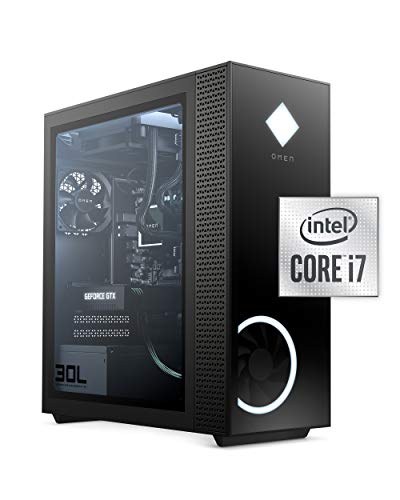
OMEN 30L Gaming Desktop RTX 3070, i7-10700KF, 16GB RAM, 1TB SSD

ASUS ROG Strix GA15DK Gaming Desktop RTX 3070, Ryzen 7 5800X, 16GB

Beelink SER5 Mini PC Ryzen 5 5500U, 16GB DDR4, 480GB NVMe SSD
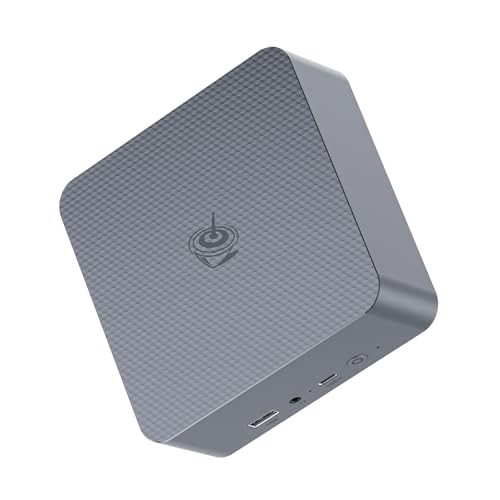
Beelink EQR7 Mini PC Ryzen 7 7735U, 24GB LPDDR5, 500GB SSD
Beelink SER5 MAX Mini PC Ryzen 7 7735U, 24GB LPDDR5, 1TB SSD
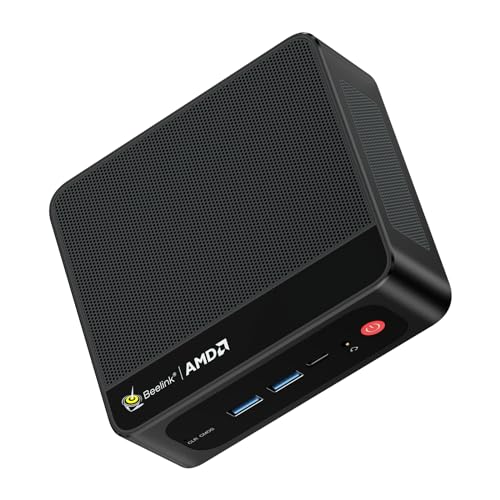
Beelink SER5 Mini PC Ryzen 5 5500U, Windows 11 Pro

Beelink SER9 MAX Mini PC Ryzen 7 H 255, 64GB DDR5, 1TB SSD
A Breakdown Of The Leading Choices
The OMEN 30L is the most traditional gaming tower on this list, and that is genuinely its strength. Inside the tempered glass and full-metal frame, the GeForce RTX 3070 pairs with an unlocked Intel Core i7-10700KF (eight cores, sixteen threads) and 16GB of RAM, giving you real muscle for 1440p gaming and steady frame rates in modern AAA titles.
Where it edges out every mini PC in this guide is thermal headroom. A full mid-tower case means quieter fans under load and room for future upgrades, from a bigger GPU down the road to additional storage. If your battle station already has the desk space, this is the cleanest path to genuine desktop-class RTX 3070 performance.
Bright Spots
- Eight-core unlocked Intel CPU handles modern games and background apps without breaking a sweat
- Dedicated GeForce RTX 3070 graphics deliver real-time ray tracing and DLSS support
- 1TB SSD cuts load times in half compared to traditional hard drives
- Tempered glass side panel and full-metal frame make future component swaps straightforward
- RGB lighting and OMEN Gaming Hub give you control over the look and performance profile
Things To Consider
- The 10th gen Intel platform is older, so CPU-heavy workflows may lag behind newer Ryzen-based systems like the ASUS ROG Strix GA15DK
- A full tower demands meaningful desk or floor space, which is a non-starter for tight setups
- Power draw runs higher than any mini PC here, so expect more heat output during long sessions
Who It Suits Best
Gamers who already have the desk space and want a traditional, upgradeable RTX 3070 build rather than a compact alternative.
Look Elsewhere When
The Beelink SER9 MAX Mini PC fits you better if you need a quiet, monitor-mounted box and are willing to trade the dedicated GPU for newer integrated graphics performance.
The ROG Strix GA15DK takes the same RTX 3070 foundation as the OMEN 30L and rebuilds it around AMD’s Ryzen 7 5800X, an eight-core processor that punches harder in multi-threaded workloads like video encoding and game streaming. The result is a desktop that feels just as comfortable running OBS and Discord alongside your game as it does pushing high frame rates.
ASUS pairs the CPU and GPU with 16GB of DDR4 RAM, a 512GB SSD for the operating system and current titles, plus a 1TB HDD for media libraries and screenshots. The dual-drive setup is the kind of thing creators appreciate, since you stop juggling files between drives and just let the system manage the split.
The Case For It
- Ryzen 7 5800X handles streaming, rendering, and gaming simultaneously without obvious slowdowns
- SSD plus HDD combo gives you fast boot times and a deep storage bench in one box
- Wi-Fi 5 support keeps cable clutter down if your router sits across the room
- ROG chassis design includes airflow-focused venting for sustained loads
Worth Noting
- 512GB SSD fills up fast with modern games, so you may rotate titles or add storage sooner than expected
- Windows 10 Home ships standard, meaning a Windows 11 upgrade adds a step to setup
- The form factor is still a mid-tower, so it will not tuck behind a monitor like a Beelink mini PC
Key Specs
Made For
Streamers, video editors, and gamers who multitask heavily and want Ryzen multi-core strength alongside the RTX 3070.
A Better Fit Elsewhere
The OMEN 30L Gaming Desktop fits you better if you prefer Intel’s platform and want a larger 1TB SSD out of the box instead of a smaller boot drive plus HDD.
The first Beelink on this list makes a sharp pivot. There is no RTX 3070 inside the SER5, and that is the point. The Ryzen 5 5500U is a six-core mobile processor with integrated Radeon graphics, built for shoppers who want a small, quiet box for lighter gaming, emulation, and daily work rather than a full tower under the desk.
The 480GB NVMe SSD is roomy enough for an operating system plus a small game library, and 16GB of DDR4 RAM is a sensible floor for a modern Windows machine. Owners commonly report that the unit disappears behind a monitor or sits on a shelf without drawing attention or throwing off much heat.
What Works In Its Favor
- Six-core Ryzen 5 5500U handles office, browsing, and lighter gaming efficiently
- 480GB NVMe boot drive loads Windows and apps quickly
- Low power draw keeps electricity use and fan noise to a minimum
- Compact chassis fits behind monitors or in entertainment centers
Points To Keep In Mind
- Integrated Radeon graphics cannot match the RTX 3070 in heavy AAA titles
- VRAM and cooling headroom are limited for sustained gaming sessions
- You may find the single SSD slot restrictive if your library grows quickly
Feature Snapshot
Best Suited To
Shoppers who want a quiet, monitor-friendly PC for esports titles, indie games, and productivity rather than full RTX 3070-class performance.
Skip It When
The Beelink EQR7 Mini PC fits you better if you want the newer Ryzen 7 7735U and faster LPDDR5 memory in a similarly compact shell.
The EQR7 keeps the same tiny footprint as the SER5 but jumps to a Ryzen 7 7735U, an eight-core chip that adds real headroom for video calls, light editing, and heavier multitasking. The 24GB of LPDDR5 RAM is generous for a mini PC at this size, and you feel the difference when juggling browser tabs, a Zoom window, and a project file at the same time.
Storage lands at 500GB, which is workable for an OS plus a moderate game or media library. The 6nm architecture helps keep thermals in check, so the EQR7 stays quiet even when you push it through a long workday.
A Few Highlights
- Ryzen 7 7735U offers eight cores and 16 threads for serious multitasking
- 24GB of LPDDR5 memory is more than most mini PCs in this class ship with
- 6nm manufacturing keeps power draw and heat output modest
- Compact chassis mounts easily behind a monitor with a VESA bracket
Small Caveats
- Integrated graphics still trail the RTX 3070 in demanding games
- 500GB storage may feel tight for large modern game installs
- RAM is soldered, so you cannot upgrade memory later
Right Fit For
Home office users, students, and families who want a fast, quiet mini PC that handles work and light gaming without dominating the desk.
Consider Something Else When
The Beelink SER5 MAX Mini PC fits you better if you want a 1TB SSD in the same Ryzen 7 7735U class for extra game and media storage.
The SER5 MAX addresses the most common complaint about mini PCs: not enough storage. It pairs the same eight-core Ryzen 7 7735U found in the EQR7 with a full 1TB SSD, which gives you real breathing room for a Windows install plus a sizable game or media library without immediately reaching for external drives.
You also get 24GB of LPDDR5 RAM, so multitasking feels similar to the EQR7. The honest read is that this is the SER5 MAX’s sweet spot: more storage than its smaller siblings, same compact footprint, and the same quiet operation that makes Beelink’s mini PCs easy to live with on a small desk.
Strengths Worth Knowing
- 1TB SSD removes the immediate need for external storage
- Ryzen 7 7735U delivers eight-core performance in a mini form factor
- 24GB LPDDR5 handles heavy browser and app multitasking smoothly
- Same low-noise chassis design as other Beelink SER5 units
Honest Caveats
- No dedicated GPU means AAA gaming performance still trails the OMEN 30L and ROG Strix GA15DK
- Memory is non-upgradable since it is soldered to the board
- Compact cooling limits sustained boost clocks under extended loads
Quick Facts
Who Will Love This
Anyone who wants a near-silent, monitor-friendly PC for general work, media, and lighter gaming and prefers the extra storage over the smaller EQR7.
Another Choice May Suit
The Beelink SER9 MAX Mini PC fits you better if you want the newer Ryzen 7 H 255 and DDR5 memory for even more headroom in creative work.
The second SER5 on this list looks similar to the earlier Beelink entry but ships with Windows 11 Pro, which makes a meaningful difference for small business and remote-work users who rely on BitLocker, Remote Desktop, and group policy management. The Ryzen 5 5500U keeps the same six-core, twelve-thread foundation you saw in the standard SER5.
For shoppers stepping into a compact PC for the first time, the Pro OS and familiar Beelink chassis lower the learning curve. It is a low-fuss pick that does the basics well: browsing, document work, light photo editing, and casual gaming on indie or esports titles.
The Good Stuff
- Windows 11 Pro unlocks business and security features missing from the Home edition
- Six-core Ryzen 5 5500U handles everyday workloads efficiently
- Small footprint fits dorm rooms, reception desks, and home offices
- Low heat output means it can sit on a shelf without ventilation concerns
Room For Improvement
- Integrated Radeon graphics cap you out of heavier modern AAA gaming
- Storage capacity is not specified in the source data, so plan to verify before purchase
- RAM is fixed and not user-upgradeable
Feature Card
Perfect Match For
First-time compact PC shoppers and small business owners who want Windows 11 Pro features in a small, affordable box.
Reach For A Different Pick When
The Beelink EQR7 Mini PC fits you better if you want a faster eight-core Ryzen 7 chip and 24GB of LPDDR5 memory in a similar form factor.
The SER9 MAX is the most powerful mini PC in this roundup, built around AMD’s Ryzen 7 H 255, an eight-core, sixteen-thread chip with a 4nm process and a 54W TDP ceiling. That is a serious thermal envelope for a mini PC, and the result is performance that brushes against entry-level desktop CPUs in many single-thread tasks.
64GB of DDR5 memory is overkill for most shoppers and perfect for the ones who need it, including video editors, software developers running virtual machines, and creators juggling large project files. The 1TB SSD keeps the storage story generous, and the compact chassis means you do not give up desk space to get that horsepower.
What Makes Sense
- Ryzen 7 H 255 delivers desktop-class multi-core performance in a mini chassis
- 64GB DDR5 RAM handles heavy creative workloads and virtual machines
- 1TB SSD offers ample room for project files and game libraries
- 4nm efficiency keeps power use more reasonable than older mini PC designs
Where It Is Less Suited
- You still lack a dedicated RTX 3070, so raw AAA gaming trails the full tower options
- 54W TDP means the fan ramps up under extended heavy loads, more so than the lower-watt Beelink siblings
- Premium specs come at a higher entry cost than simpler mini PCs
Whose Shelf It Belongs On
Content creators, developers, and power users who want near-desktop performance in a quiet, monitor-friendly form factor.
Swap It Out When
The ASUS ROG Strix GA15DK fits you better if you specifically need the GeForce RTX 3070 GPU for 1440p gaming and are willing to step back up to a mid-tower.
What To Weigh Before Choosing A 3070 Gaming PC
Form Factor Sets The Ceiling
Full towers like the OMEN 30L and ROG Strix GA15DK deliver true desktop RTX 3070 power with thermal headroom, but they demand real estate. Mini PCs such as the Beelink SER5, EQR7, SER5 MAX, and SER9 MAX trade the dedicated GPU for newer integrated graphics and Zen 3+ or Zen 4 silicon, which handle esports, indie games, and creative work well. Your desk size and mounting setup should drive this choice before the spec sheet does.
CPU Generation Drives Daily Feel
The OMEN’s 10th gen Intel i7-10700KF still games well, while the ROG Strix GA15DK’s Ryzen 7 5800X adds stronger multi-thread results for streaming. On the mini side, the Ryzen 5 5500U, Ryzen 7 7735U, and Ryzen 7 H 255 each step up meaningfully in cores, cache, and process node, so the newer the chip, the more responsive multitasking tends to feel.
Memory And Storage Tend To Stick
Mini PCs in this list ship with 16GB to 64GB of RAM, mostly soldered, so picking the right amount at purchase matters. Storage ranges from 480GB to 1TB on the Beelink units, and the ROG Strix GA15DK pairs a 512GB SSD with a 1TB HDD. If your library is large, prioritize the bigger SSD or dual-drive option now, since upgrades can be limited later.
GPU Reality Check
Only the OMEN 30L and ROG Strix GA15DK include a dedicated GeForce RTX 3070. The Beelink entries rely on integrated Radeon graphics, which is fine for many titles at 1080p but cannot match the 1440p ray-tracing performance of a system with a real RTX card. If ray tracing and high-refresh 1440p gaming are non-negotiable, a full tower is the honest path.
Key Considerations Across These Picks
Pitfalls Shoppers Hit
A common trap is buying a compact PC and expecting RTX 3070-level gaming from it. Mini PCs handle esports and indie titles beautifully, but they do not match dedicated GPU towers. Another mistake is ignoring storage; 480GB sounds roomy until a few modern games land on it. Check the SSD size and confirm expansion options before you commit, and remember that soldered RAM cannot be upgraded later.
Where The Extra Money Goes
Stepping from the SER5 to the SER9 MAX moves you from a 5500U with 16GB of RAM to an H-series 4nm chip with 64GB of DDR5 and a 1TB SSD, which is a genuine leap in creative workload headroom. Upgrading from the OMEN 30L to the ROG Strix GA15DK mainly trades Intel for Ryzen and swaps a single 1TB SSD for a dual-drive layout. In both cases, the extra cost pays off when your workflow actually stresses those extra cores and bytes, not just for bragging rights.
Frequently Asked Questions
Is The RTX 3070 Still Worth It In 2026?
The RTX 3070 remains a strong 1440p card with DLSS and ray tracing support, and it handles most modern games at high settings. If you find a desktop with one at a reasonable price, it is a sensible pick for gamers who do not need the latest flagship performance.
Can Mini Pcs Like The Beelink SER9 MAX Replace A Gaming Tower?
For esports, indie titles, and creative work, the SER9 MAX delivers impressive performance in a tiny shell. They cannot match a true RTX 3070 system in heavy AAA games at 1440p with ray tracing, so the answer depends on what you actually play and how demanding your projects are.
How Much RAM Do You Really Need In A Mini PC?
16GB covers everyday multitasking comfortably, 24GB is a generous sweet spot, and 64GB is reserved for creators running virtual machines, large datasets, or heavy editing. Most users will be happy with 24GB for the next several years.
Do These Systems Support Windows 11?
Yes, all of the Beelink units on this list support Windows 11, and the SER5 with Windows 11 Pro ships ready to use. The OMEN 30L and ROG Strix GA15DK ship with Windows 10 Home, and both are eligible for the free Windows 11 upgrade.
What Should I Prioritize: GPU Or CPU?
For 1440p gaming on a GeForce RTX 3070 system, the GPU leads the way. For content creation, streaming, and heavy multitasking on a mini PC, the CPU and RAM matter more. Match your priority to your most common workload.
The Takeaway
The right pick comes down to how you actually use your computer. Hardcore 1440p gamers belong with the OMEN 30L or ROG Strix GA15DK, where the RTX 3070 pulls real weight. Everyone else gets a quieter, cleaner desk with a Beelink mini PC, sized to your storage and memory needs. Match the form factor to your space, then match the specs to your workload, and the rest falls into place.


