


Tight budgets rarely buy smooth 1080p gaming, yet the RTX 3050 keeps changing that. This roundup sorts through full towers and compact mini PCs, matching each build to the type of gamer who will actually use it, from first-time players to anyone squeezing a real GPU into a dorm shelf.
A Side-By-Side Look
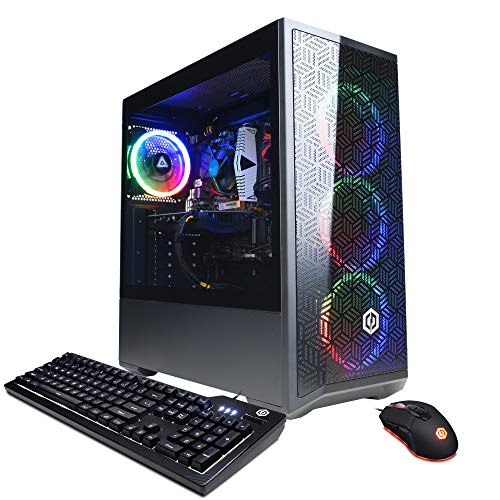
CYBERPOWERPC Gamer Xtreme VR Gaming PC (RTX 3050)
KAMRUI E3B Mini PC (Ryzen 5 7430U)

KAMRUI GK3Plus Mini PC (N97, 16GB/1TB)

KAMRUI Mini PC (Ryzen 7 7735HS)

KAMRUI Mini PC (Alder Lake N95)
KAMRUI Hyper H2 Mini PC (i5-14450HX)

Skytech Gaming Nebula (RTX 3050)
The Details Behind The Selections
Most entry-level 3050 builds still hand you a usable gaming desktop without the usual corners cut in cooling or storage. This CYBERPOWERPC pairs an Intel Core i5-12400F (a 6-core, 12-thread CPU that runs cool under load) with a GeForce RTX 3050 carrying 8GB of VRAM, the larger memory pool that helps with modern textures at 1080p. You also get 16GB of DDR4, a 500GB NVMe SSD, onboard Wi-Fi, and Windows 11 Home ready to go. For a first dedicated gaming rig in a bedroom or shared apartment, the bundle covers every cable and login you need on day one.
The case is a familiar mid-tower, roomy enough for future upgrades like a bigger SSD or extra case fan, and the airflow is generally adequate for the components inside. You can drop in a second stick of RAM later for dual-channel memory, which actually helps the RTX 3050 push a few extra frames. It also handles productivity tasks well, so a student juggling Steam, Discord, and a browser full of tabs won’t see stutters.
Good Reasons To Consider
- RTX 3050 with 8GB VRAM handles 1080p well in most modern titles
- NVMe SSD loads games and OS in seconds, no spinning hard drive noise
- Six-core i5 leaves headroom for streaming, Discord, and browser tabs
- Wi-Fi included, no extra adapter needed for most households
- Standard mid-tower gives clean upgrade paths for RAM and storage
Things To Consider
- Bloatware reports are common, so a clean Windows reinstall may be worth your time on arrival
- Stock cooling handles stock loads but tends to run warm during long sessions in warmer rooms
Key Specs
Made For
First-time PC builders who want a turnkey RTX 3050 setup without piecing components together.
Skip It When
You need a smaller footprint, since the Skytech Nebula handles a similar GPU class in a tighter case, and the KAMRUI Hyper H2 crams workstation RAM into a mini box.
Mini PCs used to mean “fine for documents, painful for games.” The E3B narrows that gap. It runs the AMD Ryzen 5 7430U, a 6-core, 12-thread mobile processor that boosts to 4.3GHz, paired with 32GB of RAM and a 512GB SSD. The 45W power envelope keeps heat and fan noise reasonable on a desk, and the integrated Radeon graphics are enough for older or indie titles, plus light esports at lower settings.
You won’t be maxing out Cyberpunk on this one, but for a dorm shelf, a studio apartment, or a second rig hooked to a living-room TV, the size is hard to beat. There’s no bulky tower to hide, and most users tuck it behind a monitor with a VESA mount. Compared to the KAMRUI GK3Plus below, the E3B trades a slower integrated GPU for substantially more RAM and a faster CPU.
Everyday Perks
- 32GB RAM handles dozens of browser tabs and big spreadsheets without choking
- 45W TDP keeps power draw and fan noise down for desktop use
- Tiny chassis fits behind a monitor, freeing desk space
Worth Noting
- No dedicated GPU, so modern AAA titles will run at low settings if at all
- 512GB fills up fast with modern game installs, expect to add external storage
- Common owner reports mention the included Wi-Fi being average for crowded apartment networks
Best Suited To
Students or remote workers who want a small, quiet box for esports, indie games, and serious multitasking.
A Better Fit Elsewhere
Gamers who need real ray tracing should grab the CYBERPOWERPC Gamer Xtreme VR tower for its dedicated RTX 3050.
The GK3Plus is the practical middle child of the KAMRUI mini lineup. It runs the 12th-gen Intel Alder Lake N97, a 4-core chip that reaches 3.6GHz, paired with 16GB of DDR4 RAM and a generous 1TB M.2 SSD. For a media PC, a kid’s homework station, or a casual Steam library, that storage headroom alone is a strong selling point.
You’ll mainly use this for older esports titles, indie hits, and 4K video playback. It can serve as a light living-room PC plugged into a TV, and unlike the KAMRUI Mini PC with the N95 below, you get four times the storage and double the RAM at the cost of a similar CPU class. The trade-off is integrated graphics, so you won’t see smooth frame rates in demanding 3D games.
Useful Touches
- 1TB SSD fits a large game library, several movies, and a full photo backup
- 4K video output works well for media and presentations
- Same small chassis as other KAMRUI boxes, easy to mount out of sight
Trade Offs
- Integrated graphics limit modern 3D gaming to very light settings
- No dedicated GPU path, so this is not a future upgrade candidate for serious gaming
Quick Facts
Right Fit For
Shoppers who need a small desktop with roomy storage for media files, school projects, and casual gaming.
Look Elsewhere When
You want a real gaming GPU, since the Skytech Nebula pairs the RTX 3050 with similar RAM for actual 1080p play.
The Ryzen 7 7735HS is the most aggressive CPU in this list, with 8 cores, 16 threads, and a 4.75GHz boost. KAMRUI pairs it with 16GB of LPDDR5 RAM (faster and more efficient than the DDR4 in most siblings) and a 512GB SSD. The 35W-45W mobile-class chip stays cool enough for a mini chassis, and that core count makes light work of video editing, code compilation, and dozens of browser tabs at once.
For gamers, the integrated Radeon graphics are stronger than the N95 or N97 found in cheaper KAMRUI boxes, meaning older AAA titles and current esports at 1080p low to medium are within reach. The real draw, though, is multitasking. If you stream, record, edit, and game in the same session, this Ryzen chip chews through the workload more comfortably than the i5-12400F in the CYBERPOWERPC tower in some threaded tasks.
What Makes Sense
- 8 cores and 16 threads handle creative apps that choke smaller mini PCs
- LPDDR5 memory improves bandwidth for data-heavy workflows
- Higher-clocked integrated graphics stretch gaming reach beyond the N95/N97 class
Honest Caveats
- No dedicated GPU, so modern AAA titles still demand lower settings
- 512GB fills quickly, plan on adding an external drive for big game libraries
- Under sustained heavy load, the compact chassis tends to run warmer than larger mid-towers, so airflow around the unit matters
Perfect Match For
Content creators, developers, and power users who want desktop-class multitasking in a mini PC.
Swap It Out When
Your priority is actual 1080p gaming with ray tracing, where the KAMRUI Hyper H2 brings HX-class Intel performance and 32GB of RAM.
For a kid’s homework PC or a guest-room web browsing box, the N95 KAMRUI is the most approachable option in this roundup. The 12th-gen Intel Alder Lake N95 (4 cores, up to 3.4GHz, 6MB cache) drives smooth Office work, web calls, and 4K video streaming. The 8GB of DDR4 RAM and 256GB M.2 SSD are modest, but appropriate for the target use case.
Just keep your expectations in check. The integrated graphics handle browser games and very old or lightweight titles, but anything demanding, like the latest sports sims or open-world RPGs, will not run well. Compared to the KAMRUI GK3Plus, you trade half the storage and 8GB of RAM for a lower cost, so this is the box to grab for non-gamers.
Bright Spots
- Lowest price point in the KAMRUI mini lineup
- Compact form slips behind a monitor or onto a bookshelf
- 4K output and quiet operation suit a living-room or office setting
Points To Note
- 8GB RAM is the floor for Windows 11, multitasking beyond a handful of apps may feel tight
- 256GB SSD fills fast with even a small game library
- Not built for modern 3D gaming at all
Who It Suits Best
Casual users who want a small, quiet PC for email, streaming, and basic school or office work.
Another Choice May Suit
Anyone planning to play 3050-class games should consider the Skytech Gaming Nebula or the CYBERPOWERPC Gamer Xtreme VR instead.
The Hyper H2 is the closest thing to a workstation in mini form. KAMRUI drops in the Intel Core i5-14450HX, an HX-class mobile chip (10 cores, 16 threads) that borrows from laptop performance-tier silicon, then pairs it with 32GB of RAM and a 1TB PCIe 4.0 SSD for serious bandwidth. It ships with Windows 11 Pro, which adds features like BitLocker and remote desktop that matter if you work from home.
Gaming isn’t the headline here. Integrated graphics mean you won’t be pushing high frame rates, but for content creation, virtualization, or running multiple VMs, the H2 chews through tasks that would bog down the N95 or N97 KAMRUI siblings. Owners should expect a slightly warmer chassis under sustained load, since HX-class chips push more watts than the typical 15W mini PC CPU.
Useful Strengths
- 32GB RAM out of the box removes the need for any near-term upgrades
- PCIe 4.0 SSD speeds shorten project load and export times
- Windows 11 Pro adds business-friendly features absent from the Home tier
Where It May Fall Short
- Integrated graphics limit dedicated 1080p gaming
- HX-class CPU generates more heat in a small case, so ventilation around the unit helps
Key Product Details
Built With In Mind
Hybrid professionals who need a powerful, compact PC for office work, content creation, and a touch of light gaming.
Reach For A Different Pick When
Gaming is the top priority, since the CYBERPOWERPC Gamer Xtreme VR is purpose-built around the RTX 3050 for actual 1080p play.
The Skytech Nebula is the simpler sibling of the two full-tower RTX 3050 builds in this lineup. It runs an Intel Core i3-12100F (4 cores, 8 threads, up to 4.3GHz) with a GeForce RTX 3050 carrying 6GB of GDDR6 VRAM, 16GB of DDR4-3200 RAM, and a 500GB NVMe SSD. There’s a 600W Gold-rated power supply, which is reassuring headroom for a future GPU swap, and 802.11ac Wi-Fi. It ships with Windows 11 Home, no bloatware, and clean HDMI and DisplayPort outputs.
The trade-off versus the CYBERPOWERPC Gamer Xtreme VR is straightforward. The i3-12100F has two fewer cores, and the RTX 3050 here carries 6GB of VRAM instead of 8GB, so very modern texture-heavy games will feel slightly tighter. For most 1080p esports and AAA titles at medium-high settings, however, the Nebula handles the load with ease, and the no-bloatware setup saves you an afternoon of cleanup.
The Upside
- RTX 3050 with dedicated ray tracing cores and DLSS support at 1080p
- 600W Gold PSU leaves headroom for a future GPU upgrade
- Clean Windows install with no bloatware saves setup time
- Wi-Fi included, so it works in a dorm or living room without an Ethernet run
Less Ideal Details
- RTX 3050 with 6GB VRAM is more limited than the 8GB version in the CYBERPOWERPC Gamer Xtreme VR
- 500GB SSD requires external storage for big modern game libraries
- i3-12100F handles gaming well but slows under heavy streaming or editing
Whose Shelf It Belongs On
1080p gamers who want a clean, simple RTX 3050 tower with no extra setup steps.
Where A Sibling Pick Shines
You can step up to the CYBERPOWERPC Gamer Xtreme VR for an 8GB RTX 3050 and a six-core i5 that handles heavier multitasking.
What To Weigh Before Picking Your 3050 Gaming PC
Gaming on a 3050 starts with the GPU, but the rest of the system decides whether the GPU can breathe. The RTX 3050 is built for 1080p, with the 8GB version handling modern titles a bit more comfortably than the 6GB card in tighter scenes. Either version supports DLSS, which is NVIDIA’s AI-driven upscaling that lets you push higher settings while keeping frame rates smooth. If you can find the 8GB version in your budget, the extra VRAM pays off over time.
CPU pairing matters more than people expect. A four-core chip like the i3-12100F is enough for pure 1080p gaming, but if you stream, run a second monitor, or keep Discord and a browser open, the extra cores of an i5-12400F or Ryzen 7 7735HS feel much smoother. The mini PCs in this list use mobile CPUs (like the N95, N97, 7430U, and 14450HX) that prioritize power efficiency over peak speed, which is great for desks and tight spaces but not for the highest frame rates.
Form factor is the bigger question. Towers like the CYBERPOWERPC Gamer Xtreme VR and the Skytech Nebula give you the GPU and cooling for proper 1080p gaming, plus easy upgrade paths. Mini PCs like the KAMRUI lineup trade the RTX 3050 for tiny footprints, which is wonderful for a shared space but limits you to integrated graphics. Match the size to the room, not just the budget.
Storage is the most often forgotten detail. 500GB sounds like a lot, but three or four modern games eat that in a week. Plan on an external SSD or a future internal upgrade, especially for the systems that don’t already come with a 1TB drive like the KAMRUI GK3Plus and the KAMRUI Hyper H2.
Key Considerations Across These Picks
Common Shopping Slip Ups
The biggest trap is buying a mini PC expecting RTX 3050-level gaming. The KAMRUI boxes in this list are excellent for productivity, but they all rely on integrated Radeon or Intel graphics, so they cannot match the CYBERPOWERPC Gamer Xtreme VR or the Skytech Nebula in actual game frame rates. The second trap is ignoring VRAM. The 8GB RTX 3050 in the CYBERPOWERPC tower handles modern textures noticeably better than the 6GB version in the Skytech Nebula, which matters as games push higher-resolution assets.
What The Higher Tier Buys
Stepping up to the CYBERPOWERPC Gamer Xtreme VR or the KAMRUI Hyper H2 buys you a real dedicated GPU, more RAM, and a faster CPU in the case of the tower. You pay for components that last longer before feeling slow, plus better airflow for sustained gaming sessions. For shoppers who mostly do office work, the budget KAMRUI options deliver the value, but for anyone running modern 3D games, the GPU and core count of the higher tier are what actually pay off.
Frequently Asked Questions
Can an RTX 3050 handle modern games at 1080p?
Yes, the RTX 3050 is built for 1080p and handles most modern titles at medium to high settings, especially with DLSS turned on. The 8GB version stretches further in texture-heavy games than the 6GB card.
How much RAM do I actually need for 3050 gaming?
16GB of DDR4 is the comfortable minimum for current games, multitasking, and a browser. The KAMRUI E3B and KAMRUI Hyper H2 ship with 32GB, which is great for content creation or heavy multitasking but not strictly required for gaming.
Are mini PCs good for gaming with an RTX 3050?
Most mini PCs do not have a dedicated GPU at all, so they cannot run games the way the CYBERPOWERPC Gamer Xtreme VR or Skytech Nebula can. Towers remain the right call for dedicated RTX 3050 gaming.
What is DLSS on the RTX 3050?
DLSS is NVIDIA’s AI upscaling that renders a game at a lower resolution and intelligently upscales it to look near-native, letting you raise visual settings while keeping frame rates smooth. It is one of the RTX 3050’s biggest practical advantages over older GTX cards.
Is 500GB of SSD storage enough for gaming?
It covers a handful of large games, but modern installs fill it quickly. Plan on an external SSD or a secondary internal drive, especially for systems without 1TB storage out of the box.
The Takeaway
The right 3050 gaming PC depends entirely on where it will live and what it will run. A tower like the CYBERPOWERPC Gamer Xtreme VR is the right answer for serious 1080p play, while the KAMRUI mini PCs fit smaller spaces and lighter workloads. Match the GPU to your real game library, and the rest of the system tends to fall into place.


