


A 2TB drive gives a gaming PC room to breathe, holding a substantial chunk of a modern library while keeping load times short. Gamers juggling AAA titles, sizable indie backlogs, or frequent capture-and-edit workflows hit a wall fast on smaller drives. The picks below cover the fastest internal NVMe options, dependable SATA upgrades, and a few compact externals and flash drives that round out a complete storage setup.
Your Options, Compared

Corsair MP600 Elite 2TB M.2 PCIe Gen4 NVMe SSD (Black)

Verbatim 32GB Store ‘n’ Stay Nano USB 3.0 Flash Drive

Verbatim Pocket 512GB External SSD USB 3.2 Gen 2
Verbatim 16GB Store ‘n’ Stay Nano USB 3.2 Gen 1 Flash Drive

Samsung 870 EVO SATA III 2.5″ 2TB SSD

Ediloca 128GB SATA III 2.5″ SSD (ES106)

Ediloca 512GB SATA III 2.5″ SSD (ES106)
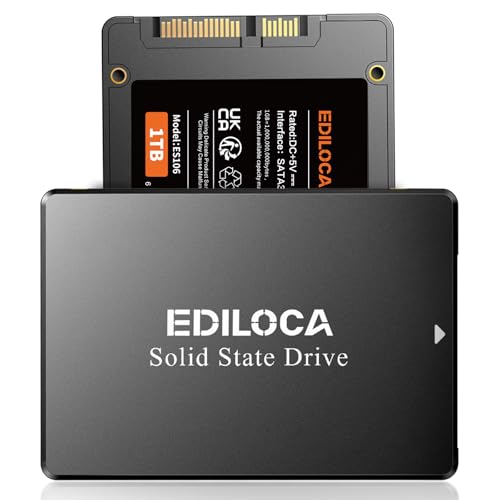
Ediloca 1TB SATA III 2.5″ SSD (ES106)

Verbatim 32GB Store ‘n’ Go Dual USB 3.2 Flash Drive
Verbatim 64GB Store ‘n’ Go Dual USB 3.2 Flash Drive
The Picks, Examined More Closely
The Corsair MP600 Elite slots into the 2TB tier that most current gaming PCs actually need, balancing fast Gen4 throughput with the kind of headroom that swallows 30+ modern titles without housekeeping. Its M.2 2280 form factor, the standard 22mm-wide stick length used across modern motherboards, drops into any desktop board with an M.2 slot, and the lack of a stock heatsink lets builders pair it with their motherboard’s own cooling plate.
For gamers chasing quick level loads and snappy texture streaming in open-world games, sequential read and write numbers at the top of the Gen4 envelope translate to noticeably shorter waits at boot and during shader compilation. Compared with the SATA-based options later in this list, this drive moves data roughly an order of magnitude faster on paper, which matters most in titles that stream assets on the fly.
The Practical Payoff
- Sequential reads listed at up to 7,000MB/s for fast boot and load sequences.
- 2TB capacity leaves room for a large active library plus capture clips.
- 3D TLC NAND strikes a workable balance between endurance and value.
- Plain M.2 2280 stick installs cleanly into most desktop motherboards.
Things To Consider
- Without a bundled heatsink, sustained workloads may run warmer than expected under poor airflow.
- Real-world speeds depend on the host board supporting PCIe Gen4, not just the drive itself.
Feature Card
Made For
Gamers running a current-gen CPU and motherboard who want top-tier Gen4 throughput without paying for a Gen5 premium.
Where Another Pick Suits Better
The Samsung 870 EVO 2TB is a smarter fit for anyone still on a SATA-only system or planning to slot storage into a PS5 expansion bay.
The Verbatim Store ‘n’ Stay Nano earns its name by sitting almost flush with a laptop’s USB port, a design that fits gamers who shuttle saves, mods, and installers between machines. Its snag-free body keeps it from catching on bag fabric or controller cables, which is a small thing until you’ve broken a flash drive on a backpack zipper.
At 32GB, the capacity suits specific tasks rather than acting as a primary game library. Think: a portable library of installer files, a stash of save backups before a risky mod install, or a media slot for an older car stereo. The 3.0 interface, an older standard still common on budget laptops, keeps transfer speeds reasonable for a thumb drive at this size.
A Strong Showing
- Low-profile body stays out of the way in tight USB layouts.
- Pocketable form factor makes accidental snaps in a bag less likely.
- USB 3.0 keeps moving files at speeds older 2.0 sticks cannot match.
Honest Caveats
- 32GB fills up fast when carrying modern game installers or captures.
- USB 3.0 tops out well below the speeds a USB 3.2 Gen 2 drive delivers.
Who It Suits Best
Travelers and remote workers who want a small, always-attached drive for saves, drivers, and small media files.
Skip It When
The Verbatim Pocket 512GB External SSD makes more sense for anyone regularly moving multi-gigabyte capture clips or large project files.
Where the Store ‘n’ Stay Nano is a sidekick, the Verbatim Pocket 512GB SSD is a real portable library, small enough to ride on a keyring but roomy enough to hold a working collection of indie titles or captures. Its USB 3.2 Gen 2 interface, a current standard with a top theoretical bandwidth of 10Gbps, lets the drive push transfer speeds well past what any flash thumb drive can manage.
Cross-platform support is where this drive pulls extra weight. Gamers running a PC at home and a PS5, Xbox, or Mac alongside it can ferry installs, captures, and profiles without a special adapter, which is rare in this size class. A built-in cable holder keeps the short cable from going missing in a bag, a small but appreciated touch for daily commuters.
Reasons It Performs
- Transfer rates listed at up to 1,000MB/s for moving large files quickly.
- Cross-platform compatibility spans PC, Mac, PS5, Xbox, and iPhone.
- Keyring-friendly design and integrated cable holder suit travel use.
Points To Note
- 512GB may feel tight for users hauling full AAA installs in their library.
- Real-world speeds depend on the host port supporting USB 3.2 Gen 2.
Right Fit For
Gamers juggling multiple devices who need a compact, fast external drive for cross-platform saves and installs.
Consider Something Else When
The Corsair MP600 Elite 2TB is a better match for users who want a single high-capacity internal drive instead of a portable one.
The 16GB sibling of the Store ‘n’ Stay Nano keeps the same low-profile body, the kind of design that disappears into a laptop’s edge, while halving the capacity. For most modern gaming tasks, 16GB is a tight fit, but for very specific jobs, it pulls its weight. Driver packs, a portable Linux installer, or a small stash of diagnostic tools all live comfortably on a drive this size.
USB 3.2 Gen 1, the rebranded name for the older USB 3.0 standard with a 5Gbps ceiling, still moves data several times faster than the 2.0 sticks many budget laptops shipped with. Compared with the 32GB Nano above, this version saves a bit of cost and physical size for users who only need a forgettable, always-attached storage option.
Everyday Advantages
- Snag-free, low-profile housing suits tight USB port layouts.
- USB 3.2 Gen 1 speeds outperform older 2.0 flash drives for file transfers.
- Compact size works well in car stereos and slim laptops.
Less Ideal Details
- 16GB is barely enough for a single modern game installer, so usage stays narrow.
- Performance is modest compared with the external SSD options on this list.
Best Suited To
Users who want a permanent, low-profile stick for boot diagnostics, recovery media, or tiny recurring backups.
Look Elsewhere When
The Verbatim 64GB Dual USB 3.2 Flash Drive offers dual connectors and double the capacity for the same general role.
The Samsung 870 EVO 2TB remains a dependable choice for gamers whose systems don’t expose an M.2 slot, or who simply want a tried-and-true SATA drive for a secondary game bay. The 2.5″ form factor, a small rectangular casing originally designed for laptops, fits anywhere a hard drive used to live, and the SATA III interface tops out near the limit of what the standard can deliver.
Sequential reads at up to 560MB/s won’t touch the Gen4 speeds the Corsair MP600 Elite reaches, but for many real-world tasks the gap feels smaller than the spec sheet suggests. Load times for most games on this drive still feel snappy, and the broad compatibility across desktops, laptops, and external enclosures makes it a flexible addition to a multi-system setup.
The Helpful Details
- 2TB capacity at a widely compatible 2.5″ SATA form factor.
- Sequential reads up to 560MB/s, near the ceiling of the SATA III standard.
- Works in older desktops, laptops, and many external enclosures without adapters.
Trade Offs
- SATA bandwidth is a fraction of modern NVMe speeds for large sequential transfers.
- Requires a SATA data cable and power connection in desktop installations.
Key Specs
Perfect Match For
Gamers on older motherboards, those extending a laptop’s storage, or anyone wanting a secondary bay for slower-access titles.
Reach For A Different Pick When
The Corsair MP600 Elite 2TB makes more sense for users on current-gen boards who want NVMe-level throughput.
The Ediloca 128GB SSD isn’t a primary gaming drive, and it’s not trying to be. Its place is at the entry tier of the SATA upgrade path, replacing a worn-out HDD in an older laptop or giving a vintage desktop a quick boot-drive refresh without committing much budget. The 2.5″ form factor fits the same bays that took spinning disks for years.
3D TLC NAND, the most common flash type in consumer SSDs because it balances cost and endurance reasonably well, gives this drive a level of reliability that older QLC drives often lack. Read speeds near 500MB/s move the boot and basic app-launch experience well past what any mechanical hard drive offers, even at this modest capacity.
Why It Works Well
- 2.5″ SATA form factor drops into nearly any older laptop or desktop.
- Sequential reads near 500MB/s, well above mechanical hard drives.
- 3D TLC NAND offers reasonable endurance for typical daily use.
Points To Keep In Mind
- 128GB is too small for a modern game library on its own.
- Lacks the polish and software ecosystem of the larger Samsung 870 EVO above.
Who Should Grab It
Anyone reviving an older PC or laptop that needs a basic, affordable boot drive without any high-capacity demands.
Swap It Out When
The Ediloca 1TB SATA III 2.5″ SSD gives four times the room at the same form factor for users who want one drive to handle more.
Stepping up to 512GB shifts the Ediloca ES106 line into a more practical gaming range, large enough to hold a modest library of current titles or to serve as a dedicated scratch disk for streaming and capture workflows. The SATA III ceiling remains the same, but read speeds inch closer to 540MB/s, which is effectively the practical limit of the standard.
For gamers pairing this drive with a smaller NVMe boot drive, the 512GB ES106 makes a workable secondary bay. The 2.5″ form factor still uses a SATA data cable, so installation isn’t quite as clean as an M.2 stick, but the swap usually takes under fifteen minutes in a standard mid-tower.
Benefits That Matter
- 512GB capacity covers a small-to-moderate game library comfortably.
- Reads near 540MB/s reach close to the practical SATA III ceiling.
- 3D TLC NAND offers reasonable endurance for daily gaming and OS use.
Small Caveats
- Installation requires a SATA data cable and available power connector.
- Brand software and ecosystem support are lighter than bigger-name alternatives.
Built With In Mind
Budget-conscious gamers building or upgrading a SATA-friendly PC who need a sensible capacity without overspending.
A Better Fit Elsewhere
The Ediloca 1TB SATA III 2.5″ SSD is a more natural choice for users who want fewer capacity trade-offs in the same form factor.
The 1TB Ediloca ES106 lands in the sweet spot for many mainstream gaming builds, large enough to host the operating system, several current titles, and a chunk of older favorites without constant housekeeping. At 550MB/s sequential read, the drive is essentially as fast as SATA III allows, which removes the interface as a bottleneck for everyday use.
Unlike the smaller Ediloca drives above, the 1TB model gives gamers room to experiment. Mods, shader caches, capture libraries, and offline backups all fit without making the OS feel cramped. The 2.5″ form factor keeps the swap straightforward in any case that originally accepted a hard drive, including most older laptops.
Useful Touches
- 1TB capacity covers a working game library plus OS and apps.
- Read speeds near 550MB/s approach the practical SATA III ceiling.
- 3D TLC NAND balances endurance and value for typical gaming workloads.
Worth Bearing In Mind
- SATA bandwidth trails NVMe drives like the Corsair MP600 Elite by a wide margin.
- Installation still needs a SATA data cable and free SATA power lead.
Feature Snapshot
Whose Shelf It Belongs On
Mainstream gamers on a SATA-only system who want a balanced capacity-to-cost ratio without stepping up to NVMe pricing.
Not Your Match When
Gamers on a current motherboard should skip ahead to the Corsair MP600 Elite 2TB for meaningfully faster throughput.
The Dual USB 3.2 Flash Drive solves a recurring pain point: moving files between a modern USB-C phone or laptop and an older USB-A desktop without a separate adapter. Both connectors live on a sliding or swiveling body, which keeps the design compact while covering the two ports that dominate today’s hardware landscape.
At 32GB, capacity is in the same modest range as the Store ‘n’ Stay Nano, but the dual-connector design opens up different workflows. Offloading 4K phone footage, transferring a small set of mods, or moving a profile between machines all happen without fishing through a cable drawer.
Real Benefits
- Dual USB-C and USB-A connectors cover most modern ports.
- USB 3.2 speeds move files faster than older 2.0 sticks.
- Compact body travels easily in pockets or attached to a keyring.
Honest Caveats
- 32GB fills up quickly for users moving large capture clips or installers.
- Some host devices may read the drive at slower USB 2.0 speeds depending on port support.
Who Will Love This
Mobile-first users and streamers who need to ferry files between a phone, a laptop, and a desktop with minimal friction.
Another Choice May Suit
The Verbatim Pocket 512GB External SSD handles the same cross-device file moves with much higher capacity and speed.
The 64GB Dual USB 3.2 Flash Drive doubles down on the 32GB version’s strengths, keeping the same dual-connector convenience while adding enough headroom for slightly larger jobs. A handful of mobile captures, a project folder, or a small game backup all fit without forcing a quick cleanup before the next transfer.
For gamers who keep a portable toolkit of drivers, repair media, and small utilities, 64GB hits a comfortable middle ground between the tiny Nano drives and full external SSDs. The USB 3.2 standard, while not the latest, still offers a meaningful upgrade over older 2.0 sticks for moving any modern file format.
Features That Help
- Dual USB-C and USB-A connectors span current and older devices.
- 64GB covers a useful mix of media, drivers, and small game backups.
- USB 3.2 speed class outperforms older flash standards noticeably.
Practical Considerations
- Capacity still trails a dedicated external SSD for serious storage jobs.
- Actual throughput depends on the host port’s generation and power delivery.
The Right Fit
Users who want a flexible, cross-port flash drive for occasional file moves and on-the-go backups.
Where A Sibling Pick Shines
The Verbatim Pocket 512GB External SSD serves users who need higher capacity and faster sustained transfer rates.
Factors To Consider When Choosing 2tb Ssds For Gaming Pc
Interface And Bandwidth
NVMe drives connected over PCIe Gen4 deliver the highest throughput in this roundup, with sequential reads reaching the multi-gigabyte-per-second range. SATA III tops out near 560MB/s, a fraction of NVMe speeds, but remains highly compatible with older systems. Match the drive interface to the slots your motherboard actually exposes; a fast NVMe drive underperforms in a SATA-only setup.
Capacity And Game Library Size
Modern AAA titles commonly run between 50GB and 150GB each, so a 2TB internal drive holds a comfortable active library plus room for captures and mods. Smaller 128GB to 512GB drives work well as dedicated boot or scratch disks but feel tight as standalone game storage. External and flash options round out a setup rather than replace an internal primary.
Form Factor And Installation
M.2 2280 sticks drop straight into a motherboard slot with no cables, while 2.5″ SATA drives need a data cable and a power connector. Motherboard heatsinks cover most NVMe sticks, though some users add a dedicated cooler for sustained workloads. The installation effort scales with how many cables and mounting points the new drive requires.
Endurance And NAND Type
3D TLC NAND is the most common flash type in this category because it balances endurance and cost. Higher-capacity drives typically include more over-provisioning, which extends usable life. For typical gaming workloads, endurance is rarely a concern, but for users writing large amounts of data daily, it deserves a closer look.
Key Considerations Across These Picks
Wrong Turns To Avoid
Picking a high-end NVMe drive for a SATA-only motherboard wastes both money and speed; always confirm the slot type before buying. Another common slip is treating a flash drive as a serious game library, when its real role is moving small files or handling boot media. Confirming the host port’s generation also matters; a USB 3.2 drive plugged into a 2.0 port drops to slower speeds.
Where The Extra Money Goes
Premium NVMe drives add faster controllers, denser NAND, and often a bundled heatsink for sustained workloads. The performance gap shows up most in large file transfers and in games that stream assets aggressively during play. For most users running a handful of titles, mid-range SATA drives still feel responsive, so paying up is most valuable for heavy creators and competitive gamers.
Frequently Asked Questions
How much game storage does 2TB actually give a gaming PC?
A 2TB internal drive typically offers around 1.8TB of usable space after formatting, which comfortably holds 15 to 25 modern AAA titles depending on size. Smaller indie games, capture clips, and mods share that pool.
Is NVMe always faster than SATA for gaming?
NVMe drives offer much higher peak throughput, but in many games the difference in load times is modest. The gap grows in open-world titles that stream assets on the fly and in workflows that move large files frequently.
Do these drives need extra cooling?
M.2 NVMe drives run warmer under sustained loads, and a motherboard heatsink or chassis airflow helps. SATA SSDs generate less heat and rarely need additional cooling in standard cases.
Can a flash drive replace a dedicated gaming SSD?
Flash drives handle small file transfers, recovery media, and backup tasks well, but their capacity and speed are too limited for primary game storage. They complement a setup rather than replace it.
Are 2.5″ SATA SSDs still worth buying in 2026?
SATA SSDs remain a strong choice for older systems, laptop upgrades, and secondary storage bays where NVMe slots are full. Their compatibility and cost-per-gigabyte keep them relevant.
Bottom Line
A 2TB drive gives a gaming PC the room to grow without constant file juggling, and the right pick depends on which slots your system exposes. NVMe drives like the Corsair MP600 Elite lead on raw speed, SATA options like the Samsung 870 EVO and the Ediloca ES106 line cover broader compatibility, and the Verbatim Pocket SSD plus dual-connector flash drives round out a flexible storage ecosystem. Match the drive to your motherboard first, then pick the capacity and form factor that fit how you actually game.


