


A decent 27-inch 144Hz monitor used to be a stretch for anyone shopping under $200, but 2026 has changed that picture. The picks below cover gamers, students, and remote workers who want fluid motion and a clean panel without paying flagship prices. You’ll find curved immersion, flat IPS sharpness, and even a 4K option for those who prioritize pixel density over refresh rate. Each entry below earns its place for a specific reason, and the trade-offs are spelled out honestly.
A Quick View Of The Lineup
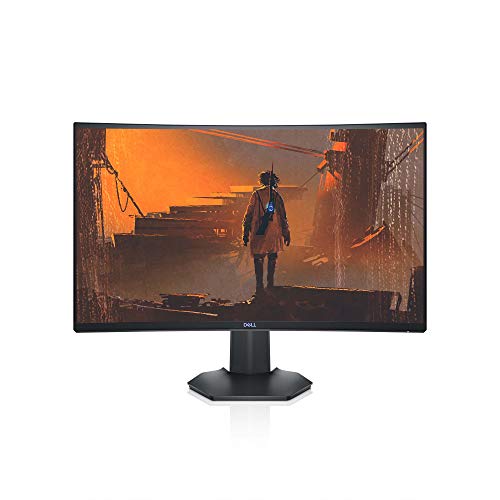
Dell S2721HGF 27 Inch 144Hz Curved Gaming Monitor

KTC H27D9 27 Inch QHD 120Hz IPS Monitor
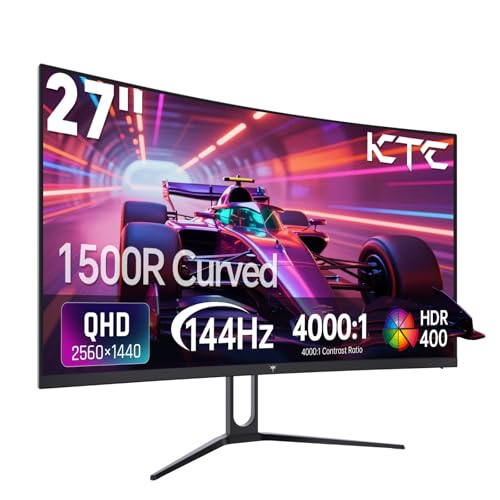
KTC H27S5C 27 Inch QHD 144Hz Curved Gaming Monitor

Sceptre C275B-1858RN 27 Inch Curved 165Hz Gaming Monitor

KTC H32T13 32 Inch QHD 120Hz IPS Monitor
KTC H24T27 24 Inch QHD 100Hz IPS Monitor
KTC H27T27S 27 Inch QHD 144Hz Gaming Monitor

KTC H24B9S 24 Inch 144Hz IPS Gaming Monitor

KTC H24V27 24 Inch 100Hz FHD Home Office Monitor

KTC H32U6 32 Inch 4K UHD 60Hz Monitor
A Deeper Look At The Lineup
The Dell S2721HGF wraps a 27-inch Full HD VA panel in a 1500R curve, the kind of curvature that pulls you into a single-player RPG or a late-night ranked session without overwhelming a small desk. With a 144Hz refresh rate and a 1ms MPRT response time, fast camera pans stay readable, and competitive shooters feel noticeably smoother than a standard 60Hz display. It also supports both AMD FreeSync Premium and Nvidia G-Sync Compatible modes, so pairing it with an AMD or Nvidia GPU rarely causes headaches.
The stand adjusts for height and tilt, which sounds basic but matters during long sessions when you need to nudge the screen closer to eye level. For shoppers who already have a VESA arm, the back of the panel accepts a 100x100mm mount. If you mostly play single-player adventures and want that wraparound feel, this Dell delivers the curve without forcing you into ultrawide territory.
What Makes Sense
- 1500R curvature wraps peripheral vision during long RPG sessions
- 144Hz refresh with 1ms MPRT keeps fast motion readable in shooters
- G-Sync Compatible and FreeSync Premium cover both major GPU camps
- Height and tilt adjustability let you dial in a comfortable neck angle
Points To Keep In Mind
- Full HD resolution on a 27-inch panel means individual pixels can read as slightly soft up close
- VA panels typically produce narrower viewing angles than IPS, so off-center seating may shift colors
Who It Suits Best
Competitive and immersive gamers who already use an Nvidia or AMD card and want a curved 27-inch display with verified adaptive sync.
Where Another Pick Suits Better
The KTC H27T27S is a better fit for shoppers who want sharper 1440p detail in a flat panel and don’t need curvature.
For shoppers splitting time between spreadsheets and a Steam library, the KTC H27D9 hits a useful middle ground with a 2560×1440 IPS panel and a 120Hz refresh rate. QHD on 27 inches gives text and UI elements a clean, dense look that 1080p simply can’t match, and IPS technology means colors stay accurate even when you tilt the screen or shift in your chair. Adaptive sync support over both HDMI and DisplayPort keeps frame pacing smooth on most modern GPUs.
The 123% sRGB color coverage and HDR support make movie nights and casual photo work more pleasant, while the low-blue-light eye-care mode helps during long reading or writing sessions. Compared to the Dell S2721HGF, this KTC trades curvature and 144Hz for sharper resolution and wider viewing angles, which many office-adjacent shoppers will find more practical.
The Practical Payoff
- QHD resolution makes spreadsheets, code, and game UI noticeably sharper than 1080p
- IPS panel keeps colors consistent when viewed from off-center positions
- 120Hz with adaptive sync covers both work smoothness and casual gaming
- VESA mount compatibility lets you swap in a monitor arm easily
Trade-Offs To Consider
- 120Hz is slightly behind 144Hz panels for hardcore competitive play
- IPS glow in dark rooms can show up in the corners during moody game scenes
Made For
Remote workers and students who game on the side and want a single panel that handles both cleanly.
Consider Something Else When
The KTC H27T27S is a better fit for shoppers who specifically want 144Hz QHD on a flat panel with deeper VA contrast.
If you want both high refresh and high resolution, the KTC H27S5C brings them together in a 1500R curved package. The 2560×1440 panel runs at 144Hz, so you can push frame rates in esports titles without giving up the pixel density that makes open-world games and editing software look clean. HDR400 support adds a measurable bump in highlights, and the 129% sRGB coverage keeps the panel lively for streaming and casual content creation.
Curvature on a 27-inch QHD panel is a matter of taste. For shoppers who like the wraparound feel of the Dell S2721HGF but want sharper resolution, this KTC is the natural step up. The catch is that pushing 1440p at 144Hz requires a reasonably capable GPU, so budget builders with older graphics cards may want to drop to 1080p before considering this option.
Features That Help
- 1440p at 144Hz delivers both sharpness and high refresh in one panel
- HDR400 and 129% sRGB give streaming and photo edits a richer look
- Curved 1500R design adds immersion for racing and flight sims
Honest Caveats
- Driving 1440p at 144Hz demands a mid-tier or better GPU
- VA panel viewing angles are tighter than IPS, so off-center seating shifts color
Right Fit For
Gamers with a capable GPU who want curved immersion without dropping to 1080p resolution.
Look Elsewhere When
The Dell S2721HGF is a better fit for shoppers who prefer sticking to 1080p or use older GPUs that can’t push 1440p frames.
The Sceptre C275B-1858RN focuses on a specific promise: high refresh gaming without the price tag. Over DisplayPort, the panel pushes up to 165Hz, and even over HDMI it hits 144Hz, which is more than enough headroom for fast-paced shooters and MOBAs. The 1800R curvature is gentler than the Dell’s 1500R, so the wraparound effect is subtle rather than dramatic, and that works well for shoppers who share their monitor between gaming and general use.
Built-in speakers cover basic system audio, and AMD FreeSync Premium support keeps frame pacing smooth for Radeon and many modern Nvidia cards. The panel runs at 1080p, so it won’t beat the KTC H27S5C for raw sharpness, but it costs less and still hits that high-refresh sweet spot.
Bright Spots
- 165Hz over DisplayPort pushes above the standard 144Hz ceiling
- FreeSync Premium support smooths out frame drops in fast titles
- Built-in speakers cover casual video calls and YouTube sessions
Points To Note
- 1080p resolution on 27 inches looks softer than 1440p competitors
- Edge-lit design means brightness can vary slightly across the panel
Best Suited To
Budget FPS and MOBA players who care more about refresh rate than pixel count.
Skip It When
The KTC H27T27S is a better fit if you want a flat panel with 1440p resolution and stronger contrast for cinematic games.
Stepping up to a 32-inch screen changes the whole desk feel, and the KTC H32T13 makes the most of that extra real estate with a 2560×1440 IPS panel. Games, timelines, and multi-window workflows all get room to breathe, and the 120Hz refresh rate keeps the experience smooth without overworking a mid-range GPU. The thin bezels also make it easier to pair with a second monitor later.
This isn’t a 27-inch panel, so it’s listed for shoppers who want more screen rather than the strictest pixel density. The IPS panel handles color and viewing angles well, and HDMI plus DisplayPort inputs keep cable options flexible. For anyone moving from a 24-inch office display, the upgrade in space is immediately noticeable.
Everyday Perks
- 32-inch QHD panel offers generous space for side-by-side windows
- 120Hz refresh keeps scrolling and motion smooth in daily use
- Thin bezels support tidy dual-monitor setups down the road
Less Ideal Details
- 32 inches requires more desk depth than a typical 27-inch monitor
- 120Hz caps below the 144Hz standard for dedicated gaming displays
Who Should Grab It
Productivity-focused shoppers with deep desks who want extra screen real estate for multitasking and light gaming.
A Better Fit Elsewhere
The KTC H27T27S is a better fit if you prefer a smaller 27-inch footprint with 144Hz refresh for faster competitive play.
Not every desk can host a 27-inch display, and the KTC H24T27 leans into the smaller end without giving up resolution. At 24 inches and 2560×1440, the panel density actually looks sharper than larger 27-inch QHD screens, which is a nice surprise for small home offices or dorm setups. The 100Hz refresh rate is a small step above 75Hz and pairs with adaptive sync support for tear-free casual gaming.
IPS technology keeps colors consistent, and the panel handles everyday work and weekend gaming equally well. Compared to the KTC H27D9 above, this model drops size and a bit of refresh rate, but gains density and saves precious desk space.
Real Benefits
- 24-inch QHD delivers higher pixel density than 27-inch QHD
- 100Hz refresh rate gives smoother scrolling than standard 60Hz/75Hz panels
- IPS panel keeps colors stable for photo and video work
Possible Compromises
- Smaller screen limits how many windows you can stack side by side
- 100Hz falls short of 144Hz for high-frame-rate competitive play
Perfect Match For
Students and remote workers with compact desks who want crisp text and smooth motion in one package.
Another Choice May Suit
The KTC H24B9S is a better fit if you want the same 24-inch size but prioritize 144Hz for esports and FPS titles.
The KTC H27T27S blends QHD resolution with a 144Hz refresh rate in a flat panel, and the standout spec is its 4000:1 contrast ratio. That depth makes dark scenes in horror games and space sims far more readable than typical 1000:1 IPS panels, and colors look richer without aggressive calibration. For single-player and story-driven titles, this trade-off is often more valuable than chasing an extra 20Hz.
Adaptive sync support over both HDMI and DisplayPort keeps frame pacing smooth across a wide range of GPUs. The flat design also makes it a strong fit for multi-monitor setups, where curved screens can create alignment headaches. Compared to the curved KTC H27S5C, this model offers better contrast and easier pairing at the cost of immersion.
The Upside
- 4000:1 contrast ratio delivers noticeably deeper blacks in dark scenes
- 144Hz QHD handles both competitive shooters and cinematic games well
- Flat panel design aligns cleanly in dual or triple monitor setups
Soft Spots
- Flat panel lacks the immersion that the curved KTC H27S5C offers
- VA viewing angles are slightly tighter than IPS equivalents
Built With In Mind
Gamers who want strong contrast for single-player titles and don’t need curvature or wide off-center viewing.
Swap It Out When
The KTC H27S5C is a better fit if you want the same 1440p 144Hz panel with a curved screen for racing and flight sims.
For competitive play, smaller screens often mean faster reactions because your eyes track the whole picture with smaller head movement. The KTC H24B9S leans into that idea with a 24-inch IPS panel running at 144Hz and a frameless design that makes multi-monitor rigs look clean. Adaptive sync support keeps the frame pacing tight when action spikes.
The 1080p resolution won’t match the KTC H24T27 for text crispness, but it’s easier on mid-range GPUs and pushes higher frame rates in esports titles. IPS colors also stay consistent when you tilt the screen, which helps in irregularly lit rooms. It’s a focused pick for shoppers who want speed and accuracy over extra pixels.
The Helpful Details
- 144Hz refresh rate is the sweet spot for competitive FPS play
- IPS panel keeps colors stable when viewed at an angle
- Frameless design supports clean multi-monitor layouts
Details To Watch
- 1080p resolution on a 24-inch panel looks softer than QHD at the same size
- Smaller screen limits immersion in cinematic single-player titles
Whose Shelf It Belongs On
Esports and FPS players who care more about high refresh and low blur than maximum screen size.
Reach For A Different Pick When
The KTC H24T27 is a better fit for shoppers who want sharper 1440p text on a 24-inch screen and don’t need 144Hz.
The KTC H24V27 leans into everyday productivity with a 100Hz refresh rate, low blue light mode, and a frameless design that fits cleanly on a study desk. The 1080p resolution is comfortable on smaller 24-inch panels where text stays readable, and the 103% sRGB coverage means casual photo work and streaming video look balanced without manual tweaks.
Connectivity covers both HDMI and VGA, so it works with older laptops and modern desktops alike. The tilt-adjustable stand and VESA mount support make it easy to place on a riser or arm later. Compared to the KTC H24B9S, this monitor trades 144Hz gaming speed for office-friendly features and broader device compatibility.
The Value In It
- Low blue light mode reduces eye strain during long reading and writing sessions
- 100Hz refresh makes scrolling and cursor movement feel smoother than 60Hz
- VGA plus HDMI ports connect to both modern and older computers
Room For Improvement
- 100Hz caps below the 144Hz gaming standard
- 1080p resolution limits sharpness compared to the KTC H24T27’s QHD panel
Who Will Love This
Students and home office workers who want smooth scrolling and eye-care features at a budget-friendly size.
Where A Sibling Pick Shines
The KTC H24B9S is a better fit for shoppers who want the same 24-inch size but prioritize 144Hz for gaming after work.
The KTC H32U6 breaks away from the high-refresh theme of this list and leans hard into pixel density. With a 3840×2160 resolution on a 32-inch panel, you get four times the detail of 1080p, and text in design software, spreadsheets, and code editors looks noticeably sharper. The 60Hz refresh rate is a deliberate trade-off, since most creative work doesn’t need 144Hz, and a 4K panel at high refresh demands a very powerful GPU.
The 3000:1 contrast ratio and 125% sRGB coverage support photo and video work, and the tilt, height, and swivel adjustable stand helps dial in a comfortable viewing angle for long editing sessions. If you mostly play slower-paced strategy and simulation games and spend more time in creative apps, this panel rewards you with detail that 27-inch QHD screens simply can’t match.
What Earns Its Place
- 4K UHD resolution gives four times the detail of 1080p screens
- Adjustable tilt, height, and swivel stand supports ergonomic setups
- 125% sRGB and HDR support suit photo and video editing work
Some Limits To Know
- 60Hz refresh rate feels slow for fast-paced competitive gaming
- 4K resolution requires a capable GPU for any modern title at usable frame rates
Right Fit For
Creators, editors, and 4K-focused shoppers who prioritize detail and color accuracy over refresh rate.
Not Your Match When
The KTC H32T13 is a better fit for shoppers who want a spacious 32-inch panel with higher refresh for everyday gaming.
What To Weigh Before Choosing Your Next Panel
Picking a monitor in this price range means deciding which trade-off bothers you least. Resolution, refresh rate, panel type, and curvature each pull the experience in a different direction, and the right balance depends on how you actually spend your screen time.
Resolution Versus Refresh Rate. At 27 inches, 1080p pixels can look soft up close, while 1440p offers a clear jump in sharpness. 144Hz matters most in competitive shooters and fast-paced action, where smoother motion can genuinely help reaction time. Shoppers who play both cinematic single-player games and esports titles often find 1440p at 144Hz the most balanced pick.
Panel Type And Use Case. IPS panels offer wide viewing angles and accurate color, which suits creative work and shared viewing. VA panels deliver deeper contrast for darker games and movies, though viewing angles are tighter. Curved panels add immersion in racing and RPG titles, while flat panels align more easily in multi-monitor setups.
Connectivity And Ergonomics. Check that your GPU has the right output, whether HDMI 2.0 or DisplayPort 1.4, to drive the panel at its full refresh rate. A height and tilt adjustable stand, or at least VESA mount support, makes a noticeable difference during long sessions. For smaller desks, a 24-inch panel keeps the screen close enough to read without crowding the workspace.
Key Considerations Across These Picks
Where Shoppers Go Wrong
A common mistake is focusing on a single headline number, like 165Hz, without checking whether the included cable and GPU output can actually drive that refresh rate. Another pitfall is ignoring panel type, since a fast IPS and a fast VA look and feel quite different in dark scenes. Buyers also tend to overlook stand adjustability, only to regret it after a week of neck strain.
When Paying More Pays Off
Stepping up from a basic 1080p 144Hz panel to a 1440p 144Hz display gives sharper text and more screen real estate for the same desk space. A higher contrast VA panel makes single-player games and movies feel more cinematic without a major price jump. For shoppers who keep their monitor for five or more years, that extra clarity tends to age better than chasing the highest refresh number at the cost of resolution.


