


A 27-inch screen hits the sweet spot for most desks, large enough to pull you into the action yet compact enough to leave room for a keyboard, mouse pad, and the obligatory energy drink. The category has gotten crowded, with options ranging from 1080p budget panels to high-refresh QD-OLED displays that make fast-paced shooters feel almost unfair. Picking the right one means balancing panel type, resolution, refresh rate, and how much desk real estate you can spare.
This shortlist pulls together nine monitors worth your attention, from curved 1080p workhorses for casual lobbies to serious 1440p panels built for long sessions. Each pick is matched to a specific use case, so you can find the one that actually fits how you play.
How The Shortlist Stacks Up
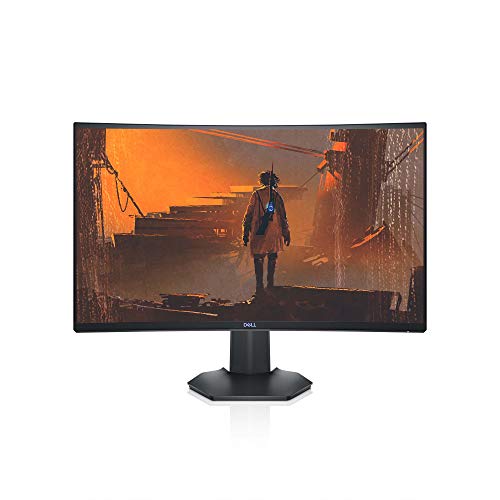
Dell S2721HGF 27 Inch Curved 144Hz Gaming Monitor (Gray)

KTC 27 Inch QHD 2K 120Hz IPS Monitor, H27D9

msi MAG 274CF X24 27-inch 240Hz FHD Gaming Monitor

KTC 24 Inch FHD 1080P 100Hz VA Monitor
KTC 24 Inch QHD 100Hz IPS Monitor 2K 1440P, H24T27

KTC 32 Inch 2K 120Hz IPS QHD Monitor HDR, H32T13
KTC 27 Inch QHD 144Hz Gaming Monitor, H27T27S

KTC 32 Inch 2K 120Hz IPS Monitor with HDR, H32D6

INNOCN 27″ QD-OLED 2K 280Hz Gaming Monitor, 2780s
The Picks, Examined More Closely
The Dell S2721HGF leans into a 1500R curve, the gentle kind that wraps the edges of the screen toward you without making flat images feel distorted. That curve pulls you into cinematic single-player games, flight sims, and racing titles where peripheral vision matters more than pixel-peeping. The 1080p resolution keeps frame rates easy to push, so mid-range GPUs can actually hit the 144Hz ceiling without breaking a sweat.
Compared to the IPS options further down this list, the S2721HGF trades a bit of viewing-angle flexibility for deeper perceived contrast. A rear joystick and shortcut buttons make the on-screen display less of a chore to navigate, which matters when you want to swap game presets between matches. If your rig lives in a dim room and you mostly play atmospheric titles, the curve earns its keep.
What Earns Its Place
- 144Hz refresh paired with 1ms MPRT response keeps fast motion readable in shooters and racers.
- Nvidia G-SYNC Compatible certification and AMD FreeSync Premium reduce screen tearing without locking you to one GPU brand.
- 1500R curvature wraps the field of view in single-player campaigns and sims.
- Height and tilt adjustability helps you dial in a comfortable posture for long sessions.
- Rear-mounted joystick shortcuts make menu tweaks quick during a game break.
Things To Consider
- 1080p on a 27-inch panel means text and UI elements look softer than the 1440p options later in this list.
- Owners commonly find the included stand footprint larger than expected, so a VESA arm may be worth planning for on a smaller desk.
Feature Snapshot
Whose Shelf It Belongs On
This is a natural fit for story-driven and sim players running a mid-tier GPU who want immersion without jumping to 1440p.
Consider Something Else When
The KTC 27 Inch QHD 2K 120Hz IPS Monitor H27D9 suits you better if sharp text for spreadsheets and coding matters as much as gaming.
The H27D9 sits in the middle of the lineup as a 27-inch IPS panel running 2560×1440 at 120Hz, the kind of spec sheet that handles a workday and a raid night without feeling like a compromise. The IPS panel gives wide viewing angles, so colors stay consistent when you lean back or share a screen during a co-op session. For anyone running a hybrid setup, this is a workhorse that does not force a choice between spreadsheets and shooters.
Step up from the Dell S2721HGF and the resolution jump is the obvious change: text in code editors, browser tabs, and game UI elements looks crisper. HDR support is present for compatible content, and the listed 123% sRGB color coverage suggests this panel takes a stab at decent color out of the box. Adaptive sync helps the panel play nice with both G-SYNC and FreeSync setups.
Positive Points
- 2560×1440 resolution makes text crisp enough for daily office work and detailed game UI.
- IPS panel keeps colors and contrast stable across wide viewing angles.
- 120Hz refresh and adaptive sync support cut down on visible stutter in supported games.
- Listed 123% sRGB coverage helps casual content work look closer to the source.
- VESA mount compatibility means you can swap in a monitor arm later.
Honest Caveats
- At 120Hz, you give up the higher ceilings of 144Hz or 240Hz options, which competitive players will notice.
- Eyecare features are a software filter rather than dedicated hardware, so you may still need room lighting tweaks for very long sessions.
Made For
Hybrid users who split their day between documents, creative work, and evening gaming on a single screen.
Look Elsewhere When
The msi MAG 274CF X24 makes more sense for competitive players chasing the 240Hz refresh ceiling.
Speed is the point of the MAG 274CF X24. The 240Hz refresh rate combined with a 0.5ms response time targets competitive shooters where every frame of input delay can be the difference between a headshot and a respawn. Resolution sits at 1920×1080, a deliberate choice that lets GPUs push the high frame rates this panel is built to display without choking on pixel count.
HDR Ready support means the panel can accept an HDR signal, even if the listed brightness is more entry-level than the QD-OLED option at the end of this list. The included tilt-only stand keeps the build simple, and VESA compatibility leaves room to upgrade the mount later. Versus the Dell S2721HGF, this is a flat panel that trades immersion for raw responsiveness.
A Favorable Mix
- 240Hz refresh paired with 0.5ms response gives competitive players the smooth target acquisition they need.
- AMD FreeSync Premium support reduces tearing in fast-paced multiplayer games.
- HDR Ready input compatibility helps supported titles look more punchy without a top-tier brightness claim.
- VESA mount support gives you an upgrade path beyond the included stand.
Points To Keep In Mind
- 1080p on a 27-inch panel can look softer for desktop work, especially when you sit close.
- The included stand only offers tilt, so anyone needing height adjustment will likely add a third-party arm or riser.
- A VGA port feels dated in 2026, even if it helps in mixed legacy setups.
Right Fit For
Ranked-mode FPS and Valorant players running a strong GPU who value motion clarity over pixel density.
Skip It When
The KTC 27 Inch QHD 144Hz Gaming Monitor H27T27S fits better if you want both a sharp 1440p picture and 144Hz in the same panel.
The first-time-upgrader category is where this 24-inch KTC earns its keep. The 23.8-inch VA panel delivers 1920×1080 at 100Hz, which is a clear step up from older 60Hz office monitors without demanding a top-tier GPU. VA panel technology tends to give you deeper blacks than typical IPS options in this class, so darker game scenes and movies can look more atmospheric.
It is not part of the 27-inch club, but that smaller footprint is the entire point for compact desks and dorm rooms. Compared to the 27-inch Dell S2721HGF, you trade screen real estate for a tighter pixel density that can make 1080p look sharper. FreeSync support keeps the panel in step with most modern AMD and compatible Nvidia GPUs.
Positive Takeaways
- 100Hz refresh on a 24-inch VA panel makes a noticeable difference over 60Hz for casual gaming and scrolling.
- VA panel deepens blacks in movies and darker games compared to budget IPS options.
- Compact 24-inch footprint fits smaller desks, dorm setups, and tight apartment corners.
Where It Is Less Suited
- 1080p at 24 inches will not stretch across multi-window workflows the way a 27-inch 1440p can.
- VA panels tend to show narrower viewing angles than IPS, so off-center seats may notice some color shift.
Best Suited To
First-time monitor shoppers, students, and anyone building a tight desk on a starter budget.
Reach For A Different Pick When
The KTC 24 Inch QHD 100Hz IPS Monitor H24T27 is a better match for compact setups that also need sharper text for school or design work.
Want 1440p sharpness without giving up desk space? The H24T27 squeezes 2560×1440 into a 24-inch IPS panel, which results in tighter pixels than the 27-inch 1440p options in this roundup. Text in IDEs, design tools, and dense game interfaces looks noticeably cleaner. The 100Hz refresh is modest but it is a step above 60Hz, and adaptive sync compatibility keeps the panel friendly to most modern GPUs.
Compared to the larger 32-inch KTC entries further down, this one targets a very specific buyer profile: anyone with a smaller desk who refuses to give up pixel density. It is not built for the highest-end competitive play, but that is not the brief here.
Practical Pluses
- 1440p resolution at 24 inches delivers crisp text and detailed game UI without dominating desk space.
- IPS panel technology gives accurate colors and wide viewing angles for shared viewing.
- Adaptive sync compatibility reduces screen tearing in supported games.
Trade Offs
- 100Hz caps you below the 144Hz+ panels in this list, so esports players may want more headroom.
- Smaller screen size means less immersion in open-world games compared to 27-inch and 32-inch alternatives.
Who Should Grab It
Compact-desk users and students who want sharp text and casual gaming in a small footprint.
Swap It Out When
The KTC 32 Inch 2K 120Hz IPS QHD Monitor HDR H32T13 is the better fit for open-world and sim players who want a larger canvas.
The H32T13 breaks the 27-inch convention for anyone who has the desk depth to handle a 32-inch panel. At 2560×1440 on a 32-inch IPS display, the pixel density is similar to a 24-inch 1080p monitor, which keeps things readable while giving you a much wider field of view. Open-world games, flight sims, and productivity multitasking benefit most from that extra space.
HDR support is present and the 120Hz refresh is a comfortable middle ground for most modern GPUs. Relative to the Dell S2721HGF, you give up the wraparound curve and gain a flat, wide canvas that is easier to share with side-by-side windows.
What Helps Most
- 32-inch screen real estate makes side-by-side documents and wide game UIs easier to manage.
- 1440p on IPS gives a clean picture with stable colors from typical desk angles.
- HDR support adds punch to compatible games and movies.
- 120Hz refresh balances smoothness with reasonable GPU demands.
Small Caveats
- A 32-inch monitor needs a deeper desk than 27-inch options, so measure before committing.
- Without a higher contrast panel technology, dark scenes will not reach OLED-style black levels.
Quick Facts
Who Will Love This
Open-world, racing, and sim fans with a deep desk who want a big, sharp canvas for both games and multitasking.
Where Another Pick Suits Better
The INNOCN 27-inch QD-OLED 2780s is a better match if you would trade panel size for OLED-level contrast and a 280Hz ceiling.
The H27T27S is the dark-scene specialist in this lineup. A native 4000:1 contrast ratio on a 27-inch 1440p panel gives horror games, space sims, and night-time racers a depth that budget IPS panels struggle to match. At 144Hz, the panel covers the refresh range most people care about for both AAA single-player and casual multiplayer.
Compared to the 240Hz MSI MAG 274CF X24, this panel is the more cinematic sibling. The trade-off is refresh ceiling versus contrast depth, and for many single-player-focused players, contrast wins out. Adaptive sync support keeps the picture clean on both major GPU brands.
What Pays Off
- Native 4000:1 contrast delivers deeper blacks in horror and dark-themed games.
- 144Hz refresh covers the most common high-refresh target for modern GPUs.
- 1440p resolution keeps game textures and UI text sharp at a normal viewing distance.
- Adaptive sync compatibility reduces tearing in supported titles.
A Few Limitations
- Contrast-focused panels can show slower pixel response than the fastest IPS competitors, so competitive FPS players may notice some smearing.
- Owners may need to tweak the on-screen display to get the most out of the panel in well-lit rooms.
At A Glance
Perfect Match For
Single-player and horror fans who want strong contrast for atmospheric games without leaving the 27-inch form factor.
A Better Fit Elsewhere
The msi MAG 274CF X24 is the smarter pick if you mostly play competitive FPS and prioritize a 240Hz refresh ceiling.
The H32D6 is the more casual 32-inch sibling to the H32T13, leaning into mixed-use scenarios like streaming, work, and lighter gaming. The 32-inch IPS panel runs 2560×1440 at 120Hz, with adaptive sync compatibility to keep things smooth across GPU brands. HDR support is included for content that benefits from extra highlight range.
Stack it next to the H32T13 and the difference comes down to slight spec variations and product positioning rather than a major capability gap. For shoppers who want a 32-inch 1440p panel without chasing the highest spec sheets, this one stays in the comfortable middle.
Features That Help
- 32-inch IPS panel delivers a wide workspace for split-screen apps and immersive gaming.
- 120Hz refresh offers smoother motion than a standard 60Hz panel.
- Adaptive sync compatibility supports both G-SYNC and FreeSync setups.
- HDR support adds extra highlight range in supported content.
Where It Is Less Suited
- The 32-inch size and 1440p resolution mean a deeper desk and a more careful chair-distance setup.
- It does not push the high refresh ceilings that competitive players often look for.
Built With In Mind
Mixed-use households where one screen handles streaming, work, and weekend gaming sessions.
Not Your Match When
The KTC 27 Inch QHD 144Hz Gaming Monitor H27T27S makes more sense for darker single-player games where contrast matters more than screen size.
The 2780s is the enthusiast pick of the bunch. QD-OLED is a panel technology that combines quantum dots with OLED self-emitting pixels, which produces the deep blacks and rich color saturation that traditional LED panels struggle to match. The result is a 27-inch 1440p display that handles both single-player mood pieces and competitive shooters with the same hardware.
At 280Hz with a 0.03ms response time, this panel targets the top end of the speed envelope while still delivering OLED contrast. HDR400 support, HDMI and DisplayPort inputs, built-in speakers, and a height-and-pivot adjustable stand round out a genuinely versatile package. The trade-off for most shoppers is budget, since QD-OLED sits well above standard LED panels.
Real-World Strengths
- QD-OLED panel delivers near-perfect blacks and rich color saturation for cinematic games.
- 280Hz refresh and 0.03ms response target the most competitive FPS and racing titles.
- 2560×1440 resolution keeps text and game UI sharp at 27 inches.
- Height, tilt, and pivot adjustments make it easier to share the screen or rotate for vertical workflows.
- HDR400, HDMI, and DisplayPort inputs cover modern consoles and PCs.
Honest Caveats
- QD-OLED panels are typically more expensive than standard LED options, so budget shoppers may need to wait.
- OLED panels can be sensitive to long static UI elements, so desktop users may want to enable panel refresh or hide taskbars as a precaution.
- Built-in speakers are convenient for quick use but will not replace a dedicated desktop audio setup.
Perfect Match For
Enthusiast gamers and content creators who want the contrast of OLED and the smoothness of a 280Hz refresh in one screen.
Where A Sibling Pick Shines
The KTC 27 Inch QHD 144Hz Gaming Monitor H27T27S is a friendlier entry into 27-inch 1440p gaming for shoppers not ready to pay the OLED premium.
Picking a 27-Inch Gaming Monitor That Fits How You Play
Match The Panel To Your Most-Played Games
The three panel types to know are IPS, VA, and OLED. IPS offers wide viewing angles and accurate color, making it a comfortable all-rounder for mixed use. VA panels typically push deeper contrast and richer blacks, which helps in horror and atmospheric games. OLED takes both further, with self-emissive pixels (meaning each pixel generates its own light) that can switch off individually for true black, though at a higher cost.
Refresh Rate Is About How You Play, Not Just Bigger Numbers
A 144Hz panel feels noticeably smoother than 60Hz during everyday mouse movement, and the jump to 240Hz is a real edge in competitive FPS and Valorant where lower input lag and clearer motion tracking matter. If you mostly play single-player or strategy games, a 120Hz or 144Hz panel covers the experience without pushing your GPU harder than needed.
Resolution And Size Work Together
A 27-inch screen pairs well with 1440p for most people, giving sharper text and game UI without requiring a top-tier graphics card. A 32-inch screen at 1440p is more like a 24-inch 1080p in pixel density but with a much wider canvas, which is great for sims and multitasking. For competitive FPS, 1080p at 240Hz still wins on raw frames per dollar.
Ports, Stands, And Extras Worth Checking
HDMI and DisplayPort are the baseline. VESA mount compatibility matters if you plan to add a monitor arm later, especially with the larger 32-inch options. Height, tilt, and pivot adjustments help during long sessions, and HDR support can add punch in compatible games, though entry-level HDR is more about compatibility than true cinematic brightness.
Key Considerations Across These Picks
Common Shopping Slip Ups
The easiest mistake is chasing the highest refresh rate without considering resolution and panel type. A 240Hz 1080p panel is wasted on a GPU that only pushes 90fps in your favorite game, and a 4K 60Hz monitor is wasted on competitive FPS where every frame matters. Another trap is ignoring desk depth. A 32-inch monitor sounds great until it is six inches from your face. Measure before committing.
What The Higher Tier Buys
Stepping up to the QD-OLED INNOCN 2780s brings OLED contrast and a 280Hz ceiling in one panel, which is the kind of jump that changes how games feel in darker scenes and how smooth fast motion looks. Higher tiers also tend to include better stands with full adjustability, which is worth it for anyone who games for hours. The honest read is that the upgrade pays off most if you already have a strong GPU and play a mix of atmospheric and competitive games, rather than only one or the other.
Frequently Asked Questions
Is 27 Inches The Best Size For Gaming?
For most desks, yes. 27 inches hits a balance between immersion and pixel density, especially with 1440p panels where text stays sharp without needing a top-tier GPU to drive high frame rates.
Do I Need 144Hz Or Is 60Hz Enough?
If you play fast-paced multiplayer or even just want smoother scrolling, 144Hz is a clear step up. For slower-paced single-player and strategy, 60Hz still works, but you will appreciate the upgrade the moment you try it.
What Is The Difference Between G-SYNC And FreeSync?
Both are adaptive sync technologies that reduce screen tearing and stutter by matching the display’s refresh to the GPU’s frame output. G-SYNC is Nvidia’s branding and FreeSync is AMD’s, and many modern monitors support both standards.
Are Curved Monitors Better For Gaming?
Curved screens help wrap peripheral vision in single-player, racing, and flight sim titles. For competitive FPS, flat panels tend to feel cleaner because there is no edge distortion, and many players find them easier to read at high refresh rates.
Should I Get An OLED Gaming Monitor?
OLED panels deliver the deepest blacks and fastest response times, which makes them excellent for cinematic and competitive games alike. The trade-off is price, and OLED panels can be more sensitive to long static UI elements, so consider your usage patterns and budget before committing.
The Takeaway
A 27-inch monitor is the most flexible screen size for gaming setups, and the right pick depends on the games you play and the GPU you own. Curved 1080p panels like the Dell S2721HGF suit immersive single-player, while high-refresh flat panels like the msi MAG 274CF X24 target competitive players. If contrast and color matter most, the QD-OLED INNOCN 2780s is the top-end move, and the KTC options in between cover nearly every budget and use case in between. Pick the one that matches your most-played genre, and the rest tends to fall into place.


