


Competitive gamers and refresh-rate obsessives know the deal: a panel that pushes 240Hz or more turns twitchy shooters and MOBAs from a guessing game into a clean read of the action. The trouble is that the term “240Hz 4K” gets thrown around loosely, and most of the actual 4K models sit in a different price neighborhood than the 1080p and 1440p speedsters dominating this roundup. Every monitor here either hits a genuine 240Hz or steps past it to 280Hz, with resolution ranging from FHD to QHD, so the picks favor raw speed and color fidelity on real-world budgets.
The Main Contenders

Alienware AW2521HF 24.5″ 240Hz IPS Gaming Monitor

KTC 24 Inch 240Hz Gaming Monitor (White, H24F7)

KTC 27 Inch 280Hz Gaming Monitor (H27E22P)

Sceptre Curved 24.5-inch 240Hz Gaming Monitor

Sceptre 24-inch Curved 180Hz Gaming Monitor

Sceptre 24.5-inch 240Hz Gaming Monitor (E255B-FWD240)
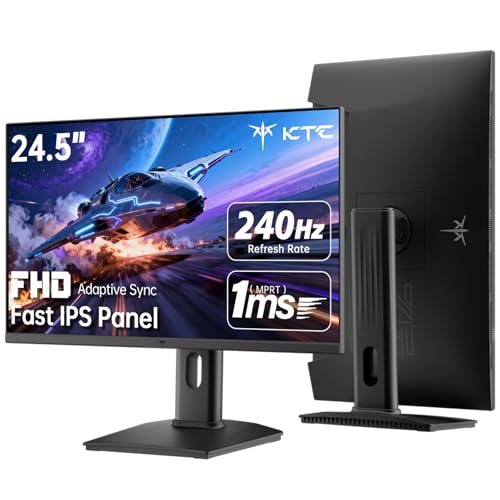
KTC 24.5″ 240Hz Fast IPS Gaming Monitor (H25T7-3)

INNOCN 27″ QD-OLED 280Hz QHD Gaming Monitor

Upperizon 16″ 240Hz Portable QHD Monitor

KTC 27 Inch 240Hz Fast IPS Monitor (H27F7)
Meet The Standout Selections
The Alienware AW2521HF leans into what competitive players actually need from a 24.5-inch panel: a true 240Hz refresh rate on a fast IPS screen, paired with a 1ms GtG (gray-to-gray) response window. GtG measures how quickly a pixel can shift from one shade of gray to another, and a 1ms figure keeps trails to a minimum during flick shots. In daily play, that translates to noticeably cleaner tracking when you whip the crosshair across a map.
Color coverage reaches up to 99% sRGB, so the screen handles saturated game art without looking washed out. AMD FreeSync Premium and NVIDIA G-SYNC Compatible certification keep the picture free of tearing across both major GPU camps. The dark “Dark Side of the Moon” chassis and hexagonal venting help the panel stay cool during marathon sessions, which matters more than people expect during long practice blocks.
Useful Touches
- Native 240Hz on a fast IPS panel keeps motion readable in fast-paced shooters.
- 1ms GtG response time limits the smear that ruins close-range duels.
- Dual adaptive-sync support works cleanly with both AMD and NVIDIA cards.
- Up to 99% sRGB coverage gives game art and UI elements a richer, more accurate look.
- Top, bottom, and rear venting keeps the panel calm through long ranked sessions.
Points To Keep In Mind
- 1080p resolution means a softer image than the QHD and 4K options in this category.
- Owners commonly report the OSD joystick takes a session or two to learn.
Key Specs
Who It Suits Best
Competitive esports players running FPS titles at 1080p who care more about input feel and motion clarity than pixel density.
Look Elsewhere When
The INNOCN 27″ QD-OLED 280Hz QHD Gaming Monitor is the better match for shoppers who want a sharper 1440p image alongside OLED contrast.
The KTC H24F7 trades the usual black slab for a clean white chassis, and that single change reshapes how a battlestation reads. The panel itself is a 24-inch Fast IPS unit running at 240Hz with a 1ms MPRT response window. MPRT (Moving Picture Response Time) measures perceived motion blur rather than pixel transition, so the figure tells you how clean fast objects look to your eye.
For most desk setups, the 178-degree viewing angle means colors stay consistent whether you’re leaning in for a ranked match or stepping back to read a guide. Adaptive Sync support reduces screen tearing without forcing a brand loyalty choice. The smaller 24-inch footprint suits compact desks and tight monitor arms.
Key Advantages
- White finish stands out in desk builds that lean light, wood, or pastel.
- 240Hz refresh keeps cursor flicks and flick shots feeling immediate.
- Fast IPS panel holds color accuracy at wide viewing angles.
Worth Noting
- 1080p resolution is softer than QHD options if you sit close to a 27-inch display.
- White chassis may show dust and fingerprints more readily than a darker finish.
Made For
Minimalist battlestation builders and gamers who want speed without a typical black-bezel look.
Consider Something Else When
The Alienware AW2521HF 24.5″ 240Hz IPS Gaming Monitor is a stronger fit for competitive players who prioritize tournament-grade tuning and brand heritage over aesthetics.
The KTC H27E22P gives you the speed of 280Hz over DisplayPort, which is the headroom the 240Hz ceiling doesn’t quite cover. The 27-inch Fast VA panel leans on deep contrast, with darker blacks that flatter moody single-player games. VA panels typically trade some viewing angle for stronger contrast, and this one still looks consistent across a normal desk setup.
At 1080p, individual pixels start to show at typical viewing distance, but the upside is that pushing 280 frames per second becomes much more achievable on mid-range GPUs. That’s the practical trade: lower resolution, higher ceiling. For competitive Valorant, CS2, or Apex players running a card that can’t quite push QHD, this monitor meets the math where it actually lives.
Where It Helps
- 280Hz refresh over DisplayPort gives a measurable edge in fast shooter duels.
- VA panel produces deeper blacks that suit horror and atmospheric titles.
- 1080p target is friendly to mid-range GPUs that can’t push QHD.
- 27-inch screen real estate feels roomier than 24-inch competitors in this list.
Trade Offs
- 1ms MPRT response is measured in motion blur terms rather than GtG transitions.
- Owners commonly report the stand tilts only and offers limited ergonomic adjustment.
Best Suited To
Speed-hungry competitive gamers with mid-range GPUs who want the largest possible frame budget without leaving 1080p behind.
Not Your Match When
The KTC 27″ 240Hz Fast IPS Monitor (H27F7) is a stronger fit for shoppers who prefer IPS color and want a height-adjustable stand included.
The Sceptre C255B-FWT240 wraps its 24.5-inch panel in a 1500R curve, the radius describing how aggressively the screen bends toward your eyes. That tighter arc pulls the edges closer than a flat panel would, and on a desk-mounted screen the effect adds presence to racing sims and story-driven games. The 240Hz ceiling keeps the fast content readable rather than smeary.
Two DisplayPort and two HDMI ports give you flexibility for multi-device setups, including a console alongside a PC. AMD FreeSync Premium support helps keep frames aligned with your GPU. The eye-care filtering and built-in speakers keep the cable count modest, which is a quiet win for anyone building a clean desk.
Notable Gains
- 1500R curvature adds depth to racing and adventure titles.
- Dual DisplayPort and dual HDMI ports support easy multi-device switching.
- 240Hz refresh keeps fast motion sharp enough for shooters.
- Built-in speakers reduce the need for extra desk hardware.
Honest Caveats
- Curved 24.5-inch screens suit a single viewer, so shared viewing angles look less even.
- 1080p resolution limits the crispness of fine UI elements and dense spreadsheets.
Feature Snapshot
Perfect Match For
Sim and story-driven gamers who want a wraparound feel without stepping up to a 32-inch curved display.
Skip It When
The Sceptre 24.5″ 240Hz Gaming Monitor (E255B-FWD240) is a better call for shoppers who prefer a flat panel for shared desks or competitive play.
The Sceptre C248B-FWT168 sits at the entry point for curved high-refresh monitors, with 180Hz on tap and 100% sRGB color coverage. The 1080p resolution keeps the GPU load manageable, which matters for casual gamers on integrated graphics or older cards. The 1500R curve mirrors the larger C255B in feel, scaled down to 24 inches.
For most casual setups, the 180Hz refresh rate is already a meaningful jump from a standard 60Hz or 75Hz office display. You get noticeably smoother scrolling, snappier mouse tracking, and reduced eye strain during long sessions. The dual HDMI and dual DisplayPort inputs let you swap between a console, work laptop, and main PC without reaching behind the panel.
A Few Highlights
- Curved 24-inch design brings immersion to smaller desks.
- 100% sRGB coverage handles photo edits and game art with reliable color.
- AMD FreeSync support reduces screen tearing on compatible GPUs.
- Built-in speakers cut down on desk clutter for casual users.
Small Caveats
- 180Hz ceiling is below the 240Hz standard set elsewhere in this list.
- Owners commonly report the included stand is basic, so a VESA arm may be a worthwhile add.
Who Will Love This
Casual gamers on a budget who want a curved panel with smooth motion and color accuracy for everyday play.
A Better Fit Elsewhere
The Sceptre Curved 24.5-inch 240Hz Gaming Monitor is the right call for shoppers who want the extra speed headroom without a steep price climb.
The Sceptre E255B-FWD240 goes flat rather than curved, which is the right call for shared desks and competitive play where geometry matters. The 24.5-inch panel runs at 240Hz with a 1ms response window, and 100% sRGB coverage means productivity apps and game art both look balanced. AMD FreeSync Premium rounds out the adaptive-sync story.
In real-world use, the dual DisplayPort and dual HDMI inputs are the practical win, since they let you keep a work laptop, console, and gaming PC connected at the same time. The built-in speakers keep the desk clean for setups where a dedicated sound system is overkill. For most mixed-use households, this monitor covers a lot of ground without forcing trade-offs.
Everyday Advantages
- Flat 24.5-inch panel suits shared viewing and competitive aiming.
- 240Hz refresh rate matches the rest of the speed tier in this roundup.
- 100% sRGB color coverage holds up for general content work.
- Multiple inputs allow simultaneous console, PC, and laptop hookups.
Things To Consider
- 1080p resolution feels soft compared to QHD panels in the same size class.
- The stand tilts but offers limited height or pivot adjustment out of the box.
Right Fit For
Multi-genre household gamers who split time between shooters, RPGs, and casual console play on the same screen.
Reach For A Different Pick When
The KTC 24.5″ 240Hz Fast IPS Gaming Monitor (H25T7-3) makes more sense for users who need a full ergonomic stand and HDR400 in the same form factor.
The KTC H25T7-3 is the spec-heavy pick of the 24.5-inch tier, with HDR400 support layered on top of a 240Hz Fast IPS panel. HDR400 is the entry tier of HDR certification, and it gives supported games a brighter highlight range without the full local-dimming experience. The 114% sRGB coverage and 1000:1 contrast ratio keep colors balanced for content work between gaming sessions.
For most desk setups, the ergonomic flexibility stands out: tilt, pivot, and height adjustment are all built in, so you don’t need to budget for a separate VESA arm. Connectivity covers HDMI 2.0, DisplayPort 1.4, and a USB 2.0 port for accessories. The 100x100mm VESA mount pattern also means a clean swap to a third-party arm if you prefer.
Real Benefits
- HDR400 support adds punch to supported games and HDR video content.
- 114% sRGB coverage exceeds the standard 99% baseline for richer color work.
- Full ergonomic stand with tilt, pivot, and height adjustment.
- VESA mount compatibility for users who prefer a custom arm setup.
Trade Offs
- 1ms MPRT response is a motion-blur figure rather than a GtG pixel transition.
- More ports can mean more cables to manage in tighter desk layouts.
Quick Facts
Whose Shelf It Belongs On
Productivity-plus-gaming desk setups that need HDR highlights, color accuracy, and an ergonomic stand in one package.
Swap It Out When
The INNOCN 27″ QD-OLED 280Hz QHD Gaming Monitor is a stronger match for shoppers who want OLED contrast and a sharper 1440p resolution.
The INNOCN 2780s is the only QD-OLED panel in this roundup, and the difference is immediate. QD-OLED (Quantum Dot OLED) layers quantum-dot color filtering over an OLED backplane, producing perfect blacks alongside a wider color volume than standard OLED. The 27-inch 2560×1440 panel hits 280Hz with a 0.03ms response, the kind of pixel speed that makes motion look almost analog.
For most visual quality enthusiasts, the resolution jump to QHD is the bigger story than the refresh rate, since 1440p on a 27-inch screen is the sweet spot for text clarity and game detail. HDR400 support adds highlight punch, and the height-and-pivot adjustable stand means you don’t need a separate arm. Compatibility with PS5, Xbox, and Switch consoles makes it a flexible centerpiece for any desk.
Notable Upsides
- QD-OLED panel delivers true blacks and exceptional contrast for cinematic games.
- 280Hz refresh rate and 0.03ms response time handle fast motion without compromise.
- QHD resolution balances sharpness with the GPU horsepower needed for high frame rates.
- Console-friendly design works across PC, PS5, Xbox, and Switch setups.
Factors To Consider
- QD-OLED panels carry a higher entry cost than the IPS and VA options in this list.
Core Details
Built With In Mind
Visual quality enthusiasts who want OLED contrast and high refresh without committing to a 4K resolution.
Where A Sibling Pick Shines
The Alienware AW2521HF 24.5″ 240Hz IPS Gaming Monitor is the better fit for tournament-bound players who prioritize proven reliability over contrast.
The Upperizon portable monitor is the odd one out, in the best way. A 16-inch 2560×1600 panel running at 240Hz with HDR support, packed into a kickstand-equipped travel chassis. The 16:10 aspect ratio adds about 11% more vertical space than a standard 16:9 screen, which is a small but noticeable lift for productivity apps and side-by-side code.
For most laptop-centric users, the real draw is the 145% sRGB color coverage in a device that slides into a bag. USB-C connectivity keeps the cable count down to a single line for compatible laptops, and HDMI handles consoles and older hardware. The VESA compatibility is the quiet win for users who want to mount it to a flexible arm at a shared desk.
A Few Strong Suits
- 16-inch form factor slips into laptop bags and hotel desks.
- 240Hz refresh rate is rare in the portable monitor category.
- USB-C single-cable connection simplifies travel setups.
- Built-in kickstand supports quick tabletop use without extra hardware.
Areas To Watch
- 16-inch screen is small for full-time desktop gaming.
- Portable panels typically need a separate power source for full brightness.
Who Should Grab It
Laptop-centric travelers and tutors who need a high-refresh second screen that travels alongside a MacBook, Surface, or gaming laptop.
Another Choice May Suit
The Upperizon-style portability is unique here, but the KTC 24.5″ 240Hz Fast IPS Gaming Monitor (H25T7-3) is the stronger call for a permanent desk setup at home.
The KTC H27F7 closes out the roundup as a 27-inch all-rounder with HDR10 support, 131% sRGB coverage, and 97% DCI-P3. DCI-P3 is the wider color space used in cinema and modern HDR content, so that figure matters for HDR game masters and movie nights alike. The 240Hz Fast IPS panel keeps the speed story consistent with the rest of the list.
For most living-room and mixed-use setups, the height-pivot-tilt adjustable stand solves the ergonomics question without an extra purchase. Brightness at 350 nits is enough for typical indoor lighting, and Adaptive-Sync support keeps the picture clean across GPU brands. It’s the monitor that quietly handles everything from a Netflix stream to a ranked Apex match without fuss.
A Strong Showing
- 27-inch 240Hz Fast IPS panel handles both fast games and detailed content work.
- 131% sRGB and 97% DCI-P3 coverage support HDR content and color-accurate work.
- Full ergonomic stand with height, pivot, and tilt adjustment.
- HDR10 support brightens supported movies and games beyond SDR levels.
Less Ideal Details
- 1080p resolution on a 27-inch panel can look soft at close viewing distance.
- 350 nits of brightness is solid indoors but can wash out in sunlit rooms.
At A Glance
The Right Fit
Living-room and mixed-use gamers who want a big 240Hz screen that also handles movie nights and work tasks without swapping panels.
Look Elsewhere When
The KTC 27 Inch 280Hz Gaming Monitor (H27E22P) is the better match for shoppers who want the extra 280Hz headroom for competitive shooters.
What Actually Matters When Picking a Fast Gaming Display
Resolution vs. Refresh Rate: The Real Trade
The cleanest way to think about gaming monitors is that resolution and refresh rate compete for the same GPU horsepower. A 1080p 240Hz panel needs roughly 240 frames per second at standard detail settings, which is achievable on most mid-range graphics cards. A 1440p 280Hz panel doubles the pixel count and pushes the same refresh target, which can require a flagship GPU to fully feed. For most shoppers, 1080p 240Hz is the practical sweet spot, while 1440p 240Hz or higher is the upgrade path for those with stronger hardware.
Panel Type Decides the Picture
IPS panels hold color accuracy at wide angles, which is great for shared viewing and content work. VA panels lean into contrast and deep blacks, which flatter dark game scenes. OLED and QD-OLED panels combine perfect blacks with fast pixel response, but the price jump is real. For most gamers prioritizing speed and color balance on a budget, Fast IPS is the most versatile pick.
Adaptive Sync Compatibility
FreeSync Premium and G-SYNC Compatible are the two adaptive-sync ecosystems. They prevent screen tearing by syncing the monitor’s refresh cycle to the GPU’s frame output. Most modern monitors support both, but verifying GPU compatibility saves a lot of menu-tinkering once the display is on your desk.
Ergonomics, Ports, and Stand Flexibility
A height-adjustable, pivot-capable stand is a meaningful upgrade over a tilt-only base, especially for long sessions. VESA mount compatibility opens the door to monitor arms for cleaner cable management. Port selection matters too: dual HDMI and DisplayPort inputs make multi-device setups painless.
What To Watch Before You Commit
Common Shopping Slip Ups
The most common mistake is chasing a refresh rate number without checking GPU capability. A 280Hz panel running at 80 frames per second is wasted headroom. The second is ignoring stand ergonomics until the monitor is mounted, then realizing a $30 arm was a better investment than a tilt-only stand. The third is treating 1080p and 1440p as visually interchangeable at 27 inches, when the pixel density difference becomes obvious at normal desk distance.
Where The Extra Money Goes
Stepping up to a QD-OLED or premium IPS panel buys you two real things: contrast and color volume. Blacks get darker, colors get richer, and HDR content actually looks different rather than slightly brighter. The refresh rate gains above 240Hz are measurable but smaller, mostly benefiting players who can already sustain 240+ frames in their main titles. For most shoppers, the upgrade from a 240Hz IPS to a 280Hz QD-OLED panel is worth it for visual quality first and speed second.
Frequently Asked Questions
Do I need a 4K monitor to enjoy 240Hz gaming?
Not necessarily. Most 240Hz panels on the market run at 1080p or 1440p because pushing 4K at 240 frames per second requires a top-tier GPU. For competitive play, 1080p 240Hz is the proven sweet spot. For mixed gaming and content work, 1440p 240Hz strikes a strong balance.
Is GtG or MPRT the more honest response time figure?
Both measure different things, so neither is dishonest on its own. GtG tracks how fast a pixel changes shade, while MPRT tracks perceived motion blur. Lower numbers are better in both cases, but comparing a 1ms GtG panel to a 1ms MPRT panel directly can mislead. GtG is the more consistent spec for serious gamers.
Can a 240Hz monitor work with a console like PS5 or Xbox Series X?
Yes, though consoles typically cap at 120Hz even on compatible displays. The 240Hz ceiling still benefits PC gaming, and the higher-refresh panels tend to ship with better HDR and color coverage. For a hybrid PC-and-console setup, 240Hz is a comfortable headroom.
What cables do I need to hit 240Hz?
DisplayPort 1.4 is the most reliable path to 240Hz at 1080p and 1440p. HDMI 2.0 handles 1080p at 240Hz on most modern GPUs, while HDMI 2.1 is required for higher resolutions at top refresh rates. The included cable in the box is usually fine, but check the spec if you’re pushing 1440p or higher.
Is a curved gaming monitor better for fast games?
Curvature helps immersion in racing, flight sims, and open-world titles, where the wraparound feel adds presence. For competitive FPS, a flat panel is the safer choice because it preserves straight reference lines and shared viewing angles. The decision is more about genre than raw speed.
Closing Remarks
The right 240Hz monitor comes down to what your GPU can actually push and how you split time between fast shooters, open-world games, and content work. For competitive players, the Alienware AW2521HF and the KTC H25T7-3 are the dependable paths. For visual quality, the INNOCN QD-OLED sits in a class of its own. The rest of the list covers the comfortable middle: clean designs, curved options, and portable picks that travel well. Match the panel to your hardware, your genres, and your desk, and the speed will take care of itself.


