


Full HD still earns its place at the desk. A well-chosen 1920×1080 monitor keeps frame rates high without taxing your GPU, and the right panel can handle everything from competitive shooters to long coding sessions without breaking a sweat. This lineup balances panel type, refresh rate, and ergonomics so you can match a screen to your rig, your space, and the games you actually play. Whether you’re chasing esports speed, building a wraparound dual setup, or just want a reliable daily driver, the options below cover the realistic decisions most shoppers face.
The Picks In Brief
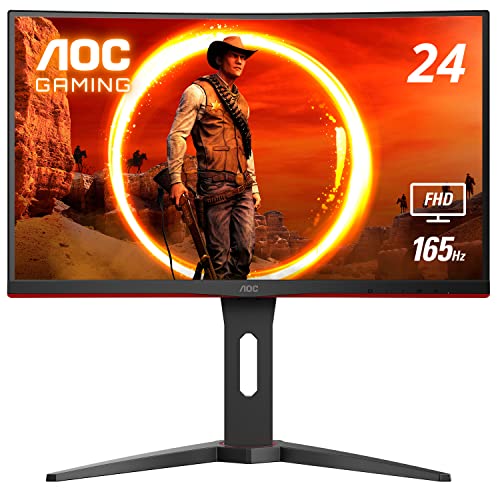
AOC C24G1A 24″ Curved Frameless Gaming Monitor 1500R VA

KTC 27 Inch QHD 120Hz IPS Monitor H27D9
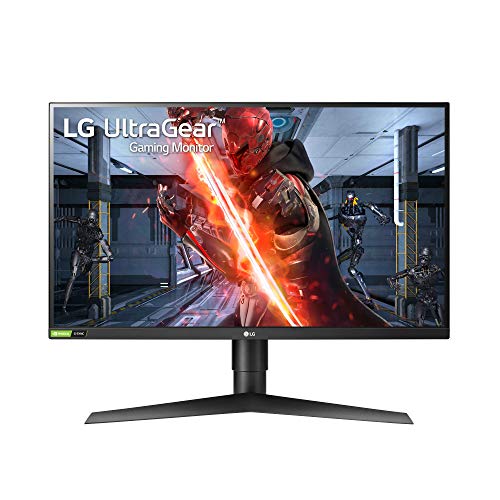
LG 27GN750-B UltraGear 27″ FHD 240Hz IPS Monitor

Kado Dual Monitor 2-Pack 27″ Curved 1500R 75Hz

KTC 24 Inch FHD 100Hz VA FreeSync Monitor

ASUS VA27EHE 27″ Eye Care IPS Monitor

KTC 32 Inch 2K 120Hz IPS HDR Monitor H32T13
KTC 24 Inch QHD 100Hz IPS Monitor H24T27
KTC 27 Inch QHD 144Hz Gaming Monitor H27T27S

KTC 32 Inch 2K 120Hz IPS HDR Monitor H32D6
The Details Behind The Selections
Few monitors wrap around you the way the AOC C24G1A does at this size. The 1500R curve, meaning a circle with a 1.5-meter radius would just contain the screen, brings the edges of the panel closer to your peripheral vision, so racing sims and immersive RPGs feel more present without demanding a 32-inch footprint. A 165Hz refresh rate over DisplayPort gives competitive players the headroom to push frame rates well past what older 60Hz screens could show.
Height, tilt, and swivel adjustments are built into the stand, which is rarer than it should be at this tier. VESA compatibility means swapping in a monitor arm later is straightforward, and the three-sided frameless design helps if you ever add a second C24G1A for a panoramic battle station.
Noteworthy Benefits
- 165Hz refresh via DisplayPort keeps fast motion crisp, a real upgrade over a stock 60Hz panel in shooters
- 1500R curve pulls the edges of the screen into your sightline for a more enveloping view
- AMD FreeSync Premium cuts visible tearing when frame rates fluctuate, so you can leave V-Sync off without artifacts
- Height-adjustable stand reduces neck strain across long sessions, especially versus fixed stands
- Frameless edges make a side-by-side dual setup feel like one continuous surface
Things To Consider
- VA panel response, rated at 1ms MPRT (Moving Picture Response Time, a measure of perceived motion blur), can show faint smearing in very dark scenes depending on the title
- 165Hz only unlocks through DisplayPort; HDMI tops out lower
Key Specs
Who It Suits Best
Esports-leaning players who want speed, immersion, and a small-footprint panel for a tight desk.
Consider Something Else When
The KTC 24 Inch FHD 100Hz VA FreeSync Monitor suits shoppers who want a similar form factor at a lower tier and don’t need the 165Hz ceiling.
The KTC H27D9 splits its identity deliberately. A 2560×1440 IPS panel gives text and spreadsheets noticeably more room than 1080p, and 123% sRGB coverage helps photos and video work look closer to their intended color. 120Hz keeps the desktop experience smooth when you alt-tab into a game between meetings.
Adaptive Sync support, meaning the monitor syncs its refresh to your GPU’s output, prevents tearing whether you run an AMD or NVIDIA card. Eye-care features like a reduced blue-light mode and a flicker-free backlight help during long document days, while the VESA-compatible back panel lets you mount it on a swing arm later.
Practical Pluses
- 2560×1440 resolution on a 27-inch panel makes text crisp without scaling tricks
- IPS panel delivers wide viewing angles for shared screens and color-accurate work
- 120Hz refresh rate keeps both work scrolling and casual gaming feeling fluid
- Adaptive Sync removes tearing across both major GPU brands
Worth Noting
- HDR is supported, but brightness levels are modest; expect subtle rather than dramatic HDR impact
- At 1440p, your GPU works harder than it would driving a 1080p screen, so frame rates in demanding games will drop
- Stand adjustability is functional but not extensive, so a VESA arm becomes useful for taller users
Right Fit For
Hybrid users who split their day between documents, creative work, and after-hours gaming on one panel.
Look Elsewhere When
The AOC C24G1A 24″ Curved Frameless Gaming Monitor is a better match for shoppers who want a curved 1080p panel with higher refresh for dedicated gaming.
The LG 27GN750-B pushes the 1080p envelope harder than most. A 240Hz refresh rate on an IPS panel, a panel technology known for accurate color and wide viewing angles, is genuinely rare, and it pairs with a 1ms response time and NVIDIA G-SYNC compatibility to keep fast motion smooth. For Valorant, CS2, or Apex players running frame rates well above 144, the difference shows up as cleaner target tracking.
HDR10 support brings expanded contrast for cinematic games, while a height, tilt, and pivot stand gives you ergonomic flexibility without forcing a separate arm purchase. The three-side borderless design is a thoughtful touch if you ever want a second panel alongside it.
The Value In It
- 240Hz refresh on IPS is hard to match in this category
- 1ms response keeps competitive play free from ghosting trails
- G-SYNC compatibility smooths frame delivery on NVIDIA GPUs
- Full ergonomic stand adjusts height, tilt, and pivot for proper posture
Trade Offs
- You need a GPU that can actually push 240fps in your main titles to appreciate the refresh ceiling
- HDR10 is supported but the panel’s peak brightness limits how dramatic HDR scenes look
- At 27 inches and 1080p, individual pixels are slightly more visible than on a 24-inch panel, which some viewers notice up close
Built With In Mind
Competitive FPS players with strong GPUs who want the smoothest possible 1080p experience.
Skip It When
The KTC 27 Inch QHD 120Hz IPS Monitor H27D9 fits shoppers who prefer sharper 1440p text and balanced speed over raw refresh headroom.
The Kado dual pack takes the friction out of building a wraparound setup. Two matching 27-inch curved panels arrive together, which solves the color-matching problem that plagues two-monitor builds where the panels drift in tone. 1500R curvature on both screens keeps the seams between them less jarring than flat panels would.
Built-in speakers cover basic desktop audio, and VESA mounting compatibility means you can put both on arms or a wall mount to reclaim desk space. At 75Hz, this isn’t an esports-grade pairing, but for productivity and immersive single-player gaming, the consistency of having two identical screens is a quiet luxury.
A Strong Showing
- Two matched panels eliminate the color and bezels-mismatch problem common to dual setups
- 1500R curve on each screen keeps the wraparound feeling natural
- Built-in speakers handle video calls and casual audio without external gear
- VESA compatibility supports clean arm or wall mounting
Points To Note
- 75Hz refresh is fine for productivity but limiting for competitive play compared to higher-Hz picks like the AOC C24G1A or LG 27GN750-B
- You’ll need two video outputs on your GPU or laptop to drive both screens
- Shipping two large panels means a bigger box to maneuver and unpack
Best Suited To
Remote workers and content creators who want a matched dual-screen setup without piecing it together from separate orders.
A Better Fit Elsewhere
The ASUS VA27EHE 27″ Eye Care IPS Monitor works better for single-monitor shoppers who prioritize eye comfort and don’t need a wraparound layout.
The KTC 24-inch covers the basics without overpromising. A 100Hz refresh rate, meaning the screen redraws 100 times per second, is a meaningful step up from a 60Hz panel for desktop smoothness and casual gaming, and the VA panel brings deeper contrast than IPS at this tier. FreeSync support prevents tearing when frame rates bounce around in lighter titles.
At 24 inches with 1080p, pixel density stays comfortable for text and games without requiring display scaling, which is helpful for older laptops and entry-level GPUs. The straightforward design and modest footprint make it an easy drop-in for a first gaming setup or a homework-station upgrade.
Strong Points
- 100Hz refresh is a clear upgrade from 60Hz for everyday smoothness
- VA panel offers deeper blacks and stronger contrast for movies and atmospheric games
- FreeSync compatibility reduces tearing without manual V-Sync tweaking
- Compact 24-inch size fits smaller desks and dorm rooms
Room For Improvement
- 100Hz ceiling is modest compared to 165Hz and 240Hz options in this roundup
- VA panels can show slight motion smearing in very dark, fast-moving scenes
Feature Snapshot
Whose Shelf It Belongs On
First-time builders and budget shoppers stepping up from an older 60Hz screen without overspending.
Reach For A Different Pick When
The AOC C24G1A 24″ Curved Frameless Gaming Monitor is the better match if you want a higher 165Hz refresh and a curved panel at a similar size.
The ASUS VA27EHE is built around the idea that a monitor should disappear into your workday. TÜV Rheinland-certified low blue light filtering and a flicker-free backlight, both verified by the German testing organization, target the eye strain that builds up across long sessions. An IPS panel keeps colors accurate from off-angle seats, which matters when a colleague leans in to review something on your screen.
Adaptive-Sync support (48Hz to 75Hz) smooths out light gaming and video, while ASUS GamePlus features add a crosshair, timer, and FPS counter for casual competitive play. The frameless design and VESA compatibility round out a practical, comfortable package that doesn’t try to be an esports screen.
Everyday Wins
- Eye Care Plus technology reduces blue light and flicker for long work sessions
- IPS panel with wide 178-degree viewing angles keeps colors consistent from any seat
- Adaptive-Sync support prevents tearing in casual games and video
- Frameless design supports clean multi-monitor workstations
Honest Caveats
- 75Hz ceiling limits the appeal for serious competitive players
- HDR is not part of the spec sheet, so cinematic contrast will look flatter than on HDR-equipped picks
- The included stand adjusts for tilt but not height, so a VESA arm is worth considering for taller desks
Who Should Grab It
Office-focused users, students, and remote workers who spend long hours in front of the screen and value eye comfort.
Another Choice May Suit
The KTC 24 Inch FHD 100Hz VA FreeSync Monitor works better for shoppers wanting a smaller, slightly faster panel without the eye-care emphasis.
Big panels make everyday tasks feel different, and the KTC H32T13 leans into that. A 32-inch 2560×1440 IPS display gives you space for split-screen work, generous game worlds, and movie nights without leaning forward. The 120Hz refresh rate keeps motion smooth whether you’re playing or just dragging windows across the desktop.
HDR support adds depth to supported games and video, while thin bezels keep the focus on the panel itself. VESA compatibility and multiple input options make placement and connectivity straightforward on most desks.
Advantages To Know
- 32-inch screen real estate is ideal for split-window productivity and immersive games
- 1440p resolution stays sharp at this size without taxing mid-range GPUs too heavily
- 120Hz refresh keeps both work and play feeling responsive
- IPS panel delivers consistent color across wide viewing angles
Factors To Consider
- 32-inch screens demand desk depth, so measure your space before committing
- HDR brightness levels are modest; deep HDR impact requires more premium displays
At A Glance
Made For
Shoppers with deep desks who want one large panel to replace a dual setup for general use and console gaming.
Where Another Pick Suits Better
The KTC 32 Inch 2K 120Hz IPS HDR Monitor H32D6 fits users who want a similar large format with slightly different connectivity priorities.
The KTC H24T27 crams 2560×1440 resolution into a 24-inch frame, which means noticeably higher pixel density than a typical 1080p screen of the same size. Text looks crisper, game textures gain detail, and the small footprint keeps it friendly to compact desks. 100Hz keeps motion smooth without demanding a flagship GPU.
IPS technology brings accurate color and wide viewing angles, which is useful if you ever tilt or share the screen. Adaptive-Sync support covers both FreeSync and G-Sync compatible setups, removing the question of which GPU brand it plays nicely with.
Useful Highlights
- 1440p on 24 inches delivers sharp text and detailed game visuals in a small package
- 100Hz refresh rate smooths scrolling and light gaming without taxing your hardware
- IPS panel keeps color and contrast consistent across wide viewing angles
- Adaptive-Sync works with both major GPU brands for tear-free visuals
Worth Bearing In Mind
- 24-inch 1440p requires display scaling in some operating systems to keep text comfortable, so configuration is part of the setup
- 100Hz is modest for competitive shooters compared to the 240Hz ceiling of the LG 27GN750-B
Perfect Match For
Shoppers with limited desk space who still want the sharpness of 1440p in a compact display.
Swap It Out When
The KTC 24 Inch FHD 100Hz VA FreeSync Monitor is the better fit if you prefer 1080p simplicity and don’t want to adjust display scaling.
The H27T27S is the pick for players who care about how games look as much as how they run. A 4000:1 contrast ratio, meaning the brightest whites are 4000 times brighter than the darkest blacks the panel can produce, is meaningfully higher than typical IPS panels and gives dark scenes real depth. That makes horror games, space sims, and moody RPGs feel more atmospheric without needing HDR to fake the effect.
A 144Hz refresh rate covers both single-player and competitive genres, and the 27-inch 1440p format gives you more screen space and detail than 1080p without overwhelming mid-range hardware. Adaptive-Sync support keeps the frame delivery clean across both GPU brands.
Useful Touches
- 4000:1 contrast gives darker games real atmospheric depth without HDR overhead
- 144Hz refresh handles both single-player and competitive play smoothly
- 1440p resolution adds detail to textures and text over 1080p
- Adaptive-Sync works with both AMD and NVIDIA GPUs
Some Limits To Know
- Strong contrast comes at the cost of slightly narrower viewing angles than typical IPS, so off-center viewing can shift the image
- At 1440p and 144Hz, your GPU needs solid headroom to push both at once
Who Will Love This
Single-player and immersive-game fans who want strong contrast for moody scenes without paying for true HDR brightness.
Not Your Match When
The LG 27GN750-B UltraGear is a better fit for competitive players who want 240Hz speed over contrast depth.
The KTC H32D6 closes the roundup with a balanced large-format option. A 32-inch 2560×1440 IPS panel gives you the room to spread out work and enjoy open-world games, while 120Hz keeps motion smooth for both. HDR support adds a layer of contrast to compatible content, and the IPS panel maintains color accuracy from off-angle seats.
Compared to the H32T13 covered earlier, the H32D6 leans toward a streamlined feature set with a focus on everyday versatility. Adaptive-Sync compatibility rounds out the gaming side, and the 1440p resolution keeps GPU demands reasonable for mid-range systems.
The Good Stuff
- 32-inch 1440p panel gives spacious work and play real estate without 4K GPU demands
- 120Hz refresh keeps both productivity scrolling and casual gaming smooth
- IPS panel maintains color and clarity at wide viewing angles
- HDR support enhances contrast in supported movies and games
Details To Watch
- HDR brightness is moderate, so cinematic HDR impact will be subtle compared to premium displays
- A 32-inch screen needs at least 28 to 32 inches of viewing distance for comfortable use, so desk depth matters
Feature Rundown
The Right Fit
Mixed users who want one large screen that handles office work, streaming, and casual gaming without juggling multiple panels.
Where A Sibling Pick Shines
The KTC 32 Inch 2K 120Hz IPS HDR Monitor H32T13 is a close alternative, with its own take on large-format balance for shoppers comparing the two.
What To Weigh Before Choosing a 1920×1080 Gaming Monitor
Panel Type And What It Means In Daily Use
The three panel types you’ll see most often are IPS (In-Plane Switching), VA (Vertical Alignment), and TN (Twisted Nematic). IPS panels, found in the ASUS VA27EHE and LG 27GN750-B, tend to deliver the most accurate color and the widest viewing angles, which is useful for shared screens and creative work. VA panels, like the ones in the AOC C24G1A and KTC 24-inch FHD, push deeper contrast and richer blacks, making atmospheric games and movies look more cinematic. The trade-off is usually slower pixel response, which can show as faint smearing in very dark, fast-moving scenes.
Refresh Rate And Response Time
Refresh rate, measured in hertz, tells you how many times per second the screen redraws, and response time, measured in milliseconds, tells you how quickly a pixel can change color. A 144Hz or 165Hz panel, like the AOC C24G1A, makes competitive play feel noticeably smoother than 60Hz, and 240Hz, like the LG 27GN750-B, takes that further for elite esports players. For slower-paced or single-player games, 75Hz or 100Hz is plenty, and your GPU will thank you for not pushing unnecessary frames.
Adaptive Sync And Variable Refresh
Adaptive-Sync technologies (AMD FreeSync and NVIDIA G-SYNC) let the monitor match its refresh rate to the frames your GPU is producing, which prevents screen tearing without the input lag of V-Sync. Most of the picks in this roundup support some form of adaptive sync, which matters any time your frame rate dips below the panel’s maximum refresh.
Size, Resolution, And Desk Space
Screen size and resolution work together. A 24-inch 1080p panel, like the AOC C24G1A or KTC 24-inch FHD, keeps pixel density comfortable for text and games at a typical desk distance. Step up to 27 inches and 1080p starts to look slightly soft up close, which is why many 27-inch shoppers prefer 1440p instead. A 32-inch screen, like the KTC H32T13 or H32D6, needs more desk depth and viewing distance to feel natural, so measure before committing.
Key Considerations Across These Picks
Common Shopping Slip Ups
The most frequent mistake is buying purely on refresh rate without checking whether the GPU can actually push frames that high. A 240Hz panel looks identical to a 60Hz panel if your hardware only delivers 60fps. Another slip is ignoring stand ergonomics; fixed stands force you to compensate with chair or monitor-arm changes later. Finally, confirm your ports match. Some of the higher refresh rates in this list only unlock over DisplayPort, with HDMI capping lower.
When Paying More Pays Off
Stepping up to a higher tier usually gets you three things: better panel technology (IPS for color or VA for contrast), stronger build and stand adjustments, and adaptive-sync at wider ranges. For competitive play, the jump from 144Hz to 240Hz on the LG 27GN750-B is the kind of upgrade you’ll feel in-game. For mixed work-and-play setups, the added resolution of 1440p on the KTC H27D9 pays off every time you open a spreadsheet. The honest read is that premium picks earn their place when you actually use the features they add, not just because they sound better on a spec sheet.
Frequently Asked Questions
Is 1920×1080 still good for gaming in 2026?
Yes, especially if your GPU is mid-range or older. 1080p lets you push higher frame rates without expensive hardware, and the 165Hz or 240Hz options in this roundup keep motion crisp in fast games.
What refresh rate should I look for in a 1080p gaming monitor?
For most players, 144Hz to 165Hz is the sweet spot. Competitive esports players benefit from 240Hz, while casual gamers may find 75Hz or 100Hz perfectly adequate for single-player titles.
Do I need G-SYNC or FreeSync with a 1080p monitor?
It helps a lot. Adaptive-Sync prevents tearing when your frame rate fluctuates, and most modern GPUs support either FreeSync or G-SYNC compatible modes. Nearly every pick in this list includes some form of adaptive sync.
Is a curved monitor better for gaming?
Curved panels, like the 1500R AOC C24G1A, pull the edges of the screen closer to your peripheral vision, which adds immersion in racing and open-world games. For competitive FPS at high refresh, flat panels are perfectly fine, and the choice comes down to preference.
Should I get a 24-inch or 27-inch monitor?
At 1080p, 24 inches keeps text and game detail sharp. At 27 inches, 1440p resolution is the better match, and that is what the KTC H27D9 offers. Measure your desk and sit distance before deciding.
Bottom Line
Full HD remains a smart, sensible resolution for gaming in 2026, and the right monitor comes down to matching panel, refresh, and size to your real setup. Competitive players will find the LG 27GN750-B and AOC C24G1A hard to beat for speed, while hybrid users get strong value from the KTC H27D9 and ASUS VA27EHE. Big-screen shoppers land on the KTC H32T13 or H32D6, and the Kado dual pack solves wraparound setups in one order. Pick the panel that fits your space, your GPU, and the games you actually play, and you will not regret the choice.


