


A great gaming PC runs hot, and the case fans doing the heavy lifting decide whether your sessions stay quiet or sound like a hair dryer. Whether you’re chasing lower thermals for a new GPU, swapping tired stock fans, or building a clean-looking rig with some RGB flair, the right airflow setup makes a real difference. The picks below cover silent workhorses, raw-performance blades, and a few cabinet-style options for AV racks and home offices where the line between gaming and everyday use blurs.
The Shortlist At A Glance
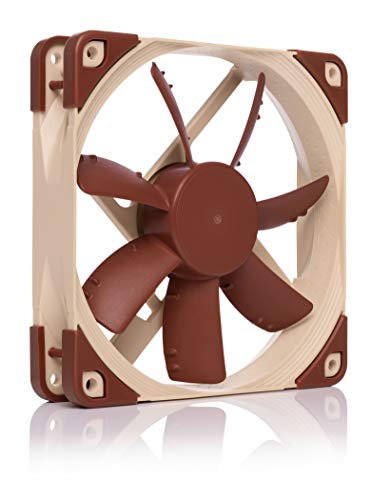
Noctua NF-S12A FLX, High-Performance Quiet Fan 120mm
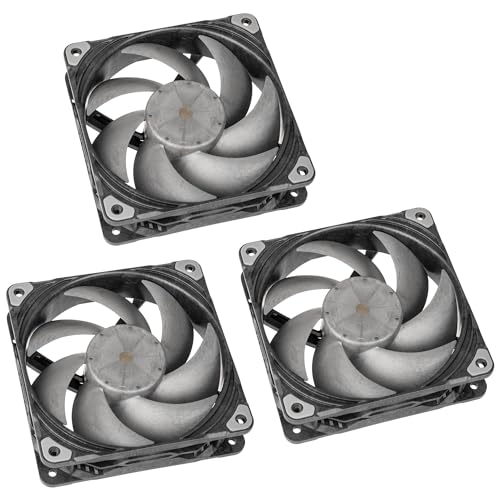
Phanteks T30-120 PWM Fan 120mm 3-Pack
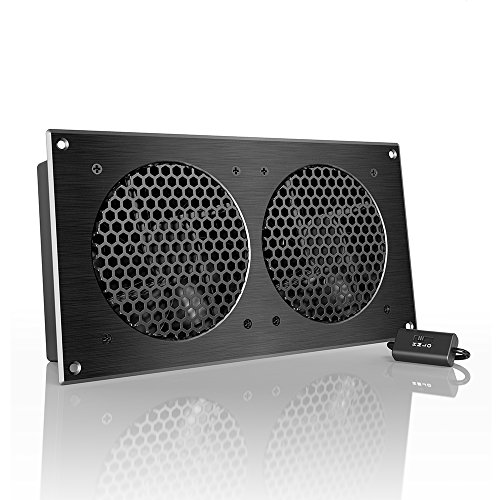
AC Infinity AIRPLATE S7, Quiet Cooling Fan System 12″

AC Infinity AIRPLATE T3, Quiet Cabinet Cooling Fan System 6″
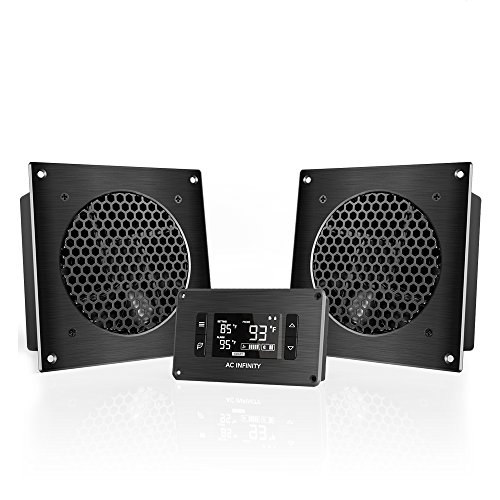
AC Infinity AIRPLATE T8, Quiet Cooling Dual-Fan System 6″

Noctua NF-A12x25 PWM, High-Performance Quiet Fan 120mm
Noctua NF-S12A PWM, High-Performance Quiet Fan 120mm

AsiaHorse AMICI-5GT RGB PC Fans with Infinity Mirror ARGB

Asiahorse Nyota 120mm Case Fan with ARGB Lighting
A Closer Look At Each Pick
The Noctua NF-S12A FLX sits in a sweet spot for builders who care more about hearing their game audio than raw cooling muscle. Running on a 3-pin Molex connection with three included speed settings, it leans into low-noise operation rather than chasing top-end RPM. For most people running a mid-tier gaming rig, the airflow it pushes feels more than enough while keeping the chassis background hum genuinely low.
Where it lands is in older cases without PWM headers, or builds where the motherboard’s fan curve is already handled by other components. You trade automatic software tuning for a simple manual switch, which some builders actually prefer. The beige-and-brown color scheme is famously polarizing, but it’s become a small badge of honor in the enthusiast scene.
The Value In It
- Among the quietest 120mm fans in its class, ideal for bedroom or shared-space setups.
- Three included low-noise adapters let you tune the curve without BIOS tinkering.
- Documented long service life, which matters when a fan failure can take other parts with it.
- Anti-Stall Knobs help maintain consistent airflow when resistance climbs.
Things To Consider
- No 4-pin PWM support, so it can’t follow dynamic motherboard fan curves.
- The signature color scheme blends with very few case interiors without modification.
Key Product Details
Right Fit For
Quiet-focused builders with a non-PWM motherboard who want plug-and-play silence without managing curves.
Look Elsewhere When
The Noctua NF-S12A PWM is a better match if you want software-controlled speed that reacts to GPU and CPU loads.
Where the NF-S12A FLX keeps things simple, the Phanteks T30-120 swings for the fences with multi-mode performance profiles. A built-in switch lets you flip between silent, balanced, and high-output operation without swapping cables. For a high-end gaming PC running a power-hungry GPU, that flexibility is the headline feature: one fan can behave differently for video editing, competitive matches, or late-night browsing.
The 3-pack format also keeps total cost of ownership in line if your case has intake, exhaust, and top mounts to populate. Owners commonly report that mounting takes a little more care than average because the fan is thicker than typical 25mm units. You trade a small bit of case clearance for a meaningful airflow and pressure bump.
What It Does Well
- Switchable performance profiles cover silent, balanced, and aggressive cooling from a single fan.
- Strong static pressure suits radiators, AIO coolers, and dense mesh front panels.
- Three fans in one box lower per-unit cost for a full build refresh.
- Wide RPM range lets the same fan follow a quiet curve or push hard under load.
Trade Offs
- Thicker than standard 120mm fans, so compatibility with compact cases and some AIO brackets should be checked first.
- The mode switch sits on the fan body, which can be awkward to reach in tight builds.
Made For
Gamers running hot GPUs and dense radiators who want one fan model that adapts to different workloads throughout the day.
Swap It Out When
The Noctua NF-S12A FLX is a calmer choice for build-and-forget setups where low noise matters more than tunable output.
The AC Infinity AIRPLATE S7 is a different animal from the case-internal fans above. It’s a 12-inch panel-mount system designed to ventilate AV cabinets, equipment racks, or home-office enclosures where heat builds up around consoles, receivers, or networking gear. The CNC-machined aluminum frame gives it a clean, built-in feel rather than a tacked-on accessory look.
A multi-speed controller on the cable lets you choose between quiet background airflow and stronger exhaust. The included Turbo Adapter bumps output further when needed, which is handy for crowded media cabinets during summer gaming marathons. Compared to the Phanteks T30-120, this fan lives outside the PC, not inside it.
What Helps Most
- CNC aluminum frame feels premium and dissipates heat well in enclosed cabinets.
- Multi-speed controller offers a simple low-to-high range without software.
- Wall outlet or USB power options make placement flexible in living-room setups.
- Turbo Adapter adds extra headroom during heavy gaming or media sessions.
Worth Noting
- It is a cabinet solution, not a replacement for case fans inside a desktop tower.
- The 12-inch panel size means you’ll want to confirm the cutout dimensions on your cabinet before ordering.
Feature Snapshot
Best Suited To
Living-room gamers with enclosed AV cabinets who want a quiet exhaust solution for consoles, receivers, and networking hardware.
A Better Fit Elsewhere
The AC Infinity AIRPLATE T3 suits you better if you need thermostat-driven automation rather than manual speed selection.
The AIRPLATE T3 takes the cabinet-cooling idea one step further by adding a digital temperature readout and onboard programming. Instead of guessing whether your media cabinet is overheating, you get a live number on the display and a thermostat that ramps the fan up only when it actually matters. For a setup running a console, a switch, and a receiver in a tight shelf, that automation is what separates a smart install from a noisy one.
At 6.3 x 6.3 x 1.3 inches, the panel fits in smaller cutouts than the larger S7 above. A SMART energy-saving mode helps when the cabinet sits idle for stretches, so the fan doesn’t run full tilt for no reason. It also benefits from dual ball bearings for longer life in always-on scenarios.
Notable Upsides
- Digital temperature display removes guesswork from cabinet cooling decisions.
- Thermostat control automates ramp-up and ramp-down based on real readings.
- SMART mode reduces unnecessary power use and noise during idle periods.
- Compact 6-inch panel fits where larger systems physically cannot.
Honest Caveats
- The interface is functional, not flashy, and the controller adds a small wiring chore inside the cabinet.
Who It Suits Best
Homeowners with always-on AV gear in enclosed shelving who want set-and-forget thermal management.
Not Your Match When
The AC Infinity AIRPLATE T8 fits a heavier thermal load better, with two fans on a single panel for denser cabinet setups.
Where the T3 brings smart automation to a single fan, the AIRPLATE T8 doubles down with two fan units behind a single 6-inch brushed aluminum panel. That added airflow matters when a cabinet houses multiple consoles, a streaming PC, or networking gear that runs warm year-round. You keep the same compact cutout but get meaningfully more headroom for thermal spikes.
The T8 also includes the same onboard processor and digital readout as the T3, so thermostat programming and SMART energy mode still apply. Compared to the single-fan T3, you may find the extra moving parts worth it only if your cabinet truly runs hot. The honest read is that the T3 handles most living-room setups fine, and the T8 is the step up when it doesn’t.
Features That Help
- Two fans on one panel deliver stronger airflow without expanding the cutout.
- Shared onboard processor handles thermostat and SMART mode for both fans.
- CNC aluminum frame matches the rest of the AIRPLATE family for a clean look.
- Useful for cabinets where a single fan plate feels undersized for the load.
Points To Note
- More moving parts than the T3, so long-term noise creep is worth monitoring.
- Power draw is higher, which adds up in always-on AV closets.
Who Should Grab It
Home users with dense AV cabinets running multiple consoles or a streaming PC who need extra airflow in a small footprint.
Where Another Pick Suits Better
The AC Infinity AIRPLATE T3 is enough for lighter loads and saves on cost, complexity, and energy use.
The NF-A12x25 PWM is Noctua’s flagship 120mm fan, and it shows in the engineering. A record-tight 0.5mm tip clearance, Flow Acceleration Channels, and an AAO acoustic frame work together to push high airflow and high static pressure at once. That’s the combination you want when cooling a 360mm AIO radiator or a dense GPU heatsink in a small case.
It runs on a 4-pin PWM header, so motherboard fan curves can ramp it up under load and quiet it down at idle. Compared to the S12A FLX, the trade-off is cost: you’re paying for premium build and tighter tolerances. For most mid-range gaming builds, the price feels hard to justify, but for a small-form-factor rig or a high-TDP GPU, the value in performance and silence is real.
Positive Takeaways
- Strong airflow and static pressure in one package, ideal for radiators and restricted intake panels.
- 4-pin PWM support means full motherboard curve integration.
- Documented long service life, which matters on parts that run 24/7 in a closed loop.
- Acoustic optimization frame keeps the high-RPM performance surprisingly civil.
Points To Keep In Mind
- Priced well above mainstream fans, so it only makes sense for specific use cases.
- The classic Noctua color scheme is still divisive in windowed builds.
Feature Rundown
Perfect Match For
Enthusiast builders with AIO radiators or high-TDP GPUs who want strong cooling without a loud rig.
Skip It When
The Phanteks T30-120 is a more affordable multi-mode alternative if you don’t need the absolute best static pressure.
The NF-S12A PWM takes the same proven S12A blade platform as the FLX version and adds 4-pin PWM support. That single change is meaningful: instead of relying on bundled adapters, the fan now reacts directly to CPU and GPU temperatures through the motherboard’s curve. For a modern gaming PC, that kind of automation makes a tangible difference in day-to-day noise levels.
It caps at a quieter 1200 RPM ceiling, which is lower than the flagship NF-A12x25 above. For most mid-tower builds, that ceiling is more than enough, especially if the case has good airflow. Where the PWM version really earns its place is in builds that previously ran the FLX and now want software-managed control.
The Upside
- 4-pin PWM delivers full motherboard curve integration for hands-off tuning.
- Acoustic Optimization frame keeps operation genuinely quiet at typical loads.
- Long documented service life reduces the chance of mid-build fan swaps.
- Familiar S12A airflow profile works well for case intake and exhaust duties.
Small Caveats
- Lower RPM ceiling than the NF-A12x25, so radiator cooling is more limited.
- The same color scheme that hasn’t changed in years.
Whose Shelf It Belongs On
Builders who want quiet case ventilation and prefer letting the motherboard manage fan speed rather than running manual adapters.
Consider Something Else When
The Noctua NF-A12x25 PWM is the upgrade for builders pushing 240mm or 360mm radiators with higher static-pressure needs.
The AMICI-5GT steps away from the muted tone of the Noctua picks and into a different audience entirely. The infinity-mirror ARGB ring and 24 onboard LEDs make it a centerpiece fan, the kind of part that earns its place in a windowed case. The reverse-blade option helps builders aiming for clean intake-side visuals where the logo faces outward.
Underneath the lighting, the HDB (hydrodynamic bearing) is designed for smoother operation and longer life than a basic sleeve bearing. Speeds go up to 1800 RPM, which puts it in the same airflow conversation as the Phanteks T30-120, though here the focus is split between cooling and aesthetics. It’s not a silent specialist, but it doesn’t pretend to be one either.
Reasons It Performs
- Infinity mirror design stands out in windowed or showcase builds.
- Up to 1800 RPM gives headroom for gaming load spikes.
- HDB bearing aims for smoother long-term operation than sleeve bearings.
- Motherboard Aura Sync support keeps the lighting tied to the rest of the rig.
Room For Improvement
- Not the quietest fan at full speed, so a custom fan curve is worth setting.
- Wired connection only, so plan for the ARGB header routing through your case.
Built With In Mind
Builders who treat their PC as a showpiece and want RGB lighting that reads clearly through a tempered-glass side panel.
Another Choice May Suit
The Asiahorse Nyota 120mm is a quieter alternative if you want ARGB style with a calmer noise profile.
The Nyota 120mm closes the list as a hybrid between the silent-focused Noctua line and the louder RGB crowd. Its 800-1800 RPM range covers a wide operating window, and the published under-29 dB noise ceiling keeps it firmly in the “polite at idle” camp. For most gaming PCs, that range is the sweet spot: quiet when you’re browsing, capable when the GPU spins up.
Where it sits relative to the AMICI-5GT is on the calmer side of the RGB spectrum. The lighting is present but not the headline feature, which makes sense if you want tasteful color without a full light show. The honest read is that this is a versatile fan for builders who want style, control, and modest noise all in one.
What Earns Its Place
- Wide 800-1800 RPM range works for both silent idle and heavier gaming loads.
- ARGB lighting is present without dominating the build’s visual identity.
- Quieter operation than the AMICI-5GT at full tilt.
- Standard 120mm form factor drops into most case mounts without fuss.
Some Limits To Know
- Top-end airflow is below the more aggressive Phanteks T30-120.
The Right Fit
Mid-range builders who want ARGB style, quiet operation, and a wide RPM range in a single fan.
Reach For A Different Pick When
The AsiaHorse AMICI-5GT is the better centerpiece for a build that wants a bolder infinity-mirror visual statement.
Matching Fans To Your Build Type
The first decision is where the fan actually lives. Internal case fans, like the Noctua NF-S12A FLX, the Phanteks T30-120, and the Noctua NF-A12x25 PWM, mount inside your tower and move air across the GPU, CPU, and radiator. Cabinet-style systems, including the three AC Infinity AIRPLATE models, ventilate enclosed AV furniture where consoles, receivers, and networking gear generate steady background heat. The two categories rarely overlap, so getting this right narrows the list quickly.
Internal fans also break down by connector type. A 3-pin fan with bundled low-noise adapters is simple but lacks automation, while a 4-pin PWM fan follows your motherboard’s temperature curve in real time. For most modern gaming PCs, PWM is the easier path because the BIOS or fan-control software handles ramp-up and ramp-down without any manual swaps.
For builds that lean on air cooling or an AIO, static pressure (the force a fan pushes through a restrictive surface like a radiator fin stack) matters more than raw airflow. For open mesh front panels, airflow is the priority. The Phanteks T30-120 and Noctua NF-A12x25 PWM both do well in restricted setups, while the S12A models shine on cleaner intake paths.
What To Check Before You Click Buy
Mistake #1: Confusing Airflow With Static Pressure
Airflow (measured in CFM, or cubic feet per minute) tells you how much air moves in open space, while static pressure tells you how well the fan pushes through dense surfaces. A high-CFM fan can stall against a radiator fin stack, while a high-static-pressure fan wastes itself in an open panel. Match the spec to the job.
Mistake #2: Ignoring Case Clearance
Some 120mm fans are 25mm thick, while thicker performance models go beyond that. A tight small-form-factor build, especially one with a front-mounted AIO, may not have room for a chunky premium fan. Always check depth and screw-hole alignment before you commit to a model.
Mistake #3: Overpaying For Style Over Function
RGB fans like the AsiaHorse AMICI-5GT and Nyota add visual appeal, but lighting hardware doesn’t cool better. If thermals are the priority, put the budget toward a quieter, higher-performing blade first and treat lighting as a secondary consideration.
Common Shopping Slip Ups
A surprisingly common trap is buying the most expensive fan in a category without checking whether the case’s airflow path can actually use it. In restricted builds, a balanced mid-tier fan often outperforms a flagship model that was designed for a less restrictive scenario.
Another misstep is skipping a manual fan curve in the BIOS. Even premium fans sound loud at full tilt if the curve is set to 100% across all temperatures. A few minutes of tuning in the motherboard UEFI or vendor software gets you most of the silence these fans can deliver.
Where The Extra Money Goes
Premium fans like the Noctua NF-A12x25 PWM cost more because of tighter build tolerances, lower-noise bearing assemblies, and longer documented lifespans. The improvement shows up most in small cases, dense radiators, and always-on workloads where every decibel and degree matters.
Mid-tier picks like the Phanteks T30-120 close much of the performance gap through clever engineering and multi-mode switches, at a lower cost. The honest read is that for most mainstream gaming PCs, mid-tier delivers close to 90% of the premium experience. The upgrade only pays off when the use case genuinely demands it.
Frequently Asked Questions
Do PWM fans need a special motherboard header?
Yes. PWM (pulse width modulation) fans require a 4-pin header on the motherboard that supports variable speed signaling. Most modern boards have several of these, but older or budget boards may only offer 3-pin DC control, which works differently and offers less precise speed adjustment.
How many case fans does a typical gaming PC need?
Most mid-tower gaming builds run well with three to five fans: one or two front intakes, one rear exhaust, and optionally top exhausts. The exact number depends on the GPU’s heat output and how restrictive the case’s front panel is to airflow.
Can cabinet fans replace case fans inside a PC?
No. Cabinet fans like the AC Infinity AIRPLATE models move air through the room or cabinet around the PC, not through the components themselves. They handle ambient thermal buildup but do nothing for the heat generated by the CPU and GPU inside the case.
Is higher RPM always better for cooling?
Not necessarily. Higher RPM moves more air but also generates more noise, and the relationship is not linear past a certain point. A well-designed mid-RPM fan with good blade geometry can outperform a poorly designed high-RPM fan at the same noise level.
How long do quality PC fans typically last?
Premium fans from established brands are commonly rated for over 100,000 hours of operation, which translates to more than a decade of typical use. Lower-cost sleeve-bearing fans tend to wear out sooner, especially in warm or dusty environments, which is one reason many builders prefer ball or fluid dynamic bearings for long-term reliability.
Closing Remarks
A great set of PC fans won’t make headlines the way a new GPU does, but the difference shows up every time you load a game. Match the fan type to your case, your cooling setup, and your tolerance for noise, and the rest falls into place. The picks above cover everything from near-silent workhorses to bold RGB centerpieces, so you can build around the experience you actually want rather than the loudest option on the shelf.


