


Speed in a gaming keyboard comes down to three measurable things: how fast the board reports your input to the PC (polling rate), how short the key travel is before a press registers (actuation), and how quickly the switch resets for the next tap. Add a rigid chassis that doesn’t flex under aggressive play, and you’ve got a board that translates intent into on-screen action without a perceptible delay. The four options below each attack that equation differently, from magnetic switches with adjustable actuation to optical designs that register keypresses using light.
This roundup is for competitive players and enthusiasts who treat input lag as a real problem. Whether you main a fast-paced shooter, grind ranked in a fighting game, or just want a board that feels impossibly snappy under your fingers, the details below should help narrow your search.
The Lineup, Simplified

Keychron Q3 Ultra Wireless Mechanical Keyboard (Black)

Keychron Q3 Ultra Wireless Mechanical Keyboard (White)

Razer Huntsman Gaming Keyboard (Quartz Pink)
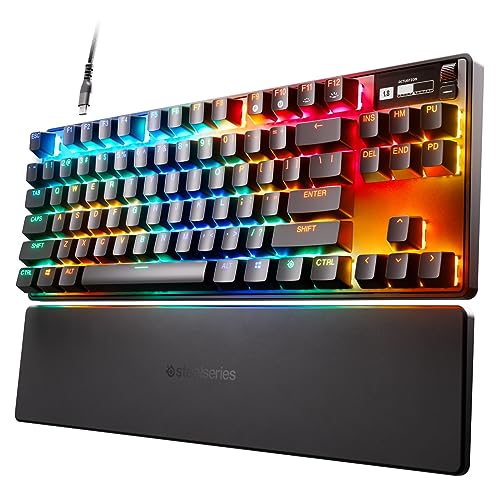
SteelSeries Apex Pro TKL HyperMagnetic Gaming Keyboard
Inside Each Recommended Option
The Keychron Q3 Ultra is the kind of board that wants to retire your cable without giving up tournament-grade responsiveness. An 8000 Hz polling rate (the number of times per second the keyboard reports its state to the host) over a 2.4 GHz wireless link is rare territory, and Keychron pairs it with Bluetooth 5.3 for desktop hopping and a wired mode for when you want zero ambiguity about the connection.
The chassis is milled from 6063 aluminum, a corrosion-resistant alloy common in mid-to-high-end keyboard frames, which gives the board a planted, desk-anchored feel during long sessions. The TKL (tenkeyless) layout drops the number pad, freeing up mouse room for low-DPI sweeps in shooters. Hot-swappable sockets let you change switch feel without soldering, which matters for anyone who likes to tinker.
The Helpful Details
- 8000 Hz polling over 2.4 GHz wireless and USB, a real differentiator against the 1000 Hz ceiling most boards still ship with.
- Triple connectivity (2.4 GHz, Bluetooth 5.3, USB-C wired) covers console, laptop, and desktop workflows in one board.
- Hot-swappable switch sockets let you swap actuation feel without a soldering iron, a genuine ownership perk for tinkerers.
- Machined aluminum body resists flex, so the typing surface stays consistent during aggressive WASD mashing.
- ZMK firmware (an open-source keyboard firmware popular in the custom community) gives deep per-key remapping and layer support for power users.
- Included Mac and Windows keycaps mean cross-OS households won’t be hunting for replacements on day one.
Things To Consider
- Top-tier polling draws more power; you may find the battery drains faster when 8K mode stays active over wireless compared to the claimed 660-hour figure at standard rates.
- The metal body adds desk weight, which is great for stability but a real consideration for anyone who travels with their setup to LAN events.
Key Specs
Best Suited To
Competitive players who want wireless freedom without surrendering the polling ceiling of a wired board, and who appreciate a chassis that feels like a piece of equipment rather than a toy.
Look Elsewhere When
The Razer Huntsman Gaming Keyboard makes more sense if you specifically want a full-size layout with a number pad and don’t need wireless connectivity.
The white Keychron Q3 Ultra is essentially the first pick in a different colorway, and that matters more than it sounds. Light-finish keyboards show dust, fingerprints, and keycap shine faster than darker boards, so you’re signing up for a slightly higher maintenance routine in exchange for a cleaner desk presence. The internals, the 8000 Hz wireless polling, the aluminum chassis, and the ZMK firmware all carry over unchanged.
For a setup with light wood desks, neutral peripherals, or Scandinavian-flavored rooms, the white finish blends in where the black version would dominate. Functionally, expect identical performance to the black Q3 Ultra, which keeps this entry focused on aesthetics rather than raw capability.
Benefits That Matter
- Identical 8000 Hz wireless polling to the black version, so no performance compromise for the color preference.
- Light finish pairs naturally with bright, minimalist battlestation setups and wood-grain desks.
Worth Noting
- Light keycaps and chassis show oil and dust faster; owners commonly report more frequent wipe-downs to keep the board looking fresh.
- Identical price-to-feature ratio to the black variant, so you’re paying a premium for finish rather than extra capability.
- Same heavy aluminum body, which is worth weighing for portable use cases.
Who It Suits Best
Owners with curated, light-toned setups who want the same wireless 8K performance as the black version and don’t mind the extra cleaning that lighter finishes demand.
Swap It Out When
The SteelSeries Apex Pro TKL HyperMagnetic Gaming Keyboard is the better match if adjustable per-key actuation matters more to your playstyle than a wireless connection.
The Razer Huntsman was one of the first widely available keyboards to lean hard into optical switch technology, and the design still holds up. Optical switches register keypresses with a beam of light rather than metal contacts, so the actuation point (the depth at which a press is recognized) can be much shorter than a traditional mechanical switch. The result feels distinctly faster on rapid taps, which is exactly the sensation competitive players chase.
The full-size layout keeps the number pad, which streamers and MMO players tend to want. Chroma RGB lighting integrates with popular games and a wide ecosystem of partner hardware, turning the board into a centerpiece of a themed battlestation. The matte aluminum top frame adds structural rigidity, helping the deck feel planted during marathon sessions.
What It Does Well
- Optical switches register presses at 1.5 mm of travel, a shorter distance than many clicky mechanical switches, which translates to faster repeat taps during sustained movement.
- Clicky optical feedback gives a tactile confirmation that many typists and rhythm-game players prefer over silent linear options.
- Full-size layout with number pad supports MMO bindings, productivity work, and content creation in a single board.
- Chroma RGB ecosystem syncs with compatible games and partner gear, useful for streamers running a unified visual theme.
- Aluminum top plate stiffens the typing surface, reducing the hollow sound some plastic-frame boards produce.
Trade Offs
- The clicky optical switch profile is louder than linear options, worth considering for shared rooms or late-night sessions.
- Wired-only design means no wireless flexibility, unlike the Keychron Q3 Ultra on this list.
- Full-size footprint takes up substantial desk real estate, which can cramp smaller setups.
Made For
Owners who want a wired, full-size board with clicky optical feedback and a polished RGB ecosystem, especially those who already use other Razer peripherals.
Consider Something Else When
The Keychron Q3 Ultra Wireless Mechanical Keyboard (Black) is the stronger pick if you specifically need a wireless board with 8K polling and a TKL layout.
The Apex Pro TKL takes a different angle on speed by letting you decide what “fast” means for each key. The OmniPoint 2.0 switches use Hall-effect magnetic sensing (a contactless design that detects key position via magnetic field changes rather than physical contact) and support 40 levels of per-key actuation between 0.1 mm and 4.0 mm. Set your WASD cluster to a hair-trigger 0.3 mm press and your utility keys deeper so you stop misfiring grenades.
Rapid Trigger is the headline feature for esports: instead of a fixed reset point, keys register repeated inputs the instant they travel back upward. In practice, that means faster counter-strafing in tactical shooters and tighter input windows in fighting games. The TKL layout, integrated OLED screen, and PBT keycaps (a textured, shine-resistant plastic) round out a board built for serious competitive use.
A Favorable Mix
- Per-key actuation from 0.1 mm to 4.0 mm lets you tune movement keys and ability keys independently, a real advantage in mixed-input games.
- Rapid Trigger technology recognizes resets based on travel distance, which can noticeably improve counter-strafe timing in tactical shooters.
- PBT keycaps resist the greasy shine that ABS caps develop over years of heavy use.
- Integrated OLED screen surfaces live game info, system stats, or custom animations without taking up monitor space.
Honest Caveats
- The feature set demands time in the configuration software; expect a learning curve before the per-key tuning pays off.
- Wired USB-C connection only, so it won’t replace a wireless board for clean-desk setups.
- The TKL layout still occupies a sizable footprint, even without the number pad.
Key Specs
The Right Fit
Esports-minded players who want granular control over each key’s actuation point and value Rapid Trigger mechanics for fast directional inputs.
Where Another Pick Suits Better
The Razer Huntsman Gaming Keyboard fits better for someone who wants a full-size layout, clicky optical feedback, and a deep RGB ecosystem without per-key tuning.
What Matters Most Before Choosing Fastest Gaming Keyboards
Polling Rate and Actuation
Polling rate measures how often the keyboard reports its key state to the host. Most boards ship at 1000 Hz, meaning one report per millisecond. The Keychron Q3 Ultra pushes that to 8000 Hz over its wireless and wired modes, which means reports every 0.125 ms. In practice, the human hand cannot outpace 1000 Hz in most scenarios, but higher polling narrows the window for stacked inputs during very fast sequences. Actuation depth, the distance a key travels before registering, matters more directly: shorter actuation equals less finger travel, which adds up across thousands of inputs per match.
Switch Technology Choices
Optical switches use a light beam to register presses, allowing shorter actuation and no metal contact wear. Magnetic Hall-effect switches detect key position magnetically, enabling per-key actuation tuning and the Rapid Trigger behavior found in the SteelSeries Apex Pro TKL. Traditional mechanical switches rely on metal contact leaves, and they remain popular for their tactile variety and lower cost, but they generally cannot match the reset speed of the newer technologies.
Layout and Desk Footprint
TKL boards drop the number pad, which saves roughly four inches of width and gives the mouse more room to roam. Full-size boards keep the numpad for productivity, data entry, and MMO bindings. Consider how much desk real estate you have, where your mouse lives during play, and whether you regularly use the numpad for non-gaming tasks.
Connectivity and Build
Wireless boards offer cleaner setups and more flexible placement, but they introduce battery management and occasionally rare connection hiccups. Wired boards remove both concerns and tend to be the default in tournament play. Aluminum frames resist flex and feel more substantial, while plastic frames cut weight and cost. Hot-swappable switch sockets add long-term flexibility for anyone who likes to change switch types without tools.
Key Considerations Across These Picks
Mistakes Worth Dodging
Picking on polling rate alone is a common trap. The jump from 1000 Hz to 8000 Hz matters for stacked inputs, but it won’t fix a switch type that doesn’t match your finger pressure preferences. Sample actuation feel before committing if you can. Also, overlooking the desk footprint of a full-size board leads to cramped mouse movement, which then undermines any speed advantage the keyboard itself provides.
Where The Extra Money Goes
Higher-tier models in this category fund features that genuinely change the feel of the board. Adjustable per-key actuation on the Apex Pro TKL, 8K wireless polling on the Keychron Q3 Ultra, and milled aluminum chassis across the top picks all add real engineering cost. The upgrade is worth it for players who can feel the difference in their fingertips, but casual gamers running single-player titles won’t extract the same value from these refinements.
Frequently Asked Questions
What polling rate do I actually need for competitive gaming?
Most competitive players will never feel the difference between 1000 Hz and 8000 Hz in isolation, but 8000 Hz can matter when multiple inputs stack within a single frame. For the vast majority of gamers, a well-built 1000 Hz board still feels excellent.
Are optical switches really faster than mechanical?
Optical switches generally offer shorter actuation distances and faster reset behavior, but “faster” depends on the specific switch design. A high-quality mechanical switch can still outfeel a budget optical switch, so brand and tuning matter as much as the underlying technology.
Does a TKL layout hurt gaming performance?
TKL boards drop the number pad, which has no effect on standard WASD, ability, or function key inputs. The change frees up desk space for wider mouse sweeps, which most FPS players consider a net positive.
Is wireless gaming keyboard latency still a problem?
Modern 2.4 GHz wireless with sub-1 ms report rates has effectively closed the gap with wired boards for nearly all players. Bluetooth still introduces more latency and is best reserved for productivity use, not competitive play.
How important is hot-swappable switches for casual users?
Hot-swap sockets are most valuable for tinkerers who like to experiment with switch feel. Casual owners will likely leave the stock switches in for the life of the board, so the feature is a nice-to-have rather than a must.
Bottom Line
Your fastest keyboard is the one that matches your playstyle, your desk, and your tolerance for tuning. Competitive FPS players chasing every possible edge will gravitate toward the Apex Pro TKL’s per-key actuation, while anyone who wants wireless freedom and top-end polling will appreciate what the Keychron Q3 Ultra delivers. The Razer Huntsman remains a strong wired option for fans of clicky optical feedback, and the white Q3 Ultra exists for the matching-setup crowd. Pick based on the feature you’ll actually use daily, and the speed will follow.


