


Long sessions at a desk can leave your wrist, forearm, and fingers sore in ways a regular mouse just ignores. A well-shaped wired gaming mouse spreads that pressure across your hand instead of pinching it, and the cable means zero battery anxiety during a ranked match. The seven picks below cover a wide range of grips, hand sizes, and budgets, so you can stop fighting your gear and get back to the game.
A Closer Look At The Lineup

SUBSONIC Iron Maiden Wired Gaming Mouse (7200 DPI)

Razer Basilisk V3 Gaming Mouse + Bungee V3 Bundle

Razer Mamba Elite Wired Gaming Mouse (16,000 DPI)
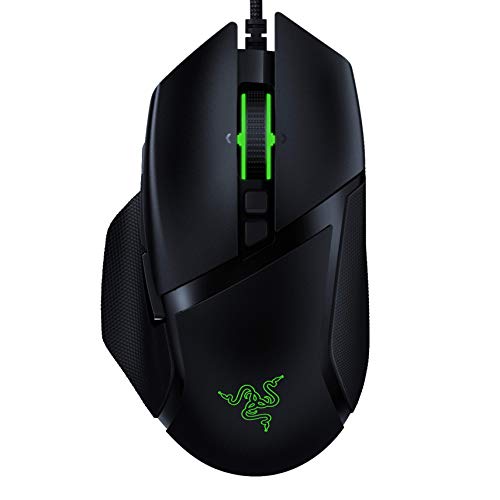
Razer Basilisk v2 Wired Gaming Mouse (20K DPI)

Glorious Model O Wired Gaming Mouse (Matte White)

Nulea Ergonomic Vertical Mouse Wired with RGB

Razer Gaming Mouse Bungee V3 Chroma
Meet The Standout Selections
Officially licensed Iron Maiden artwork gives this mouse a shelf presence most peripherals never manage, and underneath the band graphics sits a properly shaped right-handed body. The 7200 DPI optical sensor, which measures how precisely the mouse reads your hand movement on the pad, is plenty responsive for everyday gaming at 60 IPS tracking speed (inches per second the sensor can keep up with) and 20G acceleration (how many G-forces the sensor tracks during sudden flicks).
You get seven programmable buttons and a scroll wheel with a clickable tilt action for horizontal scrolling, plus a 1.5-meter braided-feeling cable that reaches most desk setups without a USB extension. The 66-gram weight keeps it light enough for long sessions, though it sits in a different class than the Glorious Model O we cover later. It is built for fans first and competitive players second, and that priority shows in the feature set.
Practical Advantages
- Licensed band artwork makes it a strong gift for Iron Maiden collectors
- 7200 DPI sensor handles casual FPS and MMO play without stuttering
- Seven programmable buttons cover push-to-talk, weapon swaps, and macros
- LED backlighting adds a touch of personality without feeling gaudy
- Light 66-gram body reduces forearm fatigue during multi-hour sessions
Things To Consider
- Plastic shell feels lighter on premium heft than the Razer entries below
- Sensor resolution sits well below the 16K to 20K range offered by competing picks
Who It Suits Best
Casual players and music fans who want a conversation-starting mouse that handles everyday ranked play without complication.
A Better Fit Elsewhere
Competitive FPS players chasing the highest DPI ceiling should look at the Razer Basilisk v2 instead, which carries a 20K sensor in a more performance-driven shell.
This bundle pairs Razer’s flagship ergonomic right-hander with the V3 Chroma bungee, which is a small weighted stand that holds your cable off the desk so it never drags on your mousepad. Eleven programmable buttons (the so-called 10+1 count includes a multi-function trigger paddle on the side) make it a strong fit for MMO players running dense action bars, while 11 RGB lighting zones along the body and underglow let you match the rest of a Chroma-equipped battlestation.
The Gen-2 optical switches register clicks at the speed of light rather than through metal contacts, so debounce delay (the tiny pause the switch needs to avoid double-clicks) is essentially eliminated and the rated lifespan stretches to 70 million clicks. You will pay for the privilege, and the bundle takes up more desk space than a mouse alone, but cable drag disappears in practice.
What Makes Sense
- Eleven programmable inputs cover raid calling, push-to-talk, and complex macros
- Gen-2 optical switches deliver 70 million click durability with crisp actuation
- Bundle includes the V3 bungee, solving cable drag in one purchase
- Eleven Chroma lighting zones sync with over 150 integrated games for reactive effects
Worth Noting
- Right-handed shape only, so left-handed users need to look elsewhere
- Full feature set requires Razer Synapse software on a Windows machine
Made For
Right-handed MMO and MOBA players who run packed action bars and want their cable managed in a single purchase.
Look Elsewhere When
Ambidextrous grippers should consider the Glorious Model O, which suits both hands and weighs noticeably less for twitchy FPS play.
The Mamba Elite slots into Razer’s lineup as a wired take on the older Mamba Wireless, leaning on the proven 5G optical sensor rated at 16,000 DPI for accurate tracking. Nine programmable buttons sit within easy reach, and the side panel gives thumb buttons that feel solid rather than mushy. Razer mechanical switches are rated for 50 million clicks, and they offer a slightly more tactile feel than the optical switches found in the newer Basilisk V3 we covered above.
Extended Chroma lighting wraps around the sides and the scroll wheel, so the mouse glows from more angles than most competitors. Onboard memory holds up to five profiles, which lets you carry different button layouts to LAN parties without reinstalling software. For most right-handed gamers, this is the safe, familiar choice.
The Helpful Details
- 16,000 DPI sensor provides ample headroom for high-resolution multi-monitor setups
- Mechanical switches offer a familiar, tactile click feel that longtime Razer users recognize
- Onboard memory stores five profiles for travel between setups
- Extended RGB strips along the sides and under the scroll wheel
- Right-handed ergonomic shape with a generous thumb rest
Honest Caveats
- Heavier body than the Glorious Model O, so flick movements take more effort
- Full software customization depends on Razer Synapse 3
Right Fit For
Right-handed gamers who prefer the feel of mechanical switches and want plenty of RGB without the V3 bundle’s higher cost.
Skip It When
Speed-focused claw-grip players will get faster swipes from the lighter Glorious Model O, which weighs in at 67 grams versus the Mamba Elite’s heavier frame.
The Basilisk v2 leans hard into competitive FPS, headlined by the Focus Plus 20,000 DPI optical sensor and Razer’s optical switches that actuate without the debounce delay of traditional mechanical designs. Eleven programmable buttons, including the signature sniper paddle on the side, give you a clutch DPI drop on demand, a feature snipers and counter-strike players tend to rely on. The Speedflex cable is light and flexible enough that you may not need a bungee.
On-the-fly sensitivity adjustment through dedicated DPI buttons keeps you from alt-tabbing to Synapse mid-match, and 16.8 million Chroma color combinations cover every imaginable battlestation theme. Max acceleration hits 50G, which means the sensor keeps tracking during aggressive flicks. It is the pick for shoppers who treat their mouse like a precision instrument.
Key Advantages
- Focus Plus 20K DPI sensor is the highest-resolution option in this lineup
- Optical switches eliminate debounce and last longer than mechanical counterparts
- Speedflex cable reduces drag without a bungee accessory
- Dedicated sniper paddle offers a clutch DPI drop with a thumb press
Room For Improvement
- Right-handed only and a bit heavy for palm-grippers chasing the lightest feel
- Lacks the bungee included in the Basilisk V3 bundle
Best Suited To
Competitive FPS players and ranked grinders who want the highest sensor resolution and the snappiest switch actuation available.
Not Your Match When
Office-leaning users with wrist discomfort should consider the Nulea vertical mouse, whose 57-degree angle reduces forearm pronation far more than this right-handed shell can.
The Model O is the lightweight specialist of the group at just 67 grams, with a honeycomb shell that punches ventilation holes through the chassis to drop mass without sacrificing rigidity. The Pixart 3360 sensor is a long-trusted workhorse (a sensor model widely considered a baseline for accurate tracking), and Omron switches provide the familiar crisp click that millions of gaming mice have shipped with. Unlike the right-handed Razer entries above, this body is ambidextrous, so southpaw players are not locked out.
The Ascended Paracord cable is light and flexible enough to feel close to a wireless setup, and the pure PTFE (polytetrafluoroethylene, a slick low-friction plastic) mouse feet glide smoothly across cloth and hard pads. Owners commonly report the matte finish picking up fingerprint oils faster than solid-shell mice, so a microfiber cloth nearby is a smart habit. For medium and large hands, the claw grip feels right at home.
Bright Spots
- 67-gram weight is the lightest in this roundup, ideal for fast flicks
- Honeycomb shell keeps the body cool during long sessions
- Ambidextrous shape welcomes left- and right-handed users
- Ascended Paracord cable approaches the feel of a wireless connection
Points To Keep In Mind
- Honeycomb holes can collect dust and skin oil over time
- Lower button count than the Razer Basilisk entries, limiting macro-heavy MMO play
Perfect Match For
Speed-focused claw-grip players with medium or large hands who want a featherlight shell and ambidextrous comfort for both ranked matches and general use.
Reach For A Different Pick When
Users who fill every action bar with macros should step up to the Razer Basilisk V3, whose eleven programmable inputs leave more room for keybindings than the Model O’s six.
Vertical mice flip the script by holding your hand in a handshake position, and Nulea’s 57-degree tilt keeps the forearm in a more neutral posture than a flat mouse can. The trade-off is real, so users coming from a traditional shape should expect a short adjustment window before muscle memory settles in. Six buttons cover the basics, and 11 RGB backlight modes add a touch of personality to a productivity-focused design.
Adjustable DPI steps at 800, 1200, 1600, and 2400 give you enough granularity for office apps, browsing, and casual games. This is not a competitive FPS tool, and the slower sensor tops out well below the 20K offered by the Razer Basilisk v2. For shoppers whose main goal is reducing wrist discomfort during long workdays, the shape alone justifies the look.
The Case For It
- 57-degree vertical grip reduces forearm pronation, easing wrist strain
- Four DPI presets cover office tasks and light gaming
- Eleven RGB backlight modes add some flair to a productivity setup
Trade Offs
- Vertical grip requires several days of adjustment for new users
- Not suited for fast-paced FPS or MMO play where quick flicks matter
Who Should Grab It
Office workers, students, and anyone with recurring wrist discomfort who wants a productivity mouse shaped for long typing and browsing sessions.
Another Choice May Suit
Gamers who still want ergonomic comfort should consider the Razer Basilisk v2, which keeps a traditional shape but offers a sculpted right-handed grip with a more capable sensor.
The V3 Chroma is not a mouse at all but a weighted cable holder, and it solves one of the oldest problems in wired gaming: the cable snagging on your mousepad edge mid-flick. A spring-loaded arm threads your mouse cord through the top, holding it at the ideal angle so slack stays managed no matter how aggressively you move. The weighted base keeps the unit planted, and the non-slip feet underneath stop it from creeping across a glossy desk.
Chroma underglow syncs the bungee with the rest of a Razer setup, so it visually belongs in the same ecosystem as the Basilisk V3. Pair it with the Model O for an effective wired-without-drag experience, or use it with any of the entries above that ships without a bundled bungee. It is a tidy upgrade for shoppers who already own a mouse they love.
The Upside
- Spring-loaded arm eliminates cable drag during fast mouse movements
- Weighted base and non-slip feet keep the unit stationary during play
- Chroma underglow ties into an existing Razer lighting setup
- Universal compatibility with any standard wired gaming mouse cable
Points To Note
- Adds desk clutter compared to a mouse alone
- Most useful only for users who already own a wired mouse they want to keep
Whose Shelf It Belongs On
Wired mouse owners who want consistent cable feel without switching to a wireless setup, especially those already invested in Razer Chroma.
Swap It Out When
Shoppers who want a single-box solution should grab the Razer Basilisk V3 bundle, which pairs the mouse and bungee together for less hassle than buying them separately.
What To Weigh Before Picking an Ergonomic Wired Gaming Mouse
Sensor resolution matters less than sensor quality. DPI (dots per inch, how sensitive the mouse is to hand movement) numbers above 16,000 rarely change how a game feels, and a well-tuned sensor at 12,000 DPI tracks more accurately than a sloppy sensor at 20,000. The Pixart 3360 in the Glorious Model O and the Focus Plus in the Razer Basilisk v2 both belong to a class of proven sensors, so prioritize tracking consistency over headline numbers.
Shape and grip style drive comfort more than any spec sheet. A palm grip favors taller, contoured bodies like the Razer Basilisk v2 or Mamba Elite, while claw and fingertip grips benefit from the shorter, lighter Model O. If your wrist aches by the end of a workday, the Nulea vertical mouse removes pronation entirely, but the trade-off in speed is real.
Cable management changes how a wired mouse actually feels. A flexible paracord or Speedflex cable reduces drag on its own, and a bungee like the Razer V3 Chroma removes the last bit of snag. Consider the surface beneath your mouse too, since PTFE feet and a quality pad work together to keep movement smooth.
Programmable buttons should match your games. MMO players benefit from the eleven-button layouts of the Razer Basilisk entries, while FPS players rarely use more than the standard six-plus-DPI cluster. Onboard memory, present in the Mamba Elite, becomes useful if you travel between setups with a laptop.
Things Most Shoppers Miss When Buying Wired Gaming Mouses
Buying on DPI alone is the easiest trap. The jump from 12,000 to 20,000 DPI does not make a mouse faster or more accurate, and the extra resolution mostly serves multi-monitor 4K setups. For a single 1080p or 1440p monitor, a sensor in the 12K to 16K range delivers all the precision you can actually use.
Ignoring hand size and grip style leads to a mouse that fights you. A small-handed palm grip on a wide shell like the Mamba Elite causes finger reach issues, while large-handed fingertip players on a small ambidextrous body lose control. Match the shape to your grip, not to the marketing photos.
Skipping the cable reality is a quiet regret. A stiff cable on a lightweight shell still feels heavy, and a bungee or paracord is what bridges the gap between wired and wireless feel. The Razer Basilisk V3 bundle and the standalone V3 Chroma bungee both address this directly.
Frequently Asked Questions
How many programmable buttons do most ergonomic wired gaming mouses offer?
Most entries in this category ship with six to eleven programmable buttons, with eleven-button models like the Razer Basilisk v2 and Basilisk V3 targeting MMO players and six-button models like the Glorious Model O favoring FPS-focused minimalism.
Are wired gaming mouses better for competitive play than wireless?
Wired connections remove battery anxiety and avoid the tiny input lag that wireless protocols can introduce, and most esports pros still prefer wired setups for that reliability. Wireless has closed the gap, but wired remains the simpler choice for tournament play.
What does a higher DPI sensor actually do for gaming?
A higher DPI sensor gives you more headroom to move the cursor across large or multiple displays, and it lets you tune sensitivity to very specific values. For most single-monitor setups, anything above 12,000 DPI is more about flexibility than raw performance.
Is a vertical ergonomic mouse good for gaming?
Vertical mice reduce forearm strain during long work sessions, but the handshake grip sacrifices the wrist mobility that fast FPS and MMO play demand. Stick with a traditional ergonomic shape like the Razer Basilisk entries for gaming, and consider a vertical mouse like the Nulea only for office use.
Do I need a mouse bungee if my mouse has a flexible cable?
A paracord or Speedflex cable cuts drag significantly, and you may not need a bungee at all. A bungee becomes useful when your cable is heavier, your mousepad is small, or you make aggressive wide movements that catch the cord on the pad edge.
The Takeaway
The right ergonomic wired gaming mouse comes down to grip, shape, and how many inputs you need during play. The Razer Basilisk v2 leads on raw sensor performance, the Glorious Model O wins on weight, and the Nulea vertical mouse solves wrist strain in a different way. Pick the one that matches the way you actually hold a mouse, and the rest tends to fall into place.


