


Spending hours in a chair with a keyboard, mouse, and triple monitors means your spine absorbs every wobble, and a cramped surface turns a clean rig into a cable jungle. The right desk changes the whole experience, giving your arms room to swing, your monitors a stable perch, and your headset a place to live when you step away. This roundup focuses on desks that handle full gaming setups, not just a laptop and a notebook, so you can stop balancing gear on shelves that weren’t built for it.
How The Shortlist Stacks Up
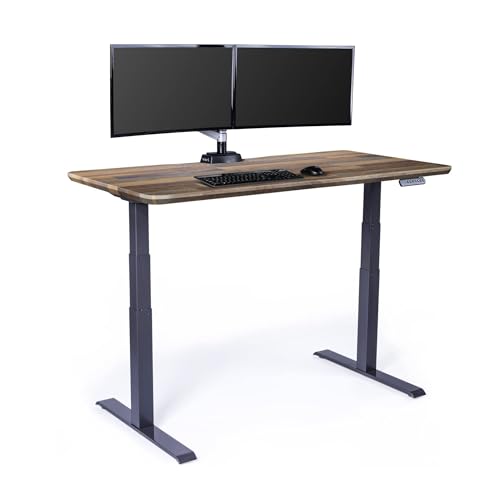
Vari Classic Electric Standing Desk 60×30

SIAGO Black 60×28 Standing Desk

EUREKA ERGONOMIC 60 Inch Gaming Desk

ODK 66 Inch L Shaped Gaming Desk

ODK 53 Inch L Shaped Gaming Desk

ODK 48 Inch L Shaped Gaming Desk

Desktronic HomeOne Standing Desk 54×28

AODK 63 Inch L Shaped Gaming Desk

Aquzee Computer Desk with Shelves

Bestier 47 Inch Desk with Bookshelf
What Each Pick Brings To The Table
A standing desk earns its keep when it disappears into your day, and the Vari Classic does exactly that. The pre-installed frame and slide-and-lock legs mean you can be moving boxes in the morning and gaming by afternoon without losing a weekend to assembly.
The reclaimed wood laminate top sits on heavy-duty steel T-style legs, giving a sturdy base for a dual-monitor setup plus a center channel speaker. Compared to the standing desks that come later in this list, the Vari leans more toward office polish than RGB personality, which suits players who split time between spreadsheets and shooters.
What Pays Off
- One-piece tabletop with a 3D laminate finish that shrugs off coffee rings and headset cable scuffs
- Slide-and-lock leg assembly reportedly takes under ten minutes with basic tools
- Sturdy T-style steel legs keep the desk planted during intense mouse swipes
- Reclaimed wood aesthetic reads as furniture, not just gaming gear
Things To Consider
- No built-in power outlets, so you’ll likely add a surge strip underneath
- Standing-desk height range is great for work but worth measuring for tall monitor arms
Key Product Details
Right Fit For
Remote workers and gamers who want a single desk that handles long workdays and weekend sessions without screaming “gamer” to the rest of the household.
Swap It Out When
You want built-in charging and LED lighting out of the box, in which case the ODK 66″ Large L Shaped Gaming Desk is a more direct match.
Thick tops and serious frames matter when your PC tower weighs as much as a small child. The SIAGO leans into that reality with a one-inch tabletop and a 2.5mm steel base, which is overkill for a laptop-and-notebook setup but ideal for a full tower with a custom loop.
Where the Vari focuses on looks and the ODK models pile on features, the SIAGO stakes its claim on raw structural support. A reinforced double-beam design helps when you brace your forearms during a tense match, and the lift capacity opens up options for clamp-mounted monitor arms that stress lighter desks.
Features That Help
- One-inch-thick desktop reduces flex even when you lean on the edge
- 2.5mm steel base paired with double-beam frame for a planted feel
- Lift capacity handles dual ultrawides plus a tower without strain
- Wide 60×28 surface gives mouse-pad room for low-DPI aiming
Worth Noting
- Plain aesthetic with no LEDs or gaming trim, so it blends into a home office
- Heavier frame makes room-to-room moves a two-person job
Built With In Mind
Power users running heavy towers, multiple ultrawides, and clamp accessories who care more about stability than RGB glow.
Consider Something Else When
Your setup is lighter and you want a sit-stand frame with more memory presets, in which case the Desktronic HomeOne Standing Desk fits the brief better.
Once you add a second monitor, a stream deck, and a microphone arm, a 48-inch desk starts feeling like a phone booth. The EUREKA ERGONOMIC stretches to 60 inches and adds RGB lighting, which is the point: this desk is built to look like part of the rig, not furniture that happens to hold a PC.
The reinforced Z-shaped frame is a smart choice for wide tops because it limits end-to-end sway when you flick a mouse across a long pad. Leveling feet are a small detail that pays off in older homes with uneven floors, and they keep the desk from rocking when your chair rolls across the room.
What It Does Well
- 60-inch top fits dual monitors plus a streaming camera and mic arm without overlap
- Z-shaped metal frame keeps the wide surface stable during fast mouse movement
- RGB lighting ties the desk visually to your other components
- Leveling feet compensate for uneven flooring in older apartments
Points To Note
- RGB controller typically lives under the desk, so plan cable routing before final placement
- Wide footprint needs at least a 65-inch wall clearance to feel open
Whose Shelf It Belongs On
Streamers and content creators running dual screens, lighting, and a mic setup who want the desk to match the rest of the build.
Not Your Match When
You’re tight on floor space and need the L-shape wraparound, which the ODK 66″ Large L Shaped Gaming Desk handles more efficiently.
An L-shaped desk earns its footprint by giving you two zones, one for the keyboard and mouse, another for the printer, laptop, or snack zone. The ODK 66-inch leans into that, and then layers on the things you usually buy separately: three power outlets, two USB ports, and RGB lighting with ten color options and ten modes.
The LED memory function is the kind of small touch that matters on day thirty, not day one, because nobody wants to re-pick their favorite shade every session. A built-in monitor stand lifts your screen to a more natural neck angle, which is genuinely useful during the long stretches between matches.
What Works In Its Favor
- Three outlets and two USB ports on the desk cut down on the power-strip octopus behind it
- Built-in monitor stand improves neck alignment for long sessions
- LED memory retains your last color and mode between power cycles
- 66-inch L-shape fits a corner and gives you a dedicated secondary work surface
Honest Caveats
- L-shape demands a real corner, so it’s a poor fit for long, narrow rooms
- Bundled features add weight, so the box is awkward to move upstairs solo
Feature Snapshot
Made For
Gamers with a dedicated corner and a long accessory list, including headsets, phones, and streaming gear that all need to plug in at once.
A Better Fit Elsewhere
You don’t have a corner to wrap, in which case the EUREKA ERGONOMIC 60 Inch Gaming Desk gives you width without the L.
Not every battlestation needs to dominate a room. The 53-inch ODK keeps the L-shape footprint of its bigger sibling but pulls the dimensions back, making it a friendlier pick for bedrooms and shared spaces. The dual shelves and CPU stand are where this desk quietly wins, because they hold the parts you don’t want sitting on the floor.
An accessory hook and small tool bag handle the spillover: cables, game cases, the random screws from a recent upgrade. It works well as a homework desk that moonlights as a gaming setup, and the power outlets keep charging simple without forcing a second wall adapter into the mix.
What Makes Sense
- Compact L-shape fits in rooms where the 66-inch version would feel oversized
- CPU stand gets the tower off the carpet and into airflow-friendly territory
- Dual shelves organize games, manuals, and small accessories
- Accessory hook and tool bag keep the desktop free of clutter
Trade Offs
- Smaller surface limits triple-monitor ambitions
- Shelf height works for mid-size towers, so check clearance for tall cases
Best Suited To
Teen bedrooms, small apartments, and shared spaces where the desk has to multitask between homework, gaming, and storage.
Look Elsewhere When
You need a wider primary surface for ultrawides, in which case the ODK 66″ Large L Shaped Gaming Desk gives you the room.
Dorms and small bedrooms ask a lot of a desk, and most L-shapes fold under the pressure. The 48-inch ODK stays in the fight by trimming just enough surface to clear narrow doorways while keeping the features that make L-shapes worth the footprint, like the outlet cluster and LED lighting.
For most apartments, a 48-inch L delivers a workable primary zone plus a usable side wing, enough for a laptop, notebook, or controller charging dock. The LED setup mirrors the larger ODK models, so the look stays consistent if you later upgrade to a bigger setup.
The Upside
- Compact L fits through standard doorways and into tighter room layouts
- Three outlets plus two USB ports handle a phone, headset, and mouse pad at once
- Colorful LED lights match the look of larger ODK models
- Side hook gives headphones a dedicated home
Soft Spots
- Smaller primary surface can feel cramped with a 32-inch monitor plus a laptop
- LED controller placement is shared across the line, so plan cable runs early
Who Will Love This
Students in dorms and renters in small bedrooms who want a feature-rich L-shape without sacrificing walkable floor space.
Reach For A Different Pick When
Your monitors are larger than 27 inches, in which case the ODK 53″ L Shaped Gaming Desk adds meaningful surface area.
Sitting for eight hours hurts, and standing all day just trades one ache for another. The Desktronic HomeOne is built for the in-between, with dual synchronized motors that move the surface smoothly, three memory presets for quick transitions, and a touchscreen that makes the whole thing feel less like gym equipment.
The European build and reinforced steel frame target a wobble-free top even at standing height, which is the detail that separates serious sit-stand desks from wobble-fests. Integrated USB and USB-C charging ports mean your phone and wireless headset can top off without a separate dock cluttering the surface.
Benefits That Matter
- Dual motors lift the top evenly, so a heavy monitor arm doesn’t tilt the surface
- Three memory presets let you switch positions in seconds
- Built-in USB and USB-C ports reduce cable clutter on the desktop
- Touchscreen controller is more intuitive than button-based panels
Where It May Fall Short
- No LED lighting, so it leans office rather than gaming in personality
- Premium framing makes it heavier than fixed-height alternatives
Who Should Grab It
Health-conscious players who game in long blocks and want to alternate between sitting and standing without adjusting the desk by hand.
Where A Sibling Pick Shines
You want a sit-stand frame with a larger top for triple-monitor setups, in which case the Vari Classic Electric Standing Desk offers more width.
If your gaming corner doubles as a display case for figures, controllers, and limited-edition gear, a plain rectangular desk feels like a missed opportunity. The AODK 63-inch puts a four-compartment hutch and a pegboard right in the L, so the things you want visible stay visible and the things you need reachable stay close at hand.
The dedicated PC tower shelf keeps a full-size case standing upright with airflow around it, and the pegboard handles headphones, controllers, and cables without eating into your primary mouse surface. It’s the most “showpiece” desk in this list, and for some players, that’s exactly the point.
Strengths Worth Knowing
- Four-compartment hutch showcases figures, models, and collectibles
- Pegboard keeps headphones and controllers off the desktop
- Dedicated PC tower shelf lifts the case for better airflow and visibility
- 63-inch L-shape balances display space with usable work surface
Points To Keep In Mind
- Hutch adds visual weight, so it dominates smaller rooms
- More built-in sections mean more surfaces to dust during routine cleaning
Perfect Match For
Collectors and showcase-build enthusiasts who want their battlestation to display gear as much as support it.
Skip It When
You’d rather keep the desktop minimal and clean, in which case the EUREKA ERGONOMIC 60 Inch Gaming Desk is a simpler stage.
A 47-inch surface handles a 24-inch monitor, a keyboard, and a notebook with room to breathe, and the Aquzee adds an open hutch and bookshelves to keep reference material, plants, and a few trophies within arm’s reach. The three shelves stretch the full 47-inch width, so they read as a continuous storage band rather than three separate cubbies.
There’s no LED lighting, no gaming trim, and no built-in outlets, which is the point. For hybrid-use rooms where schoolwork or writing sessions sit alongside evening gaming, the cleaner look tends to age better than RGB-heavy alternatives.
Strong Points
- Three full-width shelves keep books and supplies organized in plain sight
- 47-inch depth-friendly footprint fits against a single wall
- Open hutch lets you grab reference material without standing up
- Neutral styling transitions between study and gaming sessions
A Few Limitations
- No built-in power, so plan for a power strip under the desk
- No monitor riser, so a separate stand helps posture for taller players
The Right Fit
Students, writers, and hybrid-use households that want a quiet, shelf-rich desk to anchor schoolwork and casual gaming.
Not Your Match When
Your setup needs a CPU tower shelf and charging ports, which the ODK 53″ L Shaped Gaming Desk covers in one piece.
Not every first battlestation needs to be a statement piece, and the Bestier knows it. A 47-inch desktop pairs with a four-tier bookshelf to give you storage and a work surface in one footprint, and the rustic brown finish hides the minor scuffs that show up in the first year of use.
Plenty of leg room matters more than people expect: it’s the difference between sitting cross-legged during a long stream and constantly bumping your knees. The reported easy assembly is a real plus if you’re piecing together a setup in a dorm room without a garage full of tools.
A Strong Showing
- Four-tier vertical storage makes the most of small room footprints
- Plenty of leg room supports long sitting sessions without knee contact
- Rustic brown finish forgives minor scratches and dings
- Reportedly easy assembly for a desk with this much shelving
Room For Improvement
- Particle-board construction means you’ll want to avoid wet spills on the surface
- No dedicated cable management, so velcro strips help under the desk
Built With In Mind
First-time battlestation shoppers, students, and budget-conscious players who want real storage without a premium price tag.
Consider Something Else When
You want a sit-stand frame or L-shape wraparound, which the Vari Classic Electric Standing Desk or ODK 53″ L Shaped Gaming Desk provide respectively.
What Matters Most Before Choosing Desks For Gaming Setup
Surface Width And Depth
The first question is how much real estate your gear actually needs. A 24-inch monitor and a compact keyboard fit on 40 inches, but a triple-monitor rig, a stream deck, and a mic arm eat surface fast. Measure your widest monitor first, then add at least six inches of clearance on each side for peripherals and cable bend radius.
Frame Strength And Stability
Wider tops flex more, and flex shows up as monitor wobble during a hard mouse flick. Steel frames with reinforced crossbeams and leveling feet keep the surface planted, especially on older floors. Lifting capacity matters too, because clamp-mounted monitor arms add real leverage to the desktop.
Ergonomics And Adjustability
Standing desks reduce back strain during long sessions, but the lift mechanism matters as much as the height range. Dual motors keep the top level under heavy loads, and memory presets save you from re-measuring every time you switch positions. A built-in monitor stand or riser is a quiet win for neck posture.
Storage, Power, And Lighting
Built-in outlets and USB ports cut down on the power-strip chain behind the desk, and LED lighting ties the setup together visually. Shelves and hutches earn their keep in smaller rooms, where the desk has to double as a display case for figures, books, and daily accessories. Pick based on what you actually own, not what looks exciting in a product photo.
Key Considerations Across These Picks
Wrong Turns To Avoid
A common slip is choosing by total length without checking depth, because a 60-inch surface that only runs 24 inches deep won’t fit a 34-inch ultrawide plus a deep mouse pad. Another trap is buying an L-shape for a room without a true corner, leaving awkward dead space along one wall. Measure doorways, floor clearances, and monitor footprints before the box arrives.
What Separates Premium From Basic
The jump from budget to premium in this category shows up in three places: motor count on standing desks, thickness of the tabletop, and quality of the steel frame. A one-inch top resists flex that a half-inch top passes straight to your monitor, and dual motors handle heavy loads without the slow drift you see on single-motor frames. The premium tier also tends to include integrated charging, which removes a small daily annoyance that adds up over months of ownership.
Frequently Asked Questions
How Big Should A Gaming Desk Be?
For a single 24 to 27-inch monitor, a 48-inch surface gives you room to breathe. Dual monitors or a 32-inch ultrawide push you toward 55 to 60 inches, and triple screens or L-shape layouts benefit from 63 inches or more. Always measure your widest monitor and add clearance before committing.
Are L-Shaped Desks Better For Gaming?
L-shaped desks help when you want a dedicated zone for a second monitor, a streaming setup, or a printer. For a single-monitor gaming-only build, a wide rectangular surface often feels more open and gives your mouse arm more runway. Pick an L-shape for storage and zoning, not as a default.
Do Standing Desks Wobble At Full Height?
Single-motor frames can feel less stable at standing height under heavy loads, while dual-motor designs with reinforced steel tend to stay planted. The thicker the tabletop and the wider the base footprint, the less wobble you’ll notice. Spec sheets that list lift capacity and frame thickness give you a better read than marketing language.
Is Built-In RGB Lighting Worth It On A Gaming Desk?
RGB lighting is mostly aesthetic, but it can help the desk match a themed battlestation and reduce the need for separate light strips. The practical win is mood lighting during late sessions, not any performance boost. Skip it if your setup leans toward a clean, office-friendly look.
What Features Matter Most For A Heavy PC Tower?
A dedicated CPU shelf or floor cradle keeps the tower upright with airflow around it, and a desk rated for at least 150 pounds handles most full-size builds. Wide tops give you room to position the tower without blocking your leg space, and built-in cable management keeps power and display cables from tangling behind the panels.
Wrap Up
The right desk turns a pile of gear into a place you actually want to sit. Match the surface to your monitor count, the frame to your tower weight, and the extras to your room, and the rest of the setup tends to fall into place. Take your time measuring the space, and the rest of your build will feel right every time you sit down.


