


A good gaming DAC (digital-to-analog converter) takes the audio signal your PC produces and turns it into something your headphones can actually use, with more detail, more power, and often cleaner positional cues for competitive play. Most onboard motherboard audio is functional, but it shares power and circuit space with the rest of your rig, which means noise, interference, and a flat soundstage. An external DAC sidesteps all of that, and on a gaming PC it can be the difference between hearing an enemy reload around a corner and walking straight into them.
The picks below cover everything from compact dongles for laptop gamers to full desktop hubs that drive demanding headphones. A few lean toward hi-fi music, others are tuned for FPS footstep clarity, and a couple sit in the middle for people who game and stream. Use the table to scan the lineup, then read the detailed reviews for the models that match your setup.
A Closer Look At The Lineup

Logitech G502 HERO Mouse + G Pro X Headset Bundle

Fosi Audio C3 Gaming DAC Amp

Micca OriGen G3 USB and Optical DAC

Fosi Audio K7 DAC Headphone Amp

FiiO K11 DAC and Headphone Amplifier

Razer Kraken Ultimate RGB + Base Station V2

MECHEN AP10 USB DAC Dongle
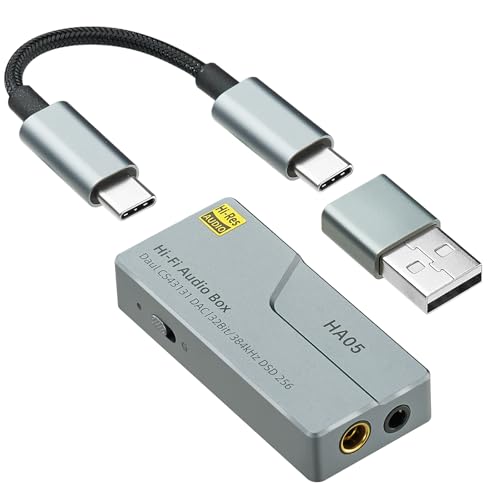
EYTSE HA05 Portable USB C DAC

Fosi Audio K5 Pro Gaming DAC Amp

TOPPING D50 III Dual ES9039Q2M DAC
More Details On Our Top Picks
This pairing is a bit of a curveball on a DAC roundup, since neither the G502 mouse nor the G Pro X headset ships with a standalone digital-to-analog converter, but the headset connects over USB and uses its own built-in processing to handle 7.1 surround sound. That sidesteps the need for any external audio hardware, which is genuinely useful for a new PC build where the budget is already spread thin across a GPU, storage, and peripherals.
The G502 HERO is one of the most recognized gaming mice in the category, and the G Pro X headset is the wired version of Logitech’s Pro line with a detachable mic. If you already have a DAC and amp you love, this bundle does not add anything new, but it covers the basics so a first-time builder can game on day one.
Well-Handled Touches
- Mouse and headset arrive together, so no driver juggling to get started
- The G Pro X headset handles its own spatial processing over USB, so no external DAC is required
- Logitech G Hub lets you tune the surround profile and EQ per game
- Detachable mic on the headset is a small but real win for streaming and travel
Worth Noting
- You’re still limited by the onboard USB audio inside the headset, not a true high-end DAC chain
- Upgrading the headset later means this bundle offers less long-term value than separates
Right Fit For
First-time PC builders putting together a complete setup on a tight budget who want peripherals and headset audio handled in one purchase.
Swap It Out When
You already own a quality mouse and want a dedicated DAC like the Fosi Audio C3 to unlock better positional audio in competitive shooters.
The C3 is built from the ground up for one audience: FPS players chasing every millisecond of audio information. Fosi Audio built it on the same platform as their K7, but layered in StepSense, a digital signal processing profile (a real-time audio filter that emphasizes specific frequencies) that pulls enemy footstep cues forward in the mix while keeping gunfire and explosions from drowning them out. For ranked play in Valorant, CS2, or Apex, that tuning matters more than raw resolution.
Connectivity covers USB to your PC, plus compatibility with PS5, Switch, and laptops, which is more cross-platform flexibility than most gaming DACs offer. A desktop volume knob keeps adjustments in arm’s reach, and the 7.1 surround mode can be toggled without diving into software menus.
Key Advantages
- StepSense profile is purpose-built for FPS positional awareness, not just music
- Native 7.1 surround handling without a third-party app
- Front-mounted hardware volume knob avoids alt-tabbing mid-match
- Works across PC, PS5, Switch, and laptops over USB
Points To Keep In Mind
- StepSense is a curated profile, not a fully customizable EQ
- Tuning skews bright and aggressive, which can fatigue ears during long single-player sessions
Feature Snapshot
Made For
Competitive FPS players who want positional audio and clear footstep cues without spending on a full audiophile chain.
Where Another Pick Suits Better
For pure music fidelity at the same price, the Micca OriGen G3 is a calmer, more neutral listen.
The OriGen G3 is a quieter pick, in a good way. It is a compact desktop DAC and headphone amp that also works as a preamp for a pair of powered bookshelf speakers, so it slots into a setup where your PC is feeding both headphones and a near-field speaker rig. The hi-fi focus shows up in the 24-bit/192kHz playback support, which is higher than the 16-bit/48kHz baseline most games actually output but useful for lossless music and high-res streaming.
Where the C3 leans bright and aggressive, the OriGen aims for a neutral, slightly warm signature that works for long sessions of music, RPG soundtracks, and casual gaming. Volume control and input switching sit on the front, so reaching over to swap between headphones and speakers is quick.
A Strong Showing
- Doubles as a headphone amp and a preamp for powered speakers
- Neutral tuning that flatters both music and atmospheric games
- USB and optical inputs cover PCs, consoles, and TVs
Honest Caveats
- No 7.1 surround processing, so competitive FPS players lose positional cues compared to the C3
- Headphone output power is modest, so planar magnetic and high-impedance headphones will underperform
Who It Suits Best
Desktop listeners who split time between headphones and powered speakers and want a single, honest hub to manage both.
Consider Something Else When
You main competitive shooters and need the footstep boost and surround that the Fosi Audio C3 is built around.
The K7 is the bigger sibling to the C3 and the most flexible unit Fosi Audio makes for desktop use. It pairs an AKM AK4493S DAC chip (a high-performance converter known for low distortion and a smooth sound) with an XMOS XU208 USB processor, which together handle PCM audio up to 384kHz at 32-bit, well above what games require but ideal for hi-res music libraries. The TPA6120 headphone amp stage delivers up to 2100mW, enough to drive demanding over-ear headphones that smaller desktop units struggle with.
Connectivity is the real story: USB-C, Bluetooth with aptX HD and Low Latency, optical, coaxial, and a microphone input all sit on the back. Outputs cover 4.4mm balanced, 3.5mm single-ended, and RCA, so it serves as the central hub for a desk that mixes a PC, a console, and a pair of powered speakers.
Practical Pluses
- 4.4mm balanced output drives high-impedance headphones with headroom to spare
- Bluetooth with aptX Low Latency means wireless headphones stay in sync for gaming
- Microphone input lets a desk headset plug straight in, no separate interface needed
- Handles PCM 384kHz/32-bit, so lossless and hi-res files play back natively
Trade Offs
- Physical footprint is larger than the C3 or K5 Pro, so cable-heavy desks need to plan for the space
- Bluetooth adds convenience, but the wired USB path still sounds best for serious listening
Quick Facts
Best Suited To
Desktop users with multiple devices and harder-to-drive headphones who want one unit to handle it all.
Not Your Match When
You play on a laptop and need a pocket-sized dongle, where the MECHEN AP10 makes more sense.
FiiO built the K11 as a “set it and forget it” desktop unit that doesn’t need a computer science degree to operate. The front panel has a single volume knob and a small display, the back has every input you might want, and the chassis feels solid enough to live on a desk for years. Power output tops out at 1400mW, which is plenty for most over-ear headphones, including planar magnetics (a headphone driver type that uses a flat diaphragm and magnetic fields rather than traditional voice coils) that strain smaller amps.
Resolution is genuinely high-end: 384kHz/32-bit PCM and DSD256 (a high-density digital audio format prized for its accuracy) playback, with both 6.35mm single-ended and 4.4mm balanced headphone jacks, plus RCA line-out for powered speakers. For someone who games and listens to music in equal measure, that flexibility matters.
A Few Strong Suits
- 1400mW output handles demanding headphones without breaking a sweat
- 4.4mm balanced plus 6.35mm single-ended jacks cover most audiophile headphones
- DSD256 and 384kHz/32-bit PCM support covers hi-res music libraries
- Solid build with a clear front display, no menu diving required
Some Limits To Know
- No microphone input, so a separate interface is needed for a desk streaming mic
- No Bluetooth, so wireless convenience is off the table
- No dedicated FPS gaming mode, unlike the C3’s StepSense profile
Whose Shelf It Belongs On
Listeners who split time between immersive single-player games and serious music sessions and want a single desktop hub that excels at both.
Look Elsewhere When
Competitive FPS is the priority, where the Fosi Audio C3’s footstep-tuned profile will serve you better.
The Kraken Ultimate is a USB gaming headset that does its audio processing internally, so once again there is no separate DAC on the desk. What it does bring is THX Spatial Audio, an in-headset virtual surround implementation, plus full Razer Chroma RGB lighting (Razer’s ecosystem for syncing colorful lighting across compatible devices) on the earcups. The included Base Station V2 doubles as a headset stand and a Chroma controller, which is genuinely useful if your desk is short on USB ports.
The active noise canceling on the detachable microphone cuts down keyboard and ambient noise during voice chat, and the earcups use cooling gel-infused cushions that stay comfortable during long sessions. The whole package leans toward immersion and aesthetics rather than pure audio fidelity, but that is exactly what it is designed for.
The Upside
- All-in-one USB audio, no extra hardware or drivers to set up
- THX Spatial Audio provides convincing surround in games and movies
- Chroma RGB syncs the headset with the rest of a Razer setup
- Active noise canceling on the detachable mic improves call clarity
Where It Is Less Suited
- Closed-back design runs warm during long sessions, even with cooling gel
- You’re locked into Razer’s ecosystem for full feature access
Who Will Love This
Razer fans building out a fully synced Chroma setup who want headset audio and lighting handled in one package.
Reach For A Different Pick When
You want upgradeable separates, where the FiiO K11 paired with your own headphones will outlast any single headset.
The AP10 is what you reach for when “desktop” is a coffee shop table and a laptop. It is a thumb-drive-sized DAC that houses an ESS Sabre ES9028Q2M chip, the same converter family you find in full-size audiophile units, and it offers both 3.5mm and 4.4mm balanced outputs. For a small dongle, that is unusual, and the balanced output in particular gives high-impedance in-ear monitors more headroom than a typical phone or laptop jack.
Hardware decoding goes up to DSD256 and 32-bit/384kHz, so lossless and hi-res files play back natively. The catch, as with all dongles, is that output power is limited, so it pairs best with efficient in-ear monitors rather than power-hungry over-ear headphones.
Points In Its Favor
- Compact enough to live on a keychain or in a laptop sleeve
- 4.4mm balanced output is rare at this size and price
- ESS Sabre converter delivers a detailed, low-noise signal
- Plug-and-play over USB with no drivers to manage
A Few Limitations
- Limited output power means high-impedance over-ears will sound quiet
- No hardware volume control, so you’re at the mercy of source-level adjustments
Perfect Match For
Laptop and travel gamers who carry high-quality in-ear monitors and want better audio than a phone jack can deliver.
Skip It When
You sit at a desk full-time and want a stationary hub, where the Fosi Audio K7 or FiiO K11 are better fits.
The HA05 is the other strong dongle in this list, and it takes a slightly different approach than the MECHEN AP10. It uses dual Cirrus Logic CS43131 DAC chips (two converters running in parallel, which can improve channel separation and dynamic range) for what is marketed as studio-level fidelity, and it runs without an internal battery, drawing power straight from the USB-C port. That last point is genuinely useful: no charging routine, no dead dongle mid-flight.
The aluminum body is light, the 3.5mm and 4.4mm outputs cover most in-ear monitors, and 32-bit/384kHz plus DSD256 playback covers the hi-res format checklist. It works with phones, tablets, laptops, and anything else that outputs audio over USB-C, which makes it a strong travel companion.
The Value In It
- Battery-free design means one less thing to charge
- Dual CS43131 chips deliver a clean, low-noise signal
- Both 3.5mm and 4.4mm balanced outputs are available
- Wide device compatibility over USB-C
What To Weigh
- Drawing power from the host device will drain a phone battery faster than a passive dongle
- Heat builds up during long sessions, so it can feel warm to the touch
Who Should Grab It
Travelers and Switch players who want a small, no-fuss upgrade over built-in audio without a charging routine.
Where A Sibling Pick Shines
For pure desktop power and connectivity, the Fosi Audio K7 covers a lot more ground in a stationary setup.
The K5 Pro is the entry-level Fosi Audio desktop unit, positioned as a step up from motherboard audio without the sticker shock of the K7. It uses a Texas Instruments NE5532 op-amp (a small analog chip that shapes the headphone output’s character) for a clean, low-noise signal path, and it adds a microphone input that the smaller K7 siblings do not have. For a desk setup with a single headset and a pair of powered speakers, that mic input is genuinely handy.
Sample rates cover 24-bit/96kHz over USB Type-C and 24-bit/192kHz over optical or coaxial, which is more than enough for gaming and streaming. Bass and treble knobs on the front let you shape the sound without software, and the combined volume-and-power knob keeps the front panel uncluttered.
What Makes Sense
- Front-panel bass and treble controls let you tune without opening any app
- Microphone input supports a desk headset without a separate interface
- Compact footprint fits on smaller desks and crowded setups
- USB-C, optical, and coaxial inputs cover PC, PS5, and TVs
Soft Spots
- Output power tops out around 1000mW at 16 ohms, so very high-impedance headphones will underperform
- No surround processing, so competitive FPS players will want the C3 instead
Spec Overview
Built With In Mind
Budget-conscious builders who want a clear upgrade over motherboard audio and a microphone input in one small box.
A Better Fit Elsewhere
If you need footstep-tuned surround for competitive play, the Fosi Audio C3 is purpose-built for that.
The D50 III is the most resolving DAC in this lineup, and arguably overkill for gaming alone, but it is a serious value if you also care about hi-res music. Dual ES9039Q2M chips from ESS handle the conversion, supporting PCM up to 768kHz and DSD up to DSD512 (a higher-density variant of the DSD format, capable of capturing even finer musical detail). The CNC-machined aluminum chassis and 12V trigger input (a signal that lets the DAC power on and off in sync with other components) suggest this is built for a proper desktop audio stack rather than a casual setup.
Inputs cover USB, Bluetooth 5.1, optical, and coaxial, and outputs include RCA and TRS balanced. It is a pure DAC, so a separate headphone amp is required for cans, but paired with a quality amp it will out-resolve anything else in this roundup.
Standout Benefits
- Dual flagship ESS DAC chips deliver exceptional detail and low noise
- PCM 768kHz and DSD512 support future-proofs the unit for hi-res formats
- CNC aluminum chassis feels solid and looks at home in a reference setup
- 12V trigger allows integration with other audio gear
Factors To Consider
- No built-in headphone amp, so a separate amp is required for headphones
- Resolution exceeds what games actually output, so the gain is mostly musical
The Right Fit
Listeners who want a reference-grade DAC for music first and a clean, neutral source for their gaming PC second.
Another Choice May Suit
If you want a single box that does both DAC and headphone amp duty, the FiiO K11 is the more practical all-in-one.
Picking A DAC That Actually Helps Your Gaming PC
Not every DAC improves every setup, and the right choice depends on where you play, what headphones you own, and whether music matters as much as game audio. A dongle is enough if you game on a laptop with efficient in-ear monitors, while a desk-bound PC gamer with hard-to-drive over-ears benefits far more from a full desktop unit with serious output power.
The first thing to weigh is output power, measured in milliwatts. Higher-impedance headphones (those rated 250 ohms and up) need more current to reach a comfortable volume, and a small dongle will run out of gas long before the FiiO K11 or Fosi Audio K7. For most gaming headsets in the 32 to 80 ohm range, even an entry-level desktop unit has plenty of headroom.
The second is surround and processing. Native 7.1 surround on a DAC like the Fosi Audio C3 simulates directional audio for competitive shooters, and that processing happens in hardware, so it does not tax the CPU. DACs that lean toward hi-fi, like the Micca OriGen G3 or TOPPING D50 III, skip surround entirely in favor of cleaner stereo, which is the right call for music but the wrong call for ranked play.
The third is connectivity. USB is the baseline. Optical and coaxial matter if you also want to feed the DAC from a console or TV. Bluetooth is convenient for casual listening but adds latency (a small audio delay that can throw off game timing) that competitive players should avoid. A microphone input is worth looking for if your gaming headset uses a 3.5mm analog mic, since it removes the need for a separate interface.
Finally, think about form factor. Dongles disappear into a laptop bag. Desktop units stay put and tend to be the long-term home of a setup, since they handle more devices and more headphones. If you split time between a desk and a couch, owning both is a reasonable approach.
What To Watch Before You Buy
Where Shoppers Go Wrong
The most common mistake is buying a DAC for a headphone it cannot drive properly. A high-end DAC with weak output stage will sound quieter and thinner than a modest DAC with strong current delivery. Match the DAC to the headphone first, and worry about resolution second.
Another trap is chasing sample rates that the source never produces. PCM 768kHz on a DSD512-capable DAC sounds impressive on the spec sheet, but games output 16-bit/48kHz at most, and lossless music rarely exceeds 24-bit/192kHz. Extra resolution helps in theory, not in practice.
The Upgrade Payoff
Moving up from a budget desktop unit to a mid-range hub like the Fosi Audio K7 or FiiO K11 buys you better headphone output, more inputs, and the kind of build quality that lasts across multiple headphone upgrades. The high-end TOPPING D50 III makes sense only if you already have the amp and the headphones to match, since it is a dedicated DAC, not an all-in-one.
For most gamers, the meaningful upgrade is moving from onboard motherboard audio to any of the desktop units in this list. That step alone cleans up the signal, drives most headphones properly, and unlocks the kind of positional detail that competitive players notice immediately.
Frequently Asked Questions
Do gaming PCs actually need a DAC?
Most onboard audio works fine, but a dedicated DAC reduces electrical interference from the rest of the PC and gives headphones a cleaner, stronger signal. The improvement is most noticeable with high-quality headphones and in competitive games where positional audio matters.
What is the difference between a DAC and a headphone amp?
A DAC converts digital audio files into an analog signal your headphones can play. A headphone amp takes that analog signal and boosts it enough to drive your headphones. Many desktop units combine both, while pure DACs like the TOPPING D50 III require a separate amp.
Will a DAC help with FPS positional audio?
Only if the DAC has surround processing or a footstep-focused profile like the Fosi Audio C3’s StepSense. A neutral hi-fi DAC improves overall sound quality but does not change the way game audio is positioned.
Are DAC dongles good enough for gaming?
For laptop and Switch gaming, yes. Dongles like the MECHEN AP10 or EYTSE HA05 outperform built-in headphone jacks and travel well. For desktop gaming with high-impedance headphones, a stationary unit will sound better and drive harder loads.
Do I need to install drivers for a DAC?
Most modern DACs are plug-and-play over USB, with no extra drivers required. Some advanced features, like custom EQ or surround profiles, may need a companion app, but basic playback works out of the box.
The Takeaway
A DAC for a gaming PC is one of those upgrades that quietly improves every session without drawing attention to itself. Competitive players get cleaner positional cues and more reliable footstep information. Music listeners get a more honest, detailed signal. The hard part is matching the unit to the setup, which is why this list ranges from a sub-$100 dongle to a reference desktop DAC. Start with your headphones, your platform, and your priorities, and the right pick tends to fall into place.


