


A custom gaming PC build starts with picking parts that actually work together, and the monitor you pair with it can make or break the experience. Shoppers hunting for the right foundation face a flood of ultrawide displays, tower rigs, and compact mini PCs that all claim to deliver smooth gameplay. This list narrows the field to nine solid picks covering everything from full-tower powerhouses to space-saving mini builds and panoramic curved screens. You’ll find options for first-time builders, esports enthusiasts chasing high refresh rates, and anyone who wants one screen that handles both work and play without compromise.
The Main Contenders
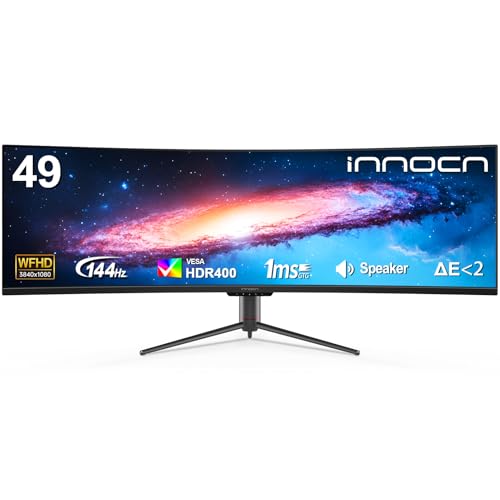
INNOCN 49″ Curved Ultrawide 3840×1080 144Hz Monitor

INNOCN 49″ Curved Ultrawide 5K2K 120Hz 49C1R

INNOCN 49″ Curved DQHD 240Hz Ultrawide Monitor

Lenovo Legion Tower 5i RTX 5070 Ti Gaming PC

ACEMAGIC K1 Mini PC Ryzen 7 7730U

INNOCN 49″ QD-OLED 5K2K 144Hz 49Q1R

INNOCN 49C1G 49″ 144Hz Ultrawide Curved Monitor

INNOCN 49″ 5K2K 240Hz QD-OLED 49Q1S

INNOCN 45C1R 45″ 5K2K Ultrawide Curved Monitor
A Deeper Look At The Lineup
The 49-inch ultrawide format replaces a dual-monitor setup with one continuous canvas, and this INNOCN model leans into that idea with an 1800R curvature that pulls the edges into your peripheral vision. At 3840×1080 resolution and 144Hz refresh, it gives sim racers, flight sim enthusiasts, and productivity multitaskers plenty of horizontal workspace without demanding a flagship GPU. Screen split features let you treat it as two virtual displays side by side, which is genuinely useful when you want a game on one half and a chat window or spreadsheet on the other.
You get HDR400 support, USB-C connectivity, and a fully adjustable stand that handles height and tilt for long sessions. Compared to the 5K2K siblings later in this list, the lower vertical pixel count means text rendering won’t feel quite as crisp, but the trade-off keeps the price approachable. For most desk setups running a mid-range graphics card, this hits a comfortable middle ground between immersion and everyday usability.
Everyday Perks
- 1800R curve wraps the edges into your field of view, reducing the need to turn your head during wide-format games.
- 144Hz refresh keeps motion fluid in racing, flight sims, and fast-paced shooters.
- USB-C, DisplayPort, and HDMI inputs cover modern laptops and desktops without adapters.
- Built-in speakers remove the need for desktop audio gear in tight setups.
- Adjustable stand supports height, tilt, and long-marathon viewing comfort.
Things To Consider
- The 1080p vertical resolution can look soft for spreadsheet work and dense code editing.
- Owners commonly report that ultrawide support varies per game, with some titles needing manual fixes for proper 32:9 rendering.
Key Specs
Who It Suits Best
Sim racers, flight sim fans, and multitaskers who want one wide screen instead of a dual-monitor array.
Where Another Pick Suits Better
For sharper text and denser detail, the INNOCN 49C1R 5K2K 120Hz brings much higher vertical resolution.
Stepping up to 5120×1440 means the same 32:9 footprint but with the vertical pixel count of a proper 1440p panel doubled across the width. The 49C1R targets people who split their day between creative software and gaming, giving video editors a long timeline view and giving gamers a sharper image than the 1080p alternative. The 1800R curve and 99% sRGB coverage add to its appeal for color-conscious work.
At 120Hz via DisplayPort 1.4, the panel handles modern games well, though you’ll want a strong graphics card to push frames at native resolution. USB-C, DisplayPort, and HDMI inputs give flexible connectivity, and height and tilt adjustments let you dial in the angle. The honest read is that this is a workhorse panel for someone who wants one screen to handle two demanding roles.
Noteworthy Benefits
- 5K2K resolution makes text and timelines much sharper than 3840×1080 ultrawides.
- 99% sRGB color coverage supports photo and video editing work without obvious banding.
- 120Hz refresh rate keeps gameplay smooth for most genres outside of pure esports.
- USB-C, DisplayPort, and HDMI cover laptops, desktops, and docks from a single panel.
Trade Offs
- Pushing 5K2K at high frame rates demands a high-tier GPU, so older cards will struggle.
- The VA panel can show some contrast shift at extreme viewing angles during off-center use.
- 49-inch ultrawide desks require at least 48 inches of width to sit comfortably at recommended viewing distance.
Made For
Content creators and hybrid work-and-play users who need sharp detail and accurate color from a single ultrawide display.
Consider Something Else When
Competitive FPS players chasing the highest frame rates will find the INNOCN 49″ DQHD 240Hz panel better suited to their needs.
This is the panel you look at when competitive shooters, racing, and fast-paced sims are your primary focus. The 240Hz refresh rate over the same 5120×1440 canvas as the slower 49C1R makes motion noticeably cleaner when you have the GPU horsepower to feed it. The 1800R curvature keeps the wraparound feel that makes ultrawides worth the desk space, and tilt, swivel, and height adjustments let you match the screen to your seating setup.
USB-C, DisplayPort, and HDMI inputs handle whatever PC or laptop you connect. In our view, the 240Hz refresh is the headline feature, and it pairs naturally with mid-to-high-tier graphics cards. If you tend to play at 1440p ultrawide and want every frame of advantage, this screen delivers without crossing into OLED pricing territory.
What Makes Sense
- 240Hz refresh rate is a noticeable upgrade for anyone moving up from 144Hz panels.
- 5120×1440 resolution keeps the image sharp while staying within practical GPU range.
- Tilt, swivel, and height adjustments adapt to varied desk and chair setups.
- USB-C, DisplayPort, and HDMI support modern GPUs and docked laptops.
Minor Gripes
- Running 240Hz at native 5K2K resolution requires a top-tier GPU for demanding AAA titles.
- VA panel contrast looks great in dim rooms but loses some punch in bright, sunlit spaces.
Quick Facts
Best Suited To
Competitive gamers and esports players who already own a strong GPU and want maximum frame rates on an ultrawide canvas.
Skip It When
Casual players or those with mid-range GPUs will get more value from the 144Hz INNOCN 49C1G without paying for frames they can’t push.
When you want a prebuilt foundation for a serious custom gaming PC build without sourcing every component yourself, the Legion Tower 5i brings an Intel Core Ultra 7 265F processor alongside an NVIDIA GeForce RTX 5070 Ti graphics card. That’s a combination that handles modern AAA titles at high settings, ray tracing, and AI-assisted upscaling without breaking a sweat. The 32GB of memory and 1TB of storage give you a comfortable baseline for game libraries and multitasking.
Legion Coldfront cooling aims to keep the system quiet and thermally stable during long sessions. The tower form factor leaves room for future upgrades, which is important if you plan to swap in a higher-capacity SSD or additional memory later. Three months of PC Game Pass is bundled in, giving you a library to explore on day one. Compared to the ACEMAGIC mini PC later in this list, this is a different class entirely, built for performance rather than desk-space efficiency.
What It Does Well
- RTX 5070 Ti GPU handles ray tracing and high-refresh gaming at native ultrawide resolutions.
- 32GB system memory supports gaming, streaming, and creative software running in parallel.
- 1TB SSD provides fast load times and enough storage for a sizable launch library.
- Coldfront cooling targets quiet operation under sustained load.
Honest Caveats
- A full tower demands more floor or desk space than a mini PC or laptop alternative.
- Prebuilt configurations can limit your motherboard and PSU choices for future upgrades.
- High-end performance comes with higher power draw, so you’ll need a reliable outlet and possibly a surge protector.
Feature Snapshot
Perfect Match For
Hardcore gamers and streamers who want a turnkey system that can drive demanding games on an ultrawide panel like the INNOCN 49Q1R.
Look Elsewhere When
Shoppers with tight desk space or minimal performance needs will find the ACEMAGIC K1 Mini PC a better size match.
The K1 Mini PC is the kind of build foundation that fits behind a monitor or on a tiny shelf, and that’s exactly the point. With an AMD Ryzen 7 7730U processor, 16GB of RAM, and a 512GB SSD running Windows 11 Pro, it handles everyday computing, indie games, and lighter esports titles without taking up desk real estate. The integrated Radeon graphics are not built for AAA games at max settings, but they handle 1080p esports at playable frame rates.
This category of small form factor PCs runs cool and quiet, which suits bedroom setups, dorm rooms, and shared offices. The compact chassis does limit future GPU upgrades, so it works best as a finished little system rather than a stepping stone. The honest read is that it’s a great entry point for first-time custom builders or anyone who wants a tidy desk with a small footprint.
The Helpful Details
- Compact chassis fits nearly anywhere, even mounted behind a compatible monitor.
- Ryzen 7 7730U handles multitasking and productivity apps with room to spare.
- 16GB of memory and a 512GB SSD cover everyday use and a modest game library.
- Windows 11 Pro comes preinstalled for immediate use out of the box.
Points To Note
- Integrated graphics limit the system to indie and lighter esports titles, not demanding AAA games.
- The small chassis leaves little room for adding a discrete GPU later.
Feature Card
Right Fit For
First-time builders, students, and anyone with limited desk space who wants a clean, quiet Windows PC for light gaming and productivity.
Another Choice May Suit
Gamers pushing AAA titles at high refresh rates will be better served by the Lenovo Legion Tower 5i and its dedicated RTX 5070 Ti.
QD-OLED changes the ultrawide game, and the 49Q1R brings that panel tech to a 5120×1440 canvas with a 144Hz refresh rate. OLED means each pixel emits its own light, so you get true blacks sitting next to bright highlights, which is a real difference in dark-game environments and HDR content. The 0.03ms response time also keeps fast motion looking clean, even compared to high-refresh VA panels.
Connectivity is generous: 90W USB-C power delivery can charge a laptop while carrying the display signal, and HDMI 2.1, DisplayPort, KVM, and a built-in USB hub make this a hub-grade display for hybrid setups. PIP and PBP modes let you run two inputs side by side, which is genuinely useful for streamers or anyone juggling a work laptop and a gaming PC. The honest read is that this is the panel to choose when image quality matters more than chasing the absolute highest refresh rate.
A Strong Showing
- QD-OLED panel delivers deep blacks and vibrant color for HDR gaming and movies.
- 0.03ms response time keeps motion crisp in fast-paced scenes.
- 90W USB-C power delivery supports laptop single-cable setups.
- KVM and USB hub reduce cable clutter for multi-device workstations.
Points To Keep In Mind
- OLED panels benefit from auto-brightness or pixel-shift features to reduce burn-in risk during long static HUD sessions.
- Peak brightness typically sits below top-tier Mini-LED monitors for sustained full-screen HDR.
Built With In Mind
Hybrid work-and-play users, HDR movie fans, and gamers who want the deepest blacks and best color from a single ultrawide display.
Swap It Out When
Competitive esports players chasing 240Hz will find the INNOCN 49Q1S with its higher refresh rate a better match.
The 49C1G slots in as a wallet-friendly entry into the 49-inch ultrawide category, sticking with 3840×1080 resolution and 144Hz refresh. For first-time ultrawide shoppers who want the wraparound feel without the 5K2K price tag, this panel covers the basics well. The 1800R curvature, 99% sRGB coverage, and HDR400 support cover the most common use cases for casual gaming, productivity, and media consumption.
USB-C, DisplayPort, and HDMI inputs handle a wide range of sources, and height and tilt adjustments make it adaptable to most desks. You won’t get OLED blacks or 240Hz motion here, but the 49C1G makes sense for someone stepping up from a single 16:9 monitor. You may find the lower vertical resolution limiting for spreadsheet-heavy work, but for everyday gaming and content viewing, it’s a solid starting point.
The Practical Payoff
- 49-inch ultrawide at a lower price makes the format accessible for new shoppers.
- 144Hz refresh handles most modern games smoothly at 1080p vertical.
- 99% sRGB color coverage suits general content viewing and casual creative work.
Small Caveats
- 1080p vertical resolution can look soft for text-heavy productivity tasks.
- Lacks the HDR punch of higher-tier panels with local dimming or OLED contrast.
Spec Overview
Who Should Grab It
First-time ultrawide shoppers and budget-conscious gamers who want a big curved display without the premium price.
Not Your Match When
Content creators needing sharper text will prefer the higher-resolution INNOCN 49C1R 5K2K panel.
The 49Q1S takes everything great about the 49Q1R and pushes the refresh rate to 240Hz, creating a hybrid display aimed at people who refuse to choose between image quality and speed. QD-OLED at 5120×1440 gives you per-pixel lighting for true blacks, and the 0.03ms response time means motion stays clean even when the frame rate climbs. This is the panel for someone who wants to play competitive shooters and watch HDR films on the same screen.
USB-C power delivery, HDMI 2.1, and DisplayPort support modern GPUs and laptops, and the adjustable stand helps you fine-tune the viewing position. In our view, this is where the ultrawide category feels like it’s finally grown up: OLED contrast and esports-grade refresh in a single panel. The trade-off shows up in the cost, and you’ll want a high-end GPU to push 5K2K at 240Hz in modern titles.
Where It Delivers
- QD-OLED contrast paired with 240Hz refresh covers both cinematic and competitive use cases.
- 5K2K resolution keeps the image sharp across the full 49-inch width.
- 0.03ms response time handles fast motion without noticeable ghosting.
- USB-C, HDMI 2.1, and DisplayPort offer flexible connectivity for modern setups.
Where It May Fall Short
- Running 5K2K at 240Hz requires a top-tier GPU for demanding AAA titles.
- OLED panels benefit from built-in panel-care features to manage long-session burn-in risk.
Whose Shelf It Belongs On
Speed-first competitive gamers and HDR enthusiasts who want the best of both worlds from a single ultrawide display.
A Better Fit Elsewhere
Shoppers on tighter budgets will find the 144Hz INNOCN 49C1G a more accessible entry into ultrawide gaming.
The 45C1R delivers the same 5120×1440 ultrawide resolution as its 49-inch siblings in a slightly smaller 45-inch form factor, which matters when desk depth is limited. The 1500R curvature is tighter than the 1800R panels above, wrapping the screen more aggressively for a near-immersive feel even at a closer viewing distance. For dual-monitor replacements on tighter desks, that smaller footprint can be a deciding factor.
USB Type-C with 90W power delivery handles laptop single-cable setups, and PIP and PBP modes support multi-input workflows. Height adjustment and tilt let you match the screen to your seating position. Compared to the larger 49-inch panels earlier in the list, this 45-inch model trades a little horizontal real estate for a footprint that fits on more desks, and the lower vertical mass makes mounting easier on smaller monitor arms.
Useful Highlights
- 45-inch size fits desks where a 49-inch ultrawide would feel cramped or too wide.
- 1500R curvature creates a tighter wraparound for shorter viewing distances.
- 90W USB-C power delivery supports laptop single-cable setups.
- PIP and PBP modes help with multi-device workflows.
Practical Considerations
- Smaller panel area means slightly less horizontal workspace for split-screen productivity.
- 5K2K resolution at 120Hz still demands a capable GPU for modern games.
Perfect Match For
Shoppers with tighter desks or anyone setting up a dual-monitor replacement who doesn’t have room for a full 49-inch panel.
Reach For A Different Pick When
Those who want maximum horizontal workspace for split-screen work should consider the INNOCN 49C1R 5K2K 120Hz instead.
Picking The Right Foundation For Your Build
Choosing components for a custom gaming PC build comes down to matching your display, case size, and GPU power to the games you actually play. Resolution and refresh rate together determine how hard your graphics card has to work, so pairing a 5K2K 240Hz panel with a mid-range GPU will leave frames on the table. Conversely, a 1080p ultrawide with a flagship GPU gives you headroom for future titles without bottlenecking at the monitor.
Panel type matters more than most shoppers expect. VA panels deliver strong contrast at lower cost, while QD-OLED gives you true blacks and near-instant response for premium setups. Form factor is the other big call: a full tower like the Legion 5i leaves room for upgrades, while a mini PC keeps your desk clean but caps your future GPU options. The right answer depends on your desk, your budget, and how long you plan to keep the build before swapping parts.
Key Considerations Across These Picks
Pitfalls Shoppers Hit
A common mistake is matching a high-end ultrawide with a graphics card that can’t push the resolution at playable frame rates, leaving you with a beautiful display running at 60fps. Another trap is ignoring desk depth: a 49-inch curved panel needs at least 30 inches of viewing distance to feel natural, and shorter setups cause eye strain during long sessions. Burn-in concerns with OLED panels are also worth weighing if you leave static HUD elements on screen for hours, though modern panels include mitigations.
The Case For Spending Up
The jump from 1080p ultrawide to 5K2K is where text sharpness and game detail become noticeably better, especially on a 49-inch canvas. Going from VA to QD-OLED brings true blacks and faster response, which matters most in dark, atmospheric games and competitive shooters. The trade-off is cost and GPU demand, so paying more makes sense when your graphics card can actually feed the panel and you spend enough time in front of it to appreciate the upgrade.
Frequently Asked Questions
What should I look for first in a custom gaming PC build?
Start with the display resolution and refresh rate you want, then pick a GPU that can drive it. The monitor you choose sets the bar for every other component.
Are 49-inch ultrawides worth the desk space?
For sim racers, flight sim fans, and productivity multitaskers, replacing two 27-inch monitors with one ultrawide removes the bezel gap and feels cleaner. Make sure your desk has at least 48 inches of width.
Do I need an OLED panel for gaming?
OLED delivers the deepest blacks and fastest response, which shines in HDR content and competitive shooters. If you mostly play bright, fast-paced esports, a high-refresh VA panel can save money.
Is a mini PC enough for gaming?
Mini PCs handle indie games, esports titles, and light creative work comfortably. Demanding AAA games at high settings still need a dedicated GPU in a larger chassis.
How much GPU power do ultrawide monitors need?
A 3840×1080 ultrawide runs well on mid-range cards, while 5120×1440 at high refresh rates needs a high-tier GPU to hit full frame targets in modern titles.
Closing Remarks
Your build works best when the display, GPU, and chassis size all line up with the games and workspace you already have. The picks above cover a wide range of those combinations, from compact mini PCs to flagship towers and ultrawide panels at multiple price points. Take a moment to match your monitor choice to the GPU you plan to pair it with, and you’ll avoid the most common upgrade regrets. Whatever direction you choose, a thoughtful build will outlast several generations of games.


