


A solid desk changes how every session feels. Your keyboard sits at the right height, monitors stay where you left them, and the tangle of cables behind your rig doesn’t win the room. The picks below cover different room shapes, monitor counts, and gear loads, so the right surface comes down to how you actually play, stream, or work from home.
The Essentials At A Glance

EUREKA ERGONOMIC 60″ Gaming Desk with RGB LED Lights

ODK 66″ L Shaped Gaming Desk with Power Outlet & LED

ODK 53″ L Shaped Gaming Desk with Shelves, LED & Outlets

ODK 48″ L Shaped Gaming Desk with LED & Outlets

Mr IRONSTONE L Shaped Gaming Desk with LED & Cup Holder

EUREKA ERGONOMIC Captain Series 60″ Gaming Desk

SEDETA 94.5″ 2 Person Gaming Desk with LED

PayLessHere 47″ R-Shaped Gaming Table in Blue
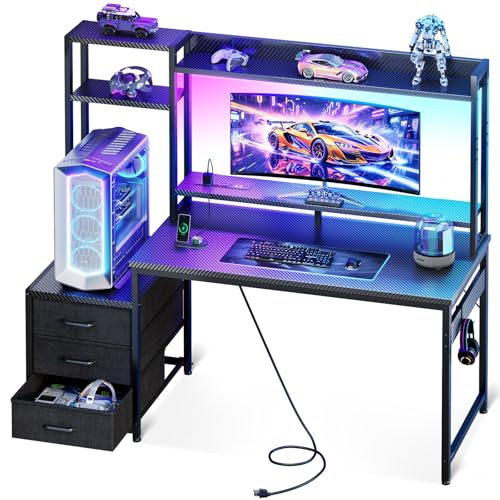
Casaottima 48″ Gaming Desk with Hutch & 3 Drawers

AODK 63″ L Shaped Gaming Desk with Display Hutch
More On The Choices That Made The List
The first pick sets the bar for room-filling battlestations. At 60 inches wide, this EUREKA ERGONOMIC desk gives dual monitors, a soundbar, and your streaming camera all the breathing room they need without forcing you to push your keyboard to one edge. RGB LED lights run along the frame, and a Z-shaped metal understructure keeps the top from wobbling during a heated round.
Where the desk earns its place is in everyday livability. Leveling feet let you dial out wobble on older hardwood, and the full-length top means your mouse pad can finally stretch the way it was meant to. Compared to the smaller ODK 48″ that lands later on the list, this is the surface to choose when your gear count outgrows a tight corner.
What It Does Well
- Wide 60″ surface that fits two monitors, speakers, and a streaming camera at once
- Z-shaped metal frame adds rigidity during fast mouse movements
- Built-in RGB lighting sets a mood without needing aftermarket strips
- Leveling feet help stabilize the top on slightly uneven flooring
Worth Noting
- At full size, you may find the 60″ footprint a tight squeeze in rooms under 8 feet long
- No integrated cable tray in the spec sheet, so cable management is on you
Feature Snapshot
Who It Suits Best
PC gamers running dual 27″ monitors with a streaming camera and audio gear who want one wide surface to hold everything.
Look Elsewhere When
The SEDETA 94.5″ 2 Person Gaming Desk is the better call when you share a room and both of you need full monitor arms and tower space.
The ODK 66″ trades a single long run for an L-shape that wraps a corner. You get one wide arm for monitors and a return that holds a tower, printer, or reference laptop. Three power outlets and two USB ports are built into the surface, which removes the hunt for an outlet strip every time you bring a new device home.
Ten color modes on the LED strip let the desk lean into a specific game or stay neutral during work hours. A memory function keeps the last setting after power cycles, so you don’t reset it every morning. The L is the upgrade from the EUREKA ERGONOMIC 60″ when your room has the corner space and your rig is too tall to tuck anywhere else.
Noteworthy Benefits
- Three outlets plus two USB ports cut down on power strip clutter behind the desk
- L-shape makes a natural home for a full tower and a second laptop
- LED lighting holds its last setting through power cycles, saving daily setup time
- Ten color modes cover mood lighting for both gaming and work sessions
Trade Offs
- As an L-shape, you may need a corner of at least 5 by 5 feet for both arms to sit cleanly
- Owners commonly report the assembly takes longer than a single-surface desk of the same length
Quick Facts
Made For
Streamers and PC builders with a full tower and a corner office who want charging ports built into the desk itself.
Consider Something Else When
The ODK 53″ L Shaped Gaming Desk is the better pick for a smaller bedroom where a 66″ L simply won’t fit.
The 53″ L brings corner ergonomics down to a smaller footprint. Dual shelves, a CPU stand, a side hook, and a small tool bag all live on the desk, so the parts of your rig that don’t need a monitor go somewhere visible. It’s the kind of layout that works in a guest room converted into a gaming nook.
Three power outlets handle phone, headset, and tower without pulling another strip into the room. LED lighting keeps the surface from feeling like a flat office desk, and the CPU stand keeps your tower off the floor where dust settles. Where the bigger ODK 66″ is the family-room answer, this is the one for a single-occupant room.
Advantages To Know
- Compact L fits bedrooms and shared-kid rooms that a 66″ L would dominate
- CPU stand raises the tower into open air, which tends to help airflow around the case
- Side hook and small bag catch controllers and cables that otherwise drift off the desk
- Built-in outlets reduce the need for an external power strip behind the desk
Points To Keep In Mind
- Dual shelves eat into usable desktop depth, so ultrawide monitors may not sit centered
- Accessory hook sits on one side, which can feel lopsided if you favor a left-handed setup
Best Suited To
Single gamers furnishing a smaller bedroom who still want a corner layout and visible storage for a full tower.
Skip It When
The ODK 66″ L Shaped Gaming Desk is the better fit when the room has at least 6 feet of wall to spare and the rig is too wide to feel comfortable here.
The 48″ L is the smallest L in the ODK lineup, and it targets a very specific problem: how do you get a corner gaming layout into a studio apartment? Three power outlets, two USB ports, and a single side hook keep the essentials in reach. Colorful LED strips on the front edge give the room some character without taking up more real estate.
For most apartment dwellers, the 48″ is the practical ceiling on a corner desk. Anything longer starts to push into the room’s traffic path. The flip side is that an ultrawide monitor won’t sit comfortably on the short arm of the L, so this desk is best matched with a single 27″ or a smaller dual-monitor stack.
Well-Handled Touches
- Compact L footprint keeps the desk inside a studio’s traffic flow
- Two USB ports on the surface charge a phone and a wireless mouse pad at once
- Single accessory hook keeps a headset or cable in reach
- LED strips on the front edge add ambiance without aftermarket installation
Honest Caveats
- Short arm of the L won’t accept an ultrawide monitor without overhang
- At 48″, you may find the surface tight for a full keyboard plus mouse pad plus microphone arm all at once
Perfect Match For
Renters and dorm residents who want a corner layout, LED lighting, and built-in charging without dominating the room.
Reach For A Different Pick When
The PayLessHere 47″ R-Shaped Gaming Table is the alternative for first desks where an L footprint doesn’t suit the room at all.
Where this Mr IRONSTONE desk stands out is the texture and the lighting control. The top uses a carbon-fiber patterned surface, which gives the desk a slightly grippier feel under the wrist than a plain laminate. RGB strips run on a phone-controlled app, so the colors can shift to match the game you’re loading rather than being locked to a few preset modes.
At 51″ across the L, the surface splits itself between monitor and tower zones. A built-in cup holder and a headphone hook are part of the package, so the desk arrives with the small accessories you’d otherwise buy separately. The trade-off is that the carbon-fiber top shows fingerprints under direct light, and the app-driven lights need a phone to unlock the full mode list.
Practical Advantages
- Carbon-fiber patterned top gives a grippier surface for keyboard and mouse work
- App-controlled RGB unlocks hundreds of effects beyond basic color cycling
- Built-in cup holder and headphone hook arrive in the box, no extra purchase needed
- Large monitor stand lifts displays to a more comfortable eye line for long sessions
Some Limits To Know
- Carbon-fiber texture tends to show fingerprints under angled lighting
- Full lighting effects require a phone app, so a guest can’t easily change colors
Who Should Grab It
Gamers who treat lighting as part of the experience and want texture under the wrist without bolting on aftermarket accessories.
Swap It Out When
The EUREKA ERGONOMIC 60″ Gaming Desk is the better fit if you want a single long surface rather than an L and prioritize surface width over corner use.
The Captain Series trades LED strips for a silhouette. The polygon-shaped legs are the visual hook: angled steel that reads as gaming without screaming for attention. Underneath that styling, the 60″ surface holds the same dual-monitor + speaker setup as any other wide gaming desk, but the room reads quieter.
This is the desk for someone whose battlestation is part of a finished room rather than a dedicated cave. You can drop it into a living space and the legs still feel intentional. Where the EUREKA ERGONOMIC 60″ RGB adds visible light, this one earns its keep on proportions and clean lines. The catch is that the look depends on the leg geometry; cover them with a curtain or storage unit and you’ve paid for style you can’t see.
Notable Upsides
- Polygon leg design doubles as visible style and structural support
- 60″ surface fits a dual-monitor setup without crowding the keyboard
- Cleaner aesthetic fits a living room or guest room better than RGB-heavy desks
- Steel frame geometry stays rigid during fast mouse movements
Where It Is Less Suited
- No built-in LED lighting, so ambient color has to come from your monitor or aftermarket strips
- Polygon legs need clear floor visibility to earn their design price; hidden behind a shelf, the look is wasted
Whose Shelf It Belongs On
Style-focused shoppers who want a gaming desk that blends into a living area rather than dominating the room.
A Better Fit Elsewhere
The Mr IRONSTONE L Shaped Gaming Desk is the better call when visible RGB lighting is part of the fun and an L footprint works.
At 94.5 inches, the SEDETA desk is built around a specific use case: two people, side by side, working or playing in the same room. The surface splits into two equal zones, and a printer stand plus storage shelves sit between them, so the middle of the desk stays useful instead of dead space. A keyboard tray tucks under either side to free the top for a tower or speakers.
LED lighting runs along the front, and a power strip with USB ports mounts in the center, which both people can reach. The honest read is that this is a household desk, not a single-rig setup. For one person, the surface is too long to reach comfortably without rolling a chair back and forth. For two, the geometry finally starts to make sense.
Key Advantages
- 94.5″ surface gives two full setups without one player crowding the other
- Center printer stand and storage shelves use the middle of the desk for shared gear
- Keyboard trays under each side keep typing height consistent across both zones
- Centered power strip with USB ports means each side has charging within arm’s reach
Practical Considerations
- Surface is too long for a single person to reach the far edge without leaving the chair
- Two-person footprint means the room needs at least 10 feet of clear wall
Feature Card
Right Fit For
Couples, siblings, or co-op gaming pairs who each want a full rig without splitting into separate rooms.
Where Another Pick Suits Better
The EUREKA ERGONOMIC 60″ Gaming Desk is the right answer for a single player who would find 94 inches of desk a stretch to use.
The PayLessHere 47″ is a starter gaming desk. The R-shaped leg bends back from the floor for a stance that reads as gaming without taking up much depth. A blue colorway is unusual for the category; most gaming desks sit in black or carbon gray, so a colored surface is a quick way to personalize a kid’s room or a first apartment.
At 47 inches, the top fits a single 24″ or 27″ monitor with room for a keyboard, mouse, and a small speaker bar. The 47″ is shorter than the ODK 48″ L, so the depth tradeoff is more about chair clearance than layout. For most people buying a first desk, that tradeoff is the right one to make.
Reasons It Performs
- Blue colorway stands out in a category dominated by black and gray finishes
- Compact 47″ surface fits a single-monitor + keyboard setup without wasted space
- R-shaped leg gives a gaming look at a starter-desk size
- Frame geometry keeps the desk rigid for everyday mouse work
Potential Drawbacks
- No built-in LED lighting or power outlets, so extras need separate purchase
- Blue finish may clash with a room that already leans neutral or warm
Who Will Love This
First-time desk shoppers, students, and parents setting up a teen’s room who want a gaming-styled surface at a small-room size.
Not Your Match When
The EUREKA ERGONOMIC Captain Series 60″ Gaming Desk is the better fit once a second monitor or a streaming rig joins the setup.
Where most gaming desks stop at a flat top, the Casaottima 48″ adds a full hutch, multi-tier display shelves, and three drawers. An 11.6″ raised PC shelf on the hutch is wide enough for a full-tower case, which is a problem on most 48″ surfaces. LED lighting ties the hutch into the rest of the gaming-desk look.
This is the desk for someone who treats their setup as a display piece. Headset hooks, controller stands, and figure shelves all have a home. The trade-off is depth: the hutch and raised PC shelf sit above the desktop, and depending on your chair height, you may find yourself sitting closer to the monitors than you would at a flat-top desk.
What Earns Its Place
- Overhead hutch turns the desk into a display surface for figures, models, and headsets
- Three drawers store small gear that would otherwise drift across the desktop
- 11.6″ raised PC shelf fits full-tower cases that 48″ surfaces usually can’t accommodate
- LED lighting on the hutch ties the storage into the rest of the gaming look
Worth Bearing In Mind
- Multi-tier hutch means you may sit closer to your monitors than a flat-top desk would allow
- More parts to assemble than a single-surface gaming desk of the same footprint
Built With In Mind
Collectors and figure displayers who want their rig on the desk instead of on the floor, plus storage for the small gear that piles up.
Another Choice May Suit
The AODK 63″ L Shaped Gaming Desk is the better fit when a full L is workable and the display needs the wider top instead of a hutch.
The AODK 63″ wraps a corner with the widest top in this list, and it leans hard into the display-first side of the hobby. A 4-compartment display cabinet sits on the hutch for figures and collectibles, and a pegboard on the back panel hangs headphones, controllers, and small accessories. A dedicated PC tower shelf holds full-tower cases off the floor and out of the way.
The wide top supports a 32″ or 34″ ultrawide on the long arm, and the return side holds a second monitor or a streaming laptop. This is the desk for someone whose rig is the centerpiece of the room. The trade-off is footprint: a 63″ L needs a corner with at least 6 by 5 feet of clearance, and the hutch adds another 18 inches of height that won’t suit every ceiling light.
Practical Pluses
- 63″ L-shape gives the largest single-person corner footprint in this list
- Display cabinet on the hutch protects figures and collectibles from desk clutter
- Pegboard stores controllers and headphones within easy reach
- Dedicated PC tower shelf fits a 10.24″ wide full-tower case off the floor
Trade-Offs To Consider
- Hutch raises the storage roughly 18 inches above the surface, which can crowd ceiling lights in low rooms
- Full 63″ L footprint needs at least 6 by 5 feet of corner space, depending on the room
Technical Highlights
Who Should Grab It
Display-oriented battlestation owners with a large figure collection and a full-tower rig who want storage off the desktop.
Where A Sibling Pick Shines
The Casaottima 48″ Gaming Desk with Hutch is the smarter call when the room is smaller and a flat-back hutch is enough storage without a 63″ L footprint.
What To Weigh Before You Pick A Gaming Desk
A gaming desk earns its place on more than size. The first thing to nail down is room geometry: a 60″ straight desk fits a long wall, an L-shape wraps a corner, and a 94″ two-person desk replaces a wall entirely. Measure the floor and the path to your power outlet before measuring anything else, because an oversized L in a narrow room will dominate the space within a week.
Surface area is the second axis. Dual 27″ monitors need at least 50 inches of width to sit with breathing room, and an ultrawide wants depth, not just width. Cable management shows up quietly in almost every spec sheet: built-in power outlets, USB ports, and routing hooks save you a power strip and a tangle of cables under the desk. For most desks in this category, the listed weight capacity is the practical ceiling, and a heavy tower plus a clamp-on mic arm pushes you close to it.
Materials change the experience. Carbon-fiber patterned tops feel grippier under the wrist and look more aggressive; smooth laminate wipes clean faster and reads quieter. Frame geometry (Z-shaped, polygon, R-shaped) mostly affects how the desk looks at floor level, but the leveling feet on the wider desks are what stop a wobble once your monitor arm is loaded. LED lighting is the most personal choice on the list. App-controlled RGB unlocks more effects; preset color modes stay out of the way of guests.
Key Considerations Across These Picks
Common Shopping Slip Ups
The easiest miss is buying a desk only by its top dimensions. An L-shape needs both arms to clear walls and doorways, and the diagonal footprint is often 2 feet longer than the listed length suggests. Measure the assembled footprint, not the spec sheet. The next slip is assuming a desk that fits your monitor will also fit a tower and a microphone arm: the side that holds a 27″ display rarely has room for both a tower stand and a boom arm, so plan for one to live on the return or the floor.
Where The Extra Money Goes
Higher-tier models in this category spend their budget on three things: storage, power, and frame rigidity. Display hutches, drawer banks, and pegboards show up only on the priciest picks, and they replace furniture that would otherwise crowd the room. Built-in outlets and USB ports save you a power strip and keep cables routed cleanly. The Z-shaped and polygon legs on the wider desks also tend to flex less than the basic frames, which matters once you clamp a heavy monitor arm to the back edge. For most single-monitor setups, the basic desks are enough. The upgrade pays off when your rig grows past a screen and a keyboard.
Frequently Asked Questions
What Size Gaming Desk Fits Two Monitors?
A 50″ to 60″ surface gives two 27″ monitors, a keyboard, and a mouse pad comfortable space without one display crowding the other. Anything under 48″ usually forces the keyboard to share depth with the monitor stands, and you start reaching over screens to reach the mouse.
Is An L-Shaped Desk Better Than A Straight Desk?
L-shapes win in corners and where you want a clear home for a full tower or a printer. Straight desks win along long walls, where an L would block traffic. The choice is mostly about the room: a corner L feels intentional in a square room and wasteful in a hallway.
Do I Need A Desk With Built-In Outlets?
If you charge a phone, a wireless headset, and a mouse pad at the same time, built-in outlets cut the cable clutter. If your gear is mostly tethered to a single tower, an external power strip behind the desk does the same job, depending on the room.
How Important Is RGB Lighting On A Gaming Desk?
RGB is the part of the desk you interact with least but see the most. It does not change performance, and it can be turned off when you need the room to read neutral. For most people, RGB is a preference call, not a feature call.
Can A Gaming Desk Hold A Full Tower PC?
Most gaming desks in this list rate for the weight of a full tower on a dedicated PC shelf or directly on the desktop, depending on the model. The wider L-shapes and the Casaottima and AODK picks with display hutches make the most room for a full tower. Always check the desk’s listed weight capacity before loading it.
Closing Remarks
The right gaming desk lines up with how your room is shaped, how many screens you run, and how much of your rig you want on display. Measure the room first, pick the footprint that fits, then let the storage, lighting, and power features decide between the desks in that size class. The list above covers straight, L-shaped, and two-person layouts, so the trade-off is mostly about which dimensions match your space.


