


There’s a particular joy in firing up a 6th-gen console and watching a screen do what LCD panels simply can’t: rolling scanlines, instant pixel response, and that unmistakable glow. The challenge is that retro gaming on a CRT isn’t always plug-and-play, especially when your collection spans consoles from the 8-bit era through the Dreamcast. The picks below cover the cables, adapters, and one full CRT set you’ll likely need to keep your library humming, whether you just scored a PVM monitor or you’re nursing a bedroom CRT back to life.
How The Shortlist Stacks Up

HBFQMDJLX Sega Dreamcast S-Video AV Cable 6 ft

BolAAzuL 3 RCA to 3 RCA Cables 10 ft

076R074050 Replace Remote for Orion CRT
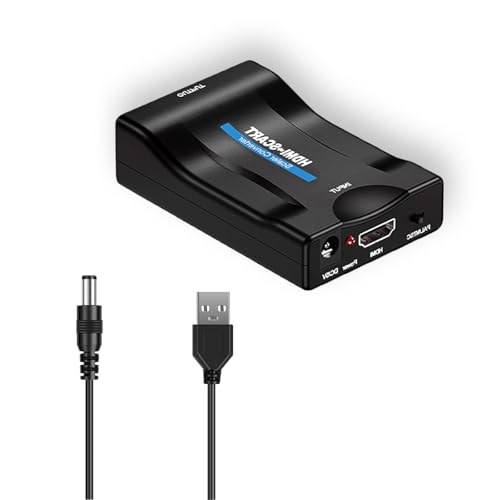
VGE HDMI to SCART Converter with MHL

Uzifhdhi RCA to HDMI Converter Adapter

Zopsc HDMI to AV 4K 30Hz Converter

ODV-II Component/AV to YPbPr Converter

AS Axis Spindleon 2-Pack NES Composite Cables
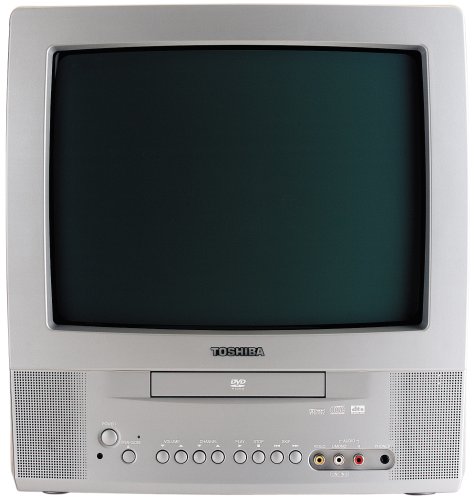
Toshiba MD13Q42 13″ CRT TV with DVD
A Deeper Look At The Lineup
The Dreamcast’s stock AV cable outputs composite video, which leaves a lot of image clarity on the table when paired with a CRT that supports S-video. S-video is an analog connection that keeps brightness and color information on separate pins, so the result is a noticeably sharper picture with less dot crawl around text and UI elements. This HBFQMDJLX cable taps that upgrade without forcing you to hunt down an OEM replacement.
For anyone running a Dreamcast on a CRT, this is one of the cheapest image-quality wins available. The 6-foot run fits neatly between a console and a TV stand, and the S-terminal connector matches the rear input of most consumer CRTs from the early 2000s.
Where It Delivers
- Keeps brightness and color signals separated for a cleaner picture than composite
- Nickel-plated connectors resist oxidation in storage, helpful for collectors who rotate consoles
- 6-foot length fits typical living-room shelf layouts without excess slack
- PVC jacket adds flexibility for routing behind a TV stand or wall-mounted setup
Things To Consider
- Limited to the Dreamcast, so it won’t help if you also own a Saturn, PS1, or N64
- Image quality still depends on the CRT’s own S-video input, which varies between consumer and prosumer sets
Quick Facts
Who It Suits Best
Dreamcast owners running a CRT that has a working S-video input and want a meaningful image upgrade over the stock composite cable.
Consider Something Else When
Anyone playing across multiple consoles should grab the BolAAzuL component cable set, which covers a wider library of retro systems with a single cable format.
Component video (YPbPr) splits the image into three signals: green carries luminance (brightness) plus sync, while blue and red handle color differences. This is the format many late-era CRTs and component-capable monitors accept, and it preserves the authentic 240p and 480i signals that retro consoles output. The BolAAzuL set is a straightforward 10-foot trio of RCA cables color-coded green, blue, and red.
Where the HBFQMDJLX Dreamcast cable is console-specific, this one pairs with any retro system that already outputs component, from the SNES and N64 to the PS1, PS2, and Genesis with the right adapter. The 10-foot length gives more flexibility than shorter bundled cables when your console shelf sits across the room from the display.
What Works In Its Favor
- Color-coded green-blue-red connectors simplify hookup, especially in a stack of consoles
- 10-foot length is forgiving for wall-mounted TVs and entertainment centers
- Works with any console that supports component, making it a shared-cable solution
- Plug-and-play with no extra software or power needed
Points To Note
- Console must already support component output, which often requires a modded or late-model system
- Routing three long cables behind furniture can be bulkier than running a single composite or S-video line
Built With In Mind
Shelves with multiple component-ready consoles that benefit from one shared cable format and the reach to span a larger room.
A Better Fit Elsewhere
For Dreamcast-only setups, the HBFQMDJLX S-video cable gets you most of the image-quality benefit without needing a component-capable display.
Orion CRT televisions from the late 90s and early 2000s are a familiar sight in retro gaming circles, partly because they’re still relatively common on the used market. The catch is that their original remotes have a way of disappearing or giving up after decades. This AULCMEET replacement targets a specific list of Orion models, including the TV1318, TV1319, and TV2525 series, and works without any programming step.
It’s a niche pick, but if you own one of the supported Orion sets, a working remote turns a CRT from a static display into a usable one. Channel surfing, switching inputs, and adjusting picture settings all become possible again.
Standout Benefits
- No programming required, drop in batteries and it pairs automatically
- Covers a wide range of Orion CRT models from the early 2000s era
- Cost-effective way to revive an otherwise functional CRT that’s stranded without a remote
Honest Caveats
- Limited to specific Orion model numbers, so compatibility is worth double-checking before ordering
- Build quality is basic plastic, similar to a stock remote, so it won’t feel premium in hand
Who Will Love This
Orion CRT owners with a supported model who lost the original remote and want a fast, no-fuss replacement.
Look Elsewhere When
Anyone shopping for cables or converters should skip this and look at the BolAAzuL component cable or the HBFQMDJLX Dreamcast cable instead.
SCART is the multi-pin AV connector that dominated European displays, and it shows up on a lot of PVMs and consumer CRTs from that era. The VGE converter bridges modern HDMI sources, including MHL-capable Android phones, into a SCART-compatible signal at standard-definition 480i or 576i resolution. It outputs in NTSC or PAL, so it works across regional CRTs without a separate converter box.
For retro gaming enthusiasts who picked up a PAL CRT in Europe or a vintage set in North America, this is one of the easier ways to feed modern HDMI output into a display that predates HDMI entirely. The compact ABS housing is small enough to slip into a carry bag for meetups and retro events.
Everyday Wins
- Converts HDMI to SCART without requiring software or driver installs
- Supports MHL phones, letting you mirror a smartphone onto a vintage display
- Dual RCA audio outputs feed a vintage amplifier alongside the SCART video
- NTSC and PAL switching makes it usable across regional CRT inventories
Worth Noting
- Output is limited to standard definition, so it won’t deliver high-resolution clarity on a CRT
- Some SCART-equipped CRTs may need a sync adjustment or specific cable pinout to recognize the signal cleanly
Made For
Retro gaming enthusiasts working with European PAL CRTs or SCART-equipped PVMs who want to add HDMI sources to a vintage display chain.
Skip It When
Anyone with a composite-only consumer CRT will find the Zopsc HDMI to AV converter simpler and more directly suited to standard North American setups.
This adapter runs in the opposite direction from most picks on this list. It takes analog RCA composite video, the yellow-red-white trio, and outputs HDMI at 720p or 1080p. The use case is older consoles feeding a modern flat-panel TV when no CRT is available, which is the reality for many retro gamers whose living room is dominated by an LCD or OLED.
The honest read is that converting composite to HDMI adds scaling artifacts that purists won’t love, but for casual play on a modern display, it gets the job done. The adapter does require external power through a USB-style connection, so plan for an open outlet or USB port near the TV.
What Pays Off
- Lets composite-only consoles work with HDMI-only modern displays
- Outputs at 720p or 1080p, matching the native resolution of most current TVs
- Plug-and-play setup with no driver installs
Trade Offs
- External power adapter is required and not always included in every listing
- Upscaling composite introduces artifacts that purists on a CRT would never accept
Right Fit For
Anyone with a vintage console in a modern living room who doesn’t have a CRT available and just wants a working picture without hunting for a used set.
Reach For A Different Pick When
Anyone using a CRT should skip this entirely and go with the HBFQMDJLX S-video cable or the BolAAzuL component cable for a native analog signal.
The Zopsc adapter takes modern HDMI output and downconverts it to analog composite video, which is the format most consumer CRTs accept. It accepts input up to 4K at 30Hz, then outputs standard 480i composite, which is the right resolution range for a CRT. That makes it useful for connecting a modern PC, laptop, or streaming device to a vintage television.
One thing worth considering: this is a one-way converter, not bidirectional, so it only works in the HDMI-to-AV direction. For retro gaming, that means it’s the right tool when you want to display a modern device’s output on a CRT rather than the other way around.
Key Advantages
- Accepts HDMI input up to 4K@30Hz, giving you flexibility on the source side
- Outputs 480i composite, the right format for most consumer CRTs
- Includes a power cord for immediate setup, no driver installs needed
- PAL and NTSC switching covers CRT sets on either regional standard
Room For Improvement
- One-way conversion only, it can’t take composite and output HDMI
- 480i output means the picture won’t look sharper than what the CRT can natively display
Best Suited To
Retro gamers who want to display a modern HDMI source on a CRT, especially those juggling a PC, laptop, or streaming stick in the same room as a vintage TV.
Where Another Pick Suits Better
For the opposite direction, composite to HDMI on a modern display, the Uzifhdhi RCA to HDMI converter is a more direct match.
The ODV-II sits in a more specialized lane. It accepts composite (CVBS) or S-video input and outputs component video (YPbPr), which is useful when you own a high-end CRT monitor that only accepts component input but you have consoles that only output composite or S-video. The conversion is one-way, but it opens up a wider console library to a component-only display.
For most people, a direct cable like the HBFQMDJLX S-video cable is simpler. This converter earns its place in setups where the display is the constraint, not the console. Line doublers and video scalers can also accept the component output, giving you a path to even higher-end signal chains.
Notable Gains
- Converts composite or S-video sources to component for component-only displays
- Compatible with video scalers and line doublers for advanced signal chains
- Helps classic 8-bit, 16-bit, and 32-bit consoles reach higher-end CRT monitors
Factors To Consider
- Adds another device to the signal chain, which is more complexity than a direct cable
- Conversion quality depends on the chipset, so research is worth doing before purchase
Perfect Match For
Owners of component-only PVMs or broadcast monitors who want to expand their console library beyond natively component-capable systems.
Swap It Out When
Anyone with a standard consumer CRT should use the BolAAzuL component cable directly, skipping the conversion step entirely.
The original NES came with a hardwired RF adapter, and swapping it out for a composite cable is the cheapest picture-quality improvement on the platform. This 2-pack from AS Axis Spindleon uses standard RCA yellow and red plugs, color-coded for easy hookup, and the 6-foot run is the right length for most shelf-to-TV layouts. The second cable in the pack is a useful spare for a second console or a backup.
You may find that the composite output on a front-loader NES still shows some noise around bright sprites, but compared to RF, the difference is night and day. For anyone setting up an NES from scratch, this is the kind of cable you wish Nintendo had shipped in the box.
Good Reasons To Consider
- Two cables in a pack cover multiple consoles or a backup
- Color-coded connectors simplify hookup on a CRT or flat panel
- 6-foot length fits most shelf setups without excess slack
- Affordable enough to keep a spare on hand
Things To Weigh
- Composite output on the NES still shows inherent signal noise that no cable can fully eliminate
- The included red plug is mono audio, which matches the NES but won’t carry stereo
Who Should Grab It
NES owners replacing the original RF adapter, or anyone who wants a clean composite connection plus a spare cable ready to go.
Not Your Match When
Anyone running a Dreamcast should grab the HBFQMDJLX S-video cable instead, which offers a much bigger image-quality upgrade over that console’s stock output.
The Toshiba MD13Q42 is a 13-inch CRT television with a built-in DVD player, and it has become a quietly iconic piece of bedroom and dorm-room gear for retro gaming enthusiasts. It accepts composite and component input, plays DVDs, CDs, and burned CD-Rs, and measures roughly 14 by 15 by 14 inches, which means it fits on a small desk or shelf without dominating the room. The unit has been around for a long time, so finding one in working condition often means shopping the used market.
For a starter setup, a working MD13Q42 means a CRT, a DVD player, and analog inputs in a single box, which simplifies the cable situation covered earlier in this list. The included glow-key remote works in low light, and the digital coaxial output can feed a soundbar or older AV receiver.
Real Benefits
- 13-inch CRT tube paired with a built-in DVD player reduces setup clutter
- Plays DVD, CD, CD-R, CD-RW, DVD-R, and VCD discs, covering most optical formats from the era
- JPEG viewer turns the screen into a slideshow for digital photos burned to disc
- Digital coaxial output feeds a multi-channel receiver for surround sound
Trade-Offs To Consider
- Long-running model, so availability is mostly through the used market with varying condition
- 13-inch screen is cozy for solo play but cramped for couch co-op
Feature Snapshot
Whose Shelf It Belongs On
Beginners who want a turnkey CRT setup for a bedroom, dorm, or small space without buying separate components.
Consider Something Else When
Anyone already running a PVM or higher-end consumer CRT should pair the BolAAzuL component cable or the HBFQMDJLX S-video cable with that existing display instead.
Matching Cables and Converters to Your Console Stack
The right cable depends less on the cable itself and more on what your CRT can accept. Component is the highest-fidelity analog format, but only late-model CRTs and PVMs have the inputs. S-video is the sweet spot for most consumer sets from the late 90s onward. Composite is universal but visibly softer, and RF is the last resort when nothing else works. Match the cable to both the console and the display.
Console Output Formats Worth Knowing
Most retro consoles output composite at minimum, and many add S-video or component with the right cable. Knowing what your specific console supports matters more than picking the fanciest cable. A stock SNES outputs composite, S-video, and RGB through its multi-AV port, while an NES tops out at composite unless you mod the console. A front-loader N64 outputs composite and S-video but not component without modification.
CRT Inputs Vary by Tier
Consumer CRTs from the late 90s typically have composite and S-video inputs, with component on higher-end models. PVM and broadcast monitors often skip composite entirely and rely on component, RGB, or BNC inputs. Before buying any cable or converter, check the back of the display and confirm which inputs are actually present. A component cable on a composite-only CRT won’t work without an active converter like the ODV-II.
Common Shopping Slip Ups and Upgrade Trade-Offs
Common Shopping Slip Ups
One of the most common mistakes is buying a cable without first checking what outputs the console actually has and what inputs the CRT actually accepts. A component cable is wasted on a composite-only display, and an S-video cable is wasted on a console that doesn’t output S-video. The other recurring slip-up is overlooking model numbers on remotes, since the AULCMEET replacement only fits a specific Orion set, not all CRTs.
When Paying More Pays Off
Higher-tier cables and converters in this category earn their price through better shielding, more durable connectors, and support for less common signal formats. The BolAAzuL 10-foot component cable, for example, costs more than a generic 3-foot cable but reaches across a room without signal loss, and the ODV-II converter handles a signal chain that direct cables cannot. For most retro gaming setups, a mid-tier cable is the practical sweet spot, and the premium tier earns its place when the display demands a specific format.
Frequently Asked Questions
Do CRTs really look better for retro games than modern TVs?
For games designed around 240p and 480i signals, CRTs display them natively without scaling artifacts. Modern TVs have to interpolate those low resolutions, which can introduce lag, blur, and input delay. The visual character of scanlines and phosphor glow is also a big part of the aesthetic.
What is S-video and why does it matter for retro gaming?
S-video keeps brightness and color on separate signal lines, which reduces dot crawl and color bleed compared to composite. For Dreamcast, SNES, N64, and GameCube, an S-video cable is one of the most cost-effective image-quality upgrades available for CRT use.
Can I connect a modern HDMI device to a CRT?
Yes, with a downconverter like the Zopsc HDMI to AV adapter. HDMI sources output digital signals that CRTs can’t read directly, so a converter box translates HDMI into 480i composite or similar. Expect some quality loss, but it works.
Are all RCA cables the same?
For composite video, a basic RCA cable works fine. For component video, where three signals travel on separate conductors, build quality starts to matter more. The BolAAzuL 10-foot set covers component with shielded runs that minimize interference, which matters in longer cable paths.
Is the Toshiba MD13Q42 still available new?
It’s a long-discontinued model, so availability is mostly through the used market. Working examples show up on resale platforms and used electronics dealers. Inspect carefully before purchase, since CRT tubes and DVD drives both have wear factors that vary by unit.
Closing Remarks
The right cable, converter, or full CRT set depends on the consoles in your collection and the display you’re pairing them with. Start by checking the back of your CRT and the output options on each console, then work backward to the cables and adapters that fit. That single habit will save you more money than any other retro-gaming decision.


